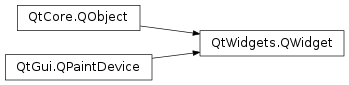
继承者: QtCharts.QChartView , QHelpContentWidget , QHelpFilterSettingsWidget , QHelpIndexWidget , QHelpSearchQueryWidget , QHelpSearchResultWidget , QCameraViewfinder , QVideoWidget , QGLWidget , QAbstractPrintDialog , QPageSetupDialog , QPrintDialog , QPrintPreviewDialog , QPrintPreviewWidget , QQuickWidget , QSvgWidget , QWebEngineView , QAbstractButton , QAbstractItemView , QAbstractScrollArea , QAbstractSlider , QAbstractSpinBox , QCalendarWidget , QCheckBox , QColorDialog , QColumnView , QComboBox , QCommandLinkButton , QDateEdit , QDateTimeEdit , QDesktopWidget , QDial , QDialog , QDialogButtonBox , QDockWidget , QDoubleSpinBox , QErrorMessage , QFileDialog , QFocusFrame , QFontComboBox , QFontDialog , QFrame , QGraphicsView , QGroupBox , QHeaderView , QInputDialog , QKeySequenceEdit , QLCDNumber , QLabel , QLineEdit , QListView , QListWidget , QMainWindow , QMdiArea , QMdiSubWindow , QMenu , QMenuBar , QMessageBox , QOpenGLWidget , QPlainTextEdit , QProgressBar , QProgressDialog , QPushButton , QRadioButton , QRubberBand , QScrollArea , QScrollBar , QSizeGrip , QSlider , QSpinBox , QSplashScreen , QSplitter , QSplitterHandle , QStackedWidget , QStatusBar , QTabBar , QTabWidget , QTableView , QTableWidget , QTextBrowser , QTextEdit , QTimeEdit , QToolBar , QToolBox , QToolButton , QTreeView , QTreeWidget , QUndoView , QWizard , QWizardPage
def
acceptDrops
()
def
accessibleDescription
()
def
accessibleName
()
def
actions
()
def
activateWindow
()
def
addAction
(action)
def
addActions
(actions)
def
adjustSize
()
def
autoFillBackground
()
def
backgroundRole
()
def
backingStore
()
def
baseSize
()
def
childAt
(p)
def
childAt
(x, y)
def
childrenRect
()
def
childrenRegion
()
def
clearFocus
()
def
clearMask
()
def
contentsMargins
()
def
contentsRect
()
def
contextMenuPolicy
()
def
create
([arg__1=0[, initializeWindow=true[, destroyOldWindow=true]]])
def
createWinId
()
def
cursor
()
def
destroy
([destroyWindow=true[, destroySubWindows=true]])
def
effectiveWinId
()
def
ensurePolished
()
def
focusNextChild
()
def
focusPolicy
()
def
focusPreviousChild
()
def
focusProxy
()
def
focusWidget
()
def
font
()
def
fontInfo
()
def
fontMetrics
()
def
foregroundRole
()
def
frameGeometry
()
def
frameSize
()
def
geometry
()
def
getContentsMargins
()
def
grab
([rectangle=QRect(QPoint(0, 0), QSize(-1, -1))])
def
grabGesture
(type[, flags=Qt.GestureFlags()])
def
grabKeyboard
()
def
grabMouse
()
def
grabMouse
(arg__1)
def
grabShortcut
(key[, context=Qt.WindowShortcut])
def
graphicsEffect
()
def
graphicsProxyWidget
()
def
hasFocus
()
def
hasMouseTracking
()
def
hasTabletTracking
()
def
inputMethodHints
()
def
insertAction
(before, action)
def
insertActions
(before, actions)
def
internalWinId
()
def
isActiveWindow
()
def
isAncestorOf
(child)
def
isEnabled
()
def
isEnabledTo
(arg__1)
def
isEnabledToTLW
()
def
isFullScreen
()
def
isHidden
()
def
isLeftToRight
()
def
isMaximized
()
def
isMinimized
()
def
isModal
()
def
isRightToLeft
()
def
isTopLevel
()
def
isVisible
()
def
isVisibleTo
(arg__1)
def
isWindow
()
def
isWindowModified
()
def
layout
()
def
layoutDirection
()
def
locale
()
def
mapFrom
(arg__1, arg__2)
def
mapFromGlobal
(arg__1)
def
mapFromParent
(arg__1)
def
mapTo
(arg__1, arg__2)
def
mapToGlobal
(arg__1)
def
mapToParent
(arg__1)
def
mask
()
def
maximumHeight
()
def
maximumSize
()
def
maximumWidth
()
def
minimumHeight
()
def
minimumSize
()
def
minimumWidth
()
def
move
(arg__1)
def
move
(x, y)
def
nativeParentWidget
()
def
nextInFocusChain
()
def
normalGeometry
()
def
overrideWindowFlags
(type)
def
overrideWindowState
(state)
def
palette
()
def
parentWidget
()
def
pos
()
def
previousInFocusChain
()
def
rect
()
def
releaseKeyboard
()
def
releaseMouse
()
def
releaseShortcut
(id)
def
removeAction
(action)
def
render
(painter, targetOffset[, sourceRegion=QRegion()[, renderFlags=QWidget.RenderFlags(DrawWindowBackground | DrawChildren)]])
def
render
(target[, targetOffset=QPoint()[, sourceRegion=QRegion()[, renderFlags=QWidget.RenderFlags(DrawWindowBackground | DrawChildren)]]])
def
repaint
(arg__1)
def
repaint
(arg__1)
def
repaint
(x, y, w, h)
def
resize
(arg__1)
def
resize
(w, h)
def
restoreGeometry
(geometry)
def
saveGeometry
()
def
screen
()
def
scroll
(dx, dy)
def
scroll
(dx, dy, arg__3)
def
setAcceptDrops
(on)
def
setAccessibleDescription
(description)
def
setAccessibleName
(name)
def
setAttribute
(arg__1[, on=true])
def
setAutoFillBackground
(enabled)
def
setBackgroundRole
(arg__1)
def
setBaseSize
(arg__1)
def
setBaseSize
(basew, baseh)
def
setContentsMargins
(left, top, right, bottom)
def
setContentsMargins
(margins)
def
setContextMenuPolicy
(policy)
def
setCursor
(arg__1)
def
setFixedHeight
(h)
def
setFixedSize
(arg__1)
def
setFixedSize
(w, h)
def
setFixedWidth
(w)
def
setFocus
(reason)
def
setFocusPolicy
(policy)
def
setFocusProxy
(arg__1)
def
setFont
(arg__1)
def
setForegroundRole
(arg__1)
def
setGeometry
(arg__1)
def
setGeometry
(x, y, w, h)
def
setGraphicsEffect
(effect)
def
setInputMethodHints
(hints)
def
setLayout
(arg__1)
def
setLayoutDirection
(direction)
def
setLocale
(locale)
def
setMask
(arg__1)
def
setMask
(arg__1)
def
setMaximumHeight
(maxh)
def
setMaximumSize
(arg__1)
def
setMaximumSize
(maxw, maxh)
def
setMaximumWidth
(maxw)
def
setMinimumHeight
(minh)
def
setMinimumSize
(arg__1)
def
setMinimumSize
(minw, minh)
def
setMinimumWidth
(minw)
def
setMouseTracking
(enable)
def
setPalette
(arg__1)
def
setParent
(parent)
def
setParent
(parent, f)
def
setShortcutAutoRepeat
(id[, enable=true])
def
setShortcutEnabled
(id[, enable=true])
def
setSizeIncrement
(arg__1)
def
setSizeIncrement
(w, h)
def
setSizePolicy
(arg__1)
def
setSizePolicy
(horizontal, vertical)
def
setStatusTip
(arg__1)
def
setStyle
(arg__1)
def
setTabletTracking
(enable)
def
setToolTip
(arg__1)
def
setToolTipDuration
(msec)
def
setUpdatesEnabled
(enable)
def
setWhatsThis
(arg__1)
def
setWindowFilePath
(filePath)
def
setWindowFlag
(arg__1[, on=true])
def
setWindowFlags
(type)
def
setWindowIcon
(icon)
def
setWindowIconText
(arg__1)
def
setWindowModality
(windowModality)
def
setWindowOpacity
(level)
def
setWindowRole
(arg__1)
def
setWindowState
(state)
def
size
()
def
sizeIncrement
()
def
sizePolicy
()
def
stackUnder
(arg__1)
def
statusTip
()
def
style
()
def
styleSheet
()
def
testAttribute
(arg__1)
def
toolTip
()
def
toolTipDuration
()
def
topLevelWidget
()
def
underMouse
()
def
ungrabGesture
(type)
def
unsetCursor
()
def
unsetLayoutDirection
()
def
unsetLocale
()
def
update
(arg__1)
def
update
(arg__1)
def
update
(x, y, w, h)
def
updateGeometry
()
def
updatesEnabled
()
def
visibleRegion
()
def
whatsThis
()
def
winId
()
def
window
()
def
windowFilePath
()
def
windowFlags
()
def
windowHandle
()
def
windowIcon
()
def
windowIconText
()
def
windowModality
()
def
windowOpacity
()
def
windowRole
()
def
windowState
()
def
windowTitle
()
def
windowType
()
def
x
()
def
y
()
def
actionEvent
(event)
def
changeEvent
(event)
def
closeEvent
(event)
def
contextMenuEvent
(event)
def
dragEnterEvent
(event)
def
dragLeaveEvent
(event)
def
dragMoveEvent
(event)
def
dropEvent
(event)
def
enterEvent
(event)
def
focusInEvent
(event)
def
focusNextPrevChild
(next)
def
focusOutEvent
(event)
def
hasHeightForWidth
()
def
heightForWidth
(arg__1)
def
hideEvent
(event)
def
inputMethodEvent
(event)
def
inputMethodQuery
(arg__1)
def
keyPressEvent
(event)
def
keyReleaseEvent
(event)
def
leaveEvent
(event)
def
minimumSizeHint
()
def
mouseDoubleClickEvent
(event)
def
mouseMoveEvent
(event)
def
mousePressEvent
(event)
def
mouseReleaseEvent
(event)
def
moveEvent
(event)
def
nativeEvent
(eventType, message)
def
paintEvent
(event)
def
resizeEvent
(event)
def
setVisible
(visible)
def
showEvent
(event)
def
sizeHint
()
def
tabletEvent
(event)
def
wheelEvent
(event)
def
close
()
def
hide
()
def
lower
()
def
raise_
()
def
repaint
()
def
setDisabled
(arg__1)
def
setEnabled
(arg__1)
def
setFocus
()
def
setHidden
(hidden)
def
setStyleSheet
(styleSheet)
def
setWindowModified
(arg__1)
def
setWindowTitle
(arg__1)
def
show
()
def
showFullScreen
()
def
showMaximized
()
def
showMinimized
()
def
showNormal
()
def
update
()
def
updateMicroFocus
()
def
customContextMenuRequested
(pos)
def
windowIconChanged
(icon)
def
windowIconTextChanged
(iconText)
def
windowTitleChanged
(title)
def
createWindowContainer
(window[, parent=None[, flags=Qt.WindowFlags()]])
def
find
(arg__1)
def
keyboardGrabber
()
def
mouseGrabber
()
def
setTabOrder
(arg__1, arg__2)
Widget 是用户界面原子:它从窗口系统接收鼠标、键盘及其它事件,并在屏幕上描绘自身表示。每个 Widget 为矩形,且按 Z 次序排序。Widget 被父级及其前面的小部件裁剪。
未嵌入父级小部件的 Widget 称为窗口。通常,窗口拥有框架和标题栏,尽管还可以创建不带这种装饰的窗口使用适合
												window


												flags
)。在 Qt 中,QMainWindow和各种子类化QDialog是最常见的窗口类型。Every widget’s constructor accepts one or two standard arguments:
														QWidget


														*parent


														=


														nullptr
是新 Widget 的父级。若它为None(默认),新的小部件将是窗口。若不是,它将是子级对于 parent ,并被约束由 parent ’s geometry (unless you specifyWindow作为窗口标志)。
														Qt::WindowFlags


														f


														=


														{


														}
(若可用的话) 设置窗口标志;默认适于几乎所有小部件,但要获得如没有窗口系统框架的窗口,就必须使用特殊标志。
QWidgethas many member functions, but some of them have little direct functionality; for example,QWidgethas a font property, but never uses this itself. There are many subclasses which provide real functionality, such asQLabel,QPushButton,QListWidget,和QTabWidget.
没有父级小部件的 Widget 始终是独立窗口 (顶层小部件)。对于这些小部件,
setWindowTitle()andsetWindowIcon()set the title bar and icon respectively.非窗口 Widget 是子级小部件,显示在其父级小部件内。Qt 中的大多数 Widget 主要用作子级小部件。例如,将按钮显示成顶层窗口是可能的,但大多数人更喜欢将按钮放在其它小部件内,譬如
QDialog.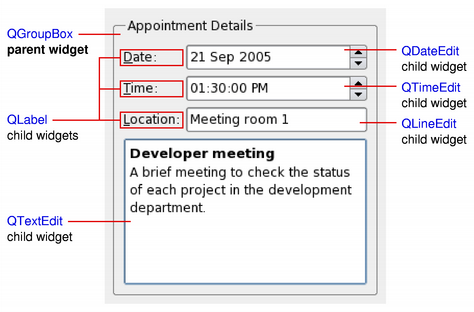
以上简图展示
QGroupBox小部件用于将各种子级 Widget 保持在布局中,提供通过QGridLayout。QLabel子级小部件已提纲以指示其完整大小。若希望使用
QWidgetto hold child widgets you will usually want to add a layout to the parentQWidget。见 布局管理 了解更多信息。
Since
QWidget是子类化的QPaintDevice,子类可以被用于显示由一系列描绘操作组成的自定义内容,采用实例化的QPainter类。此途径对比画布样式途径使用 图形视图框架 ,其中的项由应用程序添加到场景,并由框架本身渲染。每个 Widget 履行所有描绘操作均在其
paintEvent()function. This is called whenever the widget needs to be redrawn, either as a result of some external change or when requested by the application.指针式时钟范例 展示简单 Widget 如何处理描绘事件。
When implementing a new widget, it is almost always useful to reimplement
sizeHint()to provide a reasonable default size for the widget and to set the correct size policy withsetSizePolicy().By default, composite widgets which do not provide a size hint will be sized according to the space requirements of their child widgets.
The size policy lets you supply good default behavior for the layout management system, so that other widgets can contain and manage yours easily. The default size policy indicates that the size hint represents the preferred size of the widget, and this is often good enough for many widgets.
注意
The size of top-level widgets are constrained to 2/3 of the desktop’s height and width. You can
resize()the widget manually if these bounds are inadequate.
Widgets respond to events that are typically caused by user actions. Qt delivers events to widgets by calling specific event handler functions with instances of
QEventsubclasses containing information about each event.If your widget only contains child widgets, you probably do not need to implement any event handlers. If you want to detect a mouse click in a child widget call the child’s
underMouse()function inside the widget’smousePressEvent().Scribble example implements a wider set of events to handle mouse movement, button presses, and window resizing.
You will need to supply the behavior and content for your own widgets, but here is a brief overview of the events that are relevant to
QWidget, starting with the most common ones:
paintEvent()is called whenever the widget needs to be repainted. Every widget displaying custom content must implement it. Painting using aQPaintercan only take place in apaintEvent()or a function called by apaintEvent().
resizeEvent()is called when the widget has been resized.
mousePressEvent()is called when a mouse button is pressed while the mouse cursor is inside the widget, or when the widget has grabbed the mouse usinggrabMouse(). Pressing the mouse without releasing it is effectively the same as callinggrabMouse().
mouseReleaseEvent()is called when a mouse button is released. A widget receives mouse release events when it has received the corresponding mouse press event. This means that if the user presses the mouse inside your widget, then drags the mouse somewhere else before releasing the mouse button, your widget receives the release event. There is one exception: if a popup menu appears while the mouse button is held down, this popup immediately steals the mouse events.
mouseDoubleClickEvent()is called when the user double-clicks in the widget. If the user double-clicks, the widget receives a mouse press event, a mouse release event, (a mouse click event,) a second mouse press, this event and finally a second mouse release event. (Some mouse move events may also be received if the mouse is not held steady during this operation.) It is not possible to distinguish a click from a double-click until the second click arrives. (This is one reason why most GUI books recommend that double-clicks be an extension of single-clicks, rather than trigger a different action.)Widgets that accept keyboard input need to reimplement a few more event handlers:
keyPressEvent()is called whenever a key is pressed, and again when a key has been held down long enough for it to auto-repeat. The Tab and Shift+Tab keys are only passed to the widget if they are not used by the focus-change mechanisms. To force those keys to be processed by your widget, you must reimplementevent().
focusInEvent()is called when the widget gains keyboard focus (assuming you have calledsetFocusPolicy()). Well-behaved widgets indicate that they own the keyboard focus in a clear but discreet way.
focusOutEvent()is called when the widget loses keyboard focus.You may be required to also reimplement some of the less common event handlers:
mouseMoveEvent()is called whenever the mouse moves while a mouse button is held down. This can be useful during drag and drop operations. If you callsetMouseTracking(true), you get mouse move events even when no buttons are held down. (See also the 拖放 指南。)
keyReleaseEvent()is called whenever a key is released and while it is held down (if the key is auto-repeating). In that case, the widget will receive a pair of key release and key press event for every repeat. The Tab and Shift+Tab keys are only passed to the widget if they are not used by the focus-change mechanisms. To force those keys to be processed by your widget, you must reimplementevent().
wheelEvent()is called whenever the user turns the mouse wheel while the widget has the focus.
enterEvent()is called when the mouse enters the widget’s screen space. (This excludes screen space owned by any of the widget’s children.)
leaveEvent()is called when the mouse leaves the widget’s screen space. If the mouse enters a child widget it will not cause aleaveEvent().
moveEvent()is called when the widget has been moved relative to its parent.
closeEvent()is called when the user closes the widget (or whenclose()is called).There are also some rather obscure events described in the documentation for
Type. To handle these events, you need to reimplementevent()directly.The default implementation of
event()handles Tab and Shift+Tab (to move the keyboard focus), and passes on most of the other events to one of the more specialized handlers above.Events and the mechanism used to deliver them are covered in 事件系统 .
从 Qt 4.0 起,
QWidgetautomatically double-buffers its painting, so there is no need to write double-buffering code inpaintEvent()to avoid flicker.Since Qt 4.1, the
WA_ContentsPropagatedwidget attribute has been deprecated. Instead, the contents of parent widgets are propagated by default to each of their children as long asWA_PaintOnScreen未设置。可以通过更新不规则区域 (以创建非矩形子级小部件) 或采用小于完整 Alpha 分量的颜色描绘来编写自定义 Widget 以利用此特征。以下简图展示如何微调自定义 Widget 的属性和特性来达成不同效果。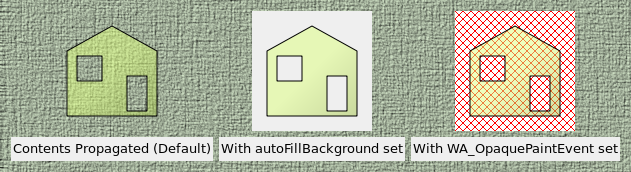
在以上简图中,构造移除区域的半透明矩形子级小部件并将其添加到父级 Widget (
QLabel展示像素图)。然后,设置不同特性和 Widget 属性以达成不同效果:
左侧 Widget 没有设置额外特性或小部件属性。此默认状态适合大多数使用透明度的自定义 Widget,形状不规则 Widget 或采用透明笔刷描绘其整个区域的 Widget。
居中 Widget 拥有
autoFillBackground设置特性。此特性用于依赖小部件提供默认背景的自定义 Widget,且采用透明笔刷在其整个区域进行描绘。右侧 Widget 拥有
WA_OpaquePaintEventwidget attribute set. This indicates that the widget will paint over its entire area with opaque colors. The widget’s area will initially be uninitialized ,在简图中采用红色对角栅格图案表示 (透过重绘区域闪耀)。Qt::WA_OpaquePaintArea 属性对于需要快速描绘其自己的特定内容且不需要默认填充背景的 Widget 很有用。要采用简单背景颜色快速更新自定义 Widget (譬如:实时绘图或图形化 Widget),最好定义合适的背景颜色 (使用
setBackgroundRole()采用Window角色),设置autoFillBackgroundproperty, and only implement the necessary drawing functionality in the widget’spaintEvent().To rapidly update custom widgets that constantly paint over their entire areas with opaque content, e.g., video streaming widgets, it is better to set the widget’s
WA_OpaquePaintEvent, avoiding any unnecessary overhead associated with repainting the widget’s background.若 Widget 拥有
WA_OpaquePaintEventWidget 属性 and theautoFillBackground设置特性,WA_OpaquePaintEvent属性优先。根据要求,应选择它们之一。从 Qt 4.1 起,父级 Widget 的内容还被传播给标准 Qt 小部件。若父级小部件以非标准方式装饰,这可能导致一些意外结果,如以下简图所示。
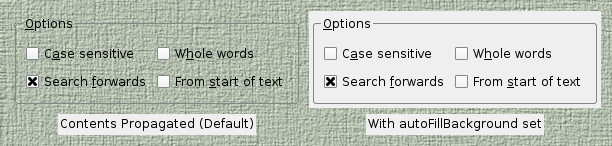
在不诉诸子类化的情况下,定制标准 Qt 小部件的描绘行为的作用域,可能略小于自定义 Widget 的作用域。通常,可以达成标准 Widget 期望的外观通过设置其
autoFillBackground特性。
从 Qt 4.5 起,在支持合成的窗口系统创建具有半透明区域的窗口是可能的。
要在顶层 Widget 启用此特征,设置其
WA_TranslucentBackground属性采用setAttribute()and ensure that its background is painted with non-opaque colors in the regions you want to be partially transparent.平台注意事项:
X11:此特征依赖于支持 ARGB 视觉和合成窗口管理器的 X 服务器使用。
Windows:小部件需要拥有
FramelessWindowHint设置窗口标志为半透明能工作。
在 Qt 4.4 引入的外来 Widget 是窗口系统的未知小部件。它们没有关联它们的本机窗口句柄。此特征可显著提高小部件描绘、重置尺寸及移除闪烁的速度。
若要求采用本机窗口的旧行为,可以选择以下选项之一:
使用
QT_USE_NATIVE_WINDOWS=1在环境中。设置
AA_NativeWindows应用程序属性。所有 Widget 将是本机小部件。设置
WA_NativeWindow小部件属性:小部件本身及其所有祖先将变为本机的 (除非WA_DontCreateNativeAncestors有设置)。调用
winId以强制本机窗口 (这隐含 3)。设置
WA_PaintOnScreen属性以强制本机窗口 (这隐含 3)。
QWidget
(
[
parent=None
[
,
f=Qt.WindowFlags()
]
]
)

- param f
WindowFlags- param parent
构造子级 Widget 为
parent
,采用 Widget 设置标志
f
.
若
parent
is
None
,新的 Widget 变为窗口。若
parent
是另一 Widget,此小部件变成子级窗口在
parent
。新的小部件被删除当其
parent
被删除。
Widget 标志自变量
f
,通常为 0,但可以将它设为定制窗口框架 (即
parent
必须是
None
)。要定制框架,使用组成值来自按位 OR 的任何
													window


													flags
.
若将子级 Widget 添加到已经可见的小部件,必须明确展示子级以使其可见。
Note that the X11 version of Qt may not be able to deliver all combinations of style flags on all systems. This is because on X11, Qt can only ask the window manager, and the window manager can override the application’s settings. On Windows, Qt can set whatever flags you want.
另请参阅
PySide2.QtWidgets.QWidget.
RenderFlag

此枚举描述如何渲染 Widget 当调用
render()
.
|
常量 |
描述 |
|---|---|
|
QWidget.DrawWindowBackground |
If you enable this option, the widget’s background is rendered into the target even if
|
|
QWidget.DrawChildren |
If you enable this option, the widget’s children are rendered recursively into the target. By default, this option is enabled. |
|
QWidget.IgnoreMask |
若启用此选项,Widget 的
|
PySide2.QtWidgets.QWidget.
acceptDrops
(
)

bool
另请参阅
PySide2.QtWidgets.QWidget.
accessibleDescription
(
)

unicode
PySide2.QtWidgets.QWidget.
accessibleName
(
)

unicode
另请参阅
PySide2.QtWidgets.QWidget.
actionEvent
(
event
)

event
–
QActionEvent
此事件处理程序被调用采用给定
event
whenever the widget’s actions are changed.
PySide2.QtWidgets.QWidget.
actions
(
)

返回此 Widget 的动作列表 (可能为空)。
PySide2.QtWidgets.QWidget.
activateWindow
(
)

把包含此 Widget 的顶层 Widget,设为活动窗口。
活动窗口是具有键盘输入聚焦的可见顶层窗口。
此函数履行如在顶层窗口的标题栏上,点击鼠标的相同操作。在 X11,结果取决于窗口管理器。若想要确保窗口堆叠在顶部,同样,还应调用
raise()
. Note that the window must be visible, otherwise has no effect.
在 Windows,若在应用程序目前不是活动窗口时调用这,则不会使其成为活动窗口。它会改变任务栏条目的颜色,以指示窗口在某些方面有变化。这是因为 Microsoft 不允许应用程序,去中断用户在另一应用程序中目前正做的。
另请参阅
isActiveWindow()
window()
show()
setWindowActivationBehavior()
PySide2.QtWidgets.QWidget.
addAction
(
action
)

action
–
QAction
追加动作
action
到此 Widget 的动作列表。
所有 QWidget 都有列表,针对
QAction
,无论如何,可以按多种不同方式图形表示它们。默认使用
QAction
列表 (返回通过
actions()
) is to create a context
QMenu
.
A
QWidget
只应每动作有一个,且已添加动作不会导致同一动作在 Widget 中出现两次。
The ownership of
action
不会被转移给此
QWidget
.
PySide2.QtWidgets.QWidget.
addActions
(
actions
)

actions –
追加动作
actions
到此 Widget 的动作列表。
PySide2.QtWidgets.QWidget.
adjustSize
(
)

调整 Widget 大小,以拟合其内容。
此函数使用
sizeHint()
if it is valid, i.e., the size hint’s width and height are >= 0. Otherwise, it sets the size to the children rectangle that covers all child widgets (the union of all child widget rectangles).
For windows, the screen size is also taken into account. If the
sizeHint()
is less than (200, 100) and the size policy is
expanding
, the window will be at least (200, 100). The maximum size of a window is 2/3 of the screen’s width and height.
另请参阅
PySide2.QtWidgets.QWidget.
autoFillBackground
(
)

bool
PySide2.QtWidgets.QWidget.
backgroundRole
(
)

ColorRole
返回 Widget 的背景角色。
The background role defines the brush from the widget’s
palette
that is used to render the background.
If no explicit background role is set, the widget inherts its parent widget’s background role.
PySide2.QtWidgets.QWidget.
backingStore
(
)

QBackingStore
返回
QBackingStore
this widget will be drawn into.
PySide2.QtWidgets.QWidget.
baseSize
(
)

QSize
另请参阅
PySide2.QtWidgets.QWidget.
changeEvent
(
event
)

event
–
QEvent
此事件处理程序可以被重实现以处理状态改变。
在此事件中改变的状态可以被检索透过
event
供给。
改变事件包括:
ToolBarChange
,
ActivationChange
,
EnabledChange
,
FontChange
,
StyleChange
,
PaletteChange
,
WindowTitleChange
,
IconTextChange
,
ModifiedChange
,
MouseTrackingChange
,
ParentChange
,
WindowStateChange
,
LanguageChange
,
LocaleChange
,
LayoutDirectionChange
,
ReadOnlyChange
.
PySide2.QtWidgets.QWidget.
childAt
(
x
,
y
)

x
–
int
y
–
int
Returns the visible child widget at the position (
x
,
y
) in the widget’s coordinate system. If there is no visible child widget at the specified position, the function returns
None
.
PySide2.QtWidgets.QWidget.
childAt
(
p
)

p
–
QPoint
这是重载函数。
Returns the visible child widget at point
p
in the widget’s own coordinate system.
PySide2.QtWidgets.QWidget.
childrenRect
(
)

QRect
PySide2.QtWidgets.QWidget.
childrenRegion
(
)

QRegion
PySide2.QtWidgets.QWidget.
clearFocus
(
)

从 Widget 获取键盘输入聚焦。
若 Widget 有活动聚焦,
														focus


														out


														event
被发送给此 Widget 以告诉它已丢失聚焦。
此 Widget 必须启用聚焦设置以获取键盘输入聚焦,即:它必须调用
setFocusPolicy()
.
PySide2.QtWidgets.QWidget.
close
(
)

bool
关闭此 Widget。返回
true
若 Widget 被关闭;否则返回
false
.
首先,它向 Widget 发送
QCloseEvent
。小部件
hidden
若它
accepts
关闭事件。若它
ignores
事件,什么都不发生。默认实现的
closeEvent()
accepts the close event.
若 Widget 拥有
WA_DeleteOnClose
标志,小部件也被删除。关闭事件会被交付给 Widget 无论小部件是否可见。
lastWindowClosed()
signal is emitted when the last visible primary window (i.e. window with no parent) with the
WA_QuitOnClose
属性设置被关闭。默认情况下,除过渡窗口 (譬如:闪屏、工具窗口及弹出菜单) 外,所有 Widget 都有设置此属性。
PySide2.QtWidgets.QWidget.
closeEvent
(
event
)

event
–
QCloseEvent
此事件处理程序被调用采用给定
event
when Qt receives a window close request for a top-level widget from the window system.
By default, the event is accepted and the widget is closed. You can reimplement this function to change the way the widget responds to window close requests. For example, you can prevent the window from closing by calling
ignore()
on all events.
Main window applications typically use reimplementations of this function to check whether the user’s work has been saved and ask for permission before closing. For example, the 应用程序范例 uses a helper function to determine whether or not to close the window:
def closeEvent(self, event):
    if maybeSave():
        writeSettings()
        event.accept()
    else:
        event.ignore()
另请参阅
event()
hide()
close()
QCloseEvent
应用程序范例
PySide2.QtWidgets.QWidget.
contentsMargins
(
)

QMargins
The function returns the widget’s contents margins.
PySide2.QtWidgets.QWidget.
contentsRect
(
)

QRect
Returns the area inside the widget’s margins.
PySide2.QtWidgets.QWidget.
contextMenuEvent
(
event
)

event
–
QContextMenuEvent
此事件处理程序,对于事件
event
,可以在子类中被重实现以接收 Widget 上下文菜单事件。
The handler is called when the widget’s
contextMenuPolicy
is
DefaultContextMenu
.
默认实现忽略上下文事件。见
QContextMenuEvent
文档编制了解更多细节。
另请参阅
PySide2.QtWidgets.QWidget.
contextMenuPolicy
(
)

ContextMenuPolicy
PySide2.QtWidgets.QWidget.
create
(
[
arg__1=0
[
,
initializeWindow=true
[
,
destroyOldWindow=true
]
]
]
)

arg__1
–
WId
initializeWindow
–
bool
destroyOldWindow
–
bool
创建新 Widget 窗口。
参数
window
,
initializeWindow
,和
destroyOldWindow
被忽略,在 Qt 5。请使用
fromWinId()
to create a
QWindow
包裹外来窗口并把它传递给
createWindowContainer()
代替。
另请参阅
createWindowContainer()
fromWinId()
PySide2.QtWidgets.QWidget.
createWinId
(
)

Ensures that the widget has a window system identifier, i.e. that it is known to the windowing system.
PySide2.QtWidgets.QWidget.
createWindowContainer
(
window
[
,
parent=None
[
,
flags=Qt.WindowFlags()
]
]
)

创建
QWidget
使之可能嵌入
window
成
QWidget
基应用程序。
窗口容器被创建作为子级对于
parent
和采用窗口标志
flags
.
Once the window has been embedded into the container, the container will control the window’s geometry and visibility. Explicit calls to
setGeometry()
,
show()
or
hide()
on an embedded window is not recommended.
容器拥有所有权对于
window
。窗口可以从窗口容器中被移除采用调用
setParent()
.
The window container is attached as a native child window to the toplevel window it is a child of. When a window container is used as a child of a
QAbstractScrollArea
or
QMdiArea
, it will create a
													native


													window
for every widget in its parent chain to allow for proper stacking and clipping in this use case. Creating a native window for the window container also allows for proper stacking and clipping. This must be done before showing the window container. Applications with many native child windows may suffer from performance issues.
窗口容器有许多已知局限性:
Stacking order; The embedded window will stack on top of the widget hierarchy as an opaque box. The stacking order of multiple overlapping window container instances is undefined.
渲染集成;窗口容器无法互操作与
QGraphicsProxyWidget
,
render()
or similar functionality.
Focus Handling; It is possible to let the window container instance have any focus policy and it will delegate focus to the window via a call to
requestActivate()
. However, returning to the normal focus chain from the
QWindow
instance will be up to the
QWindow
instance implementation itself. For instance, when entering a Qt Quick based window with tab focus, it is quite likely that further tab presses will only cycle inside the QML application. Also, whether
requestActivate()
actually gives the window focus, is platform dependent.
使用多个窗口容器实例在
QWidget
基应用程序会大大损害应用程序的整体性能。
PySide2.QtWidgets.QWidget.
cursor
(
)

QCursor
另请参阅
PySide2.QtWidgets.QWidget.
customContextMenuRequested
(
pos
)

pos
–
QPoint
PySide2.QtWidgets.QWidget.
destroy
(
[
destroyWindow=true
[
,
destroySubWindows=true
]
]
)

destroyWindow
–
bool
destroySubWindows
–
bool
释放窗口系统资源。销毁 Widget 窗口,若
destroyWindow
为 true。
calls itself recursively for all the child widgets, passing
destroySubWindows
为
destroyWindow
参数。要更好地控制 Subwidget 的销毁,请先选择性地销毁 Subwidget。
此函数通常被调用从
QWidget
析构函数。
PySide2.QtWidgets.QWidget.
dragEnterEvent
(
event
)

event
–
QDragEnterEvent
此事件处理程序被调用当拖拽正在进行中且鼠标进入此 Widget 时。事件被传入
event
参数。
If the event is ignored, the widget won’t receive any
														drag


														move


														events
.
见 拖放文档编制 了解如何为应用程序提供拖放的概述。
另请参阅
PySide2.QtWidgets.QWidget.
dragLeaveEvent
(
event
)

event
–
QDragLeaveEvent
此事件处理程序被调用当拖拽正在进行中且鼠标离开此 Widget 时。事件被传入
event
参数。
见 拖放文档编制 了解如何为应用程序提供拖放的概述。
另请参阅
PySide2.QtWidgets.QWidget.
dragMoveEvent
(
event
)

event
–
QDragMoveEvent
此事件处理程序被调用若拖拽正在进行中且发生以下任一条件:光标进入此 Widget、光标在此 Widget 内移动、若按下键盘修饰键当此 Widget 获得聚焦时。事件被传入
event
参数。
见 拖放文档编制 了解如何为应用程序提供拖放的概述。
另请参阅
PySide2.QtWidgets.QWidget.
dropEvent
(
event
)

event
–
QDropEvent
此事件处理程序被调用当拖拽掉落在此 Widget 上时。事件被传入
event
参数。
见 拖放文档编制 了解如何为应用程序提供拖放的概述。
另请参阅
PySide2.QtWidgets.QWidget.
effectiveWinId
(
)

WId
Returns the effective window system identifier of the widget, i.e. the native parent’s window system identifier.
若 Widget 是本机的,此函数返回本机小部件 ID。否则,返回首个本机父级 Widget (即:包含此 Widget 的顶层小部件) 的窗口 ID。
注意
推荐不要存储此值,因为运行时它可能改变。
另请参阅
PySide2.QtWidgets.QWidget.
ensurePolished
(
)

确保 Widget 及其子级已被抛光,通过
QStyle
(即:拥有恰当的字体和调色板)。
QWidget
calls this function after it has been fully constructed but before it is shown the very first time. You can call this function if you want to ensure that the widget is polished before doing an operation, e.g., the correct font size might be needed in the widget’s
sizeHint()
reimplementation. Note that this function
is
调用自默认实现的
sizeHint()
.
抛光对必须在调用所有构造函数 (来自基类及子类) 之后的最终初始化很有用。
若需要改变某些设置当抛光 Widget 时,重实现
event()
and handle the
波兰语
事件类型。
注意
函数被声明为 const 以便可以从其它 const 函数中调用它 (如
sizeHint()
).
另请参阅
event()
PySide2.QtWidgets.QWidget.
enterEvent
(
event
)

event
–
QEvent
此事件处理程序可以在子类中被重实现以接收 Widget 进入事件,当传入
event
参数。
事件被发送给 Widget,当鼠标光标进入 Widget 时。
另请参阅
leaveEvent()
mouseMoveEvent()
event()
PySide2.QtWidgets.QWidget.
find
(
arg__1
)

arg__1
–
WId
返回指向 Widget 的指针,采用窗口标识符/句柄
id
.
窗口标识符类型取决于底层窗口系统,见
qwindowdefs.h
实际定义。若没有带此标识符的 Widget,
None
被返回。
PySide2.QtWidgets.QWidget.
focusInEvent
(
event
)

event
–
QFocusEvent
此事件处理程序可以在子类中被重实现,以接收 Widget 的键盘聚焦事件 (聚焦接收)。事件被传入
event
参数
Widget 通常必须
setFocusPolicy()
to something other than
NoFocus
为接收聚焦事件 (注意:应用程序程序员可以调用
setFocus()
on any widget, even those that do not normally accept focus.)
默认实现更新 Widget (除了窗口未指定
focusPolicy()
).
PySide2.QtWidgets.QWidget.
focusNextChild
(
)

bool
Finds a new widget to give the keyboard focus to, as appropriate for Tab, and returns
true
if it can find a new widget, or false if it can’t.
另请参阅
PySide2.QtWidgets.QWidget.
focusNextPrevChild
(
next
)

next
–
bool
bool
查找新的 Widget 以给予键盘聚焦,如适合 Tab 和 Shift+Tab,并返回
true
if it can find a new widget, or false if it can’t.
若
next
为 true,此函数向前搜索,若
next
为 False,向后搜索。
Sometimes, you will want to reimplement this function. For example, a web browser might reimplement it to move its “current active link” forward or backward, and call only when it reaches the last or first link on the “page”.
Child widgets call on their parent widgets, but only the window that contains the child widgets decides where to redirect focus. By reimplementing this function for an object, you thus gain control of focus traversal for all child widgets.
PySide2.QtWidgets.QWidget.
focusOutEvent
(
event
)

event
–
QFocusEvent
此事件处理程序可以在子类中被重实现,以接收 Widget 的键盘聚焦事件 (聚焦丢失)。事件被传入
event
参数。
Widget 通常必须
setFocusPolicy()
to something other than
NoFocus
为接收聚焦事件 (注意:应用程序程序员可以调用
setFocus()
on any widget, even those that do not normally accept focus.)
默认实现更新 Widget (除了窗口未指定
focusPolicy()
).
PySide2.QtWidgets.QWidget.
focusPolicy
(
)

FocusPolicy
另请参阅
PySide2.QtWidgets.QWidget.
focusPreviousChild
(
)

bool
Finds a new widget to give the keyboard focus to, as appropriate for Shift+Tab, and returns
true
if it can find a new widget, or false if it can’t.
另请参阅
PySide2.QtWidgets.QWidget.
focusProxy
(
)

返回聚焦代理,或
None
若没有聚焦代理。
另请参阅
PySide2.QtWidgets.QWidget.
focusWidget
(
)

返回最后子级当此小部件
setFocus
被调用。对于顶层 Widget,这是窗口被激活的情况下获得聚焦的小部件
这不同于
focusWidget()
, which returns the focus widget in the currently active window.
PySide2.QtWidgets.QWidget.
fontInfo
(
)

QFontInfo
Returns the font info for the widget’s current font. Equivalent to
QFontInfo(widget->font())
.
另请参阅
PySide2.QtWidgets.QWidget.
fontMetrics
(
)

QFontMetrics
Returns the font metrics for the widget’s current font. Equivalent to
QFontMetrics(widget->font())
.
另请参阅
PySide2.QtWidgets.QWidget.
foregroundRole
(
)

ColorRole
返回前景角色。
The foreground role defines the color from the widget’s
palette
用于绘制前景。
若未明确设置前景角色,函数返回对比后台角色的角色。
PySide2.QtWidgets.QWidget.
frameGeometry
(
)

QRect
PySide2.QtWidgets.QWidget.
frameSize
(
)

QSize
PySide2.QtWidgets.QWidget.
geometry
(
)

QRect
另请参阅
PySide2.QtWidgets.QWidget.
getContentsMargins
(
)

注意
此函数被弃用。
使用
contentsMargins()
.
Returns the widget’s contents margins for
left
,
top
,
right
,和
bottom
.
PySide2.QtWidgets.QWidget.
grab
(
[
rectangle=QRect(QPoint(0
,
0)
,
QSize(-1
,
-1))
]
)

rectangle
–
QRect
QPixmap
把 Widget 渲染成像素图,限定通过给定
rectangle
。若 Widget 有任何子级,它们也会被描绘在适当位置。
若矩形具有无效指定尺寸 (默认),整个 Widget 被描绘。
PySide2.QtWidgets.QWidget.
grabGesture
(
type
[
,
flags=Qt.GestureFlags()
]
)

type
–
GestureType
flags
–
GestureFlags
将 Widget 订阅到给定
gesture
采有特定
flags
.
PySide2.QtWidgets.QWidget.
grabKeyboard
(
)

抓取键盘输入。
此 Widget 接收所有键盘事件直到
releaseKeyboard()
is called; other widgets get no keyboard events at all. Mouse events are not affected. Use
grabMouse()
if you want to grab that.
The focus widget is not affected, except that it doesn’t receive any keyboard events.
setFocus()
moves the focus as usual, but the new focus widget receives keyboard events only after
releaseKeyboard()
被调用。
If a different widget is currently grabbing keyboard input, that widget’s grab is released first.
PySide2.QtWidgets.QWidget.
grabMouse
(
arg__1
)

arg__1
–
QCursor
此函数重载
grabMouse()
.
抓取鼠标输入和改变光标形状。
光标会假定形状
cursor
(对于只要鼠标聚焦被抓住) 且此 Widget 将是接收鼠标事件的唯一小部件直到
releaseMouse()
is called().
警告
抓取鼠标可能锁定终端。
注意
见注意事项在
grabMouse()
.
PySide2.QtWidgets.QWidget.
grabMouse
(
)

抓取鼠标输入。
此 Widget 接收所有鼠标事件直到
releaseMouse()
is called; other widgets get no mouse events at all. Keyboard events are not affected. Use
grabKeyboard()
if you want to grab that.
警告
以鼠标抓取应用程序的 Bug 会经常锁定终端。使用此函数要极其谨慎,并考虑使用
-nograb
命令行选项当调试时。
抓取鼠标几乎从不是必要的当使用 Qt 时,因为 Qt 会明智地抓取和释放鼠标。特别是,当鼠标按钮被按下时,Qt 抓住鼠标并保持它直到最后一个按钮被释放。
注意
仅可见 Widget 可以抓取鼠标输入。若
isVisible()
返回
false
for a widget, that widget cannot call .
注意
On Windows, only works when the mouse is inside a window owned by the process. On macOS, only works when the mouse is inside the frame of that widget.
PySide2.QtWidgets.QWidget.
grabShortcut
(
key
[
,
context=Qt.WindowShortcut
]
)

key
–
QKeySequence
context
–
ShortcutContext
int
Adds a shortcut to Qt’s shortcut system that watches for the given
key
序列在给定
context
。若
context
is
ApplicationShortcut
,快捷方式适用于整个应用程序。否则,要么本地到此 Widget,
WidgetShortcut
,或到窗口本身,
WindowShortcut
.
若相同
key
序列有被几个 Widget 所抓取,当
key
序列发生
Shortcut
event is sent to all the widgets to which it applies in a non-deterministic order, but with the ``ambiguous’’ flag set to true.
警告
通常不需要使用此函数;而是创建
QAction
s with the shortcut key sequences you require (if you also want equivalent menu options and toolbar buttons), or create
QShortcut
s if you just need key sequences. Both
QAction
and
QShortcut
handle all the event filtering for you, and provide signals which are triggered when the user triggers the key sequence, so are much easier to use than this low-level function.
PySide2.QtWidgets.QWidget.
graphicsEffect
(
)

The function returns a pointer to the widget’s graphics effect.
若 Widget 没有图形效果,
None
被返回。
另请参阅
PySide2.QtWidgets.QWidget.
graphicsProxyWidget
(
)

返回在图形视图中相应嵌入 Widget 的代理小部件;否则返回
None
.
PySide2.QtWidgets.QWidget.
hasFocus
(
)

bool
PySide2.QtWidgets.QWidget.
hasHeightForWidth
(
)

bool
返回
true
if the widget’s preferred height depends on its width; otherwise returns
false
.
PySide2.QtWidgets.QWidget.
hasMouseTracking
(
)

bool
PySide2.QtWidgets.QWidget.
hasTabletTracking
(
)

bool
PySide2.QtWidgets.QWidget.
heightForWidth
(
arg__1
)

arg__1
–
int
int
返回此 Widget 的首选高度,给定宽度
w
.
If this widget has a layout, the default implementation returns the layout’s preferred height. if there is no layout, the default implementation returns -1 indicating that the preferred height does not depend on the width.
PySide2.QtWidgets.QWidget.
hide
(
)

隐藏 Widget。此函数相当于
setVisible
(false).
PySide2.QtWidgets.QWidget.
hideEvent
(
event
)

event
–
QHideEvent
此事件处理程序可以在子类中被重实现以接收 Widget 隐藏事件。事件被传入
event
参数。
隐藏事件被立即发送给 Widget 在它们被隐藏后。
注意:Widget 接收自发展示和隐藏事件当通过窗口系统改变其映射状态时,如:自发隐藏事件当用户最小化窗口时,和自发展示事件当窗口被再次还原时。在接收自发隐藏事件之后仍然认为 Widget 是可见的,在意识到
isVisible()
.
另请参阅
visible
event()
QHideEvent
PySide2.QtWidgets.QWidget.
inputMethodEvent
(
event
)

event
–
QInputMethodEvent
此事件处理程序,对于事件
event
,可以在子类中重实现以接收输入法合成事件。处理程序被调用,当输入法状态改变时。
注意:当创建自定义文本编辑 Widget 时,
WA_InputMethodEnabled
窗口属性必须被明确设置 (使用
setAttribute()
function) in order to receive input method events.
默认实现调用 event->ignore(),拒绝输入法事件。见
QInputMethodEvent
文档编制了解更多细节。
另请参阅
event()
QInputMethodEvent
PySide2.QtWidgets.QWidget.
inputMethodHints
(
)

InputMethodHints
PySide2.QtWidgets.QWidget.
inputMethodQuery
(
arg__1
)

arg__1
–
InputMethodQuery
object
此方法仅与输入 Widget 相关。输入法使用它查询 Widget 的一组属性,以便能够支持为支持围绕文本和再转换的复杂输入法操作。
query
指定要查询的特性。
PySide2.QtWidgets.QWidget.
insertAction
(
before
,
action
)

插入动作
action
to this widget’s list of actions, before the action
before
。它追加动作,若
before
is
None
or
before
不是有效动作 (对于此 Widget)。
A
QWidget
每动作只应有一个。
PySide2.QtWidgets.QWidget.
insertActions
(
before
,
actions
)

before
–
QAction
actions –
插入动作
actions
to this widget’s list of actions, before the action
before
。它追加动作,若
before
is
None
or
before
不是有效动作 (对于此 Widget)。
A
QWidget
每动作最多能有一个。
PySide2.QtWidgets.QWidget.
internalWinId
(
)

WId
PySide2.QtWidgets.QWidget.
isActiveWindow
(
)

bool
PySide2.QtWidgets.QWidget.
isAncestorOf
(
child
)

child
–
QWidget
bool
返回
true
若此 Widget 是父级 (或祖父级等任何级别),针对给定
child
,且两 Widget 在同一窗口;否则返回
false
.
PySide2.QtWidgets.QWidget.
isEnabled
(
)

bool
PySide2.QtWidgets.QWidget.
isEnabledTo
(
arg__1
)

arg__1
–
QWidget
bool
返回
true
若此 Widget 将变为被启用,若
ancestor
被启用;否则返回
false
.
就是这种情况若不是 Widget 本身或每个父级直到,但排除
ancestor
已被明确禁用。
returns false if this widget or any if its ancestors was explicitly disabled.
这里的祖先一词是指在相同窗口中的父级 Widget。
Therefore (0) stops at this widget’s window, unlike
isEnabled()
which also takes parent windows into considerations.
另请参阅
setEnabled()
enabled
PySide2.QtWidgets.QWidget.
isEnabledToTLW
(
)

bool
注意
此函数被弃用。
This function is deprecated. It is equivalent to
isEnabled()
PySide2.QtWidgets.QWidget.
isFullScreen
(
)

bool
PySide2.QtWidgets.QWidget.
isHidden
(
)

bool
返回
true
若 Widget 被隐藏,否则返回
false
.
隐藏 Widget 才变为可见当
show()
is called on it. It will not be automatically shown when the parent is shown.
要校验可见性,使用 !
isVisible()
instead (notice the exclamation mark).
implies !
isVisible()
, but a widget can be not visible and not hidden at the same time. This is the case for widgets that are children of widgets that are not visible.
Widget 被隐藏若:
它们被创建作为独立窗口,
它们是作为可见 Widget 子级创建的,
hide()
or
setVisible
(false) 被调用。
PySide2.QtWidgets.QWidget.
isLeftToRight
(
)

bool
PySide2.QtWidgets.QWidget.
isMaximized
(
)

bool
PySide2.QtWidgets.QWidget.
isMinimized
(
)

bool
PySide2.QtWidgets.QWidget.
isModal
(
)

bool
PySide2.QtWidgets.QWidget.
isRightToLeft
(
)

bool
PySide2.QtWidgets.QWidget.
isTopLevel
(
)

bool
使用
isWindow()
代替。
PySide2.QtWidgets.QWidget.
isVisible
(
)

bool
PySide2.QtWidgets.QWidget.
isVisibleTo
(
arg__1
)

arg__1
–
QWidget
bool
返回
true
当此 Widget 变为可见若
ancestor
被展示;否则返回
false
.
true 情况发生若 Widget 本身或任何父级直到但排除
ancestor
已被明确隐藏。
此函数仍将返回 true,若 Widget 被其它屏幕窗口遮挡,但可以是物理可见的,若它或它们要被移动。
is identical to
isVisible()
.
另请参阅
PySide2.QtWidgets.QWidget.
isWindow
(
)

bool
返回
true
若 Widget 是独立窗口,否则返回
false
.
A window is a widget that isn’t visually the child of any other widget and that usually has a frame and a
														window


														title
.
窗口可以拥有
														parent


														widget
。那么,它将与其父级被分组在一起和被删除当父级被删除时,它将最小化当父级被最小化时,等。若窗口管理器支持,它还拥有如其父级的常见任务栏条目。
QDialog
and
QMainWindow
Widget 默认是窗口,即使在构造函数中有指定父级 Widget。此行为的指定通过
Window
标志。
PySide2.QtWidgets.QWidget.
isWindowModified
(
)

bool
PySide2.QtWidgets.QWidget.
keyPressEvent
(
event
)

event
–
QKeyEvent
此事件处理程序,对于事件
event
,可以在子类中重实现以接收 Widget 的按键事件。
Widget 必须调用
setFocusPolicy()
to accept focus initially and have focus in order to receive a key press event.
若重实现此处理程序,则调用基类实现很重要若按键不行动。
默认实现关闭弹出 Widget 若用户按下键序列
Cancel
(typically the Escape key). Otherwise the event is ignored, so that the widget’s parent can interpret it.
注意:
QKeyEvent
开始采用 isAccepted() == true,因此不需要调用
accept()
- just do not call the base class implementation if you act upon the key.
PySide2.QtWidgets.QWidget.
keyReleaseEvent
(
event
)

event
–
QKeyEvent
此事件处理程序,对于事件
event
,可以在子类中被重实现以接收 Widget 按键释放事件。
Widget 必须
														accept


														focus
初始和
														have


														focus
为接收键释放事件。
若重实现此处理程序,则调用基类实现很重要若按键不行动。
The default implementation ignores the event, so that the widget’s parent can interpret it.
注意:
QKeyEvent
开始采用 isAccepted() == true,因此不需要调用
accept()
- just do not call the base class implementation if you act upon the key.
另请参阅
keyPressEvent()
ignore()
setFocusPolicy()
focusInEvent()
focusOutEvent()
event()
QKeyEvent
PySide2.QtWidgets.QWidget.
keyboardGrabber
(
)

返回目前正抓取键盘输入的 Widget。
若在此应用程序中目前没有 Widget 正抓取键盘,
None
被返回。
PySide2.QtWidgets.QWidget.
layout
(
)

返回安装在此 Widget 上的布局管理器,或
None
若未安装布局管理器。
The layout manager sets the geometry of the widget’s children that have been added to the layout.
另请参阅
PySide2.QtWidgets.QWidget.
layoutDirection
(
)

LayoutDirection
另请参阅
PySide2.QtWidgets.QWidget.
leaveEvent
(
event
)

event
–
QEvent
此事件处理程序可以在子类中被重实现以接收 Widget 离开事件,当传入
event
参数。
离开事件被发送给 Widget 当鼠标光标离开 Widget 时。
另请参阅
enterEvent()
mouseMoveEvent()
event()
PySide2.QtWidgets.QWidget.
locale
(
)

QLocale
另请参阅
PySide2.QtWidgets.QWidget.
lower
(
)

Lowers the widget to the bottom of the parent widget’s stack.
在此调用之后,Widget 将在视觉上位于 (且因此被遮盖由) 任何重叠同级小部件后面。
另请参阅
raise()
stackUnder()
PySide2.QtWidgets.QWidget.
mapFrom
(
arg__1
,
arg__2
)

arg__1
–
QWidget
arg__2
–
QPoint
QPoint
翻译 Widget 坐标
pos
从坐标系统为
parent
to this widget’s coordinate system. The
parent
必须不是
None
且必须是调用 Widget 的父级。
PySide2.QtWidgets.QWidget.
mapFromGlobal
(
arg__1
)

arg__1
–
QPoint
QPoint
翻译全局屏幕坐标
pos
到 Widget 坐标。
PySide2.QtWidgets.QWidget.
mapFromParent
(
arg__1
)

arg__1
–
QPoint
QPoint
翻译父级 Widget 坐标
pos
到 Widget 坐标。
如同
mapFromGlobal()
if the widget has no parent.
PySide2.QtWidgets.QWidget.
mapTo
(
arg__1
,
arg__2
)

arg__1
–
QWidget
arg__2
–
QPoint
QPoint
翻译 Widget 坐标
pos
到坐标系统为
parent
。
parent
必须不是
None
且必须是调用 Widget 的父级。
PySide2.QtWidgets.QWidget.
mapToGlobal
(
arg__1
)

arg__1
–
QPoint
QPoint
翻译 Widget 坐标
pos
到全局屏幕坐标。例如:
mapToGlobal(QPoint(0,0))
将给出 Widget 左上像素的全局坐标。
PySide2.QtWidgets.QWidget.
mapToParent
(
arg__1
)

arg__1
–
QPoint
QPoint
翻译 Widget 坐标
pos
到父级 Widget 坐标。
如同
mapToGlobal()
if the widget has no parent.
PySide2.QtWidgets.QWidget.
mask
(
)

QRegion
返回在 Widget 上目前设置的遮罩。若未设置遮罩,返回值会是空区域。
另请参阅
setMask()
clearMask()
isEmpty()
异形时钟范例
PySide2.QtWidgets.QWidget.
maximumHeight
(
)

int
另请参阅
PySide2.QtWidgets.QWidget.
maximumSize
(
)

QSize
另请参阅
PySide2.QtWidgets.QWidget.
maximumWidth
(
)

int
另请参阅
PySide2.QtWidgets.QWidget.
minimumHeight
(
)

int
另请参阅
PySide2.QtWidgets.QWidget.
minimumSize
(
)

QSize
另请参阅
PySide2.QtWidgets.QWidget.
minimumSizeHint
(
)

QSize
PySide2.QtWidgets.QWidget.
minimumWidth
(
)

int
另请参阅
PySide2.QtWidgets.QWidget.
mouseDoubleClickEvent
(
event
)

event
–
QMouseEvent
此事件处理程序,对于事件
event
,可以在子类中重实现以接收 Widget 的鼠标双击事件。
默认实现调用
mousePressEvent()
.
注意
The widget will also receive mouse press and mouse release events in addition to the double click event. And if another widget that overlaps this widget disappears in response to press or release events, then this widget will only receive the double click event. It is up to the developer to ensure that the application interprets these events correctly.
另请参阅
mousePressEvent()
mouseReleaseEvent()
mouseMoveEvent()
event()
QMouseEvent
PySide2.QtWidgets.QWidget.
mouseGrabber
(
)

返回目前正抓取鼠标输入的 Widget。
若在此应用程序中目前没有 Widget 正抓取鼠标,
None
被返回。
PySide2.QtWidgets.QWidget.
mouseMoveEvent
(
event
)

event
–
QMouseEvent
此事件处理程序,对于事件
event
,可以在子类中重实现以接收 Widget 的鼠标移动事件。
If mouse tracking is switched off, mouse move events only occur if a mouse button is pressed while the mouse is being moved. If mouse tracking is switched on, mouse move events occur even if no mouse button is pressed.
pos()
reports the position of the mouse cursor, relative to this widget. For press and release events, the position is usually the same as the position of the last mouse move event, but it might be different if the user’s hand shakes. This is a feature of the underlying window system, not Qt.
If you want to show a tooltip immediately, while the mouse is moving (e.g., to get the mouse coordinates with
pos()
and show them as a tooltip), you must first enable mouse tracking as described above. Then, to ensure that the tooltip is updated immediately, you must call
showText()
而不是
setToolTip()
in your implementation of .
PySide2.QtWidgets.QWidget.
mousePressEvent
(
event
)

event
–
QMouseEvent
此事件处理程序,对于事件
event
,可以在子类中被重实现以接收 Widget 的鼠标按下事件。
If you create new widgets in the the
mouseReleaseEvent()
may not end up where you expect, depending on the underlying window system (or X11 window manager), the widgets’ location and maybe more.
The default implementation implements the closing of popup widgets when you click outside the window. For other widget types it does nothing.
PySide2.QtWidgets.QWidget.
mouseReleaseEvent
(
event
)

event
–
QMouseEvent
此事件处理程序,对于事件
event
,可以在子类中被重实现以接收 Widget 的鼠标释放事件。
PySide2.QtWidgets.QWidget.
move
(
x
,
y
)

x
–
int
y
–
int
这是重载函数。
这相当于 move(
QPoint
(
x
,
y
)).
PySide2.QtWidgets.QWidget.
move
(
arg__1
)

arg__1
–
QPoint
PySide2.QtWidgets.QWidget.
moveEvent
(
event
)

event
–
QMoveEvent
此事件处理程序可以在子类中重实现,以接收的 Widget 移动事件被传入
event
参数。当 Widget 收到此事件时,它已在新位置。
可访问旧位置透过
oldPos()
.
另请参阅
resizeEvent()
event()
move()
QMoveEvent
PySide2.QtWidgets.QWidget.
nativeEvent
(
eventType
,
message
)

eventType
–
QByteArray
message
–
void
PyObject
此特殊事件处理程序可以在子类中重实现以接收本机平台事件,标识通过
eventType
其被传入
message
参数。
在此函数的重实现中,若想要停止 Qt 正处理的事件,返回 true 并设置
result
。
result
参数仅对 Windows 有意义。若返回 false,此本机事件被传回 Qt,将事件翻译成 Qt 事件并将它发送给 Widget。
注意
事件才会被交付给此事件处理程序,若 Widget 具有本机窗口句柄。
注意
此函数取代 Qt 4 的事件过滤器函数 x11Event() winEvent() 及 macEvent()。
|
平台 |
事件类型标识符 |
消息类型 |
结果类型 |
|
Windows |
“windows_generic_MSG” |
MSG * |
LRESULT |
|
macOS |
“NSEvent” |
NSEvent * |
|
|
XCB |
“xcb_generic_event_t” |
xcb_generic_event_t * |
PySide2.QtWidgets.QWidget.
nativeParentWidget
(
)

返回此 Widget 的本机父级 (即:具有系统标识符的下一祖先小部件) 或
None
若它没有任何本机父级。
另请参阅
PySide2.QtWidgets.QWidget.
nextInFocusChain
(
)

Returns the next widget in this widget’s focus chain.
PySide2.QtWidgets.QWidget.
normalGeometry
(
)

QRect
PySide2.QtWidgets.QWidget.
overrideWindowFlags
(
type
)

type
–
WindowFlags
将 Widget 窗口标志设为
flags
,
without
告诉窗口系统。
警告
Do not call this function unless you really know what you’re doing.
另请参阅
PySide2.QtWidgets.QWidget.
overrideWindowState
(
state
)

state
–
WindowStates
The function sets the window state on child widgets similar to
setWindowState()
. The difference is that the window state changed event has the isOverride() flag set. It exists mainly to keep QWorkspace working.
PySide2.QtWidgets.QWidget.
paintEvent
(
event
)

event
–
QPaintEvent
此事件处理程序可在子类中被重实现,以接收传入描绘事件
event
.
描绘事件是重新描绘 Widget 全部或局部的请求。它能发生是因为下列原因之一:
许多 Widget 可以在被要求时仅重新描绘其整个表面,但一些缓慢 Widget 需要通过只描绘请求区域进行优化:
region()
. This speed optimization does not change the result, as painting is clipped to that region during event processing.
QListView
and
QTableView
会这样做,例如。
Qt 还试着通过把多个描绘事件合并成一个以加速描绘。当
update()
is called several times or the window system sends several paint events, Qt merges these events into one event with a larger region (see
united()
). The
repaint()
function does not permit this optimization, so we suggest using
update()
whenever possible.
When the paint event occurs, the update region has normally been erased, so you are painting on the widget’s background.
背景可以被设置使用
setBackgroundRole()
and
setPalette()
.
从 Qt 4.0 起,
QWidget
automatically double-buffers its painting, so there is no need to write double-buffering code in to avoid flicker.
注意
通常,应该克制调用
update()
or
repaint()
inside
a . For example, calling
update()
or
repaint()
on children inside a results in undefined behavior; the child may or may not get a paint event.
警告
If you are using a custom paint engine without Qt’s backingstore,
WA_PaintOnScreen
必须被设置。否则,
paintEngine()
will never be called; the backingstore will be used instead.
PySide2.QtWidgets.QWidget.
palette
(
)

QPalette
另请参阅
PySide2.QtWidgets.QWidget.
pos
(
)

QPoint
PySide2.QtWidgets.QWidget.
previousInFocusChain
(
)

The function returns the previous widget in this widget’s focus chain.
另请参阅
PySide2.QtWidgets.QWidget.
raise_
(
)

Raises this widget to the top of the parent widget’s stack.
在此调用之后,Widget 会在任何重叠同级 Widget 之前可见。
注意
当使用
activateWindow()
, you can call this function to ensure that the window is stacked on top.
另请参阅
PySide2.QtWidgets.QWidget.
rect
(
)

QRect
PySide2.QtWidgets.QWidget.
releaseKeyboard
(
)

释放键盘抓取。
PySide2.QtWidgets.QWidget.
releaseMouse
(
)

释放鼠标抓取。
PySide2.QtWidgets.QWidget.
releaseShortcut
(
id
)

id
–
int
删除快捷方式采用给定
id
from Qt’s shortcut system. The widget will no longer receive
Shortcut
events for the shortcut’s key sequence (unless it has other shortcuts with the same key sequence).
警告
You should not normally need to use this function since Qt’s shortcut system removes shortcuts automatically when their parent widget is destroyed. It is best to use
QAction
or
QShortcut
to handle shortcuts, since they are easier to use than this low-level function. Note also that this is an expensive operation.
PySide2.QtWidgets.QWidget.
removeAction
(
action
)

action
–
QAction
移除动作
action
from this widget’s list of actions.
PySide2.QtWidgets.QWidget.
render
(
target
[
,
targetOffset=QPoint()
[
,
sourceRegion=QRegion()
[
,
renderFlags=QWidget.RenderFlags(DrawWindowBackground | DrawChildren)
]
]
]
)

target
–
QPaintDevice
targetOffset
–
QPoint
sourceRegion
–
QRegion
renderFlags
–
RenderFlags
PySide2.QtWidgets.QWidget.
render
(
painter
,
targetOffset
[
,
sourceRegion=QRegion()
[
,
renderFlags=QWidget.RenderFlags(DrawWindowBackground | DrawChildren)
]
]
)

painter
–
QPainter
targetOffset
–
QPoint
sourceRegion
–
QRegion
renderFlags
–
RenderFlags
PySide2.QtWidgets.QWidget.
repaint
(
x
,
y
,
w
,
h
)

x
–
int
y
–
int
w
–
int
h
–
int
这是重载函数。
此版本重新描绘矩形 (
x
,
y
,
w
,
h
) 在 Widget 内。
若
w
是负的,它会被替换采用
													width()


													-


													x
,且若
h
是负的,它会被替换采用
													height()


													-


													y
.
PySide2.QtWidgets.QWidget.
repaint
(
arg__1
)

arg__1
–
QRect
PySide2.QtWidgets.QWidget.
repaint
(
)

直接重新绘制 Widget 通过调用
paintEvent()
immediately, unless updates are disabled or the widget is hidden.
We suggest only using if you need an immediate repaint, for example during animation. In almost all circumstances
update()
is better, as it permits Qt to optimize for speed and minimize flicker.
警告
If you call in a function which may itself be called from
paintEvent()
, you may get infinite recursion. The
update()
function never causes recursion.
PySide2.QtWidgets.QWidget.
repaint
(
arg__1
)

arg__1
–
QRegion
PySide2.QtWidgets.QWidget.
resize
(
arg__1
)

arg__1
–
QSize
PySide2.QtWidgets.QWidget.
resize
(
w
,
h
)

w
–
int
h
–
int
这是重载函数。
此相当于 resize(
QSize
(
w
,
h
)).
PySide2.QtWidgets.QWidget.
resizeEvent
(
event
)

event
–
QResizeEvent
此事件处理程序可以在子类中被重实现以接收 Widget 重置尺寸事件,当传入
event
parameter. When is called, the widget already has its new geometry. The old size is accessible through
oldSize()
.
Widget 将被擦除并立即接收描绘事件,在处理重置尺寸事件后。无需 (或应该) 在此处理程序内完成绘制。
另请参阅
moveEvent()
event()
resize()
QResizeEvent
paintEvent()
涂鸦范例
PySide2.QtWidgets.QWidget.
restoreGeometry
(
geometry
)

geometry
–
QByteArray
bool
还原顶层 Widget 的几何体和状态,存储在字节数组
geometry
。返回
true
当成功时;否则返回
false
.
若还原几何体离屏,它将被修改为在可用屏幕几何体内。
要还原保存几何体使用
QSettings
,可以使用的代码像这样:
settings = QSettings("MyCompany", "MyApp")
myWidget.restoreGeometry(settings.value("myWidget/geometry").toByteArray())
见 窗口几何体 文档编制,了解有关窗口几何体问题的概述。
使用
restoreState()
to restore the geometry and the state of toolbars and dock widgets.
PySide2.QtWidgets.QWidget.
saveGeometry
(
)

QByteArray
保存顶层 Widget 的当前几何体及状态。
要在窗口关闭时保存几何体,可以实现像这样的关闭事件:
class MyWidget(QWidget):
    self.settings = None
    def closeEvent(event):
        # event is a QCloseEvent
        self.settings = QSettings("MyCompany", "MyApp")
        self.settings.setValue("geometry", self.saveGeometry())
        QWidget.closeEvent(self, event)
见 窗口几何体 文档编制,了解有关窗口几何体问题的概述。
使用
saveState()
to save the geometry and the state of toolbars and dock widgets.
PySide2.QtWidgets.QWidget.
screen
(
)

QScreen
返回 Widget 所在的屏幕。
另请参阅
PySide2.QtWidgets.QWidget.
scroll
(
dx
,
dy
)

dx
–
int
dy
–
int
卷动 Widget 包括其子级
dx
像素到右侧和
dy
向下。两者
dx
and
dy
可能为负值。
在卷动之后,Widget 将接收需要重新描绘区域的描绘事件。对于 Qt 知道是不透明的 Widget,这只是新近暴露部分。例如,若不透明 Widget 向左滚动 8 像素,则只有右边缘 8 像素宽条纹需要更新。
由于 Widget 默认传播其父级内容,因此需要设置
autoFillBackground
特性,或使用
setAttribute()
to set the
WA_OpaquePaintEvent
属性,以使 Widget 变得不透明。
对于使用内容传播的 Widget,卷动将导致整个卷动区域的更新。
另请参阅
														Transparency


														and


														Double


														Buffering
PySide2.QtWidgets.QWidget.
scroll
(
dx
,
dy
,
arg__3
)

dx
–
int
dy
–
int
arg__3
–
QRect
这是重载函数。
此版本仅卷动
r
且不会移动 Widget 子级。
若
r
为空或无效,结果不确定。
另请参阅
PySide2.QtWidgets.QWidget.
setAcceptDrops
(
on
)

on
–
bool
另请参阅
PySide2.QtWidgets.QWidget.
setAccessibleDescription
(
description
)

description – unicode
PySide2.QtWidgets.QWidget.
setAccessibleName
(
name
)

name – unicode
另请参阅
PySide2.QtWidgets.QWidget.
setAttribute
(
arg__1
[
,
on=true
]
)

arg__1
–
WidgetAttribute
on
–
bool
设置属性
attribute
在此 Widget 若
on
为 true;否则清零属性。
另请参阅
PySide2.QtWidgets.QWidget.
setAutoFillBackground
(
enabled
)

enabled
–
bool
另请参阅
PySide2.QtWidgets.QWidget.
setBackgroundRole
(
arg__1
)

arg__1
–
ColorRole
将 Widget 背景角色设为
role
.
The background role defines the brush from the widget’s
palette
that is used to render the background.
若
role
is
NoRole
, then the widget inherits its parent’s background role.
Note that styles are free to choose any color from the palette. You can modify the palette or set a style sheet if you don’t achieve the result you want with .
PySide2.QtWidgets.QWidget.
setBaseSize
(
arg__1
)

arg__1
–
QSize
另请参阅
PySide2.QtWidgets.QWidget.
setBaseSize
(
basew
,
baseh
)

basew
–
int
baseh
–
int
这是重载函数。
This corresponds to
setBaseSize
(
QSize
(
basew
,
baseh
)). Sets the widgets base size to width
basew
and height
baseh
.
PySide2.QtWidgets.QWidget.
setContentsMargins
(
margins
)

margins
–
QMargins
这是重载函数。
setContentsMargins
function sets the margins around the widget’s contents.
Sets the margins around the contents of the widget to have the sizes determined by
margins
. The margins are used by the layout system, and may be used by subclasses to specify the area to draw in (e.g. excluding the frame).
更改边距将触发
resizeEvent()
.
PySide2.QtWidgets.QWidget.
setContentsMargins
(
left
,
top
,
right
,
bottom
)

left
–
int
top
–
int
right
–
int
bottom
–
int
Sets the margins around the contents of the widget to have the sizes
left
,
top
,
right
,和
bottom
. The margins are used by the layout system, and may be used by subclasses to specify the area to draw in (e.g. excluding the frame).
更改边距将触发
resizeEvent()
.
PySide2.QtWidgets.QWidget.
setContextMenuPolicy
(
policy
)

policy
–
ContextMenuPolicy
另请参阅
PySide2.QtWidgets.QWidget.
setDisabled
(
arg__1
)

arg__1
–
bool
禁用 Widget 输入事件若
disable
为 true;否则启用输入事件。
见
enabled
文档编制,了解更多信息。
PySide2.QtWidgets.QWidget.
setEnabled
(
arg__1
)

arg__1
–
bool
另请参阅
PySide2.QtWidgets.QWidget.
setFixedHeight
(
h
)

h
–
int
Sets both the minimum and maximum heights of the widget to
h
without changing the widths. Provided for convenience.
PySide2.QtWidgets.QWidget.
setFixedSize
(
arg__1
)

arg__1
–
QSize
Sets both the minimum and maximum sizes of the widget to
s
, thereby preventing it from ever growing or shrinking.
这将覆盖默认尺寸约束设置通过
QLayout
.
要移除约束,将尺寸设为
QWIDGETSIZE_MAX
.
Alternatively, if you want the widget to have a fixed size based on its contents, you can call
setSizeConstraint
(
SetFixedSize
);
另请参阅
PySide2.QtWidgets.QWidget.
setFixedSize
(
w
,
h
)

w
–
int
h
–
int
这是重载函数。
把 Widget 的宽度设置为
w
且高度为
h
.
PySide2.QtWidgets.QWidget.
setFixedWidth
(
w
)

w
–
int
把 Widget 的最小 最大宽度设为
w
不改变高度。为了方便提供。
PySide2.QtWidgets.QWidget.
setFocus
(
reason
)

reason
–
FocusReason
把键盘输入聚焦给予此 Widget (或其聚焦代理),若此 Widget 或其父级之一是
														active


														window
。
reason
argument will be passed into any focus event sent from this function, it is used to give an explanation of what caused the widget to get focus. If the window is not active, the widget will be given the focus when the window becomes active.
First, a focus about to change event is sent to the focus widget (if any) to tell it that it is about to lose the focus. Then focus is changed, a focus out event is sent to the previous focus item and a focus in event is sent to the new item to tell it that it just received the focus. (Nothing happens if the focus in and focus out widgets are the same.)
注意
On embedded platforms,
setFocus()
will not cause an input panel to be opened by the input method. If you want this to happen, you have to send a
RequestSoftwareInputPanel
event to the widget yourself.
setFocus()
gives focus to a widget regardless of its focus policy, but does not clear any keyboard grab (see
grabKeyboard()
).
Be aware that if the widget is hidden, it will not accept focus until it is shown.
警告
If you call
setFocus()
in a function which may itself be called from
focusOutEvent()
or
focusInEvent()
, you may get an infinite recursion.
另请参阅
hasFocus()
clearFocus()
focusInEvent()
focusOutEvent()
setFocusPolicy()
focusWidget()
focusWidget()
grabKeyboard()
grabMouse()
Widget 中的键盘焦点
RequestSoftwareInputPanel
PySide2.QtWidgets.QWidget.
setFocus
(
)

这是重载函数。
把键盘输入聚焦给予此 Widget (或其聚焦代理),若此 Widget 或其父级之一是
														active


														window
.
PySide2.QtWidgets.QWidget.
setFocusPolicy
(
policy
)

policy
–
FocusPolicy
另请参阅
PySide2.QtWidgets.QWidget.
setFocusProxy
(
arg__1
)

arg__1
–
QWidget
Sets the widget’s focus proxy to widget
w
。若
w
is
None
,函数把此 Widget 重置为没有聚焦代理。
Some widgets can “have focus”, but create a child widget, such as
QLineEdit
, to actually handle the focus. In this case, the widget can set the line edit to be its focus proxy.
sets the widget which will actually get focus when “this widget” gets it. If there is a focus proxy,
setFocus()
and
hasFocus()
operate on the focus proxy.
另请参阅
PySide2.QtWidgets.QWidget.
setForegroundRole
(
arg__1
)

arg__1
–
ColorRole
把 Widget 的前景角色设为
role
.
The foreground role defines the color from the widget’s
palette
用于绘制前景。
若
role
is
NoRole
, the widget uses a foreground role that contrasts with the background role.
Note that styles are free to choose any color from the palette. You can modify the palette or set a style sheet if you don’t achieve the result you want with .
PySide2.QtWidgets.QWidget.
setGeometry
(
arg__1
)

arg__1
–
QRect
另请参阅
PySide2.QtWidgets.QWidget.
setGeometry
(
x
,
y
,
w
,
h
)

x
–
int
y
–
int
w
–
int
h
–
int
这是重载函数。
This corresponds to
setGeometry
(
QRect
(
x
,
y
,
w
,
h
)).
PySide2.QtWidgets.QWidget.
setGraphicsEffect
(
effect
)

effect
–
QGraphicsEffect
The function is for setting the widget’s graphics effect.
集
effect
as the widget’s effect. If there already is an effect installed on this widget,
QWidget
will delete the existing effect before installing the new
effect
.
若
effect
is the installed effect on a different widget, will remove the effect from the widget and install it on this widget.
QWidget
takes ownership of
effect
.
注意
此函数将效果应用到自身及其所有子级。
注意
Graphics effects are not supported for OpenGL-based widgets, such as
QGLWidget
,
QOpenGLWidget
and
QQuickWidget
.
另请参阅
PySide2.QtWidgets.QWidget.
setHidden
(
hidden
)

hidden
–
bool
便利函数,相当于
setVisible
(!``hidden`` ).
另请参阅
PySide2.QtWidgets.QWidget.
setInputMethodHints
(
hints
)

hints
–
InputMethodHints
另请参阅
PySide2.QtWidgets.QWidget.
setLayout
(
arg__1
)

arg__1
–
QLayout
将此 Widget 的布局管理器设为
layout
.
如果此 Widget 已安装了布局管理器,
QWidget
won’t let you install another. You must first delete the existing layout manager (returned by
layout()
) before you can call with the new layout.
若
layout
is the layout manager on a different widget, will reparent the layout and make it the layout manager for this widget.
范例:
QVBoxLayout *layout = new QVBoxLayout;
layout->addWidget(formWidget);
setLayout(layout);
An alternative to calling this function is to pass this widget to the layout’s constructor.
QWidget
将拥有所有权对于
layout
.
PySide2.QtWidgets.QWidget.
setLayoutDirection
(
direction
)

direction
–
LayoutDirection
另请参阅
PySide2.QtWidgets.QWidget.
setMask
(
arg__1
)

arg__1
–
QBitmap
PySide2.QtWidgets.QWidget.
setMask
(
arg__1
)

arg__1
–
QRegion
PySide2.QtWidgets.QWidget.
setMaximumHeight
(
maxh
)

maxh
–
int
另请参阅
PySide2.QtWidgets.QWidget.
setMaximumSize
(
arg__1
)

arg__1
–
QSize
另请参阅
PySide2.QtWidgets.QWidget.
setMaximumSize
(
maxw
,
maxh
)

maxw
–
int
maxh
–
int
这是重载函数。
This function corresponds to
setMaximumSize
(
QSize
(
maxw
,
maxh
))。设置最大宽度到
maxw
和最大高度到
maxh
.
PySide2.QtWidgets.QWidget.
setMaximumWidth
(
maxw
)

maxw
–
int
另请参阅
PySide2.QtWidgets.QWidget.
setMinimumHeight
(
minh
)

minh
–
int
另请参阅
PySide2.QtWidgets.QWidget.
setMinimumSize
(
arg__1
)

arg__1
–
QSize
另请参阅
PySide2.QtWidgets.QWidget.
setMinimumSize
(
minw
,
minh
)

minw
–
int
minh
–
int
这是重载函数。
This function corresponds to
setMinimumSize
(
QSize
(minw, minh)). Sets the minimum width to
minw
and the minimum height to
minh
.
PySide2.QtWidgets.QWidget.
setMinimumWidth
(
minw
)

minw
–
int
另请参阅
PySide2.QtWidgets.QWidget.
setMouseTracking
(
enable
)

enable
–
bool
另请参阅
PySide2.QtWidgets.QWidget.
setParent
(
parent
)

parent
–
QWidget
将 Widget 父级设为
parent
, and resets the window flags. The widget is moved to position (0, 0) in its new parent.
If the new parent widget is in a different window, the reparented widget and its children are appended to the end of the
														tab


														chain
of the new parent widget, in the same internal order as before. If one of the moved widgets had keyboard focus, calls
clearFocus()
for that widget.
If the new parent widget is in the same window as the old parent, setting the parent doesn’t change the tab order or keyboard focus.
If the “new” parent widget is the old parent widget, this function does nothing.
注意
The widget becomes invisible as part of changing its parent, even if it was previously visible. You must call
show()
to make the widget visible again.
警告
It is very unlikely that you will ever need this function. If you have a widget that changes its content dynamically, it is far easier to use
QStackedWidget
.
另请参阅
PySide2.QtWidgets.QWidget.
setParent
(
parent
,
f
)

parent
–
QWidget
f
–
WindowFlags
这是重载函数。
此函数还接受 Widget 标志,
f
作为自变量。
PySide2.QtWidgets.QWidget.
setShortcutAutoRepeat
(
id
[
,
enable=true
]
)

id
–
int
enable
–
bool
若
enable
is true, auto repeat of the shortcut with the given
id
被启用;否则它被禁用。
PySide2.QtWidgets.QWidget.
setShortcutEnabled
(
id
[
,
enable=true
]
)

id
–
int
enable
–
bool
若
enable
为 True,快捷方式采用给定
id
被启用;否则快捷方式被禁用。
PySide2.QtWidgets.QWidget.
setSizeIncrement
(
arg__1
)

arg__1
–
QSize
另请参阅
PySide2.QtWidgets.QWidget.
setSizeIncrement
(
w
,
h
)

w
–
int
h
–
int
这是重载函数。
将 x (宽度) 尺寸增量设为
w
and the y (height) size increment to
h
.
PySide2.QtWidgets.QWidget.
setSizePolicy
(
arg__1
)

arg__1
–
QSizePolicy
另请参阅
PySide2.QtWidgets.QWidget.
setSizePolicy
(
horizontal
,
vertical
)

horizontal
–
Policy
vertical
–
Policy
这是重载函数。
将 Widget 尺寸策略设为
horizontal
and
vertical
, with standard stretch and no height-for-width.
另请参阅
QSizePolicy()
PySide2.QtWidgets.QWidget.
setStatusTip
(
arg__1
)

arg__1 – unicode
另请参阅
PySide2.QtWidgets.QWidget.
setStyle
(
arg__1
)

arg__1
–
QStyle
Sets the widget’s GUI style to
style
. The ownership of the style object is not transferred.
If no style is set, the widget uses the application’s style,
style()
代替。
Setting a widget’s style has no effect on existing or future child widgets.
警告
This function is particularly useful for demonstration purposes, where you want to show Qt’s styling capabilities. Real applications should avoid it and use one consistent GUI style instead.
警告
Qt style sheets are currently not supported for custom
QStyle
subclasses. We plan to address this in some future release.
另请参阅
PySide2.QtWidgets.QWidget.
setStyleSheet
(
styleSheet
)

styleSheet – unicode
另请参阅
PySide2.QtWidgets.QWidget.
setTabOrder
(
arg__1
,
arg__2
)

Puts the
second
widget after the
first
widget in the focus order.
It effectively removes the
second
widget from its focus chain and inserts it after the
first
小部件。
Note that since the tab order of the
second
widget is changed, you should order a chain like this:
widget.setTabOrder(a, b) # a to b
widget.setTabOrder(b, c) # a to b to c
widge.tsetTabOrder(c, d) # a to b to c to d
not 像这样:
# WRONG
widget.setTabOrder(c, d) # c to d
widget.setTabOrder(a, b) # a to b AND c to d
widget.setTabOrder(b, c) # a to b to c, but not c to d
若
first
or
second
has a focus proxy, correctly substitutes the proxy.
注意
Since Qt 5.10: A widget that has a child as focus proxy is understood as a compound widget. When setting a tab order between one or two compound widgets, the local tab order inside each will be preserved. This means that if both widgets are compound widgets, the resulting tab order will be from the last child inside
first
, to the first child inside
second
.
PySide2.QtWidgets.QWidget.
setTabletTracking
(
enable
)

enable
–
bool
另请参阅
PySide2.QtWidgets.QWidget.
setToolTipDuration
(
msec
)

msec
–
int
另请参阅
PySide2.QtWidgets.QWidget.
setUpdatesEnabled
(
enable
)

enable
–
bool
另请参阅
PySide2.QtWidgets.QWidget.
setVisible
(
visible
)

visible
–
bool
另请参阅
PySide2.QtWidgets.QWidget.
setWhatsThis
(
arg__1
)

arg__1 – unicode
另请参阅
PySide2.QtWidgets.QWidget.
setWindowFilePath
(
filePath
)

filePath – unicode
另请参阅
PySide2.QtWidgets.QWidget.
setWindowFlag
(
arg__1
[
,
on=true
]
)

arg__1
–
WindowType
on
–
bool
设置窗口标志
flag
在此 Widget 若
on
为 true;否则清零标志。
PySide2.QtWidgets.QWidget.
setWindowFlags
(
type
)

type
–
WindowFlags
另请参阅
PySide2.QtWidgets.QWidget.
setWindowIcon
(
icon
)

icon
–
QIcon
另请参阅
PySide2.QtWidgets.QWidget.
setWindowIconText
(
arg__1
)

arg__1 – unicode
另请参阅
PySide2.QtWidgets.QWidget.
setWindowModality
(
windowModality
)

windowModality
–
WindowModality
另请参阅
PySide2.QtWidgets.QWidget.
setWindowModified
(
arg__1
)

arg__1
–
bool
另请参阅
PySide2.QtWidgets.QWidget.
setWindowOpacity
(
level
)

level
–
qreal
另请参阅
PySide2.QtWidgets.QWidget.
setWindowRole
(
arg__1
)

arg__1 – unicode
Sets the window’s role to
role
。这仅对 X11 中的窗口有意义。
另请参阅
PySide2.QtWidgets.QWidget.
setWindowState
(
state
)

state
–
WindowStates
把窗口状态设为
windowState
. The window state is a OR’ed combination of
WindowState
:
WindowMinimized
,
WindowMaximized
,
WindowFullScreen
,和
WindowActive
.
若窗口不可见 (即
isVisible()
返回
false
),窗口状态将生效当
show()
is called. For visible windows, the change is immediate. For example, to toggle between full-screen and normal mode, use the following code:
w.setWindowState(w.windowState() ^ Qt.WindowFullScreen)
为还原和激活最小化窗口 (当维持其最大化和/或全屏状态时),使用以下:
w.setWindowState(w.windowState() & ~Qt.WindowMinimized | Qt.WindowActive)
调用此函数将隐藏 Widget。必须调用
show()
to make the widget visible again.
注意
在某些窗口系统中
WindowActive
不是立即的,且在某些情况下可能被忽略。
当窗口状态改变时,Widget 接收
changeEvent()
of type
WindowStateChange
.
另请参阅
WindowState
windowState()
PySide2.QtWidgets.QWidget.
setWindowTitle
(
arg__1
)

arg__1 – unicode
另请参阅
PySide2.QtWidgets.QWidget.
show
(
)

展示 Widget 及其子级 Widget。
这相当于调用
showFullScreen()
,
showMaximized()
,或
setVisible
(true), depending on the platform’s default behavior for the window flags.
PySide2.QtWidgets.QWidget.
showEvent
(
event
)

event
–
QShowEvent
此事件处理程序可以在子类中被重实现以接收 Widget 展示事件,当传入
event
参数。
非自发展示事件会被立即发送给 Widget 在展示它们之前。窗口的自发展示事件是之后交付的。
注意:Widget 接收自发展示和隐藏事件当通过窗口系统改变其映射状态时,如:自发隐藏事件当用户最小化窗口时,和自发展示事件当窗口被再次还原时。在接收自发隐藏事件之后仍然认为 Widget 是可见的,在意识到
isVisible()
.
另请参阅
visible
event()
QShowEvent
PySide2.QtWidgets.QWidget.
showFullScreen
(
)

以全屏模式展示 Widget。
调用此函数仅影响
windows
.
要从全屏模式返回,调用
showNormal()
.
Full-screen mode works fine under Windows, but has certain problems under X. These problems are due to limitations of the ICCCM protocol that specifies the communication between X11 clients and the window manager. ICCCM simply does not understand the concept of non-decorated full-screen windows. Therefore, the best we can do is to request a borderless window and place and resize it to fill the entire screen. Depending on the window manager, this may or may not work. The borderless window is requested using MOTIF hints, which are at least partially supported by virtually all modern window managers.
An alternative would be to bypass the window manager entirely and create a window with the
X11BypassWindowManagerHint
flag. This has other severe problems though, like totally broken keyboard focus and very strange effects on desktop changes or when the user raises other windows.
遵循后现代 ICCCM 规范的 X11 窗口管理器正确支持全屏模式。
PySide2.QtWidgets.QWidget.
showMaximized
(
)

最大化展示 Widget。
调用此函数仅影响
windows
.
在 X11,此函数可能不正确工作于某些窗口管理器。见 窗口几何体 文档编制了解解释。
PySide2.QtWidgets.QWidget.
size
(
)

QSize
PySide2.QtWidgets.QWidget.
sizeHint
(
)

QSize
PySide2.QtWidgets.QWidget.
sizeIncrement
(
)

QSize
另请参阅
PySide2.QtWidgets.QWidget.
sizePolicy
(
)

另请参阅
PySide2.QtWidgets.QWidget.
stackUnder
(
arg__1
)

arg__1
–
QWidget
下置 Widget
w
in the parent widget’s stack.
要使这工作,Widget 本身和
w
必须同级。
另请参阅
raise()
lower()
PySide2.QtWidgets.QWidget.
statusTip
(
)

unicode
另请参阅
PySide2.QtWidgets.QWidget.
style
(
)

另请参阅
PySide2.QtWidgets.QWidget.
styleSheet
(
)

unicode
另请参阅
PySide2.QtWidgets.QWidget.
tabletEvent
(
event
)

event
–
QTabletEvent
此事件处理程序,对于事件
event
,可在子类中重新实现以接收 Widget 的 Tablet (平板电脑) 事件。
若重实现此处理程序,非常重要的是
ignore()
the event if you do not handle it, so that the widget’s parent can interpret it.
默认实现忽略事件。
若数位板跟踪被切换为关,数位板移动事件才发生若手写笔接触数位板,或至少按下一手写笔按钮,当移动手写笔时。若数位板跟踪被切换为开,数位板移动事件发生,即使手写笔悬停在数位板附近,没有按下按钮。
另请参阅
ignore()
accept()
event()
setTabletTracking()
QTabletEvent
PySide2.QtWidgets.QWidget.
testAttribute
(
arg__1
)

arg__1
–
WidgetAttribute
bool
返回
true
若属性
attribute
在此 Widget 被设置;否则返回
false
.
另请参阅
PySide2.QtWidgets.QWidget.
toolTip
(
)

unicode
另请参阅
PySide2.QtWidgets.QWidget.
toolTipDuration
(
)

int
另请参阅
PySide2.QtWidgets.QWidget.
underMouse
(
)

bool
返回
true
若 Widget 在鼠标光标下方;否则返回
false
.
此值不会正确更新,在拖放操作期间。
另请参阅
PySide2.QtWidgets.QWidget.
ungrabGesture
(
type
)

type
–
GestureType
退订 Widget 从给定
gesture
type
PySide2.QtWidgets.QWidget.
unsetCursor
(
)

PySide2.QtWidgets.QWidget.
unsetLayoutDirection
(
)

PySide2.QtWidgets.QWidget.
unsetLocale
(
)

PySide2.QtWidgets.QWidget.
update
(
)

更新 Widget 除非更新被禁用或 Widget 被隐藏。
此函数不会导致立即重新绘制;相反,它在 Qt 返回到主事件循环时调度描绘处理事件。这准许 Qt 去优化以提高速度并减少闪烁相比调用
repaint()
does.
Calling several times normally results in just one
paintEvent()
调用。
Qt normally erases the widget’s area before the
paintEvent()
call. If the
WA_OpaquePaintEvent
Widget 属性被设置,Widget 负责采用不透明颜色描绘其所有像素。
PySide2.QtWidgets.QWidget.
update
(
arg__1
)

arg__1
–
QRect
PySide2.QtWidgets.QWidget.
update
(
arg__1
)

arg__1
–
QRegion
PySide2.QtWidgets.QWidget.
update
(
x
,
y
,
w
,
h
)

x
–
int
y
–
int
w
–
int
h
–
int
这是重载函数。
此版本更新矩形 (
x
,
y
,
w
,
h
) 在 Widget 内。
PySide2.QtWidgets.QWidget.
updateGeometry
(
)

通知布局系统此 Widget 已改变,且可能需要更改几何体。
调用此函数,若
sizeHint()
or
sizePolicy()
have changed.
For explicitly hidden widgets, is a no-op. The layout system will be notified as soon as the widget is shown.
PySide2.QtWidgets.QWidget.
updateMicroFocus
(
)

Updates the widget’s micro focus.
PySide2.QtWidgets.QWidget.
updatesEnabled
(
)

bool
另请参阅
PySide2.QtWidgets.QWidget.
visibleRegion
(
)

QRegion
返回可以发生描绘事件的未遮盖区域。
对于可见 Widget,这是其它 Widget 未覆盖的近似区域;否则,这是空区域。
repaint()
function calls this function if necessary, so in general you do not need to call it.
PySide2.QtWidgets.QWidget.
whatsThis
(
)

unicode
另请参阅
PySide2.QtWidgets.QWidget.
wheelEvent
(
event
)

event
–
QWheelEvent
此事件处理程序,对于事件
event
,可以在子类中被重实现以接收 Widget 滚轮事件。
若重实现此处理程序,非常重要的是
ignore()
the event if you do not handle it, so that the widget’s parent can interpret it.
默认实现忽略事件。
另请参阅
ignore()
accept()
event()
QWheelEvent
PySide2.QtWidgets.QWidget.
winId
(
)

WId
返回 Widget 的窗口系统标识符。
原则上是可移植的,但若使用它,可能会做一些不可移植的事情。小心。
If a widget is non-native (alien) and is invoked on it, that widget will be provided a native handle.
此值可能在运行时改变。事件带有类型
WinIdChange
会被发送给 Widget 在窗口系统标识符改变后。
另请参阅
PySide2.QtWidgets.QWidget.
window
(
)

返回用于此 Widget 的窗口,即具有 (或可能具有) 窗口系统框架的下一祖先 Widget。
若 Widget 是窗口,Widget 本身被返回。
典型用法是更改窗口标题:
aWidget.window().setWindowTitle("New Window Title")
另请参阅
PySide2.QtWidgets.QWidget.
windowFilePath
(
)

unicode
另请参阅
PySide2.QtWidgets.QWidget.
windowFlags
(
)

WindowFlags
另请参阅
PySide2.QtWidgets.QWidget.
windowHandle
(
)

QWindow
如果这是本机 Widget,返回关联
QWindow
。否则返回 null。
Native widgets include toplevel widgets,
QGLWidget
, and child widgets on which
winId()
was called.
PySide2.QtWidgets.QWidget.
windowIcon
(
)

QIcon
另请参阅
PySide2.QtWidgets.QWidget.
windowIconChanged
(
icon
)

icon
–
QIcon
PySide2.QtWidgets.QWidget.
windowIconText
(
)

unicode
另请参阅
PySide2.QtWidgets.QWidget.
windowIconTextChanged
(
iconText
)

iconText – unicode
PySide2.QtWidgets.QWidget.
windowModality
(
)

WindowModality
另请参阅
PySide2.QtWidgets.QWidget.
windowOpacity
(
)

qreal
另请参阅
PySide2.QtWidgets.QWidget.
windowRole
(
)

unicode
Returns the window’s role, or an empty string.
PySide2.QtWidgets.QWidget.
windowState
(
)

WindowStates
Returns the current window state. The window state is a OR’ed combination of
WindowState
:
WindowMinimized
,
WindowMaximized
,
WindowFullScreen
,和
WindowActive
.
另请参阅
WindowState
setWindowState()
PySide2.QtWidgets.QWidget.
windowTitle
(
)

unicode
另请参阅
PySide2.QtWidgets.QWidget.
windowTitleChanged
(
title
)

title – unicode
PySide2.QtWidgets.QWidget.
windowType
(
)

WindowType
返回此 Widget 的窗口类型。这等同于
windowFlags()
&
WindowType_Mask
.
另请参阅
PySide2.QtWidgets.QWidget.
x
(
)

int
PySide2.QtWidgets.QWidget.
y
(
)

int
