QProgressDialogclass provides feedback on the progress of a slow operation. 更多 …

def
autoClose
()
def
autoReset
()
def
labelText
()
def
maximum
()
def
minimum
()
def
minimumDuration
()
def
open
(receiver, member)
def
setAutoClose
(close)
def
setAutoReset
(reset)
def
setBar
(bar)
def
setCancelButton
(button)
def
setLabel
(label)
def
value
()
def
wasCanceled
()
def
cancel
()
def
forceShow
()
def
reset
()
def
setCancelButtonText
(text)
def
setLabelText
(text)
def
setMaximum
(maximum)
def
setMinimum
(minimum)
def
setMinimumDuration
(ms)
def
setRange
(minimum, maximum)
def
setValue
(progress)
进度对话框用于给予用户操作将花费多长时间的指示,并演示应用程序没有被冻结。它还可以让用户有机会中止操作。
A common problem with progress dialogs is that it is difficult to know when to use them; operations take different amounts of time on different hardware.
QProgressDialogoffers a solution to this problem: it estimates the time the operation will take (based on time for steps), and only shows itself if that estimate is beyondminimumDuration()(4 seconds by default).使用
setMinimum()andsetMaximum()or the constructor to set the number of “steps” in the operation and callsetValue()as the operation progresses. The number of steps can be chosen arbitrarily. It can be the number of files copied, the number of bytes received, the number of iterations through the main loop of your algorithm, or some other suitable unit. Progress starts at the value set bysetMinimum(), and the progress dialog shows that the operation has finished when you callsetValue()with the value set bysetMaximum()as its argument.对话框在操作结束时自动重置并隐藏本身。使用
setAutoReset()andsetAutoClose()to change this behavior. Note that if you set a new maximum (usingsetMaximum()orsetRange()) that equals your currentvalue(), the dialog will not close regardless.There are two ways of using
QProgressDialog: modal and modeless.Compared to a modeless
QProgressDialog, a modalQProgressDialogis simpler to use for the programmer. Do the operation in a loop, callsetValue()at intervals, and check for cancellation withwasCanceled()。例如:progress = QProgressDialog("Copying files...", "Abort Copy", 0, numFiles, self) progress.setWindowModality(Qt.WindowModal) for i in range(numFiles): progress.setValue(i) if progress.wasCanceled(): break #... copy one file progress.setValue(numFiles)A modeless progress dialog is suitable for operations that take place in the background, where the user is able to interact with the application. Such operations are typically based on
QTimer(或timerEvent()) orQSocketNotifier; or performed in a separate thread. AQProgressBarin the status bar of your main window is often an alternative to a modeless progress dialog.You need to have an event loop to be running, connect the
canceled()signal to a slot that stops the operation, and callsetValue()at intervals. For example:# Operation constructor def __init__(self, parent=None): QObject.__init__(self, parent) pd = QProgressDialog("Operation in progress.", "Cancel", 0, 100) pd.canceled.connect(self.cancel) t = QTimer(self) t.timeout.connect(self.perform) t.start(0) def perform(self): pd.setValue(steps) #... perform one percent of the operation steps += 1 if steps > pd.maximum(): t.stop() def cancel(self): t.stop() #... cleanupIn both modes the progress dialog may be customized by replacing the child widgets with custom widgets by using
setLabel(),setBar(),和setCancelButton(). The functionssetLabelText()andsetCancelButtonText()set the texts shown.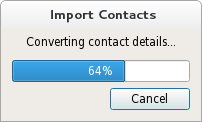
QProgressDialog
(
[
parent=None
[
,
flags=Qt.WindowFlags()
]
]
)

QProgressDialog(labelText, cancelButtonText, minimum, maximum[, parent=None[, flags=Qt.WindowFlags()]])
- param parent
- param cancelButtonText
unicode
- param flags
WindowFlags- param labelText
unicode
- param minimum
int- param maximum
int
构造进度对话框。
默认设置:
标签文本为空。
The cancel button text is (translated) “Cancel”.
最小为 0;
最大为 100
parent
argument is dialog’s parent widget. The widget flags,
f
, are passed to the
QDialog()
构造函数。
构造进度对话框。
labelText
是用于提醒用户进展如何的文本。
cancelButtonText
是要在取消按钮上显示的文本。若传递的是 QString(),则不展示取消按钮。
minimum
and
maximum
is the number of steps in the operation for which this progress dialog shows progress. For example, if the operation is to examine 50 files, this value minimum value would be 0, and the maximum would be 50. Before examining the first file, call
setValue
(0). As each file is processed call
setValue
(1),
setValue
(2), etc., finally calling
setValue
(50) after examining the last file.
parent
argument is the dialog’s parent widget. The parent,
parent
, and widget flags,
f
, are passed to the
QDialog()
构造函数。
PySide2.QtWidgets.QProgressDialog.
autoClose
(
)

bool
另请参阅
PySide2.QtWidgets.QProgressDialog.
autoReset
(
)

bool
另请参阅
PySide2.QtWidgets.QProgressDialog.
cancel
(
)

重置进度对话框。
wasCanceled()
becomes true until the progress dialog is reset. The progress dialog becomes hidden.
PySide2.QtWidgets.QProgressDialog.
canceled
(
)

PySide2.QtWidgets.QProgressDialog.
forceShow
(
)

展示对话框,若算法被启动后其仍被隐藏和
minimumDuration
毫秒已过去。
另请参阅
PySide2.QtWidgets.QProgressDialog.
labelText
(
)

unicode
另请参阅
PySide2.QtWidgets.QProgressDialog.
maximum
(
)

int
另请参阅
PySide2.QtWidgets.QProgressDialog.
minimum
(
)

int
另请参阅
PySide2.QtWidgets.QProgressDialog.
minimumDuration
(
)

int
另请参阅
PySide2.QtWidgets.QProgressDialog.
open
(
receiver
,
member
)

receiver
–
QObject
member – str
打开对话框并连接其
canceled()
signal to the slot specified by
receiver
and
member
.
信号将断开槽连接,当对话框被关闭时。
PySide2.QtWidgets.QProgressDialog.
reset
(
)

重置进度对话框。进度对话框变为隐藏,若
autoClose()
为 true。
PySide2.QtWidgets.QProgressDialog.
setAutoClose
(
close
)

close
–
bool
另请参阅
PySide2.QtWidgets.QProgressDialog.
setAutoReset
(
reset
)

reset
–
bool
另请参阅
PySide2.QtWidgets.QProgressDialog.
setBar
(
bar
)

bar
–
QProgressBar
将进度栏小部件设为
bar
。进度对话框会重置尺寸以拟合。进度对话框拥有其所有权对于进度
bar
当必要时会被删除,因此不要使用分配在堆栈上的进度条。
PySide2.QtWidgets.QProgressDialog.
setCancelButton
(
button
)

button
–
QPushButton
将取消按钮设为 Push Button (按钮)
cancelButton
。进度对话框拥有此按钮 (会被删除当必要时) 的所有权,因此,勿传递堆栈中的对象地址,即:使用 new() 去创建按钮。若
None
被传递,则取消按钮不会被展示。
PySide2.QtWidgets.QProgressDialog.
setCancelButtonText
(
text
)

text – unicode
Sets the cancel button’s text to
cancelButtonText
。若文本被设为 QString(),它将导致取消按钮被隐藏并被删除。
另请参阅
PySide2.QtWidgets.QProgressDialog.
setLabel
(
label
)

label
–
QLabel
把标签设为
label
。进度对话框会重置尺寸以拟合。标签变为由进度对话框所有,且当必要时会将其删除,因此,不要把对象地址传递到堆栈上。
另请参阅
PySide2.QtWidgets.QProgressDialog.
setLabelText
(
text
)

text – unicode
另请参阅
PySide2.QtWidgets.QProgressDialog.
setMinimumDuration
(
ms
)

ms
–
int
另请参阅
PySide2.QtWidgets.QProgressDialog.
setRange
(
minimum
,
maximum
)

minimum
–
int
maximum
–
int
Sets the progress dialog’s minimum and maximum values to
minimum
and
maximum
,分别。
若
maximum
小于
minimum
,
minimum
变为唯一合法值。
If the current value falls outside the new range, the progress dialog is reset with
reset()
.
PySide2.QtWidgets.QProgressDialog.
value
(
)

int
另请参阅
PySide2.QtWidgets.QProgressDialog.
wasCanceled
(
)

bool
