QMdiSubWindowclass provides a subwindow class forQMdiArea. 更多 …

def
isShaded
()
def
keyboardPageStep
()
def
keyboardSingleStep
()
def
maximizedButtonsWidget
()
def
mdiArea
()
def
setKeyboardPageStep
(step)
def
setKeyboardSingleStep
(step)
def
setOption
(option[, on=true])
def
setSystemMenu
(systemMenu)
def
setWidget
(widget)
def
systemMenu
()
def
testOption
(arg__1)
def
widget
()
def
showShaded
()
def
showSystemMenu
()
def
aboutToActivate
()
def
windowStateChanged
(oldState, newState)
QMdiSubWindowrepresents a top-level window in aQMdiArea, and consists of a title bar with window decorations, an internal widget, and (depending on the current style) a window frame and a size grip.QMdiSubWindowhas its own layout, which consists of the title bar and a center area for the internal widget.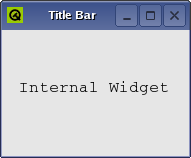
The most common way to construct a
QMdiSubWindowis to calladdSubWindow()with the internal widget as the argument. You can also create a subwindow yourself, and set an internal widget by callingsetWidget().You use the same API when programming with subwindows as with regular top-level windows (e.g., you can call functions such as
show(),hide(),showMaximized(),和setWindowTitle()).
QMdiSubWindowalso supports behavior specific to subwindows in an MDI area.By default, each
QMdiSubWindowis visible inside the MDI area viewport when moved around, but it is also possible to specify transparent window movement and resizing behavior, where only the outline of a subwindow is updated during these operations. ThesetOption()function is used to enable this behavior.
isShaded()function detects whether the subwindow is currently shaded (i.e., the window is collapsed so that only the title bar is visible). To enter shaded mode, callshowShaded().QMdiSubWindow发射windowStateChanged()signal whenever the window state has changed (e.g., when the window becomes minimized, or is restored). It also emitsaboutToActivate()before it is activated.In keyboard-interactive mode, the windows are moved and resized with the keyboard. You can enter this mode through the system menu of the window. The
keyboardSingleStepandkeyboardPageStepproperties control the distance the widget is moved or resized for each keypress event. When shift is pressed down page step is used; otherwise single step is used.You can also change the active window with the keyboard. By pressing the control and tab keys at the same time, the next (using the current
WindowOrder) subwindow will be activated. By pressing control, shift, and tab, you will activate the previous window. This is equivalent to callingactivateNextSubWindow()andactivatePreviousSubWindow(). Note that these shortcuts overrides global shortcuts, but not theQMdiAreas shortcuts.另请参阅
QMdiSubWindow
(
[
parent=None
[
,
flags=Qt.WindowFlags()
]
]
)

- param parent
- param flags
WindowFlags
构造新
QMdiSubWindow
widget. The
parent
and
flags
arguments are passed to
QWidget
‘s constructor.
Instead of using addSubWindow(), it is also simply possible to use
setParent()
when you add the subwindow to a
QMdiArea
.
Note that only
QMdiSubWindow
s can be set as children of
QMdiArea
; you cannot, for instance, write:
//bad code
QMdiArea mdiArea;
QTextEdit editor(&mdiArea); // invalid child widget
另请参阅
PySide2.QtWidgets.QMdiSubWindow.
SubWindowOption

This enum describes options that customize the behavior of
QMdiSubWindow
.
|
常量 |
描述 |
|---|---|
|
QMdiSubWindow.RubberBandResize |
If you enable this option, a rubber band control is used to represent the subwindow’s outline, and the user resizes this instead of the subwindow itself. As a result, the subwindow maintains its original position and size until the resize operation has been completed, at which time it will receive a single
|
|
QMdiSubWindow.RubberBandMove |
If you enable this option, a rubber band control is used to represent the subwindow’s outline, and the user moves this instead of the subwindow itself. As a result, the subwindow remains in its original position until the move operation has completed, at which time a
|
PySide2.QtWidgets.QMdiSubWindow.
aboutToActivate
(
)

PySide2.QtWidgets.QMdiSubWindow.
isShaded
(
)

bool
返回
true
if this window is shaded; otherwise returns
false
.
A window is shaded if it is collapsed so that only the title bar is visible.
PySide2.QtWidgets.QMdiSubWindow.
keyboardPageStep
(
)

int
PySide2.QtWidgets.QMdiSubWindow.
keyboardSingleStep
(
)

int
PySide2.QtWidgets.QMdiSubWindow.
mdiArea
(
)

Returns the area containing this sub-window, or
None
若没有。
另请参阅
PySide2.QtWidgets.QMdiSubWindow.
setKeyboardPageStep
(
step
)

step
–
int
另请参阅
PySide2.QtWidgets.QMdiSubWindow.
setKeyboardSingleStep
(
step
)

step
–
int
另请参阅
PySide2.QtWidgets.QMdiSubWindow.
setOption
(
option
[
,
on=true
]
)

option
–
SubWindowOption
on
–
bool
若
on
is true,
option
is enabled on the subwindow; otherwise it is disabled. See
SubWindowOption
for the effect of each option.
另请参阅
SubWindowOption
testOption()
PySide2.QtWidgets.QMdiSubWindow.
setSystemMenu
(
systemMenu
)

systemMenu
–
QMenu
集
systemMenu
as the current system menu for this subwindow.
By default, each
QMdiSubWindow
有标准系统菜单。
QActions for the system menu created by
QMdiSubWindow
will automatically be updated depending on the current window state; e.g., the minimize action will be disabled after the window is minimized.
QActions added by the user are not updated by
QMdiSubWindow
.
QMdiSubWindow
takes ownership of
systemMenu
; you do not have to delete it. Any existing menus will be deleted.
PySide2.QtWidgets.QMdiSubWindow.
setWidget
(
widget
)

widget
–
QWidget
集
widget
as the internal widget of this subwindow. The internal widget is displayed in the center of the subwindow beneath the title bar.
QMdiSubWindow
takes temporary ownership of
widget
; you do not have to delete it. Any existing internal widget will be removed and reparented to the root window.
另请参阅
PySide2.QtWidgets.QMdiSubWindow.
showShaded
(
)

Calling this function makes the subwindow enter the shaded mode. When the subwindow is shaded, only the title bar is visible.
Although shading is not supported by all styles, this function will still show the subwindow as shaded, regardless of whether support for shading is available. However, when used with styles without shading support, the user will be unable to return from shaded mode through the user interface (e.g., through a shade button in the title bar).
另请参阅
PySide2.QtWidgets.QMdiSubWindow.
showSystemMenu
(
)

Shows the system menu below the system menu icon in the title bar.
PySide2.QtWidgets.QMdiSubWindow.
systemMenu
(
)

Returns a pointer to the current system menu, or zero if no system menu is set.
QMdiSubWindow
provides a default system menu, but you can also set the menu with
setSystemMenu()
.
PySide2.QtWidgets.QMdiSubWindow.
testOption
(
arg__1
)

arg__1
–
SubWindowOption
bool
返回
true
if
option
被启用;否则返回
false
.
另请参阅
SubWindowOption
setOption()
PySide2.QtWidgets.QMdiSubWindow.
widget
(
)

Returns the current internal widget.
另请参阅
PySide2.QtWidgets.QMdiSubWindow.
windowStateChanged
(
oldState
,
newState
)

oldState
–
WindowStates
newState
–
WindowStates
