QCalendarWidgetclass provides a monthly based calendar widget allowing the user to select a date. 更多 …

def
calendar
()
def
dateEditAcceptDelay
()
def
dateTextFormat
()
def
dateTextFormat
(date)
def
firstDayOfWeek
()
def
headerTextFormat
()
def
horizontalHeaderFormat
()
def
isDateEditEnabled
()
def
isGridVisible
()
def
isNavigationBarVisible
()
def
maximumDate
()
def
minimumDate
()
def
monthShown
()
def
selectedDate
()
def
selectionMode
()
def
setCalendar
(calendar)
def
setDateEditAcceptDelay
(delay)
def
setDateEditEnabled
(enable)
def
setDateTextFormat
(date, format)
def
setFirstDayOfWeek
(dayOfWeek)
def
setHeaderTextFormat
(format)
def
setHorizontalHeaderFormat
(format)
def
setMaximumDate
(date)
def
setMinimumDate
(date)
def
setSelectionMode
(mode)
def
setVerticalHeaderFormat
(format)
def
setWeekdayTextFormat
(dayOfWeek, format)
def
updateCell
(date)
def
updateCells
()
def
verticalHeaderFormat
()
def
weekdayTextFormat
(dayOfWeek)
def
yearShown
()
def
setCurrentPage
(year, month)
def
setDateRange
(min, max)
def
setGridVisible
(show)
def
setNavigationBarVisible
(visible)
def
setSelectedDate
(date)
def
showNextMonth
()
def
showNextYear
()
def
showPreviousMonth
()
def
showPreviousYear
()
def
showSelectedDate
()
def
showToday
()
def
activated
(date)
def
clicked
(date)
def
currentPageChanged
(year, month)
def
selectionChanged
()
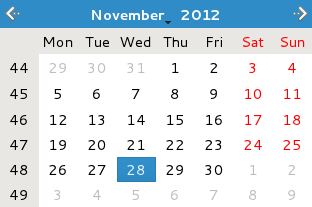
The widget is initialized with the current month and year, but
QCalendarWidgetprovides several public slots to change the year and month that is shown.By default, today’s date is selected, and the user can select a date using both mouse and keyboard. The currently selected date can be retrieved using the
selectedDate()function. It is possible to constrain the user selection to a given date range by setting theminimumDateandmaximumDateproperties. Alternatively, both properties can be set in one go using thesetDateRange()convenience slot. Set theselectionMode特性到NoSelectionto prohibit the user from selecting at all. Note that a date also can be selected programmatically using thesetSelectedDate()槽。The currently displayed month and year can be retrieved using the
monthShown()andyearShown()functions, respectively.A newly created calendar widget uses abbreviated day names, and both Saturdays and Sundays are marked in red. The calendar grid is not visible. The week numbers are displayed, and the first column day is the first day of the week for the calendar’s locale.
The notation of the days can be altered to a single letter abbreviations (“M” for “Monday”) by setting the
horizontalHeaderFormat特性到SingleLetterDayNames. Setting the same property toLongDayNamesmakes the header display the complete day names. The week numbers can be removed by setting theverticalHeaderFormat特性到NoVerticalHeader. The calendar grid can be turned on by setting thegridVisibleproperty to true using thesetGridVisible()函数:
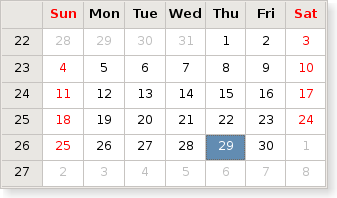
Finally, the day in the first column can be altered using the
setFirstDayOfWeek()函数。
QCalendarWidgetclass also provides three signals,selectionChanged(),activated()andcurrentPageChanged()making it possible to respond to user interaction.The rendering of the headers, weekdays or single days can be largely customized by setting
QTextCharFormat‘s for some special weekday, a special date or for the rendering of the headers.Only a subset of the properties in
QTextCharFormatare used by the calendar widget. Currently, the foreground, background and font properties are used to determine the rendering of individual cells in the widget.
QCalendarWidget
(
[
parent=None
]
)

- param parent
Constructs a calendar widget with the given
parent
.
The widget is initialized with the current month and year, and the currently selected date is today.
另请参阅
PySide2.QtWidgets.QCalendarWidget.
HorizontalHeaderFormat

This enum type defines the various formats the horizontal header can display.
|
常量 |
描述 |
|---|---|
|
QCalendarWidget.SingleLetterDayNames |
The header displays a single letter abbreviation for day names (e.g. M for Monday). |
|
QCalendarWidget.ShortDayNames |
The header displays a short abbreviation for day names (e.g. Mon for Monday). |
|
QCalendarWidget.LongDayNames |
The header displays complete day names (e.g. Monday). |
|
QCalendarWidget.NoHorizontalHeader |
头被隐藏。 |
另请参阅
horizontalHeaderFormat()
VerticalHeaderFormat
PySide2.QtWidgets.QCalendarWidget.
VerticalHeaderFormat

This enum type defines the various formats the vertical header can display.
|
常量 |
描述 |
|---|---|
|
QCalendarWidget.ISOWeekNumbers |
The header displays ISO week numbers as described by
|
|
QCalendarWidget.NoVerticalHeader |
头被隐藏。 |
另请参阅
verticalHeaderFormat()
HorizontalHeaderFormat
PySide2.QtWidgets.QCalendarWidget.
SelectionMode

This enum describes the types of selection offered to the user for selecting dates in the calendar.
|
常量 |
描述 |
|---|---|
|
QCalendarWidget.NoSelection |
Dates cannot be selected. |
|
QCalendarWidget.SingleSelection |
Single dates can be selected. |
另请参阅
PySide2.QtWidgets.QCalendarWidget.
activated
(
date
)

date
–
QDate
PySide2.QtWidgets.QCalendarWidget.
calendar
(
)

QCalendar
PySide2.QtWidgets.QCalendarWidget.
clicked
(
date
)

date
–
QDate
PySide2.QtWidgets.QCalendarWidget.
currentPageChanged
(
year
,
month
)

year
–
int
month
–
int
PySide2.QtWidgets.QCalendarWidget.
dateEditAcceptDelay
(
)

int
PySide2.QtWidgets.QCalendarWidget.
dateTextFormat
(
)

返回
QMap
from
QDate
to
QTextCharFormat
showing all dates that use a special format that alters their rendering.
另请参阅
PySide2.QtWidgets.QCalendarWidget.
dateTextFormat
(
date
)

date
–
QDate
QTextCharFormat
返回
QTextCharFormat
for
date
. The char format can be be empty if the date is not renderd specially.
PySide2.QtWidgets.QCalendarWidget.
firstDayOfWeek
(
)

DayOfWeek
另请参阅
PySide2.QtWidgets.QCalendarWidget.
headerTextFormat
(
)

QTextCharFormat
Returns the text char format for rendering the header.
PySide2.QtWidgets.QCalendarWidget.
horizontalHeaderFormat
(
)

PySide2.QtWidgets.QCalendarWidget.
isDateEditEnabled
(
)

bool
PySide2.QtWidgets.QCalendarWidget.
isGridVisible
(
)

bool
bool
PySide2.QtWidgets.QCalendarWidget.
maximumDate
(
)

QDate
另请参阅
PySide2.QtWidgets.QCalendarWidget.
minimumDate
(
)

QDate
另请参阅
PySide2.QtWidgets.QCalendarWidget.
monthShown
(
)

int
Returns the currently displayed month. Months are numbered from 1 to 12.
PySide2.QtWidgets.QCalendarWidget.
paintCell
(
painter
,
rect
,
date
)

painter
–
QPainter
rect
–
QRect
date
–
QDate
Paints the cell specified by the given
date
,使用给定
painter
and
rect
.
PySide2.QtWidgets.QCalendarWidget.
selectedDate
(
)

QDate
另请参阅
PySide2.QtWidgets.QCalendarWidget.
selectionChanged
(
)

PySide2.QtWidgets.QCalendarWidget.
selectionMode
(
)

另请参阅
PySide2.QtWidgets.QCalendarWidget.
setCalendar
(
calendar
)

calendar
–
QCalendar
PySide2.QtWidgets.QCalendarWidget.
setCurrentPage
(
year
,
month
)

year
–
int
month
–
int
Displays the given
month
为给定
year
without changing the selected date. Use the
setSelectedDate()
function to alter the selected date.
The currently displayed month and year can be retrieved using the
monthShown()
and
yearShown()
functions respectively.
PySide2.QtWidgets.QCalendarWidget.
setDateEditAcceptDelay
(
delay
)

delay
–
int
PySide2.QtWidgets.QCalendarWidget.
setDateEditEnabled
(
enable
)

enable
–
bool
另请参阅
PySide2.QtWidgets.QCalendarWidget.
setDateRange
(
min
,
max
)

min
–
QDate
max
–
QDate
Defines a date range by setting the
minimumDate
and
maximumDate
特性。
The date range restricts the user selection, i.e. the user can only select dates within the specified date range. Note that
calendar.setDateRange(min, max)
is analogous to
calendar.setMinimumDate(min)
calendar.setMaximumDate(max)
若
min
or
max
parameters are not valid
QDate
objects, this function does nothing.
PySide2.QtWidgets.QCalendarWidget.
setDateTextFormat
(
date
,
format
)

date
–
QDate
format
–
QTextCharFormat
Sets the format used to render the given
date
to that specified by
format
.
若
date
is null, all date formats are cleared.
另请参阅
PySide2.QtWidgets.QCalendarWidget.
setFirstDayOfWeek
(
dayOfWeek
)

dayOfWeek
–
DayOfWeek
另请参阅
PySide2.QtWidgets.QCalendarWidget.
setGridVisible
(
show
)

show
–
bool
另请参阅
PySide2.QtWidgets.QCalendarWidget.
setHeaderTextFormat
(
format
)

format
–
QTextCharFormat
Sets the text char format for rendering the header to
format
. If you also set a weekday text format, this format’s foreground and background color will take precedence over the header’s format. The other formatting information will still be decided by the header’s format.
另请参阅
PySide2.QtWidgets.QCalendarWidget.
setHorizontalHeaderFormat
(
format
)

format
–
HorizontalHeaderFormat
PySide2.QtWidgets.QCalendarWidget.
setMaximumDate
(
date
)

date
–
QDate
另请参阅
PySide2.QtWidgets.QCalendarWidget.
setMinimumDate
(
date
)

date
–
QDate
另请参阅
visible
–
bool
PySide2.QtWidgets.QCalendarWidget.
setSelectedDate
(
date
)

date
–
QDate
另请参阅
PySide2.QtWidgets.QCalendarWidget.
setSelectionMode
(
mode
)

mode
–
SelectionMode
另请参阅
PySide2.QtWidgets.QCalendarWidget.
setVerticalHeaderFormat
(
format
)

format
–
VerticalHeaderFormat
PySide2.QtWidgets.QCalendarWidget.
setWeekdayTextFormat
(
dayOfWeek
,
format
)

dayOfWeek
–
DayOfWeek
format
–
QTextCharFormat
Sets the text char format for rendering of day in the week
dayOfWeek
to
format
. The format will take precedence over the header format in case of foreground and background color. Other text formatting information is taken from the headers format.
PySide2.QtWidgets.QCalendarWidget.
showNextMonth
(
)

Shows the next month relative to the currently displayed month. Note that the selected date is not changed.
PySide2.QtWidgets.QCalendarWidget.
showNextYear
(
)

Shows the currently displayed month in the next year relative to the currently displayed year. Note that the selected date is not changed.
PySide2.QtWidgets.QCalendarWidget.
showPreviousMonth
(
)

Shows the previous month relative to the currently displayed month. Note that the selected date is not changed.
PySide2.QtWidgets.QCalendarWidget.
showPreviousYear
(
)

Shows the currently displayed month in the 上一 year relative to the currently displayed year. Note that the selected date is not changed.
PySide2.QtWidgets.QCalendarWidget.
showSelectedDate
(
)

Shows the month of the selected date.
PySide2.QtWidgets.QCalendarWidget.
showToday
(
)

Shows the month of the today’s date.
PySide2.QtWidgets.QCalendarWidget.
updateCell
(
date
)

date
–
QDate
Updates the cell specified by the given
date
unless updates are disabled or the cell is hidden.
PySide2.QtWidgets.QCalendarWidget.
updateCells
(
)

更新所有可见单元格,除非更新被禁用。
另请参阅
PySide2.QtWidgets.QCalendarWidget.
verticalHeaderFormat
(
)

PySide2.QtWidgets.QCalendarWidget.
weekdayTextFormat
(
dayOfWeek
)

dayOfWeek
–
DayOfWeek
QTextCharFormat
Returns the text char format for rendering of day in the week
dayOfWeek
.
PySide2.QtWidgets.QCalendarWidget.
yearShown
(
)

int
Returns the year of the currently displayed month. Months are numbered from 1 to 12.
