QBoxLayoutclass lines up child widgets horizontally or vertically. 更多 …

继承者: QHBoxLayout , QVBoxLayout
def
addLayout
(layout[, stretch=0])
def
addSpacerItem
(spacerItem)
def
addSpacing
(size)
def
addStretch
([stretch=0])
def
addStrut
(arg__1)
def
addWidget
(arg__1[, stretch=0[, alignment=Qt.Alignment()]])
def
direction
()
def
insertItem
(index, arg__2)
def
insertLayout
(index, layout[, stretch=0])
def
insertSpacerItem
(index, spacerItem)
def
insertSpacing
(index, size)
def
insertStretch
(index[, stretch=0])
def
insertWidget
(index, widget[, stretch=0[, alignment=Qt.Alignment()]])
def
setDirection
(arg__1)
def
setStretch
(index, stretch)
def
setStretchFactor
(l, stretch)
def
setStretchFactor
(w, stretch)
def
stretch
(index)
QBoxLayouttakes the space it gets (from its parent layout or from theparentWidget()), divides it up into a row of boxes, and makes each managed widget fill one box.
若
QBoxLayout‘s orientation isHorizontal框按合适尺寸排成一行。每个 Widget (或其它框) 将至少获得其最小尺寸和最多获得其最大尺寸。任何多余空间根据拉伸因子共享 (下文有关这更多)。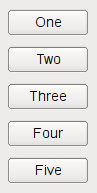
若
QBoxLayout‘s orientation isVertical,框被放置在列中,再采用合适尺寸。The easiest way to create a
QBoxLayoutis to use one of the convenience classes, e.g.QHBoxLayout(forHorizontal框) 或QVBoxLayout(forVerticalboxes). You can also use theQBoxLayoutconstructor directly, specifying its direction asLeftToRight,RightToLeft,TopToBottom,或BottomToTop.若
QBoxLayoutis not the top-level layout (i.e. it is not managing all of the widget’s area and children), you must add it to its parent layout before you can do anything with it. The normal way to add a layout is by calling parentLayout->addLayout().Once you have done this, you can add boxes to the
QBoxLayoutusing one of four functions:
addWidget()to add a widget to theQBoxLayoutand set the widget’s stretch factor. (The stretch factor is along the row of boxes.)
addSpacing()to create an empty box; this is one of the functions you use to create nice and spacious dialogs. See below for ways to set margins.
addStretch()to create an empty, stretchable box.
addLayout()to add a box containing anotherQLayoutto the row and set that layout’s stretch factor.使用
insertWidget(),insertSpacing(),insertStretch()orinsertLayout()to insert a box at a specified position in the layout.
QBoxLayoutalso includes two margin widths:
setContentsMargins()sets the width of the outer border on each side of the widget. This is the width of the reserved space along each of theQBoxLayout‘s four sides.
setSpacing()sets the width between neighboring boxes. (You can useaddSpacing()to get more space at a particular spot.)边距默认由样式提供。大多数 Qt 样式指定的默认边距对于 Widget 为 9,对于窗口为 11。间距默认与顶层布局边距宽度相同,或与父布局相同。
要从布局移除 Widget,调用
removeWidget()。调用hide()on a widget also effectively removes the widget from the layout untilshow()被调用。几乎总是想要使用
QVBoxLayoutandQHBoxLayout而不是QBoxLayoutbecause of their convenient constructors.
QBoxLayout
(
arg__1
[
,
parent=None
]
)

- param parent
- param arg__1
Direction
构造新
QBoxLayout
with direction
dir
和父级 Widget
parent
.
另请参阅
PySide2.QtWidgets.QBoxLayout.
Direction

此类型用于确定框布局的方向。
|
常量 |
描述 |
|---|---|
|
QBoxLayout.LeftToRight |
水平从左到右。 |
|
QBoxLayout.RightToLeft |
水平从右到左。 |
|
QBoxLayout.TopToBottom |
垂直从上到下。 |
|
QBoxLayout.BottomToTop |
垂直从下到上。 |
PySide2.QtWidgets.QBoxLayout.
addLayout
(
layout
[
,
stretch=0
]
)

layout
–
QLayout
stretch
–
int
添加
layout
到方框末尾,采用连续拉伸因子
stretch
.
另请参阅
insertLayout()
addItem()
addWidget()
PySide2.QtWidgets.QBoxLayout.
addSpacerItem
(
spacerItem
)

spacerItem
–
QSpacerItem
添加
spacerItem
到此方框布局的末尾。
另请参阅
PySide2.QtWidgets.QBoxLayout.
addSpacing
(
size
)

size
–
int
添加不可拉伸空间 (
QSpacerItem
) 采用尺寸
size
到此方框布局的末尾。
QBoxLayout
提供默认边距和间距。此函数添加额外空间。
另请参阅
insertSpacing()
addItem()
QSpacerItem
PySide2.QtWidgets.QBoxLayout.
addStretch
(
[
stretch=0
]
)

stretch
–
int
添加可拉伸空间 (
QSpacerItem
) with zero minimum size and stretch factor
stretch
到此方框布局的末尾。
另请参阅
insertStretch()
addItem()
QSpacerItem
PySide2.QtWidgets.QBoxLayout.
addStrut
(
arg__1
)

arg__1
–
int
Limits the perpendicular dimension of the box (e.g. height if the box is
LeftToRight
) to a minimum of
size
. Other constraints may increase the limit.
另请参阅
addItem()
PySide2.QtWidgets.QBoxLayout.
addWidget
(
arg__1
[
,
stretch=0
[
,
alignment=Qt.Alignment()
]
]
)

arg__1
–
QWidget
stretch
–
int
alignment
–
Alignment
添加
widget
到此框布局的末尾,采用拉伸因子
stretch
和对齐
alignment
.
拉伸因子仅应用于
direction
的
QBoxLayout
,且相对于其它方框和 Widget 在此
QBoxLayout
。具有更高拉伸因子的 Widget 和方框增长更多。
若拉伸因子为 0 且什么都没有除非
QBoxLayout
拥有大于 0 的拉伸因子,空间分布将根据
QWidget
:sizePolicy() of each widget that’s involved.
对齐方式的指定通过
alignment
。默认对齐为 0,意味着 Widget 填充整个单元格。
另请参阅
insertWidget()
addItem()
addLayout()
addStretch()
addSpacing()
addStrut()
PySide2.QtWidgets.QBoxLayout.
direction
(
)

返回框的方向。
addWidget()
and
addSpacing()
work in this direction; the stretch stretches in this direction.
另请参阅
setDirection()
Direction
addWidget()
addSpacing()
PySide2.QtWidgets.QBoxLayout.
insertItem
(
index
,
arg__2
)

index
–
int
arg__2
–
QLayoutItem
插入
item
到此框布局在位置
index
。若
index
为负,项被添加在末尾。
另请参阅
addItem()
insertWidget()
insertLayout()
insertStretch()
insertSpacing()
PySide2.QtWidgets.QBoxLayout.
insertLayout
(
index
,
layout
[
,
stretch=0
]
)

index
–
int
layout
–
QLayout
stretch
–
int
插入
layout
在位置
index
,采用拉伸因子
stretch
。若
index
为负,布局被添加在末尾。
layout
变为框布局的子级。
另请参阅
PySide2.QtWidgets.QBoxLayout.
insertSpacerItem
(
index
,
spacerItem
)

index
–
int
spacerItem
–
QSpacerItem
插入
spacerItem
在位置
index
, with zero minimum size and stretch factor. If
index
为负,空间被添加在末尾。
PySide2.QtWidgets.QBoxLayout.
insertSpacing
(
index
,
size
)

index
–
int
size
–
int
插入不可拉伸空间 (
QSpacerItem
) 在位置
index
,采用尺寸
size
。若
index
为负,空间被添加在末尾。
框布局具有默认的边距和间距。此函数添加额外空间。
PySide2.QtWidgets.QBoxLayout.
insertStretch
(
index
[
,
stretch=0
]
)

index
–
int
stretch
–
int
插入可拉伸空间 (
QSpacerItem
) 在位置
index
,采用 0 最小尺寸和拉伸因子
stretch
。若
index
为负,空间被添加在末尾。
PySide2.QtWidgets.QBoxLayout.
insertWidget
(
index
,
widget
[
,
stretch=0
[
,
alignment=Qt.Alignment()
]
]
)

index
–
int
widget
–
QWidget
stretch
–
int
alignment
–
Alignment
插入
widget
在位置
index
,采用拉伸因子
stretch
和对齐
alignment
。若
index
为负,Widget 被添加到末尾。
拉伸因子仅应用于
direction
的
QBoxLayout
,且相对于其它方框和 Widget 在此
QBoxLayout
。具有更高拉伸因子的 Widget 和方框增长更多。
若拉伸因子为 0 且什么都没有除非
QBoxLayout
拥有大于 0 的拉伸因子,空间分布将根据
QWidget
:sizePolicy() of each widget that’s involved.
对齐方式的指定通过
alignment
。默认对齐为 0,意味着 Widget 填充整个单元格。
另请参阅
PySide2.QtWidgets.QBoxLayout.
setDirection
(
arg__1
)

arg__1
–
Direction
将此布局的方向设为
direction
.
另请参阅
PySide2.QtWidgets.QBoxLayout.
setStretch
(
index
,
stretch
)

index
–
int
stretch
–
int
设置拉伸因子在位置
index
. to
stretch
.
另请参阅
PySide2.QtWidgets.QBoxLayout.
setStretchFactor
(
l
,
stretch
)

l
–
QLayout
stretch
–
int
bool
这是重载函数。
设置拉伸因子为布局
layout
to
stretch
并返回
true
if
layout
在此布局中被找到 (不包括子级布局);否则返回
false
.
PySide2.QtWidgets.QBoxLayout.
setStretchFactor
(
w
,
stretch
)

w
–
QWidget
stretch
–
int
bool
设置拉伸因子为
widget
to
stretch
and returns true if
widget
在此布局中被找到 (不包括子级布局);否则返回
false
.
另请参阅
PySide2.QtWidgets.QBoxLayout.
stretch
(
index
)

index
–
int
int
返回拉伸因子在位置
index
.
另请参阅
