QGridLayoutclass lays out widgets in a grid. 更多 …

def
addItem
(item, row, column[, rowSpan=1[, columnSpan=1[, alignment=Qt.Alignment()]]])
def
addLayout
(arg__1, row, column, rowSpan, columnSpan[, alignment=Qt.Alignment()])
def
addLayout
(arg__1, row, column[, alignment=Qt.Alignment()])
def
addWidget
(arg__1, row, column, rowSpan, columnSpan[, alignment=Qt.Alignment()])
def
addWidget
(arg__1, row, column[, alignment=Qt.Alignment()])
def
cellRect
(row, column)
def
columnCount
()
def
columnMinimumWidth
(column)
def
columnStretch
(column)
def
getItemPosition
(idx)
def
horizontalSpacing
()
def
itemAtPosition
(row, column)
def
originCorner
()
def
rowCount
()
def
rowMinimumHeight
(row)
def
rowStretch
(row)
def
setColumnMinimumWidth
(column, minSize)
def
setColumnStretch
(column, stretch)
def
setDefaultPositioning
(n, orient)
def
setHorizontalSpacing
(spacing)
def
setOriginCorner
(arg__1)
def
setRowMinimumHeight
(row, minSize)
def
setRowStretch
(row, stretch)
def
setVerticalSpacing
(spacing)
def
verticalSpacing
()
QGridLayouttakes the space made available to it (by its parent layout or by theparentWidget()), divides it up into rows and columns, and puts each widget it manages into the correct cell.列和行的行为等同;我们将讨论列,但行也有等效函数。
Each column has a minimum width and a stretch factor. The minimum width is the greatest of that set using
setColumnMinimumWidth()and the minimum width of each widget in that column. The stretch factor is set usingsetColumnStretch()and determines how much of the available space the column will get over and above its necessary minimum.Normally, each managed widget or layout is put into a cell of its own using
addWidget(). It is also possible for a widget to occupy multiple cells using the row and column spanning overloads ofaddItem()andaddWidget(). If you do this,QGridLayoutwill guess how to distribute the size over the columns/rows (based on the stretch factors).要从布局移除 Widget,调用
removeWidget()。调用hide()on a widget also effectively removes the widget from the layout untilshow()被调用。This illustration shows a fragment of a dialog with a five-column, three-row grid (the grid is shown overlaid in magenta):
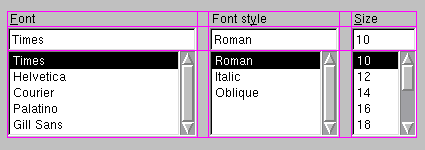
Columns 0, 2 and 4 in this dialog fragment are made up of a
QLabel,QLineEdit, and a QListBox. Columns 1 and 3 are placeholders made withsetColumnMinimumWidth(). Row 0 consists of threeQLabelobjects, row 1 of threeQLineEditobjects and row 2 of three QListBox objects. We used placeholder columns (1 and 3) to get the right amount of space between the columns.Note that the columns and rows are not equally wide or tall. If you want two columns to have the same width, you must set their minimum widths and stretch factors to be the same yourself. You do this using
setColumnMinimumWidth()andsetColumnStretch().若
QGridLayoutis not the top-level layout (i.e. does not manage all of the widget’s area and children), you must add it to its parent layout when you create it, but before you do anything with it. The normal way to add a layout is by callingaddLayout()on the parent layout.Once you have added your layout you can start putting widgets and other layouts into the cells of your grid layout using
addWidget(),addItem(),和addLayout().
QGridLayoutalso includes two margin widths: thecontents margin和spacing(). The contents margin is the width of the reserved space along each of theQGridLayout‘s four sides. Thespacing()is the width of the automatically allocated spacing between neighboring boxes.The default contents margin values are provided by the
style. The default value Qt styles specify is 9 for child widgets and 11 for windows. The spacing defaults to the same as the margin width for a top-level layout, or to the same as the parent layout.
QGridLayout

QGridLayout(parent)
- param parent
构造新栅格布局。
You must insert this grid into another layout. You can insert widgets and layouts into this layout at any time, but laying out will not be performed before this is inserted into another layout.
构造新
QGridLayout
with parent widget,
parent
. The layout has one row and one column initially, and will expand when new items are inserted.
PySide2.QtWidgets.QGridLayout.
addItem
(
item
,
row
,
column
[
,
rowSpan=1
[
,
columnSpan=1
[
,
alignment=Qt.Alignment()
]
]
]
)

item
–
QLayoutItem
row
–
int
column
–
int
rowSpan
–
int
columnSpan
–
int
alignment
–
Alignment
添加
item
在位置
row
,
column
, spanning
rowSpan
rows and
columnSpan
columns, and aligns it according to
alignment
。若
rowSpan
and/or
columnSpan
is -1, then the item will extend to the bottom and/or right edge, respectively. The layout takes ownership of the
item
.
警告
Do not use this function to add child layouts or child widget items. Use
addLayout()
or
addWidget()
代替。
PySide2.QtWidgets.QGridLayout.
addLayout
(
arg__1
,
row
,
column
[
,
alignment=Qt.Alignment()
]
)

arg__1
–
QLayout
row
–
int
column
–
int
alignment
–
Alignment
Places the
layout
at position (
row
,
column
) in the grid. The top-left position is (0, 0).
对齐方式的指定通过
alignment
。默认对齐为 0,意味着 Widget 填充整个单元格。
A non-zero alignment indicates that the layout should not grow to fill the available space but should be sized according to
sizeHint()
.
layout
becomes a child of the grid layout.
PySide2.QtWidgets.QGridLayout.
addLayout
(
arg__1
,
row
,
column
,
rowSpan
,
columnSpan
[
,
alignment=Qt.Alignment()
]
)

arg__1
–
QLayout
row
–
int
column
–
int
rowSpan
–
int
columnSpan
–
int
alignment
–
Alignment
这是重载函数。
This version adds the layout
layout
to the cell grid, spanning multiple rows/columns. The cell will start at
row
,
column
spanning
rowSpan
rows and
columnSpan
columns.
若
rowSpan
and/or
columnSpan
is -1, then the layout will extend to the bottom and/or right edge, respectively.
PySide2.QtWidgets.QGridLayout.
addWidget
(
arg__1
,
row
,
column
[
,
alignment=Qt.Alignment()
]
)

arg__1
–
QWidget
row
–
int
column
–
int
alignment
–
Alignment
添加给定
widget
to the cell grid at
row
,
column
. The top-left position is (0, 0) by default.
对齐方式的指定通过
alignment
。默认对齐为 0,意味着 Widget 填充整个单元格。
PySide2.QtWidgets.QGridLayout.
addWidget
(
arg__1
,
row
,
column
,
rowSpan
,
columnSpan
[
,
alignment=Qt.Alignment()
]
)

arg__1
–
QWidget
row
–
int
column
–
int
rowSpan
–
int
columnSpan
–
int
alignment
–
Alignment
这是重载函数。
This version adds the given
widget
to the cell grid, spanning multiple rows/columns. The cell will start at
fromRow
,
fromColumn
spanning
rowSpan
rows and
columnSpan
columns. The
widget
will have the given
alignment
.
若
rowSpan
and/or
columnSpan
is -1, then the widget will extend to the bottom and/or right edge, respectively.
PySide2.QtWidgets.QGridLayout.
cellRect
(
row
,
column
)

row
–
int
column
–
int
QRect
Returns the geometry of the cell with row
row
and column
column
in the grid. Returns an invalid rectangle if
row
or
column
is outside the grid.
警告
in the current version of Qt this function does not return valid results until
setGeometry()
has been called, i.e. after the
parentWidget()
is visible.
PySide2.QtWidgets.QGridLayout.
columnCount
(
)

int
Returns the number of columns in this grid.
PySide2.QtWidgets.QGridLayout.
columnMinimumWidth
(
column
)

column
–
int
int
Returns the column spacing for column
column
.
PySide2.QtWidgets.QGridLayout.
columnStretch
(
column
)

column
–
int
int
Returns the stretch factor for column
column
.
另请参阅
PySide2.QtWidgets.QGridLayout.
getItemPosition
(
idx
)

idx
–
int
Returns the position information of the item with the given
index
.
The variables passed as
row
and
column
are updated with the position of the item in the layout, and the
rowSpan
and
columnSpan
variables are updated with the vertical and horizontal spans of the item.
另请参阅
itemAtPosition()
itemAt()
PySide2.QtWidgets.QGridLayout.
horizontalSpacing
(
)

int
PySide2.QtWidgets.QGridLayout.
itemAtPosition
(
row
,
column
)

row
–
int
column
–
int
Returns the layout item that occupies cell (
row
,
column
),或
None
if the cell is empty.
PySide2.QtWidgets.QGridLayout.
originCorner
(
)

Corner
Returns the corner that’s used for the grid’s origin, i.e. for position (0, 0).
另请参阅
PySide2.QtWidgets.QGridLayout.
rowCount
(
)

int
Returns the number of rows in this grid.
PySide2.QtWidgets.QGridLayout.
rowMinimumHeight
(
row
)

row
–
int
int
Returns the minimum width set for row
row
.
PySide2.QtWidgets.QGridLayout.
rowStretch
(
row
)

row
–
int
int
Returns the stretch factor for row
row
.
另请参阅
PySide2.QtWidgets.QGridLayout.
setColumnMinimumWidth
(
column
,
minSize
)

column
–
int
minSize
–
int
Sets the minimum width of column
column
to
minSize
像素。
PySide2.QtWidgets.QGridLayout.
setColumnStretch
(
column
,
stretch
)

column
–
int
stretch
–
int
Sets the stretch factor of column
column
to
stretch
. The first column is number 0.
The stretch factor is relative to the other columns in this grid. Columns with a higher stretch factor take more of the available space.
The default stretch factor is 0. If the stretch factor is 0 and no other column in this table can grow at all, the column may still grow.
An alternative approach is to add spacing using
addItem()
采用
QSpacerItem
.
PySide2.QtWidgets.QGridLayout.
setDefaultPositioning
(
n
,
orient
)

n
–
int
orient
–
取向
Sets the positioning mode used by
addItem()
。若
orient
is
Horizontal
, this layout is expanded to
n
columns, and items will be added columns-first. Otherwise it is expanded to
n
rows and items will be added rows-first.
PySide2.QtWidgets.QGridLayout.
setHorizontalSpacing
(
spacing
)

spacing
–
int
另请参阅
PySide2.QtWidgets.QGridLayout.
setOriginCorner
(
arg__1
)

arg__1
–
Corner
Sets the grid’s origin corner, i.e. position (0, 0), to
corner
.
另请参阅
PySide2.QtWidgets.QGridLayout.
setRowMinimumHeight
(
row
,
minSize
)

row
–
int
minSize
–
int
Sets the minimum height of row
row
to
minSize
像素。
PySide2.QtWidgets.QGridLayout.
setRowStretch
(
row
,
stretch
)

row
–
int
stretch
–
int
Sets the stretch factor of row
row
to
stretch
. The first row is number 0.
The stretch factor is relative to the other rows in this grid. Rows with a higher stretch factor take more of the available space.
The default stretch factor is 0. If the stretch factor is 0 and no other row in this table can grow at all, the row may still grow.
PySide2.QtWidgets.QGridLayout.
setVerticalSpacing
(
spacing
)

spacing
–
int
另请参阅
PySide2.QtWidgets.QGridLayout.
verticalSpacing
(
)

int
另请参阅
