
def
alignment
()
def
initStyleOption
(option)
def
isCheckable
()
def
isChecked
()
def
isFlat
()
def
setAlignment
(alignment)
def
setCheckable
(checkable)
def
setFlat
(flat)
def
setTitle
(title)
def
title
()
def
setChecked
(checked)
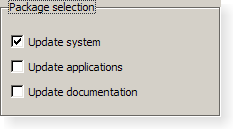
A group box provides a frame, a title on top, a keyboard shortcut, and displays various other widgets inside itself. The keyboard shortcut moves keyboard focus to one of the group box’s child widgets.
QGroupBoxalso lets you set thetitle(normally set in the constructor) and the title’s alignment . Group boxes can becheckable. Child widgets in checkable group boxes are enabled or disabled depending on whether or not the group box ischecked.You can minimize the space consumption of a group box by enabling the
flatproperty. In moststyles, enabling this property results in the removal of the left, right and bottom edges of the frame.
QGroupBoxdoesn’t automatically lay out the child widgets (which are oftenQCheckBoxes orQRadioButtons but can be any widgets). The following example shows how we can set up aQGroupBoxwith a layout:groupBox = QGroupBox("Exclusive Radio Buttons") radio1 = QRadioButton("&Radio button 1") radio2 = QRadioButton("R&adio button 2") radio3 = QRadioButton("Ra&dio button 3") radio1.setChecked(True) vbox = QVBoxLayout() vbox.addWidget(radio1) vbox.addWidget(radio2) vbox.addWidget(radio3) vbox.addStretch(1) groupBox.setLayout(vbox)另请参阅
QGroupBox
(
[
parent=None
]
)

QGroupBox(title[, parent=None])
- param parent
- param title
unicode
Constructs a group box widget with the given
parent
but with no title.
Constructs a group box with the given
title
and
parent
.
PySide2.QtWidgets.QGroupBox.
alignment
(
)

Alignment
另请参阅
PySide2.QtWidgets.QGroupBox.
clicked
(
[
checked=false
]
)

checked
–
bool
PySide2.QtWidgets.QGroupBox.
initStyleOption
(
option
)

option
–
QStyleOptionGroupBox
初始化
option
采用值来自此
QGroupBox
。此方法对子类是有用的,当需要
QStyleOptionGroupBox
, but don’t want to fill in all the information themselves.
另请参阅
PySide2.QtWidgets.QGroupBox.
isCheckable
(
)

bool
PySide2.QtWidgets.QGroupBox.
isChecked
(
)

bool
PySide2.QtWidgets.QGroupBox.
isFlat
(
)

bool
PySide2.QtWidgets.QGroupBox.
setAlignment
(
alignment
)

alignment
–
int
另请参阅
PySide2.QtWidgets.QGroupBox.
setCheckable
(
checkable
)

checkable
–
bool
另请参阅
PySide2.QtWidgets.QGroupBox.
setChecked
(
checked
)

checked
–
bool
另请参阅
PySide2.QtWidgets.QGroupBox.
title
(
)

unicode
另请参阅
PySide2.QtWidgets.QGroupBox.
toggled
(
arg__1
)

arg__1
–
bool
