Shows how to use the standard layout managers.
基本布局 shows how to use the standard layout managers that are available in Qt:
QBoxLayout,QGridLayout,和QFormLayout.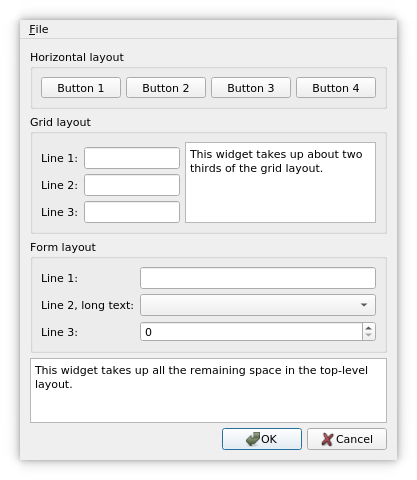
QBoxLayoutclass lines up widgets horizontally or vertically.QHBoxLayoutandQVBoxLayoutare convenience subclasses ofQBoxLayout.QGridLayoutlays out widgets in cells by dividing the available space into rows and columns.QFormLayout, on the other hand, sets its children in a two-column form with labels in the left column and input fields in the right column.更多信息,拜访 布局管理 页面。
要运行范例从 Qt Creator ,打开 欢迎 模式,然后选择范例从 范例 . For more information, visit Building and Running an Example.
class Dialog : public QDialog
{
    Q_OBJECT
public:
    Dialog();
private:
    void createMenu();
    void createHorizontalGroupBox();
    void createGridGroupBox();
    void createFormGroupBox();
    enum { NumGridRows = 3, NumButtons = 4 };
    QMenuBar *menuBar;
    QGroupBox *horizontalGroupBox;
    QGroupBox *gridGroupBox;
    QGroupBox *formGroupBox;
    QTextEdit *smallEditor;
    QTextEdit *bigEditor;
    QLabel *labels[NumGridRows];
    QLineEdit *lineEdits[NumGridRows];
    QPushButton *buttons[NumButtons];
    QDialogButtonBox *buttonBox;
    QMenu *fileMenu;
    QAction *exitAction;
};
Dialog类继承QDialog. It is a custom widget that displays its child widgets using the geometry managers:QHBoxLayout,QVBoxLayout,QGridLayout,和QFormLayout.There are four private functions to simplify the class constructor: the
createMenu(),createHorizontalGroupBox(),createGridGroupBox(),和createFormGroupBox()functions create several widgets that the example uses to demonstrate how the layout affects their appearances.
Dialog::Dialog()
{
    createMenu();
    createHorizontalGroupBox();
    createGridGroupBox();
    createFormGroupBox();
In the constructor, we first use the
createMenu()function to create and populate a menu bar and thecreateHorizontalGroupBox()function to create a group box containing four buttons with a horizontal layout. Next, we use thecreateGridGroupBox()function to create a group box containing several line edits and a small text editor which are displayed in a grid layout. Finally, we use thecreateFormGroupBox()function to create a group box with three labels and three input fields: a line edit, a combo box, and a spin box.bigEditor = new QTextEdit; bigEditor->setPlainText(tr("This widget takes up all the remaining space " "in the top-level layout.")); buttonBox = new QDialogButtonBox(QDialogButtonBox::Ok | QDialogButtonBox::Cancel); connect(buttonBox, &QDialogButtonBox::accepted, this, &QDialog::accept); connect(buttonBox, &QDialogButtonBox::rejected, this, &QDialog::reject);We also create a big text editor and a dialog button box. The
QDialogButtonBoxclass is a widget that presents buttons in a layout that is appropriate to the current widget style. The preferred buttons can be specified as arguments to the constructor, using theStandardButtons枚举。Note that we don’t have to specify a parent for the widgets when we create them. The reason is that all the widgets we create here will be added to a layout, and when we add a widget to a layout, it is automatically reparented to the widget the layout is installed on.
QVBoxLayout *mainLayout = new QVBoxLayout;The main layout is a
QVBoxLayout对象。QVBoxLayoutis a convenience class for a box layout with vertical orientation.In general, the
QBoxLayoutclass takes the space it gets (from its parent layout or from the parent widget), divides it up into a series of boxes, and makes each managed widget fill one box. If theQBoxLayout‘s orientation isHorizontalthe boxes are placed in a row. If the orientation isVertical, the boxes are placed in a column. The corresponding convenience classes areQHBoxLayoutandQVBoxLayout,分别。mainLayout->setMenuBar(menuBar);When we call the
setMenuBar()function, the layout places the provided menu bar at the top of the parent widget, and outside the widget’scontent margins. All child widgets are placed below the bottom edge of the menu bar.mainLayout->addWidget(horizontalGroupBox); mainLayout->addWidget(gridGroupBox); mainLayout->addWidget(formGroupBox); mainLayout->addWidget(bigEditor); mainLayout->addWidget(buttonBox);我们使用
addWidget()function to add the widgets to the end of the layout. Each widget will get at least its minimum size and at most its maximum size. It is possible to specify a stretch factor in theaddWidget()function, and any excess space is shared according to these stretch factors. If not specified, a widget’s stretch factor is 0.setLayout(mainLayout); setWindowTitle(tr("Basic Layouts")); }We install the main layout on the
Dialogwidget using thesetLayout()function, and all of the layout’s widgets are automatically reparented to be children of theDialog小部件。void Dialog::createMenu() { menuBar = new QMenuBar; fileMenu = new QMenu(tr("&File"), this); exitAction = fileMenu->addAction(tr("E&xit")); menuBar->addMenu(fileMenu); connect(exitAction, &QAction::triggered, this, &QDialog::accept); }In the private
createMenu()function we create a menu bar, and add a pull-down File menu containing an Exit option.void Dialog::createHorizontalGroupBox() { horizontalGroupBox = new QGroupBox(tr("Horizontal layout")); QHBoxLayout *layout = new QHBoxLayout; for (int i = 0; i < NumButtons; ++i) { buttons[i] = new QPushButton(tr("Button %1").arg(i + 1)); layout->addWidget(buttons[i]); } horizontalGroupBox->setLayout(layout); }When we create the horizontal group box, we use a
QHBoxLayoutas the internal layout. We create the buttons we want to put in the group box, add them to the layout and install the layout on the group box.void Dialog::createGridGroupBox() { gridGroupBox = new QGroupBox(tr("Grid layout"));在
createGridGroupBox()function we use aQGridLayoutwhich lays out widgets in a grid. It takes the space made available to it (by its parent layout or by the parent widget), divides it up into rows and columns, and puts each widget it manages into the correct cell.for (int i = 0; i < NumGridRows; ++i) { labels[i] = new QLabel(tr("Line %1:").arg(i + 1)); lineEdits[i] = new QLineEdit; layout->addWidget(labels[i], i + 1, 0); layout->addWidget(lineEdits[i], i + 1, 1); }For each row in the grid we create a label and an associated line edit, and add them to the layout. The
addWidget()function differ from the corresponding function inQBoxLayout: It needs the row and column specifying the grid cell to put the widget in.smallEditor = new QTextEdit; smallEditor->setPlainText(tr("This widget takes up about two thirds of the " "grid layout.")); layout->addWidget(smallEditor, 0, 2, 4, 1);
addWidget()can in addition take arguments specifying the number of rows and columns the cell will be spanning. In this example, we create a small editor which spans three rows and one column.For both the
addWidget()andaddWidget()functions it is also possible to add a last argument specifying the widget’s alignment. By default it fills the whole cell. But we could, for example, align a widget with the right edge by specifying the alignment to beAlignRight.layout->setColumnStretch(1, 10); layout->setColumnStretch(2, 20); gridGroupBox->setLayout(layout); }Each column in a grid layout has a stretch factor. The stretch factor is set using
setColumnStretch()and determines how much of the available space the column will get over and above its necessary minimum.In this example, we set the stretch factors for columns 1 and 2. The stretch factor is relative to the other columns in this grid; columns with a higher stretch factor take more of the available space. So column 2 in our grid layout will get more of the available space than column 1, and column 0 will not grow at all since its stretch factor is 0 (the default).
Columns and rows behave identically; there is an equivalent stretch factor for rows, as well as a
setRowStretch()函数。void Dialog::createFormGroupBox() { formGroupBox = new QGroupBox(tr("Form layout")); QFormLayout *layout = new QFormLayout; layout->addRow(new QLabel(tr("Line 1:")), new QLineEdit); layout->addRow(new QLabel(tr("Line 2, long text:")), new QComboBox); layout->addRow(new QLabel(tr("Line 3:")), new QSpinBox); formGroupBox->setLayout(layout); }在
createFormGroupBox()function, we use aQFormLayoutto neatly arrange objects into two columns - name and field. There are threeQLabelobjects for names with three corresponding input widgets as fields: aQLineEdit,QComboBox和QSpinBox。不像addWidget()andaddWidget(), we useaddRow()to add widgets to the layout.
