
继承者: QHelpIndexWidget , QListWidget , QUndoView
def
batchSize
()
def
clearPropertyFlags
()
def
contentsSize
()
def
flow
()
def
gridSize
()
def
isRowHidden
(row)
def
isSelectionRectVisible
()
def
isWrapping
()
def
itemAlignment
()
def
layoutMode
()
def
modelColumn
()
def
movement
()
def
rectForIndex
(index)
def
resizeContents
(width, height)
def
resizeMode
()
def
setBatchSize
(batchSize)
def
setFlow
(flow)
def
setGridSize
(size)
def
setItemAlignment
(alignment)
def
setLayoutMode
(mode)
def
setModelColumn
(column)
def
setMovement
(movement)
def
setPositionForIndex
(position, index)
def
setResizeMode
(mode)
def
setRowHidden
(row, hide)
def
setSelectionRectVisible
(show)
def
setSpacing
(space)
def
setUniformItemSizes
(enable)
def
setViewMode
(mode)
def
setWordWrap
(on)
def
setWrapping
(enable)
def
spacing
()
def
uniformItemSizes
()
def
viewMode
()
def
wordWrap
()
def
indexesMoved
(indexes)
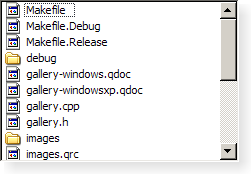
A
QListViewpresents items stored in a model, either as a simple non-hierarchical list, or as a collection of icons. This class is used to provide lists and icon views that were previously provided by theQListBoxandQIconViewclasses, but using the more flexible approach provided by Qt’s model/view architecture.
QListViewclass is one of the 模型/视图类 and is part of Qt’s 模型/视图框架 .此视图不显示水平或垂直标题;要显示具有水平标题的项列表,使用
QTreeView代替。
QListViewimplements the interfaces defined by theQAbstractItemView类以允许它显示提供数据,通过模型派生自QAbstractItemModel类。Items in a list view can be displayed using one of two view modes: In
ListMode, the items are displayed in the form of a simple list; inIconMode, the list view takes the form of an icon view in which the items are displayed with icons like files in a file manager. By default, the list view is inListMode. To change the view mode, use thesetViewMode()function, and to determine the current view mode, useviewMode().Items in these views are laid out in the direction specified by the
flow()of the list view. The items may be fixed in place, or allowed to move, depending on the view’smovement()状态。If the items in the model cannot be completely laid out in the direction of flow, they can be wrapped at the boundary of the view widget; this depends on
isWrapping(). This property is useful when the items are being represented by an icon view.
resizeMode()andlayoutMode()govern how and when the items are laid out. Items are spaced according to theirspacing(), and can exist within a notional grid of size specified bygridSize(). The items can be rendered as large or small icons depending on theiriconSize().
It is possible to give the view hints about the data it is handling in order to improve its performance when displaying large numbers of items. One approach that can be taken for views that are intended to display items with equal sizes is to set the
uniformItemSizesproperty to true.
QListView
(
[
parent=None
]
)

- param parent
创建新
QListView
采用给定
parent
to view a model. Use
setModel()
to set the model.
PySide2.QtWidgets.QListView.
Movement

|
常量 |
描述 |
|---|---|
|
QListView.Static |
The items cannot be moved by the user. |
|
QListView.Free |
The items can be moved freely by the user. |
|
QListView.Snap |
The items snap to the specified grid when moved; see
|
PySide2.QtWidgets.QListView.
Flow

|
常量 |
描述 |
|---|---|
|
QListView.LeftToRight |
The items are laid out in the view from the left to the right. |
|
QListView.TopToBottom |
The items are laid out in the view from the top to the bottom. |
PySide2.QtWidgets.QListView.
ResizeMode

|
常量 |
描述 |
|---|---|
|
QListView.Fixed |
The items will only be laid out the first time the view is shown. |
|
QListView.Adjust |
The items will be laid out every time the view is resized. |
PySide2.QtWidgets.QListView.
LayoutMode

|
常量 |
描述 |
|---|---|
|
QListView.SinglePass |
一次性布局所有项。 |
|
QListView.Batched |
The items are laid out in batches of
|
另请参阅
PySide2.QtWidgets.QListView.
ViewMode

|
常量 |
描述 |
|---|---|
|
QListView.ListMode |
The items are laid out using
|
|
QListView.IconMode |
The items are laid out using
|
PySide2.QtWidgets.QListView.
batchSize
(
)

int
另请参阅
PySide2.QtWidgets.QListView.
clearPropertyFlags
(
)

清零
QListView
-specific property flags. See
viewMode
.
Properties inherited from
QAbstractItemView
are not covered by the property flags. Specifically,
dragEnabled
and
acceptsDrops
are computed by
QListView
when calling
setMovement()
or
setViewMode()
.
PySide2.QtWidgets.QListView.
contentsSize
(
)

QSize
PySide2.QtWidgets.QListView.
gridSize
(
)

QSize
另请参阅
PySide2.QtWidgets.QListView.
indexesMoved
(
indexes
)

indexes
–
QModelIndexList
PySide2.QtWidgets.QListView.
isRowHidden
(
row
)

row
–
int
bool
返回
true
若
row
被隐藏;否则返回
false
.
PySide2.QtWidgets.QListView.
isSelectionRectVisible
(
)

bool
PySide2.QtWidgets.QListView.
isWrapping
(
)

bool
PySide2.QtWidgets.QListView.
itemAlignment
(
)

Alignment
另请参阅
PySide2.QtWidgets.QListView.
layoutMode
(
)

另请参阅
PySide2.QtWidgets.QListView.
modelColumn
(
)

int
另请参阅
PySide2.QtWidgets.QListView.
movement
(
)

另请参阅
PySide2.QtWidgets.QListView.
rectForIndex
(
index
)

index
–
QModelIndex
QRect
Returns the rectangle of the item at position
index
in the model. The rectangle is in contents coordinates.
另请参阅
visualRect()
PySide2.QtWidgets.QListView.
resizeContents
(
width
,
height
)

width
–
int
height
–
int
Resize the internal contents to
width
and
height
and set the scroll bar ranges accordingly.
PySide2.QtWidgets.QListView.
resizeMode
(
)

另请参阅
PySide2.QtWidgets.QListView.
setBatchSize
(
batchSize
)

batchSize
–
int
另请参阅
PySide2.QtWidgets.QListView.
setGridSize
(
size
)

size
–
QSize
另请参阅
PySide2.QtWidgets.QListView.
setItemAlignment
(
alignment
)

alignment
–
Alignment
另请参阅
PySide2.QtWidgets.QListView.
setLayoutMode
(
mode
)

mode
–
LayoutMode
另请参阅
PySide2.QtWidgets.QListView.
setModelColumn
(
column
)

column
–
int
另请参阅
PySide2.QtWidgets.QListView.
setPositionForIndex
(
position
,
index
)

position
–
QPoint
index
–
QModelIndex
Sets the contents position of the item at
index
in the model to the given
position
. If the list view’s movement mode is Static or its view mode is
ListView
, this function will have no effect.
PySide2.QtWidgets.QListView.
setResizeMode
(
mode
)

mode
–
ResizeMode
另请参阅
PySide2.QtWidgets.QListView.
setRowHidden
(
row
,
hide
)

row
–
int
hide
–
bool
若
hide
is true, the given
row
will be hidden; otherwise the
row
will be shown.
另请参阅
PySide2.QtWidgets.QListView.
setSelectionRectVisible
(
show
)

show
–
bool
PySide2.QtWidgets.QListView.
setUniformItemSizes
(
enable
)

enable
–
bool
另请参阅
PySide2.QtWidgets.QListView.
setWordWrap
(
on
)

on
–
bool
另请参阅
PySide2.QtWidgets.QListView.
setWrapping
(
enable
)

enable
–
bool
另请参阅
PySide2.QtWidgets.QListView.
spacing
(
)

int
另请参阅
PySide2.QtWidgets.QListView.
uniformItemSizes
(
)

bool
PySide2.QtWidgets.QListView.
viewMode
(
)

另请参阅
PySide2.QtWidgets.QListView.
wordWrap
(
)

bool
另请参阅
