QAbstractItemModelclass provides the abstract interface for item model classes. 更多 …

继承者: QAbstractListModel , QAbstractProxyModel , QAbstractTableModel , QConcatenateTablesProxyModel , QIdentityProxyModel , QSortFilterProxyModel , QStringListModel , QTransposeProxyModel , QStandardItemModel , QHelpContentModel , QHelpIndexModel , QSqlQueryModel , QSqlRelationalTableModel , QSqlTableModel , QDirModel , QFileSystemModel
def
beginInsertColumns
(parent, first, last)
def
beginInsertRows
(parent, first, last)
def
beginMoveColumns
(sourceParent, sourceFirst, sourceLast, destinationParent, destinationColumn)
def
beginMoveRows
(sourceParent, sourceFirst, sourceLast, destinationParent, destinationRow)
def
beginRemoveColumns
(parent, first, last)
def
beginRemoveRows
(parent, first, last)
def
beginResetModel
()
def
changePersistentIndex
(from, to)
def
changePersistentIndexList
(from, to)
def
checkIndex
(index[, options=CheckIndexOption.NoOption])
def
createIndex
(row, column, ptr)
def
createIndex
(row, column[, id=0])
def
decodeData
(row, column, parent, stream)
def
encodeData
(indexes, stream)
def
endInsertColumns
()
def
endInsertRows
()
def
endMoveColumns
()
def
endMoveRows
()
def
endRemoveColumns
()
def
endRemoveRows
()
def
endResetModel
()
def
hasIndex
(row, column[, parent=QModelIndex()])
def
insertColumn
(column[, parent=QModelIndex()])
def
insertRow
(row[, parent=QModelIndex()])
def
moveColumn
(sourceParent, sourceColumn, destinationParent, destinationChild)
def
moveRow
(sourceParent, sourceRow, destinationParent, destinationChild)
def
persistentIndexList
()
def
removeColumn
(column[, parent=QModelIndex()])
def
removeRow
(row[, parent=QModelIndex()])
def
buddy
(index)
def
canDropMimeData
(data, action, row, column, parent)
def
canFetchMore
(parent)
def
columnCount
([parent=QModelIndex()])
def
data
(index[, role=Qt.DisplayRole])
def
dropMimeData
(data, action, row, column, parent)
def
fetchMore
(parent)
def
flags
(index)
def
hasChildren
([parent=QModelIndex()])
def
headerData
(section, orientation[, role=Qt.DisplayRole])
def
index
(row, column[, parent=QModelIndex()])
def
insertColumns
(column, count[, parent=QModelIndex()])
def
insertRows
(row, count[, parent=QModelIndex()])
def
itemData
(index)
def
match
(start, role, value[, hits=1[, flags=Qt.MatchFlags(Qt.MatchStartsWith|Qt.MatchWrap)]])
def
mimeData
(indexes)
def
mimeTypes
()
def
moveColumns
(sourceParent, sourceColumn, count, destinationParent, destinationChild)
def
moveRows
(sourceParent, sourceRow, count, destinationParent, destinationChild)
def
parent
(child)
def
removeColumns
(column, count[, parent=QModelIndex()])
def
removeRows
(row, count[, parent=QModelIndex()])
def
revert
()
def
roleNames
()
def
rowCount
([parent=QModelIndex()])
def
setData
(index, value[, role=Qt.EditRole])
def
setHeaderData
(section, orientation, value[, role=Qt.EditRole])
def
setItemData
(index, roles)
def
sibling
(row, column, idx)
def
sort
(column[, order=Qt.AscendingOrder])
def
span
(index)
def
submit
()
def
supportedDragActions
()
def
supportedDropActions
()
def
resetInternalData
()
def
dataChanged
(topLeft, bottomRight[, roles=list()])
def
headerDataChanged
(orientation, first, last)
def
layoutAboutToBeChanged
([parents=list()[, hint=QAbstractItemModel.NoLayoutChangeHint]])
def
layoutChanged
([parents=list()[, hint=QAbstractItemModel.NoLayoutChangeHint]])
QAbstractItemModelclass defines the standard interface that item models must use to be able to interoperate with other components in the model/view architecture. It is not supposed to be instantiated directly. Instead, you should subclass it to create new models.
QAbstractItemModelclass is one of the 模型/视图类 and is part of Qt’s 模型/视图框架 . It can be used as the underlying data model for the item view elements in QML or the item view classes in the Qt Widgets module.If you need a model to use with an item view such as QML’s List View element or the C++ widgets
QListVieworQTableView, you should consider subclassingQAbstractListModelorQAbstractTableModelinstead of this class.The underlying data model is exposed to views and delegates as a hierarchy of tables. If you do not make use of the hierarchy, then the model is a simple table of rows and columns. Each item has a unique index specified by a
QModelIndex.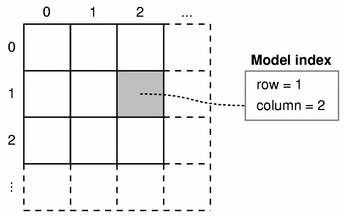
Every item of data that can be accessed via a model has an associated model index. You can obtain this model index using the
index()function. Each index may have asibling()index; child items have aparent()index.Each item has a number of data elements associated with it and they can be retrieved by specifying a role (see
ItemDataRole) to the model’sdata()function. Data for all available roles can be obtained at the same time using theitemData()函数。Data for each role is set using a particular
ItemDataRole. Data for individual roles are set individually withsetData(), or they can be set for all roles withsetItemData().Items can be queried with
flags()(见ItemFlag) to see if they can be selected, dragged, or manipulated in other ways.If an item has child objects,
hasChildren()返回truefor the corresponding index.The model has a
rowCount()和columnCount()for each level of the hierarchy. Rows and columns can be inserted and removed withinsertRows(),insertColumns(),removeRows(),和removeColumns().The model emits signals to indicate changes. For example,
dataChanged()is emitted whenever items of data made available by the model are changed. Changes to the headers supplied by the model causeheaderDataChanged()to be emitted. If the structure of the underlying data changes, the model can emitlayoutChanged()to indicate to any attached views that they should redisplay any items shown, taking the new structure into account.The items available through the model can be searched for particular data using the
match()函数。To sort the model, you can use
sort().
注意
Some general guidelines for subclassing models are available in the 模型子类化参考 .
当子类化
QAbstractItemModel, at the very least you must implementindex(),parent(),rowCount(),columnCount(),和data(). These functions are used in all read-only models, and form the basis of editable models.You can also reimplement
hasChildren()to provide special behavior for models where the implementation ofrowCount()is expensive. This makes it possible for models to restrict the amount of data requested by views, and can be used as a way to implement lazy population of model data.To enable editing in your model, you must also implement
setData(), and reimplementflags()to ensure thatItemIsEditableis returned. You can also reimplementheaderData()andsetHeaderData()to control the way the headers for your model are presented.
dataChanged()andheaderDataChanged()signals must be emitted explicitly when reimplementing thesetData()andsetHeaderData()functions, respectively.Custom models need to create model indexes for other components to use. To do this, call
createIndex()with suitable row and column numbers for the item, and an identifier for it, either as a pointer or as an integer value. The combination of these values must be unique for each item. Custom models typically use these unique identifiers in other reimplemented functions to retrieve item data and access information about the item’s parents and children. See the 简单树模型范例 for more information about unique identifiers.It is not necessary to support every role defined in
ItemDataRole. Depending on the type of data contained within a model, it may only be useful to implement thedata()function to return valid information for some of the more common roles. Most models provide at least a textual representation of item data for theDisplayRole, and well-behaved models should also provide valid information for theToolTipRoleandWhatsThisRole. Supporting these roles enables models to be used with standard Qt views. However, for some models that handle highly-specialized data, it may be appropriate to provide data only for user-defined roles.Models that provide interfaces to resizable data structures can provide implementations of
insertRows(),removeRows(),insertColumns(),andremoveColumns(). When implementing these functions, it is important to notify any connected views about changes to the model’s dimensions both before and after they occur:
An
insertRows()implementation must callbeginInsertRows()before inserting new rows into the data structure, andendInsertRows()immediately afterwards .An
insertColumns()implementation must callbeginInsertColumns()before inserting new columns into the data structure, andendInsertColumns()immediately afterwards .A
removeRows()implementation must callbeginRemoveRows()before the rows are removed from the data structure, andendRemoveRows()immediately afterwards .A
removeColumns()implementation must callbeginRemoveColumns()before the columns are removed from the data structure, andendRemoveColumns()immediately afterwards .private signals that these functions emit give attached components the chance to take action before any data becomes unavailable. The encapsulation of the insert and remove operations with these begin and end functions also enables the model to manage
														persistent


														model


														indexes
correctly. If you want selections to be handled properly, you must ensure that you call these functions. If you insert or remove an item with children, you do not need to call these functions for the child items. In other words, the parent item will take care of its child items.To create models that populate incrementally, you can reimplement
fetchMore()andcanFetchMore(). If the reimplementation offetchMore()adds rows to the model,beginInsertRows()andendInsertRows()must be called.
QAbstractItemModel
(
[
parent=None
]
)

- param parent
Constructs an abstract item model with the given
parent
.
PySide2.QtCore.QAbstractItemModel.
LayoutChangeHint

This enum describes the way the model changes layout.
|
常量 |
描述 |
|---|---|
|
QAbstractItemModel.NoLayoutChangeHint |
No hint is available. |
|
QAbstractItemModel.VerticalSortHint |
Rows are being sorted. |
|
QAbstractItemModel.HorizontalSortHint |
Columns are being sorted. |
Note that and carry the meaning that items are being moved within the same parent, not moved to a different parent in the model, and not filtered out or in.
PySide2.QtCore.QAbstractItemModel.
CheckIndexOption

This enum can be used to control the checks performed by
checkIndex()
.
|
常量 |
描述 |
|---|---|
|
QAbstractItemModel.CheckIndexOption.NoOption |
No check options are specified. |
|
QAbstractItemModel.CheckIndexOption.IndexIsValid |
The model index passed to
|
|
QAbstractItemModel.CheckIndexOption.DoNotUseParent |
Does not perform any check involving the usage of the parent of the index passed to
|
|
QAbstractItemModel.CheckIndexOption.ParentIsInvalid |
The parent of the model index passed to
|
New in version 5.11.
PySide2.QtCore.QAbstractItemModel.
beginInsertColumns
(
parent
,
first
,
last
)

parent
–
QModelIndex
first
–
int
last
–
int
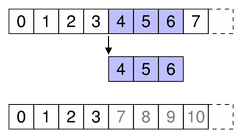
Begins a column insertion operation.
When reimplementing
insertColumns()
in a subclass, you must call this function
before
inserting data into the model’s underlying data store.
parent
index corresponds to the parent into which the new columns are inserted;
first
and
last
are the column numbers of the new columns will have after they have been inserted.
|
|
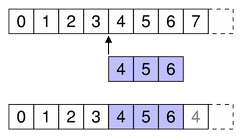
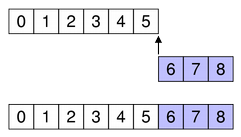
Specify the first and last column numbers for the span of columns you want to insert into an item in a model.
|
|
|
To append columns, insert them after the last column.
|
注意
This function emits the
columnsAboutToBeInserted()
signal which connected views (or proxies) must handle before the data is inserted. Otherwise, the views may end up in an invalid state.
另请参阅
PySide2.QtCore.QAbstractItemModel.
beginInsertRows
(
parent
,
first
,
last
)

parent
–
QModelIndex
first
–
int
last
–
int
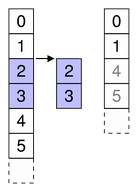
Begins a row insertion operation.
When reimplementing
insertRows()
in a subclass, you must call this function
before
inserting data into the model’s underlying data store.
parent
index corresponds to the parent into which the new rows are inserted;
first
and
last
are the row numbers that the new rows will have after they have been inserted.
|
|
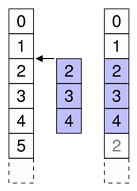
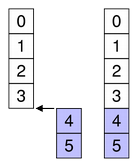
Specify the first and last row numbers for the span of rows you want to insert into an item in a model.
|
|
|
To append rows, insert them after the last row.
|
注意
This function emits the
rowsAboutToBeInserted()
signal which connected views (or proxies) must handle before the data is inserted. Otherwise, the views may end up in an invalid state.
另请参阅
PySide2.QtCore.QAbstractItemModel.
beginMoveColumns
(
sourceParent
,
sourceFirst
,
sourceLast
,
destinationParent
,
destinationColumn
)

sourceParent
–
QModelIndex
sourceFirst
–
int
sourceLast
–
int
destinationParent
–
QModelIndex
destinationColumn
–
int
bool
Begins a column move operation.
When reimplementing a subclass, this method simplifies moving entities in your model. This method is responsible for moving persistent indexes in the model, which you would otherwise be required to do yourself. Using and
endMoveColumns
is an alternative to emitting
layoutAboutToBeChanged
and
layoutChanged
directly along with
changePersistentIndex
.
sourceParent
index corresponds to the parent from which the columns are moved;
sourceFirst
and
sourceLast
are the first and last column numbers of the columns to be moved. The
destinationParent
index corresponds to the parent into which those columns are moved. The
destinationChild
is the column to which the columns will be moved. That is, the index at column
sourceFirst
in
sourceParent
will become column
destinationChild
in
destinationParent
, followed by all other columns up to
sourceLast
.
However, when moving columns down in the same parent (
sourceParent
and
destinationParent
are equal), the columns will be placed before the
destinationChild
index. That is, if you wish to move columns 0 and 1 so they will become columns 1 and 2,
destinationChild
should be 3. In this case, the new index for the source column
i
(which is between
sourceFirst
and
sourceLast
) is equal to
(destinationChild-sourceLast-1+i)
.
注意:若
sourceParent
and
destinationParent
are the same, you must ensure that the
destinationChild
is not within the range of
sourceFirst
and
sourceLast
+ 1. You must also ensure that you do not attempt to move a column to one of its own children or ancestors. This method returns
false
if either condition is true, in which case you should abort your move operation.
另请参阅
PySide2.QtCore.QAbstractItemModel.
beginMoveRows
(
sourceParent
,
sourceFirst
,
sourceLast
,
destinationParent
,
destinationRow
)

sourceParent
–
QModelIndex
sourceFirst
–
int
sourceLast
–
int
destinationParent
–
QModelIndex
destinationRow
–
int
bool
Begins a row move operation.
When reimplementing a subclass, this method simplifies moving entities in your model. This method is responsible for moving persistent indexes in the model, which you would otherwise be required to do yourself. Using and
endMoveRows
is an alternative to emitting
layoutAboutToBeChanged
and
layoutChanged
directly along with
changePersistentIndex
.
sourceParent
index corresponds to the parent from which the rows are moved;
sourceFirst
and
sourceLast
are the first and last row numbers of the rows to be moved. The
destinationParent
index corresponds to the parent into which those rows are moved. The
destinationChild
is the row to which the rows will be moved. That is, the index at row
sourceFirst
in
sourceParent
will become row
destinationChild
in
destinationParent
, followed by all other rows up to
sourceLast
.
However, when moving rows down in the same parent (
sourceParent
and
destinationParent
are equal), the rows will be placed before the
destinationChild
index. That is, if you wish to move rows 0 and 1 so they will become rows 1 and 2,
destinationChild
should be 3. In this case, the new index for the source row
i
(which is between
sourceFirst
and
sourceLast
) is equal to
(destinationChild-sourceLast-1+i)
.
注意:若
sourceParent
and
destinationParent
are the same, you must ensure that the
destinationChild
is not within the range of
sourceFirst
and
sourceLast
+ 1. You must also ensure that you do not attempt to move a row to one of its own children or ancestors. This method returns
false
if either condition is true, in which case you should abort your move operation.
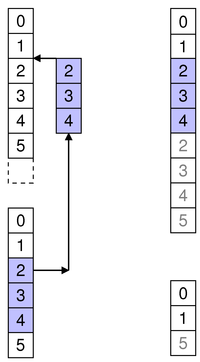
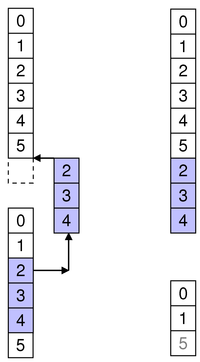
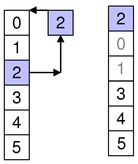
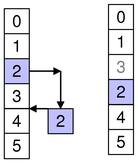
|
|
Specify the first and last row numbers for the span of rows in the source parent you want to move in the model. Also specify the row in the destination parent to move the span to.
|
|
|
To append rows to another parent, move them to after the last row.
|
|
|
To move rows within the same parent, specify the row to move them to.
|
|
|
To move rows within the same parent, specify the row to move them to.
|
另请参阅
PySide2.QtCore.QAbstractItemModel.
beginRemoveColumns
(
parent
,
first
,
last
)

parent
–
QModelIndex
first
–
int
last
–
int
Begins a column removal operation.
When reimplementing
removeColumns()
in a subclass, you must call this function
before
removing data from the model’s underlying data store.
parent
index corresponds to the parent from which the new columns are removed;
first
and
last
are the column numbers of the first and last columns to be removed.
|
|
Specify the first and last column numbers for the span of columns you want to remove from an item in a model.
|
注意
This function emits the
columnsAboutToBeRemoved()
signal which connected views (or proxies) must handle before the data is removed. Otherwise, the views may end up in an invalid state.
另请参阅
PySide2.QtCore.QAbstractItemModel.
beginRemoveRows
(
parent
,
first
,
last
)

parent
–
QModelIndex
first
–
int
last
–
int
Begins a row removal operation.
When reimplementing
removeRows()
in a subclass, you must call this function
before
removing data from the model’s underlying data store.
parent
index corresponds to the parent from which the new rows are removed;
first
and
last
are the row numbers of the rows to be removed.
|
|
Specify the first and last row numbers for the span of rows you want to remove from an item in a model.
|
注意
This function emits the
rowsAboutToBeRemoved()
signal which connected views (or proxies) must handle before the data is removed. Otherwise, the views may end up in an invalid state.
另请参阅
PySide2.QtCore.QAbstractItemModel.
beginResetModel
(
)

Begins a model reset operation.
A reset operation resets the model to its current state in any attached views.
注意
Any views attached to this model will be reset as well.
When a model is reset it means that any previous data reported from the model is now invalid and has to be queried for again. This also means that the current item and any selected items will become invalid.
When a model radically changes its data it can sometimes be easier to just call this function rather than emit
dataChanged()
to inform other components when the underlying data source, or its structure, has changed.
You must call this function before resetting any internal data structures in your model or proxy model.
This function emits the signal
modelAboutToBeReset()
.
另请参阅
modelAboutToBeReset()
modelReset()
endResetModel()
PySide2.QtCore.QAbstractItemModel.
buddy
(
index
)

index
–
QModelIndex
Returns a model index for the buddy of the item represented by
index
. When the user wants to edit an item, the view will call this function to check whether another item in the model should be edited instead. Then, the view will construct a delegate using the model index returned by the buddy item.
The default implementation of this function has each item as its own buddy.
PySide2.QtCore.QAbstractItemModel.
canDropMimeData
(
data
,
action
,
row
,
column
,
parent
)

data
–
QMimeData
action
–
DropAction
row
–
int
column
–
int
parent
–
QModelIndex
bool
返回
true
if a model can accept a drop of the
data
. This default implementation only checks if
data
has at least one format in the list of
mimeTypes()
and if
action
is among the model’s
supportedDropActions()
.
Reimplement this function in your custom model, if you want to test whether the
data
can be dropped at
row
,
column
,
parent
with
action
. If you don’t need that test, it is not necessary to reimplement this function.
另请参阅
PySide2.QtCore.QAbstractItemModel.
canFetchMore
(
parent
)

parent
–
QModelIndex
bool
返回
true
if there is more data available for
parent
;否则返回
false
.
The default implementation always returns
false
.
If returns
true
,
fetchMore()
function should be called. This is the behavior of
QAbstractItemView
, for example.
另请参阅
PySide2.QtCore.QAbstractItemModel.
changePersistentIndex
(
from
,
to
)

from
–
QModelIndex
to
–
QModelIndex
改变
QPersistentModelIndex
that is equal to the given
from
model index to the given
to
model index.
If no persistent model index equal to the given
from
model index was found, nothing is changed.
PySide2.QtCore.QAbstractItemModel.
changePersistentIndexList
(
from
,
to
)

from
–
QModelIndexList
to
–
QModelIndexList
Changes the {
QPersistentModelIndex
}es that are equal to the indexes in the given
from
model index list to the given
to
model index list.
If no persistent model indexes equal to the indexes in the given
from
model index list are found, nothing is changed.
PySide2.QtCore.QAbstractItemModel.
checkIndex
(
index
[
,
options=CheckIndexOption.NoOption
]
)

index
–
QModelIndex
options
–
CheckIndexOptions
bool
This function checks whether
index
is a legal model index for this model. A legal model index is either an invalid model index, or a valid model index for which all the following holds:
the index’ model is
this
;
the index’ row is greater or equal than zero;
the index’ row is less than the row count for the index’ parent;
the index’ column is greater or equal than zero;
the index’ column is less than the column count for the index’ parent.
options
argument may change some of these checks. If
options
contains
IndexIsValid
,那么
index
must be a valid index; this is useful when reimplementing functions such as
data()
or
setData()
, which expect valid indexes.
若
options
contains
DoNotUseParent
, then the checks that would call
parent()
are omitted; this allows calling this function from a
parent()
reimplementation (otherwise, this would result in endless recursion and a crash).
若
options
does not contain
DoNotUseParent
, and it contains
ParentIsInvalid
, then an additional check is performed: the parent index is checked for not being valid. This is useful when implementing flat models such as lists or tables, where no model index should have a valid parent index.
This function returns true if all the checks succeeded, and false otherwise. This allows to use the function in
Q_ASSERT
and similar other debugging mechanisms. If some check failed, a warning message will be printed in the
qt.core.qabstractitemmodel.checkindex
logging category, containing some information that may be useful for debugging the failure.
注意
This function is a debugging helper for implementing your own item models. When developing complex models, as well as when building complicated model hierarchies (e.g. using proxy models), it is useful to call this function in order to catch bugs relative to illegal model indices (as defined above) accidentally passed to some
QAbstractItemModel
API.
警告
Note that it’s undefined behavior to pass illegal indices to item models, so applications must refrain from doing so, and not rely on any “defensive” programming that item models could employ to handle illegal indexes gracefully.
另请参阅
PySide2.QtCore.QAbstractItemModel.
columnCount
(
[
parent=QModelIndex()
]
)

parent
–
QModelIndex
int
Returns the number of columns for the children of the given
parent
.
In most subclasses, the number of columns is independent of the
parent
.
例如:
int DomModel::columnCount(const QModelIndex &parent) const
{
    Q_UNUSED(parent);
    return 3;
}
注意
When implementing a table based model, should return 0 when the parent is valid.
另请参阅
PySide2.QtCore.QAbstractItemModel.
createIndex
(
row
,
column
,
ptr
)

row
–
int
column
–
int
ptr
–
PyObject
When using a QSortFilterProxyModel, its indexes have their own internal pointer. It is not advisable to access this internal pointer outside of the model. Use the data() function instead. This function provides a consistent interface that model subclasses must use to create model indexes.
警告
Because of some Qt/Python itegration rules, the ptr argument do not get the reference incremented during the QModelIndex life time. So it is necessary to keep the object used on ptr argument alive during the whole process. Do not destroy the object if you are not sure about that.
PySide2.QtCore.QAbstractItemModel.
createIndex
(
row
,
column
[
,
id=0
]
)

row
–
int
column
–
int
id
–
quintptr
Creates a model index for the given
row
and
column
with the internal identifier,
id
.
This function provides a consistent interface that model subclasses must use to create model indexes.
另请参阅
PySide2.QtCore.QAbstractItemModel.
data
(
index
[
,
role=Qt.DisplayRole
]
)

index
–
QModelIndex
role
–
int
object
Returns the data stored under the given
role
for the item referred to by the
index
.
注意
If you do not have a value to return, return an
invalid
QVariant
instead of returning 0.
另请参阅
ItemDataRole
setData()
headerData()
PySide2.QtCore.QAbstractItemModel.
dataChanged
(
topLeft
,
bottomRight
[
,
roles=list()
]
)

topLeft
–
QModelIndex
bottomRight
–
QModelIndex
roles –
PySide2.QtCore.QAbstractItemModel.
decodeData
(
row
,
column
,
parent
,
stream
)

row
–
int
column
–
int
parent
–
QModelIndex
stream
–
QDataStream
bool
PySide2.QtCore.QAbstractItemModel.
dropMimeData
(
data
,
action
,
row
,
column
,
parent
)

data
–
QMimeData
action
–
DropAction
row
–
int
column
–
int
parent
–
QModelIndex
bool
处理
data
提供通过拖放操作结束按给定
action
.
返回
true
if the data and action were handled by the model; otherwise returns
false
.
指定
row
,
column
and
parent
indicate the location of an item in the model where the operation ended. It is the responsibility of the model to complete the action at the correct location.
For instance, a drop action on an item in a
QTreeView
can result in new items either being inserted as children of the item specified by
row
,
column
,和
parent
, or as siblings of the item.
当
row
and
column
are -1 it means that the dropped data should be considered as dropped directly on
parent
. Usually this will mean appending the data as child items of
parent
。若
row
and
column
are greater than or equal zero, it means that the drop occurred just before the specified
row
and
column
以指定
parent
.
mimeTypes()
member is called to get the list of acceptable MIME types. This default implementation assumes the default implementation of
mimeTypes()
, which returns a single default MIME type. If you reimplement
mimeTypes()
in your custom model to return multiple MIME types, you must reimplement this function to make use of them.
PySide2.QtCore.QAbstractItemModel.
encodeData
(
indexes
,
stream
)

indexes
–
QModelIndexList
stream
–
QDataStream
PySide2.QtCore.QAbstractItemModel.
endInsertColumns
(
)

Ends a column insertion operation.
When reimplementing
insertColumns()
in a subclass, you must call this function
after
inserting data into the model’s underlying data store.
另请参阅
PySide2.QtCore.QAbstractItemModel.
endInsertRows
(
)

Ends a row insertion operation.
When reimplementing
insertRows()
in a subclass, you must call this function
after
inserting data into the model’s underlying data store.
另请参阅
PySide2.QtCore.QAbstractItemModel.
endMoveColumns
(
)

Ends a column move operation.
When implementing a subclass, you must call this function after moving data within the model’s underlying data store.
另请参阅
PySide2.QtCore.QAbstractItemModel.
endMoveRows
(
)

Ends a row move operation.
When implementing a subclass, you must call this function after moving data within the model’s underlying data store.
另请参阅
PySide2.QtCore.QAbstractItemModel.
endRemoveColumns
(
)

Ends a column removal operation.
When reimplementing
removeColumns()
in a subclass, you must call this function
after
removing data from the model’s underlying data store.
另请参阅
PySide2.QtCore.QAbstractItemModel.
endRemoveRows
(
)

Ends a row removal operation.
When reimplementing
removeRows()
in a subclass, you must call this function
after
removing data from the model’s underlying data store.
另请参阅
PySide2.QtCore.QAbstractItemModel.
endResetModel
(
)

Completes a model reset operation.
You must call this function after resetting any internal data structure in your model or proxy model.
This function emits the signal
modelReset()
.
另请参阅
PySide2.QtCore.QAbstractItemModel.
fetchMore
(
parent
)

parent
–
QModelIndex
Fetches any available data for the items with the parent specified by the
parent
index.
Reimplement this if you are populating your model incrementally.
The default implementation does nothing.
另请参阅
PySide2.QtCore.QAbstractItemModel.
flags
(
index
)

index
–
QModelIndex
ItemFlags
Returns the item flags for the given
index
.
The base class implementation returns a combination of flags that enables the item (
ItemIsEnabled
) and allows it to be selected (
ItemIsSelectable
).
另请参阅
ItemFlags
PySide2.QtCore.QAbstractItemModel.
hasChildren
(
[
parent=QModelIndex()
]
)

parent
–
QModelIndex
bool
返回
true
if
parent
has any children; otherwise returns
false
.
使用
rowCount()
on the parent to find out the number of children.
Note that it is undefined behavior to report that a particular index with this method if the same index has the flag
ItemNeverHasChildren
set.
PySide2.QtCore.QAbstractItemModel.
hasIndex
(
row
,
column
[
,
parent=QModelIndex()
]
)

row
–
int
column
–
int
parent
–
QModelIndex
bool
返回
true
if the model returns a valid
QModelIndex
for
row
and
column
with
parent
,否则返回
false
.
PySide2.QtCore.QAbstractItemModel.
headerData
(
section
,
orientation
[
,
role=Qt.DisplayRole
]
)

section
–
int
orientation
–
取向
role
–
int
object
返回数据为给定
role
and
section
in the header with the specified
orientation
.
For horizontal headers, the section number corresponds to the column number. Similarly, for vertical headers, the section number corresponds to the row number.
另请参阅
ItemDataRole
setHeaderData()
QHeaderView
PySide2.QtCore.QAbstractItemModel.
headerDataChanged
(
orientation
,
first
,
last
)

orientation
–
取向
first
–
int
last
–
int
PySide2.QtCore.QAbstractItemModel.
index
(
row
,
column
[
,
parent=QModelIndex()
]
)

row
–
int
column
–
int
parent
–
QModelIndex
返回模型中的项索引,指定通过给定
row
,
column
and
parent
index.
当在子类中重实现此函数时,调用
createIndex()
to generate model indexes that other components can use to refer to items in your model.
另请参阅
PySide2.QtCore.QAbstractItemModel.
insertColumn
(
column
[
,
parent=QModelIndex()
]
)

column
–
int
parent
–
QModelIndex
bool
Inserts a single column before the given
column
in the child items of the
parent
指定。
返回
true
if the column is inserted; otherwise returns
false
.
PySide2.QtCore.QAbstractItemModel.
insertColumns
(
column
,
count
[
,
parent=QModelIndex()
]
)

column
–
int
count
–
int
parent
–
QModelIndex
bool
On models that support this, inserts
count
new columns into the model before the given
column
. The items in each new column will be children of the item represented by the
parent
model index.
若
column
is 0, the columns are prepended to any existing columns.
若
column
is
columnCount()
, the columns are appended to any existing columns.
若
parent
has no children, a single row with
count
columns is inserted.
返回
true
if the columns were successfully inserted; otherwise returns
false
.
The base class implementation does nothing and returns
false
.
If you implement your own model, you can reimplement this function if you want to support insertions. Alternatively, you can provide your own API for altering the data.
PySide2.QtCore.QAbstractItemModel.
insertRow
(
row
[
,
parent=QModelIndex()
]
)

row
–
int
parent
–
QModelIndex
bool
Inserts a single row before the given
row
in the child items of the
parent
指定。
注意
This function calls the virtual method
insertRows
.
返回
true
if the row is inserted; otherwise returns
false
.
PySide2.QtCore.QAbstractItemModel.
insertRows
(
row
,
count
[
,
parent=QModelIndex()
]
)

row
–
int
count
–
int
parent
–
QModelIndex
bool
注意
The base class implementation of this function does nothing and returns
false
.
On models that support this, inserts
count
rows into the model before the given
row
. Items in the new row will be children of the item represented by the
parent
model index.
若
row
is 0, the rows are prepended to any existing rows in the parent.
若
row
is
rowCount()
, the rows are appended to any existing rows in the parent.
若
parent
has no children, a single column with
count
rows is inserted.
返回
true
if the rows were successfully inserted; otherwise returns
false
.
If you implement your own model, you can reimplement this function if you want to support insertions. Alternatively, you can provide your own API for altering the data. In either case, you will need to call
beginInsertRows()
and
endInsertRows()
to notify other components that the model has changed.
PySide2.QtCore.QAbstractItemModel.
itemData
(
index
)

index
–
QModelIndex
Returns a map with values for all predefined roles in the model for the item at the given
index
.
Reimplement this function if you want to extend the default behavior of this function to include custom roles in the map.
另请参阅
setItemData()
ItemDataRole
data()
PySide2.QtCore.QAbstractItemModel.
layoutAboutToBeChanged
(
[
parents=list()
[
,
hint=QAbstractItemModel.NoLayoutChangeHint
]
]
)

parents –
hint
–
LayoutChangeHint
PySide2.QtCore.QAbstractItemModel.
layoutChanged
(
[
parents=list()
[
,
hint=QAbstractItemModel.NoLayoutChangeHint
]
]
)

parents –
hint
–
LayoutChangeHint
PySide2.QtCore.QAbstractItemModel.
match
(
start
,
role
,
value
[
,
hits=1
[
,
flags=Qt.MatchFlags(Qt.MatchStartsWith|Qt.MatchWrap)
]
]
)

start
–
QModelIndex
role
–
int
value – object
hits
–
int
flags
–
MatchFlags
QModelIndexList
Returns a list of indexes for the items in the column of the
start
index where data stored under the given
role
matches the specified
value
. The way the search is performed is defined by the
flags
given. The list that is returned may be empty. Note also that the order of results in the list may not correspond to the order in the model, if for example a proxy model is used. The order of the results cannot be relied upon.
The search begins from the
start
index, and continues until the number of matching data items equals
hits
, the search reaches the last row, or the search reaches
start
again - depending on whether
MatchWrap
指定在
flags
. If you want to search for all matching items, use
hits
= -1.
By default, this function will perform a wrapping, string-based comparison on all items, searching for items that begin with the search term specified by
value
.
注意
The default implementation of this function only searches columns. Reimplement this function to include a different search behavior.
PySide2.QtCore.QAbstractItemModel.
mimeData
(
indexes
)

indexes
–
QModelIndexList
Returns an object that contains serialized items of data corresponding to the list of
indexes
specified. The format used to describe the encoded data is obtained from the
mimeTypes()
function. This default implementation uses the default MIME type returned by the default implementation of
mimeTypes()
. If you reimplement
mimeTypes()
in your custom model to return more MIME types, reimplement this function to make use of them.
If the list of
indexes
is empty, or there are no supported MIME types, 0 is returned rather than a serialized empty list.
PySide2.QtCore.QAbstractItemModel.
mimeTypes
(
)

字符串列表
Returns the list of allowed MIME types. By default, the built-in models and views use an internal MIME type:
application/x-qabstractitemmodeldatalist
.
When implementing drag and drop support in a custom model, if you will return data in formats other than the default internal MIME type, reimplement this function to return your list of MIME types.
If you reimplement this function in your custom model, you must also reimplement the member functions that call it:
mimeData()
and
dropMimeData()
.
另请参阅
PySide2.QtCore.QAbstractItemModel.
moveColumn
(
sourceParent
,
sourceColumn
,
destinationParent
,
destinationChild
)

sourceParent
–
QModelIndex
sourceColumn
–
int
destinationParent
–
QModelIndex
destinationChild
–
int
bool
On models that support this, moves
sourceColumn
from
sourceParent
to
destinationChild
under
destinationParent
.
返回
true
if the columns were successfully moved; otherwise returns
false
.
另请参阅
PySide2.QtCore.QAbstractItemModel.
moveColumns
(
sourceParent
,
sourceColumn
,
count
,
destinationParent
,
destinationChild
)

sourceParent
–
QModelIndex
sourceColumn
–
int
count
–
int
destinationParent
–
QModelIndex
destinationChild
–
int
bool
On models that support this, moves
count
columns starting with the given
sourceColumn
under parent
sourceParent
to column
destinationChild
under parent
destinationParent
.
返回
true
if the columns were successfully moved; otherwise returns
false
.
The base class implementation does nothing and returns
false
.
If you implement your own model, you can reimplement this function if you want to support moving. Alternatively, you can provide your own API for altering the data.
PySide2.QtCore.QAbstractItemModel.
moveRow
(
sourceParent
,
sourceRow
,
destinationParent
,
destinationChild
)

sourceParent
–
QModelIndex
sourceRow
–
int
destinationParent
–
QModelIndex
destinationChild
–
int
bool
On models that support this, moves
sourceRow
from
sourceParent
to
destinationChild
under
destinationParent
.
返回
true
if the rows were successfully moved; otherwise returns
false
.
另请参阅
PySide2.QtCore.QAbstractItemModel.
moveRows
(
sourceParent
,
sourceRow
,
count
,
destinationParent
,
destinationChild
)

sourceParent
–
QModelIndex
sourceRow
–
int
count
–
int
destinationParent
–
QModelIndex
destinationChild
–
int
bool
On models that support this, moves
count
rows starting with the given
sourceRow
under parent
sourceParent
to row
destinationChild
under parent
destinationParent
.
返回
true
if the rows were successfully moved; otherwise returns
false
.
The base class implementation does nothing and returns
false
.
If you implement your own model, you can reimplement this function if you want to support moving. Alternatively, you can provide your own API for altering the data.
PySide2.QtCore.QAbstractItemModel.
parent
(
child
)

child
–
QModelIndex
Returns the parent of the model item with the given
index
. If the item has no parent, an invalid
QModelIndex
被返回。
A common convention used in models that expose tree data structures is that only items in the first column have children. For that case, when reimplementing this function in a subclass the column of the returned
QModelIndex
would be 0.
When reimplementing this function in a subclass, be careful to avoid calling
QModelIndex
member functions, such as
parent()
, since indexes belonging to your model will simply call your implementation, leading to infinite recursion.
另请参阅
PySide2.QtCore.QAbstractItemModel.
persistentIndexList
(
)

QModelIndexList
Returns the list of indexes stored as persistent indexes in the model.
PySide2.QtCore.QAbstractItemModel.
removeColumn
(
column
[
,
parent=QModelIndex()
]
)

column
–
int
parent
–
QModelIndex
bool
移除给定
column
from the child items of the
parent
指定。
返回
true
if the column is removed; otherwise returns
false
.
PySide2.QtCore.QAbstractItemModel.
removeColumns
(
column
,
count
[
,
parent=QModelIndex()
]
)

column
–
int
count
–
int
parent
–
QModelIndex
bool
On models that support this, removes
count
columns starting with the given
column
under parent
parent
from the model.
返回
true
if the columns were successfully removed; otherwise returns
false
.
The base class implementation does nothing and returns
false
.
If you implement your own model, you can reimplement this function if you want to support removing. Alternatively, you can provide your own API for altering the data.
PySide2.QtCore.QAbstractItemModel.
removeRow
(
row
[
,
parent=QModelIndex()
]
)

row
–
int
parent
–
QModelIndex
bool
移除给定
row
from the child items of the
parent
指定。
返回
true
if the row is removed; otherwise returns
false
.
This is a convenience function that calls
removeRows()
。
QAbstractItemModel
implementation of
removeRows()
does nothing.
PySide2.QtCore.QAbstractItemModel.
removeRows
(
row
,
count
[
,
parent=QModelIndex()
]
)

row
–
int
count
–
int
parent
–
QModelIndex
bool
On models that support this, removes
count
rows starting with the given
row
under parent
parent
from the model.
返回
true
if the rows were successfully removed; otherwise returns
false
.
The base class implementation does nothing and returns
false
.
If you implement your own model, you can reimplement this function if you want to support removing. Alternatively, you can provide your own API for altering the data.
PySide2.QtCore.QAbstractItemModel.
resetInternalData
(
)

This slot is called just after the internal data of a model is cleared while it is being reset.
This slot is provided the convenience of subclasses of concrete proxy models, such as subclasses of
QSortFilterProxyModel
which maintain extra data.
class CustomDataProxy : public QSortFilterProxyModel
{
    Q_OBJECT
public:
    CustomDataProxy(QObject *parent)
      : QSortFilterProxyModel(parent)
    {
    }
    ...
    QVariant data(const QModelIndex &index, int role) override
    {
        if (role != Qt::BackgroundRole)
            return QSortFilterProxyModel::data(index, role);
        if (m_customData.contains(index.row()))
            return m_customData.value(index.row());
        return QSortFilterProxyModel::data(index, role);
    }
private slots:
    void resetInternalData()
    {
        m_customData.clear();
    }
private:
  QHash<int, QVariant> m_customData;
};
注意
Due to a mistake, this slot is missing in Qt 5.0.
另请参阅
modelAboutToBeReset()
modelReset()
PySide2.QtCore.QAbstractItemModel.
revert
(
)

Lets the model know that it should discard cached information. This function is typically used for row editing.
另请参阅
PySide2.QtCore.QAbstractItemModel.
roleNames
(
)

Returns the model’s role names.
The default role names set by Qt are:
|
Qt Role |
QML Role Name |
|
|
display |
|
|
decoration |
|
|
edit |
|
|
toolTip |
|
|
statusTip |
|
|
whatsThis |
另请参阅
setRoleNames()
PySide2.QtCore.QAbstractItemModel.
rowCount
(
[
parent=QModelIndex()
]
)

parent
–
QModelIndex
int
Returns the number of rows under the given
parent
. When the parent is valid it means that is returning the number of children of parent.
注意
When implementing a table based model, should return 0 when the parent is valid.
另请参阅
PySide2.QtCore.QAbstractItemModel.
setData
(
index
,
value
[
,
role=Qt.EditRole
]
)

index
–
QModelIndex
value – object
role
–
int
bool
设置
role
data for the item at
index
to
value
.
返回
true
若成功;否则返回
false
.
dataChanged()
signal should be emitted if the data was successfully set.
The base class implementation returns
false
. This function and
data()
must be reimplemented for editable models.
另请参阅
ItemDataRole
data()
itemData()
PySide2.QtCore.QAbstractItemModel.
setHeaderData
(
section
,
orientation
,
value
[
,
role=Qt.EditRole
]
)

section
–
int
orientation
–
取向
value – object
role
–
int
bool
Sets the data for the given
role
and
section
in the header with the specified
orientation
到
value
供给。
返回
true
if the header’s data was updated; otherwise returns
false
.
When reimplementing this function, the
headerDataChanged()
signal must be emitted explicitly.
另请参阅
ItemDataRole
headerData()
PySide2.QtCore.QAbstractItemModel.
setItemData
(
index
,
roles
)

index
–
QModelIndex
roles –
bool
Sets the role data for the item at
index
to the associated value in
roles
, for every
ItemDataRole
.
返回
true
若成功;否则返回
false
.
Roles that are not in
roles
will not be modified.
另请参阅
PySide2.QtCore.QAbstractItemModel.
sibling
(
row
,
column
,
idx
)

row
–
int
column
–
int
idx
–
QModelIndex
Returns the sibling at
row
and
column
for the item at
index
, or an invalid
QModelIndex
if there is no sibling at that location.
is just a convenience function that finds the item’s parent, and uses it to retrieve the index of the child item in the specified
row
and
column
.
This method can optionally be overridden for implementation-specific optimization.
PySide2.QtCore.QAbstractItemModel.
sort
(
column
[
,
order=Qt.AscendingOrder
]
)

column
–
int
order
–
SortOrder
Sorts the model by
column
以给定
order
.
基类实现什么都不做。
PySide2.QtCore.QAbstractItemModel.
span
(
index
)

index
–
QModelIndex
Returns the row and column span of the item represented by
index
.
注意
Currently, span is not used.
PySide2.QtCore.QAbstractItemModel.
submit
(
)

bool
Lets the model know that it should submit cached information to permanent storage. This function is typically used for row editing.
返回
true
if there is no error; otherwise returns
false
.
另请参阅
PySide2.QtCore.QAbstractItemModel.
supportedDragActions
(
)

DropActions
Returns the actions supported by the data in this model.
默认实现返回
supportedDropActions()
. Reimplement this function if you wish to support additional actions.
is used by
startDrag()
as the default values when a drag occurs.
另请参阅
setSupportedDragActions()
DropActions
将拖放用于项视图
PySide2.QtCore.QAbstractItemModel.
supportedDropActions
(
)

DropActions
Returns the drop actions supported by this model.
默认实现返回
CopyAction
. Reimplement this function if you wish to support additional actions. You must also reimplement the
dropMimeData()
function to handle the additional operations.
另请参阅
dropMimeData()
DropActions
将拖放用于项视图