
继承者: QBitmap
def
cacheKey
()
def
convertFromImage
(img[, flags=Qt.AutoColor])
def
copy
([rect=QRect()])
def
copy
(x, y, width, height)
def
createHeuristicMask
([clipTight=true])
def
createMaskFromColor
(maskColor[, mode=Qt.MaskInColor])
def
fill
([fillColor=Qt.white])
def
fill
(device, ofs)
def
fill
(device, xofs, yofs)
def
hasAlpha
()
def
hasAlphaChannel
()
def
isNull
()
def
isQBitmap
()
def
load
(fileName[, format=None[, flags=Qt.AutoColor]])
def
loadFromData
(buf[, format=None[, flags=Qt.AutoColor]])
def
loadFromData
(data[, format=None[, flags=Qt.AutoColor]])
def
mask
()
def
rect
()
def
save
(device[, format=None[, quality=-1]])
def
save
(fileName[, format=None[, quality=-1]])
def
scaled
(s[, aspectMode=Qt.IgnoreAspectRatio[, mode=Qt.FastTransformation]])
def
scaled
(w, h[, aspectMode=Qt.IgnoreAspectRatio[, mode=Qt.FastTransformation]])
def
scaledToHeight
(h[, mode=Qt.FastTransformation])
def
scaledToWidth
(w[, mode=Qt.FastTransformation])
def
scroll
(dx, dy, rect[, exposed=None])
def
scroll
(dx, dy, x, y, width, height[, exposed=None])
def
setDevicePixelRatio
(scaleFactor)
def
setMask
(arg__1)
def
size
()
def
swap
(other)
def
toImage
()
def
transformed
(arg__1[, mode=Qt.FastTransformation])
def
transformed
(arg__1[, mode=Qt.FastTransformation])
def
defaultDepth
()
def
fromImage
(image[, flags=Qt.AutoColor])
def
fromImage
(image[, flags=Qt.AutoColor])
def
fromImageInPlace
(image[, flags=Qt.AutoColor])
def
fromImageReader
(imageReader[, flags=Qt.AutoColor])
def
grabWidget
(widget, rect)
def
grabWidget
(widget[, x=0[, y=0[, w=-1[, h=-1]]]])
def
grabWindow
(arg__1[, x=0[, y=0[, w=-1[, h=-1]]]])
def
trueMatrix
(m, w, h)
def
trueMatrix
(m, w, h)
Qt 为处理图像数据提供了 4 个类:
QImage,QPixmap,QBitmapandQPicture.QImageis designed and optimized for I/O, and for direct pixel access and manipulation, whileQPixmap为在屏幕上展示图像而设计 优化的。QBitmap只是方便类,继承QPixmap, ensuring a depth of 1. TheisQBitmap()function returnstrueif aQPixmapobject is really a bitmap, otherwise returnsfalse。最后,QPicture类是描绘设备,它记录并重演QPainter命令。A
QPixmapcan easily be displayed on the screen usingQLabel或某一QAbstractButton‘s subclasses (such asQPushButtonandQToolButton).QLabel拥有 pixmap 属性,而QAbstractButton拥有 icon 特性。
QPixmapobjects can be passed around by value since theQPixmapclass uses implicit data sharing. For more information, see the 隐式数据共享 文档编制。QPixmapobjects can also be streamed.Note that the pixel data in a pixmap is internal and is managed by the underlying window system. Because
QPixmap是QPaintDevice子类,QPainter可用于在像素图上直接绘制。像素只可以被访问透过QPainterfunctions or by converting theQPixmap到QImage。不管怎样,fill()function is available for initializing the entire pixmap with a given color.有函数能转换
QImageandQPixmap. Typically, theQImage类用于加载图像文件,可选操纵图像数据,之后QImageobject is converted into aQPixmapto be shown on screen. Alternatively, if no manipulation is desired, the image file can be loaded directly into aQPixmap.
QPixmapprovides a collection of functions that can be used to obtain a variety of information about the pixmap. In addition, there are several functions that enables transformation of the pixmap.
QPixmapprovides several ways of reading an image file: The file can be loaded when constructing theQPixmapobject, or by using theload()orloadFromData()functions later on. When loading an image, the file name can either refer to an actual file on disk or to one of the application’s embedded resources. See Qt 资源系统 overview for details on how to embed images and other resource files in the application’s executable.只需调用
save()function to save aQPixmap对象。可获得支持的文件格式的完整列表,透过
supportedImageFormats()andsupportedImageFormats()functions. New file formats can be added as plugins. By default, Qt supports the following formats:
格式
描述
Qt’s support
BMP
Windows 位图
读/写
GIF
Graphic Interchange Format (图形互换格式) 可选
Read
JPG
Joint Photographic Experts Group (联合摄影专家组)
读/写
JPEG
Joint Photographic Experts Group (联合摄影专家组)
读/写
PNG
Portable Network Graphics (便携式网络图形)
读/写
PBM
Portable Bitmap (便携式位图)
Read
PGM
Portable Graymap (便携式灰度图)
Read
PPM
Portable Pixmap (便携式像素图)
读/写
XBM
X11 Bitmap (X11 位图)
读/写
XPM
X11 Pixmap (X11 像素图)
读/写
QPixmapprovides a collection of functions that can be used to obtain a variety of information about the pixmap:
可用函数
几何体
size(),width()andheight()functions provide information about the pixmap’s size. Therect()function returns the image’s enclosing rectangle.Alpha 组件
hasAlphaChannel()返回true若像素图是遵守 Alpha 通道的格式,否则返回false。hasAlpha(),setMask()andmask()functions are legacy and should not be used. They are potentially very slow.
createHeuristicMask()function creates and returns a 1-bpp heuristic mask (i.e. aQBitmap) 对于此像素图而言。它通过在一个角选择颜色工作,然后从所有边缘开始切掉该颜色的像素。createMaskFromColor()function creates and returns a mask (i.e. aQBitmap) 对于基于给定颜色的像素图而言。低级信息
depth()function returns the depth of the pixmap. ThedefaultDepth()function returns the default depth, i.e. the depth used by the application on the given screen.
cacheKey()function returns a number that uniquely identifies the contents of theQPixmap对象。
A
QPixmapobject can be converted into aQImage使用toImage()function. Likewise, aQImagecan be converted into aQPixmap使用fromImage(). If this is too expensive an operation, you can usefromImage()代替。To convert a
QPixmapto and from HICON you can use the QtWinExtras functions QtWin::toHICON() and QtWin::fromHICON() respectively.
QPixmapsupports a number of functions for creating a new pixmap that is a transformed version of the original:
scaled(),scaledToWidth()andscaledToHeight()functions return scaled copies of the pixmap, while thecopy()函数创建QPixmapthat is a plain copy of the original one.
transformed()function returns a copy of the pixmap that is transformed with the given transformation matrix and transformation mode: Internally, the transformation matrix is adjusted to compensate for unwanted translation, i.e.transformed()returns the smallest pixmap containing all transformed points of the original pixmap. The statictrueMatrix()function returns the actual matrix used for transforming the pixmap.
QPixmap

构造 null 像素图。
另请参阅
从文件构造像素图采用给定
fileName
. If the file does not exist or is of an unknown format, the pixmap becomes a null pixmap.
The loader attempts to read the pixmap using the specified
format
。若
format
is not specified (which is the default), the loader probes the file for a header to guess the file format.
The file name can either refer to an actual file on disk or to one of the application’s embedded resources. See the 资源系统 overview for details on how to embed images and other resource files in the application’s executable.
If the image needs to be modified to fit in a lower-resolution result (e.g. converting from 32-bit to 8-bit), use the
flags
to control the conversion.
fileName
,
format
and
flags
parameters are passed on to
load()
. This means that the data in
fileName
is not compiled into the binary. If
fileName
contains a relative path (e.g. the filename only) the relevant file must be found relative to the runtime working directory.
另请参阅
														Reading


														and


														Writing


														图像


														文件
构造像素图采用给定
width
and
height
. If either
width
or
height
is zero, a null pixmap is constructed.
警告
This will create a
QPixmap
with uninitialized data. Call
fill()
to fill the pixmap with an appropriate color before drawing onto it with
QPainter
.
另请参阅
PySide2.QtGui.QPixmap.
cacheKey
(
)

qint64
Returns a number that identifies this
QPixmap
. Distinct
QPixmap
objects can only have the same cache key if they refer to the same contents.
The will change when the pixmap is altered.
PySide2.QtGui.QPixmap.
convertFromImage
(
img
[
,
flags=Qt.AutoColor
]
)

img
–
QImage
flags
–
ImageConversionFlags
bool
Replaces this pixmap’s data with the given
image
使用指定
flags
来控制转换。
flags
自变量是按位 OR 的
ImageConversionFlags
。传递 0 为
flags
sets all the default options. Returns
true
if the result is that this pixmap is not null.
Note: this function was part of Qt 3 support in Qt 4.6 and earlier. It has been promoted to official API status in 4.7 to support updating the pixmap’s image without creating a new
QPixmap
as
fromImage()
would.
另请参阅
PySide2.QtGui.QPixmap.
copy
(
[
rect=QRect()
]
)

rect
–
QRect
Returns a deep copy of the subset of the pixmap that is specified by the given
rectangle
. For more information on deep copies, see the
隐式数据共享
文档编制。
若给定
rectangle
is empty, the whole image is copied.
另请参阅
operator=()
QPixmap()
														Pixmap


														变换
PySide2.QtGui.QPixmap.
copy
(
x
,
y
,
width
,
height
)

x
–
int
y
–
int
width
–
int
height
–
int
这是重载函数。
Returns a deep copy of the subset of the pixmap that is specified by the rectangle
QRect
(
x
,
y
,
width
,
height
).
PySide2.QtGui.QPixmap.
createHeuristicMask
(
[
clipTight=true
]
)

clipTight
–
bool
Creates and returns a heuristic mask for this pixmap.
The function works by selecting a color from one of the corners and then chipping away pixels of that color, starting at all the edges. If
clipTight
is true (the default) the mask is just large enough to cover the pixels; otherwise, the mask is larger than the data pixels.
The mask may not be perfect but it should be reasonable, so you can do things such as the following:
myPixmap = QPixmap()
myPixmap.setMask(myPixmap.createHeuristicMask())
This function is slow because it involves converting to/from a
QImage
, and non-trivial computations.
PySide2.QtGui.QPixmap.
createMaskFromColor
(
maskColor
[
,
mode=Qt.MaskInColor
]
)

Creates and returns a mask for this pixmap based on the given
maskColor
。若
mode
is
MaskInColor
, all pixels matching the maskColor will be transparent. If
mode
is
MaskOutColor
, all pixels matching the maskColor will be opaque.
This function is slow because it involves converting to/from a
QImage
.
PySide2.QtGui.QPixmap.
defaultDepth
(
)

int
Returns the default pixmap depth used by the application.
On all platforms the depth of the primary screen will be returned.
注意
QGuiApplication
must be created before calling this function.
另请参阅
depth()
depth()
														Pixmap


														Information
PySide2.QtGui.QPixmap.
fill
(
device
,
ofs
)

device
–
QPaintDevice
ofs
–
QPoint
注意
此函数被弃用。
PySide2.QtGui.QPixmap.
fill
(
device
,
xofs
,
yofs
)

device
–
QPaintDevice
xofs
–
int
yofs
–
int
注意
此函数被弃用。
PySide2.QtGui.QPixmap.
fill
(
[
fillColor=Qt.white
]
)

fillColor
–
QColor
填充像素图采用给定
color
.
此函数的效果是未定义的,当像素图正在被绘制时。
另请参阅
														Pixmap


														变换
PySide2.QtGui.QPixmap.
fromImage
(
image
[
,
flags=Qt.AutoColor
]
)

PySide2.QtGui.QPixmap.
fromImage
(
image
[
,
flags=Qt.AutoColor
]
)

PySide2.QtGui.QPixmap.
fromImageInPlace
(
image
[
,
flags=Qt.AutoColor
]
)

PySide2.QtGui.QPixmap.
fromImageReader
(
imageReader
[
,
flags=Qt.AutoColor
]
)

imageReader
–
QImageReader
flags
–
ImageConversionFlags
创建
QPixmap
从图像直接读取自
imageReader
。
flags
自变量是按位 OR 的
ImageConversionFlags
。传递 0 为
flags
设置所有默认选项。
在某些系统,将图像直接读取到
QPixmap
可以使用更少内存相比读取
QImage
以转换它到
QPixmap
.
另请参阅
fromImage()
toImage()
														Pixmap


														Conversion
PySide2.QtGui.QPixmap.
grabWidget
(
widget
[
,
x=0
[
,
y=0
[
,
w=-1
[
,
h=-1
]
]
]
]
)

widget
–
QObject
x
–
int
y
–
int
w
–
int
h
–
int
注意
此函数被弃用。
使用
grab()
代替。
PySide2.QtGui.QPixmap.
grabWidget
(
widget
,
rect
)

widget
–
QObject
rect
–
QRect
注意
此函数被弃用。
使用
grab()
代替。
PySide2.QtGui.QPixmap.
grabWindow
(
arg__1
[
,
x=0
[
,
y=0
[
,
w=-1
[
,
h=-1
]
]
]
]
)

arg__1
–
WId
x
–
int
y
–
int
w
–
int
h
–
int
注意
此函数被弃用。
创建并返回通过抓取内容构造的像素图,为给定
window
限定通过
QRect
(
x
,
y
,
width
,
height
).
自变量 (
x
,
y
) 指定窗口偏移,而 (
width
,
height
) 指定要拷贝区域。若
width
为负,则函数把所有内容拷贝到窗口右边界。若
height
为负,则函数把所有内容拷贝到窗口底部。
窗口系统标识符 (
WId
) 可以被检索使用
winId()
function. The rationale for using a window identifier and not a
QWidget
,允许抓取不属于应用程序的窗口、窗口系统框架、等等。
The function grabs pixels from the screen, not from the window, i.e. if there is another window partially or entirely over the one you grab, you get pixels from the overlying window, too. The mouse cursor is generally not grabbed.
注意:在 X11 若给定
window
doesn’t have the same depth as the root window, and another window partially or entirely obscures the one you grab, you will
not
获取上方窗口的像素。像素图遮盖区域的内容将是未定义和未初始化的。
在 Windows Vista 及更高版本抓取分层窗口,其被创建通过设置
WA_TranslucentBackground
属性, 会不工作。相反,抓取桌面 Widget 应该工作。
警告
通常,抓住屏幕外区域是不安全的。这取决于底层窗口系统。
警告
The function is deprecated in Qt 5.0 since there might be platform plugins in which window system identifiers (
WId
) are local to a screen. Use
grabWindow()
代替。
另请参阅
grabWidget()
屏幕截图范例
QScreen
PySide2.QtGui.QPixmap.
hasAlpha
(
)

bool
返回
true
若此像素图有 Alpha 通道,
or
有遮罩,否则返回
false
.
另请参阅
PySide2.QtGui.QPixmap.
hasAlphaChannel
(
)

bool
返回
true
若像素图是遵守 Alpha 通道的格式,否则返回
false
.
另请参阅
PySide2.QtGui.QPixmap.
isNull
(
)

bool
返回
true
若这是 null 像素图;否则返回
false
.
A null pixmap has zero width, zero height and no contents. You cannot draw in a null pixmap.
PySide2.QtGui.QPixmap.
load
(
fileName
[
,
format=None
[
,
flags=Qt.AutoColor
]
]
)

fileName – unicode
format – str
flags
–
ImageConversionFlags
bool
从文件加载像素图采用给定
fileName
. Returns true if the pixmap was successfully loaded; otherwise invalidates the pixmap and returns
false
.
The loader attempts to read the pixmap using the specified
format
。若
format
is not specified (which is the default), the loader probes the file for a header to guess the file format.
The file name can either refer to an actual file on disk or to one of the application’s embedded resources. See the 资源系统 overview for details on how to embed pixmaps and other resource files in the application’s executable.
If the data needs to be modified to fit in a lower-resolution result (e.g. converting from 32-bit to 8-bit), use the
flags
to control the conversion.
Note that QPixmaps are automatically added to the
QPixmapCache
when loaded from a file in main thread; the key used is internal and cannot be acquired.
另请参阅
loadFromData()
														Reading


														and


														Writing


														图像


														文件
PySide2.QtGui.QPixmap.
loadFromData
(
data
[
,
format=None
[
,
flags=Qt.AutoColor
]
]
)

data
–
QByteArray
format – str
flags
–
ImageConversionFlags
bool
这是重载函数。
Loads a pixmap from the binary
data
使用指定
format
and conversion
flags
.
PySide2.QtGui.QPixmap.
loadFromData
(
buf
[
,
format=None
[
,
flags=Qt.AutoColor
]
]
)

buf
–
uchar
format – str
flags
–
ImageConversionFlags
bool
Loads a pixmap from the
len
first bytes of the given binary
data
。返回
true
if the pixmap was loaded successfully; otherwise invalidates the pixmap and returns
false
.
The loader attempts to read the pixmap using the specified
format
。若
format
is not specified (which is the default), the loader probes the file for a header to guess the file format.
If the data needs to be modified to fit in a lower-resolution result (e.g. converting from 32-bit to 8-bit), use the
flags
to control the conversion.
另请参阅
load()
														Reading


														and


														Writing


														图像


														文件
This method must be used with an QPixmap object, not the class:
# Wrong
pixmap = QPixmap.loadFromData(...)
# Right
pixmap = QPixmap().loadFromData(...)
PySide2.QtGui.QPixmap.
mask
(
)

Extracts a bitmap mask from the pixmap’s alpha channel.
警告
This is potentially an expensive operation. The mask of the pixmap is extracted dynamically from the pixeldata.
另请参阅
setMask()
														Pixmap


														Information
PySide2.QtGui.QPixmap.
rect
(
)

QRect
Returns the pixmap’s enclosing rectangle.
另请参阅
														Pixmap


														Information
PySide2.QtGui.QPixmap.
save
(
fileName
[
,
format=None
[
,
quality=-1
]
]
)

fileName – unicode
format – str
quality
–
int
bool
PySide2.QtGui.QPixmap.
save
(
device
[
,
format=None
[
,
quality=-1
]
]
)

device
–
QIODevice
format – str
quality
–
int
bool
这是重载函数。
此函数写入
QPixmap
到给定
device
使用指定图像文件
format
and
quality
因子。这可以被使用,例如:把像素图直接保存到
QByteArray
:
pixmap = QPixmap()
bytes = QByteArray()
buffer(bytes)
buffer.open(QIODevice.WriteOnly)
pixmap.save(buffer, "PNG") # writes pixmap into bytes in PNG format
PySide2.QtGui.QPixmap.
scaled
(
s
[
,
aspectMode=Qt.IgnoreAspectRatio
[
,
mode=Qt.FastTransformation
]
]
)

s
–
QSize
aspectMode
–
AspectRatioMode
mode
–
TransformationMode
缩放像素图到给定
size
,使用宽高比和变换模式,指定通过
aspectRatioMode
and
transformMode
.
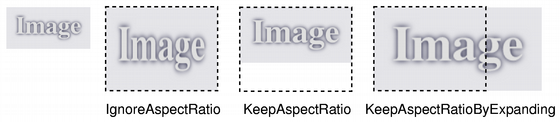
若
aspectRatioMode
is
IgnoreAspectRatio
,像素图被比例缩放到
size
.
若
aspectRatioMode
is
KeepAspectRatio
,像素图被比例缩放到尽可能大的矩形,不超出
size
, 维持宽高比。
若
aspectRatioMode
is
KeepAspectRatioByExpanding
,像素图被比例缩放到尽可能小的矩形,超出
size
, 维持宽高比。
若给定
size
为空,此函数返回 null 像素图。
在某些情况下,把像素图绘制到具有比例缩放设置的描绘器,比比例缩放像素图效果更好。如:当描绘器是基于 OpenGL 的实例,或当比例缩放因子快速变化时。
另请参阅
isNull()
														Pixmap


														变换
PySide2.QtGui.QPixmap.
scaled
(
w
,
h
[
,
aspectMode=Qt.IgnoreAspectRatio
[
,
mode=Qt.FastTransformation
]
]
)

w
–
int
h
–
int
aspectMode
–
AspectRatioMode
mode
–
TransformationMode
这是重载函数。
Returns a copy of the pixmap scaled to a rectangle with the given
width
and
height
according to the given
aspectRatioMode
and
transformMode
.
若
width
或
height
is zero or negative, this function returns a null pixmap.
PySide2.QtGui.QPixmap.
scaledToHeight
(
h
[
,
mode=Qt.FastTransformation
]
)

h
–
int
mode
–
TransformationMode
Returns a scaled copy of the image. The returned image is scaled to the given
height
using the specified transformation
mode
. The width of the pixmap is automatically calculated so that the aspect ratio of the pixmap is preserved.
若
height
为 0 或负数,返回 null 像素图。
另请参阅
isNull()
														Pixmap


														变换
PySide2.QtGui.QPixmap.
scaledToWidth
(
w
[
,
mode=Qt.FastTransformation
]
)

w
–
int
mode
–
TransformationMode
Returns a scaled copy of the image. The returned image is scaled to the given
width
using the specified transformation
mode
. The height of the pixmap is automatically calculated so that the aspect ratio of the pixmap is preserved.
若
width
为 0 或负数,返回 null 像素图。
另请参阅
isNull()
														Pixmap


														变换
PySide2.QtGui.QPixmap.
scroll
(
dx
,
dy
,
rect
[
,
exposed=None
]
)

dx
–
int
dy
–
int
rect
–
QRect
exposed
–
QRegion
Scrolls the area
rect
of this pixmap by (
dx
,
dy
). The exposed region is left unchanged. You can optionally pass a pointer to an empty
QRegion
to get the region that is
exposed
by the scroll operation.
pixmap = QPixmap("background.png")
exposed = QRegion()
pixmap.scroll(10, 10, pixmap.rect(), exposed)
You cannot scroll while there is an active painter on the pixmap.
另请参阅
scroll()
scroll()
PySide2.QtGui.QPixmap.
scroll
(
dx
,
dy
,
x
,
y
,
width
,
height
[
,
exposed=None
]
)

dx
–
int
dy
–
int
x
–
int
y
–
int
width
–
int
height
–
int
exposed
–
QRegion
This convenience function is equivalent to calling (
dx
,
dy
,
QRect
(
x
,
y
,
width
,
height
),
exposed
).
另请参阅
scroll()
scroll()
PySide2.QtGui.QPixmap.
setDevicePixelRatio
(
scaleFactor
)

scaleFactor
–
qreal
Sets the device pixel ratio for the pixmap. This is the ratio between image pixels and device-independent pixels.
默认
scaleFactor
is 1.0. Setting it to something else has two effects:
QPainters that are opened on the pixmap will be scaled. For example, painting on a 200x200 image if with a ratio of 2.0 will result in effective (device-independent) painting bounds of 100x100.
Code paths in Qt that calculate layout geometry based on the pixmap size will take the ratio into account:
QSize
layoutSize = pixmap.
size()
/ pixmap.
devicePixelRatio()
The net effect of this is that the pixmap is displayed as high-DPI pixmap rather than a large pixmap (see
													绘制


													High


													Resolution


													版本


													of


													Pixmaps


													and


													图像
).
另请参阅
devicePixelRatio()
PySide2.QtGui.QPixmap.
setMask
(
arg__1
)

arg__1
–
QBitmap
设置遮罩位图。
此函数合并
mask
with the pixmap’s alpha channel. A pixel value of 1 on the mask means the pixmap’s pixel is unchanged; a value of 0 means the pixel is transparent. The mask must have the same size as this pixmap.
Setting a null mask resets the mask, leaving the previously transparent pixels black. The effect of this function is undefined when the pixmap is being painted on.
警告
这是潜在的昂贵操作。
PySide2.QtGui.QPixmap.
size
(
)

QSize
返回像素图尺寸。
另请参阅
width()
height()
														Pixmap


														Information
PySide2.QtGui.QPixmap.
toImage
(
)

将像素图转换成
QImage
。返回 null 图像,若转换失败。
If the pixmap has 1-bit depth, the returned image will also be 1 bit deep. Images with more bits will be returned in a format closely represents the underlying system. Usually this will be
Format_ARGB32_Premultiplied
for pixmaps with an alpha and
Format_RGB32
or
Format_RGB16
for pixmaps without alpha.
Note that for the moment, alpha masks on monochrome images are ignored.
另请参阅
fromImage()
														图像


														格式
PySide2.QtGui.QPixmap.
transformed
(
arg__1
[
,
mode=Qt.FastTransformation
]
)

注意
此函数被弃用。
PySide2.QtGui.QPixmap.
transformed
(
arg__1
[
,
mode=Qt.FastTransformation
]
)

arg__1
–
QTransform
mode
–
TransformationMode
PySide2.QtGui.QPixmap.
trueMatrix
(
m
,
w
,
h
)

注意
此函数被弃用。
PySide2.QtGui.QPixmap.
trueMatrix
(
m
,
w
,
h
)

m
–
QTransform
w
–
int
h
–
int
