继承者: QStylePainter
def
background
()
def
backgroundMode
()
def
begin
(arg__1)
def
beginNativePainting
()
def
boundingRect
(rect, flags, text)
def
boundingRect
(rect, flags, text)
def
boundingRect
(rect, text[, o=QTextOption()])
def
boundingRect
(x, y, w, h, flags, text)
def
brush
()
def
brushOrigin
()
def
clipBoundingRect
()
def
clipPath
()
def
clipRegion
()
def
combinedMatrix
()
def
combinedTransform
()
def
compositionMode
()
def
device
()
def
deviceMatrix
()
def
deviceTransform
()
def
drawArc
(arg__1, a, alen)
def
drawArc
(rect, a, alen)
def
drawArc
(x, y, w, h, a, alen)
def
drawChord
(arg__1, a, alen)
def
drawChord
(rect, a, alen)
def
drawChord
(x, y, w, h, a, alen)
def
drawConvexPolygon
(arg__1)
def
drawConvexPolygon
(arg__1)
def
drawConvexPolygon
(polygon)
def
drawConvexPolygon
(polygon)
def
drawEllipse
(center, rx, ry)
def
drawEllipse
(center, rx, ry)
def
drawEllipse
(r)
def
drawEllipse
(r)
def
drawEllipse
(x, y, w, h)
def
drawImage
(p, image)
def
drawImage
(p, image)
def
drawImage
(p, image, sr[, flags=Qt.AutoColor])
def
drawImage
(p, image, sr[, flags=Qt.AutoColor])
def
drawImage
(r, image)
def
drawImage
(r, image)
def
drawImage
(targetRect, image, sourceRect[, flags=Qt.AutoColor])
def
drawImage
(targetRect, image, sourceRect[, flags=Qt.AutoColor])
def
drawImage
(x, y, image[, sx=0[, sy=0[, sw=-1[, sh=-1[, flags=Qt.AutoColor]]]]])
def
drawLine
(line)
def
drawLine
(line)
def
drawLine
(p1, p2)
def
drawLine
(p1, p2)
def
drawLine
(x1, y1, x2, y2)
def
drawLines
(lines)
def
drawLines
(lines)
def
drawLines
(pointPairs)
def
drawLines
(pointPairs)
def
drawPath
(path)
def
drawPicture
(p, picture)
def
drawPicture
(p, picture)
def
drawPicture
(x, y, picture)
def
drawPie
(arg__1, a, alen)
def
drawPie
(rect, a, alen)
def
drawPie
(x, y, w, h, a, alen)
def
drawPixmap
(p, pm)
def
drawPixmap
(p, pm)
def
drawPixmap
(p, pm, sr)
def
drawPixmap
(p, pm, sr)
def
drawPixmap
(r, pm)
def
drawPixmap
(targetRect, pixmap, sourceRect)
def
drawPixmap
(targetRect, pixmap, sourceRect)
def
drawPixmap
(x, y, pm)
def
drawPixmap
(x, y, pm, sx, sy, sw, sh)
def
drawPixmap
(x, y, w, h, pm)
def
drawPixmap
(x, y, w, h, pm, sx, sy, sw, sh)
def
drawPixmapFragments
(fragments, fragmentCount, pixmap[, hints=QPainter.PixmapFragmentHints()])
def
drawPoint
(p)
def
drawPoint
(pt)
def
drawPoint
(x, y)
def
drawPoints
(arg__1)
def
drawPoints
(arg__1)
def
drawPoints
(points)
def
drawPoints
(points)
def
drawPolygon
(arg__1, arg__2)
def
drawPolygon
(arg__1, arg__2)
def
drawPolygon
(polygon[, fillRule=Qt.OddEvenFill])
def
drawPolygon
(polygon[, fillRule=Qt.OddEvenFill])
def
drawPolyline
(arg__1)
def
drawPolyline
(arg__1)
def
drawPolyline
(polygon)
def
drawPolyline
(polyline)
def
drawRect
(rect)
def
drawRect
(rect)
def
drawRect
(x1, y1, w, h)
def
drawRects
(rectangles)
def
drawRects
(rectangles)
def
drawRoundRect
(r[, xround=25[, yround=25]])
def
drawRoundRect
(r[, xround=25[, yround=25]])
def
drawRoundRect
(x, y, w, h[, xRound=25[, yRound=25]])
def
drawRoundedRect
(rect, xRadius, yRadius[, mode=Qt.AbsoluteSize])
def
drawRoundedRect
(rect, xRadius, yRadius[, mode=Qt.AbsoluteSize])
def
drawRoundedRect
(x, y, w, h, xRadius, yRadius[, mode=Qt.AbsoluteSize])
def
drawStaticText
(left, top, staticText)
def
drawStaticText
(topLeftPosition, staticText)
def
drawStaticText
(topLeftPosition, staticText)
def
drawText
(p, s)
def
drawText
(p, s)
def
drawText
(r, flags, text)
def
drawText
(r, flags, text)
def
drawText
(r, text[, o=QTextOption()])
def
drawText
(x, y, s)
def
drawText
(x, y, w, h, flags, text)
def
drawTextItem
(p, ti)
def
drawTextItem
(p, ti)
def
drawTextItem
(x, y, ti)
def
drawTiledPixmap
(arg__1, arg__2[, pos=QPoint()])
def
drawTiledPixmap
(rect, pm[, offset=QPointF()])
def
drawTiledPixmap
(x, y, w, h, arg__5[, sx=0[, sy=0]])
def
end
()
def
endNativePainting
()
def
eraseRect
(arg__1)
def
eraseRect
(arg__1)
def
eraseRect
(x, y, w, h)
def
fillPath
(path, brush)
def
fillRect
(arg__1, arg__2)
def
fillRect
(arg__1, arg__2)
def
fillRect
(arg__1, color)
def
fillRect
(arg__1, color)
def
fillRect
(r, c)
def
fillRect
(r, c)
def
fillRect
(r, preset)
def
fillRect
(r, preset)
def
fillRect
(r, style)
def
fillRect
(r, style)
def
fillRect
(x, y, w, h, arg__5)
def
fillRect
(x, y, w, h, c)
def
fillRect
(x, y, w, h, color)
def
fillRect
(x, y, w, h, preset)
def
fillRect
(x, y, w, h, style)
def
font
()
def
fontInfo
()
def
fontMetrics
()
def
hasClipping
()
def
initFrom
(device)
def
isActive
()
def
layoutDirection
()
def
matrix
()
def
matrixEnabled
()
def
opacity
()
def
paintEngine
()
def
pen
()
def
renderHints
()
def
resetMatrix
()
def
resetTransform
()
def
restore
()
def
rotate
(a)
def
save
()
def
scale
(sx, sy)
def
setBackground
(bg)
def
setBackgroundMode
(mode)
def
setBrush
(brush)
def
setBrush
(style)
def
setBrushOrigin
(arg__1)
def
setBrushOrigin
(arg__1)
def
setBrushOrigin
(x, y)
def
setClipPath
(path[, op=Qt.ReplaceClip])
def
setClipRect
(arg__1[, op=Qt.ReplaceClip])
def
setClipRect
(arg__1[, op=Qt.ReplaceClip])
def
setClipRect
(x, y, w, h[, op=Qt.ReplaceClip])
def
setClipRegion
(arg__1[, op=Qt.ReplaceClip])
def
setClipping
(enable)
def
setCompositionMode
(mode)
def
setFont
(f)
def
setLayoutDirection
(direction)
def
setMatrix
(matrix[, combine=false])
def
setMatrixEnabled
(enabled)
def
setOpacity
(opacity)
def
setPen
(color)
def
setPen
(pen)
def
setPen
(style)
def
setRenderHint
(hint[, on=true])
def
setRenderHints
(hints[, on=true])
def
setTransform
(transform[, combine=false])
def
setViewTransformEnabled
(enable)
def
setViewport
(viewport)
def
setViewport
(x, y, w, h)
def
setWindow
(window)
def
setWindow
(x, y, w, h)
def
setWorldMatrix
(matrix[, combine=false])
def
setWorldMatrixEnabled
(enabled)
def
setWorldTransform
(matrix[, combine=false])
def
shear
(sh, sv)
def
strokePath
(path, pen)
def
testRenderHint
(hint)
def
transform
()
def
translate
(dx, dy)
def
translate
(offset)
def
translate
(offset)
def
viewTransformEnabled
()
def
视口
()
def
window
()
def
worldMatrix
()
def
worldMatrixEnabled
()
def
worldTransform
()
def
redirected
(device[, offset=None])
def
restoreRedirected
(device)
def
setRedirected
(device, replacement[, offset=QPoint()])
QPainterprovides highly optimized functions to do most of the drawing GUI programs require. It can draw everything from simple lines to complex shapes like pies and chords. It can also draw aligned text and pixmaps. Normally, it draws in a “natural” coordinate system, but it can also do view and world transformation.QPaintercan operate on any object that inherits theQPaintDevice类。The common use of
QPainteris inside a widget’s paint event: Construct and customize (e.g. set the pen or the brush) the painter. Then draw. Remember to destroy theQPainterobject after drawing. For example:def paintEvent(self, paintEvent): painter = QPainter(self) painter.setPen(Qt.blue) painter.setFont(QFont("Arial", 30)) painter.drawText(rect(), Qt.AlignCenter, "Qt")The core functionality of
QPainteris drawing, but the class also provide several functions that allows you to customizeQPainter‘s settings and its rendering quality, and others that enable clipping. In addition you can control how different shapes are merged together by specifying the painter’s composition mode.
isActive()function indicates whether the painter is active. A painter is activated by thebegin()function and the constructor that takes aQPaintDevice自变量。end()function, and the destructor, deactivates it.连同
QPaintDeviceandQPaintEngineclasses,QPainterform the basis for Qt’s paint system.QPainteris the class used to perform drawing operations.QPaintDevicerepresents a device that can be painted on using aQPainter.QPaintEngine提供用于在不同类型设备上描绘的描绘器接口。若描绘器活动,device()returns the paint device on which the painter paints, andpaintEngine()returns the paint engine that the painter is currently operating on. For more information, see the 描绘系统 .有时,可能期望其它人去描绘在不寻常
QPaintDevice.QPaintersupports a static function to do this,setRedirected().警告
When the paintdevice is a widget,
QPaintercan only be used inside a paintEvent() function or in a function called by paintEvent().
There are several settings that you can customize to make
QPainterdraw according to your preferences:
font()is the font used for drawing text. If the painterisActive(), you can retrieve information about the currently set font, and its metrics, using thefontInfo()andfontMetrics()functions respectively.
brush()defines the color or pattern that is used for filling shapes.
pen()defines the color or stipple that is used for drawing lines or boundaries.
backgroundMode()defines whether there is abackground()or not, i.e it is eitherOpaqueModeorTransparentMode.
background()only applies whenbackgroundMode()isOpaqueModeandpen()is a stipple. In that case, it describes the color of the background pixels in the stipple.
brushOrigin()defines the origin of the tiled brushes, normally the origin of widget’s background.
viewport(),window(),worldTransform()make up the painter’s coordinate transformation system. For more information, see theCoordinate 变换section and the 坐标系统 文档编制。
hasClipping()tells whether the painter clips at all. (The paint device clips, too.) If the painter clips, it clips toclipRegion().
layoutDirection()defines the layout direction used by the painter when drawing text.
worldMatrixEnabled()tells whether world transformation is enabled.
viewTransformEnabled()tells whether view transformation is enabled.注意:其中一些设置会镜像某些绘制设备设置,如
font()。begin()function (or equivalently theQPainterconstructor) copies these attributes from the paint device.You can at any time save the
QPainter‘s state by calling thesave()function which saves all the available settings on an internal stack. Therestore()function pops them back.
QPainterprovides functions to draw most primitives:drawPoint(),drawPoints(),drawLine(),drawRect(),drawRoundedRect(),drawEllipse(),drawArc(),drawPie(),drawChord(),drawPolyline(),drawPolygon(),drawConvexPolygon()and drawCubicBezier(). The two convenience functions,drawRects()anddrawLines(), draw the given number of rectangles or lines in the given array ofQRectsorQLines使用当前钢笔和笔刷。
QPainterclass also provides thefillRect()function which fills the givenQRect,采用给定QBrush,和eraseRect()function that erases the area inside the given rectangle.所有这些函数都有整数和浮点版本。
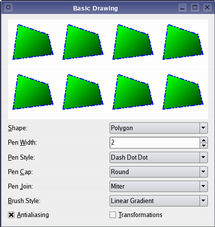
基本绘制范例
If you need to draw a complex shape, especially if you need to do so repeatedly, consider creating a
QPainterPathand drawing it usingdrawPath().
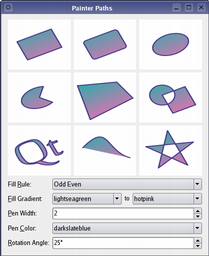
描绘器路径范例
QPainterPathclass provides a container for painting operations, enabling graphical shapes to be constructed and reused.Painter Paths example shows how painter paths can be used to build complex shapes for rendering.
QPainteralso provides thefillPath()function which fills the givenQPainterPath采用给定QBrush,和strokePath()function that draws the outline of the given path (i.e. strokes the path).另请参阅 向量变形 example which shows how to use advanced vector techniques to draw text using a
QPainterPath, 渐变 example which shows the different types of gradients that are available in Qt, and the 路径笔画 example which shows Qt’s built-in dash patterns and shows how custom patterns can be used to extend the range of available patterns.
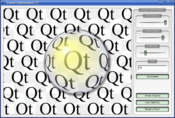
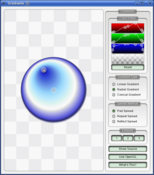
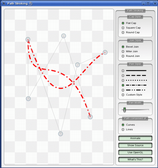
Text drawing is done using
drawText(). When you need fine-grained positioning,boundingRect()tells you where a givendrawText()command will draw.
There are functions to draw pixmaps/images, namely
drawPixmap(),drawImage()anddrawTiledPixmap(). BothdrawPixmap()anddrawImage()produce the same result, except thatdrawPixmap()is faster on-screen whiledrawImage()may be faster on aQPrinteror other devices.There is a
drawPicture()function that draws the contents of an entireQPicture。drawPicture()function is the only function that disregards all the painter’s settings asQPicturehas its own settings.
High resolution versions of pixmaps have a device pixel ratio value larger than 1 (see
QImageReader,devicePixelRatio()). Should it match the value of the underlyingQPaintDevice, it is drawn directly onto the device with no additional transformation applied.This is for example the case when drawing a
QPixmapof 64x64 pixels size with a device pixel ratio of 2 onto a high DPI screen which also has a device pixel ratio of 2. Note that the pixmap is then effectively 32x32 pixels in user space . Code paths in Qt that calculate layout geometry based on the pixmap size will use this size. The net effect of this is that the pixmap is displayed as high DPI pixmap rather than a large pixmap.
To get the optimal rendering result using
QPainter, you should use the platform independentQImageas paint device; i.e. usingQImagewill ensure that the result has an identical pixel representation on any platform.
QPainterclass also provides a means of controlling the rendering quality through itsRenderHintenum and the support for floating point precision: All the functions for drawing primitives has a floating point version. These are often used in combination with the抗锯齿render hint.
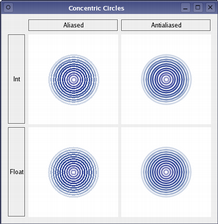
同心圆范例
Concentric Circles example shows the improved rendering quality that can be obtained using floating point precision and anti-aliasing when drawing custom widgets.
The application’s main window displays several widgets which are drawn using the various combinations of precision and anti-aliasing.
RenderHintenum specifies flags toQPainterthat may or may not be respected by any given engine.抗锯齿indicates that the engine should antialias edges of primitives if possible,TextAntialiasingindicates that the engine should antialias text if possible, and theSmoothPixmapTransformindicates that the engine should use a smooth pixmap transformation algorithm.
renderHints()function returns a flag that specifies the rendering hints that are set for this painter. Use thesetRenderHint()function to set or clear the currently setRenderHints.
Normally, the
QPainteroperates on the device’s own coordinate system (usually pixels), butQPainterhas good support for coordinate transformations.
nop
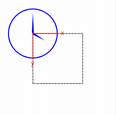
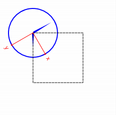
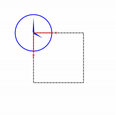
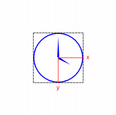
The most commonly used transformations are scaling, rotation, translation and shearing. Use the
scale()function to scale the coordinate system by a given offset, therotate()function to rotate it clockwise andtranslate()to translate it (i.e. adding a given offset to the points). You can also twist the coordinate system around the origin using theshear()function. See the 仿射变换 example for a visualization of a sheared coordinate system.另请参阅 变换 example which shows how transformations influence the way that
QPainterrenders graphics primitives. In particular it shows how the order of transformations affects the result.
仿射变换范例
仿射变换 example shows Qt’s ability to perform affine transformations on painting operations. The demo also allows the user to experiment with the transformation operations and see the results immediately.
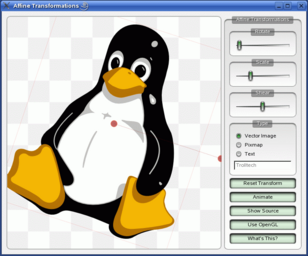
All the tranformation operations operate on the transformation
worldTransform(). A matrix transforms a point in the plane to another point. For more information about the transformation matrix, see the 坐标系统 andQTransform文档编制。
setWorldTransform()function can replace or add to the currently setworldTransform()。resetTransform()function resets any transformations that were made usingtranslate(),scale(),shear(),rotate(),setWorldTransform(),setViewport()andsetWindow()functions. ThedeviceTransform()returns the matrix that transforms from logical coordinates to device coordinates of the platform dependent paint device. The latter function is only needed when using platform painting commands on the platform dependent handle, and the platform does not do transformations nativly.When drawing with
QPainter, we specify points using logical coordinates which then are converted into the physical coordinates of the paint device. The mapping of the logical coordinates to the physical coordinates are handled byQPainter‘scombinedTransform(), a combination ofviewport()andwindow()andworldTransform()。viewport()represents the physical coordinates specifying an arbitrary rectangle, thewindow()describes the same rectangle in logical coordinates, and theworldTransform()is identical with the transformation matrix.另请参阅 坐标系统
QPaintercan clip any drawing operation to a rectangle, a region, or a vector path. The current clip is available using the functionsclipRegion()andclipPath(). Whether paths or regions are preferred (faster) depends on the underlyingpaintEngine(). For example, theQImagepaint engine prefers paths while the X11 paint engine prefers regions. Setting a clip is done in the painters logical coordinates.After
QPainter‘s clipping, the paint device may also clip. For example, most widgets clip away the pixels used by child widgets, and most printers clip away an area near the edges of the paper. This additional clipping is not reflected by the return value ofclipRegion()orhasClipping().
QPainterprovides theCompositionModeenum which defines the Porter-Duff rules for digital image compositing; it describes a model for combining the pixels in one image, the source, with the pixels in another image, the destination.The two most common forms of composition are
SourceandSourceOver.Sourceis used to draw opaque objects onto a paint device. In this mode, each pixel in the source replaces the corresponding pixel in the destination. InSourceOvercomposition mode, the source object is transparent and is drawn on top of the destination.Note that composition transformation operates pixelwise. For that reason, there is a difference between using the graphic primitive itself and its bounding rectangle: The bounding rect contains pixels with alpha == 0 (i.e the pixels surrounding the primitive). These pixels will overwrite the other image’s pixels, effectively clearing those, while the primitive only overwrites its own area.
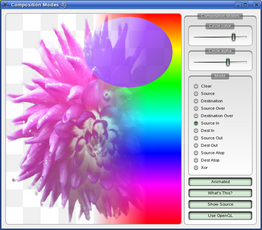
合成模式范例
复合模式 example, available in Qt’s examples directory, allows you to experiment with the various composition modes and see the results immediately.
If you are using coordinates with Qt’s raster-based paint engine, it is important to note that, while coordinates greater than +/- 2 15 can be used, any painting performed with coordinates outside this range is not guaranteed to be shown; the drawing may be clipped. This is due to the use of
short intin the implementation.The outlines generated by Qt’s stroker are only an approximation when dealing with curved shapes. It is in most cases impossible to represent the outline of a bezier curve segment using another bezier curve segment, and so Qt approximates the curve outlines by using several smaller curves. For performance reasons there is a limit to how many curves Qt uses for these outlines, and thus when using large pen widths or scales the outline error increases. To generate outlines with smaller errors it is possible to use the
QPainterPathStrokerclass, which has the setCurveThreshold member function which let’s the user specify the error tolerance. Another workaround is to convert the paths to polygons first and then draw the polygons instead.
QPainteris a rich framework that allows developers to do a great variety of graphical operations, such as gradients, composition modes and vector graphics. AndQPaintercan do this across a variety of different hardware and software stacks. Naturally the underlying combination of hardware and software has some implications for performance, and ensuring that every single operation is fast in combination with all the various combinations of composition modes, brushes, clipping, transformation, etc, is close to an impossible task because of the number of permutations. As a compromise we have selected a subset of theQPainterAPI and backends, where performance is guaranteed to be as good as we can sensibly get it for the given combination of hardware and software.The backends we focus on as high-performance engines are:
Raster - This backend implements all rendering in pure software and is always used to render into QImages. For optimal performance only use the format types
Format_ARGB32_Premultiplied,Format_RGB32orFormat_RGB16. Any other format, includingFormat_ARGB32, has significantly worse performance. This engine is used by default forQWidgetandQPixmap.OpenGL 2.0 (ES) - This backend is the primary backend for hardware accelerated graphics. It can be run on desktop machines and embedded devices supporting the OpenGL 2.0 or OpenGL/ES 2.0 specification. This includes most graphics chips produced in the last couple of years. The engine can be enabled by using
QPainteronto aQOpenGLWidget.These operations are:
Simple transformations, meaning translation and scaling, pluss 0, 90, 180, 270 degree rotations.
drawPixmap()in combination with simple transformations and opacity with non-smooth transformation mode (QPainter::SmoothPixmapTransformnot enabled as a render hint).Rectangle fills with solid color, two-color linear gradients and simple transforms.
Rectangular clipping with simple transformations and intersect clip.
复合模式
QPainter::CompositionMode_SourceandCompositionMode_SourceOver.Rounded rectangle filling using solid color and two-color linear gradients fills.
3x3 patched pixmaps, via .
This list gives an indication of which features to safely use in an application where performance is critical. For certain setups, other operations may be fast too, but before making extensive use of them, it is recommended to benchmark and verify them on the system where the software will run in the end. There are also cases where expensive operations are ok to use, for instance when the result is cached in a
QPixmap.另请参阅
QPaintDeviceQPaintEngineQt SVG 基本绘制范例绘制 Utility 函数
QPainter

QPainter(arg__1)
- param arg__1
构造描绘器。
Constructs a painter that begins painting the paint
device
immediately.
This constructor is convenient for short-lived painters, e.g. in a
paintEvent()
and should be used only once. The constructor calls
begin()
for you and the
QPainter
destructor automatically calls
end()
.
Here’s an example using
begin()
and
end()
:
def paintEvent(self, paintEvent):
p = QPainter()
p.begin(self)
p.drawLine(...) # drawing code
p.end()
The same example using this constructor:
self paintEvent(self, paintEvent):
p = QPainter(self)
p.drawLine(...) # drawing code
Since the constructor cannot provide feedback when the initialization of the painter failed you should rather use
begin()
and
end()
to paint on external devices, e.g. printers.
PySide2.QtGui.QPainter.
RenderHint

Renderhints are used to specify flags to
QPainter
that may or may not be respected by any given engine.
|
常量 |
描述 |
|---|---|
|
QPainter.Antialiasing |
Indicates that the engine should antialias edges of primitives if possible. |
|
QPainter.TextAntialiasing |
Indicates that the engine should antialias text if possible. To forcibly disable antialiasing for text, do not use this hint. Instead, set
|
|
QPainter.SmoothPixmapTransform |
Indicates that the engine should use a smooth pixmap transformation algorithm (such as bilinear) rather than nearest neighbor. |
|
QPainter.HighQualityAntialiasing |
This value is obsolete and will be ignored, use the Antialiasing render hint instead. |
|
QPainter.NonCosmeticDefaultPen |
This value is obsolete, the default for
|
|
QPainter.Qt4CompatiblePainting |
Compatibility hint telling the engine to use the same X11 based fill rules as in Qt 4, where aliased rendering is offset by slightly less than half a pixel. Also will treat default constructed pens as cosmetic. Potentially useful when porting a Qt 4 application to Qt 5. |
|
QPainter.LosslessImageRendering |
Use a lossless image rendering, whenever possible. Currently, this hint is only used when
|
另请参阅
renderHints()
setRenderHint()
渲染
Quality
同心圆范例
PySide2.QtGui.QPainter.
PixmapFragmentHint

|
常量 |
描述 |
|---|---|
|
QPainter.OpaqueHint |
Indicates that the pixmap fragments to be drawn are opaque. Opaque fragments are potentially faster to draw. |
另请参阅
drawPixmapFragments()
PixmapFragment
New in version 4.7.
PySide2.QtGui.QPainter.
CompositionMode

Defines the modes supported for digital image compositing. Composition modes are used to specify how the pixels in one image, the source, are merged with the pixel in another image, the destination.
Please note that the bitwise raster operation modes, denoted with a RasterOp prefix, are only natively supported in the X11 and raster paint engines. This means that the only way to utilize these modes on the Mac is via a
QImage
. The RasterOp denoted blend modes are
not
supported for pens and brushes with alpha components. Also, turning on the
抗锯齿
render hint will effectively disable the RasterOp modes.
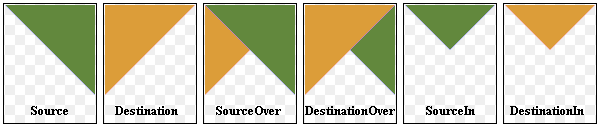
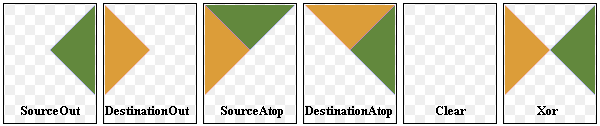
The most common type is SourceOver (often referred to as just alpha blending) where the source pixel is blended on top of the destination pixel in such a way that the alpha component of the source defines the translucency of the pixel.
Several composition modes require an alpha channel in the source or target images to have an effect. For optimal performance the image format
Format_ARGB32_Premultiplied
is preferred.
When a composition mode is set it applies to all painting operator, pens, brushes, gradients and pixmap/image drawing.
|
常量 |
描述 |
|---|---|
|
QPainter.CompositionMode_SourceOver |
This is the default mode. The alpha of the source is used to blend the pixel on top of the destination. |
|
QPainter.CompositionMode_DestinationOver |
The alpha of the destination is used to blend it on top of the source pixels. This mode is the inverse of . |
|
QPainter.CompositionMode_Clear |
The pixels in the destination are cleared (set to fully transparent) independent of the source. |
|
QPainter.CompositionMode_Source |
The output is the source pixel. (This means a basic copy operation and is identical to SourceOver when the source pixel is opaque). |
|
QPainter.CompositionMode_Destination |
The output is the destination pixel. This means that the blending has no effect. This mode is the inverse of . |
|
QPainter.CompositionMode_SourceIn |
The output is the source, where the alpha is reduced by that of the destination. |
|
QPainter.CompositionMode_DestinationIn |
The output is the destination, where the alpha is reduced by that of the source. This mode is the inverse of . |
|
QPainter.CompositionMode_SourceOut |
The output is the source, where the alpha is reduced by the inverse of destination. |
|
QPainter.CompositionMode_DestinationOut |
The output is the destination, where the alpha is reduced by the inverse of the source. This mode is the inverse of . |
|
QPainter.CompositionMode_SourceAtop |
The source pixel is blended on top of the destination, with the alpha of the source pixel reduced by the alpha of the destination pixel. |
|
QPainter.CompositionMode_DestinationAtop |
The destination pixel is blended on top of the source, with the alpha of the destination pixel is reduced by the alpha of the destination pixel. This mode is the inverse of . |
|
QPainter.CompositionMode_Xor |
The source, whose alpha is reduced with the inverse of the destination alpha, is merged with the destination, whose alpha is reduced by the inverse of the source alpha. is not the same as the bitwise Xor. |
|
QPainter.CompositionMode_Plus |
Both the alpha and color of the source and destination pixels are added together. |
|
QPainter.CompositionMode_Multiply |
The output is the source color multiplied by the destination. Multiplying a color with white leaves the color unchanged, while multiplying a color with black produces black. |
|
QPainter.CompositionMode_Screen |
The source and destination colors are inverted and then multiplied. Screening a color with white produces white, whereas screening a color with black leaves the color unchanged. |
|
QPainter.CompositionMode_Overlay |
Multiplies or screens the colors depending on the destination color. The destination color is mixed with the source color to reflect the lightness or darkness of the destination. |
|
QPainter.CompositionMode_Darken |
The darker of the source and destination colors is selected. |
|
QPainter.CompositionMode_Lighten |
The lighter of the source and destination colors is selected. |
|
QPainter.CompositionMode_ColorDodge |
The destination color is brightened to reflect the source color. A black source color leaves the destination color unchanged. |
|
QPainter.CompositionMode_ColorBurn |
The destination color is darkened to reflect the source color. A white source color leaves the destination color unchanged. |
|
QPainter.CompositionMode_HardLight |
Multiplies or screens the colors depending on the source color. A light source color will lighten the destination color, whereas a dark source color will darken the destination color. |
|
QPainter.CompositionMode_SoftLight |
Darkens or lightens the colors depending on the source color. Similar to . |
|
QPainter.CompositionMode_Difference |
Subtracts the darker of the colors from the lighter. Painting with white inverts the destination color, whereas painting with black leaves the destination color unchanged. |
|
QPainter.CompositionMode_Exclusion |
Similar to , but with a lower contrast. Painting with white inverts the destination color, whereas painting with black leaves the destination color unchanged. |
|
QPainter.RasterOp_SourceOrDestination |
Does a bitwise OR operation on the source and destination pixels (src OR dst). |
|
QPainter.RasterOp_SourceAndDestination |
Does a bitwise AND operation on the source and destination pixels (src AND dst). |
|
QPainter.RasterOp_SourceXorDestination |
Does a bitwise XOR operation on the source and destination pixels (src XOR dst). |
|
QPainter.RasterOp_NotSourceAndNotDestination |
Does a bitwise NOR operation on the source and destination pixels ((NOT src) AND (NOT dst)). |
|
QPainter.RasterOp_NotSourceOrNotDestination |
Does a bitwise NAND operation on the source and destination pixels ((NOT src) OR (NOT dst)). |
|
QPainter.RasterOp_NotSourceXorDestination |
Does a bitwise operation where the source pixels are inverted and then XOR’ed with the destination ((NOT src) XOR dst). |
|
QPainter.RasterOp_NotSource |
Does a bitwise operation where the source pixels are inverted (NOT src). |
|
QPainter.RasterOp_NotSourceAndDestination |
Does a bitwise operation where the source is inverted and then AND’ed with the destination ((NOT src) AND dst). |
|
QPainter.RasterOp_SourceAndNotDestination |
Does a bitwise operation where the source is AND’ed with the inverted destination pixels (src AND (NOT dst)). |
|
QPainter.RasterOp_NotSourceOrDestination |
Does a bitwise operation where the source is inverted and then OR’ed with the destination ((NOT src) OR dst). |
|
QPainter.RasterOp_ClearDestination |
The pixels in the destination are cleared (set to 0) independent of the source. |
|
QPainter.RasterOp_SetDestination |
The pixels in the destination are set (set to 1) independent of the source. |
|
QPainter.RasterOp_NotDestination |
Does a bitwise operation where the destination pixels are inverted (NOT dst). |
|
QPainter.RasterOp_SourceOrNotDestination |
Does a bitwise operation where the source is OR’ed with the inverted destination pixels (src OR (NOT dst)). |
另请参阅
compositionMode()
setCompositionMode()
Composition
Modes
图像合成范例
PySide2.QtGui.QPainter.
background
(
)

返回当前背景笔刷。
另请参阅
PySide2.QtGui.QPainter.
backgroundMode
(
)

BGMode
返回当前背景模式。
另请参阅
PySide2.QtGui.QPainter.
begin
(
arg__1
)

arg__1
–
QPaintDevice
bool
Begins painting the paint
device
并返回
true
若成功;否则返回
false
.
Notice that all painter settings (
setPen()
,
setBrush()
etc.) are reset to default values when is called.
The errors that can occur are serious problems, such as these:
painter.begin(0) # impossible - paint device cannot be 0
image = QPixmap(0, 0)
painter.begin(&image) # impossible - image.isNull() == true
painter.begin(myWidget)
painter2.begin(myWidget) # impossible - only one painter at a time
Note that most of the time, you can use one of the constructors instead of , and that
end()
is automatically done at destruction.
警告
A paint device can only be painted by one painter at a time.
警告
Painting on a
QImage
with the format
Format_Indexed8
不被支持。
另请参阅
end()
QPainter()
PySide2.QtGui.QPainter.
beginNativePainting
(
)

Flushes the painting pipeline and prepares for the user issuing commands directly to the underlying graphics context. Must be followed by a call to
endNativePainting()
.
Note that only the states the underlying paint engine changes will be reset to their respective default states. The states we reset may change from release to release. The following states are currently reset in the OpenGL 2 engine:
blending is disabled
the depth, stencil and scissor tests are disabled
the active texture unit is reset to 0
the depth mask, depth function and the clear depth are reset to their default values
the stencil mask, stencil operation and stencil function are reset to their default values
the current color is reset to solid white
If, for example, the OpenGL polygon mode is changed by the user inside a beginNativePaint()/
endNativePainting()
block, it will not be reset to the default state by
endNativePainting()
. Here is an example that shows intermixing of painter commands and raw OpenGL commands:
painter = QPainter(self)
painter.fillRect(0, 0, 128, 128, Qt.green)
painter.beginNativePainting()
glEnable(GL_SCISSOR_TEST)
glScissor(0, 0, 64, 64)
glClearColor(1, 0, 0, 1)
glClear(GL_COLOR_BUFFER_BIT)
glDisable(GL_SCISSOR_TEST)
painter.endNativePainting()
另请参阅
PySide2.QtGui.QPainter.
boundingRect
(
rect
,
flags
,
text
)

rect
–
QRect
flags
–
int
text – unicode
QRect
PySide2.QtGui.QPainter.
boundingRect
(
rect
,
text
[
,
o=QTextOption()
]
)

rect
–
QRectF
text – unicode
o
–
QTextOption
QRectF
PySide2.QtGui.QPainter.
boundingRect
(
rect
,
flags
,
text
)

rect
–
QRectF
flags
–
int
text – unicode
QRectF
PySide2.QtGui.QPainter.
boundingRect
(
x
,
y
,
w
,
h
,
flags
,
text
)

x
–
int
y
–
int
w
–
int
h
–
int
flags
–
int
text – unicode
QRect
这是重载函数。
Returns the bounding rectangle of the given
text
as it will appear when drawn inside the rectangle beginning at the point (
x
,
y
) with width
w
and height
h
.
PySide2.QtGui.QPainter.
brush
(
)

Returns the painter’s current brush.
另请参阅
setBrush()
设置
PySide2.QtGui.QPainter.
brushOrigin
(
)

QPoint
Returns the currently set brush origin.
另请参阅
PySide2.QtGui.QPainter.
clipBoundingRect
(
)

QRectF
Returns the bounding rectangle of the current clip if there is a clip; otherwise returns an empty rectangle. Note that the clip region is given in logical coordinates.
The bounding rectangle is not guaranteed to be tight.
PySide2.QtGui.QPainter.
clipPath
(
)

Returns the current clip path in logical coordinates.
警告
QPainter
does not store the combined clip explicitly as this is handled by the underlying
QPaintEngine
, so the path is recreated on demand and transformed to the current logical coordinate system. This is potentially an expensive operation.
PySide2.QtGui.QPainter.
clipRegion
(
)

Returns the currently set clip region. Note that the clip region is given in logical coordinates.
警告
QPainter
does not store the combined clip explicitly as this is handled by the underlying
QPaintEngine
, so the path is recreated on demand and transformed to the current logical coordinate system. This is potentially an expensive operation.
PySide2.QtGui.QPainter.
combinedMatrix
(
)

注意
此函数被弃用。
Returns the transformation matrix combining the current window/viewport and world transformation.
It is advisable to use
combinedTransform()
instead of this function to preserve the properties of perspective transformations.
PySide2.QtGui.QPainter.
combinedTransform
(
)

Returns the transformation matrix combining the current window/viewport and world transformation.
PySide2.QtGui.QPainter.
compositionMode
(
)

Returns the current composition mode.
另请参阅
CompositionMode
setCompositionMode()
PySide2.QtGui.QPainter.
device
(
)

Returns the paint device on which this painter is currently painting, or
None
if the painter is not active.
另请参阅
PySide2.QtGui.QPainter.
deviceMatrix
(
)

注意
此函数被弃用。
Returns the matrix that transforms from logical coordinates to device coordinates of the platform dependent paint device.
注意
It is advisable to use
deviceTransform()
instead of this function to preserve the properties of perspective transformations.
此函数是
only
needed when using platform painting commands on the platform dependent handle (
HANDLE
), and the platform does not do transformations nativly.
PaintEngineFeature
enum can be queried to determine whether the platform performs the transformations or not.
PySide2.QtGui.QPainter.
deviceTransform
(
)

Returns the matrix that transforms from logical coordinates to device coordinates of the platform dependent paint device.
此函数是
only
needed when using platform painting commands on the platform dependent handle (
HANDLE
), and the platform does not do transformations nativly.
PaintEngineFeature
enum can be queried to determine whether the platform performs the transformations or not.
PySide2.QtGui.QPainter.
drawArc
(
arg__1
,
a
,
alen
)

arg__1
–
QRect
a
–
int
alen
–
int
PySide2.QtGui.QPainter.
drawArc
(
rect
,
a
,
alen
)

rect
–
QRectF
a
–
int
alen
–
int
PySide2.QtGui.QPainter.
drawArc
(
x
,
y
,
w
,
h
,
a
,
alen
)

x
–
int
y
–
int
w
–
int
h
–
int
a
–
int
alen
–
int
这是重载函数。
Draws the arc defined by the rectangle beginning at (
x
,
y
) with the specified
width
and
height
,和给定
startAngle
and
spanAngle
.
PySide2.QtGui.QPainter.
drawChord
(
arg__1
,
a
,
alen
)

arg__1
–
QRect
a
–
int
alen
–
int
PySide2.QtGui.QPainter.
drawChord
(
rect
,
a
,
alen
)

rect
–
QRectF
a
–
int
alen
–
int
PySide2.QtGui.QPainter.
drawChord
(
x
,
y
,
w
,
h
,
a
,
alen
)

x
–
int
y
–
int
w
–
int
h
–
int
a
–
int
alen
–
int
这是重载函数。
Draws the chord defined by the rectangle beginning at (
x
,
y
) with the specified
width
and
height
,和给定
startAngle
and
spanAngle
.
PySide2.QtGui.QPainter.
drawConvexPolygon
(
arg__1
)

arg__1 –
PySide2.QtGui.QPainter.
drawConvexPolygon
(
arg__1
)

arg__1 –
PySide2.QtGui.QPainter.
drawEllipse
(
center
,
rx
,
ry
)

center
–
QPoint
rx
–
int
ry
–
int
PySide2.QtGui.QPainter.
drawEllipse
(
center
,
rx
,
ry
)

center
–
QPointF
rx
–
qreal
ry
–
qreal
PySide2.QtGui.QPainter.
drawEllipse
(
r
)

r
–
QRect
PySide2.QtGui.QPainter.
drawEllipse
(
r
)

r
–
QRectF
PySide2.QtGui.QPainter.
drawEllipse
(
x
,
y
,
w
,
h
)

x
–
int
y
–
int
w
–
int
h
–
int
这是重载函数。
Draws the ellipse defined by the rectangle beginning at (
x
,
y
) with the given
width
and
height
.
PySide2.QtGui.QPainter.
drawImage
(
targetRect
,
image
,
sourceRect
[
,
flags=Qt.AutoColor
]
)

targetRect
–
QRect
image
–
QImage
sourceRect
–
QRect
flags
–
ImageConversionFlags
PySide2.QtGui.QPainter.
drawImage
(
x
,
y
,
image
[
,
sx=0
[
,
sy=0
[
,
sw=-1
[
,
sh=-1
[
,
flags=Qt.AutoColor
]
]
]
]
]
)

x
–
int
y
–
int
image
–
QImage
sx
–
int
sy
–
int
sw
–
int
sh
–
int
flags
–
ImageConversionFlags
这是重载函数。
Draws an image at (
x
,
y
) by copying a part of
image
into the paint device.
(
x
,
y
) specifies the top-left point in the paint device that is to be drawn onto. (
sx
,
sy
) specifies the top-left point in
image
that is to be drawn. The default is (0, 0).
(
sw
,
sh
) specifies the size of the image that is to be drawn. The default, (0, 0) (and negative) means all the way to the bottom-right of the image.
PySide2.QtGui.QPainter.
drawImage
(
targetRect
,
image
,
sourceRect
[
,
flags=Qt.AutoColor
]
)

targetRect
–
QRectF
image
–
QImage
sourceRect
–
QRectF
flags
–
ImageConversionFlags
PySide2.QtGui.QPainter.
drawImage
(
p
,
image
,
sr
[
,
flags=Qt.AutoColor
]
)

p
–
QPointF
image
–
QImage
sr
–
QRectF
flags
–
ImageConversionFlags
PySide2.QtGui.QPainter.
drawImage
(
p
,
image
,
sr
[
,
flags=Qt.AutoColor
]
)

p
–
QPoint
image
–
QImage
sr
–
QRect
flags
–
ImageConversionFlags
PySide2.QtGui.QPainter.
drawLine
(
line
)

line
–
QLine
PySide2.QtGui.QPainter.
drawLine
(
line
)

line
–
QLineF
PySide2.QtGui.QPainter.
drawLine
(
p1
,
p2
)

p1
–
QPoint
p2
–
QPoint
PySide2.QtGui.QPainter.
drawLine
(
p1
,
p2
)

p1
–
QPointF
p2
–
QPointF
PySide2.QtGui.QPainter.
drawLine
(
x1
,
y1
,
x2
,
y2
)

x1
–
int
y1
–
int
x2
–
int
y2
–
int
这是重载函数。
Draws a line from (
x1
,
y1
) to (
x2
,
y2
).
PySide2.QtGui.QPainter.
drawLines
(
lines
)

lines –
PySide2.QtGui.QPainter.
drawLines
(
pointPairs
)

pointPairs –
PySide2.QtGui.QPainter.
drawLines
(
pointPairs
)

pointPairs –
PySide2.QtGui.QPainter.
drawLines
(
lines
)

lines –
PySide2.QtGui.QPainter.
drawPath
(
path
)

path
–
QPainterPath
Draws the given painter
path
using the current pen for outline and the current brush for filling.
|
|
path = QPainterPath()
path.moveTo(20, 80)
path.lineTo(20, 30)
path.cubicTo(80, 0, 50, 50, 80, 80)
painter = QPainter(self)
painter.drawPath(path)
|
PySide2.QtGui.QPainter.
drawPicture
(
x
,
y
,
picture
)

x
–
int
y
–
int
picture
–
QPicture
这是重载函数。
绘制给定
picture
at point (
x
,
y
).
PySide2.QtGui.QPainter.
drawPie
(
arg__1
,
a
,
alen
)

arg__1
–
QRect
a
–
int
alen
–
int
PySide2.QtGui.QPainter.
drawPie
(
x
,
y
,
w
,
h
,
a
,
alen
)

x
–
int
y
–
int
w
–
int
h
–
int
a
–
int
alen
–
int
这是重载函数。
Draws the pie defined by the rectangle beginning at (
x
,
y
) with the specified
width
and
height
,和给定
startAngle
and
spanAngle
.
PySide2.QtGui.QPainter.
drawPie
(
rect
,
a
,
alen
)

rect
–
QRectF
a
–
int
alen
–
int
PySide2.QtGui.QPainter.
drawPixmap
(
x
,
y
,
w
,
h
,
pm
,
sx
,
sy
,
sw
,
sh
)

x
–
int
y
–
int
w
–
int
h
–
int
pm
–
QPixmap
sx
–
int
sy
–
int
sw
–
int
sh
–
int
这是重载函数。
Draws the rectangular portion with the origin (
sx
,
sy
), width
sw
and height
sh
, of the given
pixmap
, at the point (
x
,
y
), with a width of
w
and a height of
h
. If sw or sh are equal to zero the width/height of the pixmap is used and adjusted by the offset sx/sy;
PySide2.QtGui.QPainter.
drawPixmap
(
x
,
y
,
w
,
h
,
pm
)

x
–
int
y
–
int
w
–
int
h
–
int
pm
–
QPixmap
这是重载函数。
Draws the
pixmap
into the rectangle at position (
x
,
y
) with the given
width
and
height
.
PySide2.QtGui.QPainter.
drawPixmap
(
x
,
y
,
pm
,
sx
,
sy
,
sw
,
sh
)

x
–
int
y
–
int
pm
–
QPixmap
sx
–
int
sy
–
int
sw
–
int
sh
–
int
这是重载函数。
Draws a pixmap at (
x
,
y
) by copying a part of the given
pixmap
into the paint device.
(
x
,
y
) specifies the top-left point in the paint device that is to be drawn onto. (
sx
,
sy
) specifies the top-left point in
pixmap
that is to be drawn. The default is (0, 0).
(
sw
,
sh
) specifies the size of the pixmap that is to be drawn. The default, (0, 0) (and negative) means all the way to the bottom-right of the pixmap.
PySide2.QtGui.QPainter.
drawPixmap
(
targetRect
,
pixmap
,
sourceRect
)

targetRect
–
QRectF
pixmap
–
QPixmap
sourceRect
–
QRectF
PySide2.QtGui.QPainter.
drawPixmap
(
targetRect
,
pixmap
,
sourceRect
)

targetRect
–
QRect
pixmap
–
QPixmap
sourceRect
–
QRect
PySide2.QtGui.QPainter.
drawPixmapFragments
(
fragments
,
fragmentCount
,
pixmap
[
,
hints=QPainter.PixmapFragmentHints()
]
)

fragments
–
PixmapFragment
fragmentCount
–
int
pixmap
–
QPixmap
hints
–
PixmapFragmentHints
This function is used to draw
pixmap
, or a sub-rectangle of
pixmap
, at multiple positions with different scale, rotation and opacity.
fragments
is an array of
fragmentCount
elements specifying the parameters used to draw each pixmap fragment. The
hints
parameter can be used to pass in drawing hints.
This function is potentially faster than multiple calls to
drawPixmap()
, since the backend can optimize state changes.
另请参阅
PixmapFragment
PixmapFragmentHint
PySide2.QtGui.QPainter.
drawPoint
(
p
)

p
–
QPoint
PySide2.QtGui.QPainter.
drawPoint
(
pt
)

pt
–
QPointF
PySide2.QtGui.QPainter.
drawPoint
(
x
,
y
)

x
–
int
y
–
int
这是重载函数。
Draws a single point at position (
x
,
y
).
PySide2.QtGui.QPainter.
drawPoints
(
arg__1
)

arg__1 –
PySide2.QtGui.QPainter.
drawPoints
(
arg__1
)

arg__1 –
PySide2.QtGui.QPainter.
drawPolygon
(
arg__1
,
arg__2
)

arg__1 –
arg__2
–
FillRule
PySide2.QtGui.QPainter.
drawPolygon
(
arg__1
,
arg__2
)

arg__1 –
arg__2
–
FillRule
PySide2.QtGui.QPainter.
drawPolygon
(
polygon
[
,
fillRule=Qt.OddEvenFill
]
)

polygon
–
QPolygon
fillRule
–
FillRule
PySide2.QtGui.QPainter.
drawPolygon
(
polygon
[
,
fillRule=Qt.OddEvenFill
]
)

polygon
–
QPolygonF
fillRule
–
FillRule
PySide2.QtGui.QPainter.
drawPolyline
(
arg__1
)

arg__1 –
PySide2.QtGui.QPainter.
drawPolyline
(
arg__1
)

arg__1 –
PySide2.QtGui.QPainter.
drawRect
(
rect
)

rect
–
QRect
PySide2.QtGui.QPainter.
drawRect
(
rect
)

rect
–
QRectF
PySide2.QtGui.QPainter.
drawRect
(
x1
,
y1
,
w
,
h
)

x1
–
int
y1
–
int
w
–
int
h
–
int
这是重载函数。
Draws a rectangle with upper left corner at (
x
,
y
) and with the given
width
and
height
.
PySide2.QtGui.QPainter.
drawRects
(
rectangles
)

rectangles –
PySide2.QtGui.QPainter.
drawRects
(
rectangles
)

rectangles –
PySide2.QtGui.QPainter.
drawRoundRect
(
r
[
,
xround=25
[
,
yround=25
]
]
)

r
–
QRect
xround
–
int
yround
–
int
注意
此函数被弃用。
PySide2.QtGui.QPainter.
drawRoundRect
(
r
[
,
xround=25
[
,
yround=25
]
]
)

r
–
QRectF
xround
–
int
yround
–
int
注意
此函数被弃用。
PySide2.QtGui.QPainter.
drawRoundRect
(
x
,
y
,
w
,
h
[
,
xRound=25
[
,
yRound=25
]
]
)

x
–
int
y
–
int
w
–
int
h
–
int
xRound
–
int
yRound
–
int
注意
此函数被弃用。
这是重载函数。
Draws the rectangle
x
,
y
,
w
,
h
with rounded corners.
PySide2.QtGui.QPainter.
drawRoundedRect
(
x
,
y
,
w
,
h
,
xRadius
,
yRadius
[
,
mode=Qt.AbsoluteSize
]
)

x
–
int
y
–
int
w
–
int
h
–
int
xRadius
–
qreal
yRadius
–
qreal
mode
–
SizeMode
这是重载函数。
Draws the given rectangle
x
,
y
,
w
,
h
with rounded corners.
PySide2.QtGui.QPainter.
drawRoundedRect
(
rect
,
xRadius
,
yRadius
[
,
mode=Qt.AbsoluteSize
]
)

rect
–
QRect
xRadius
–
qreal
yRadius
–
qreal
mode
–
SizeMode
PySide2.QtGui.QPainter.
drawRoundedRect
(
rect
,
xRadius
,
yRadius
[
,
mode=Qt.AbsoluteSize
]
)

rect
–
QRectF
xRadius
–
qreal
yRadius
–
qreal
mode
–
SizeMode
PySide2.QtGui.QPainter.
drawStaticText
(
topLeftPosition
,
staticText
)

topLeftPosition
–
QPoint
staticText
–
QStaticText
PySide2.QtGui.QPainter.
drawStaticText
(
left
,
top
,
staticText
)

left
–
int
top
–
int
staticText
–
QStaticText
这是重载函数。
Draws the
staticText
at coordinates
left
and
top
.
注意
The y-position is used as the top of the font.
PySide2.QtGui.QPainter.
drawStaticText
(
topLeftPosition
,
staticText
)

topLeftPosition
–
QPointF
staticText
–
QStaticText
PySide2.QtGui.QPainter.
drawText
(
p
,
s
)

p
–
QPoint
s – unicode
PySide2.QtGui.QPainter.
drawText
(
p
,
s
)

p
–
QPointF
s – unicode
PySide2.QtGui.QPainter.
drawText
(
r
,
flags
,
text
)

r
–
QRect
flags
–
int
text – unicode
PySide2.QtGui.QPainter.
drawText
(
r
,
text
[
,
o=QTextOption()
]
)

r
–
QRectF
text – unicode
o
–
QTextOption
PySide2.QtGui.QPainter.
drawText
(
r
,
flags
,
text
)

r
–
QRectF
flags
–
int
text – unicode
PySide2.QtGui.QPainter.
drawText
(
x
,
y
,
s
)

x
–
int
y
–
int
s – unicode
PySide2.QtGui.QPainter.
drawText
(
x
,
y
,
w
,
h
,
flags
,
text
)

x
–
int
y
–
int
w
–
int
h
–
int
flags
–
int
text – unicode
这是重载函数。
绘制给定
text
within the rectangle with origin (
x
,
y
),
width
and
height
.
boundingRect
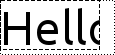
(if not null) is set to the what the bounding rectangle should be in order to enclose the whole text. For example, in the following image, the dotted line represents
boundingRect
as calculated by the function, and the dashed line represents the rectangle defined by
x
,
y
,
width
and
height
:
|
|
QPainter painter(this);
QFont font = painter.font();
font.setPixelSize(48);
painter.setFont(font);
const QRect rectangle = QRect(0, 0, 100, 50);
QRect boundingRect;
painter.drawText(rectangle, 0, tr("Hello"), &boundingRect);
QPen pen = painter.pen();
pen.setStyle(Qt::DotLine);
painter.setPen(pen);
painter.drawRect(boundingRect.adjusted(0, 0, -pen.width(), -pen.width()));
pen.setStyle(Qt::DashLine);
painter.setPen(pen);
painter.drawRect(rectangle.adjusted(0, 0, -pen.width(), -pen.width()));
|
flags
argument is a bitwise OR of the following flags:
AlignLeft
AlignRight
AlignHCenter
AlignJustify
AlignTop
AlignBottom
AlignVCenter
AlignCenter
TextSingleLine
TextExpandTabs
TextShowMnemonic
TextWordWrap
默认情况下,
QPainter
绘制抗锯齿文本。
注意
The y-position is used as the top of the font.
PySide2.QtGui.QPainter.
drawTiledPixmap
(
x
,
y
,
w
,
h
,
arg__5
[
,
sx=0
[
,
sy=0
]
]
)

x
–
int
y
–
int
w
–
int
h
–
int
arg__5
–
QPixmap
sx
–
int
sy
–
int
这是重载函数。
Draws a tiled
pixmap
in the specified rectangle.
(
x
,
y
) specifies the top-left point in the paint device that is to be drawn onto; with the given
width
and
height
. (
sx
,
sy
) specifies the top-left point in the
pixmap
that is to be drawn; this defaults to (0, 0).
PySide2.QtGui.QPainter.
drawTiledPixmap
(
rect
,
pm
[
,
offset=QPointF()
]
)

rect
–
QRectF
pm
–
QPixmap
offset
–
QPointF
PySide2.QtGui.QPainter.
drawTiledPixmap
(
arg__1
,
arg__2
[
,
pos=QPoint()
]
)

arg__1
–
QRect
arg__2
–
QPixmap
pos
–
QPoint
PySide2.QtGui.QPainter.
end
(
)

bool
Ends painting. Any resources used while painting are released. You don’t normally need to call this since it is called by the destructor.
返回
true
if the painter is no longer active; otherwise returns
false
.
另请参阅
PySide2.QtGui.QPainter.
endNativePainting
(
)

Restores the painter after manually issuing native painting commands. Lets the painter restore any native state that it relies on before calling any other painter commands.
PySide2.QtGui.QPainter.
eraseRect
(
arg__1
)

arg__1
–
QRect
PySide2.QtGui.QPainter.
eraseRect
(
arg__1
)

arg__1
–
QRectF
PySide2.QtGui.QPainter.
eraseRect
(
x
,
y
,
w
,
h
)

x
–
int
y
–
int
w
–
int
h
–
int
这是重载函数。
Erases the area inside the rectangle beginning at (
x
,
y
) with the given
width
and
height
.
PySide2.QtGui.QPainter.
fillPath
(
path
,
brush
)

path
–
QPainterPath
brush
–
QBrush
Fills the given
path
using the given
brush
. The outline is not drawn.
Alternatively, you can specify a
QColor
而不是
QBrush
; the
QBrush
constructor (taking a
QColor
argument) will automatically create a solid pattern brush.
另请参阅
PySide2.QtGui.QPainter.
fillRect
(
x
,
y
,
w
,
h
,
color
)

x
–
int
y
–
int
w
–
int
h
–
int
color
–
QColor
PySide2.QtGui.QPainter.
fillRect
(
x
,
y
,
w
,
h
,
arg__5
)

x
–
int
y
–
int
w
–
int
h
–
int
arg__5
–
QBrush
PySide2.QtGui.QPainter.
fillRect
(
x
,
y
,
w
,
h
,
c
)

x
–
int
y
–
int
w
–
int
h
–
int
c
–
GlobalColor
这是重载函数。
Fills the rectangle beginning at (
x
,
y
) with the given
width
and
height
,使用给定
color
.
PySide2.QtGui.QPainter.
fillRect
(
x
,
y
,
w
,
h
,
style
)

x
–
int
y
–
int
w
–
int
h
–
int
style
–
BrushStyle
这是重载函数。
Fills the rectangle beginning at (
x
,
y
) with the given
width
and
height
, using the brush
style
指定。
PySide2.QtGui.QPainter.
fillRect
(
x
,
y
,
w
,
h
,
preset
)

x
–
int
y
–
int
w
–
int
h
–
int
preset
–
Preset
这是重载函数。
Fills the rectangle beginning at (
x
,
y
) with the given
width
and
height
, using the given gradient
preset
.
PySide2.QtGui.QPainter.
fillRect
(
r
,
c
)

r
–
QRectF
c
–
GlobalColor
PySide2.QtGui.QPainter.
fillRect
(
r
,
style
)

r
–
QRectF
style
–
BrushStyle
PySide2.QtGui.QPainter.
fillRect
(
r
,
c
)

r
–
QRect
c
–
GlobalColor
PySide2.QtGui.QPainter.
fillRect
(
r
,
style
)

r
–
QRect
style
–
BrushStyle
PySide2.QtGui.QPainter.
fillRect
(
r
,
preset
)

r
–
QRect
preset
–
Preset
PySide2.QtGui.QPainter.
fillRect
(
r
,
preset
)

r
–
QRectF
preset
–
Preset
PySide2.QtGui.QPainter.
font
(
)

Returns the currently set font used for drawing text.
另请参阅
PySide2.QtGui.QPainter.
fontInfo
(
)

Returns the font info for the painter if the painter is active. Otherwise, the return value is undefined.
另请参阅
font()
isActive()
设置
PySide2.QtGui.QPainter.
fontMetrics
(
)

Returns the font metrics for the painter if the painter is active. Otherwise, the return value is undefined.
另请参阅
font()
isActive()
设置
PySide2.QtGui.QPainter.
hasClipping
(
)

bool
返回
true
if clipping has been set; otherwise returns
false
.
另请参阅
setClipping()
Clipping
PySide2.QtGui.QPainter.
initFrom
(
device
)

device
–
QPaintDevice
注意
此函数被弃用。
Initializes the painters pen, background and font to the same as the given
device
.
另请参阅
begin()
设置
PySide2.QtGui.QPainter.
isActive
(
)

bool
返回
true
if
begin()
has been called and
end()
has not yet been called; otherwise returns
false
.
另请参阅
PySide2.QtGui.QPainter.
layoutDirection
(
)

LayoutDirection
Returns the layout direction used by the painter when drawing text.
PySide2.QtGui.QPainter.
matrix
(
)

注意
此函数被弃用。
使用
worldTransform()
代替。
PySide2.QtGui.QPainter.
matrixEnabled
(
)

bool
注意
此函数被弃用。
使用
worldMatrixEnabled()
instead
PySide2.QtGui.QPainter.
opacity
(
)

qreal
返回描绘器的不透明度。默认值为 1。
另请参阅
PySide2.QtGui.QPainter.
paintEngine
(
)

Returns the paint engine that the painter is currently operating on if the painter is active; otherwise 0.
另请参阅
PySide2.QtGui.QPainter.
redirected
(
device
[
,
offset=None
]
)

device
–
QPaintDevice
offset
–
QPoint
注意
此函数被弃用。
使用
render()
obsoletes the use of this function.
Returns the replacement for given
device
. The optional out parameter
offset
returns the offset within the replaced device.
警告
Making use of redirections in the
QPainter
API implies that
begin()
and
QPaintDevice
destructors need to hold a mutex for a short period. This can impact performance. Use of
render
is strongly encouraged.
PySide2.QtGui.QPainter.
renderHints
(
)

RenderHints
Returns a flag that specifies the rendering hints that are set for this painter.
另请参阅
setRenderHints()
testRenderHint()
渲染
Quality
PySide2.QtGui.QPainter.
resetMatrix
(
)

注意
此函数被弃用。
Resets any transformations that were made using
translate()
,
scale()
,
shear()
,
rotate()
,
setWorldMatrix()
,
setViewport()
and
setWindow()
.
It is advisable to use
resetTransform()
instead of this function to preserve the properties of perspective transformations.
另请参阅
															Coordinate


															变换
PySide2.QtGui.QPainter.
resetTransform
(
)

Resets any transformations that were made using
translate()
,
scale()
,
shear()
,
rotate()
,
setWorldTransform()
,
setViewport()
and
setWindow()
.
另请参阅
Coordinate
变换
PySide2.QtGui.QPainter.
restore
(
)

Restores the current painter state (pops a saved state off the stack).
另请参阅
PySide2.QtGui.QPainter.
restoreRedirected
(
device
)

device
–
QPaintDevice
注意
此函数被弃用。
使用
render()
obsoletes the use of this function.
Restores the previous redirection for the given
device
after a call to
setRedirected()
.
警告
Making use of redirections in the
QPainter
API implies that
begin()
and
QPaintDevice
destructors need to hold a mutex for a short period. This can impact performance. Use of
render
is strongly encouraged.
另请参阅
PySide2.QtGui.QPainter.
rotate
(
a
)

a
–
qreal
Rotates the coordinate system clockwise. The given
angle
parameter is in degrees.
另请参阅
setWorldTransform()
Coordinate
变换
PySide2.QtGui.QPainter.
save
(
)

Saves the current painter state (pushes the state onto a stack). A must be followed by a corresponding
restore()
; the
end()
function unwinds the stack.
另请参阅
PySide2.QtGui.QPainter.
scale
(
sx
,
sy
)

sx
–
qreal
sy
–
qreal
Scales the coordinate system by (
sx
,
sy
).
另请参阅
setWorldTransform()
Coordinate
变换
PySide2.QtGui.QPainter.
setBackground
(
bg
)

bg
–
QBrush
将描绘器背景笔刷设为给定
brush
.
The background brush is the brush that is filled in when drawing opaque text, stippled lines and bitmaps. The background brush has no effect in transparent background mode (which is the default).
另请参阅
PySide2.QtGui.QPainter.
setBackgroundMode
(
mode
)

mode
–
BGMode
将描绘器背景模式设为给定
mode
TransparentMode
(默认) 绘制点画线和文本无需设置背景像素。
OpaqueMode
填充这些空间采用当前背景色。
注意:为绘制透明位图或像素图,必须使用
setMask()
.
另请参阅
PySide2.QtGui.QPainter.
setBrush
(
style
)

style
–
BrushStyle
这是重载函数。
Sets the painter’s brush to black color and the specified
style
.
PySide2.QtGui.QPainter.
setBrushOrigin
(
arg__1
)

arg__1
–
QPoint
PySide2.QtGui.QPainter.
setBrushOrigin
(
arg__1
)

arg__1
–
QPointF
PySide2.QtGui.QPainter.
setBrushOrigin
(
x
,
y
)

x
–
int
y
–
int
这是重载函数。
Sets the brush’s origin to point (
x
,
y
).
PySide2.QtGui.QPainter.
setClipPath
(
path
[
,
op=Qt.ReplaceClip
]
)

path
–
QPainterPath
op
–
ClipOperation
Enables clipping, and sets the clip path for the painter to the given
path
, with the clip
operation
.
Note that the clip path is specified in logical (painter) coordinates.
另请参阅
clipPath()
clipRegion()
Clipping
PySide2.QtGui.QPainter.
setClipRect
(
arg__1
[
,
op=Qt.ReplaceClip
]
)

arg__1
–
QRect
op
–
ClipOperation
PySide2.QtGui.QPainter.
setClipRect
(
x
,
y
,
w
,
h
[
,
op=Qt.ReplaceClip
]
)

x
–
int
y
–
int
w
–
int
h
–
int
op
–
ClipOperation
Enables clipping, and sets the clip region to the rectangle beginning at (
x
,
y
) with the given
width
and
height
.
PySide2.QtGui.QPainter.
setClipRect
(
arg__1
[
,
op=Qt.ReplaceClip
]
)

arg__1
–
QRectF
op
–
ClipOperation
PySide2.QtGui.QPainter.
setClipRegion
(
arg__1
[
,
op=Qt.ReplaceClip
]
)

arg__1
–
QRegion
op
–
ClipOperation
Sets the clip region to the given
region
using the specified clip
operation
. The default clip operation is to replace the current clip region.
Note that the clip region is given in logical coordinates.
另请参阅
clipRegion()
setClipRect()
Clipping
PySide2.QtGui.QPainter.
setClipping
(
enable
)

enable
–
bool
Enables clipping if
enable
is true, or disables clipping if
enable
is false.
另请参阅
hasClipping()
Clipping
PySide2.QtGui.QPainter.
setCompositionMode
(
mode
)

mode
–
CompositionMode
将合成模式设为给定
mode
.
警告
Only a
QPainter
operating on a
QImage
fully supports all composition modes. The RasterOp modes are supported for X11 as described in
compositionMode()
.
另请参阅
PySide2.QtGui.QPainter.
setFont
(
f
)

f
–
QFont
Sets the painter’s font to the given
font
.
This font is used by subsequent
drawText()
functions. The text color is the same as the pen color.
If you set a font that isn’t available, Qt finds a close match.
font()
will return what you set using and
fontInfo()
returns the font actually being used (which may be the same).
另请参阅
font()
drawText()
设置
PySide2.QtGui.QPainter.
setLayoutDirection
(
direction
)

direction
–
LayoutDirection
Sets the layout direction used by the painter when drawing text, to the specified
direction
.
默认为
LayoutDirectionAuto
, which will implicitly determine the direction from the text drawn.
PySide2.QtGui.QPainter.
setMatrix
(
matrix
[
,
combine=false
]
)

matrix
–
QMatrix
combine
–
bool
注意
此函数被弃用。
使用
setWorldTransform()
代替。
PySide2.QtGui.QPainter.
setMatrixEnabled
(
enabled
)

enabled
–
bool
注意
此函数被弃用。
使用
setWorldMatrixEnabled()
代替。
PySide2.QtGui.QPainter.
setOpacity
(
opacity
)

opacity
–
qreal
把描绘器的不透明度设为
opacity
. The value should be in the range 0.0 to 1.0, where 0.0 is fully transparent and 1.0 is fully opaque.
Opacity set on the painter will apply to all drawing operations individually.
另请参阅
PySide2.QtGui.QPainter.
setPen
(
style
)

style
–
PenStyle
这是重载函数。
Sets the painter’s pen to have the given
style
, width 1 and black color.
PySide2.QtGui.QPainter.
setRedirected
(
device
,
replacement
[
,
offset=QPoint()
]
)

device
–
QPaintDevice
replacement
–
QPaintDevice
offset
–
QPoint
注意
此函数被弃用。
Please use
render()
代替。
Redirects all paint commands for the given paint
device
, to the
replacement
device. The optional point
offset
defines an offset within the source device.
The redirection will not be effective until the
begin()
function has been called; make sure to call
end()
为给定
device
‘s painter (if any) before redirecting. Call
restoreRedirected()
to restore the previous redirection.
警告
Making use of redirections in the
QPainter
API implies that
begin()
and
QPaintDevice
destructors need to hold a mutex for a short period. This can impact performance. Use of
render
is strongly encouraged.
PySide2.QtGui.QPainter.
setRenderHint
(
hint
[
,
on=true
]
)

hint
–
RenderHint
on
–
bool
Sets the given render
hint
on the painter if
on
is true; otherwise clears the render hint.
另请参阅
setRenderHints()
renderHints()
														渲染


														Quality
PySide2.QtGui.QPainter.
setRenderHints
(
hints
[
,
on=true
]
)

hints
–
RenderHints
on
–
bool
Sets the given render
hints
on the painter if
on
is true; otherwise clears the render hints.
另请参阅
setRenderHint()
renderHints()
														渲染


														Quality
PySide2.QtGui.QPainter.
setTransform
(
transform
[
,
combine=false
]
)

transform
–
QTransform
combine
–
bool
Sets the world transformation matrix. If
combine
is true, the specified
transform
is combined with the current matrix; otherwise it replaces the current matrix.
PySide2.QtGui.QPainter.
setViewTransformEnabled
(
enable
)

enable
–
bool
Enables view transformations if
enable
is true, or disables view transformations if
enable
is false.
PySide2.QtGui.QPainter.
setViewport
(
视口
)

视口
–
QRect
Sets the painter’s viewport rectangle to the given
rectangle
, and enables view transformations.
The viewport rectangle is part of the view transformation. The viewport specifies the device coordinate system. Its sister, the
window()
, specifies the logical coordinate system.
The default viewport rectangle is the same as the device’s rectangle.
PySide2.QtGui.QPainter.
setViewport
(
x
,
y
,
w
,
h
)

x
–
int
y
–
int
w
–
int
h
–
int
这是重载函数。
Sets the painter’s viewport rectangle to be the rectangle beginning at (
x
,
y
) with the given
width
and
height
.
PySide2.QtGui.QPainter.
setWindow
(
window
)

window
–
QRect
Sets the painter’s window to the given
rectangle
, and enables view transformations.
The window rectangle is part of the view transformation. The window specifies the logical coordinate system. Its sister, the
viewport()
, specifies the device coordinate system.
The default window rectangle is the same as the device’s rectangle.
PySide2.QtGui.QPainter.
setWindow
(
x
,
y
,
w
,
h
)

x
–
int
y
–
int
w
–
int
h
–
int
这是重载函数。
Sets the painter’s window to the rectangle beginning at (
x
,
y
) and the given
width
and
height
.
PySide2.QtGui.QPainter.
setWorldMatrix
(
matrix
[
,
combine=false
]
)

matrix
–
QMatrix
combine
–
bool
注意
此函数被弃用。
Sets the transformation matrix to
matrix
and enables transformations.
注意
It is advisable to use
setWorldTransform()
instead of this function to preserve the properties of perspective transformations.
若
combine
is true, then
matrix
is combined with the current transformation matrix; otherwise
matrix
replaces the current transformation matrix.
若
matrix
is the identity matrix and
combine
is false, this function calls
setWorldMatrixEnabled
(false). (The identity matrix is the matrix where
m11()
and
m22()
are 1.0 and the rest are 0.0.)
The following functions can transform the coordinate system without using a
QMatrix
:
They operate on the painter’s
worldMatrix()
and are implemented like this:
def rotate(self, angle):
matrix = QMatrix()
matrix.rotate(angle)
setWorldMatrix(matrix, true)
Note that when using function you should always have
combine
be true when you are drawing into a
QPicture
. Otherwise it may not be possible to replay the picture with additional transformations; using the
translate()
,
scale()
, etc. convenience functions is safe.
For more information about the coordinate system, transformations and window-viewport conversion, see 坐标系统 .
PySide2.QtGui.QPainter.
setWorldMatrixEnabled
(
enabled
)

enabled
–
bool
Enables transformations if
enable
is true, or disables transformations if
enable
is false. The world transformation matrix is not changed.
另请参阅
worldMatrixEnabled()
worldTransform()
														Coordinate


														变换
PySide2.QtGui.QPainter.
setWorldTransform
(
matrix
[
,
combine=false
]
)

matrix
–
QTransform
combine
–
bool
Sets the world transformation matrix. If
combine
is true, the specified
matrix
is combined with the current matrix; otherwise it replaces the current matrix.
PySide2.QtGui.QPainter.
shear
(
sh
,
sv
)

sh
–
qreal
sv
–
qreal
Shears the coordinate system by (
sh
,
sv
).
另请参阅
setWorldTransform()
														Coordinate


														变换
PySide2.QtGui.QPainter.
strokePath
(
path
,
pen
)

path
–
QPainterPath
pen
–
QPen
Draws the outline (strokes) the path
path
with the pen specified by
pen
另请参阅
fillPath()
绘制
PySide2.QtGui.QPainter.
testRenderHint
(
hint
)

hint
–
RenderHint
bool
返回
true
if
hint
已设置;否则返回
false
.
PySide2.QtGui.QPainter.
transform
(
)

别名为
worldTransform()
. Returns the world transformation matrix.
PySide2.QtGui.QPainter.
translate
(
offset
)

offset
–
QPoint
PySide2.QtGui.QPainter.
translate
(
offset
)

offset
–
QPointF
PySide2.QtGui.QPainter.
translate
(
dx
,
dy
)

dx
–
qreal
dy
–
qreal
这是重载函数。
Translates the coordinate system by the vector (
dx
,
dy
).
PySide2.QtGui.QPainter.
viewTransformEnabled
(
)

bool
返回
true
if view transformation is enabled; otherwise returns false.
PySide2.QtGui.QPainter.
视口
(
)

QRect
Returns the viewport rectangle.
PySide2.QtGui.QPainter.
window
(
)

QRect
Returns the window rectangle.
PySide2.QtGui.QPainter.
worldMatrix
(
)

注意
此函数被弃用。
Returns the world transformation matrix.
It is advisable to use
worldTransform()
because does not preserve the properties of perspective transformations.
另请参阅
setWorldMatrix()
														Coordinate


														变换
坐标系统
PySide2.QtGui.QPainter.
worldMatrixEnabled
(
)

bool
返回
true
if world transformation is enabled; otherwise returns false.
PySide2.QtGui.QPainter.
worldTransform
(
)

Returns the world transformation matrix.
另请参阅