QFontMetricsclass provides font metrics information. 更多 …
def
__eq__
(other)
def
__ne__
(other)
def
ascent
()
def
averageCharWidth
()
def
boundingRect
(r, flags, text[, tabstops=0[, tabarray=None]])
def
boundingRect
(text)
def
boundingRect
(x, y, w, h, flags, text[, tabstops=0[, tabarray=None]])
def
boundingRectChar
(arg__1)
def
capHeight
()
def
charWidth
(str, pos)
def
descent
()
def
elidedText
(text, mode, width[, flags=0])
def
fontDpi
()
def
height
()
def
horizontalAdvance
(arg__1)
def
horizontalAdvance
(arg__1[, len=-1])
def
inFont
(arg__1)
def
inFontUcs4
(ucs4)
def
leading
()
def
leftBearing
(arg__1)
def
lineSpacing
()
def
lineWidth
()
def
maxWidth
()
def
minLeftBearing
()
def
minRightBearing
()
def
overlinePos
()
def
rightBearing
(arg__1)
def
size
(flags, str[, tabstops=0[, tabarray=None]])
def
strikeOutPos
()
def
swap
(other)
def
tightBoundingRect
(text)
def
underlinePos
()
def
width
(arg__1, len, flags)
def
width
(arg__1[, len=-1])
def
widthChar
(arg__1)
def
xHeight
()
QFontMetricsfunctions calculate the size of characters and strings for a given font. There are three ways you can create aQFontMetrics对象:
Calling the
QFontMetricsconstructor with aQFontcreates a font metrics object for a screen-compatible font, i.e. the font cannot be a printer font. If the font is changed later, the font metrics object is not updated.(Note: If you use a printer font the values returned may be inaccurate. Printer fonts are not always accessible so the nearest screen font is used if a printer font is supplied.)
fontMetrics()returns the font metrics for a widget’s font. This is equivalent toQFontMetrics(widget-> font() ). If the widget’s font is changed later, the font metrics object is not updated.
fontMetrics()returns the font metrics for a painter’s current font. If the painter’s font is changed later, the font metrics object is not updated.Once created, the object provides functions to access the individual metrics of the font, its characters, and for strings rendered in the font.
There are several functions that operate on the font:
ascent(),descent(),height(),leading()andlineSpacing()return the basic size properties of the font. TheunderlinePos(),overlinePos(),strikeOutPos()andlineWidth()functions, return the properties of the line that underlines, overlines or strikes out the characters. These functions are all fast.There are also some functions that operate on the set of glyphs in the font:
minLeftBearing(),minRightBearing()andmaxWidth(). These are by necessity slow, and we recommend avoiding them if possible.For each character, you can get its
horizontalAdvance(),leftBearing(),和rightBearing(), and find out whether it is in the font usinginFont(). You can also treat the character as a string, and use the string functions on it.The string functions include
horizontalAdvance(), to return the width of a string in pixels (or points, for a printer),boundingRect(), to return a rectangle large enough to contain the rendered string, andsize(), to return the size of that rectangle.范例:
font = QFont("times", 24)
fm = QFontMetrics(font)
pixelsWide = fm.width("What's the width of this text?")
pixelsHigh = fm.height()
QFontMetrics
(
arg__1
)

QFontMetrics(font, pd)
QFontMetrics(arg__1)
pd
–
QPaintDevice
font
–
QFont
arg__1
–
QFont
PySide2.QtGui.QFontMetrics.
ascent
(
)

int
Returns the ascent of the font.
The ascent of a font is the distance from the baseline to the highest position characters extend to. In practice, some font designers break this rule, e.g. when they put more than one accent on top of a character, or to accommodate an unusual character in an exotic language, so it is possible (though rare) that this value will be too small.
另请参阅
PySide2.QtGui.QFontMetrics.
averageCharWidth
(
)

int
Returns the average width of glyphs in the font.
PySide2.QtGui.QFontMetrics.
boundingRect
(
r
,
flags
,
text
[
,
tabstops=0
[
,
tabarray=None
]
]
)

r
–
QRect
flags
–
int
text – unicode
tabstops
–
int
tabarray
–
int
QRect
这是重载函数。
Returns the bounding rectangle of the characters in the string specified by
text
, which is the set of pixels the text would cover if drawn at (0, 0). The drawing, and hence the bounding rectangle, is constrained to the rectangle
rect
.
flags
argument is the bitwise OR of the following flags:
AlignLeft
aligns to the left border, except for Arabic and Hebrew where it aligns to the right.
AlignRight
aligns to the right border, except for Arabic and Hebrew where it aligns to the left.
AlignJustify
produces justified text.
AlignHCenter
aligns horizontally centered.
AlignTop
aligns to the top border.
AlignBottom
aligns to the bottom border.
AlignVCenter
aligns vertically centered
AlignCenter
(==
														Qt::AlignHCenter


														|


														Qt::AlignVCenter
)
TextSingleLine
ignores newline characters in the text.
TextExpandTabs
expands tabs (see below)
TextShowMnemonic
interprets “&x” as
x
; i.e., underlined.
TextWordWrap
breaks the text to fit the rectangle.
Horizontal
alignment defaults to
AlignLeft
and vertical alignment defaults to
AlignTop
.
If several of the horizontal or several of the vertical alignment flags are set, the resulting alignment is undefined.
若
TextExpandTabs
is set in
flags
, then: if
tabArray
is non-null, it specifies a 0-terminated sequence of pixel-positions for tabs; otherwise if
tabStops
is non-zero, it is used as the tab spacing (in pixels).
Note that the bounding rectangle may extend to the left of (0, 0), e.g. for italicized fonts, and that the text output may cover all pixels in the bounding rectangle.
Newline characters are processed as linebreaks.
Despite the different actual character heights, the heights of the bounding rectangles of “Yes” and “yes” are the same.
The bounding rectangle returned by this function is somewhat larger than that calculated by the simpler
boundingRect()
function. This function uses the
													maximum


													left
and
right
font bearings as is necessary for multi-line text to align correctly. Also, fontHeight() and
lineSpacing()
are used to calculate the height, rather than individual character heights.
另请参阅
horizontalAdvance()
boundingRect()
Alignment
PySide2.QtGui.QFontMetrics.
boundingRect
(
text
)

text – unicode
QRect
PySide2.QtGui.QFontMetrics.
boundingRect
(
x
,
y
,
w
,
h
,
flags
,
text
[
,
tabstops=0
[
,
tabarray=None
]
]
)

x
–
int
y
–
int
w
–
int
h
–
int
flags
–
int
text – unicode
tabstops
–
int
tabarray
–
int
QRect
这是重载函数。
Returns the bounding rectangle for the given
text
within the rectangle specified by the
x
and
y
coordinates,
width
,和
height
.
若
TextExpandTabs
is set in
flags
and
tabArray
is non-null, it specifies a 0-terminated sequence of pixel-positions for tabs; otherwise, if
tabStops
is non-zero, it is used as the tab spacing (in pixels).
PySide2.QtGui.QFontMetrics.
boundingRectChar
(
arg__1
)

arg__1
–
QChar
QRect
Returns the rectangle that is covered by ink if character
ch
were to be drawn at the origin of the coordinate system.
Note that the bounding rectangle may extend to the left of (0, 0) (e.g., for italicized fonts), and that the text output may cover all pixels in the bounding rectangle. For a space character the rectangle will usually be empty.
Note that the rectangle usually extends both above and below the base line.
警告
The width of the returned rectangle is not the advance width of the character. Use (const
QString
&) or
horizontalAdvance()
代替。
另请参阅
PySide2.QtGui.QFontMetrics.
capHeight
(
)

int
Returns the cap height of the font.
The cap height of a font is the height of a capital letter above the baseline. It specifically is the height of capital letters that are flat - such as H or I - as opposed to round letters such as O, or pointed letters like A, both of which may display overshoot.
另请参阅
PySide2.QtGui.QFontMetrics.
charWidth
(
str
,
pos
)

str – unicode
pos
–
int
int
注意
此函数被弃用。
Returns the width of the character at position
pos
in the string
text
.
The whole string is needed, as the glyph drawn may change depending on the context (the letter before and after the current one) for some languages (e.g. Arabic).
This function also takes non spacing marks and ligatures into account.
PySide2.QtGui.QFontMetrics.
descent
(
)

int
Returns the descent of the font.
The descent is the distance from the base line to the lowest point characters extend to. In practice, some font designers break this rule, e.g. to accommodate an unusual character in an exotic language, so it is possible (though rare) that this value will be too small.
另请参阅
PySide2.QtGui.QFontMetrics.
elidedText
(
text
,
mode
,
width
[
,
flags=0
]
)

text – unicode
mode
–
TextElideMode
width
–
int
flags
–
int
unicode
若字符串
text
宽于
width
, returns an elided version of the string (i.e., a string with “…” in it). Otherwise, returns the original string.
mode
parameter specifies whether the text is elided on the left (e.g., “…tech”), in the middle (e.g., “Tr…ch”), or on the right (e.g., “Trol…”).
width
以像素为单位指定,而不是字符。
flags
自变量是可选的,且目前只支持
TextShowMnemonic
作为值。
The elide mark follows the
layoutdirection
. For example, it will be on the right side of the text for right-to-left layouts if the
mode
is
Qt::ElideLeft
, and on the left side of the text if the
mode
is
Qt::ElideRight
.
PySide2.QtGui.QFontMetrics.
fontDpi
(
)

qreal
返回字体 DPI (每英寸点数)。
PySide2.QtGui.QFontMetrics.
height
(
)

int
返回字体的高度。
另请参阅
PySide2.QtGui.QFontMetrics.
horizontalAdvance
(
arg__1
)

arg__1
–
QChar
int
这是重载函数。
Returns the horizontal advance of character
ch
in pixels. This is a distance appropriate for drawing a subsequent character after
ch
.
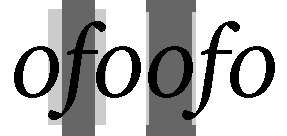
Some of the metrics are described in the image. The central dark rectangles cover the logical
horizontalAdvance()
of each character. The outer pale rectangles cover the
leftBearing()
and
rightBearing()
of each character. Notice that the bearings of “f” in this particular font are both negative, while the bearings of “o” are both positive.
警告
This function will produce incorrect results for Arabic characters or non-spacing marks in the middle of a string, as the glyph shaping and positioning of marks that happens when processing strings cannot be taken into account. When implementing an interactive text control, use
QTextLayout
代替。
另请参阅
PySide2.QtGui.QFontMetrics.
horizontalAdvance
(
arg__1
[
,
len=-1
]
)

arg__1 – unicode
len
–
int
int
Returns the horizontal advance in pixels of the first
len
characters of
text
。若
len
is negative (the default), the entire string is used.
This is the distance appropriate for drawing a subsequent character after
text
.
另请参阅
PySide2.QtGui.QFontMetrics.
inFont
(
arg__1
)

arg__1
–
QChar
bool
返回
true
if character
ch
is a valid character in the font; otherwise returns
false
.
PySide2.QtGui.QFontMetrics.
inFontUcs4
(
ucs4
)

ucs4
–
uint
bool
返回
true
if the character
ucs4
encoded in UCS-4/UTF-32 is a valid character in the font; otherwise returns
false
.
PySide2.QtGui.QFontMetrics.
leading
(
)

int
Returns the leading of the font.
This is the natural inter-line spacing.
另请参阅
PySide2.QtGui.QFontMetrics.
leftBearing
(
arg__1
)

arg__1
–
QChar
int
Returns the left bearing of character
ch
in the font.
The left bearing is the right-ward distance of the left-most pixel of the character from the logical origin of the character. This value is negative if the pixels of the character extend to the left of the logical origin.
见
horizontalAdvance()
for a graphical description of this metric.
PySide2.QtGui.QFontMetrics.
lineSpacing
(
)

int
Returns the distance from one base line to the next.
PySide2.QtGui.QFontMetrics.
lineWidth
(
)

int
Returns the width of the underline and strikeout lines, adjusted for the point size of the font.
PySide2.QtGui.QFontMetrics.
maxWidth
(
)

int
Returns the width of the widest character in the font.
PySide2.QtGui.QFontMetrics.
minLeftBearing
(
)

int
Returns the minimum left bearing of the font.
This is the smallest
leftBearing
(char) of all characters in the font.
Note that this function can be very slow if the font is large.
PySide2.QtGui.QFontMetrics.
minRightBearing
(
)

int
Returns the minimum right bearing of the font.
This is the smallest
rightBearing
(char) of all characters in the font.
Note that this function can be very slow if the font is large.
PySide2.QtGui.QFontMetrics.
__ne__
(
other
)

other
–
QFontMetrics
bool
返回
true
if
other
is not equal to this object; otherwise returns
false
.
Two font metrics are considered equal if they were constructed from the same
QFont
and the paint devices they were constructed for are considered compatible.
另请参阅
operator==()
PySide2.QtGui.QFontMetrics.
__eq__
(
other
)

other
–
QFontMetrics
bool
返回
true
if
other
is equal to this object; otherwise returns
false
.
Two font metrics are considered equal if they were constructed from the same
QFont
and the paint devices they were constructed for are considered compatible.
另请参阅
operator!=()
PySide2.QtGui.QFontMetrics.
overlinePos
(
)

int
Returns the distance from the base line to where an overline should be drawn.
PySide2.QtGui.QFontMetrics.
rightBearing
(
arg__1
)

arg__1
–
QChar
int
Returns the right bearing of character
ch
in the font.
The right bearing is the left-ward distance of the right-most pixel of the character from the logical origin of a subsequent character. This value is negative if the pixels of the character extend to the right of the
horizontalAdvance()
of the character.
见
horizontalAdvance()
for a graphical description of this metric.
PySide2.QtGui.QFontMetrics.
size
(
flags
,
str
[
,
tabstops=0
[
,
tabarray=None
]
]
)

flags
–
int
str – unicode
tabstops
–
int
tabarray
–
int
QSize
Returns the size in pixels of
text
.
flags
argument is the bitwise OR of the following flags:
TextSingleLine
ignores newline characters.
TextExpandTabs
expands tabs (see below)
TextShowMnemonic
interprets “&x” as
x
; i.e., underlined.
TextWordWrap
breaks the text to fit the rectangle.
若
TextExpandTabs
is set in
flags
, then: if
tabArray
is non-null, it specifies a 0-terminated sequence of pixel-positions for tabs; otherwise if
tabStops
is non-zero, it is used as the tab spacing (in pixels).
Newline characters are processed as linebreaks.
Despite the different actual character heights, the heights of the bounding rectangles of “Yes” and “yes” are the same.
另请参阅
PySide2.QtGui.QFontMetrics.
strikeOutPos
(
)

int
Returns the distance from the base line to where the strikeout line should be drawn.
PySide2.QtGui.QFontMetrics.
swap
(
other
)

other
–
QFontMetrics
Swaps this font metrics instance with
other
。此函数非常快,且从不失败。
PySide2.QtGui.QFontMetrics.
tightBoundingRect
(
text
)

text – unicode
QRect
Returns a tight bounding rectangle around the characters in the string specified by
text
. The bounding rectangle always covers at least the set of pixels the text would cover if drawn at (0, 0).
Note that the bounding rectangle may extend to the left of (0, 0), e.g. for italicized fonts, and that the width of the returned rectangle might be different than what the
horizontalAdvance()
method returns.
If you want to know the advance width of the string (to lay out a set of strings next to each other), use
horizontalAdvance()
代替。
Newline characters are processed as normal characters, not as linebreaks.
警告
Calling this method is very slow on Windows.
PySide2.QtGui.QFontMetrics.
underlinePos
(
)

int
Returns the distance from the base line to where an underscore should be drawn.
PySide2.QtGui.QFontMetrics.
width
(
arg__1
[
,
len=-1
]
)

arg__1 – unicode
len
–
int
int
注意
此函数被弃用。
Returns the width in pixels of the first
len
characters of
text
。若
len
is negative (the default), the entire string is used.
Note that this value is
not
等于
boundingRect()
.;
boundingRect()
returns a rectangle describing the pixels this string will cover whereas returns the distance to where the next string should be drawn.
in Qt 5.11. Use
horizontalAdvance()
代替。
PySide2.QtGui.QFontMetrics.
width
(
arg__1
,
len
,
flags
)

arg__1 – unicode
len
–
int
flags
–
int
int
注意
此函数被弃用。
PySide2.QtGui.QFontMetrics.
widthChar
(
arg__1
)

arg__1
–
QChar
int
注意
此函数被弃用。
这是重载函数。
Returns the logical width of character
ch
in pixels. This is a distance appropriate for drawing a subsequent character after
ch
.
Some of the metrics are described in the image to the right. The central dark rectangles cover the logical of each character. The outer pale rectangles cover the
leftBearing()
and
rightBearing()
of each character. Notice that the bearings of “f” in this particular font are both negative, while the bearings of “o” are both positive.
in Qt 5.11. Use
horizontalAdvance()
代替。
警告
This function will produce incorrect results for Arabic characters or non-spacing marks in the middle of a string, as the glyph shaping and positioning of marks that happens when processing strings cannot be taken into account. When implementing an interactive text control, use
QTextLayout
代替。
PySide2.QtGui.QFontMetrics.
xHeight
(
)

int
Returns the ‘x’ height of the font. This is often but not always the same as the height of the character ‘x’.
