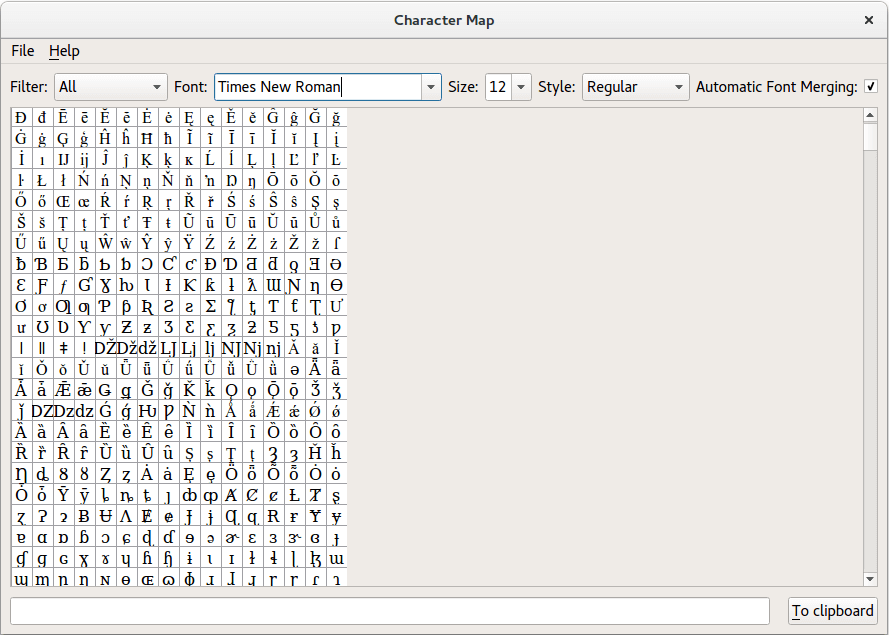
In the constructor, we set up the window’s central widget and fill it with some standard widgets (two comboboxes, a line edit, and a push button). We also construct a CharacterWidget custom widget, and add a
QScrollArea
so that we can view its contents:
Q_DECLARE_METATYPE(QFontComboBox::FontFilter)
MainWindow::MainWindow(QWidget *parent)
    : QMainWindow(parent)
{
    QMenu *fileMenu = menuBar()->addMenu(tr("File"));
    fileMenu->addAction(tr("Quit"), this, &QWidget::close);
    QMenu *helpMenu = menuBar()->addMenu(tr("&Help"));
    helpMenu->addAction(tr("Show Font Info"), this, &MainWindow::showInfo);
    helpMenu->addAction(tr("About &Qt"), qApp, &QApplication::aboutQt);
    QWidget *centralWidget = new QWidget;
    QLabel *filterLabel = new QLabel(tr("Filter:"));
    filterCombo = new QComboBox;
    filterCombo->addItem(tr("All"), QVariant::fromValue(QFontComboBox::AllFonts));
    filterCombo->addItem(tr("Scalable"), QVariant::fromValue(QFontComboBox::ScalableFonts));
    filterCombo->addItem(tr("Monospaced"), QVariant::fromValue(QFontComboBox::MonospacedFonts));
    filterCombo->addItem(tr("Proportional"), QVariant::fromValue(QFontComboBox::ProportionalFonts));
    filterCombo->setCurrentIndex(0);
    connect(filterCombo, QOverload<int>::of(&QComboBox::currentIndexChanged),
            this, &MainWindow::filterChanged);
    QLabel *fontLabel = new QLabel(tr("Font:"));
    fontCombo = new QFontComboBox;
    QLabel *sizeLabel = new QLabel(tr("Size:"));
    sizeCombo = new QComboBox;
    QLabel *styleLabel = new QLabel(tr("Style:"));
    styleCombo = new QComboBox;
    QLabel *fontMergingLabel = new QLabel(tr("Automatic Font Merging:"));
    fontMerging = new QCheckBox;
    fontMerging->setChecked(true);
    scrollArea = new QScrollArea;
    characterWidget = new CharacterWidget;
    scrollArea->setWidget(characterWidget);
QScrollArea
provides a viewport onto the
CharacterWidget
when we set its widget and handles much of the work needed to provide a scrolling viewport.
The font combo box is automatically popuplated with a list of available fonts. We list the available styles for the current font in the style combobox using the following function:
findStyles(fontCombo->currentFont());
The line edit and push button are used to supply text to the clipboard:
    lineEdit = new QLineEdit;
    lineEdit->setClearButtonEnabled(true);
#ifndef QT_NO_CLIPBOARD
    QPushButton *clipboardButton = new QPushButton(tr("&To clipboard"));
We also obtain a clipboard object so that we can send text entered by the user to other applications.
Most of the signals emitted in the example come from standard widgets. We connect these signals to slots in this class, and to the slots provided by other widgets.
connect(fontCombo, &QFontComboBox::currentFontChanged,
        this, &MainWindow::findStyles);
connect(fontCombo, &QFontComboBox::currentFontChanged,
        this, &MainWindow::findSizes);
connect(fontCombo, &QFontComboBox::currentFontChanged,
        characterWidget, &CharacterWidget::updateFont);
connect(sizeCombo, &QComboBox::currentTextChanged,
        characterWidget, &CharacterWidget::updateSize);
connect(styleCombo, &QComboBox::currentTextChanged,
        characterWidget, &CharacterWidget::updateStyle);
The font combobox’s
currentFontChanged()
signal is connected to the findStyles() function so that the list of available styles can be shown for each font that is used. Since both the font and the style can be changed by the user, the font combobox’s currentFontChanged() signal and the style combobox’s
currentIndexChanged()
are connected directly to the character widget.
The final two connections allow characters to be selected in the character widget, and text to be inserted into the clipboard:
    connect(characterWidget, &CharacterWidget::characterSelected,
            this, &MainWindow::insertCharacter);
#ifndef QT_NO_CLIPBOARD
    connect(clipboardButton, &QAbstractButton::clicked, this, &MainWindow::updateClipboard);
#endif
The character widget emits the characterSelected() custom signal when the user clicks on a character, and this is handled by the insertCharacter() function in this class. The clipboard is changed when the push button emits the clicked() signal, and we handle this with the updateClipboard() function.
The remaining code in the constructor sets up the layout of the central widget, and provides a window title:
    QHBoxLayout *controlsLayout = new QHBoxLayout;
    controlsLayout->addWidget(filterLabel);
    controlsLayout->addWidget(filterCombo, 1);
    controlsLayout->addWidget(fontLabel);
    controlsLayout->addWidget(fontCombo, 1);
    controlsLayout->addWidget(sizeLabel);
    controlsLayout->addWidget(sizeCombo, 1);
    controlsLayout->addWidget(styleLabel);
    controlsLayout->addWidget(styleCombo, 1);
    controlsLayout->addWidget(fontMergingLabel);
    controlsLayout->addWidget(fontMerging, 1);
    controlsLayout->addStretch(1);
    QHBoxLayout *lineLayout = new QHBoxLayout;
    lineLayout->addWidget(lineEdit, 1);
    lineLayout->addSpacing(12);
#ifndef QT_NO_CLIPBOARD
    lineLayout->addWidget(clipboardButton);
#endif
    QVBoxLayout *centralLayout = new QVBoxLayout;
    centralLayout->addLayout(controlsLayout);
    centralLayout->addWidget(scrollArea, 1);
    centralLayout->addSpacing(4);
    centralLayout->addLayout(lineLayout);
    centralWidget->setLayout(centralLayout);
    setCentralWidget(centralWidget);
    setWindowTitle(tr("Character Map"));
}
The font combobox is automatically populated with a list of available font families. The styles that can be used with each font are found by the findStyles() function. This function is called whenever the user selects a different font in the font combobox.
void MainWindow::findStyles(const QFont &font)
{
    QFontDatabase fontDatabase;
    QString currentItem = styleCombo->currentText();
    styleCombo->clear();
We begin by recording the currently selected style, and we clear the style combobox so that we can insert the styles associated with the current font family.
    const QStringList styles = fontDatabase.styles(font.family());
    for (const QString &style : styles)
        styleCombo->addItem(style);
    int styleIndex = styleCombo->findText(currentItem);
    if (styleIndex == -1)
        styleCombo->setCurrentIndex(0);
    else
        styleCombo->setCurrentIndex(styleIndex);
}
We use the font database to collect the styles that are available for the current font, and insert them into the style combobox. The current item is reset if the original style is not available for this font.
The last two functions are slots that respond to signals from the character widget and the main window’s push button. The insertCharacter() function is used to insert characters from the character widget when the user clicks a character:
void MainWindow::insertCharacter(const QString &character)
{
    lineEdit->insert(character);
}
The character is inserted into the line edit at the current cursor position.
The main window’s “To clipboard” push button is connected to the updateClipboard() function so that, when it is clicked, the clipboard is updated to contain the contents of the line edit:
#ifndef QT_NO_CLIPBOARD
void MainWindow::updateClipboard()
{
    QGuiApplication::clipboard()->setText(lineEdit->text(), QClipboard::Clipboard);
    QGuiApplication::clipboard()->setText(lineEdit->text(), QClipboard::Selection);
}
#endif
class FontInfoDialog : public QDialog
{
public:
    explicit FontInfoDialog(QWidget *parent = nullptr);
private:
    QString text() const;
};
FontInfoDialog::FontInfoDialog(QWidget *parent) : QDialog(parent)
{
    setWindowFlags(windowFlags() & ~Qt::WindowContextHelpButtonHint);
    QVBoxLayout *mainLayout = new QVBoxLayout(this);
    QPlainTextEdit *textEdit = new QPlainTextEdit(text(), this);
    textEdit->setReadOnly(true);
    textEdit->setFont(QFontDatabase::systemFont(QFontDatabase::FixedFont));
    mainLayout->addWidget(textEdit);
    QDialogButtonBox *buttonBox = new QDialogButtonBox(QDialogButtonBox::Close, this);
    connect(buttonBox, &QDialogButtonBox::rejected, this, &QDialog::reject);
    mainLayout->addWidget(buttonBox);
}
QString FontInfoDialog::text() const
{
    QString text;
    QTextStream str(&text);
    const QFont defaultFont = QFontDatabase::systemFont(QFontDatabase::GeneralFont);
    const QFont fixedFont = QFontDatabase::systemFont(QFontDatabase::FixedFont);
    const QFont titleFont = QFontDatabase::systemFont(QFontDatabase::TitleFont);
    const QFont smallestReadableFont = QFontDatabase::systemFont(QFontDatabase::SmallestReadableFont);
    str << "Qt " << QT_VERSION_STR << " on " << QGuiApplication::platformName()
        << ", " << logicalDpiX() << "DPI";
    if (!qFuzzyCompare(devicePixelRatioF(), qreal(1)))
        str  << ", device pixel ratio: " << devicePixelRatioF();
    str << "\n\nDefault font : " << defaultFont.family() << ", " << defaultFont.pointSizeF() << "pt\n"
        << "Fixed font   : " << fixedFont.family() << ", " << fixedFont.pointSizeF() << "pt\n"
        << "Title font   : " << titleFont.family() << ", " << titleFont.pointSizeF() << "pt\n"
        << "Smallest font: " << smallestReadableFont.family() << ", " << smallestReadableFont.pointSizeF() << "pt\n";
    return text;
}
void MainWindow::showInfo()
{
    const QRect screenGeometry = screen()->geometry();
    FontInfoDialog *dialog = new FontInfoDialog(this);
    dialog->setWindowTitle(tr("Fonts"));
    dialog->setAttribute(Qt::WA_DeleteOnClose);
    dialog->resize(screenGeometry.width() / 4, screenGeometry.height() / 4);
    dialog->show();
}
We copy all the text from the line edit to the clipboard, but we do not clear the line edit.
范例工程 @ code.qt.io