代码编辑器范例展示如何创建拥有行号和突显当前行的简单编辑器。
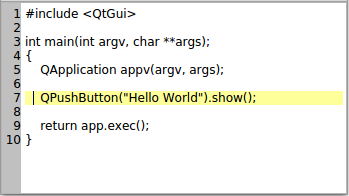
从图像可以看出,编辑器在编辑区域左侧区域显示行号。编辑器将突显包含光标的行。
实现编辑器在
CodeEditor,这是 Widget 继承QPlainTextEdit。保持单独 Widget 在CodeEditor(LineNumberArea) 以在其中绘制行号。
QPlainTextEdit继承自QAbstractScrollArea, and editing takes place within itsviewport()‘s margins. We make room for our line number area by setting the left margin of the viewport to the size we need to draw the line numbers.When it comes to editing code, we prefer
QPlainTextEditoverQTextEditbecause it is optimized for handling plain text. See theQPlainTextEdit类描述了解细节。
QPlainTextEditlets us add selections in addition to the selection the user can make with the mouse or keyboard. We use this functionality to highlight the current line. More on this later.We will now move on to the definitions and implementations of
CodeEditorandLineNumberArea. Let’s start with theLineNumberArea类。
We paint the line numbers on this widget, and place it over the
CodeEditor‘sviewport()‘s left margin area.We need to use protected functions in
QPlainTextEditwhile painting the area. So to keep things simple, we paint the area in theCodeEditorclass. The area also asks the editor to calculate its size hint.Note that we could simply paint the line numbers directly on the code editor, and drop the LineNumberArea class. However, the
QWidgetclass helps us toscroll()its contents. Also, having a separate widget is the right choice if we wish to extend the editor with breakpoints or other code editor features. The widget would then help in the handling of mouse events.class LineNumberArea : public QWidget { public: LineNumberArea(CodeEditor *editor) : QWidget(editor), codeEditor(editor) {} QSize sizeHint() const override { return QSize(codeEditor->lineNumberAreaWidth(), 0); } protected: void paintEvent(QPaintEvent *event) override { codeEditor->lineNumberAreaPaintEvent(event); } private: CodeEditor *codeEditor; };
Here is the code editor’s class definition:
class CodeEditor : public QPlainTextEdit
{
    Q_OBJECT
public:
    CodeEditor(QWidget *parent = nullptr);
    void lineNumberAreaPaintEvent(QPaintEvent *event);
    int lineNumberAreaWidth();
protected:
    void resizeEvent(QResizeEvent *event) override;
private slots:
    void updateLineNumberAreaWidth(int newBlockCount);
    void highlightCurrentLine();
    void updateLineNumberArea(const QRect &rect, int dy);
private:
    QWidget *lineNumberArea;
};
In the editor we resize and draw the line numbers on the
LineNumberArea. We need to do this when the number of lines in the editor changes, and when the editor’s viewport() is scrolled. Of course, it is also done when the editor’s size changes. We do this inupdateLineNumberWidth()andupdateLineNumberArea().Whenever, the cursor’s position changes, we highlight the current line in
highlightCurrentLine().
We will now go through the code editors implementation, starting off with the constructor.
CodeEditor::CodeEditor(QWidget *parent) : QPlainTextEdit(parent)
{
    lineNumberArea = new LineNumberArea(this);
    connect(this, &CodeEditor::blockCountChanged, this, &CodeEditor::updateLineNumberAreaWidth);
    connect(this, &CodeEditor::updateRequest, this, &CodeEditor::updateLineNumberArea);
    connect(this, &CodeEditor::cursorPositionChanged, this, &CodeEditor::highlightCurrentLine);
    updateLineNumberAreaWidth(0);
    highlightCurrentLine();
}
In the constructor we connect our slots to signals in
QPlainTextEdit. It is necessary to calculate the line number area width and highlight the first line when the editor is created.int CodeEditor::lineNumberAreaWidth() { int digits = 1; int max = qMax(1, blockCount()); while (max >= 10) { max /= 10; ++digits; } int space = 3 + fontMetrics().horizontalAdvance(QLatin1Char('9')) * digits; return space; }
lineNumberAreaWidth()function calculates the width of theLineNumberAreawidget. We take the number of digits in the last line of the editor and multiply that with the maximum width of a digit.void CodeEditor::updateLineNumberAreaWidth(int /* newBlockCount */) { setViewportMargins(lineNumberAreaWidth(), 0, 0, 0); }When we update the width of the line number area, we simply call
setViewportMargins().void CodeEditor::updateLineNumberArea(const QRect &rect, int dy) { if (dy) lineNumberArea->scroll(0, dy); else lineNumberArea->update(0, rect.y(), lineNumberArea->width(), rect.height()); if (rect.contains(viewport()->rect())) updateLineNumberAreaWidth(0); }This slot is invoked when the editors viewport has been scrolled. The
QRectgiven as argument is the part of the editing area that is do be updated (redrawn).dyholds the number of pixels the view has been scrolled vertically.void CodeEditor::resizeEvent(QResizeEvent *e) { QPlainTextEdit::resizeEvent(e); QRect cr = contentsRect(); lineNumberArea->setGeometry(QRect(cr.left(), cr.top(), lineNumberAreaWidth(), cr.height())); }When the size of the editor changes, we also need to resize the line number area.
void CodeEditor::highlightCurrentLine()
{
    QList<QTextEdit::ExtraSelection> extraSelections;
    if (!isReadOnly()) {
        QTextEdit::ExtraSelection selection;
        QColor lineColor = QColor(Qt::yellow).lighter(160);
        selection.format.setBackground(lineColor);
        selection.format.setProperty(QTextFormat::FullWidthSelection, true);
        selection.cursor = textCursor();
        selection.cursor.clearSelection();
        extraSelections.append(selection);
    }
    setExtraSelections(extraSelections);
}
When the cursor position changes, we highlight the current line, i.e., the line containing the cursor.
QPlainTextEditgives the possibility to have more than one selection at the same time. we can set the character format (QTextCharFormat) of these selections. We clear the cursors selection before setting the new new QPlainTextEdit::ExtraSelection, else several lines would get highlighted when the user selects multiple lines with the mouse.One sets the selection with a text cursor. When using the FullWidthSelection property, the current cursor text block (line) will be selected. If you want to select just a portion of the text block, the cursor should be moved with
movePosition()from a position set withsetPosition().void CodeEditor::lineNumberAreaPaintEvent(QPaintEvent *event) { QPainter painter(lineNumberArea); painter.fillRect(event->rect(), Qt::lightGray);
lineNumberAreaPaintEvent()is called fromLineNumberAreawhenever it receives a paint event. We start off by painting the widget’s background.QTextBlock block = firstVisibleBlock(); int blockNumber = block.blockNumber(); int top = qRound(blockBoundingGeometry(block).translated(contentOffset()).top()); int bottom = top + qRound(blockBoundingRect(block).height());We will now loop through all visible lines and paint the line numbers in the extra area for each line. Notice that in a plain text edit each line will consist of one
QTextBlock; though, if line wrapping is enabled, a line may span several rows in the text edit’s viewport.We get the top and bottom y-coordinate of the first text block, and adjust these values by the height of the current text block in each iteration in the loop.
    while (block.isValid() && top <= event->rect().bottom()) {
        if (block.isVisible() && bottom >= event->rect().top()) {
            QString number = QString::number(blockNumber + 1);
            painter.setPen(Qt::black);
            painter.drawText(0, top, lineNumberArea->width(), fontMetrics().height(),
                             Qt::AlignRight, number);
        }
        block = block.next();
        top = bottom;
        bottom = top + qRound(blockBoundingRect(block).height());
        ++blockNumber;
    }
}
Notice that we check if the block is visible in addition to check if it is in the areas viewport - a block can, for example, be hidden by a window placed over the text edit.
No self-respecting code editor is without a syntax highligther; the 句法高亮范例 shows how to create one.
In addition to line numbers, you can add more to the extra area, for instance, break points.
QSyntaxHighlightergives the possibility to add user data to each text block withsetCurrentBlockUserData(). This can be used to implement parenthesis matching. In thehighlightCurrentLine(), the data of the currentBlock() can be fetched withuserData(). Matching parentheses can be highlighted with an extra selection. The “Matching Parentheses withQSyntaxHighlighter” article in Qt Quarterly 31 implements this. You find it here: http://doc.qt.io/archives/qq/ .
