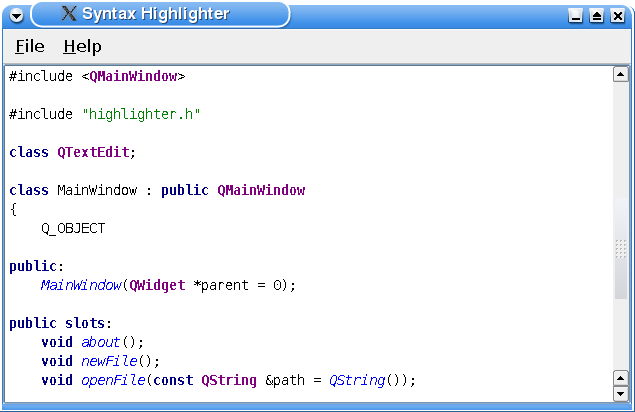
When subclassing the
QSyntaxHighlighter
class you must pass the parent parameter to the base class constructor. The parent is the text document upon which the syntax highlighting will be applied. In this example, we have also chosen to define our highlighting rules in the constructor:
Highlighter::Highlighter(QTextDocument *parent)
    : QSyntaxHighlighter(parent)
{
    HighlightingRule rule;
    keywordFormat.setForeground(Qt::darkBlue);
    keywordFormat.setFontWeight(QFont::Bold);
    const QString keywordPatterns[] = {
        QStringLiteral("\\bchar\\b"), QStringLiteral("\\bclass\\b"), QStringLiteral("\\bconst\\b"),
        QStringLiteral("\\bdouble\\b"), QStringLiteral("\\benum\\b"), QStringLiteral("\\bexplicit\\b"),
        QStringLiteral("\\bfriend\\b"), QStringLiteral("\\binline\\b"), QStringLiteral("\\bint\\b"),
        QStringLiteral("\\blong\\b"), QStringLiteral("\\bnamespace\\b"), QStringLiteral("\\boperator\\b"),
        QStringLiteral("\\bprivate\\b"), QStringLiteral("\\bprotected\\b"), QStringLiteral("\\bpublic\\b"),
        QStringLiteral("\\bshort\\b"), QStringLiteral("\\bsignals\\b"), QStringLiteral("\\bsigned\\b"),
        QStringLiteral("\\bslots\\b"), QStringLiteral("\\bstatic\\b"), QStringLiteral("\\bstruct\\b"),
        QStringLiteral("\\btemplate\\b"), QStringLiteral("\\btypedef\\b"), QStringLiteral("\\btypename\\b"),
        QStringLiteral("\\bunion\\b"), QStringLiteral("\\bunsigned\\b"), QStringLiteral("\\bvirtual\\b"),
        QStringLiteral("\\bvoid\\b"), QStringLiteral("\\bvolatile\\b"), QStringLiteral("\\bbool\\b")
    };
    for (const QString &pattern : keywordPatterns) {
        rule.pattern = QRegularExpression(pattern);
        rule.format = keywordFormat;
        highlightingRules.append(rule);
    }
First we define a keyword rule which recognizes the most common C++ keywords. We give the
keywordFormat
a bold, dark blue font. For each keyword, we assign the keyword and the specified format to a HighlightingRule object and append the object to our list of rules.
classFormat.setFontWeight(QFont::Bold);
classFormat.setForeground(Qt::darkMagenta);
rule.pattern = QRegularExpression(QStringLiteral("\\bQ[A-Za-z]+\\b"));
rule.format = classFormat;
highlightingRules.append(rule);
quotationFormat.setForeground(Qt::darkGreen);
rule.pattern = QRegularExpression(QStringLiteral("\".*\""));
rule.format = quotationFormat;
highlightingRules.append(rule);
functionFormat.setFontItalic(true);
functionFormat.setForeground(Qt::blue);
rule.pattern = QRegularExpression(QStringLiteral("\\b[A-Za-z0-9_]+(?=\\()"));
rule.format = functionFormat;
highlightingRules.append(rule);
Then we create a format that we will apply to Qt class names. The class names will be rendered with a dark magenta color and a bold style. We specify a string pattern that is actually a regular expression capturing all Qt class names. Then we assign the regular expression and the specified format to a HighlightingRule object and append the object to our list of rules.
We also define highlighting rules for quotations and functions using the same approach: The patterns have the form of regular expressions and are stored in HighlightingRule objects with the associated format.
    singleLineCommentFormat.setForeground(Qt::red);
    rule.pattern = QRegularExpression(QStringLiteral("//[^\n]*"));
    rule.format = singleLineCommentFormat;
    highlightingRules.append(rule);
    multiLineCommentFormat.setForeground(Qt::red);
    commentStartExpression = QRegularExpression(QStringLiteral("/\\*"));
    commentEndExpression = QRegularExpression(QStringLiteral("\\*/"));
}
The C++ language has two variations of comments: The single line comment (
//
) and the multiline comment (
/*...*
/
). The single line comment can easily be defined through a highlighting rule similar to the previous ones. But the multiline comment needs special care due to the design of the
QSyntaxHighlighter
类。
After a
QSyntaxHighlighter
object is created, its
highlightBlock()
function will be called automatically whenever it is necessary by the rich text engine, highlighting the given text block. The problem appears when a comment spans several text blocks. We will take a closer look at how this problem can be solved when reviewing the implementation of the
Highlighter::highlightBlock()
function. At this point we only specify the multiline comment’s color.
void Highlighter::highlightBlock(const QString &text)
{
    for (const HighlightingRule &rule : qAsConst(highlightingRules)) {
        QRegularExpressionMatchIterator matchIterator = rule.pattern.globalMatch(text);
        while (matchIterator.hasNext()) {
            QRegularExpressionMatch match = matchIterator.next();
            setFormat(match.capturedStart(), match.capturedLength(), rule.format);
        }
    }
The highlightBlock() function is called automatically whenever it is necessary by the rich text engine, i.e. when there are text blocks that have changed.
First we apply the syntax highlighting rules that we stored in the
highlightingRules
vector. For each rule (i.e. for each HighlightingRule object) we search for the pattern in the given text block using the
indexOf()
function. When the first occurrence of the pattern is found, we use the
capturedLength()
function to determine the string that will be formatted.
capturedLength()
returns the length of the last matched string, or 0 if there was no match.
To perform the actual formatting the
QSyntaxHighlighter
class provides the
setFormat()
function. This function operates on the text block that is passed as argument to the
highlightBlock()
function. The specified format is applied to the text from the given start position for the given length. The formatting properties set in the given format are merged at display time with the formatting information stored directly in the document. Note that the document itself remains unmodified by the format set through this function.
This process is repeated until the last occurrence of the pattern in the current text block is found.
To deal with constructs that can span several text blocks (like the C++ multiline comment), it is necessary to know the end state of the previous text block (e.g. “in comment”). Inside your
highlightBlock()
implementation you can query the end state of the previous text block using the
previousBlockState()
function. After parsing the block you can save the last state using
setCurrentBlockState()
.
previousBlockState()
function return an int value. If no state is set, the returned value is -1. You can designate any other value to identify any given state using the
setCurrentBlockState()
function. Once the state is set, the
QTextBlock
keeps that value until it is set again or until the corresponding paragraph of text is deleted.
In this example we have chosen to use 0 to represent the “not in comment” state, and 1 for the “in comment” state. When the stored syntax highlighting rules are applied we initialize the current block state to 0.
int startIndex = 0;
if (previousBlockState() != 1)
    startIndex = text.indexOf(commentStartExpression);
If the previous block state was “in comment” (
												previousBlockState()


												==


												1
), we start the search for an end expression at the beginning of the text block. If the previousBlockState() returns 0, we start the search at the location of the first occurrence of a start expression.
    while (startIndex >= 0) {
        QRegularExpressionMatch match = commentEndExpression.match(text, startIndex);
        int endIndex = match.capturedStart();
        int commentLength = 0;
        if (endIndex == -1) {
            setCurrentBlockState(1);
            commentLength = text.length() - startIndex;
        } else {
            commentLength = endIndex - startIndex
                            + match.capturedLength();
        }
        setFormat(startIndex, commentLength, multiLineCommentFormat);
        startIndex = text.indexOf(commentStartExpression, startIndex + commentLength);
    }
}
When an end expression is found, we calculate the length of the comment and apply the multiline comment format. Then we search for the next occurrence of the start expression and repeat the process. If no end expression can be found in the current text block we set the current block state to 1, i.e. “in comment”.
This completes the
Highlighter
class implementation; it is now ready for use.