QTextBlockclass provides a container for text fragments in aQTextDocument. 更多 …
def
__eq__
(o)
def
__iter__
()
def
__lt__
(o)
def
__ne__
(o)
def
begin
()
def
blockFormat
()
def
blockFormatIndex
()
def
blockNumber
()
def
charFormat
()
def
charFormatIndex
()
def
clearLayout
()
def
contains
(position)
def
document
()
def
end
()
def
firstLineNumber
()
def
fragmentIndex
()
def
isValid
()
def
isVisible
()
def
layout
()
def
length
()
def
lineCount
()
def
next
()
def
position
()
def
上一
()
def
revision
()
def
setLineCount
(count)
def
setRevision
(rev)
def
setUserData
(data)
def
setUserState
(state)
def
setVisible
(visible)
def
text
()
def
textDirection
()
def
textFormats
()
def
textList
()
def
userData
()
def
userState
()
文本块将块或文本段落封装在
QTextDocument.QTextBlockprovides read-only access to the block/paragraph structure of QTextDocuments. It is mainly of use if you want to implement your own layouts for the visual representation of aQTextDocument, or if you want to iterate over a document and write out the contents in your own custom format.Text blocks are created by their parent documents. If you need to create a new text block, or modify the contents of a document while examining its contents, use the cursor-based interface provided by
QTextCursor代替。各文本块位于特定
position()在document(). The contents of the block can be obtained by using thetext()function. Thelength()function determines the block’s size within the document (including formatting characters). The visual properties of the block are determined by its textlayout(), itscharFormat(), and itsblockFormat().
next()andprevious()functions enable iteration over consecutive valid blocks in a document under the condition that the document is not modified by other means during the iteration process. Note that, although blocks are returned in sequence, adjacent blocks may come from different places in the document structure. The validity of a block can be determined by callingisValid().
QTextBlockprovides comparison operators to make it easier to work with blocks:operator==()compares two block for equality,operator!=()compares two blocks for inequality, andoperatordetermines whether a block precedes another in the same document.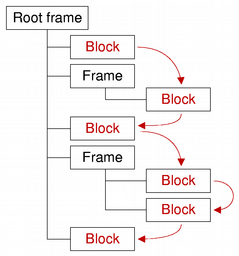
QTextBlock

QTextBlock(o)
- param o
拷贝
other
text block’s attributes to this text block.
PySide2.QtGui.QTextBlock.
__iter__
(
)

PyObject
PySide2.QtGui.QTextBlock.
begin
(
)

Returns a text block iterator pointing to the beginning of the text block.
另请参阅
PySide2.QtGui.QTextBlock.
blockFormat
(
)

返回
QTextBlockFormat
that describes block-specific properties.
另请参阅
PySide2.QtGui.QTextBlock.
blockFormatIndex
(
)

int
Returns an index into the document’s internal list of block formats for the text block’s format.
另请参阅
PySide2.QtGui.QTextBlock.
blockNumber
(
)

int
返回此块的编号,或 -1 若块无效。
另请参阅
PySide2.QtGui.QTextBlock.
charFormat
(
)

返回
QTextCharFormat
that describes the block’s character format. The block’s character format is used when inserting text into an empty block.
另请参阅
PySide2.QtGui.QTextBlock.
charFormatIndex
(
)

int
Returns an index into the document’s internal list of character formats for the text block’s character format.
另请参阅
PySide2.QtGui.QTextBlock.
clearLayout
(
)

清零
QTextLayout
that is used to lay out and display the block’s contents.
另请参阅
PySide2.QtGui.QTextBlock.
contains
(
position
)

position
–
int
bool
返回
true
若给定
position
位于文本块内;否则返回
false
.
PySide2.QtGui.QTextBlock.
document
(
)

返回此文本块所属的文本文档,或
None
若文本块不属于任何文档。
PySide2.QtGui.QTextBlock.
end
(
)

返回指向文本块末尾的文本块迭代器。
另请参阅
PySide2.QtGui.QTextBlock.
firstLineNumber
(
)

int
Returns the first line number of this block, or -1 if the block is invalid. Unless the layout supports it, the line number is identical to the block number.
另请参阅
PySide2.QtGui.QTextBlock.
fragmentIndex
(
)

int
PySide2.QtGui.QTextBlock.
isValid
(
)

bool
返回
true
若此文本块有效;否则返回
false
.
PySide2.QtGui.QTextBlock.
isVisible
(
)

bool
返回
true
若块可见;否则返回
false
.
另请参阅
PySide2.QtGui.QTextBlock.
layout
(
)

返回
QTextLayout
that is used to lay out and display the block’s contents.
注意:返回的
QTextLayout
object can only be modified from the documentChanged implementation of a
QAbstractTextDocumentLayout
subclass. Any changes applied from the outside cause undefined behavior.
另请参阅
PySide2.QtGui.QTextBlock.
length
(
)

int
返回块的长度 (以字符为单位)。
注意
The length returned includes all formatting characters, for example, newline.
PySide2.QtGui.QTextBlock.
lineCount
(
)

int
Returns the line count. Not all document layouts support this feature.
另请参阅
PySide2.QtGui.QTextBlock.
next
(
)

返回此块之后的文档文本块;或空文本块若这是最后一个。
注意:下一个块可能与此块位于不同的框架 (或表格) 中。
另请参阅
PySide2.QtGui.QTextBlock.
__ne__
(
o
)

o
–
QTextBlock
bool
返回
true
若此文本块不同于
other
文本块。
PySide2.QtGui.QTextBlock.
__lt__
(
o
)

o
–
QTextBlock
bool
PySide2.QtGui.QTextBlock.
__eq__
(
o
)

o
–
QTextBlock
bool
返回
true
若此文本块相同如
other
文本块。
PySide2.QtGui.QTextBlock.
position
(
)

int
Returns the index of the block’s first character within the document.
PySide2.QtGui.QTextBlock.
上一
(
)

Returns the text block in the document before this block, or an empty text block if this is the first one.
Note that the previous block may be in a different frame or table to this block.
PySide2.QtGui.QTextBlock.
revision
(
)

int
返回块修订。
另请参阅
PySide2.QtGui.QTextBlock.
setLineCount
(
count
)

count
–
int
把行数设为
count
.
另请参阅
PySide2.QtGui.QTextBlock.
setRevision
(
rev
)

rev
–
int
把块修订设为
rev
.
另请参阅
PySide2.QtGui.QTextBlock.
setUserData
(
data
)

data
–
QTextBlockUserData
附加给定
data
对象到文本块。
QTextBlockUserData
can be used to store custom settings. The ownership is passed to the underlying text document, i.e. the provided
QTextBlockUserData
object will be deleted if the corresponding text block gets deleted. The user data object is not stored in the undo history, so it will not be available after undoing the deletion of a text block.
For example, if you write a programming editor in an IDE, you may want to let your user set breakpoints visually in your code for an integrated debugger. In a programming editor a line of text usually corresponds to one
QTextBlock
。
QTextBlockUserData
interface allows the developer to store data for each
QTextBlock
, like for example in which lines of the source code the user has a breakpoint set. Of course this could also be stored externally, but by storing it inside the
QTextDocument
, it will for example be automatically deleted when the user deletes the associated line. It’s really just a way to store custom information in the
QTextDocument
without using custom properties in
QTextFormat
which would affect the undo/redo stack.
另请参阅
PySide2.QtGui.QTextBlock.
setUserState
(
state
)

state
–
int
存储指定
state
integer value in the text block. This may be useful for example in a syntax highlighter to store a text parsing state.
另请参阅
PySide2.QtGui.QTextBlock.
setVisible
(
visible
)

visible
–
bool
Sets the block’s visibility to
visible
.
另请参阅
PySide2.QtGui.QTextBlock.
text
(
)

unicode
Returns the block’s contents as plain text.
PySide2.QtGui.QTextBlock.
textDirection
(
)

LayoutDirection
返回解析文本方向。
If the block has no explicit direction set, it will resolve the direction from the blocks content. Returns either
LeftToRight
or
RightToLeft
.
另请参阅
layoutDirection()
isRightToLeft()
LayoutDirection
PySide2.QtGui.QTextBlock.
textFormats
(
)

Returns the block’s text format options as a list of continuous ranges of
QTextCharFormat
. The range’s character format is used when inserting text within the range boundaries.
PySide2.QtGui.QTextBlock.
userData
(
)

返回指针指向
QTextBlockUserData
对象,若有设置采用
setUserData()
,或
None
.
另请参阅
PySide2.QtGui.QTextBlock.
userState
(
)

int
返回先前设置的整数值采用
setUserState()
or -1.
另请参阅
