QTabletEventclass contains parameters that describe a Tablet event. 更多 …

def
button
()
def
buttons
()
def
device
()
def
deviceType
()
def
globalPos
()
def
globalPosF
()
def
globalX
()
def
globalY
()
def
hiResGlobalX
()
def
hiResGlobalY
()
def
pointerType
()
def
pos
()
def
posF
()
def
pressure
()
def
rotation
()
def
tangentialPressure
()
def
uniqueId
()
def
x
()
def
xTilt
()
def
y
()
def
yTilt
()
def
z
()
平板事件 由数位板外围设备 (譬如 Wacom 数位板及各种其它品牌) 和电磁手写笔设备 (包括采用某些类型的数位板计算机) 生成。(不同于
QTouchEvent触摸屏生成,即使在触摸屏上使用无源手写笔。)数位板事件类似于鼠标事件;例如,
x(),y(),pos(),globalX(),globalY(),和globalPos()accessors provide the cursor position, and you can see whichbuttons()are pressed (pressing the stylus tip against the tablet surface is equivalent to a left mouse button). But tablet events also pass through some extra information that the tablet device driver provides; for example, you might want to do subpixel rendering with higher resolution coordinates (globalPosF()), adjust color brightness based on thepressure()of the tool against the tablet surface, use different brushes depending on the type of tool in use (deviceType()), modulate the brush shape in some way according to the X-axis and Y-axis tilt of the tool with respect to the tablet surface (xTilt()andyTilt()), and use a virtual eraser instead of a brush if the user switches to the other end of a double-ended stylus (pointerType()).Every event contains an accept flag that indicates whether the receiver wants the event. You should call
accept()if you handle the tablet event; otherwise it will be sent to the parent widget. The exception areTabletEnterProximityandTabletLeaveProximityevents: these are only sent toQApplicationand do not check whether or not they are accepted.
setEnabled()function can be used to enable or disable mouse, tablet and keyboard events for a widget.事件处理程序
tabletEvent()receivesTabletPress,TabletReleaseandTabletMoveevents. Qt will first send a tablet event, then if it is not accepted by any widget, it will send a mouse event. This allows users of applications that are not designed for tablets to use a tablet like a mouse. However high-resolution drawing applications should handle the tablet events, because they can occur at a higher frequency, which is a benefit for smooth and accurate drawing. If the tablet events are rejected, the synthetic mouse events may be compressed for efficiency.New in Qt 5.4:
QTabletEventincludes all information available from the device, includingbuttons(). Previously it was not possible to accept all tablet events and also know which stylus buttons were pressed.Note that pressing the stylus button while the stylus hovers over the tablet will generate a button press on some types of tablets, while on other types it will be necessary to press the stylus against the tablet surface in order to register the simultaneous stylus button press.
If the tablet is configured in xorg.conf to use the Wacom driver, there will be separate XInput “devices” for the stylus, eraser, and (optionally) cursor and touchpad. Qt recognizes these by their names. Otherwise, if the tablet is configured to use the evdev driver, there will be only one device and applications may not be able to distinguish the stylus from the eraser.
Tablet support currently requires the WACOM windows driver providing the DLL
wintab32.dllto be installed. It is contained in older packages, for examplepentablet_5.3.5-3.exe.
QTabletEvent
(
t
,
pos
,
globalPos
,
device
,
pointerType
,
pressure
,
xTilt
,
yTilt
,
tangentialPressure
,
rotation
,
z
,
keyState
,
uniqueID
)

注意
This constructor is deprecated.
QTabletEvent(t, pos, globalPos, device, pointerType, pressure, xTilt, yTilt, tangentialPressure, rotation, z, keyState, uniqueID, button, buttons)
- param globalPos
QPointF- param rotation
qreal- param z
int- param uniqueID
qint64- param pointerType
int- param buttons
MouseButtons- param pos
QPointF- param device
int- param yTilt
int- param xTilt
int- param button
MouseButton- param keyState
KeyboardModifiers- param t
Type- param pressure
qreal- param tangentialPressure
qreal
构造数位板事件为给定
type
.
pos
parameter indicates where the event occurred in the widget;
globalPos
is the corresponding position in absolute coordinates.
pressure
contains the pressure exerted on the
device
.
pointerType
描述正在使用的笔类型。
xTilt
and
yTilt
contain the device’s degree of tilt from the x and y axes respectively.
keyState
specifies which keyboard modifiers are pressed (e.g., Ctrl).
uniqueID
parameter contains the unique ID for the current device.
z
parameter contains the coordinate of the device on the tablet, this is usually given by a wheel on 4D mouse. If the device does not support a Z-axis, pass zero here.
tangentialPressure
parameter contins the tangential pressure of an air brush. If the device does not support tangential pressure, pass 0 here.
rotation
contains the device’s rotation in degrees. 4D mice support rotation. If the device does not support rotation, pass 0 here.
in 5.4: use the constructor with MouseButton status
另请参阅
pos()
globalPos()
device()
pressure()
xTilt()
yTilt()
uniqueId()
rotation()
tangentialPressure()
z()
构造数位板事件为给定
type
.
pos
parameter indicates where the event occurred in the widget;
globalPos
is the corresponding position in absolute coordinates.
pressure
contains the pressure exerted on the
device
.
pointerType
描述正在使用的笔类型。
xTilt
and
yTilt
contain the device’s degree of tilt from the x and y axes respectively.
keyState
specifies which keyboard modifiers are pressed (e.g., Ctrl).
uniqueID
parameter contains the unique ID for the current device.
z
parameter contains the coordinate of the device on the tablet, this is usually given by a wheel on 4D mouse. If the device does not support a Z-axis, pass zero here.
tangentialPressure
parameter contins the tangential pressure of an air brush. If the device does not support tangential pressure, pass 0 here.
rotation
contains the device’s rotation in degrees. 4D mice, the Wacom Art Pen, and the Apple Pencil support rotation. If the device does not support rotation, pass 0 here.
button
that caused the event is given as a value from the
MouseButton
枚举。若事件
type
不是
TabletPress
or
TabletRelease
, the appropriate button for this event is
NoButton
.
buttons
是事件发生时的所有按钮状态。
PySide2.QtGui.QTabletEvent.
TabletDevice

此枚举定义生成事件的设备类型。
|
常量 |
描述 |
|---|---|
|
QTabletEvent.NoDevice |
没有设备,或未知设备。 |
|
QTabletEvent.Puck |
游标 (类似扁平鼠标的设备,带有十字准线透明圆圈)。 |
|
QTabletEvent.Stylus |
手写笔。 |
|
QTabletEvent.Airbrush |
喷枪 |
|
QTabletEvent.FourDMouse |
4D 鼠标。 |
|
QTabletEvent.RotationStylus |
特殊手写笔,还知道旋转 (6D 手写笔)。 |
PySide2.QtGui.QTabletEvent.
PointerType

此枚举定义生成事件是什么点类型。
|
常量 |
描述 |
|---|---|
|
QTabletEvent.UnknownPointer |
未知设备。 |
|
QTabletEvent.Pen |
像手写笔设备的尖端 (笔的窄端)。 |
|
QTabletEvent.Cursor |
任何像游标的设备。 |
|
QTabletEvent.Eraser |
像手写笔设备的橡皮擦端 (笔的宽端)。 |
另请参阅
MouseButton
返回导致事件的按钮。
注意:返回值始终是
NoButton
for
TabletMove
,
TabletEnterProximity
and
TabletLeaveProximity
事件。
另请参阅
buttons()
MouseButton
MouseButtons
Returns the button state when the event was generated. The button state is a combination of buttons from the
MouseButton
enum using the OR operator. For
TabletMove
events, this is all buttons that are pressed down. For
TabletPress
events this includes the button that caused the event. For
TabletRelease
events this excludes the button that caused the event.
另请参阅
button()
MouseButton
PySide2.QtGui.QTabletEvent.
device
(
)

注意
此函数被弃用。
使用
deviceType()
.
PySide2.QtGui.QTabletEvent.
deviceType
(
)

返回生成事件的设备类型。
另请参阅
TabletDevice
PySide2.QtGui.QTabletEvent.
globalPos
(
)

QPoint
Returns the global position of the device
at the time of the event
. This is important on asynchronous windows systems like X11; whenever you move your widgets around in response to mouse events, can differ significantly from the current position
pos()
.
PySide2.QtGui.QTabletEvent.
globalPosF
(
)

QPointF
Returns the global position of the device
at the time of the event
. This is important on asynchronous windows systems like X11; whenever you move your widgets around in response to mouse events, can differ significantly from the current position
pos()
.
另请参阅
PySide2.QtGui.QTabletEvent.
globalX
(
)

int
返回事件发生时鼠标指针的全局 x 位置。
PySide2.QtGui.QTabletEvent.
globalY
(
)

int
返回事件发生时数位板设备的全局 y 位置。
PySide2.QtGui.QTabletEvent.
hiResGlobalX
(
)

qreal
注意
此函数被弃用。
The high precision x position of the tablet device.
use
globalPosF()
PySide2.QtGui.QTabletEvent.
hiResGlobalY
(
)

qreal
注意
此函数被弃用。
The high precision y position of the tablet device.
use
globalPosF()
PySide2.QtGui.QTabletEvent.
pointerType
(
)

返回生成事件的点类型。
PySide2.QtGui.QTabletEvent.
pos
(
)

QPoint
返回设备位置,相对接收事件 Widget。
若为响应鼠标事件而移动 Widget,使用
globalPos()
instead of this function.
另请参阅
PySide2.QtGui.QTabletEvent.
posF
(
)

QPointF
返回设备位置,相对接收事件 Widget。
若为响应鼠标事件而移动 Widget,使用
globalPosF()
instead of this function.
另请参阅
PySide2.QtGui.QTabletEvent.
pressure
(
)

qreal
Returns the pressure for the device. 0.0 indicates that the stylus is not on the tablet, 1.0 indicates the maximum amount of pressure for the stylus.
另请参阅
PySide2.QtGui.QTabletEvent.
rotation
(
)

qreal
Returns the rotation of the current tool in degrees, where zero means the tip of the stylus is pointing towards the top of the tablet, a positive value means it’s turned to the right, and a negative value means it’s turned to the left. This can be given by a 4D Mouse or a rotation-capable stylus (such as the Wacom Art Pen or the Apple Pencil). If the device does not support rotation, this value is always 0.0.
PySide2.QtGui.QTabletEvent.
tangentialPressure
(
)

qreal
Returns the tangential pressure for the device. This is typically given by a finger wheel on an airbrush tool. The range is from -1.0 to 1.0. 0.0 indicates a neutral position. Current airbrushes can only move in the positive direction from the neutrual position. If the device does not support tangential pressure, this value is always 0.0.
另请参阅
PySide2.QtGui.QTabletEvent.
uniqueId
(
)

qint64
Returns a unique ID for the current device, making it possible to differentiate between multiple devices being used at the same time on the tablet.
此特征的支持从属数位板。
同一设备的值可能因操作系统而异。
Later versions of the Wacom driver for Linux will now report the ID information. If you have a tablet that supports unique ID and are not getting the information on Linux, consider upgrading your driver.
As of Qt 4.2, the unique ID is the same regardless of the orientation of the pen. Earlier versions would report a different value when using the eraser-end versus the pen-end of the stylus on some OS’s.
另请参阅
PySide2.QtGui.QTabletEvent.
x
(
)

int
返回设备的 x 位置,相对接收事件 Widget。
PySide2.QtGui.QTabletEvent.
xTilt
(
)

int
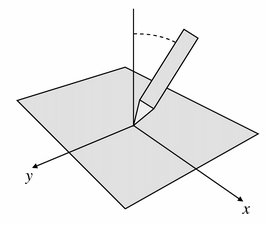
Returns the angle between the device (a pen, for example) and the perpendicular in the direction of the x axis. Positive values are towards the tablet’s physical right. The angle is in the range -60 to +60 degrees.
另请参阅
PySide2.QtGui.QTabletEvent.
y
(
)

int
返回设备的 y 位置,相对接收事件 Widget。
PySide2.QtGui.QTabletEvent.
yTilt
(
)

int
Returns the angle between the device (a pen, for example) and the perpendicular in the direction of the y axis. Positive values are towards the bottom of the tablet. The angle is within the range -60 to +60 degrees.
另请参阅
PySide2.QtGui.QTabletEvent.
z
(
)

int
Returns the z position of the device. Typically this is represented by a wheel on a 4D Mouse. If the device does not support a Z-axis, this value is always zero. This is not the same as pressure.
另请参阅
