def
__add__
(r)
def
__add__
(r)
def
__and__
(r)
def
__and__
(r)
def
__eq__
(r)
def
__iadd__
(r)
def
__iadd__
(r)
def
__ior__
(r)
def
__isub__
(r)
def
__ixor__
(r)
def
__mul__
(, m)
def
__mul__
(, m)
def
__ne__
(r)
def
__or__
(r)
def
__sub__
(r)
def
__xor__
(r)
def
begin
()
def
boundingRect
()
def
cbegin
()
def
cend
()
def
contains
(p)
def
contains
(r)
def
end
()
def
intersected
(r)
def
intersected
(r)
def
intersects
(r)
def
intersects
(r)
def
isEmpty
()
def
isNull
()
def
rectCount
()
def
rects
()
def
setRects
(rect, num)
def
subtracted
(r)
def
swap
(other)
def
translate
(dx, dy)
def
translate
(p)
def
translated
(dx, dy)
def
translated
(p)
def
united
(r)
def
united
(r)
def
xored
(r)
QRegionis used withsetClipRegion()to limit the paint area to what needs to be painted. There is also arepaint()function that takes aQRegion参数。QRegionis the best tool for minimizing the amount of screen area to be updated by a repaint.This class is not suitable for constructing shapes for rendering, especially as outlines. Use
QPainterPathto create paths and shapes for use withQPainter.
A region can be created from a rectangle, an ellipse, a polygon or a bitmap. Complex regions may be created by combining simple regions using
united(),intersected(),subtracted(),或xored()(exclusive or). You can move a region usingtranslate().You can test whether a region
isEmpty()or if itcontains()aQPointorQRect. The bounding rectangle can be found withboundingRect().Iteration over the region (with
begin(),end(), or C++11 ranged-for loops) gives a decomposition of the region into rectangles.Example of using complex regions:
class MyWidget (QWidget):
    # ...
    def paintEvent(self):
        r1 = QRegion(QRect(100, 100, 200, 80), QRegion.Ellipse) # r1: elliptic region
                )
        r2 = QRect(100, 120, 90, 30)   # r2: rectangular region
        r3 = r1.intersected(r2)        # r3: intersection
        painter = QPainter(self)
        painter.setClipRegion(r3)
        ...                            # paint clipped graphics
QRegion

Constructs an empty region.
另请参阅
Constructs a rectangular or elliptic region.
若
t
is
Rectangle
, the region is the filled rectangle (
x
,
y
,
w
,
h
)。若
t
is
Ellipse
, the region is the filled ellipse with center at (
x
+
w
/ 2,
y
+
h
/ 2) and size (
w
,``h`` ).
PySide2.QtGui.QRegion.
RegionType

Specifies the shape of the region to be created.
|
常量 |
描述 |
|---|---|
|
QRegion.Rectangle |
the region covers the entire rectangle. |
|
QRegion.Ellipse |
the region is an ellipse inside the rectangle. |
PySide2.QtGui.QRegion.
begin
(
)

QRect
返回
const_iterator
pointing to the beginning of the range of non-overlapping rectangles that make up the region.
The union of all the rectangles is equal to the original region.
PySide2.QtGui.QRegion.
boundingRect
(
)

QRect
Returns the bounding rectangle of this region. An empty region gives a rectangle that is
isNull()
.
PySide2.QtGui.QRegion.
contains
(
p
)

p
–
QPoint
bool
PySide2.QtGui.QRegion.
contains
(
r
)

r
–
QRect
bool
PySide2.QtGui.QRegion.
end
(
)

QRect
返回
const_iterator
pointing to one past the end of non-overlapping rectangles that make up the region.
The union of all the rectangles is equal to the original region.
PySide2.QtGui.QRegion.
intersects
(
r
)

r
–
QRect
bool
PySide2.QtGui.QRegion.
isEmpty
(
)

bool
返回
true
若区域为空;否则返回
false
。空区域是不包含任何点的区域。
范例:
r1 = QRegion(10, 10, 20, 20)
r1.isNull()                // false
r1.isEmpty()               // false
r2 = QRegion(40, 40, 20, 20)
r3 = QRegion()
r3.isNull()                // true
r3.isEmpty()               // true
r3 = r1.intersected(r2)    // r3: intersection of r1 and r2
r3.isNull()                // false
r3.isEmpty()               // true
r3 = r1.united(r2)         // r3: union of r1 and r2
r3.isNull()                // false
r3.isEmpty()               // false
PySide2.QtGui.QRegion.
isNull
(
)

bool
返回
true
若区域为空;否则返回
false
. An empty region is a region that contains no points. This function is the same as
isEmpty
另请参阅
PySide2.QtGui.QRegion.
__ne__
(
r
)

r
–
QRegion
bool
返回
true
if this region is different from the
other
region; otherwise returns
false
.
PySide2.QtGui.QRegion.
__mul__
(
m
)

m
–
QTransform
PySide2.QtGui.QRegion.
__sub__
(
r
)

Applies the
subtracted()
function to this region and
r
.
r1-r2
相当于
r1.subtracted(r2)
.
另请参阅
PySide2.QtGui.QRegion.
__isub__
(
r
)

Applies the
subtracted()
function to this region and
r
and assigns the result to this region.
r1-=r2
相当于
													r1


													=


													r1.subtracted(r2)
.
另请参阅
PySide2.QtGui.QRegion.
__eq__
(
r
)

r
–
QRegion
bool
返回
true
if the region is equal to
r
;否则返回 false。
PySide2.QtGui.QRegion.
__xor__
(
r
)

Applies the
xored()
function to this region and
r
.
r1^r2
相当于
r1.xored(r2)
.
另请参阅
PySide2.QtGui.QRegion.
__ixor__
(
r
)

Applies the
xored()
function to this region and
r
and assigns the result to this region.
r1^=r2
相当于
													r1


													=


													r1.xored(r2)
.
另请参阅
PySide2.QtGui.QRegion.
__or__
(
r
)

Applies the
united()
function to this region and
r
.
r1|r2
相当于
r1.united(r2)
.
另请参阅
united()
operator+()
PySide2.QtGui.QRegion.
__ior__
(
r
)

Applies the
united()
function to this region and
r
and assigns the result to this region.
r1|=r2
相当于
													r1


													=


													r1.united(r2)
.
另请参阅
PySide2.QtGui.QRegion.
rectCount
(
)

int
Returns the number of rectangles that this region is composed of. Same as
													end()


													-


													begin()
.
PySide2.QtGui.QRegion.
rects
(
)

注意
此函数被弃用。
Returns an array of non-overlapping rectangles that make up the region.
The union of all the rectangles is equal to the original region.
另请参阅
PySide2.QtGui.QRegion.
setRects
(
rect
,
num
)

rect
–
QRect
num
–
int
Sets the region using the array of rectangles specified by
rects
and
number
. The rectangles
must
be optimally Y-X sorted and follow these restrictions:
The rectangles must not intersect.
All rectangles with a given top coordinate must have the same height.
No two rectangles may abut horizontally (they should be combined into a single wider rectangle in that case).
The rectangles must be sorted in ascending order, with Y as the major sort key and X as the minor sort key.
另请参阅
PySide2.QtGui.QRegion.
subtracted
(
r
)

Returns a region which is
r
subtracted from this region.
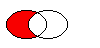
The figure shows the result when the ellipse on the right is subtracted from the ellipse on the left (
													left


													-


													right
).
另请参阅
PySide2.QtGui.QRegion.
swap
(
other
)

other
–
QRegion
Swaps region
other
with this region. This operation is very fast and never fails.
PySide2.QtGui.QRegion.
translate
(
p
)

p
–
QPoint
这是重载函数。
Translates the region
point
.x()
along the x axis and
point
.y()
along the y axis, relative to the current position. Positive values move the region to the right and down.
Translates to the given
point
.
PySide2.QtGui.QRegion.
translate
(
dx
,
dy
)

dx
–
int
dy
–
int
Translates (moves) the region
dx
along the X axis and
dy
along the Y axis.
PySide2.QtGui.QRegion.
translated
(
p
)

p
–
QPoint
这是重载函数。
Returns a copy of the regtion that is translated
p
.x()
along the x axis and
p
.y()
along the y axis, relative to the current position. Positive values move the rectangle to the right and down.
另请参阅
PySide2.QtGui.QRegion.
translated
(
dx
,
dy
)

dx
–
int
dy
–
int
Returns a copy of the region that is translated
dx
along the x axis and
dy
along the y axis, relative to the current position. Positive values move the region to the right and down.
另请参阅