QPainterPathclass provides a container for painting operations, enabling graphical shapes to be constructed and reused. 更多 …
def
__add__
(other)
def
__and__
(other)
def
__eq__
(other)
def
__iadd__
(other)
def
__iand__
(other)
def
__ior__
(other)
def
__isub__
(other)
def
__mul__
(, m)
def
__mul__
(, m)
def
__ne__
(other)
def
__or__
(other)
def
__sub__
(other)
def
addEllipse
(center, rx, ry)
def
addEllipse
(rect)
def
addEllipse
(x, y, w, h)
def
addPath
(path)
def
addPolygon
(polygon)
def
addRect
(rect)
def
addRect
(x, y, w, h)
def
addRegion
(region)
def
addRoundRect
(rect, roundness)
def
addRoundRect
(rect, xRnd, yRnd)
def
addRoundRect
(x, y, w, h, roundness)
def
addRoundRect
(x, y, w, h, xRnd, yRnd)
def
addRoundedRect
(rect, xRadius, yRadius[, mode=Qt.AbsoluteSize])
def
addRoundedRect
(x, y, w, h, xRadius, yRadius[, mode=Qt.AbsoluteSize])
def
addText
(point, f, text)
def
addText
(x, y, f, text)
def
angleAtPercent
(t)
def
arcMoveTo
(rect, angle)
def
arcMoveTo
(x, y, w, h, angle)
def
arcTo
(rect, startAngle, arcLength)
def
arcTo
(x, y, w, h, startAngle, arcLength)
def
boundingRect
()
def
capacity
()
def
clear
()
def
closeSubpath
()
def
connectPath
(path)
def
contains
(p)
def
contains
(pt)
def
contains
(rect)
def
controlPointRect
()
def
cubicTo
(ctrlPt1, ctrlPt2, endPt)
def
cubicTo
(ctrlPt1x, ctrlPt1y, ctrlPt2x, ctrlPt2y, endPtx, endPty)
def
currentPosition
()
def
elementAt
(i)
def
elementCount
()
def
fillRule
()
def
intersected
(r)
def
intersects
(p)
def
intersects
(rect)
def
isEmpty
()
def
length
()
def
lineTo
(p)
def
lineTo
(x, y)
def
moveTo
(p)
def
moveTo
(x, y)
def
percentAtLength
(t)
def
pointAtPercent
(t)
def
quadTo
(ctrlPt, endPt)
def
quadTo
(ctrlPtx, ctrlPty, endPtx, endPty)
def
reserve
(size)
def
setElementPositionAt
(i, x, y)
def
setFillRule
(fillRule)
def
simplified
()
def
slopeAtPercent
(t)
def
subtracted
(r)
def
subtractedInverted
(r)
def
swap
(other)
def
toFillPolygon
([matrix=QTransform()])
def
toFillPolygon
(matrix)
def
toFillPolygons
([matrix=QTransform()])
def
toFillPolygons
(matrix)
def
toReversed
()
def
toSubpathPolygons
([matrix=QTransform()])
def
toSubpathPolygons
(matrix)
def
translate
(dx, dy)
def
translate
(offset)
def
translated
(dx, dy)
def
translated
(offset)
def
united
(r)
A painter path is an object composed of a number of graphical building blocks, such as rectangles, ellipses, lines, and curves. Building blocks can be joined in closed subpaths, for example as a rectangle or an ellipse. A closed path has coinciding start and end points. Or they can exist independently as unclosed subpaths, such as lines and curves.
A
QPainterPathobject can be used for filling, outlining, and clipping. To generate fillable outlines for a given painter path, use theQPainterPathStrokerclass. The main advantage of painter paths over normal drawing operations is that complex shapes only need to be created once; then they can be drawn many times using only calls to thedrawPath()函数。
QPainterPathprovides a collection of functions that can be used to obtain information about the path and its elements. In addition it is possible to reverse the order of the elements using thetoReversed()function. There are also several functions to convert this painter path object into a polygon representation.
A
QPainterPathobject can be constructed as an empty path, with a given start point, or as a copy of anotherQPainterPathobject. Once created, lines and curves can be added to the path using thelineTo(),arcTo(),cubicTo()andquadTo()functions. The lines and curves stretch from thecurrentPosition()to the position passed as argument.
currentPosition()的QPainterPathobject is always the end position of the last subpath that was added (or the initial start point). Use themoveTo()function to move thecurrentPosition()without adding a component. ThemoveTo()function implicitly starts a new subpath, and closes the previous one. Another way of starting a new subpath is to call thecloseSubpath()function which closes the current path by adding a line from thecurrentPosition()back to the path’s start position. Note that the new path will have (0, 0) as its initialcurrentPosition().
QPainterPathclass also provides several convenience functions to add closed subpaths to a painter path:addEllipse(),addPath(),addRect(),addRegion()andaddText()。addPolygon()function adds an unclosed subpath. In fact, these functions are all collections ofmoveTo(),lineTo()andcubicTo()operations.In addition, a path can be added to the current path using the
connectPath()function. But note that this function will connect the last element of the current path to the first element of given one by adding a line.Below is a code snippet that shows how a
QPainterPathobject can be used:
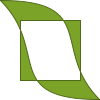
The painter path is initially empty when constructed. We first add a rectangle, which is a closed subpath. Then we add two bezier curves which together form a closed subpath even though they are not closed individually. Finally we draw the entire path. The path is filled using the default fill rule,
OddEvenFill. Qt provides two methods for filling paths:
OddEvenFill
WindingFill
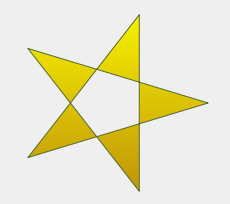
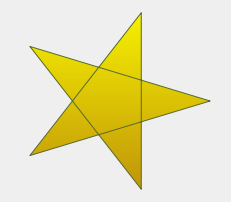
见
FillRuledocumentation for the definition of the rules. A painter path’s currently set fill rule can be retrieved using thefillRule()function, and altered using thesetFillRule()函数。
QPainterPathclass provides a collection of functions that returns information about the path and its elements.
currentPosition()function returns the end point of the last subpath that was added (or the initial start point). TheelementAt()function can be used to retrieve the various subpath elements, the number of elements can be retrieved using theelementCount()function, and theisEmpty()function tells whether thisQPainterPathobject contains any elements at all.
controlPointRect()function returns the rectangle containing all the points and control points in this path. This function is significantly faster to compute than the exactboundingRect()which returns the bounding rectangle of this painter path with floating point precision.最后,
QPainterPathprovides thecontains()function which can be used to determine whether a given point or rectangle is inside the path, and theintersects()function which determines if any of the points inside a given rectangle also are inside this path.
For compatibility reasons, it might be required to simplify the representation of a painter path:
QPainterPathprovides thetoFillPolygon(),toFillPolygons()andtoSubpathPolygons()functions which convert the painter path into a polygon. ThetoFillPolygon()returns the painter path as one single polygon, while the two latter functions return a list of polygons.
toFillPolygons()andtoSubpathPolygons()functions are provided because it is usually faster to draw several small polygons than to draw one large polygon, even though the total number of points drawn is the same. The difference between the two is the number of polygons they return: ThetoSubpathPolygons()creates one polygon for each subpath regardless of intersecting subpaths (i.e. overlapping bounding rectangles), while thetoFillPolygons()functions creates only one polygon for overlapping subpaths.
toFillPolygon()andtoFillPolygons()functions first convert all the subpaths to polygons, then uses a rewinding technique to make sure that overlapping subpaths can be filled using the correct fill rule. Note that rewinding inserts additional lines in the polygon so the outline of the fill polygon does not match the outline of the path.
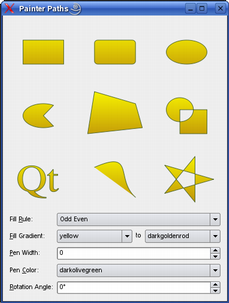
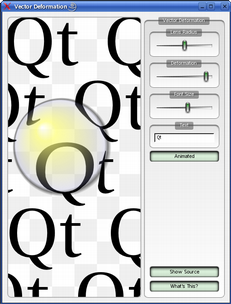
Qt provides the 描绘器路径范例 和 Vector Deformation example which are located in Qt’s example directory.
描绘器路径范例 shows how painter paths can be used to build complex shapes for rendering and lets the user experiment with the filling and stroking. The Vector Deformation Example shows how to use
QPainterPathto draw text.
QPainterPath

QPainterPath(other)
QPainterPath(startPoint)
- param other
- param startPoint
QPointF
构造空
QPainterPath
对象。
PySide2.QtGui.QPainterPath.
ElementType

This enum describes the types of elements used to connect vertices in subpaths.
Note that elements added as closed subpaths using the
addEllipse()
,
addPath()
,
addPolygon()
,
addRect()
,
addRegion()
and
addText()
convenience functions, is actually added to the path as a collection of separate elements using the
moveTo()
,
lineTo()
and
cubicTo()
函数。
|
常量 |
描述 |
|---|---|
|
QPainterPath.MoveToElement |
A new subpath. See also
|
|
QPainterPath.LineToElement |
A line. See also
|
|
QPainterPath.CurveToElement |
|
|
QPainterPath.CurveToDataElement |
The extra data required to describe a curve in a element. |
PySide2.QtGui.QPainterPath.
addEllipse
(
center
,
rx
,
ry
)

center
–
QPointF
rx
–
qreal
ry
–
qreal
这是重载函数。
Creates an ellipse positioned at
center
with radii
rx
and
ry
, and adds it to the painter path as a closed subpath.
PySide2.QtGui.QPainterPath.
addEllipse
(
x
,
y
,
w
,
h
)

x
–
qreal
y
–
qreal
w
–
qreal
h
–
qreal
这是重载函数。
Creates an ellipse within the bounding rectangle defined by its top-left corner at (
x
,
y
),
width
and
height
, and adds it to the painter path as a closed subpath.
PySide2.QtGui.QPainterPath.
addEllipse
(
rect
)

rect
–
QRectF
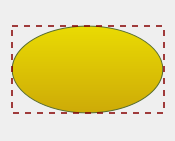
Creates an ellipse within the specified
boundingRectangle
and adds it to the painter path as a closed subpath.
The ellipse is composed of a clockwise curve, starting and finishing at zero degrees (the 3 o’clock position).
|
|
myGradient = QLinearGradient()
myPen = QPen()
boundingRectangle = QRectF()
myPath = QPainterPath()
myPath.addEllipse(boundingRectangle)
QPainter painter(self)
painter.setBrush(myGradient)
painter.setPen(myPen)
painter.drawPath(myPath)
|
另请参阅
arcTo()
drawEllipse()
														正在合成


														a


														QPainterPath
PySide2.QtGui.QPainterPath.
addPath
(
path
)

path
–
QPainterPath
添加给定
path
to
this
path as a closed subpath.
另请参阅
connectPath()
														正在合成


														a


														QPainterPath
PySide2.QtGui.QPainterPath.
addPolygon
(
polygon
)

polygon
–
QPolygonF
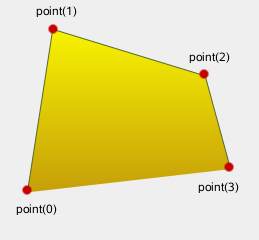
添加给定
polygon
to the path as an (unclosed) subpath.
Note that the current position after the polygon has been added, is the last point in
polygon
. To draw a line back to the first point, use the
closeSubpath()
函数。
|
|
myGradient = QLinearGradient()
myPen = QPen()
myPolygon = QPolygonF()
myPath = QPainterPath()
myPath.addPolygon(myPolygon)
QPainter painter(self)
painter.setBrush(myGradient)
painter.setPen(myPen)
painter.drawPath(myPath)
|
另请参阅
lineTo()
														正在合成


														a


														QPainterPath
PySide2.QtGui.QPainterPath.
addRect
(
rect
)

rect
–
QRectF
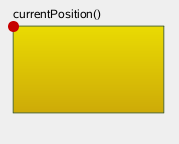
添加给定
rectangle
to this path as a closed subpath.
rectangle
is added as a clockwise set of lines. The painter path’s current position after the
rectangle
has been added is at the top-left corner of the rectangle.
|
|
myGradient = QLinearGradient()
myPen = QPen()
myRectangle = QRectF()
myPath = QPainterPath()
myPath.addRect(myRectangle)
painter = QPainter(self)
painter.setBrush(myGradient)
painter.setPen(myPen)
painter.drawPath(myPath)
|
另请参阅
addRegion()
lineTo()
														正在合成


														a


														QPainterPath
PySide2.QtGui.QPainterPath.
addRect
(
x
,
y
,
w
,
h
)

x
–
qreal
y
–
qreal
w
–
qreal
h
–
qreal
这是重载函数。
Adds a rectangle at position (
x
,
y
), with the given
width
and
height
, as a closed subpath.
PySide2.QtGui.QPainterPath.
addRegion
(
region
)

region
–
QRegion
添加给定
region
to the path by adding each rectangle in the region as a separate closed subpath.
另请参阅
addRect()
														正在合成


														a


														QPainterPath
PySide2.QtGui.QPainterPath.
addRoundRect
(
rect
,
roundness
)

rect
–
QRectF
roundness
–
int
注意
此函数被弃用。
这是重载函数。
Adds a rounded rectangle,
rect
, to the path.
roundness
argument specifies uniform roundness for the rectangle. Vertical and horizontal roundness factors will be adjusted accordingly to act uniformly around both axes. Use this method if you want a rectangle equally rounded across both the X and Y axis.
另请参阅
PySide2.QtGui.QPainterPath.
addRoundRect
(
rect
,
xRnd
,
yRnd
)

rect
–
QRectF
xRnd
–
int
yRnd
–
int
注意
此函数被弃用。
Adds a rectangle
r
with rounded corners to the path.
xRnd
and
yRnd
arguments specify how rounded the corners should be. 0 is angled corners, 99 is maximum roundedness.
另请参阅
PySide2.QtGui.QPainterPath.
addRoundRect
(
x
,
y
,
w
,
h
,
roundness
)

x
–
qreal
y
–
qreal
w
–
qreal
h
–
qreal
roundness
–
int
注意
此函数被弃用。
这是重载函数。
Adds a rounded rectangle to the path, defined by the coordinates
x
and
y
with the specified
width
and
height
.
roundness
argument specifies uniform roundness for the rectangle. Vertical and horizontal roundness factors will be adjusted accordingly to act uniformly around both axes. Use this method if you want a rectangle equally rounded across both the X and Y axis.
另请参阅
PySide2.QtGui.QPainterPath.
addRoundRect
(
x
,
y
,
w
,
h
,
xRnd
,
yRnd
)

x
–
qreal
y
–
qreal
w
–
qreal
h
–
qreal
xRnd
–
int
yRnd
–
int
注意
此函数被弃用。
这是重载函数。
Adds a rectangle with rounded corners to the path. The rectangle is constructed from
x
,
y
, and the width and height
w
and
h
.
xRnd
and
yRnd
arguments specify how rounded the corners should be. 0 is angled corners, 99 is maximum roundedness.
另请参阅
PySide2.QtGui.QPainterPath.
addRoundedRect
(
rect
,
xRadius
,
yRadius
[
,
mode=Qt.AbsoluteSize
]
)

rect
–
QRectF
xRadius
–
qreal
yRadius
–
qreal
mode
–
SizeMode
Adds the given rectangle
rect
with rounded corners to the path.
xRadius
and
yRadius
arguments specify the radii of the ellipses defining the corners of the rounded rectangle. When
mode
is
RelativeSize
,
xRadius
and
yRadius
are specified in percentage of half the rectangle’s width and height respectively, and should be in the range 0.0 to 100.0.
另请参阅
PySide2.QtGui.QPainterPath.
addRoundedRect
(
x
,
y
,
w
,
h
,
xRadius
,
yRadius
[
,
mode=Qt.AbsoluteSize
]
)

x
–
qreal
y
–
qreal
w
–
qreal
h
–
qreal
xRadius
–
qreal
yRadius
–
qreal
mode
–
SizeMode
这是重载函数。
Adds the given rectangle
x
,
y
,
w
,
h
with rounded corners to the path.
PySide2.QtGui.QPainterPath.
addText
(
point
,
f
,
text
)

point
–
QPointF
f
–
QFont
text – unicode
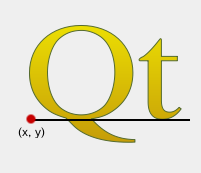
添加给定
text
to this path as a set of closed subpaths created from the
font
supplied. The subpaths are positioned so that the left end of the text’s baseline lies at the specified
point
.
|
|
myGradient = QLinearGradient()
myPen = QPen()
myFont = QFont()
QPointF baseline(x, y)
myPath = QPainterPath()
myPath.addText(baseline, myFont, tr("Qt"))
painter QPainter(self)
painter.setBrush(myGradient)
painter.setPen(myPen)
painter.drawPath(myPath)
|
另请参阅
drawText()
														正在合成


														a


														QPainterPath
PySide2.QtGui.QPainterPath.
addText
(
x
,
y
,
f
,
text
)

x
–
qreal
y
–
qreal
f
–
QFont
text – unicode
这是重载函数。
添加给定
text
to this path as a set of closed subpaths created from the
font
supplied. The subpaths are positioned so that the left end of the text’s baseline lies at the point specified by (
x
,
y
).
PySide2.QtGui.QPainterPath.
angleAtPercent
(
t
)

t
–
qreal
qreal
Returns the angle of the path tangent at the percentage
t
. The argument
t
has to be between 0 and 1.
Positive values for the angles mean counter-clockwise while negative values mean the clockwise direction. Zero degrees is at the 3 o’clock position.
Note that similarly to the other percent methods, the percentage measurement is not linear with regards to the length if curves are present in the path. When curves are present the percentage argument is mapped to the t parameter of the Bezier equations.
PySide2.QtGui.QPainterPath.
arcMoveTo
(
rect
,
angle
)

rect
–
QRectF
angle
–
qreal
Creates a move to that lies on the arc that occupies the given
rectangle
at
angle
.
Angles are specified in degrees. Clockwise arcs can be specified using negative angles.
PySide2.QtGui.QPainterPath.
arcMoveTo
(
x
,
y
,
w
,
h
,
angle
)

x
–
qreal
y
–
qreal
w
–
qreal
h
–
qreal
angle
–
qreal
这是重载函数。
Creates a move to that lies on the arc that occupies the
QRectF
(
x
,
y
,
width
,
height
) at
angle
.
PySide2.QtGui.QPainterPath.
arcTo
(
rect
,
startAngle
,
arcLength
)

rect
–
QRectF
startAngle
–
qreal
arcLength
–
qreal
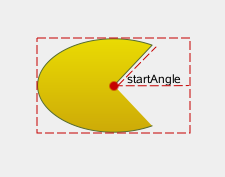
Creates an arc that occupies the given
rectangle
, beginning at the specified
startAngle
and extending
sweepLength
degrees counter-clockwise.
Angles are specified in degrees. Clockwise arcs can be specified using negative angles.
Note that this function connects the starting point of the arc to the current position if they are not already connected. After the arc has been added, the current position is the last point in arc. To draw a line back to the first point, use the
closeSubpath()
函数。
|
|
myGradient = QLinearGradient()
myPen = QPen()
startPoint = QPointF()
center = QPointF()
myPath = QPainterPath()
myPath.moveTo(center)
myPath.arcTo(boundingRect, startAngle,
             sweepLength)
painter = QPainter(self)
painter.setBrush(myGradient)
painter.setPen(myPen)
painter.drawPath(myPath)
|
另请参阅
arcMoveTo()
addEllipse()
drawArc()
drawPie()
														正在合成


														a


														QPainterPath
PySide2.QtGui.QPainterPath.
arcTo
(
x
,
y
,
w
,
h
,
startAngle
,
arcLength
)

x
–
qreal
y
–
qreal
w
–
qreal
h
–
qreal
startAngle
–
qreal
arcLength
–
qreal
这是重载函数。
Creates an arc that occupies the rectangle
QRectF
(
x
,
y
,
width
,
height
), beginning at the specified
startAngle
and extending
sweepLength
degrees counter-clockwise.
PySide2.QtGui.QPainterPath.
boundingRect
(
)

QRectF
Returns the bounding rectangle of this painter path as a rectangle with floating point precision.
另请参阅
PySide2.QtGui.QPainterPath.
capacity
(
)

int
Returns the number of elements allocated by the
QPainterPath
.
PySide2.QtGui.QPainterPath.
clear
(
)

Clears the path elements stored.
This allows the path to reuse previous memory allocations.
另请参阅
PySide2.QtGui.QPainterPath.
closeSubpath
(
)

Closes the current subpath by drawing a line to the beginning of the subpath, automatically starting a new path. The current point of the new path is (0, 0).
If the subpath does not contain any elements, this function does nothing.
另请参阅
moveTo()
														正在合成


														a


														QPainterPath
PySide2.QtGui.QPainterPath.
connectPath
(
path
)

path
–
QPainterPath
Connects the given
path
to
this
path by adding a line from the last element of this path to the first element of the given path.
另请参阅
addPath()
														正在合成


														a


														QPainterPath
PySide2.QtGui.QPainterPath.
contains
(
p
)

p
–
QPainterPath
bool
PySide2.QtGui.QPainterPath.
contains
(
pt
)

pt
–
QPointF
bool
PySide2.QtGui.QPainterPath.
contains
(
rect
)

rect
–
QRectF
bool
PySide2.QtGui.QPainterPath.
controlPointRect
(
)

QRectF
Returns the rectangle containing all the points and control points in this path.
This function is significantly faster to compute than the exact
boundingRect()
, and the returned rectangle is always a superset of the rectangle returned by
boundingRect()
.
另请参阅
PySide2.QtGui.QPainterPath.
cubicTo
(
ctrlPt1
,
ctrlPt2
,
endPt
)

ctrlPt1
–
QPointF
ctrlPt2
–
QPointF
endPt
–
QPointF
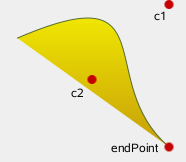
Adds a cubic Bezier curve between the current position and the given
endPoint
using the control points specified by
c1
,和
c2
.
After the curve is added, the current position is updated to be at the end point of the curve.
|
|
myGradient = QLinearGradient()
myPen = QPen()
myPath = QPainterPath()
myPath.cubicTo(c1, c2, endPoint)
painter = QPainter(self)
painter.setBrush(myGradient)
painter.setPen(myPen)
painter.drawPath(myPath)
|
另请参阅
quadTo()
														正在合成


														a


														QPainterPath
PySide2.QtGui.QPainterPath.
cubicTo
(
ctrlPt1x
,
ctrlPt1y
,
ctrlPt2x
,
ctrlPt2y
,
endPtx
,
endPty
)

ctrlPt1x
–
qreal
ctrlPt1y
–
qreal
ctrlPt2x
–
qreal
ctrlPt2y
–
qreal
endPtx
–
qreal
endPty
–
qreal
这是重载函数。
Adds a cubic Bezier curve between the current position and the end point (
endPointX
,
endPointY
) with control points specified by (
c1X
,
c1Y
) 和 (
c2X
,
c2Y
).
PySide2.QtGui.QPainterPath.
currentPosition
(
)

QPointF
Returns the current position of the path.
PySide2.QtGui.QPainterPath.
elementAt
(
i
)

i
–
int
Returns the element at the given
index
in the painter path.
另请参阅
ElementType
elementCount()
isEmpty()
PySide2.QtGui.QPainterPath.
elementCount
(
)

int
Returns the number of path elements in the painter path.
另请参阅
ElementType
elementAt()
isEmpty()
PySide2.QtGui.QPainterPath.
fillRule
(
)

FillRule
Returns the painter path’s currently set fill rule.
另请参阅
PySide2.QtGui.QPainterPath.
intersected
(
r
)

r
–
QPainterPath
Returns a path which is the intersection of this path’s fill area and
p
‘s fill area. Bezier curves may be flattened to line segments due to numerical instability of doing bezier curve intersections.
PySide2.QtGui.QPainterPath.
intersects
(
rect
)

rect
–
QRectF
bool
PySide2.QtGui.QPainterPath.
intersects
(
p
)

p
–
QPainterPath
bool
PySide2.QtGui.QPainterPath.
isEmpty
(
)

bool
返回
true
if either there are no elements in this path, or if the only element is a
MoveToElement
;否则返回
false
.
另请参阅
PySide2.QtGui.QPainterPath.
length
(
)

qreal
Returns the length of the current path.
PySide2.QtGui.QPainterPath.
lineTo
(
p
)

p
–
QPointF
Adds a straight line from the current position to the given
endPoint
. After the line is drawn, the current position is updated to be at the end point of the line.
另请参阅
addPolygon()
addRect()
														正在合成


														a


														QPainterPath
PySide2.QtGui.QPainterPath.
lineTo
(
x
,
y
)

x
–
qreal
y
–
qreal
这是重载函数。
Draws a line from the current position to the point (
x
,
y
).
PySide2.QtGui.QPainterPath.
moveTo
(
p
)

p
–
QPointF
Moves the current point to the given
point
, implicitly starting a new subpath and closing the previous one.
另请参阅
closeSubpath()
														正在合成


														a


														QPainterPath
PySide2.QtGui.QPainterPath.
moveTo
(
x
,
y
)

x
–
qreal
y
–
qreal
这是重载函数。
Moves the current position to (
x
,
y
) and starts a new subpath, implicitly closing the previous path.
PySide2.QtGui.QPainterPath.
__ne__
(
other
)

other
–
QPainterPath
bool
返回
true
if this painter path differs from the given
path
.
Note that comparing paths may involve a per element comparison which can be slow for complex paths.
另请参阅
operator==()
PySide2.QtGui.QPainterPath.
__and__
(
other
)

other
–
QPainterPath
PySide2.QtGui.QPainterPath.
__iand__
(
other
)

other
–
QPainterPath
PySide2.QtGui.QPainterPath.
__mul__
(
m
)

m
–
QTransform
PySide2.QtGui.QPainterPath.
__add__
(
other
)

other
–
QPainterPath
Returns the union of this path and the
other
path. This function is equivalent to operator|().
另请参阅
united()
operator+=()
operator-()
PySide2.QtGui.QPainterPath.
__iadd__
(
other
)

other
–
QPainterPath
Unites this path with
other
, and returns a reference to this path. This is equivalent to operator|=().
另请参阅
united()
operator+()
operator-=()
PySide2.QtGui.QPainterPath.
__sub__
(
other
)

other
–
QPainterPath
Subtracts the
other
path from a copy of this path, and returns the copy.
另请参阅
subtracted()
operator-=()
operator+()
PySide2.QtGui.QPainterPath.
__isub__
(
other
)

other
–
QPainterPath
Subtracts
other
from this path, and returns a reference to this path.
另请参阅
subtracted()
operator-()
operator+=()
PySide2.QtGui.QPainterPath.
__eq__
(
other
)

other
–
QPainterPath
bool
返回
true
if this painterpath is equal to the given
path
.
Note that comparing paths may involve a per element comparison which can be slow for complex paths.
另请参阅
operator!=()
PySide2.QtGui.QPainterPath.
__or__
(
other
)

other
–
QPainterPath
Returns the union of this path and the
other
路径。
另请参阅
united()
operator|=()
intersected()
operator&()
PySide2.QtGui.QPainterPath.
__ior__
(
other
)

other
–
QPainterPath
Unites this path with
other
and returns a reference to this path.
另请参阅
united()
operator|()
operator&=()
PySide2.QtGui.QPainterPath.
percentAtLength
(
t
)

t
–
qreal
qreal
Returns percentage of the whole path at the specified length
len
.
Note that similarly to other percent methods, the percentage measurement is not linear with regards to the length, if curves are present in the path. When curves are present the percentage argument is mapped to the t parameter of the Bezier equations.
PySide2.QtGui.QPainterPath.
pointAtPercent
(
t
)

t
–
qreal
QPointF
Returns the point at at the percentage
t
of the current path. The argument
t
has to be between 0 and 1.
Note that similarly to other percent methods, the percentage measurement is not linear with regards to the length, if curves are present in the path. When curves are present the percentage argument is mapped to the t parameter of the Bezier equations.
PySide2.QtGui.QPainterPath.
quadTo
(
ctrlPt
,
endPt
)

ctrlPt
–
QPointF
endPt
–
QPointF
Adds a quadratic Bezier curve between the current position and the given
endPoint
with the control point specified by
c
.
After the curve is added, the current point is updated to be at the end point of the curve.
另请参阅
cubicTo()
														正在合成


														a


														QPainterPath
PySide2.QtGui.QPainterPath.
quadTo
(
ctrlPtx
,
ctrlPty
,
endPtx
,
endPty
)

ctrlPtx
–
qreal
ctrlPty
–
qreal
endPtx
–
qreal
endPty
–
qreal
这是重载函数。
Adds a quadratic Bezier curve between the current point and the endpoint (
endPointX
,
endPointY
) with the control point specified by (
cx
,
cy
).
PySide2.QtGui.QPainterPath.
reserve
(
size
)

size
–
int
Reserves a given amount of elements in
QPainterPath
‘s internal memory.
Attempts to allocate memory for at least
size
元素。
另请参阅
clear()
capacity()
reserve()
PySide2.QtGui.QPainterPath.
setElementPositionAt
(
i
,
x
,
y
)

i
–
int
x
–
qreal
y
–
qreal
Sets the x and y coordinate of the element at index
index
to
x
and
y
.
PySide2.QtGui.QPainterPath.
setFillRule
(
fillRule
)

fillRule
–
FillRule
Sets the fill rule of the painter path to the given
fillRule
. Qt provides two methods for filling paths:
|
|
|
|
|
|
另请参阅
PySide2.QtGui.QPainterPath.
simplified
(
)

Returns a simplified version of this path. This implies merging all subpaths that intersect, and returning a path containing no intersecting edges. Consecutive parallel lines will also be merged. The simplified path will always use the default fill rule,
OddEvenFill
. Bezier curves may be flattened to line segments due to numerical instability of doing bezier curve intersections.
PySide2.QtGui.QPainterPath.
slopeAtPercent
(
t
)

t
–
qreal
qreal
Returns the slope of the path at the percentage
t
. The argument
t
has to be between 0 and 1.
Note that similarly to other percent methods, the percentage measurement is not linear with regards to the length, if curves are present in the path. When curves are present the percentage argument is mapped to the t parameter of the Bezier equations.
PySide2.QtGui.QPainterPath.
subtracted
(
r
)

r
–
QPainterPath
Returns a path which is
p
‘s fill area subtracted from this path’s fill area.
Set operations on paths will treat the paths as areas. Non-closed paths will be treated as implicitly closed. Bezier curves may be flattened to line segments due to numerical instability of doing bezier curve intersections.
PySide2.QtGui.QPainterPath.
subtractedInverted
(
r
)

r
–
QPainterPath
注意
此函数被弃用。
使用
subtracted()
代替。
另请参阅
PySide2.QtGui.QPainterPath.
swap
(
other
)

other
–
QPainterPath
Swaps painter path
other
with this painter path. This operation is very fast and never fails.
PySide2.QtGui.QPainterPath.
toFillPolygon
(
[
matrix=QTransform()
]
)

matrix
–
QTransform
PySide2.QtGui.QPainterPath.
toFillPolygon
(
matrix
)

注意
此函数被弃用。
PySide2.QtGui.QPainterPath.
toFillPolygons
(
[
matrix=QTransform()
]
)

matrix
–
QTransform
PySide2.QtGui.QPainterPath.
toReversed
(
)

Creates and returns a reversed copy of the path.
It is the order of the elements that is reversed: If a
QPainterPath
is composed by calling the
moveTo()
,
lineTo()
and
cubicTo()
functions in the specified order, the reversed copy is composed by calling
cubicTo()
,
lineTo()
and
moveTo()
.
PySide2.QtGui.QPainterPath.
toSubpathPolygons
(
[
matrix=QTransform()
]
)

matrix
–
QTransform
PySide2.QtGui.QPainterPath.
translate
(
offset
)

offset
–
QPointF
这是重载函数。
Translates all elements in the path by the given
offset
.
另请参阅
PySide2.QtGui.QPainterPath.
translate
(
dx
,
dy
)

dx
–
qreal
dy
–
qreal
Translates all elements in the path by (
dx
,
dy
).
另请参阅
PySide2.QtGui.QPainterPath.
translated
(
offset
)

offset
–
QPointF
这是重载函数。
Returns a copy of the path that is translated by the given
offset
.
另请参阅
PySide2.QtGui.QPainterPath.
translated
(
dx
,
dy
)

dx
–
qreal
dy
–
qreal
Returns a copy of the path that is translated by (
dx
,
dy
).
另请参阅
PySide2.QtGui.QPainterPath.
united
(
r
)

r
–
QPainterPath
Returns a path which is the union of this path’s fill area and
p
‘s fill area.
Set operations on paths will treat the paths as areas. Non-closed paths will be treated as implicitly closed. Bezier curves may be flattened to line segments due to numerical instability of doing bezier curve intersections.