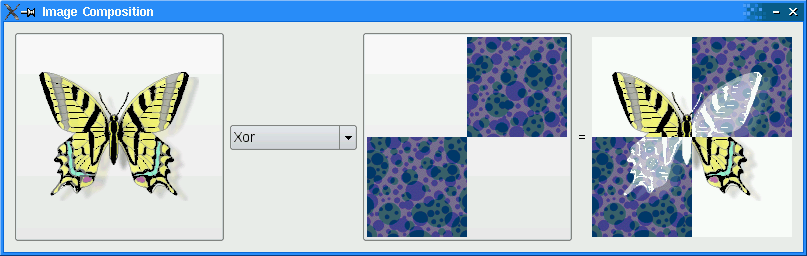
The Image Composition example requires two source images, butterfly.png and checker.png that are embedded within imagecomposition.qrc . The file contains the following code:
<Code snippet "/tmp/snapshot-qt5full-5.15.0/qt5/qtbase/painting/imagecomposition/imagecomposition.qrc" not found>有关资源文件的更多信息,见 Qt 资源系统 .
ImageComposer类是子类化的QWidgetthat implements three private slots,chooseSource(),chooseDestination(),和recalculateResult().class ImageComposer : public QWidget { Q_OBJECT public: ImageComposer(); private slots: void chooseSource(); void chooseDestination(); void recalculateResult();此外,
ImageComposerconsists of five private functions,addOp(),chooseImage(),loadImage(),currentMode(),和imagePos(), as well as private instances ofQToolButton,QComboBox,QLabel,和QImage.private: void addOp(QPainter::CompositionMode mode, const QString &name); void chooseImage(const QString &title, QImage *image, QToolButton *button); void loadImage(const QString &fileName, QImage *image, QToolButton *button); QPainter::CompositionMode currentMode() const; QPoint imagePos(const QImage &image) const; QToolButton *sourceButton; QToolButton *destinationButton; QComboBox *operatorComboBox; QLabel *equalLabel; QLabel *resultLabel; QImage sourceImage; QImage destinationImage; QImage resultImage; };
We declare a
QSize对象,resultSize, as a static constant with width and height equal to 200.static const QSize resultSize(200, 200);Within the constructor, we instantiate a
QToolButton对象,sourceButtonand set itsiconSize特性到resultSize。operatorComboBoxis instantiated and then populated using theaddOp()function. This function accepts aCompositionMode,mode,和QString,name, representing the name of the composition mode.ImageComposer::ImageComposer() { sourceButton = new QToolButton; sourceButton->setIconSize(resultSize); operatorComboBox = new QComboBox; addOp(QPainter::CompositionMode_SourceOver, tr("SourceOver")); addOp(QPainter::CompositionMode_DestinationOver, tr("DestinationOver")); addOp(QPainter::CompositionMode_Clear, tr("Clear")); addOp(QPainter::CompositionMode_Source, tr("Source")); addOp(QPainter::CompositionMode_Destination, tr("Destination")); addOp(QPainter::CompositionMode_SourceIn, tr("SourceIn")); addOp(QPainter::CompositionMode_DestinationIn, tr("DestinationIn")); addOp(QPainter::CompositionMode_SourceOut, tr("SourceOut")); addOp(QPainter::CompositionMode_DestinationOut, tr("DestinationOut")); addOp(QPainter::CompositionMode_SourceAtop, tr("SourceAtop")); addOp(QPainter::CompositionMode_DestinationAtop, tr("DestinationAtop")); addOp(QPainter::CompositionMode_Xor, tr("Xor")); addOp(QPainter::CompositionMode_Plus, tr("Plus")); addOp(QPainter::CompositionMode_Multiply, tr("Multiply")); addOp(QPainter::CompositionMode_Screen, tr("Screen")); addOp(QPainter::CompositionMode_Overlay, tr("Overlay")); addOp(QPainter::CompositionMode_Darken, tr("Darken")); addOp(QPainter::CompositionMode_Lighten, tr("Lighten")); addOp(QPainter::CompositionMode_ColorDodge, tr("ColorDodge")); addOp(QPainter::CompositionMode_ColorBurn, tr("ColorBurn")); addOp(QPainter::CompositionMode_HardLight, tr("HardLight")); addOp(QPainter::CompositionMode_SoftLight, tr("SoftLight")); addOp(QPainter::CompositionMode_Difference, tr("Difference")); addOp(QPainter::CompositionMode_Exclusion, tr("Exclusion"));
destinationButtonis instantiated and itsiconSizeproperty is set toresultSizeas well. TheQLabelsequalLabelandresultLabelare created andresultLabel‘sminimumWidth被设置。destinationButton = new QToolButton; destinationButton->setIconSize(resultSize); equalLabel = new QLabel(tr("=")); resultLabel = new QLabel; resultLabel->setMinimumWidth(resultSize.width());We connect the following signals to their corresponding slots:
sourceButton’sclicked()signal is connected tochooseSource(),
operatorComboBox’sactivated()signal is connected torecalculateResult(),和
destinationButton’sclicked()signal is connected tochooseDestination().connect(sourceButton, &QAbstractButton::clicked, this, &ImageComposer::chooseSource); connect(operatorComboBox, QOverload<int>::of(&QComboBox::activated), this, &ImageComposer::recalculateResult); connect(destinationButton, &QAbstractButton::clicked, this, &ImageComposer::chooseDestination);A
QGridLayout,mainLayout, is used to place all the widgets. Note thatmainLayout‘ssizeConstraintproperty is set toSetFixedSize, which means thatImageComposer‘s size cannot be resized at all.QGridLayout *mainLayout = new QGridLayout; mainLayout->addWidget(sourceButton, 0, 0, 3, 1); mainLayout->addWidget(operatorComboBox, 1, 1); mainLayout->addWidget(destinationButton, 0, 2, 3, 1); mainLayout->addWidget(equalLabel, 1, 3); mainLayout->addWidget(resultLabel, 0, 4, 3, 1); mainLayout->setSizeConstraint(QLayout::SetFixedSize); setLayout(mainLayout);We create a
QImage,resultImage, and we invokeloadImage()twice to load both the image files in our imagecomposition.qrc file. Then, we set thewindowTitleproperty to “Image Composition”.resultImage = QImage(resultSize, QImage::Format_ARGB32_Premultiplied); loadImage(":/images/butterfly.png", &sourceImage, sourceButton); loadImage(":/images/checker.png", &destinationImage, destinationButton); setWindowTitle(tr("Image Composition")); }
chooseSource()andchooseDestination()functions are convenience functions that invokechooseImage()with specific parameters.void ImageComposer::chooseSource() { chooseImage(tr("Choose Source Image"), &sourceImage, sourceButton); } void ImageComposer::chooseDestination() { chooseImage(tr("Choose Destination Image"), &destinationImage, destinationButton); }
chooseImage()function loads an image of the user’s choice, depending on thetitle,image,和button.void ImageComposer::chooseImage(const QString &title, QImage *image, QToolButton *button) { QString fileName = QFileDialog::getOpenFileName(this, title); if (!fileName.isEmpty()) loadImage(fileName, image, button); }
recalculateResult()function is used to calculate amd display the result of combining the two images together with the user’s choice of composition mode.void ImageComposer::recalculateResult() { QPainter::CompositionMode mode = currentMode(); QPainter painter(&resultImage); painter.setCompositionMode(QPainter::CompositionMode_Source); painter.fillRect(resultImage.rect(), Qt::transparent); painter.setCompositionMode(QPainter::CompositionMode_SourceOver); painter.drawImage(0, 0, destinationImage); painter.setCompositionMode(mode); painter.drawImage(0, 0, sourceImage); painter.setCompositionMode(QPainter::CompositionMode_DestinationOver); painter.fillRect(resultImage.rect(), Qt::white); painter.end(); resultLabel->setPixmap(QPixmap::fromImage(resultImage)); }
addOp()function adds an item to theoperatorComboBox使用QComboBox‘saddItemfunction. This function accepts aCompositionMode,mode,和QString,name. The rectangle is filled with Qt::Transparent and both thesourceImageanddestinationImageare painted, before displaying it onresultLabel.void ImageComposer::addOp(QPainter::CompositionMode mode, const QString &name) { operatorComboBox->addItem(name, mode); }
loadImage()function paints a transparent background usingfillRect()and drawsimagein a centralized position usingdrawImage(). Thisimageis then set as thebutton‘s icon.void ImageComposer::loadImage(const QString &fileName, QImage *image, QToolButton *button) { image->load(fileName); // Scale the image to given size *image = image->scaled(resultSize, Qt::KeepAspectRatio); QImage fixedImage(resultSize, QImage::Format_ARGB32_Premultiplied); QPainter painter(&fixedImage); painter.setCompositionMode(QPainter::CompositionMode_Source); painter.fillRect(fixedImage.rect(), Qt::transparent); painter.setCompositionMode(QPainter::CompositionMode_SourceOver); painter.drawImage(imagePos(*image), *image); painter.end(); button->setIcon(QPixmap::fromImage(fixedImage)); *image = fixedImage; recalculateResult(); }
currentMode()function returns the composition mode currently selected inoperatorComboBox.QPainter::CompositionMode ImageComposer::currentMode() const { return (QPainter::CompositionMode) operatorComboBox->itemData(operatorComboBox->currentIndex()).toInt(); }我们使用
imagePos()function to ensure that images loaded onto theQToolButton对象,sourceButtonanddestinationButton, are centralized.QPoint ImageComposer::imagePos(const QImage &image) const { return QPoint((resultSize.width() - image.width()) / 2, (resultSize.height() - image.height()) / 2); }
main()
main()function instantiatesQApplicationandImageComposerand invokes itsshow()函数。int main(int argc, char *argv[]) { Q_INIT_RESOURCE(imagecomposition); QApplication app(argc, argv); ImageComposer composer; composer.show(); return app.exec(); }