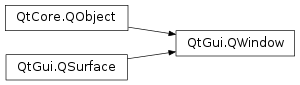
继承者: Qt3DExtras.Qt3DWindow , QtDataVisualization.Q3DBars , QtDataVisualization.Q3DScatter , QtDataVisualization.Q3DSurface , QtDataVisualization.QAbstract3DGraph , QOpenGLWindow , QPaintDeviceWindow , QRasterWindow , QQuickView , QQuickWindow
def
baseSize
()
def
contentOrientation
()
def
create
()
def
cursor
()
def
destroy
()
def
devicePixelRatio
()
def
filePath
()
def
flags
()
def
frameGeometry
()
def
frameMargins
()
def
framePosition
()
def
geometry
()
def
height
()
def
icon
()
def
isActive
()
def
isAncestorOf
(child[, mode=IncludeTransients])
def
isExposed
()
def
isModal
()
def
isTopLevel
()
def
isVisible
()
def
mapFromGlobal
(pos)
def
mapToGlobal
(pos)
def
mask
()
def
maximumHeight
()
def
maximumSize
()
def
maximumWidth
()
def
minimumHeight
()
def
minimumSize
()
def
minimumWidth
()
def
modality
()
def
opacity
()
def
parent
(mode)
def
position
()
def
reportContentOrientationChange
(orientation)
def
requestedFormat
()
def
resize
(newSize)
def
resize
(w, h)
def
screen
()
def
setBaseSize
(size)
def
setCursor
(arg__1)
def
setFilePath
(filePath)
def
setFlag
(arg__1[, on=true])
def
setFlags
(flags)
def
setFormat
(format)
def
setFramePosition
(point)
def
setIcon
(icon)
def
setKeyboardGrabEnabled
(grab)
def
setMask
(region)
def
setMaximumSize
(size)
def
setMinimumSize
(size)
def
setModality
(modality)
def
setMouseGrabEnabled
(grab)
def
setOpacity
(level)
def
setParent
(parent)
def
setPosition
(posx, posy)
def
setPosition
(pt)
def
setScreen
(screen)
def
setSizeIncrement
(size)
def
setSurfaceType
(surfaceType)
def
setTransientParent
(parent)
def
setVisibility
(v)
def
setWindowState
(state)
def
setWindowStates
(states)
def
sizeIncrement
()
def
title
()
def
transientParent
()
def
type
()
def
unsetCursor
()
def
visibility
()
def
width
()
def
winId
()
def
windowState
()
def
windowStates
()
def
x
()
def
y
()
def
accessibleRoot
()
def
exposeEvent
(arg__1)
def
focusInEvent
(arg__1)
def
focusObject
()
def
focusOutEvent
(arg__1)
def
hideEvent
(arg__1)
def
keyPressEvent
(arg__1)
def
keyReleaseEvent
(arg__1)
def
mouseDoubleClickEvent
(arg__1)
def
mouseMoveEvent
(arg__1)
def
mousePressEvent
(arg__1)
def
mouseReleaseEvent
(arg__1)
def
moveEvent
(arg__1)
def
nativeEvent
(eventType, message)
def
resizeEvent
(arg__1)
def
showEvent
(arg__1)
def
tabletEvent
(arg__1)
def
touchEvent
(arg__1)
def
wheelEvent
(arg__1)
def
alert
(msec)
def
close
()
def
hide
()
def
lower
()
def
raise_
()
def
requestActivate
()
def
requestUpdate
()
def
setGeometry
(posx, posy, w, h)
def
setGeometry
(rect)
def
setHeight
(arg)
def
setMaximumHeight
(h)
def
setMaximumWidth
(w)
def
setMinimumHeight
(h)
def
setMinimumWidth
(w)
def
setTitle
(arg__1)
def
setVisible
(visible)
def
setWidth
(arg)
def
setX
(arg)
def
setY
(arg)
def
show
()
def
showFullScreen
()
def
showMaximized
()
def
showMinimized
()
def
showNormal
()
def
startSystemMove
()
def
startSystemResize
(edges)
def
activeChanged
()
def
contentOrientationChanged
(orientation)
def
focusObjectChanged
(object)
def
heightChanged
(arg)
def
maximumHeightChanged
(arg)
def
maximumWidthChanged
(arg)
def
minimumHeightChanged
(arg)
def
minimumWidthChanged
(arg)
def
modalityChanged
(modality)
def
opacityChanged
(opacity)
def
screenChanged
(screen)
def
transientParentChanged
(transientParent)
def
visibilityChanged
(visibility)
def
visibleChanged
(arg)
def
widthChanged
(arg)
def
windowStateChanged
(windowState)
def
windowTitleChanged
(title)
def
xChanged
(arg)
def
yChanged
(arg)
由父级提供的窗口,将变为其父级窗口的本机子级窗口。
应用程序通常会使用
QWidgetorQQuickViewfor its UI, and notQWindowdirectly. Still, it is possible to render directly to aQWindowwithQBackingStoreorQOpenGLContext,当希望把依赖关系降到最低 (或想要直接使用 OpenGL) 时。 光栅窗口范例 and OpenGL 窗口范例 are useful reference examples for how to render to aQWindowusing either approach.
Windows can potentially use a lot of memory. A usual measurement is width times height times color depth. A window might also include multiple buffers to support double and triple buffering, as well as depth and stencil buffers. To release a window’s memory resources, call the
destroy()函数。
QWindowhasreportContentOrientationChange()that can be used to specify the layout of the window contents in relation to the screen. The content orientation is simply a hint to the windowing system about which orientation the window contents are in. It’s useful when you wish to keep the same window size, but rotate the contents instead, especially when doing rotation animations between different orientations. The windowing system might use this value to determine the layout of system popups or dialogs.
By default, the window is not visible, and you must call
setVisible(true), orshow()or similar to make it visible. To make a window hidden again, callsetVisible(false) orhide(). The visible property describes the state the application wants the window to be in. Depending on the underlying system, a visible window might still not be shown on the screen. It could, for instance, be covered by other opaque windows or moved outside the physical area of the screen. On windowing systems that have exposure notifications, theisExposed()accessor describes whether the window should be treated as directly visible on screen. TheexposeEvent()function is called whenever an area of the window is invalidated, for example due to the exposure in the windowing system changing. On windowing systems that do not make this information visible to the application,isExposed()will simply return the same value asisVisible().
Visibilityqueried throughvisibility()is a convenience API combining the functions of visible() andwindowStates().
There are two Qt APIs that can be used to render content into a window,
QBackingStorefor rendering with aQPainterand flushing the contents to a window with typeRasterSurface,和QOpenGLContextfor rendering with OpenGL to a window with typeOpenGLSurface.The application can start rendering as soon as
isExposed()返回true, and can keep rendering until itisExposed()返回false. To find out whenisExposed()changes, reimplementexposeEvent(). The window will always get a resize event before the first expose event.
If the window’s width and height are left uninitialized, the window will get a reasonable default geometry from the platform window. If the position is left uninitialized, then the platform window will allow the windowing system to position the window. For example on X11, the window manager usually does some kind of smart positioning to try to avoid having new windows completely obscure existing windows. However
setGeometry()initializes both the position and the size, so if you want a fixed size but an automatic position, you should callresize()orsetWidth()andsetHeight()代替。
QWindow
(
[
screen=None
]
)

QWindow(parent)
- param parent
- param screen
QScreen
创建顶层窗口,在
targetScreen
.
窗口不被展示直到
setVisible
(true),
show()
, or similar is called.
另请参阅
创建窗口作为子级,为给定
parent
窗口。
窗口会被嵌入在父级窗口内,其坐标相对于父级。
屏幕继承自父级。
另请参阅
PySide2.QtGui.QWindow.
Visibility

This enum describes what part of the screen the window occupies or should occupy.
|
常量 |
描述 |
|---|---|
|
QWindow.Windowed |
The window occupies part of the screen, but not necessarily the entire screen. This state will occur only on windowing systems which support showing multiple windows simultaneously. In this state it is possible for the user to move and resize the window manually, if WindowFlags permit it and if it is supported by the windowing system. |
|
QWindow.Minimized |
The window is reduced to an entry or icon on the task bar, dock, task list or desktop, depending on how the windowing system handles minimized windows. |
|
QWindow.Maximized |
The window occupies one entire screen, and the titlebar is still visible. On most windowing systems this is the state achieved by clicking the maximize button on the toolbar. |
|
QWindow.FullScreen |
The window occupies one entire screen, is not resizable, and there is no titlebar. On some platforms which do not support showing multiple simultaneous windows, this can be the usual visibility when the window is not hidden. |
|
QWindow.AutomaticVisibility |
This means to give the window a default visible state, which might be fullscreen or windowed depending on the platform. It can be given as a parameter to
|
|
QWindow.Hidden |
The window is not visible in any way, however it may remember a latent visibility which can be restored by setting . |
PySide2.QtGui.QWindow.
AncestorMode

This enum is used to control whether or not transient parents should be considered ancestors.
|
常量 |
描述 |
|---|---|
|
QWindow.ExcludeTransients |
Transient parents are not considered ancestors. |
|
QWindow.IncludeTransients |
Transient parents are considered ancestors. |
PySide2.QtGui.QWindow.
accessibleRoot
(
)

Returns the accessibility interface for the object that the window represents
另请参阅
QAccessible
PySide2.QtGui.QWindow.
activeChanged
(
)

PySide2.QtGui.QWindow.
alert
(
msec
)

msec
–
int
Causes an alert to be shown for
msec
miliseconds. If
msec
is
0
(the default), then the alert is shown indefinitely until the window becomes active again. This function has no effect on an active window.
In alert state, the window indicates that it demands attention, for example by flashing or bouncing the taskbar entry.
PySide2.QtGui.QWindow.
baseSize
(
)

QSize
返回窗口的基尺寸。
另请参阅
PySide2.QtGui.QWindow.
close
(
)

bool
关闭窗口。
This closes the window, effectively calling
destroy()
, and potentially quitting the application. Returns
true
on success, false if it has a parent window (in which case the top level window should be closed instead).
PySide2.QtGui.QWindow.
contentOrientation
(
)

ScreenOrientation
PySide2.QtGui.QWindow.
contentOrientationChanged
(
orientation
)

orientation
–
ScreenOrientation
PySide2.QtGui.QWindow.
create
(
)

Allocates the platform resources associated with the window.
It is at this point that the surface format set using
setFormat()
gets resolved into an actual native surface. However, the window remains hidden until
setVisible()
被调用。
Note that it is not usually necessary to call this function directly, as it will be implicitly called by
show()
,
setVisible()
, and other functions that require access to the platform resources.
调用
destroy()
to free the platform resources if necessary.
另请参阅
PySide2.QtGui.QWindow.
cursor
(
)

用于此窗口的光标形状
另请参阅
PySide2.QtGui.QWindow.
devicePixelRatio
(
)

qreal
Returns the ratio between physical pixels and device-independent pixels for the window. This value is dependent on the screen the window is on, and may change when the window is moved.
Common values are 1.0 on normal displays and 2.0 on Apple “retina” displays.
注意
For windows not backed by a platform window, meaning that
create()
was not called, the function will fall back to the associated
QScreen
‘s device pixel ratio.
另请参阅
PySide2.QtGui.QWindow.
exposeEvent
(
arg__1
)

arg__1
–
QExposeEvent
曝光事件 (
ev
) 被发送通过窗口系统,每当窗口区域无效时 (例如:由于窗口系统改变曝光)。
应用程序可以开始渲染到窗口,采用
QBackingStore
and
QOpenGLContext
as soon as it gets an such that
isExposed()
为 true。
若窗口被移出屏幕,使之完全被另一窗口、图标化或类似窗口所掩盖,此函数可能被调用,且值
isExposed()
might change to false. When this happens, an application should stop its rendering as it is no longer visible to the user.
Resize (重置尺寸) 事件将始终被发送,在窗口首次被展示的曝光事件之前。
另请参阅
PySide2.QtGui.QWindow.
filePath
(
)

unicode
表示此窗口的文件名。
另请参阅
PySide2.QtGui.QWindow.
flags
(
)

WindowFlags
另请参阅
PySide2.QtGui.QWindow.
focusInEvent
(
arg__1
)

arg__1
–
QFocusEvent
覆盖此以处理聚焦入事件 (
ev
).
Focus in events are sent when the window receives keyboard focus.
另请参阅
PySide2.QtGui.QWindow.
focusObject
(
)

QObject
返回
QObject
that will be the final receiver of events tied focus, such as key events.
PySide2.QtGui.QWindow.
focusObjectChanged
(
object
)

object
–
QObject
PySide2.QtGui.QWindow.
focusOutEvent
(
arg__1
)

arg__1
–
QFocusEvent
覆盖此以处理聚焦出事件 (
ev
).
Focus out events are sent when the window loses keyboard focus.
另请参阅
PySide2.QtGui.QWindow.
frameGeometry
(
)

QRect
Returns the geometry of the window, including its window frame.
The geometry is in relation to the virtualGeometry() of its screen.
另请参阅
PySide2.QtGui.QWindow.
frameMargins
(
)

QMargins
Returns the window frame margins surrounding the window.
PySide2.QtGui.QWindow.
framePosition
(
)

QPoint
Returns the top left position of the window, including its window frame.
This returns the same value as
frameGeometry()
.
topLeft()
.
PySide2.QtGui.QWindow.
fromWinId
(
id
)

id
–
WId
创建由另一进程 (或由使用 Qt 下本机库) 创建的窗口的本地表示。
给定句柄
id
到本机窗口,此方法创建
QWindow
对象,其可以被用于表示窗口,当援引方法像
setParent()
and .
这可以在支持它的平台上使用,以嵌入
QWindow
在本机窗口,或把本机窗口嵌入在
QWindow
.
若外来窗口不被支持,或在平台插件中嵌入本机窗口失败,此函数返回
None
.
注意
结果
QWindow
不应用于操纵底层本机窗口 (除重新父级化外),或用于观察本机窗口的状态变化。对这类操作的任何支持都是偶然的,高度依赖平台且未经测试。
另请参阅
PySide2.QtGui.QWindow.
geometry
(
)

QRect
Returns the geometry of the window, excluding its window frame.
The geometry is in relation to the virtualGeometry() of its screen.
PySide2.QtGui.QWindow.
height
(
)

int
另请参阅
PySide2.QtGui.QWindow.
heightChanged
(
arg
)

arg
–
int
PySide2.QtGui.QWindow.
hide
(
)

隐藏窗口。
相当于调用
setVisible
(false).
另请参阅
PySide2.QtGui.QWindow.
hideEvent
(
arg__1
)

arg__1
–
QHideEvent
Override this to handle hide events (
ev
).
The function is called when the window has requested being hidden in the windowing system.
PySide2.QtGui.QWindow.
icon
(
)

Returns the window’s icon in the windowing system
另请参阅
PySide2.QtGui.QWindow.
isActive
(
)

bool
返回
true
if the window should appear active from a style perspective.
This is the case for the window that has input focus as well as windows that are in the same parent / transient parent chain as the focus window.
To get the window that currently has focus, use
focusWindow()
.
PySide2.QtGui.QWindow.
isAncestorOf
(
child
[
,
mode=IncludeTransients
]
)

child
–
QWindow
mode
–
AncestorMode
bool
返回
true
if the window is an ancestor of the given
child
。若
mode
is
IncludeTransients
, then transient parents are also considered ancestors.
PySide2.QtGui.QWindow.
isExposed
(
)

bool
Returns if this window is exposed in the windowing system.
When the window is not exposed, it is shown by the application but it is still not showing in the windowing system, so the application should minimize rendering and other graphical activities.
An
exposeEvent()
is sent every time this value changes.
另请参阅
PySide2.QtGui.QWindow.
isModal
(
)

bool
Returns whether the window is modal.
A modal window prevents other windows from getting any input.
另请参阅
PySide2.QtGui.QWindow.
isTopLevel
(
)

bool
Returns whether the window is top level, i.e. has no parent window.
PySide2.QtGui.QWindow.
isVisible
(
)

bool
PySide2.QtGui.QWindow.
keyPressEvent
(
arg__1
)

arg__1
–
QKeyEvent
Override this to handle key press events (
ev
).
另请参阅
PySide2.QtGui.QWindow.
keyReleaseEvent
(
arg__1
)

arg__1
–
QKeyEvent
Override this to handle key release events (
ev
).
另请参阅
PySide2.QtGui.QWindow.
lower
(
)

降低窗口系统中的窗口。
请求降低窗口将出现在其它窗口下方。
PySide2.QtGui.QWindow.
mapFromGlobal
(
pos
)

pos
–
QPoint
QPoint
翻译全局屏幕坐标
pos
to window coordinates.
另请参阅
PySide2.QtGui.QWindow.
mapToGlobal
(
pos
)

pos
–
QPoint
QPoint
Translates the window coordinate
pos
到全局屏幕坐标。例如:
mapToGlobal(QPoint(0,0))
would give the global coordinates of the top-left pixel of the window.
另请参阅
PySide2.QtGui.QWindow.
mask
(
)

Returns the mask set on the window.
The mask is a hint to the windowing system that the application does not want to receive mouse or touch input outside the given region.
另请参阅
PySide2.QtGui.QWindow.
maximumHeight
(
)

int
另请参阅
PySide2.QtGui.QWindow.
maximumHeightChanged
(
arg
)

arg
–
int
PySide2.QtGui.QWindow.
maximumSize
(
)

QSize
Returns the maximum size of the window.
另请参阅
PySide2.QtGui.QWindow.
maximumWidth
(
)

int
另请参阅
PySide2.QtGui.QWindow.
maximumWidthChanged
(
arg
)

arg
–
int
PySide2.QtGui.QWindow.
minimumHeight
(
)

int
另请参阅
PySide2.QtGui.QWindow.
minimumHeightChanged
(
arg
)

arg
–
int
PySide2.QtGui.QWindow.
minimumSize
(
)

QSize
Returns the minimum size of the window.
另请参阅
PySide2.QtGui.QWindow.
minimumWidth
(
)

int
另请参阅
PySide2.QtGui.QWindow.
minimumWidthChanged
(
arg
)

arg
–
int
PySide2.QtGui.QWindow.
modality
(
)

WindowModality
另请参阅
PySide2.QtGui.QWindow.
modalityChanged
(
modality
)

modality
–
WindowModality
PySide2.QtGui.QWindow.
mouseDoubleClickEvent
(
arg__1
)

arg__1
–
QMouseEvent
Override this to handle mouse double click events (
ev
).
PySide2.QtGui.QWindow.
mouseMoveEvent
(
arg__1
)

arg__1
–
QMouseEvent
Override this to handle mouse move events (
ev
).
PySide2.QtGui.QWindow.
mousePressEvent
(
arg__1
)

arg__1
–
QMouseEvent
Override this to handle mouse press events (
ev
).
另请参阅
PySide2.QtGui.QWindow.
mouseReleaseEvent
(
arg__1
)

arg__1
–
QMouseEvent
Override this to handle mouse release events (
ev
).
另请参阅
PySide2.QtGui.QWindow.
moveEvent
(
arg__1
)

arg__1
–
QMoveEvent
Override this to handle window move events (
ev
).
PySide2.QtGui.QWindow.
nativeEvent
(
eventType
,
message
)

eventType
–
QByteArray
message
–
void
PyObject
Override this to handle platform dependent events. Will be given
eventType
,
message
and
result
.
This might make your application non-portable.
Should return true only if the event was handled.
PySide2.QtGui.QWindow.
opacity
(
)

qreal
另请参阅
PySide2.QtGui.QWindow.
opacityChanged
(
opacity
)

opacity
–
qreal
PySide2.QtGui.QWindow.
parent
(
mode
)

mode
–
AncestorMode
Returns the parent window, if any.
若
mode
is
IncludeTransients
, then the transient parent is returned if there is no parent.
A window without a parent is known as a top level window.
另请参阅
PySide2.QtGui.QWindow.
position
(
)

QPoint
Returns the position of the window on the desktop excluding any window frame
另请参阅
PySide2.QtGui.QWindow.
raise_
(
)

在窗口系统中提升窗口。
请求提升窗口将出现在其它窗口上方。
PySide2.QtGui.QWindow.
reportContentOrientationChange
(
orientation
)

orientation
–
ScreenOrientation
PySide2.QtGui.QWindow.
requestActivate
(
)

请求窗口被激活,即:接收键盘聚焦。
另请参阅
isActive()
focusWindow()
setWindowActivationBehavior()
PySide2.QtGui.QWindow.
requestUpdate
(
)

Schedules a
UpdateRequest
event to be delivered to this window.
The event is delivered in sync with the display vsync on platforms where this is possible. Otherwise, the event is delivered after a delay of 5 ms. The additional time is there to give the event loop a bit of idle time to gather system events, and can be overridden using the QT_QPA_UPDATE_IDLE_TIME environment variable.
When driving animations, this function should be called once after drawing has completed. Calling this function multiple times will result in a single event being delivered to the window.
子类化的
QWindow
should reimplement
event()
, intercept the event and call the application’s rendering code, then call the base class implementation.
注意
The subclass’ reimplementation of
event()
must invoke the base class implementation, unless it is absolutely sure that the event does not need to be handled by the base class. For example, the default implementation of this function relies on
Timer
events. Filtering them away would therefore break the delivery of the update events.
PySide2.QtGui.QWindow.
requestedFormat
(
)

Returns the requested surface format of this window.
If the requested format was not supported by the platform implementation, the will differ from the actual window format.
This is the value set with
setFormat()
.
另请参阅
setFormat()
format()
PySide2.QtGui.QWindow.
resize
(
newSize
)

newSize
–
QSize
set the size of the window, excluding any window frame, to
newSize
另请参阅
size()
geometry()
PySide2.QtGui.QWindow.
resize
(
w
,
h
)

w
–
int
h
–
int
set the size of the window, excluding any window frame, to a
QSize
constructed from width
w
and height
h
For interactively resizing windows, see
startSystemResize()
.
另请参阅
size()
geometry()
PySide2.QtGui.QWindow.
resizeEvent
(
arg__1
)

arg__1
–
QResizeEvent
Override this to handle resize events (
ev
).
The resize event is called whenever the window is resized in the windowing system, either directly through the windowing system acknowledging a
setGeometry()
or
resize()
request, or indirectly through the user resizing the window manually.
PySide2.QtGui.QWindow.
screen
(
)

QScreen
返回在其中展示窗口的屏幕,或 null 若没有的话。
对于子级窗口,这返回相应顶层窗口屏幕。
PySide2.QtGui.QWindow.
screenChanged
(
screen
)

screen
–
QScreen
PySide2.QtGui.QWindow.
setBaseSize
(
size
)

size
–
QSize
Sets the base
size
of the window.
The base size is used to calculate a proper window size if the window defines
sizeIncrement()
.
PySide2.QtGui.QWindow.
setCursor
(
arg__1
)

arg__1
–
QCursor
set the cursor shape for this window
The mouse
cursor
will assume this shape when it is over this window, unless an override cursor is set. See the
													list


													of


													predefined


													cursor


													对象
了解有用形状范围。
If no cursor has been set, or after a call to
unsetCursor()
, the parent window’s cursor is used.
By default, the cursor has the
ArrowCursor
形状。
Some underlying window implementations will reset the cursor if it leaves a window even if the mouse is grabbed. If you want to have a cursor set for all windows, even when outside the window, consider
setOverrideCursor()
.
PySide2.QtGui.QWindow.
setFilePath
(
filePath
)

filePath – unicode
set the file name this window is representing.
The windowing system might use
filePath
to display the path of the document this window is representing in the tile bar.
另请参阅
PySide2.QtGui.QWindow.
setFlag
(
arg__1
[
,
on=true
]
)

arg__1
–
WindowType
on
–
bool
设置窗口标志
flag
on this window if
on
为 true;否则清零标志。
另请参阅
PySide2.QtGui.QWindow.
setFormat
(
format
)

format
–
QSurfaceFormat
Sets the window’s surface
format
.
The format determines properties such as color depth, alpha, depth and stencil buffer size, etc. For example, to give a window a transparent background (provided that the window system supports compositing, and provided that other content in the window does not make it opaque again):
QSurfaceFormat format;
format.setAlphaBufferSize(8);
window.setFormat(format);
The surface format will be resolved in the
create()
function. Calling this function after
create()
has been called will not re-resolve the surface format of the native surface.
When the format is not explicitly set via this function, the format returned by
defaultFormat()
will be used. This means that when having multiple windows, individual calls to this function can be replaced by one single call to
setDefaultFormat()
before creating the first window.
另请参阅
format()
create()
destroy()
setDefaultFormat()
PySide2.QtGui.QWindow.
setFramePosition
(
point
)

point
–
QPoint
Sets the upper left position of the window (
point
) including its window frame.
位置与其屏幕的 virtualGeometry() 有关。
PySide2.QtGui.QWindow.
setGeometry
(
rect
)

rect
–
QRect
Sets the geometry of the window, excluding its window frame, to
rect
.
The geometry is in relation to the virtualGeometry() of its screen.
另请参阅
PySide2.QtGui.QWindow.
setGeometry
(
posx
,
posy
,
w
,
h
)

posx
–
int
posy
–
int
w
–
int
h
–
int
Sets the geometry of the window, excluding its window frame, to a rectangle constructed from
posx
,
posy
,
w
and
h
.
The geometry is in relation to the virtualGeometry() of its screen.
另请参阅
PySide2.QtGui.QWindow.
setIcon
(
icon
)

icon
–
QIcon
Sets the window’s
icon
in the windowing system
The window icon might be used by the windowing system for example to decorate the window, and/or in the task switcher.
注意
On macOS, the window title bar icon is meant for windows representing documents, and will only show up if a file path is also set.
另请参阅
PySide2.QtGui.QWindow.
setKeyboardGrabEnabled
(
grab
)

grab
–
bool
bool
Sets whether keyboard grab should be enabled or not (
grab
).
If the return value is true, the window receives all key events until (false) is called; other windows get no key events at all. Mouse events are not affected. Use
setMouseGrabEnabled()
if you want to grab that.
PySide2.QtGui.QWindow.
setMask
(
region
)

region
–
QRegion
Sets the mask of the window.
The mask is a hint to the windowing system that the application does not want to receive mouse or touch input outside the given
region
.
The window manager may or may not choose to display any areas of the window not included in the mask, thus it is the application’s responsibility to clear to transparent the areas that are not part of the mask.
另请参阅
PySide2.QtGui.QWindow.
setMaximumHeight
(
h
)

h
–
int
另请参阅
PySide2.QtGui.QWindow.
setMaximumSize
(
size
)

size
–
QSize
Sets the maximum size of the window.
This is a hint to the window manager to prevent resizing above the specified
size
.
PySide2.QtGui.QWindow.
setMaximumWidth
(
w
)

w
–
int
另请参阅
PySide2.QtGui.QWindow.
setMinimumHeight
(
h
)

h
–
int
另请参阅
PySide2.QtGui.QWindow.
setMinimumSize
(
size
)

size
–
QSize
Sets the minimum size of the window.
This is a hint to the window manager to prevent resizing below the specified
size
.
PySide2.QtGui.QWindow.
setMinimumWidth
(
w
)

w
–
int
另请参阅
PySide2.QtGui.QWindow.
setModality
(
modality
)

modality
–
WindowModality
另请参阅
PySide2.QtGui.QWindow.
setMouseGrabEnabled
(
grab
)

grab
–
bool
bool
Sets whether mouse grab should be enabled or not (
grab
).
If the return value is true, the window receives all mouse events until (false) is called; other windows get no mouse events at all. Keyboard events are not affected. Use
setKeyboardGrabEnabled()
if you want to grab that.
PySide2.QtGui.QWindow.
setParent
(
parent
)

parent
–
QWindow
设置
parent
窗口。这将导致窗口系统管理窗口的裁剪,因此,它将被裁剪到
parent
窗口。
设置
parent
to be
None
将使窗口成为顶层窗口。
若
parent
是窗口创建通过
fromWinId()
, then the current window will be embedded inside
parent
,若平台支持它。
另请参阅
PySide2.QtGui.QWindow.
setPosition
(
pt
)

pt
–
QPoint
把窗口在桌面上的位置,设为
pt
位置与其屏幕的 virtualGeometry() 有关。
对于交互式移动窗口,见
startSystemMove()
. For interactively resizing windows, see
startSystemResize()
.
PySide2.QtGui.QWindow.
setPosition
(
posx
,
posy
)

posx
–
int
posy
–
int
把窗口在桌面上的位置,设为
posx
,
posy
位置与其屏幕的 virtualGeometry() 有关。
另请参阅
PySide2.QtGui.QWindow.
setScreen
(
screen
)

screen
–
QScreen
Sets the screen on which the window should be shown.
If the window has been created, it will be recreated on the
newScreen
.
注意
若屏幕是多屏幕虚拟桌面的一部分,窗口不会自动移至
newScreen
. To place the window relative to the screen, use the screen’s
topLeft()
position.
This function only works for top level windows.
PySide2.QtGui.QWindow.
setSizeIncrement
(
size
)

size
–
QSize
Sets the size increment (
size
) of the window.
When the user resizes the window, the size will move in steps of
sizeIncrement()
.
width()
pixels horizontally and
sizeIncrement()
.
height()
pixels vertically, with
baseSize()
as the basis.
By default, this property contains a size with zero width and height.
The windowing system might not support size increments.
PySide2.QtGui.QWindow.
setSurfaceType
(
surfaceType
)

surfaceType
–
SurfaceType
设置
surfaceType
of the window.
Specifies whether the window is meant for raster rendering with
QBackingStore
, or OpenGL rendering with
QOpenGLContext
.
surfaceType
will be used when the native surface is created in the
create()
function. Calling this function after the native surface has been created requires calling
destroy()
and
create()
to release the old native surface and create a new one.
另请参阅
surfaceType()
QBackingStore
QOpenGLContext
create()
destroy()
PySide2.QtGui.QWindow.
setVisibility
(
v
)

v
–
Visibility
另请参阅
PySide2.QtGui.QWindow.
setVisible
(
visible
)

visible
–
bool
另请参阅
PySide2.QtGui.QWindow.
setWindowState
(
state
)

state
–
WindowState
set the screen-occupation state of the window
The window
state
represents whether the window appears in the windowing system as maximized, minimized, fullscreen, or normal.
The enum value
WindowActive
is not an accepted parameter.
PySide2.QtGui.QWindow.
setWindowStates
(
states
)

states
–
WindowStates
set the screen-occupation state of the window
The window
state
represents whether the window appears in the windowing system as maximized, minimized and/or fullscreen.
The window can be in a combination of several states. For example, if the window is both minimized and maximized, the window will appear minimized, but clicking on the task bar entry will restore it to the maximized state.
The enum value
WindowActive
should not be set.
PySide2.QtGui.QWindow.
show
(
)

展示窗口。
这相当于调用
showFullScreen()
,
showMaximized()
,或
showNormal()
, depending on the platform’s default behavior for the window type and flags.
PySide2.QtGui.QWindow.
showEvent
(
arg__1
)

arg__1
–
QShowEvent
Override this to handle show events (
ev
).
The function is called when the window has requested becoming visible.
If the window is successfully shown by the windowing system, this will be followed by a resize and an expose event.
PySide2.QtGui.QWindow.
showFullScreen
(
)

Shows the window as fullscreen.
相当于调用
setWindowStates
(
WindowFullScreen
) and then
setVisible
(true)。
PySide2.QtGui.QWindow.
showMaximized
(
)

Shows the window as maximized.
相当于调用
setWindowStates
(
WindowMaximized
) and then
setVisible
(true)。
PySide2.QtGui.QWindow.
showMinimized
(
)

Shows the window as minimized.
相当于调用
setWindowStates
(
WindowMinimized
) and then
setVisible
(true)。
PySide2.QtGui.QWindow.
showNormal
(
)

Shows the window as normal, i.e. neither maximized, minimized, nor fullscreen.
相当于调用
setWindowStates
(
WindowNoState
) and then
setVisible
(true)。
PySide2.QtGui.QWindow.
sizeIncrement
(
)

QSize
Returns the size increment of the window.
另请参阅
PySide2.QtGui.QWindow.
startSystemMove
(
)

bool
启动系统特定的移动操作
Calling this will start an interactive move operation on the window by platforms that support it. The actual behavior may vary depending on the platform. Usually, it will make the window follow the mouse cursor until a mouse button is released.
On platforms that support it, this method of moving windows is preferred over
setPosition
, because it allows a more native look-and-feel of moving windows, e.g. letting the window manager snap this window against other windows, or special tiling or resizing behavior with animations when dragged to the edge of the screen. Furthermore, on some platforms such as Wayland,
setPosition
is not supported, so this is the only way the application can influence its position.
Returns true if the operation was supported by the system.
PySide2.QtGui.QWindow.
startSystemResize
(
edges
)

edges
–
Edges
bool
Start a system-specific resize operation
Calling this will start an interactive resize operation on the window by platforms that support it. The actual behavior may vary depending on the platform. Usually, it will make the window resize so that its edge follows the mouse cursor.
On platforms that support it, this method of resizing windows is preferred over
setGeometry
, because it allows a more native look-and-feel of resizing windows, e.g. letting the window manager snap this window against other windows, or special resizing behavior with animations when dragged to the edge of the screen.
edges
should either be a single edge, or two adjacent edges (a corner). Other values are not allowed.
Returns true if the operation was supported by the system.
PySide2.QtGui.QWindow.
tabletEvent
(
arg__1
)

arg__1
–
QTabletEvent
Override this to handle tablet press, move, and release events (
ev
).
Proximity enter and leave events are not sent to windows, they are delivered to the application instance.
PySide2.QtGui.QWindow.
title
(
)

unicode
另请参阅
PySide2.QtGui.QWindow.
touchEvent
(
arg__1
)

arg__1
–
QTouchEvent
Override this to handle touch events (
ev
).
PySide2.QtGui.QWindow.
type
(
)

WindowType
Returns the type of the window.
This returns the part of the window flags that represents whether the window is a dialog, tooltip, popup, regular window, etc.
另请参阅
PySide2.QtGui.QWindow.
unsetCursor
(
)

Restores the default arrow cursor for this window.
PySide2.QtGui.QWindow.
visibility
(
)

另请参阅
PySide2.QtGui.QWindow.
visibilityChanged
(
visibility
)

visibility
–
Visibility
PySide2.QtGui.QWindow.
visibleChanged
(
arg
)

arg
–
bool
PySide2.QtGui.QWindow.
wheelEvent
(
arg__1
)

arg__1
–
QWheelEvent
Override this to handle mouse wheel or other wheel events (
ev
).
PySide2.QtGui.QWindow.
width
(
)

int
另请参阅
PySide2.QtGui.QWindow.
widthChanged
(
arg
)

arg
–
int
PySide2.QtGui.QWindow.
winId
(
)

WId
Returns the window’s platform id.
对于此 ID 可能有用的平台,返回值将表示相应屏幕内的唯一窗口。
另请参阅
PySide2.QtGui.QWindow.
windowState
(
)

WindowState
窗口的屏幕占用状态
PySide2.QtGui.QWindow.
windowStateChanged
(
windowState
)

windowState
–
WindowState
PySide2.QtGui.QWindow.
windowStates
(
)

WindowStates
窗口的屏幕占用状态
The window can be in a combination of several states. For example, if the window is both minimized and maximized, the window will appear minimized, but clicking on the task bar entry will restore it to the maximized state.
另请参阅
PySide2.QtGui.QWindow.
windowTitleChanged
(
title
)

title – unicode
PySide2.QtGui.QWindow.
xChanged
(
arg
)

arg
–
int
PySide2.QtGui.QWindow.
yChanged
(
arg
)

arg
–
int
