def
actualSize
(size[, mode=Normal[, state=Off]])
def
actualSize
(window, size[, mode=Normal[, state=Off]])
def
addFile
(fileName[, size=QSize()[, mode=Normal[, state=Off]]])
def
addPixmap
(pixmap[, mode=Normal[, state=Off]])
def
availableSizes
([mode=Normal[, state=Off]])
def
cacheKey
()
def
isMask
()
def
isNull
()
def
name
()
def
paint
(painter, rect[, alignment=Qt.AlignCenter[, mode=Normal[, state=Off]]])
def
paint
(painter, x, y, w, h[, alignment=Qt.AlignCenter[, mode=Normal[, state=Off]]])
def
pixmap
(extent[, mode=Normal[, state=Off]])
def
pixmap
(size[, mode=Normal[, state=Off]])
def
pixmap
(w, h[, mode=Normal[, state=Off]])
def
pixmap
(window, size[, mode=Normal[, state=Off]])
def
setIsMask
(isMask)
def
swap
(other)
def
fallbackSearchPaths
()
def
fallbackThemeName
()
def
fromTheme
(name)
def
fromTheme
(name, fallback)
def
hasThemeIcon
(name)
def
setFallbackSearchPaths
(paths)
def
setFallbackThemeName
(name)
def
setThemeName
(path)
def
setThemeSearchPaths
(searchpath)
def
themeName
()
def
themeSearchPaths
()
A
QIconcan generate smaller, larger, active, and disabled pixmaps from the set of pixmaps it is given. Such pixmaps are used by Qt widgets to show an icon representing a particular action.The simplest use of
QIconis to create one from aQPixmapfile or resource, and then use it, allowing Qt to work out all the required icon styles and sizes. For example:button = QToolButton() button.setIcon(QIcon("open.xpm"))To undo a
QIcon, simply set a null icon in its place:button.setIcon(QIcon())使用
supportedImageFormats()andsupportedImageFormats()functions to retrieve a complete list of the supported file formats.When you retrieve a pixmap using pixmap(
QSize, Mode, State), and no pixmap for this given size, mode and state has been added withaddFile()oraddPixmap(),那么QIconwill generate one on the fly. This pixmap generation happens in aQIconEngine. The default engine scales pixmaps down if required, but never up, and it uses the current style to calculate a disabled appearance. By using custom icon engines, you can customize every aspect of generated icons. WithQIconEnginePluginit is possible to register different icon engines for different file suffixes, making it possible for third parties to provide additional icon engines to those included with Qt.注意
Since Qt 4.2, an icon engine that supports SVG is included.
If you write your own widgets that have an option to set a small pixmap, consider allowing a
QIconto be set for that pixmap. The Qt classQToolButtonis an example of such a widget.Provide a method to set a
QIcon, and when you draw the icon, choose whichever pixmap is appropriate for the current state of your widget. For example:def drawIcon(self, painter, pos): enabledStatus = QIcon.Normal if not isEnabled(): enabledStatus = QIcon::Disabled onOff = QIcon.On if not isOn(): onOff = QIcon.Off pixmap = self.icon.pixmap(QSize(22, 22), enabledStatus, onOff) painter.drawPixmap(pos, pixmap)You might also make use of the
Activemode, perhaps making your widgetActivewhen the mouse is over the widget (seeenterEvent()), while the mouse is pressed pending the release that will activate the function, or when it is the currently selected item. If the widget can be toggled, the “On” mode might be used to draw a different icon.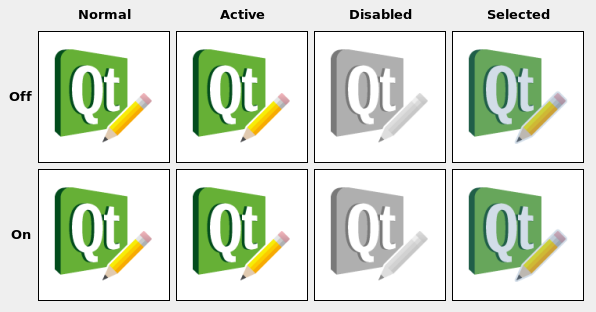
注意
QIconneeds aQGuiApplicationinstance before the icon is created.
There are two ways that
QIconsupports high DPI icons: viaaddFile()andfromTheme().
addFile()is useful if you have your own custom directory structure and do not need to use the freedesktop.org Icon Theme Specification . Icons created via this approach use Qt’s"@nx" high DPI syntax.使用
fromTheme()is necessary if you plan on following the Icon Theme Specification. To makeQIconuse the high DPI version of an image, add an additional entry to the appropriateindex.theme文件:[Icon Theme] Name=Test Comment=Test Theme Directories=32x32/actions,32x32@2/actions [32x32/actions] Size=32 Context=Actions Type=Fixed # High DPI version of the entry above. [32x32@2/actions] Size=32 Scale=2 Type=FixedYour icon theme directory would then look something like this:
├── 32x32
│   └── actions
│       └── appointment-new.png
├── 32x32@2
│   └── actions
│       └── appointment-new.png
└── index.theme
QIcon

QIcon(engine)
QIcon(other)
QIcon(pixmap)
QIcon(fileName)
- param other
- param fileName
unicode
- param engine
- param pixmap
Constructs a null icon.
Creates an icon with a specific icon
engine
. The icon takes ownership of the engine.
PySide2.QtGui.QIcon.
模式

This enum type describes the mode for which a pixmap is intended to be used. The currently defined modes are:
|
常量 |
描述 |
|---|---|
|
QIcon.Normal |
Display the pixmap when the user is not interacting with the icon, but the functionality represented by the icon is available. |
|
QIcon.Disabled |
Display the pixmap when the functionality represented by the icon is not available. |
|
QIcon.Active |
Display the pixmap when the functionality represented by the icon is available and the user is interacting with the icon, for example, moving the mouse over it or clicking it. |
|
QIcon.Selected |
Display the pixmap when the item represented by the icon is selected. |
PySide2.QtGui.QIcon.
State

This enum describes the state for which a pixmap is intended to be used. The state can be:
|
常量 |
描述 |
|---|---|
|
QIcon.Off |
Display the pixmap when the widget is in an “off” state |
|
QIcon.On |
Display the pixmap when the widget is in an “on” state |
PySide2.QtGui.QIcon.
actualSize
(
window
,
size
[
,
mode=Normal
[
,
state=Off
]
]
)

Returns the actual size of the icon for the requested
window
size
,
mode
,和
state
.
The pixmap can be smaller than the requested size. The returned size is in device-independent pixels (This is relevant for high-dpi pixmaps.)
另请参阅
PySide2.QtGui.QIcon.
actualSize
(
size
[
,
mode=Normal
[
,
state=Off
]
]
)

Returns the actual size of the icon for the requested
size
,
mode
,和
state
. The result might be smaller than requested, but never larger. The returned size is in device-independent pixels (This is relevant for high-dpi pixmaps.)
PySide2.QtGui.QIcon.
addFile
(
fileName
[
,
size=QSize()
[
,
mode=Normal
[
,
state=Off
]
]
]
)

Adds an image from the file with the given
fileName
to the icon, as a specialization for
size
,
mode
and
state
. The file will be loaded on demand. Note: custom icon engines are free to ignore additionally added pixmaps.
若
fileName
contains a relative path (e.g. the filename only) the relevant file must be found relative to the runtime working directory.
The file name can refer to an actual file on disk or to one of the application’s embedded resources. See the 资源系统 overview for details on how to embed images and other resource files in the application’s executable.
使用
supportedImageFormats()
and
supportedImageFormats()
functions to retrieve a complete list of the supported file formats.
If a high resolution version of the image exists (identified by the suffix
@2x
on the base name), it is automatically loaded and added with the
device pixel ratio
set to a value of 2. This can be disabled by setting the environment variable
QT_HIGHDPI_DISABLE_2X_IMAGE_LOADING
(见
QImageReader
).
注意
When you add a non-empty filename to a
QIcon
, the icon becomes non-null, even if the file doesn’t exist or points to a corrupt file.
另请参阅
addPixmap()
devicePixelRatio()
PySide2.QtGui.QIcon.
addPixmap
(
pixmap
[
,
mode=Normal
[
,
state=Off
]
]
)

添加
pixmap
to the icon, as a specialization for
mode
and
state
.
Custom icon engines are free to ignore additionally added pixmaps.
另请参阅
PySide2.QtGui.QIcon.
availableSizes
(
[
mode=Normal
[
,
state=Off
]
]
)

Returns a list of available icon sizes for the specified
mode
and
state
.
PySide2.QtGui.QIcon.
cacheKey
(
)

qint64
Returns a number that identifies the contents of this
QIcon
object. Distinct
QIcon
objects can have the same key if they refer to the same contents.
The will change when the icon is altered via
addPixmap()
or
addFile()
.
Cache keys are mostly useful in conjunction with caching.
另请参阅
PySide2.QtGui.QIcon.
fallbackSearchPaths
(
)

字符串列表
Returns the fallback search paths for icons.
The default value will depend on the platform.
PySide2.QtGui.QIcon.
fallbackThemeName
(
)

unicode
Returns the name of the fallback icon theme.
On X11, if not set, the fallback icon theme depends on your desktop settings. On other platforms it is not set by default.
PySide2.QtGui.QIcon.
fromTheme
(
name
)

name – unicode
返回
QIcon
corresponding to
name
in the current icon theme.
The latest version of the freedesktop icon specification and naming specification can be obtained here:
http://standards.freedesktop.org/icon-theme-spec/icon-theme-spec-latest.html
http://standards.freedesktop.org/icon-naming-spec/icon-naming-spec-latest.html
To fetch an icon from the current icon theme:
undoicon = QIcon.fromTheme("edit-undo")
注意
By default, only X11 will support themed icons. In order to use themed icons on Mac and Windows, you will have to bundle a compliant theme in one of your
themeSearchPaths()
and set the appropriate
themeName()
.
注意
Qt will make use of GTK’s icon-theme.cache if present to speed up the lookup. These caches can be generated using gtk-update-icon-cache: https://developer.gnome.org/gtk3/stable/gtk-update-icon-cache.html .
注意
If an icon can’t be found in the current theme, then it will be searched in
fallbackSearchPaths()
as an unthemed icon.
PySide2.QtGui.QIcon.
fromTheme
(
name
,
fallback
)

这是重载函数。
返回
QIcon
corresponding to
name
in the current icon theme. If no such icon is found in the current theme
fallback
被返回取而代之。
If you want to provide a guaranteed fallback for platforms that do not support theme icons, you can use the second argument:
undoicon = QIcon.fromTheme("edit-undo", QIcon(":/undo.png"))
PySide2.QtGui.QIcon.
hasThemeIcon
(
name
)

name – unicode
bool
返回
true
if there is an icon available for
name
in the current icon theme, otherwise returns
false
.
PySide2.QtGui.QIcon.
isMask
(
)

bool
返回
true
if this icon has been marked as a mask image. Certain platforms render mask icons differently (for example, menu icons on macOS).
另请参阅
PySide2.QtGui.QIcon.
isNull
(
)

bool
返回
true
if the icon is empty; otherwise returns
false
.
An icon is empty if it has neither a pixmap nor a filename.
Note: Even a non-null icon might not be able to create valid pixmaps, eg. if the file does not exist or cannot be read.
PySide2.QtGui.QIcon.
name
(
)

unicode
Returns the name used to create the icon, if available.
Depending on the way the icon was created, it may have an associated name. This is the case for icons created with
fromTheme()
or icons using a
QIconEngine
which supports the
IconNameHook
.
另请参阅
PySide2.QtGui.QIcon.
paint
(
painter
,
rect
[
,
alignment=Qt.AlignCenter
[
,
mode=Normal
[
,
state=Off
]
]
]
)

Uses the
painter
to paint the icon with specified
alignment
, required
mode
,和
state
into the rectangle
rect
.
另请参阅
PySide2.QtGui.QIcon.
paint
(
painter
,
x
,
y
,
w
,
h
[
,
alignment=Qt.AlignCenter
[
,
mode=Normal
[
,
state=Off
]
]
]
)

这是重载函数。
Paints the icon into the rectangle
QRect
(
x
,
y
,
w
,
h
).
PySide2.QtGui.QIcon.
pixmap
(
w
,
h
[
,
mode=Normal
[
,
state=Off
]
]
)

这是重载函数。
Returns a pixmap of size
QSize
(
w
,
h
). The pixmap might be smaller than requested, but never larger.
设置
AA_UseHighDpiPixmaps
application attribute enables this function to return pixmaps that are larger than the requested size. Such images will have a devicePixelRatio larger than 1.
PySide2.QtGui.QIcon.
pixmap
(
extent
[
,
mode=Normal
[
,
state=Off
]
]
)

这是重载函数。
Returns a pixmap of size
QSize
(
extent
,
extent
). The pixmap might be smaller than requested, but never larger.
设置
AA_UseHighDpiPixmaps
application attribute enables this function to return pixmaps that are larger than the requested size. Such images will have a devicePixelRatio larger than 1.
PySide2.QtGui.QIcon.
pixmap
(
size
[
,
mode=Normal
[
,
state=Off
]
]
)

PySide2.QtGui.QIcon.
pixmap
(
window
,
size
[
,
mode=Normal
[
,
state=Off
]
]
)

PySide2.QtGui.QIcon.
setFallbackSearchPaths
(
paths
)

paths – 字符串列表
Sets the fallback search paths for icons to
paths
.
注意
To add some path without replacing existing ones:
QIcon::setFallbackSearchPaths(QIcon::fallbackSearchPaths() << "my/search/path");
PySide2.QtGui.QIcon.
setFallbackThemeName
(
name
)

name – unicode
Sets the fallback icon theme to
name
.
name
should correspond to a directory name in the themeSearchPath() containing an index.theme file describing its contents.
PySide2.QtGui.QIcon.
setIsMask
(
isMask
)

isMask
–
bool
Indicate that this icon is a mask image(boolean
isMask
), and hence can potentially be modified based on where it’s displayed.
另请参阅
PySide2.QtGui.QIcon.
setThemeName
(
path
)

path – unicode
Sets the current icon theme to
name
.
name
should correspond to a directory name in the themeSearchPath() containing an index.theme file describing its contents.
PySide2.QtGui.QIcon.
setThemeSearchPaths
(
searchpath
)

searchpath – 字符串列表
Sets the search paths for icon themes to
paths
.
PySide2.QtGui.QIcon.
swap
(
other
)

other
–
QIcon
Swaps icon
other
with this icon. This operation is very fast and never fails.
PySide2.QtGui.QIcon.
themeName
(
)

unicode
Returns the name of the current icon theme.
On X11, the current icon theme depends on your desktop settings. On other platforms it is not set by default.
PySide2.QtGui.QIcon.
themeSearchPaths
(
)

字符串列表
Returns the search paths for icon themes.
The default value will depend on the platform:
On X11, the search path will use the XDG_DATA_DIRS environment variable if available.
By default all platforms will have the resource directory
:\icons
as a fallback. You can use “rcc -project” to generate a resource file from your icon theme.
