
def
addPage
(page)
def
button
(which)
def
buttonText
(which)
def
currentId
()
def
currentPage
()
def
field
(name)
def
hasVisitedPage
(id)
def
options
()
def
page
(id)
def
pageIds
()
def
pixmap
(which)
def
removePage
(id)
def
setButton
(which, button)
def
setButtonLayout
(layout)
def
setButtonText
(which, text)
def
setDefaultProperty
(className, property, changedSignal)
def
setField
(name, value)
def
setOption
(option[, on=true])
def
setOptions
(options)
def
setPage
(id, page)
def
setPixmap
(which, pixmap)
def
setSideWidget
(widget)
def
setStartId
(id)
def
setSubTitleFormat
(format)
def
setTitleFormat
(format)
def
setWizardStyle
(style)
def
sideWidget
()
def
startId
()
def
subTitleFormat
()
def
testOption
(option)
def
titleFormat
()
def
visitedIds
()
def
visitedPages
()
def
wizardStyle
()
def
cleanupPage
(id)
def
initializePage
(id)
def
nextId
()
def
validateCurrentPage
()
def
currentIdChanged
(id)
def
customButtonClicked
(which)
def
helpRequested
()
def
pageAdded
(id)
def
pageRemoved
(id)
A wizard (also called an assistant on macOS) is a special type of input dialog that consists of a sequence of pages. A wizard’s purpose is to guide the user through a process step by step. Wizards are useful for complex or infrequent tasks that users may find difficult to learn.
QWizard继承QDialogand represents a wizard. Each page is aQWizardPage(aQWidgetsubclass). To create your own wizards, you can use these classes directly, or you can subclass them for more control.话题:
The following example illustrates how to create wizard pages and add them to a wizard. For more advanced examples, see Class Wizard and License Wizard .
QWizardPage *createIntroPage()
{
    QWizardPage *page = new QWizardPage;
    page->setTitle("Introduction");
    QLabel *label = new QLabel("This wizard will help you register your copy "
                               "of Super Product Two.");
    label->setWordWrap(true);
    QVBoxLayout *layout = new QVBoxLayout;
    layout->addWidget(label);
    page->setLayout(layout);
    return page;
}
QWizardPage *createRegistrationPage()
{
    ...
}
QWizardPage *createConclusionPage()
{
    ...
}
int main(int argc, char *argv[])
{
    QCoreApplication::setAttribute(Qt::AA_UseHighDpiPixmaps);
    QApplication app(argc, argv);
#ifndef QT_NO_TRANSLATION
    QString translatorFileName = QLatin1String("qtbase_");
    translatorFileName += QLocale::system().name();
    QTranslator *translator = new QTranslator(&app);
    if (translator->load(translatorFileName, QLibraryInfo::location(QLibraryInfo::TranslationsPath)))
        app.installTranslator(translator);
#endif
    QWizard wizard;
    wizard.addPage(createIntroPage());
    wizard.addPage(createRegistrationPage());
    wizard.addPage(createConclusionPage());
    wizard.setWindowTitle("Trivial Wizard");
    wizard.show();
    return app.exec();
}
QWizardsupports four wizard looks:
ClassicStyle
ModernStyle
MacStyle
AeroStyleYou can explicitly set the look to use using
setWizardStyle()(e.g., if you want the same look on all platforms).
ClassicStyle
ModernStyle
MacStyle
AeroStyle
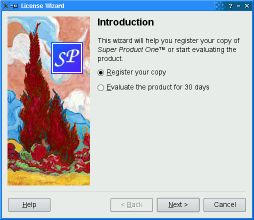
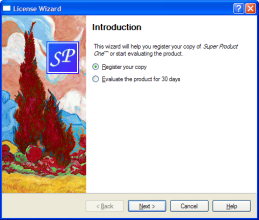

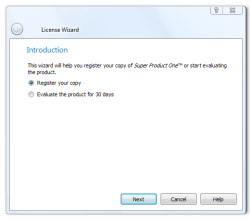
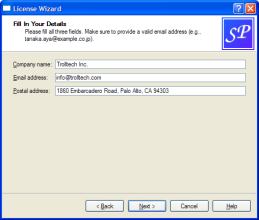
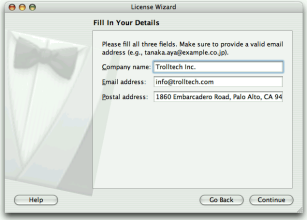
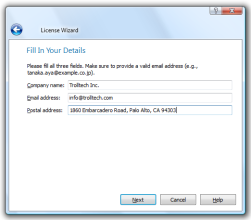
注意:
AeroStylehas effect only on a Windows Vista system with alpha compositing enabled.ModernStyleis used as a fallback when this condition is not met.In addition to the wizard style, there are several options that control the look and feel of the wizard. These can be set using
setOption()orsetOptions()。例如,HaveHelpButtonmakesQWizardshow a Help button along with the other wizard buttons.You can even change the order of the wizard buttons to any arbitrary order using
setButtonLayout(), and you can add up to three custom buttons (e.g., a Print button) to the button row. This is achieved by callingsetButton()orsetButtonText()withCustomButton1,CustomButton2,或CustomButton3to set up the button, and by enabling theHaveCustomButton1,HaveCustomButton2,或HaveCustomButton3options. Whenever the user clicks a custom button,customButtonClicked()is emitted. For example:wizard()->setButtonText(QWizard::CustomButton1, tr("&Print")); wizard()->setOption(QWizard::HaveCustomButton1, true); connect(wizard(), &QWizard::customButtonClicked, this, &ConclusionPage::printButtonClicked);
Wizards consist of a sequence of
QWizardPages. At any time, only one page is shown. A page has the following attributes:The diagram belows shows how
QWizardrenders these attributes, assuming they are all present andModernStyleis used: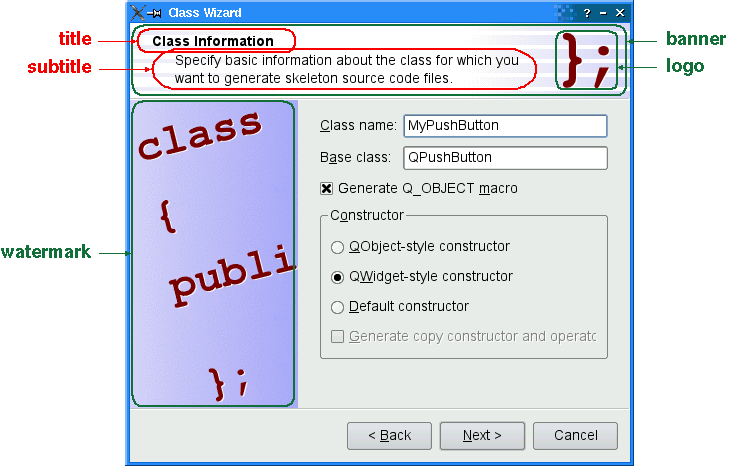
当
subTitle有设置,QWizarddisplays it in a header, in which case it also uses theBannerPixmap和LogoPixmapto decorate the header. TheWatermarkPixmapis displayed on the left side, below the header. At the bottom, there is a row of buttons allowing the user to navigate through the pages.The page itself (the
QWizardPagewidget) occupies the area between the header, the watermark, and the button row. Typically, the page is aQWizardPageon which aQGridLayoutis installed, with standard child widgets (QLabels,QLineEdits, etc.).If the wizard’s style is
MacStyle, the page looks radically different: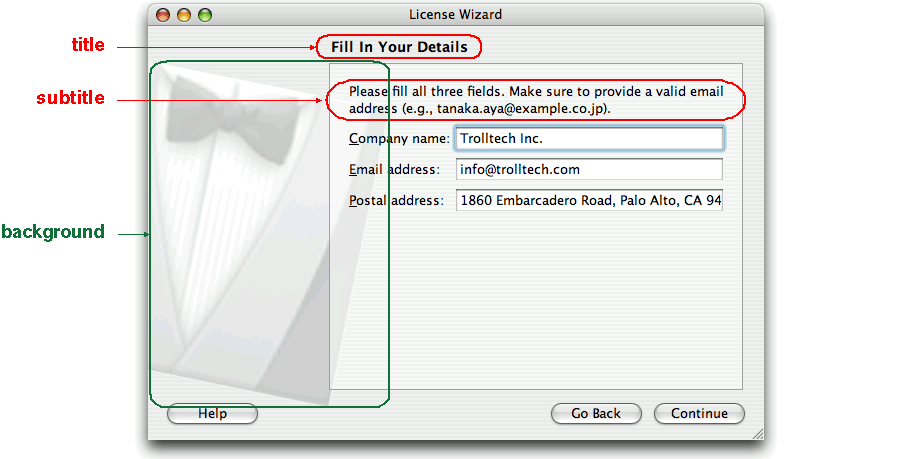
The watermark, banner, and logo pixmaps are ignored by the
MacStyle。若BackgroundPixmapis set, it is used as the background for the wizard; otherwise, a default “assistant” image is used.The title and subtitle are set by calling
setTitle()andsetSubTitle()on the individual pages. They may be plain text or HTML (seetitleFormatandsubTitleFormat). The pixmaps can be set globally for the entire wizard usingsetPixmap(), or on a per-page basis usingsetPixmap().
In many wizards, the contents of a page may affect the default values of the fields of a later page. To make it easy to communicate between pages,
QWizardsupports a “field” mechanism that allows you to register a field (e.g., aQLineEdit) on a page and to access its value from any page. It is also possible to specify mandatory fields (i.e., fields that must be filled before the user can advance to the next page).To register a field, call
registerField()field. For example:class ClassInfoPage(QWizardPage): def __init__(self, parent): QWizardPage.__init__(self, parent) ... classNameLabel = QLabel(self.tr("&Class name:")) classNameLineEdit = QLineEdit() classNameLabel.setBuddy(classNameLineEdit) baseClassLabel = QLabel(self.tr("B&ase class:")) baseClassLineEdit = QLineEdit() baseClassLabel.setBuddy(baseClassLineEdit) qobjectMacroCheckBox = QCheckBox(self.tr("Generate Q_OBJECT ¯o")) registerField("className*", classNameLineEdit) registerField("baseClass", baseClassLineEdit) registerField("qobjectMacro", qobjectMacroCheckBox) ...The above code registers three fields,
className,baseClass,和qobjectMacro, which are associated with three child widgets. The asterisk (*) next toclassNamedenotes a mandatory field.The fields of any page are accessible from any other page. For example:
def initializePage(self):
    className = field("className")
    self.headerLineEdit.setText(className.lower() + ".h")
    self.implementationLineEdit.setText(className.lower() + ".cpp")
    self.outputDirLineEdit.setText(QDir.convertSeparators(QDir.tempPath()))
Here, we call
field()to access the contents of theclassNamefield (which was defined in theClassInfoPage) and use it to initialize theOutputFilePage. The field’s contents is returned as aQVariant.When we create a field using
registerField(), we pass a unique field name and a widget. We can also provide a Qt property name and a “changed” signal (a signal that is emitted when the property changes) as third and fourth arguments; however, this is not necessary for the most common Qt widgets, such asQLineEdit,QCheckBox,和QComboBox, becauseQWizardknows which properties to look for.If an asterisk (
*) is appended to the name when the property is registered, the field is a mandatory field . When a page has mandatory fields, the Next and/or Finish buttons are enabled only when all mandatory fields are filled.To consider a field “filled”,
QWizardsimply checks that the field’s current value doesn’t equal the original value (the value it had wheninitializePage()was called). ForQLineEditandQAbstractSpinBox子类,QWizardalso checks thathasAcceptableInput()returns true, to honor any validator or mask.
QWizard‘s mandatory field mechanism is provided for convenience. A more powerful (but also more cumbersome) alternative is to reimplementisComplete()and to emit thecompleteChanged()signal whenever the page becomes complete or incomplete.The enabled/disabled state of the Next and/or Finish buttons is one way to perform validation on the user input. Another way is to reimplement
validateCurrentPage()(或validatePage()) to perform some last-minute validation (and show an error message if the user has entered incomplete or invalid information). If the function returnstrue, the next page is shown (or the wizard finishes); otherwise, the current page stays up.
Most wizards have a linear structure, with page 1 followed by page 2 and so on until the last page. The Class Wizard example is such a wizard. With
QWizard, linear wizards are created by instantiating theQWizardPages and inserting them usingaddPage(). By default, the pages are shown in the order in which they were added. For example:def __init__(self, parent): QWizard.__init__(self, parent): self.addPage(IntroPage()) self.addPage(ClassInfoPage()) self.addPage(CodeStylePage()) self.addPage(OutputFilesPage()) self.addPage(ConclusionPage()) ...When a page is about to be shown,
QWizardcallsinitializePage()(which in turn callsinitializePage()) to fill the page with default values. By default, this function does nothing, but it can be reimplemented to initialize the page’s contents based on other pages’ fields (see theexample above).If the user presses Back,
cleanupPage()is called (which in turn callscleanupPage()). The default implementation resets the page’s fields to their original values (the values they had beforeinitializePage()was called). If you want the Back button to be non-destructive and keep the values entered by the user, simply enable theIndependentPages选项。
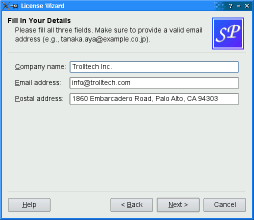
Some wizards are more complex in that they allow different traversal paths based on the information provided by the user. The License Wizard example illustrates this. It provides five wizard pages; depending on which options are selected, the user can reach different pages.
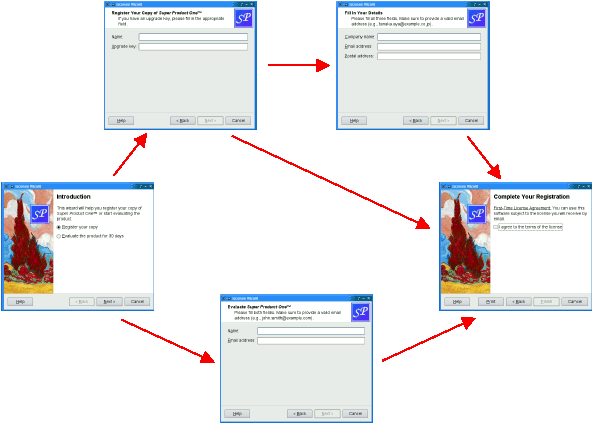
In complex wizards, pages are identified by IDs. These IDs are typically defined using an enum. For example:
class LicenseWizard (QWizard):
    ...
    Page_Intro = 1
    Page_Evaluate = 2
    Page_Register = 3
    Page_Details = 4
    Page_Conclusion = 5
    ...
The pages are inserted using
setPage(), which takes an ID and an instance ofQWizardPage(or of a subclass):LicenseWizard::LicenseWizard(QWidget *parent) : QWizard(parent) { setPage(Page_Intro, new IntroPage); setPage(Page_Evaluate, new EvaluatePage); setPage(Page_Register, new RegisterPage); setPage(Page_Details, new DetailsPage); setPage(Page_Conclusion, new ConclusionPage); ... }By default, the pages are shown in increasing ID order. To provide a dynamic order that depends on the options chosen by the user, we must reimplement
nextId()。例如:int IntroPage::nextId() const { if (evaluateRadioButton->isChecked()) { return LicenseWizard::Page_Evaluate; } else { return LicenseWizard::Page_Register; } } int EvaluatePage::nextId() const { return LicenseWizard::Page_Conclusion; } int RegisterPage::nextId() const { if (upgradeKeyLineEdit->text().isEmpty()) { return LicenseWizard::Page_Details; } else { return LicenseWizard::Page_Conclusion; } } int DetailsPage::nextId() const { return LicenseWizard::Page_Conclusion; } int ConclusionPage::nextId() const { return -1; }It would also be possible to put all the logic in one place, in a
nextId()reimplementation. For example:def nextId(self): id = self.currentId() if id == Page_Intro: if field("intro.evaluate").toBool(): return Page_Evaluate else: return Page_Register elif id == Page_Evaluate: return Page_Conclusion elif id == Page_Register: if field("register.upgradeKey").toString().isEmpty(): return Page_Details else: return Page_Conclusion elif id == Page_Details: return Page_Conclusion else: return -1To start at another page than the page with the lowest ID, call
setStartId().To test whether a page has been visited or not, call
hasVisitedPage()。例如:void ConclusionPage::initializePage() { QString licenseText; if (wizard()->hasVisitedPage(LicenseWizard::Page_Evaluate)) { licenseText = tr("<u>Evaluation License Agreement:</u> " "You can use this software for 30 days and make one " "backup, but you are not allowed to distribute it."); } else if (wizard()->hasVisitedPage(LicenseWizard::Page_Details)) { licenseText = tr("<u>First-Time License Agreement:</u> " "You can use this software subject to the license " "you will receive by email."); } else { licenseText = tr("<u>Upgrade License Agreement:</u> " "This software is licensed under the terms of your " "current license."); } bottomLabel->setText(licenseText); }另请参阅
QWizard
(
[
parent=None
[
,
flags=Qt.WindowFlags()
]
]
)

- param parent
- param flags
WindowFlags
Constructs a wizard with the given
parent
and window
flags
.
另请参阅
parent()
windowFlags()
PySide2.QtWidgets.QWizard.
WizardButton

This enum specifies the buttons in a wizard.
|
常量 |
描述 |
|---|---|
|
QWizard.BackButton |
The Back button (Go Back on macOS) |
|
QWizard.NextButton |
The Next button (Continue on macOS) |
|
QWizard.CommitButton |
The Commit button |
|
QWizard.FinishButton |
The Finish button (Done on macOS) |
|
QWizard.CancelButton |
The Cancel button (see also
|
|
QWizard.HelpButton |
The Help button (see also
|
|
QWizard.CustomButton1 |
The first user-defined button (see also
|
|
QWizard.CustomButton2 |
The second user-defined button (see also
|
|
QWizard.CustomButton3 |
The third user-defined button (see also
|
The following value is only useful when calling
setButtonLayout()
:
|
常量 |
描述 |
|---|---|
|
QWizard.Stretch |
A horizontal stretch in the button layout |
PySide2.QtWidgets.QWizard.
WizardPixmap

This enum specifies the pixmaps that can be associated with a page.
|
常量 |
描述 |
|---|---|
|
QWizard.WatermarkPixmap |
The tall pixmap on the left side of a
|
|
QWizard.LogoPixmap |
The small pixmap on the right side of a
|
|
QWizard.BannerPixmap |
The pixmap that occupies the background of a
|
|
QWizard.BackgroundPixmap |
The pixmap that occupies the background of a
|
另请参阅
setPixmap()
setPixmap()
														Elements


														of


														a


														Wizard


														Page
PySide2.QtWidgets.QWizard.
WizardStyle

This enum specifies the different looks supported by
QWizard
.
|
常量 |
描述 |
|---|---|
|
QWizard.ClassicStyle |
Classic Windows look |
|
QWizard.ModernStyle |
Modern Windows look |
|
QWizard.MacStyle |
macOS look |
|
QWizard.AeroStyle |
Windows Aero look |
另请参阅
setWizardStyle()
WizardOption
														Wizard


														Look


														and


														Feel
PySide2.QtWidgets.QWizard.
WizardOption

This enum specifies various options that affect the look and feel of a wizard.
|
常量 |
描述 |
|---|---|
|
QWizard.IndependentPages |
The pages are independent of each other (i.e., they don’t derive values from each other). |
|
QWizard.IgnoreSubTitles |
Don’t show any subtitles, even if they are set. |
|
QWizard.ExtendedWatermarkPixmap |
Extend any
|
|
QWizard.NoDefaultButton |
Don’t make the Next or Finish button the dialog’s
|
|
QWizard.NoBackButtonOnStartPage |
Don’t show the Back button on the start page. |
|
QWizard.NoBackButtonOnLastPage |
Don’t show the Back button on the last page. |
|
QWizard.DisabledBackButtonOnLastPage |
Disable the Back button on the last page. |
|
QWizard.HaveNextButtonOnLastPage |
Show the (disabled) Next button on the last page. |
|
QWizard.HaveFinishButtonOnEarlyPages |
Show the (disabled) Finish button on non-final pages. |
|
QWizard.NoCancelButton |
Don’t show the Cancel button. |
|
QWizard.CancelButtonOnLeft |
Put the Cancel button on the left of Back (rather than on the right of Finish or Next). |
|
QWizard.HaveHelpButton |
Show the Help button. |
|
QWizard.HelpButtonOnRight |
Put the Help button on the far right of the button layout (rather than on the far left). |
|
QWizard.HaveCustomButton1 |
Show the first user-defined button (
|
|
QWizard.HaveCustomButton2 |
Show the second user-defined button (
|
|
QWizard.HaveCustomButton3 |
Show the third user-defined button (
|
|
QWizard.NoCancelButtonOnLastPage |
Don’t show the Cancel button on the last page. |
PySide2.QtWidgets.QWizard.
addPage
(
page
)

page
–
QWizardPage
int
添加给定
page
to the wizard, and returns the page’s ID.
The ID is guaranteed to be larger than any other ID in the
QWizard
so far.
另请参阅
PySide2.QtWidgets.QWizard.
back
(
)

Goes back to the previous page.
This is equivalent to pressing the Back button.
which
–
WizardButton
Returns the button corresponding to role
which
.
which
–
WizardButton
unicode
Returns the text on button
which
.
If a text has ben set using
setButtonText()
, this text is returned.
By default, the text on buttons depends on the
wizardStyle
. For example, on macOS, the Next button is called Continue.
PySide2.QtWidgets.QWizard.
cleanupPage
(
id
)

id
–
int
此虚拟函数被调用由
QWizard
to clean up page
id
just before the user leaves it by clicking Back (unless the
IndependentPages
option is set).
默认实现调用
cleanupPage()
on page(
id
).
PySide2.QtWidgets.QWizard.
currentId
(
)

int
PySide2.QtWidgets.QWizard.
currentIdChanged
(
id
)

id
–
int
PySide2.QtWidgets.QWizard.
currentPage
(
)

Returns a pointer to the current page, or
None
if there is no current page (e.g., before the wizard is shown).
This is equivalent to calling page(
currentId()
).
另请参阅
PySide2.QtWidgets.QWizard.
customButtonClicked
(
which
)

which
–
int
PySide2.QtWidgets.QWizard.
field
(
name
)

name – unicode
object
Returns the value of the field called
name
.
This function can be used to access fields on any page of the wizard.
PySide2.QtWidgets.QWizard.
hasVisitedPage
(
id
)

id
–
int
bool
返回
true
if the page history contains page
id
; otherwise, returns
false
.
Pressing Back marks the current page as “unvisited” again.
另请参阅
PySide2.QtWidgets.QWizard.
helpRequested
(
)

PySide2.QtWidgets.QWizard.
initializePage
(
id
)

id
–
int
此虚拟函数被调用由
QWizard
to prepare page
id
just before it is shown either as a result of
restart()
being called, or as a result of the user clicking Next. (However, if the
IndependentPages
option is set, this function is only called the first time the page is shown.)
By reimplementing this function, you can ensure that the page’s fields are properly initialized based on fields from previous pages.
默认实现调用
initializePage()
on page(
id
).
PySide2.QtWidgets.QWizard.
next
(
)

Advances to the next page.
This is equivalent to pressing the Next or Commit button.
PySide2.QtWidgets.QWizard.
nextId
(
)

int
此虚拟函数被调用由
QWizard
to find out which page to show when the user clicks the Next button.
The return value is the ID of the next page, or -1 if no page follows.
默认实现调用
nextId()
在
currentPage()
.
By reimplementing this function, you can specify a dynamic page order.
另请参阅
PySide2.QtWidgets.QWizard.
options
(
)

WizardOptions
另请参阅
PySide2.QtWidgets.QWizard.
page
(
id
)

id
–
int
Returns the page with the given
id
,或
None
if there is no such page.
PySide2.QtWidgets.QWizard.
pageAdded
(
id
)

id
–
int
PySide2.QtWidgets.QWizard.
pageIds
(
)

Returns the list of page IDs.
PySide2.QtWidgets.QWizard.
pageRemoved
(
id
)

id
–
int
PySide2.QtWidgets.QWizard.
pixmap
(
which
)

which
–
WizardPixmap
QPixmap
Returns the pixmap set for role
which
.
By default, the only pixmap that is set is the
BackgroundPixmap
on macOS version 10.13 and earlier.
另请参阅
setPixmap()
pixmap()
														Elements


														of


														a


														Wizard


														Page
PySide2.QtWidgets.QWizard.
removePage
(
id
)

id
–
int
Removes the page with the given
id
.
cleanupPage()
will be called if necessary.
注意
Removing a page may influence the value of the
startId
特性。
PySide2.QtWidgets.QWizard.
restart
(
)

Restarts the wizard at the start page. This function is called automatically when the wizard is shown.
另请参阅
PySide2.QtWidgets.QWizard.
setButton
(
which
,
button
)

which
–
WizardButton
button
–
QAbstractButton
Sets the button corresponding to role
which
to
button
.
To add extra buttons to the wizard (e.g., a Print button), one way is to call with
CustomButton1
to
CustomButton3
, and make the buttons visible using the
HaveCustomButton1
to
HaveCustomButton3
选项。
另请参阅
button()
setButtonText()
setButtonLayout()
options
PySide2.QtWidgets.QWizard.
setButtonLayout
(
layout
)

layout –
Sets the order in which buttons are displayed to
layout
,其中
layout
is a list of
WizardButton
s.
The default layout depends on the options (e.g., whether
HelpButtonOnRight
) that are set. You can call this function if you need more control over the buttons’ layout than what
options
already provides.
You can specify horizontal stretches in the layout using
Stretch
.
范例:
class MyWizard(QWizard):
    def __init__(self, parent):
        QWizard.__ini__(self, parent)
        ...
        layout = [QWizard.Stretch, QWizard.BackButton, QWizard.CancelButton, QWizard.NextButton, QWizard.FinishButton]
        setButtonLayout(layout);
        ...
PySide2.QtWidgets.QWizard.
setButtonText
(
which
,
text
)

which
–
WizardButton
text – unicode
Sets the text on button
which
to be
text
.
By default, the text on buttons depends on the
wizardStyle
. For example, on macOS, the Next button is called Continue.
To add extra buttons to the wizard (e.g., a Print button), one way is to call with
CustomButton1
,
CustomButton2
,或
CustomButton3
to set their text, and make the buttons visible using the
HaveCustomButton1
,
HaveCustomButton2
, and/or
HaveCustomButton3
选项。
Button texts may also be set on a per-page basis using
setButtonText()
.
PySide2.QtWidgets.QWizard.
setDefaultProperty
(
className
,
特性
,
changedSignal
)

className – str
特性 – str
changedSignal – str
Sets the default property for
className
to be
特性
, and the associated change signal to be
changedSignal
.
The default property is used when an instance of
className
(or of one of its subclasses) is passed to
registerField()
and no property is specified.
QWizard
knows the most common Qt widgets. For these (or their subclasses), you don’t need to specify a
特性
或
changedSignal
. The table below lists these widgets:
|
Widget |
特性 |
Change Notification Signal |
|
bool
|
||
|
int
|
||
|
int
|
||
|
|
||
|
int
|
||
|
int
|
另请参阅
PySide2.QtWidgets.QWizard.
setField
(
name
,
value
)

name – unicode
value – object
Sets the value of the field called
name
to
value
.
This function can be used to set fields on any page of the wizard.
PySide2.QtWidgets.QWizard.
setOption
(
option
[
,
on=true
]
)

option
–
WizardOption
on
–
bool
设置给定
option
to be enabled if
on
is true; otherwise, clears the given
option
.
另请参阅
options
testOption()
setWizardStyle()
PySide2.QtWidgets.QWizard.
setPage
(
id
,
page
)

id
–
int
page
–
QWizardPage
添加给定
page
to the wizard with the given
id
.
注意
Adding a page may influence the value of the
startId
property in case it was not set explicitly.
另请参阅
PySide2.QtWidgets.QWizard.
setPixmap
(
which
,
pixmap
)

which
–
WizardPixmap
pixmap
–
QPixmap
Sets the pixmap for role
which
to
pixmap
.
The pixmaps are used by
QWizard
when displaying a page. Which pixmaps are actually used depend on the
													wizard


													style
.
Pixmaps can also be set for a specific page using
setPixmap()
.
另请参阅
pixmap()
setPixmap()
														Elements


														of


														a


														Wizard


														Page
PySide2.QtWidgets.QWizard.
setSideWidget
(
widget
)

widget
–
QWidget
设置给定
widget
to be shown on the left side of the wizard. For styles which use the
WatermarkPixmap
(
ClassicStyle
and
ModernStyle
) the side widget is displayed on top of the watermark, for other styles or when the watermark is not provided the side widget is displayed on the left side of the wizard.
传递
None
shows no side widget.
当
widget
不是
None
the wizard reparents it.
Any previous side widget is hidden.
You may call with the same widget at different times.
All widgets set here will be deleted by the wizard when it is destroyed unless you separately reparent the widget after setting some other side widget (or
None
).
By default, no side widget is present.
另请参阅
PySide2.QtWidgets.QWizard.
setSubTitleFormat
(
format
)

format
–
TextFormat
另请参阅
PySide2.QtWidgets.QWizard.
setTitleFormat
(
format
)

format
–
TextFormat
另请参阅
PySide2.QtWidgets.QWizard.
setWizardStyle
(
style
)

style
–
WizardStyle
另请参阅
PySide2.QtWidgets.QWizard.
sideWidget
(
)

Returns the widget on the left side of the wizard or
None
.
By default, no side widget is present.
另请参阅
PySide2.QtWidgets.QWizard.
startId
(
)

int
另请参阅
PySide2.QtWidgets.QWizard.
subTitleFormat
(
)

TextFormat
另请参阅
PySide2.QtWidgets.QWizard.
testOption
(
option
)

option
–
WizardOption
bool
返回
true
若给定
option
被启用;否则,返回 false。
另请参阅
options
setOption()
setWizardStyle()
PySide2.QtWidgets.QWizard.
titleFormat
(
)

TextFormat
另请参阅
PySide2.QtWidgets.QWizard.
validateCurrentPage
(
)

bool
此虚拟函数被调用由
QWizard
when the user clicks Next or Finish to perform some last-minute validation. If it returns
true
, the next page is shown (or the wizard finishes); otherwise, the current page stays up.
默认实现调用
validatePage()
在
currentPage()
.
When possible, it is usually better style to disable the Next or Finish button (by specifying
													mandatory


													fields
or by reimplementing
isComplete()
) than to reimplement .
PySide2.QtWidgets.QWizard.
visitedIds
(
)

Returns the list of IDs of visited pages, in the order in which the pages were visited.
另请参阅
PySide2.QtWidgets.QWizard.
visitedPages
(
)

注意
此函数被弃用。
使用
visitedIds()
instead
PySide2.QtWidgets.QWizard.
wizardStyle
(
)

另请参阅
