
继承者: QtCharts.QChartView , QHelpContentWidget , QHelpIndexWidget , QAbstractItemView , QAbstractScrollArea , QColumnView , QGraphicsView , QHeaderView , QLCDNumber , QLabel , QListView , QListWidget , QMdiArea , QPlainTextEdit , QScrollArea , QSplitter , QStackedWidget , QTableView , QTableWidget , QTextBrowser , QTextEdit , QToolBox , QTreeView , QTreeWidget , QUndoView
def
drawFrame
(arg__1)
def
frameRect
()
def
frameShadow
()
def
frameShape
()
def
frameStyle
()
def
frameWidth
()
def
initStyleOption
(option)
def
lineWidth
()
def
midLineWidth
()
def
setFrameRect
(arg__1)
def
setFrameShadow
(arg__1)
def
setFrameShape
(arg__1)
def
setFrameStyle
(arg__1)
def
setLineWidth
(arg__1)
def
setMidLineWidth
(arg__1)
QMenuuses this to “raise” the menu above the surrounding screen.QProgressBarhas a “sunken” look.QLabel拥有 Flat (扁平) 外观。像这些的 Widget 框架可以改变。label = QLabel() label.setFrameStyle(QFrame.Panel | QFrame.Raised) label.setLineWidth(2) pbar = QProgressBar() label.setFrameStyle(QFrame.NoFrame)
QFrameclass can also be used directly for creating simple placeholder frames without any contents.框架样式的指定通过
frame shape和shadow style用于在视觉上分隔框架与周围 Widget。 这些特性可以一起设置使用setFrameStyle()function and read withframeStyle().框架形状包括
NoFrame,Box,Panel,StyledPanel,HLineandVLine;阴影样式包括Plain,RaisedandSunken.框架 Widget 拥有 3 个描述边框厚度的属性:
lineWidth,midLineWidth,和frameWidth.
The line width is the width of the frame border. It can be modified to customize the frame’s appearance.
中线宽度指定框架中间额外线条的宽度,使用第 3 种颜色以获得特殊 3D 效果。注意:只绘制中线对于
Box,HLineandVLine凸起或凹陷框架。框架宽度由框架样式确定,和
frameWidth()function is used to obtain the value defined for the style used.定制框架和框架内容之间的边距采用
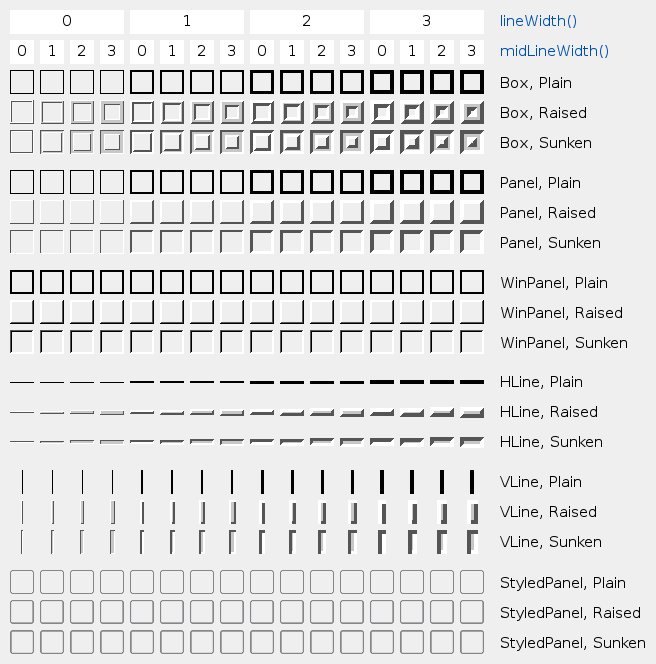
setContentsMargins()函数。此表展示一些样式和线宽的组合:
QFrame
(
[
parent=None
[
,
f=Qt.WindowFlags()
]
]
)

- param f
WindowFlags- param parent
构造框架 Widget 采用框架样式
NoFrame
和 1 像素框架宽度。
parent
and
f
自变量被传递给
QWidget
构造函数。
PySide2.QtWidgets.QFrame.
形状

此枚举类型定义框架可用形状。
|
常量 |
描述 |
|---|---|
|
QFrame.NoFrame |
|
|
QFrame.Box |
|
|
QFrame.Panel |
|
|
QFrame.StyledPanel |
绘制外观从属当前 GUI 样式的矩形面板。可以凸起或凹陷。 |
|
QFrame.HLine |
|
|
QFrame.VLine |
|
|
QFrame.WinPanel |
draws a rectangular panel that can be raised or sunken like those in Windows 2000. Specifying this shape sets the line width to 2 pixels. is provided for compatibility. For GUI style independence we recommend using instead. |
当不调用
QStyle
,形状交互影响
Shadow
,
lineWidth()
和
midLineWidth()
to create the total result. See the picture of the frames in the main class documentation.
另请参阅
Shadow
style()
drawPrimitive()
PySide2.QtWidgets.QFrame.
Shadow

此枚举类型定义用于把 3D 效果给予框架的阴影类型。
|
常量 |
描述 |
|---|---|
|
QFrame.Plain |
the frame and contents appear level with the surroundings; draws using the palette
|
|
QFrame.Raised |
the frame and contents appear raised; draws a 3D raised line using the light and dark colors of the current color group |
|
QFrame.Sunken |
the frame and contents appear sunken; draws a 3D sunken line using the light and dark colors of the current color group |
阴影交互影响
形状
,
lineWidth()
和
midLineWidth()
. See the picture of the frames in the main class documentation.
另请参阅
PySide2.QtWidgets.QFrame.
StyleMask

此枚举定义 2 常量,可以用于提取 2 分量为
frameStyle()
:
|
常量 |
描述 |
|---|---|
|
QFrame.Shadow_Mask |
|
|
QFrame.Shape_Mask |
|
Normally, you don’t need to use these, since
frameShadow()
and
frameShape()
already extract the
Shadow
和
形状
部分在
frameStyle()
.
PySide2.QtWidgets.QFrame.
drawFrame
(
arg__1
)

arg__1
–
QPainter
Used by
QLabel
and
QLCDNumber
PySide2.QtWidgets.QFrame.
frameRect
(
)

QRect
另请参阅
PySide2.QtWidgets.QFrame.
frameShadow
(
)

另请参阅
PySide2.QtWidgets.QFrame.
frameShape
(
)

另请参阅
PySide2.QtWidgets.QFrame.
frameStyle
(
)

int
返回框架样式。
默认值为
Plain
.
PySide2.QtWidgets.QFrame.
frameWidth
(
)

int
PySide2.QtWidgets.QFrame.
initStyleOption
(
option
)

option
–
QStyleOptionFrame
初始化
option
采用值来自此
QFrame
。此方法对子类是有用的,当需要
QStyleOptionFrame
but don’t want to fill in all the information themselves.
另请参阅
PySide2.QtWidgets.QFrame.
lineWidth
(
)

int
另请参阅
PySide2.QtWidgets.QFrame.
midLineWidth
(
)

int
另请参阅
PySide2.QtWidgets.QFrame.
setFrameRect
(
arg__1
)

arg__1
–
QRect
另请参阅
PySide2.QtWidgets.QFrame.
setFrameStyle
(
arg__1
)

arg__1
–
int
将框架样式设为
style
.
style
是框架形状和框架阴影样式之间的按位 OR。见主类文档编制中的框架图片。
框架形状给出在
形状
和阴影样式在
Shadow
.
若指定大于 0 的中线宽度,则绘制附加线条为
Raised
or
Sunken
Box
,
HLine
,和
VLine
框架。使用当前颜色组的中间色绘制中间线条。
另请参阅
PySide2.QtWidgets.QFrame.
setLineWidth
(
arg__1
)

arg__1
–
int
另请参阅
PySide2.QtWidgets.QFrame.
setMidLineWidth
(
arg__1
)

arg__1
–
int
另请参阅
