QGraphicsViewclass provides a widget for displaying the contents of aQGraphicsScene. 更多 …

继承者: QtCharts.QChartView
def
alignment
()
def
backgroundBrush
()
def
cacheMode
()
def
centerOn
(item)
def
centerOn
(pos)
def
centerOn
(x, y)
def
dragMode
()
def
ensureVisible
(item[, xmargin=50[, ymargin=50]])
def
ensureVisible
(rect[, xmargin=50[, ymargin=50]])
def
ensureVisible
(x, y, w, h[, xmargin=50[, ymargin=50]])
def
fitInView
(item[, aspectRadioMode=Qt.IgnoreAspectRatio])
def
fitInView
(rect[, aspectRadioMode=Qt.IgnoreAspectRatio])
def
fitInView
(x, y, w, h[, aspectRadioMode=Qt.IgnoreAspectRatio])
def
foregroundBrush
()
def
isInteractive
()
def
isTransformed
()
def
itemAt
(pos)
def
itemAt
(x, y)
def
items
()
def
items
(path[, mode=Qt.IntersectsItemShape])
def
items
(polygon[, mode=Qt.IntersectsItemShape])
def
items
(pos)
def
items
(rect[, mode=Qt.IntersectsItemShape])
def
items
(x, y)
def
items
(x, y, w, h[, mode=Qt.IntersectsItemShape])
def
mapFromScene
(path)
def
mapFromScene
(point)
def
mapFromScene
(polygon)
def
mapFromScene
(rect)
def
mapFromScene
(x, y)
def
mapFromScene
(x, y, w, h)
def
mapToScene
(path)
def
mapToScene
(point)
def
mapToScene
(polygon)
def
mapToScene
(rect)
def
mapToScene
(x, y)
def
mapToScene
(x, y, w, h)
def
matrix
()
def
optimizationFlags
()
def
render
(painter[, target=QRectF()[, source=QRect()[, aspectRatioMode=Qt.KeepAspectRatio]]])
def
renderHints
()
def
resetCachedContent
()
def
resetMatrix
()
def
resetTransform
()
def
resizeAnchor
()
def
rotate
(angle)
def
rubberBandRect
()
def
rubberBandSelectionMode
()
def
scale
(sx, sy)
def
scene
()
def
sceneRect
()
def
setAlignment
(alignment)
def
setBackgroundBrush
(brush)
def
setCacheMode
(mode)
def
setDragMode
(mode)
def
setForegroundBrush
(brush)
def
setInteractive
(allowed)
def
setMatrix
(matrix[, combine=false])
def
setOptimizationFlag
(flag[, enabled=true])
def
setOptimizationFlags
(flags)
def
setRenderHint
(hint[, enabled=true])
def
setRenderHints
(hints)
def
setResizeAnchor
(anchor)
def
setRubberBandSelectionMode
(mode)
def
setScene
(scene)
def
setSceneRect
(rect)
def
setSceneRect
(x, y, w, h)
def
setTransform
(matrix[, combine=false])
def
setTransformationAnchor
(anchor)
def
setViewportUpdateMode
(mode)
def
shear
(sh, sv)
def
transform
()
def
transformationAnchor
()
def
translate
(dx, dy)
def
viewportTransform
()
def
viewportUpdateMode
()
def
drawBackground
(painter, rect)
def
drawForeground
(painter, rect)
def
drawItems
(painter, items, options)
def
invalidateScene
([rect=QRectF()[, layers=QGraphicsScene.AllLayers]])
def
updateScene
(rects)
def
updateSceneRect
(rect)
def
rubberBandChanged
(viewportRect, fromScenePoint, toScenePoint)
QGraphicsViewvisualizes the contents of aQGraphicsScene在可卷动视口。要创建带几何项的场景,见QGraphicsScene‘s documentation.QGraphicsView属于 图形视图框架 .To visualize a scene, you start by constructing a
QGraphicsViewobject, passing the address of the scene you want to visualize toQGraphicsView‘s constructor. Alternatively, you can callsetScene()to set the scene at a later point. After you callshow(), the view will by default scroll to the center of the scene and display any items that are visible at this point. For example:scene = QGraphicsScene() scene.addText("Hello, world!") view = QGraphicsView(scene) view.show()You can explicitly scroll to any position on the scene by using the scroll bars, or by calling
centerOn(). By passing a point tocenterOn(),QGraphicsViewwill scroll its viewport to ensure that the point is centered in the view. An overload is provided for scrolling to aQGraphicsItem, in which caseQGraphicsViewwill see to that the center of the item is centered in the view. If all you want is to ensure that a certain area is visible, (but not necessarily centered,) you can callensureVisible()代替。
QGraphicsViewcan be used to visualize a whole scene, or only parts of it. The visualized area is by default detected automatically when the view is displayed for the first time (by callingitemsBoundingRect()). To set the visualized area rectangle yourself, you can callsetSceneRect(). This will adjust the scroll bars’ ranges appropriately. Note that although the scene supports a virtually unlimited size, the range of the scroll bars will never exceed the range of an integer (INT_MIN, INT_MAX).
QGraphicsViewvisualizes the scene by callingrender(). By default, the items are drawn onto the viewport by using a regularQPainter, and using default render hints. To change the default render hints thatQGraphicsViewpasses toQPainterwhen painting items, you can callsetRenderHints().默认情况下,
QGraphicsViewprovides a regularQWidgetfor the viewport widget. You can access this widget by callingviewport(), or you can replace it by callingsetViewport(). To render using OpenGL, simply callsetViewport(newQOpenGLWidget).QGraphicsViewtakes ownership of the viewport widget.
QGraphicsViewsupports affine transformations, usingQTransform. You can either pass a matrix tosetTransform(), or you can call one of the convenience functionsrotate(),scale(),translate()orshear(). The most two common transformations are scaling, which is used to implement zooming, and rotation.QGraphicsViewkeeps the center of the view fixed during a transformation. Because of the scene alignment (setAligment()), translating the view will have no visual impact.You can interact with the items on the scene by using the mouse and keyboard.
QGraphicsViewtranslates the mouse and key events into scene events, (events that inheritQGraphicsSceneEvent,), and forward them to the visualized scene. In the end, it’s the individual item that handles the events and reacts to them. For example, if you click on a selectable item, the item will typically let the scene know that it has been selected, and it will also redraw itself to display a selection rectangle. Similiary, if you click and drag the mouse to move a movable item, it’s the item that handles the mouse moves and moves itself. Item interaction is enabled by default, and you can toggle it by callingsetInteractive().You can also provide your own custom scene interaction, by creating a subclass of
QGraphicsView, and reimplementing the mouse and key event handlers. To simplify how you programmatically interact with items in the view,QGraphicsViewprovides the mapping functionsmapToScene()andmapFromScene(), and the item accessorsitems()anditemAt(). These functions allow you to map points, rectangles, polygons and paths between view coordinates and scene coordinates, and to find items on the scene using view coordinates.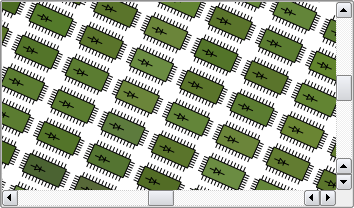
注意
Using an OpenGL viewport limits the ability to use
QGraphicsProxyWidget. Not all combinations of widgets and styles can be supported with such a setup. You should carefully test your UI and make the necessary adjustments.
QGraphicsView
(
scene
[
,
parent=None
]
)

QGraphicsView([parent=None])
- param parent
- param scene
构造
QGraphicsView
and sets the visualized scene to
scene
.
parent
会被传递给
QWidget
‘s constructor.
构造
QGraphicsView
.
parent
会被传递给
QWidget
‘s constructor.
PySide2.QtWidgets.QGraphicsView.
ViewportAnchor

This enums describe the possible anchors that
QGraphicsView
can use when the user resizes the view or when the view is transformed.
|
常量 |
描述 |
|---|---|
|
QGraphicsView.NoAnchor |
No anchor, i.e. the view leaves the scene’s position unchanged. |
|
QGraphicsView.AnchorViewCenter |
The scene point at the center of the view is used as the anchor. |
|
QGraphicsView.AnchorUnderMouse |
The point under the mouse is used as the anchor. |
PySide2.QtWidgets.QGraphicsView.
CacheModeFlag

This enum describes the flags that you can set for a
QGraphicsView
‘s cache mode.
|
常量 |
描述 |
|---|---|
|
QGraphicsView.CacheNone |
All painting is done directly onto the viewport. |
|
QGraphicsView.CacheBackground |
The background is cached. This affects both custom backgrounds, and backgrounds based on the
|
另请参阅
PySide2.QtWidgets.QGraphicsView.
DragMode

This enum describes the default action for the view when pressing and dragging the mouse over the viewport.
|
常量 |
描述 |
|---|---|
|
QGraphicsView.NoDrag |
Nothing happens; the mouse event is ignored. |
|
QGraphicsView.ScrollHandDrag |
The cursor changes into a pointing hand, and dragging the mouse around will scroll the scrolbars. This mode works both in
|
|
QGraphicsView.RubberBandDrag |
A rubber band will appear. Dragging the mouse will set the rubber band geometry, and all items covered by the rubber band are selected. This mode is disabled for non-interactive views. |
PySide2.QtWidgets.QGraphicsView.
ViewportUpdateMode

This enum describes how
QGraphicsView
updates its viewport when the scene contents change or are exposed.
|
常量 |
描述 |
|---|---|
|
QGraphicsView.FullViewportUpdate |
When any visible part of the scene changes or is reexposed,
|
|
QGraphicsView.MinimalViewportUpdate |
|
|
QGraphicsView.SmartViewportUpdate |
|
|
QGraphicsView.BoundingRectViewportUpdate |
The bounding rectangle of all changes in the viewport will be redrawn. This mode has the advantage that
|
|
QGraphicsView.NoViewportUpdate |
|
另请参阅
PySide2.QtWidgets.QGraphicsView.
OptimizationFlag

This enum describes flags that you can enable to improve rendering performance in
QGraphicsView
. By default, none of these flags are set. Note that setting a flag usually imposes a side effect, and this effect can vary between paint devices and platforms.
|
常量 |
描述 |
|---|---|
|
QGraphicsView.DontClipPainter |
此值已过时且不起作用。 |
|
QGraphicsView.DontSavePainterState |
When rendering,
|
|
QGraphicsView.DontAdjustForAntialiasing |
Disables
|
|
QGraphicsView.IndirectPainting |
Since Qt 4.6, restore the old painting algorithm that calls
|
PySide2.QtWidgets.QGraphicsView.
alignment
(
)

Alignment
另请参阅
PySide2.QtWidgets.QGraphicsView.
backgroundBrush
(
)

QBrush
另请参阅
PySide2.QtWidgets.QGraphicsView.
cacheMode
(
)

CacheMode
另请参阅
PySide2.QtWidgets.QGraphicsView.
centerOn
(
item
)

item
–
QGraphicsItem
这是重载函数。
Scrolls the contents of the viewport to ensure that
item
is centered in the view.
另请参阅
PySide2.QtWidgets.QGraphicsView.
centerOn
(
pos
)

pos
–
QPointF
PySide2.QtWidgets.QGraphicsView.
centerOn
(
x
,
y
)

x
–
qreal
y
–
qreal
这是重载函数。
This function is provided for convenience. It’s equivalent to calling
centerOn
(
QPointF
(
x
,
y
)).
PySide2.QtWidgets.QGraphicsView.
dragMode
(
)

另请参阅
PySide2.QtWidgets.QGraphicsView.
drawBackground
(
painter
,
rect
)

painter
–
QPainter
rect
–
QRectF
Draws the background of the scene using
painter
, before any items and the foreground are drawn. Reimplement this function to provide a custom background for this view.
If all you want is to define a color, texture or gradient for the background, you can call
setBackgroundBrush()
代替。
All painting is done in
scene
coordinates.
rect
is the exposed rectangle.
The default implementation fills
rect
using the view’s
backgroundBrush
. If no such brush is defined (the default), the scene’s function is called instead.
PySide2.QtWidgets.QGraphicsView.
drawForeground
(
painter
,
rect
)

painter
–
QPainter
rect
–
QRectF
Draws the foreground of the scene using
painter
, after the background and all items are drawn. Reimplement this function to provide a custom foreground for this view.
If all you want is to define a color, texture or gradient for the foreground, you can call
setForegroundBrush()
代替。
All painting is done in
scene
coordinates.
rect
is the exposed rectangle.
The default implementation fills
rect
using the view’s
foregroundBrush
. If no such brush is defined (the default), the scene’s function is called instead.
PySide2.QtWidgets.QGraphicsView.
drawItems
(
painter
,
items
,
options
)

painter
–
QPainter
items
–
QGraphicsItem[]
options
–
QStyleOptionGraphicsItem[]
Draws the items
items
in the scene using
painter
, after the background and before the foreground are drawn.
numItems
is the number of items in
items
and options in
options
.
options
is a list of styleoptions; one for each item. Reimplement this function to provide custom item drawing for this view.
The default implementation calls the scene’s function.
Since Qt 4.6, this function is not called anymore unless the
IndirectPainting
flag is given as an Optimization flag.
另请参阅
drawForeground()
drawBackground()
drawItems()
PySide2.QtWidgets.QGraphicsView.
ensureVisible
(
item
[
,
xmargin=50
[
,
ymargin=50
]
]
)

item
–
QGraphicsItem
xmargin
–
int
ymargin
–
int
这是重载函数。
Scrolls the contents of the viewport so that the center of item
item
is visible, with margins specified in pixels by
xmargin
and
ymargin
. If the specified point cannot be reached, the contents are scrolled to the nearest valid position. The default value for both margins is 50 pixels.
另请参阅
PySide2.QtWidgets.QGraphicsView.
ensureVisible
(
rect
[
,
xmargin=50
[
,
ymargin=50
]
]
)

rect
–
QRectF
xmargin
–
int
ymargin
–
int
PySide2.QtWidgets.QGraphicsView.
ensureVisible
(
x
,
y
,
w
,
h
[
,
xmargin=50
[
,
ymargin=50
]
]
)

x
–
qreal
y
–
qreal
w
–
qreal
h
–
qreal
xmargin
–
int
ymargin
–
int
这是重载函数。
This function is provided for convenience. It’s equivalent to calling
ensureVisible
(
QRectF
(
x
,
y
,
w
,
h
),
xmargin
,
ymargin
).
PySide2.QtWidgets.QGraphicsView.
fitInView
(
item
[
,
aspectRadioMode=Qt.IgnoreAspectRatio
]
)

item
–
QGraphicsItem
aspectRadioMode
–
AspectRatioMode
这是重载函数。
Ensures that
item
fits tightly inside the view, scaling the view according to
aspectRatioMode
.
PySide2.QtWidgets.QGraphicsView.
fitInView
(
x
,
y
,
w
,
h
[
,
aspectRadioMode=Qt.IgnoreAspectRatio
]
)

x
–
qreal
y
–
qreal
w
–
qreal
h
–
qreal
aspectRadioMode
–
AspectRatioMode
这是重载函数。
This convenience function is equivalent to calling
fitInView
(
QRectF
(
x
,
y
,
w
,
h
),
aspectRatioMode
).
PySide2.QtWidgets.QGraphicsView.
fitInView
(
rect
[
,
aspectRadioMode=Qt.IgnoreAspectRatio
]
)

rect
–
QRectF
aspectRadioMode
–
AspectRatioMode
PySide2.QtWidgets.QGraphicsView.
foregroundBrush
(
)

QBrush
另请参阅
PySide2.QtWidgets.QGraphicsView.
invalidateScene
(
[
rect=QRectF()
[
,
layers=QGraphicsScene.AllLayers
]
]
)

rect
–
QRectF
layers
–
SceneLayers
Invalidates and schedules a redraw of
layers
inside
rect
.
rect
is in scene coordinates. Any cached content for
layers
inside
rect
is unconditionally invalidated and redrawn.
You can call this function to notify
QGraphicsView
of changes to the background or the foreground of the scene. It is commonly used for scenes with tile-based backgrounds to notify changes when
QGraphicsView
has enabled background caching.
注意:
QGraphicsView
currently supports background caching only (see
CacheBackground
). This function is equivalent to calling
update()
if any layer but
BackgroundLayer
被传递。
另请参阅
invalidate()
update()
PySide2.QtWidgets.QGraphicsView.
isInteractive
(
)

bool
PySide2.QtWidgets.QGraphicsView.
isTransformed
(
)

bool
返回
true
if the view is transformed (i.e., a non-identity transform has been assigned, or the scrollbars are adjusted).
PySide2.QtWidgets.QGraphicsView.
itemAt
(
pos
)

pos
–
QPoint
Returns the item at position
pos
, which is in viewport coordinates. If there are several items at this position, this function returns the topmost item.
范例:
def mousePressEvent(self, event):
    if (item = itemAt(event.pos()):
        print "You clicked on item", item
    else:
        print "You didn't click on an item."
另请参阅
items()
排序
PySide2.QtWidgets.QGraphicsView.
itemAt
(
x
,
y
)

x
–
int
y
–
int
这是重载函数。
This function is provided for convenience. It’s equivalent to calling
itemAt
(
QPoint
(
x
,
y
)).
PySide2.QtWidgets.QGraphicsView.
items
(
)

Returns a list of all the items in the associated scene, in descending stacking order (i.e., the first item in the returned list is the uppermost item).
另请参阅
items()
排序
PySide2.QtWidgets.QGraphicsView.
items
(
x
,
y
,
w
,
h
[
,
mode=Qt.IntersectsItemShape
]
)

x
–
int
y
–
int
w
–
int
h
–
int
mode
–
ItemSelectionMode
This convenience function is equivalent to calling items(
QRectF
(
x
,
y
,
w
,
h
),
mode
).
PySide2.QtWidgets.QGraphicsView.
items
(
x
,
y
)

x
–
int
y
–
int
This function is provided for convenience. It’s equivalent to calling items(
QPoint
(
x
,
y
)).
PySide2.QtWidgets.QGraphicsView.
items
(
rect
[
,
mode=Qt.IntersectsItemShape
]
)

rect
–
QRect
mode
–
ItemSelectionMode
PySide2.QtWidgets.QGraphicsView.
items
(
polygon
[
,
mode=Qt.IntersectsItemShape
]
)

polygon
–
QPolygon
mode
–
ItemSelectionMode
PySide2.QtWidgets.QGraphicsView.
items
(
pos
)

pos
–
QPoint
Returns a list of all the items at the position
pos
in the view. The items are listed in descending stacking order (i.e., the first item in the list is the uppermost item, and the last item is the lowermost item).
pos
is in viewport coordinates.
This function is most commonly called from within mouse event handlers in a subclass in
QGraphicsView
.
pos
is in untransformed viewport coordinates, just like
pos()
.
def mousePressEvent(self, event):
    print "There are", items(event->pos()).size(), "items at position", mapToScene(event->pos())
另请参阅
items()
排序
PySide2.QtWidgets.QGraphicsView.
items
(
path
[
,
mode=Qt.IntersectsItemShape
]
)

path
–
QPainterPath
mode
–
ItemSelectionMode
PySide2.QtWidgets.QGraphicsView.
mapFromScene
(
path
)

path
–
QPainterPath
QPainterPath
PySide2.QtWidgets.QGraphicsView.
mapFromScene
(
point
)

point
–
QPointF
QPoint
PySide2.QtWidgets.QGraphicsView.
mapFromScene
(
polygon
)

polygon
–
QPolygonF
QPolygon
PySide2.QtWidgets.QGraphicsView.
mapFromScene
(
rect
)

rect
–
QRectF
QPolygon
PySide2.QtWidgets.QGraphicsView.
mapFromScene
(
x
,
y
)

x
–
qreal
y
–
qreal
QPoint
This function is provided for convenience. It’s equivalent to calling
mapFromScene
(
QPointF
(
x
,
y
)).
PySide2.QtWidgets.QGraphicsView.
mapFromScene
(
x
,
y
,
w
,
h
)

x
–
qreal
y
–
qreal
w
–
qreal
h
–
qreal
QPolygon
This function is provided for convenience. It’s equivalent to calling
mapFromScene
(
QRectF
(
x
,
y
,
w
,
h
)).
PySide2.QtWidgets.QGraphicsView.
mapToScene
(
polygon
)

polygon
–
QPolygon
QPolygonF
PySide2.QtWidgets.QGraphicsView.
mapToScene
(
x
,
y
,
w
,
h
)

x
–
int
y
–
int
w
–
int
h
–
int
QPolygonF
This function is provided for convenience. It’s equivalent to calling
mapToScene
(
QRect
(
x
,
y
,
w
,
h
)).
PySide2.QtWidgets.QGraphicsView.
mapToScene
(
x
,
y
)

x
–
int
y
–
int
QPointF
This function is provided for convenience. It’s equivalent to calling
mapToScene
(
QPoint
(
x
,
y
)).
PySide2.QtWidgets.QGraphicsView.
mapToScene
(
rect
)

rect
–
QRect
QPolygonF
PySide2.QtWidgets.QGraphicsView.
mapToScene
(
point
)

point
–
QPoint
QPointF
PySide2.QtWidgets.QGraphicsView.
mapToScene
(
path
)

path
–
QPainterPath
QPainterPath
PySide2.QtWidgets.QGraphicsView.
matrix
(
)

QMatrix
注意
此函数被弃用。
使用
transform()
代替。
Returns the current transformation matrix for the view. If no current transformation is set, the identity matrix is returned.
PySide2.QtWidgets.QGraphicsView.
optimizationFlags
(
)

OptimizationFlags
PySide2.QtWidgets.QGraphicsView.
render
(
painter
[
,
target=QRectF()
[
,
source=QRect()
[
,
aspectRatioMode=Qt.KeepAspectRatio
]
]
]
)

painter
–
QPainter
target
–
QRectF
source
–
QRect
aspectRatioMode
–
AspectRatioMode
渲染
source
rect, which is in view coordinates, from the scene into
target
, which is in paint device coordinates, using
painter
. This function is useful for capturing the contents of the view onto a paint device, such as a
QImage
(e.g., to take a screenshot), or for printing to
QPrinter
。例如:
scene = QGraphicsScene()
scene.addItem(...
...
view = QGraphicsView(scene)
view.show()
...
printer = QPrinter(QPrinter.HighResolution)
printer.setPageSize(QPrinter.A4)
painter = QPainter(printer)
# print, fitting the viewport contents into a full page
view.render(painter)
# print the upper half of the viewport into the lower.
# half of the page.
viewport = view.viewport()->rect()
view.render(painter,
            QRectF(0, printer.height() / 2,
                   printer.width(), printer.height() / 2),
            viewport.adjusted(0, 0, 0, -viewport.height() / 2))
若
source
is a null rect, this function will use
viewport()
->
rect()
to determine what to draw. If
target
is a null rect, the full dimensions of
painter
‘s paint device (e.g., for a
QPrinter
, the page size) will be used.
The source rect contents will be transformed according to
aspectRatioMode
to fit into the target rect. By default, the aspect ratio is kept, and
source
is scaled to fit in
target
.
另请参阅
PySide2.QtWidgets.QGraphicsView.
renderHints
(
)

RenderHints
另请参阅
PySide2.QtWidgets.QGraphicsView.
resetCachedContent
(
)

Resets any cached content. Calling this function will clear
QGraphicsView
‘s cache. If the current cache mode is
CacheNone
, this function does nothing.
This function is called automatically for you when the
backgroundBrush
or
backgroundBrush
properties change; you only need to call this function if you have reimplemented
drawBackground()
or
drawBackground()
to draw a custom background, and need to trigger a full redraw.
另请参阅
PySide2.QtWidgets.QGraphicsView.
resetMatrix
(
)

注意
此函数被弃用。
使用
resetTransform()
代替。
Resets the view transformation matrix to the identity matrix.
另请参阅
PySide2.QtWidgets.QGraphicsView.
resetTransform
(
)

Resets the view transformation to the identity matrix.
PySide2.QtWidgets.QGraphicsView.
resizeAnchor
(
)

另请参阅
PySide2.QtWidgets.QGraphicsView.
rotate
(
angle
)

angle
–
qreal
Rotates the current view transformation
angle
degrees clockwise.
PySide2.QtWidgets.QGraphicsView.
rubberBandChanged
(
viewportRect
,
fromScenePoint
,
toScenePoint
)

viewportRect
–
QRect
fromScenePoint
–
QPointF
toScenePoint
–
QPointF
PySide2.QtWidgets.QGraphicsView.
rubberBandRect
(
)

QRect
This functions returns the current rubber band area (in viewport coordinates) if the user is currently doing an itemselection with rubber band. When the user is not using the rubber band this functions returns (a null) QRectF().
Notice that part of this
QRect
can be outise the visual viewport. It can e.g contain negative values.
PySide2.QtWidgets.QGraphicsView.
rubberBandSelectionMode
(
)

ItemSelectionMode
PySide2.QtWidgets.QGraphicsView.
scale
(
sx
,
sy
)

sx
–
qreal
sy
–
qreal
Scales the current view transformation by (
sx
,
sy
).
PySide2.QtWidgets.QGraphicsView.
scene
(
)

Returns a pointer to the scene that is currently visualized in the view. If no scene is currently visualized,
None
被返回。
另请参阅
PySide2.QtWidgets.QGraphicsView.
sceneRect
(
)

QRectF
另请参阅
PySide2.QtWidgets.QGraphicsView.
setAlignment
(
alignment
)

alignment
–
Alignment
另请参阅
PySide2.QtWidgets.QGraphicsView.
setBackgroundBrush
(
brush
)

brush
–
QBrush
另请参阅
PySide2.QtWidgets.QGraphicsView.
setCacheMode
(
mode
)

mode
–
CacheMode
另请参阅
PySide2.QtWidgets.QGraphicsView.
setForegroundBrush
(
brush
)

brush
–
QBrush
另请参阅
PySide2.QtWidgets.QGraphicsView.
setInteractive
(
allowed
)

allowed
–
bool
另请参阅
PySide2.QtWidgets.QGraphicsView.
setMatrix
(
matrix
[
,
combine=false
]
)

matrix
–
QMatrix
combine
–
bool
注意
此函数被弃用。
使用
setTransform()
代替。
Sets the view’s current transformation matrix to
matrix
.
若
combine
is true, then
matrix
is combined with the current matrix; otherwise,
matrix
replaces
the current matrix.
combine
is false by default.
The transformation matrix tranforms the scene into view coordinates. Using the default transformation, provided by the identity matrix, one pixel in the view represents one unit in the scene (e.g., a 10x10 rectangular item is drawn using 10x10 pixels in the view). If a 2x2 scaling matrix is applied, the scene will be drawn in 1:2 (e.g., a 10x10 rectangular item is then drawn using 20x20 pixels in the view).
范例:
scene = QGraphicsScene()
scene.addText("GraphicsView rotated clockwise")
view = QGraphicsView(scene)
view.rotate(90) # the text is rendered with a 90 degree clockwise rotation
view.show()
To simplify interation with items using a transformed view,
QGraphicsView
提供
mapTo
… and
mapFrom
… functions that can translate between scene and view coordinates. For example, you can call
mapToScene()
to map a view coordinate to a floating point scene coordinate, or
mapFromScene()
to map from floating point scene coordinates to view coordinates.
PySide2.QtWidgets.QGraphicsView.
setOptimizationFlag
(
flag
[
,
enabled=true
]
)

flag
–
OptimizationFlag
enabled
–
bool
Enables
flag
if
enabled
is true; otherwise disables
flag
.
另请参阅
PySide2.QtWidgets.QGraphicsView.
setOptimizationFlags
(
flags
)

flags
–
OptimizationFlags
另请参阅
PySide2.QtWidgets.QGraphicsView.
setRenderHint
(
hint
[
,
enabled=true
]
)

hint
–
RenderHint
enabled
–
bool
若
enabled
is true, the render hint
hint
被启用;否则它被禁用。
另请参阅
PySide2.QtWidgets.QGraphicsView.
setRenderHints
(
hints
)

hints
–
RenderHints
另请参阅
PySide2.QtWidgets.QGraphicsView.
setResizeAnchor
(
anchor
)

anchor
–
ViewportAnchor
另请参阅
PySide2.QtWidgets.QGraphicsView.
setRubberBandSelectionMode
(
mode
)

mode
–
ItemSelectionMode
PySide2.QtWidgets.QGraphicsView.
setScene
(
scene
)

scene
–
QGraphicsScene
Sets the current scene to
scene
。若
scene
is already being viewed, this function does nothing.
When a scene is set on a view, the
changed()
signal is automatically connected to this view’s
updateScene()
slot, and the view’s scroll bars are adjusted to fit the size of the scene.
The view does not take ownership of
scene
.
另请参阅
PySide2.QtWidgets.QGraphicsView.
setSceneRect
(
rect
)

rect
–
QRectF
另请参阅
PySide2.QtWidgets.QGraphicsView.
setSceneRect
(
x
,
y
,
w
,
h
)

x
–
qreal
y
–
qreal
w
–
qreal
h
–
qreal
PySide2.QtWidgets.QGraphicsView.
setTransform
(
matrix
[
,
combine=false
]
)

matrix
–
QTransform
combine
–
bool
Sets the view’s current transformation matrix to
matrix
.
若
combine
is true, then
matrix
is combined with the current matrix; otherwise,
matrix
replaces
the current matrix.
combine
is false by default.
The transformation matrix tranforms the scene into view coordinates. Using the default transformation, provided by the identity matrix, one pixel in the view represents one unit in the scene (e.g., a 10x10 rectangular item is drawn using 10x10 pixels in the view). If a 2x2 scaling matrix is applied, the scene will be drawn in 1:2 (e.g., a 10x10 rectangular item is then drawn using 20x20 pixels in the view).
范例:
scene = QGraphicsScene()
scene.addText("GraphicsView rotated clockwise")
view = QGraphicsView(scene)
view.rotate(90) # the text is rendered with a 90 degree clockwise rotation
view.show()
To simplify interation with items using a transformed view,
QGraphicsView
提供
mapTo
… and
mapFrom
… functions that can translate between scene and view coordinates. For example, you can call
mapToScene()
to map a view coordiate to a floating point scene coordinate, or
mapFromScene()
to map from floating point scene coordinates to view coordinates.
PySide2.QtWidgets.QGraphicsView.
setTransformationAnchor
(
anchor
)

anchor
–
ViewportAnchor
PySide2.QtWidgets.QGraphicsView.
setViewportUpdateMode
(
mode
)

mode
–
ViewportUpdateMode
另请参阅
PySide2.QtWidgets.QGraphicsView.
shear
(
sh
,
sv
)

sh
–
qreal
sv
–
qreal
Shears the current view transformation by (
sh
,
sv
).
PySide2.QtWidgets.QGraphicsView.
transform
(
)

QTransform
Returns the current transformation matrix for the view. If no current transformation is set, the identity matrix is returned.
PySide2.QtWidgets.QGraphicsView.
transformationAnchor
(
)

PySide2.QtWidgets.QGraphicsView.
translate
(
dx
,
dy
)

dx
–
qreal
dy
–
qreal
Translates the current view transformation by (
dx
,
dy
).
PySide2.QtWidgets.QGraphicsView.
updateScene
(
rects
)

rects –
Schedules an update of the scene rectangles
rects
.
另请参阅
PySide2.QtWidgets.QGraphicsView.
updateSceneRect
(
rect
)

rect
–
QRectF
Notifies
QGraphicsView
that the scene’s scene rect has changed.
rect
is the new scene rect. If the view already has an explicitly set scene rect, this function does nothing.
PySide2.QtWidgets.QGraphicsView.
viewportTransform
(
)

QTransform
Returns a matrix that maps scene coordinates to viewport coordinates.
PySide2.QtWidgets.QGraphicsView.
viewportUpdateMode
(
)

