QGraphicsProxyWidgetclass provides a proxy layer for embedding aQWidget在QGraphicsScene. 更多 …

def
createProxyForChildWidget
(child)
def
setWidget
(widget)
def
subWidgetRect
(widget)
def
widget
()
def
newProxyWidget
(arg__1)
QGraphicsProxyWidgetembedsQWidget-based widgets, for example, aQPushButton,QFontComboBox, or evenQFileDialog, intoQGraphicsScene. It forwards events between the two objects and translates betweenQWidget‘s integer-based geometry and QGraphicsWidget ‘s qreal-based geometry.QGraphicsProxyWidgetsupports all core features ofQWidget, including tab focus, keyboard input, Drag & Drop, and popups. You can also embed complex widgets, e.g., widgets with subwidgets.范例:
import sys
QApplication app(sys.argv)
tabWidget = QTabWidget()
scene = QGraphicsScene()
proxy = scene.addWidget(tabWidget)
view = QGraphicsView(scene)
view.show()
return app.exec_()
QGraphicsProxyWidgettakes care of automatically embedding popup children of embedded widgets through creating a child proxy for each popup. This means that when an embeddedQComboBoxshows its popup list, a newQGraphicsProxyWidgetis created automatically, embedding the popup, and positioning it correctly. This only works if the popup is child of the embedded widget (for examplesetMenu()requires theQMenuinstance to be child of theQToolButton).
There are two ways to embed a widget using
QGraphicsProxyWidget. The most common way is to pass a widget pointer toaddWidget()together with any relevantWindowFlags. This function returns a pointer to aQGraphicsProxyWidget. You can then choose to reparent or position either the proxy, or the embedded widget itself.For example, in the code snippet below, we embed a group box into the proxy:
groupBox = QGroupBox("Contact Details")
numberLabel = QLabel("Telephone number")
numberEdit = QLineEdit()
layout = QFormLayout()
layout.addRow(numberLabel, numberEdit)
groupBox.setLayout(layout)
scene = QGraphicsScene()
proxy = scene.addWidget(groupBox)
view = QGraphicsView(scene)
view.show()
The image below is the output obtained with its contents margin and contents rect labeled.
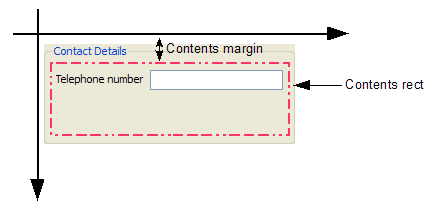
Alternatively, you can start by creating a new
QGraphicsProxyWidgetitem, and then callsetWidget()to embed aQWidgetlater. Thewidget()function returns a pointer to the embedded widget.QGraphicsProxyWidgetshares ownership withQWidget, so if either of the two widgets are destroyed, the other widget will be automatically destroyed as well.
QGraphicsProxyWidgetkeeps its state in sync with the embedded widget. For example, if the proxy is hidden or disabled, the embedded widget will be hidden or disabled as well, and vice versa. When the widget is embedded by calling addWidget(),QGraphicsProxyWidgetcopies the state from the widget into the proxy, and after that, the two will stay synchronized where possible. By default, when you embed a widget into a proxy, both the widget and the proxy will be visible because a QGraphicsWidget is visible when created (you do not have to callshow()). If you explicitly hide the embedded widget, the proxy will also become invisible.范例:
scene = QGraphicsScene()
edit = QLineEdit()
proxy = scene.addWidget(edit)
edit.isVisible()  // returns true
proxy.isVisible() // also returns true
edit.hide()
edit.isVisible()  // returns false
proxy.isVisible() // also returns false
QGraphicsProxyWidgetmaintains symmetry for the following states:
QWidgetstate
QGraphicsProxyWidgetstate注意事项
enabled
enabled
visible
visibleThe explicit state is also symmetric.
geometryGeometry is only guaranteed to be symmetric while the embedded widget is visible.
layoutDirection
style
palette
font
cursorThe embedded widget overrides the proxy widget cursor. The proxy cursor changes depending on which embedded subwidget is currently under the mouse.
sizeHint()All size hint functionality from the embedded widget is forwarded by the proxy.
getContentsMargins()Updated once by
setWidget().
windowTitleUpdated once by
setWidget().注意
QGraphicsScenekeeps the embedded widget in a special state that prevents it from disturbing other widgets (both embedded and not embedded) while the widget is embedded. In this state, the widget may differ slightly in behavior from when it is not embedded.警告
This class is provided for convenience when bridging QWidgets and QGraphicsItems, it should not be used for high-performance scenarios. In particular, embedding widgets into a scene that is then displayed through a
QGraphicsViewthat uses an OpenGL viewport will not work for all combinations.
QGraphicsProxyWidget
(
[
parent=None
[
,
wFlags=Qt.WindowFlags()
]
]
)

- param parent
- param wFlags
WindowFlags
Constructs a new QGraphicsProxy widget.
parent
and
wFlags
are passed to
QGraphicsItem
‘s constructor.
PySide2.QtWidgets.QGraphicsProxyWidget.
createProxyForChildWidget
(
child
)

child
–
QWidget
Creates a proxy widget for the given
child
of the widget contained in this proxy.
This function makes it possible to acquire proxies for non top-level widgets. For instance, you can embed a dialog, and then transform only one of its widgets.
If the widget is already embedded, return the existing proxy widget.
PySide2.QtWidgets.QGraphicsProxyWidget.
newProxyWidget
(
arg__1
)

arg__1
–
QWidget
Creates a proxy widget for the given
child
of the widget contained in this proxy.
您不应该直接调用此函数。使用
createProxyForChildWidget()
代替。
This function is a fake virtual slot that you can reimplement in your subclass in order to control how new proxy widgets are created. The default implementation returns a proxy created with the
QGraphicsProxyWidget()
constructor with this proxy widget as the parent.
PySide2.QtWidgets.QGraphicsProxyWidget.
setWidget
(
widget
)

widget
–
QWidget
Embeds
widget
into this proxy widget. The embedded widget must reside exclusively either inside or outside of Graphics View. You cannot embed a widget as long as it is is visible elsewhere in the UI, at the same time.
widget
must be a top-level widget whose parent is
None
.
When the widget is embedded, its state (e.g., visible, enabled, geometry, size hints) is copied into the proxy widget. If the embedded widget is explicitly hidden or disabled, the proxy widget will become explicitly hidden or disabled after embedding is complete. The class documentation has a full overview over the shared state.
QGraphicsProxyWidget
‘s window flags determine whether the widget, after embedding, will be given window decorations or not.
After this function returns,
QGraphicsProxyWidget
will keep its state synchronized with that of
widget
whenever possible.
If a widget is already embedded by this proxy when this function is called, that widget will first be automatically unembedded. Passing
None
为
widget
argument will only unembed the widget, and the ownership of the currently embedded widget will be passed on to the caller. Every child widget that are embedded will also be embedded and their proxy widget destroyed.
Note that widgets with the
WA_PaintOnScreen
widget attribute set and widgets that wrap an external application or controller cannot be embedded. Examples are
QOpenGLWidget
and QAxWidget.
另请参阅
PySide2.QtWidgets.QGraphicsProxyWidget.
subWidgetRect
(
widget
)

widget
–
QWidget
QRectF
Returns the rectangle for
widget
, which must be a descendant of
widget()
,或
widget()
itself, in this proxy item’s local coordinates.
If no widget is embedded,
widget
is
None
,或
widget
is not a descendant of the embedded widget, this function returns an empty
QRectF
.
另请参阅
PySide2.QtWidgets.QGraphicsProxyWidget.
widget
(
)

Returns a pointer to the embedded widget.
另请参阅
