QGraphicsRectItemclass provides a rectangle item that you can add to aQGraphicsScene. 更多 …

To set the item’s rectangle, pass a
QRectFtoQGraphicsRectItem‘s constructor, or call thesetRect()function. Therect()function returns the current rectangle.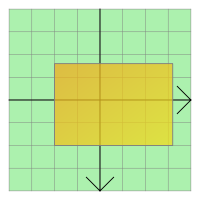
QGraphicsRectItemuses the rectangle and the pen width to provide a reasonable implementation ofboundingRect(),shape(),和contains()。paint()function draws the rectangle using the item’s associated pen and brush, which you can set by calling thesetPen()andsetBrush()函数。注意
The rendering of invalid rectangles, such as those with negative widths or heights, is undefined. If you cannot be sure that you are using valid rectangles (for example, if you are creating rectangles using data from an unreliable source) then you should use
normalized()to create normalized rectangles, and use those instead.
QGraphicsRectItem
(
[
parent=None
]
)

QGraphicsRectItem(rect[, parent=None])
QGraphicsRectItem(x, y, w, h[, parent=None])
- param w
qreal- param parent
- param x
qreal- param y
qreal- param h
qreal- param rect
QRectF
构造
QGraphicsRectItem
.
parent
会被传递给
QAbstractGraphicsShapeItem
‘s constructor.
另请参阅
构造
QGraphicsRectItem
,使用
rect
as the default rectangle.
parent
会被传递给
QAbstractGraphicsShapeItem
‘s constructor.
另请参阅
构造
QGraphicsRectItem
with a default rectangle defined by (
x
,
y
) and the given
width
and
height
.
parent
会被传递给
QAbstractGraphicsShapeItem
‘s constructor.
另请参阅
PySide2.QtWidgets.QGraphicsRectItem.
rect
(
)

QRectF
Returns the item’s rectangle.
另请参阅
PySide2.QtWidgets.QGraphicsRectItem.
setRect
(
rect
)

rect
–
QRectF
Sets the item’s rectangle to be the given
rectangle
.
另请参阅
PySide2.QtWidgets.QGraphicsRectItem.
setRect
(
x
,
y
,
w
,
h
)

x
–
qreal
y
–
qreal
w
–
qreal
h
–
qreal
