QGraphicsEllipseItemclass provides an ellipse item that you can add to aQGraphicsScene. 更多 …

def
rect
()
def
setRect
(rect)
def
setRect
(x, y, w, h)
def
setSpanAngle
(angle)
def
setStartAngle
(angle)
def
spanAngle
()
def
startAngle
()
QGraphicsEllipseItemrespresents an ellipse with a fill and an outline, and you can also use it for ellipse segments (seestartAngle(),spanAngle()).
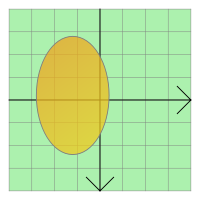
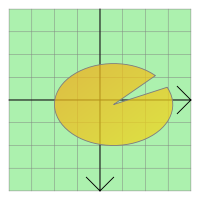
To set the item’s ellipse, pass a
QRectFtoQGraphicsEllipseItem‘s constructor, or callsetRect()。rect()function returns the current ellipse geometry.
QGraphicsEllipseItemuses the rect and the pen width to provide a reasonable implementation ofboundingRect(),shape(),和contains()。paint()function draws the ellipse using the item’s associated pen and brush, which you can set by callingsetPen()andsetBrush().
QGraphicsEllipseItem
(
[
parent=None
]
)

QGraphicsEllipseItem(rect[, parent=None])
QGraphicsEllipseItem(x, y, w, h[, parent=None])
- param w
qreal- param parent
- param x
qreal- param y
qreal- param h
qreal- param rect
QRectF
构造
QGraphicsEllipseItem
.
parent
会被传递给
QAbstractGraphicsShapeItem
‘s constructor.
另请参阅
构造
QGraphicsEllipseItem
使用
rect
as the default rectangle.
parent
会被传递给
QAbstractGraphicsShapeItem
‘s constructor.
另请参阅
构造
QGraphicsEllipseItem
using the rectangle defined by (
x
,
y
) and the given
width
and
height
, as the default rectangle.
parent
会被传递给
QAbstractGraphicsShapeItem
‘s constructor.
另请参阅
PySide2.QtWidgets.QGraphicsEllipseItem.
rect
(
)

QRectF
Returns the item’s ellipse geometry as a
QRectF
.
另请参阅
setRect()
drawEllipse()
PySide2.QtWidgets.QGraphicsEllipseItem.
setRect
(
rect
)

rect
–
QRectF
Sets the item’s ellipse geometry to
rect
. The rectangle’s left edge defines the left edge of the ellipse, and the rectangle’s top edge describes the top of the ellipse. The height and width of the rectangle describe the height and width of the ellipse.
另请参阅
rect()
drawEllipse()
PySide2.QtWidgets.QGraphicsEllipseItem.
setRect
(
x
,
y
,
w
,
h
)

x
–
qreal
y
–
qreal
w
–
qreal
h
–
qreal
PySide2.QtWidgets.QGraphicsEllipseItem.
setSpanAngle
(
angle
)

angle
–
int
Sets the span angle for an ellipse segment to
angle
, which is in 16ths of a degree. This angle is used together with
startAngle()
to represent an ellipse segment (a pie). By default, the span angle is 5760 (360 * 16, a full ellipse).
另请参阅
spanAngle()
setStartAngle()
drawPie()
PySide2.QtWidgets.QGraphicsEllipseItem.
setStartAngle
(
angle
)

angle
–
int
Sets the start angle for an ellipse segment to
angle
, which is in 16ths of a degree. This angle is used together with
spanAngle()
for representing an ellipse segment (a pie). By default, the start angle is 0.
另请参阅
startAngle()
setSpanAngle()
drawPie()
PySide2.QtWidgets.QGraphicsEllipseItem.
spanAngle
(
)

int
Returns the span angle of an ellipse segment in 16ths of a degree. This angle is used together with
startAngle()
for representing an ellipse segment (a pie). By default, this function returns 5760 (360 * 16, a full ellipse).
PySide2.QtWidgets.QGraphicsEllipseItem.
startAngle
(
)

int
Returns the start angle for an ellipse segment in 16ths of a degree. This angle is used together with
spanAngle()
for representing an ellipse segment (a pie). By default, the start angle is 0.
