QGraphicsLineItemclass provides a line item that you can add to aQGraphicsScene. 更多 …

To set the item’s line, pass a
QLineFtoQGraphicsLineItem‘s constructor, or call thesetLine()function. Theline()function returns the current line. By default the line is black with a width of 0, but you can change this by callingsetPen().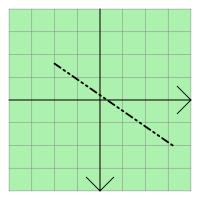
QGraphicsLineItemuses the line and the pen width to provide a reasonable implementation ofboundingRect(),shape(),和contains()。paint()function draws the line using the item’s associated pen.
QGraphicsLineItem
(
[
parent=None
]
)

QGraphicsLineItem(line[, parent=None])
QGraphicsLineItem(x1, y1, x2, y2[, parent=None])
- param parent
- param y1
qreal- param line
QLineF- param y2
qreal- param x1
qreal- param x2
qreal
构造
QGraphicsLineItem
.
parent
会被传递给
QGraphicsItem
‘s constructor.
另请参阅
构造
QGraphicsLineItem
,使用
line
作为默认线条。
parent
会被传递给
QGraphicsItem
‘s constructor.
另请参阅
构造
QGraphicsLineItem
, using the line between (
x1
,
y1
) 和 (
x2
,
y2
) 作为默认线条。
parent
会被传递给
QGraphicsItem
‘s constructor.
另请参阅
PySide2.QtWidgets.QGraphicsLineItem.
line
(
)

QLineF
Returns the item’s line, or a null line if no line has been set.
另请参阅
PySide2.QtWidgets.QGraphicsLineItem.
pen
(
)

QPen
Returns the item’s pen, or a black solid 0-width pen if no pen has been set.
另请参阅
PySide2.QtWidgets.QGraphicsLineItem.
setLine
(
line
)

line
–
QLineF
Sets the item’s line to be the given
line
.
另请参阅
PySide2.QtWidgets.QGraphicsLineItem.
setLine
(
x1
,
y1
,
x2
,
y2
)

x1
–
qreal
y1
–
qreal
x2
–
qreal
y2
–
qreal
这是重载函数。
Sets the item’s line to be the line between (
x1
,
y1
) 和 (
x2
,
y2
).
这如同调用
												setLine(QLineF(x1,


												y1,


												x2,


												y2))
.
