QWhatsThisclass provides a simple description of any widget, i.e. answering the question “What’s This?”. 更多 …
def
createAction
([parent=None])
def
enterWhatsThisMode
()
def
hideText
()
def
inWhatsThisMode
()
def
leaveWhatsThisMode
()
def
showText
(pos, text[, w=None])
“What’s This?” help is part of an application’s online help system, and provides users with information about the functionality and usage of a particular widget. “What’s This?” help texts are typically longer and more detailed than
tooltips, but generally provide less information than that supplied by separate help windows.
QWhatsThisprovides a single window with an explanatory text that pops up when the user asks “What’s This?”. The default way for users to ask the question is to move the focus to the relevant widget and press Shift+F1. The help text appears immediately; it goes away as soon as the user does something else. (Note that if there is a shortcut for Shift+F1, this mechanism will not work.) Some dialogs provide a “?” button that users can click to enter “What’s This?” mode; they then click the relevant widget to pop up the “What’s This?” window. It is also possible to provide a a menu option or toolbar button to switch into “What’s This?” mode.To add “What’s This?” text to a widget or an action, you simply call
setWhatsThis()orsetWhatsThis().The text can be either rich text or plain text. If you specify a rich text formatted string, it will be rendered using the default stylesheet, making it possible to embed images in the displayed text. To be as fast as possible, the default stylesheet uses a simple method to determine whether the text can be rendered as plain text. See
mightBeRichText()了解细节。Act = QAction(tr("&New"), self) Act.setShortcut(tr("Ctrl+N")) Act.setStatusTip(QObject.tr("Create a new file")) Act.setWhatsThis(QObject.tr("Click self option to create a new file."))An alternative way to enter “What’s This?” mode is to call
createAction(), and add the returnedQActionto either a menu or a tool bar. By invoking this context help action (in the picture below, the button with the arrow and question mark icon) the user switches into “What’s This?” mode. If they now click on a widget the appropriate help text is shown. The mode is left when help is given or when the user presses Esc.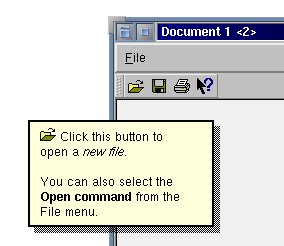
You can enter “What’s This?” mode programmatically with
enterWhatsThisMode(), check the mode withinWhatsThisMode(), and return to normal mode withleaveWhatsThisMode().If you want to control the “What’s This?” behavior of a widget manually see
WA_CustomWhatsThis.It is also possible to show different help texts for different regions of a widget, by using a
QHelpEventof typeWhatsThis. Intercept the help event in your widget’sevent()function and callshowText()with the text you want to display for the position specified inpos(). If the text is rich text and the user clicks on a link, the widget also receives aQWhatsThisClickedEventwith the link’s reference ashref(). If aQWhatsThisClickedEventis handled (i.e.event()returns true), the help window remains visible. CallhideText()to hide it explicitly.另请参阅
QToolTip
PySide2.QtWidgets.QWhatsThis.
createAction
(
[
parent=None
]
)

parent
–
QObject
Returns a ready-made
QAction
, used to invoke “What’s This?” context help, with the given
parent
.
返回的
QAction
provides a convenient way to let users enter “What’s This?” mode.
PySide2.QtWidgets.QWhatsThis.
enterWhatsThisMode
(
)

This function switches the user interface into “What’s This?” mode. The user interface can be switched back into normal mode by the user (e.g. by them clicking or pressing Esc), or programmatically by calling
leaveWhatsThisMode()
.
When entering “What’s This?” mode, a
QEvent
of type Qt::EnterWhatsThisMode is sent to all toplevel widgets.
PySide2.QtWidgets.QWhatsThis.
hideText
(
)

If a “What’s This?” window is showing, this destroys it.
另请参阅
PySide2.QtWidgets.QWhatsThis.
inWhatsThisMode
(
)

bool
返回
true
if the user interface is in “What’s This?” mode; otherwise returns
false
.
另请参阅
PySide2.QtWidgets.QWhatsThis.
leaveWhatsThisMode
(
)

If the user interface is in “What’s This?” mode, this function switches back to normal mode; otherwise it does nothing.
When leaving “What’s This?” mode, a
QEvent
of type Qt::LeaveWhatsThisMode is sent to all toplevel widgets.
