QPrintDialogclass provides a dialog for specifying the printer’s configuration. 更多 …

def
open
(receiver, member)
def
options
()
def
setOption
(option[, on=true])
def
setOptions
(options)
def
testOption
(option)
The dialog allows users to change document-related settings, such as the paper size and orientation, type of print (color or grayscale), range of pages, and number of copies to print.
Controls are also provided to enable users to choose from the printers available, including any configured network printers.
Typically,
QPrintDialogobjects are constructed with aQPrinterobject, and executed using theexec()函数。printDialog = QPrintDialog(printer, parent) if printDialog.exec_() == QDialog.Accepted: # print ...If the dialog is accepted by the user, the
QPrinterobject is correctly configured for printing.
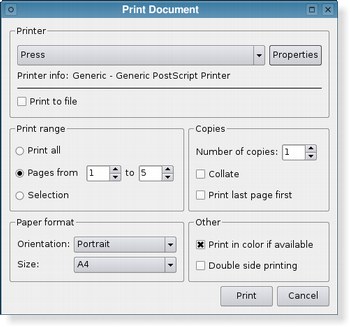
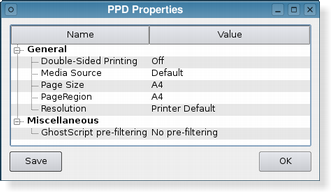
The printer dialog (shown above in Plastique style) enables access to common printing properties. On X11 platforms that use the CUPS printing system, the settings for each available printer can be modified via the dialog’s Properties push button.
On Windows and macOS, the native print dialog is used, which means that some
QWidgetandQDialogproperties set on the dialog won’t be respected. The native print dialog on macOS does not support setting printer options, i.e.setOptions()andsetOption()have no effect.In Qt 4.4, it was possible to use the static functions to show a sheet on macOS. This is no longer supported in Qt 4.5. If you want this functionality, use
open().另请参阅
QPrintDialog
(
printer
[
,
parent=None
]
)

QPrintDialog([parent=None])
- param parent
QWidget- param printer
Constructs a new modal printer dialog for the given
printer
采用给定
parent
.
PySide2.QtPrintSupport.QPrintDialog.
open
(
receiver
,
member
)

receiver
–
QObject
member – str
这是重载函数。
打开对话框并连接其
accepted()
signal to the slot specified by
receiver
and
member
.
信号将断开槽连接,当对话框被关闭时。
PySide2.QtPrintSupport.QPrintDialog.
options
(
)

PrintDialogOptions
另请参阅
PySide2.QtPrintSupport.QPrintDialog.
setOption
(
option
[
,
on=true
]
)

option
–
PrintDialogOption
on
–
bool
设置给定
option
to be enabled if
on
is true; otherwise, clears the given
option
.
另请参阅
PySide2.QtPrintSupport.QPrintDialog.
setOptions
(
options
)

options
–
PrintDialogOptions
另请参阅
PySide2.QtPrintSupport.QPrintDialog.
testOption
(
option
)

option
–
PrintDialogOption
bool
返回
true
若给定
option
被启用;否则,返回 false。
另请参阅
