How to use style sheets to customize the appearance of widgets.
Qt 样式表是允许定制 Widget 外观的强大机制,除了可能已有的,通过子类化
QStyle。Qt 样式表的概念、术语和语法深受启发被 HTML CSS (级联样式表) ,但适应 Widget 世界。话题:
注意
若 Qt 样式表被用于设置 Widget 外观函数的同一 Widget,如
setFont()orsetBackground(), style sheets will take precedence if the settings conflict.
Styles sheets are textual specifications that can be set on the whole application using
setStyleSheet()or on a specific widget (and its children) usingsetStyleSheet(). If several style sheets are set at different levels, Qt derives the effective style sheet from all of those that are set. This is called cascading.For example, the following style sheet specifies that all
QLineEdits should use yellow as their background color, and allQCheckBoxes should use red as the text color:QLineEdit { background: yellow } QCheckBox { color: red }For this kind of customization, style sheets are much more powerful than
QPalette. For example, it might be tempting to set theButtonrole to red for aQPushButtonto obtain a red push button. However, this wasn’t guaranteed to work for all styles, because style authors are restricted by the different platforms’ guidelines and (on Windows and macOS) by the native theme engine.Style sheets let you perform all kinds of customizations that are difficult or impossible to perform using
QPalettealone. If you want yellow backgrounds for mandatory fields, red text for potentially destructive push buttons, or fancy check boxes, style sheets are the answer.Style sheets are applied on top of the current
													widget


													style
, meaning that your applications will look as native as possible, but any style sheet constraints will be taken into consideration. Unlike palette fiddling, style sheets offer guarantees: If you set the background color of aQPushButtonto be red, you can be assured that the button will have a red background in all styles, on all platforms. In addition, Qt Designer provides style sheet integration, making it easy to view the effects of a style sheet in differentwidget styles.In addition, style sheets can be used to provide a distinctive look and feel for your application, without having to subclass
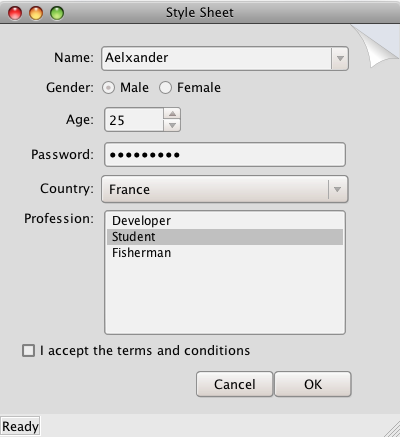
QStyle. For example, you can specify arbitrary images for radio buttons and check boxes to make them stand out. Using this technique, you can also achieve minor customizations that would normally require subclassing several style classes, such as specifying astyle hint。 Style Sheet example depicted below defines two distinctive style sheets that you can try out and modify at will.
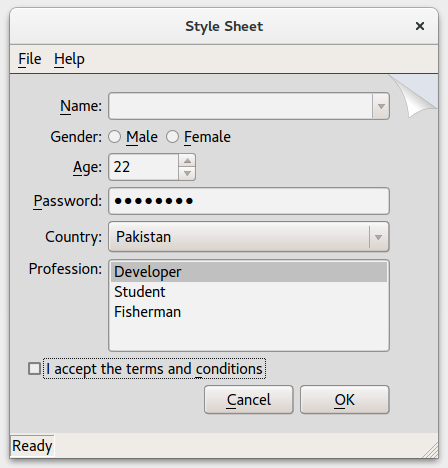
Pagefold theme running on Windows
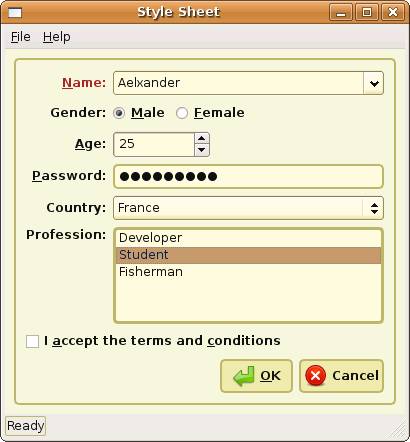
Coffee theme running on Ubuntu Linux
Pagefold theme running on macOS
When a style sheet is active, the
QStylereturned bystyle()is a wrapper “style sheet” style, not the platform-specific style. The wrapper style ensures that any active style sheet is respected and otherwise forwards the drawing operations to the underlying, platform-specific style (e.g., QWindowsVistaStyle on Windows).从 Qt 4.5 起,Qt 样式表完全支持 macOS。
