内容表

上一话题

动画框架

下一话题

音频概述

窗口和对话框 Widget

Windows and Dialogs in Qt.

A widget 未嵌入父级 Widget 的称为窗口。(通常,窗口具有框架和标题栏,尽管使用适当窗口标记创建没有这种装饰的窗口也是可能的)。在 Qt 中, QMainWindow 和各种子类化 QDialog 是最常见的窗口类型。

In applications, windows provide the screen space upon which the user interface is built. Windows separate applications visually from each other and usually provide a window decoration that allows the user to resize and position the applications according to his preferences. Windows are typically integrated into the desktop environment and to some degree managed by the window management system that the desktop environment provides. For instance, selected windows of an application are represented in the task bar.

首要和次要窗口

Any QWidget that has no parent will become a window, and will on most platforms be listed in the desktop’s task bar. This is usually only wanted for one window in the application, the 首要窗口 .

此外, QWidget that has a parent can become a window by setting the Window flag. Depending on the window management system such 次要窗口 are usually stacked on top of their respective parent window, and not have a task bar entry of their own.

QMainWindow 类设置 Window flag in its constructor, as it is designed to be used as a window and provides facilities that are not wanted for child widgets.

主窗口和对话框

应用程序主窗口 provides the framework for building the application’s main user interface, and are created by subclassing QMainWindow . QMainWindow has its own layout to which you can add a menu bar , tool bars , dockable widgets status bar . The center area can be occupied by any kind of QWidget .

对话框窗口 are used as secondary windows that present the user with options and choices. Dialogs are created by subclassing QDialog and using Widget 和布局 to implement the user interface. In addition, Qt provides a number of ready-made standard dialogs that can be used for standard tasks like file or font selection.

Both main windows and dialogs can be created with Qt Designer, Qt’s visual design tool. Using Qt Designer is a lot faster than hand-coding, and makes it easy to test different design ideas. Creating designs visually and reading the code generated by uic is a great way to learn Qt!

窗口几何体

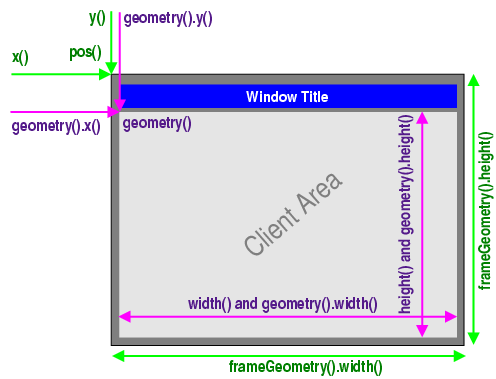
QWidget provides several functions that deal with a widget’s geometry. Some of these functions operate on the pure client area (i.e. the window excluding the window frame), others include the window frame. The differentiation is done in a way that covers the most common usage transparently.

  • 包括窗框: x() , y() , frameGeometry() , pos() ,和 move() .

  • 排除窗框: geometry() , width() , height() , rect() ,和 size() .

Note that the distinction only matters for decorated top-level widgets. For all child widgets, the frame geometry is equal to the widget’s client geometry.

此简图展示大多数在使用的函数:

../_images/geometry.png

X11 特殊性

On X11, a window does not have a frame until the window manager decorates it. This happens asynchronously at some point in time after calling show() and the first paint event the window receives, or it does not happen at all. Bear in mind that X11 is policy-free (others call it flexible). Thus you cannot make any safe assumption about the decoration frame your window will get. Basic rule: There’s always one user who uses a window manager that breaks your assumption, and who will complain to you.

Furthermore, a toolkit cannot simply place windows on the screen. All Qt can do is to send certain hints to the window manager. The window manager, a separate process, may either obey, ignore or misunderstand them. Due to the partially unclear Inter-Client Communication Conventions Manual (ICCCM), window placement is handled quite differently in existing window managers.

X11 provides no standard or easy way to get the frame geometry once the window is decorated. Qt solves this problem with nifty heuristics and clever code that works on a wide range of window managers that exist today. Don’t be surprised if you find one where frameGeometry() returns wrong results though.

Nor does X11 provide a way to maximize a window. showMaximized() has to emulate the feature. Its result depends on the result of frameGeometry() and the capability of the window manager to do proper window placement, neither of which can be guaranteed.