继承者: QDesktopWidget , QHelpSearchResultWidget , QHelpSearchQueryWidget , QComboBox , QCalendarWidget , QAbstractButton , QPushButton , QCommandLinkButton , QCheckBox , QWizardPage , QWebInspector , QLineEdit , QSvgWidget , Phonon.VolumeSlider , Phonon.VideoPlayer , Phonon.SeekSlider , QWorkspace , QToolButton , QFrame , QToolBox , QAbstractScrollArea , QGraphicsView , QDeclarativeView , QAbstractItemView , QTreeView , QHelpContentWidget , QTreeWidget , QHeaderView , QTableView , QTableWidget , QColumnView , QListView , QUndoView , QListWidget , QHelpIndexWidget , QToolBar , QRubberBand , QTabWidget , QStatusBar , QTabBar , Phonon.EffectWidget , QStackedWidget , QSplitterHandle , QAbstractSlider , QSlider , QDial , QSplitter , QAbstractSpinBox , QDateTimeEdit , QTimeEdit , QDateEdit , QSplashScreen , QDoubleSpinBox , QSpinBox , QSizeGrip , QScrollBar , QScrollArea , QRadioButton , QProgressBar , QDialog , QAbstractPrintDialog , QPrintDialog , QAbstractPageSetupDialog , QPageSetupDialog , QFileDialog , QWizard , QProgressDialog , QPrintPreviewDialog , QFontDialog , QMessageBox , QInputDialog , QErrorMessage , QColorDialog , QPrintPreviewWidget , QPlainTextEdit , QTextEdit , QTextBrowser , QMenuBar , QMenu , QMdiSubWindow , QMdiArea , QMainWindow , QLCDNumber , QLabel , QGroupBox , QFontComboBox , QFocusFrame , QDockWidget , QGLWidget , QDialogButtonBox , QWebView
PySide.QtGui.QWidget 类是所有用户界面对象的基类。
Widget 是用户界面原子:它从窗口系统接收鼠标、键盘及其它事件,并在屏幕上描绘自身表示。每个 Widget 为矩形,且按 Z 次序排序。Widget 被父级及其前面的小部件裁剪。
未嵌入父级小部件的 Widget 称为窗口。通常,窗口拥有框架和标题栏,尽管还可以创建不带这种装饰的窗口使用适合 window flags )。在 Qt 中, PySide.QtGui.QMainWindow 和各种子类化 PySide.QtGui.QDialog 是最常见的窗口类型。
每个 Widget 的构造函数接受 1 个或 2 个标准自变量:
PySide.QtGui.QWidget has many member functions, but some of them have little direct functionality; for example, PySide.QtGui.QWidget has a font property, but never uses this itself. There are many subclasses which provide real functionality, such as PySide.QtGui.QLabel , PySide.QtGui.QPushButton , PySide.QtGui.QListWidget ,和 PySide.QtGui.QTabWidget .
没有父级小部件的 Widget 始终是独立窗口 (顶层小部件)。对于这些小部件, PySide.QtGui.QWidget.setWindowTitle() and PySide.QtGui.QWidget.setWindowIcon() set the title bar and icon respectively.
非窗口 Widget 是子级小部件,显示在其父级小部件内。Qt 中的大多数 Widget 主要用作子级小部件。例如,将按钮显示成顶层窗口是可能的,但大多数人更喜欢将按钮放在其它小部件内,譬如 PySide.QtGui.QDialog .
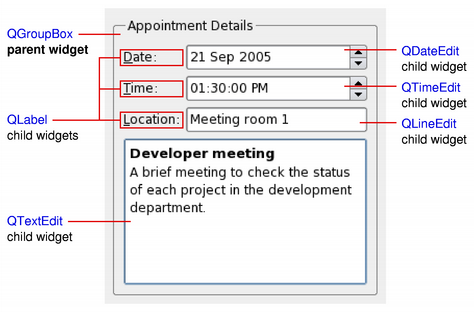
以上简图展示 PySide.QtGui.QGroupBox 小部件用于将各种子级 Widget 保持在布局中,提供通过 PySide.QtGui.QGridLayout 。 PySide.QtGui.QLabel 子级小部件已提纲以指示其完整大小。
若希望使用 PySide.QtGui.QWidget to hold child widgets you will usually want to add a layout to the parent PySide.QtGui.QWidget 。见 布局管理 了解更多信息。
当 Widget 被用作分组多个子级 Widget 的容器时,它被称为复合 Widget。这些可以被创建,通过构造 Widget 采用所需视觉特性 PySide.QtGui.QFrame , for example - and adding child widgets to it, usually managed by a layout. The above diagram shows such a composite widget that was created using Qt Designer .
Composite widgets can also be created by subclassing a standard widget, such as PySide.QtGui.QWidget or PySide.QtGui.QFrame ,并在子类的构造函数中添加必要布局和子级 Widget。许多 随 Qt 提供的范例 使用这种途径,且它还涵盖于 Qt 教程 .
Since PySide.QtGui.QWidget 是子类化的 PySide.QtGui.QPaintDevice ,子类可以被用于显示由一系列描绘操作组成的自定义内容,采用实例化的 PySide.QtGui.QPainter 类。此途径对比画布样式途径使用 图形视图框架 ,其中的项由应用程序添加到场景,并由框架本身渲染。
每个 Widget 履行所有描绘操作均在其 PySide.QtGui.QWidget.paintEvent() function. This is called whenever the widget needs to be redrawn, either as a result of some external change or when requested by the application.
指针式时钟范例 展示简单 Widget 如何处理描绘事件。
When implementing a new widget, it is almost always useful to reimplement PySide.QtGui.QWidget.sizeHint() to provide a reasonable default size for the widget and to set the correct size policy with PySide.QtGui.QWidget.setSizePolicy() .
By default, composite widgets which do not provide a size hint will be sized according to the space requirements of their child widgets.
The size policy lets you supply good default behavior for the layout management system, so that other widgets can contain and manage yours easily. The default size policy indicates that the size hint represents the preferred size of the widget, and this is often good enough for many widgets.
注意
顶层 Widget 尺寸被约束到桌面高度和宽度的 2/3。可以 PySide.QtGui.QWidget.resize() the widget manually if these bounds are inadequate.
Widgets respond to events that are typically caused by user actions. Qt delivers events to widgets by calling specific event handler functions with instances of PySide.QtCore.QEvent subclasses containing information about each event.
If your widget only contains child widgets, you probably do not need to implement any event handlers. If you want to detect a mouse click in a child widget call the child's PySide.QtGui.QWidget.underMouse() function inside the widget's PySide.QtGui.QWidget.mousePressEvent() .
Scribble example implements a wider set of events to handle mouse movement, button presses, and window resizing.
You will need to supply the behavior and content for your own widgets, but here is a brief overview of the events that are relevant to PySide.QtGui.QWidget , starting with the most common ones:
Widgets that accept keyboard input need to reimplement a few more event handlers:
You may be required to also reimplement some of the less common event handlers:
There are also some rather obscure events described in the documentation for QEvent.Type . To handle these events, you need to reimplement PySide.QtGui.QWidget.event() directly.
The default implementation of PySide.QtGui.QWidget.event() handles Tab and Shift+Tab (to move the keyboard focus), and passes on most of the other events to one of the more specialized handlers above.
Events and the mechanism used to deliver them are covered in 事件系统 .
除各平台的标准小部件样式外,Widget 还可以根据指定规则被样式化在 style sheet 。此特征使您能够定制特定 Widget 外观,以向用户提供有关其目的的视觉暗示。例如,可以按特定方式样式化按钮,以指示它履行破坏性动作。
Widget 样式表用法的更详细描述在 Qt 样式表 文档。
从 Qt 4.0 起, PySide.QtGui.QWidget automatically double-buffers its painting, so there is no need to write double-buffering code in PySide.QtGui.QWidget.paintEvent() to avoid flicker.
Since Qt 4.1, the Qt.WA_ContentsPropagated widget attribute has been deprecated. Instead, the contents of parent widgets are propagated by default to each of their children as long as Qt.WA_PaintOnScreen 未设置。可以通过更新不规则区域 (以创建非矩形子级小部件) 或采用小于完整 Alpha 分量的颜色描绘来编写自定义 Widget 以利用此特征。以下简图展示如何微调自定义 Widget 的属性和特性来达成不同效果。
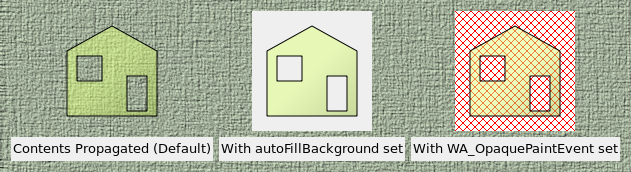
在以上简图中,构造移除区域的半透明矩形子级小部件并将其添加到父级 Widget ( PySide.QtGui.QLabel 展示像素图)。然后,设置不同特性和 Widget 属性以达成不同效果:
要采用简单背景颜色快速更新自定义 Widget (譬如:实时绘图或图形化 Widget),最好定义合适的背景颜色 (使用 PySide.QtGui.QWidget.setBackgroundRole() 采用 QPalette.Window 角色),设置 PySide.QtGui.QWidget.autoFillBackground() 特性,且仅实现必要绘图功能在小部件的 PySide.QtGui.QWidget.paintEvent() .
要快速更新不断采用不透明内容描绘其整个区域的自定义 Widget (如:视频流小部件),最好设置小部件的 Qt.WA_OpaquePaintEvent ,避免关联重新描绘 Widget 背景的任何不必要开销。
若 Widget 拥有 Qt.WA_OpaquePaintEvent Widget 属性 and the PySide.QtGui.QWidget.autoFillBackground() 设置特性, Qt.WA_OpaquePaintEvent 属性优先。根据要求,应选择它们之一。
从 Qt 4.1 起,父级 Widget 的内容还被传播给标准 Qt 小部件。若父级小部件以非标准方式装饰,这可能导致一些意外结果,如以下简图所示。
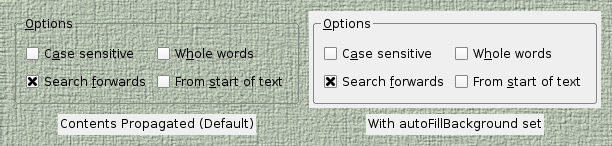
在不诉诸子类化的情况下,定制标准 Qt 小部件的描绘行为的作用域,可能略小于自定义 Widget 的作用域。通常,可以达成标准 Widget 期望的外观通过设置其 PySide.QtGui.QWidget.autoFillBackground() 特性。
从 Qt 4.5 起,在支持合成的窗口系统创建具有半透明区域的窗口是可能的。
要在顶层 Widget 启用此特征,设置其 Qt.WA_TranslucentBackground 属性采用 PySide.QtGui.QWidget.setAttribute() and ensure that its background is painted with non-opaque colors in the regions you want to be partially transparent.
平台注意事项:
在 Qt 4.4 引入的外来 Widget 是窗口系统的未知小部件。它们没有关联它们的本机窗口句柄。此特征可显著提高小部件描绘、重置尺寸及移除闪烁的速度。
若要求采用本机窗口的旧行为,可以选择以下选项之一:
Since Qt 4.6, Softkeys are usually physical keys on a device that have a corresponding label or other visual representation on the screen that is generally located next to its physical counterpart. They are most often found on mobile phone platforms. In modern touch based user interfaces it is also possible to have softkeys that do not correspond to any physical keys. Softkeys differ from other onscreen labels in that they are contextual.
In Qt, contextual softkeys are added to a widget by calling PySide.QtGui.QWidget.addAction() and passing a QAction with a softkey role set on it. When the widget containing the softkey actions has focus, its softkeys should appear in the user interface. Softkeys are discovered by traversing the widget hierarchy so it is possible to define a single set of softkeys that are present at all times by calling PySide.QtGui.QWidget.addAction() for a given top level widget.
On some platforms, this concept overlaps with QMenuBar such that if no other softkeys are found and the top level widget is a PySide.QtGui.QMainWindow 包含 PySide.QtGui.QMenuBar , the menubar actions may appear on one of the softkeys.
Note: Currently softkeys are only supported on the Symbian Platform.
| 参数: |
|
|---|
此枚举描述如何渲染 Widget 当调用 QWidget.render() .
| 常量 | 描述 |
|---|---|
| QWidget.DrawWindowBackground | 若启用此选项,Widget 背景被渲染到目标即使 PySide.QtGui.QWidget.autoFillBackground() 未设置。默认情况下,此选项是启用的。 |
| QWidget.DrawChildren | 若启用此选项,Widget 的子级被递归渲染到目标。默认情况下,此选项是启用的。 |
| QWidget.IgnoreMask | 若启用此选项,Widget 的 QWidget.mask() is ignored when rendering into the target. By default, this option is disabled. |
| 返回类型: | PySide.QtCore.bool |
|---|
This property holds whether drop events are enabled for this widget.
把此特性设为 true 向系统宣布此 Widget may 能够接受掉落事件。
若 Widget 是桌面 ( PySide.QtGui.QWidget.windowType() == Qt.Desktop ), this may fail if another application is using the desktop; you can call PySide.QtGui.QWidget.acceptDrops() to test if this occurs.
警告
不要在拖放事件处理程序中修改此特性。
默认情况下,此特性为 false。
另请参阅
拖放
| 返回类型: | unicode |
|---|
This property holds the widget's description as seen by assistive technologies.
默认情况下,此特性包含空字符串。
另请参阅
QAccessibleInterface.text()
| 返回类型: | unicode |
|---|
This property holds the widget's name as seen by assistive technologies.
This property is used by accessible clients to identify, find, or announce the widget for accessible clients.
默认情况下,此特性包含空字符串。
另请参阅
QAccessibleInterface.text()
| 参数: | event – PySide.QtGui.QActionEvent |
|---|
此事件处理程序被调用采用给定 event 每当 Widget 的操作发生更改时。
| 返回类型: |
|---|
返回此 Widget 的动作列表 (可能为空)。
把包含此 Widget 的顶层 Widget,设为活动窗口。
活动窗口是具有键盘输入聚焦的可见顶层窗口。
此函数履行如在顶层窗口的标题栏上,点击鼠标的相同操作。在 X11,结果取决于窗口管理器。若想要确保窗口堆叠在顶部,同样,还应调用 raise() . Note that the window must be visible, otherwise PySide.QtGui.QWidget.activateWindow() 不起作用。
在 Windows,若在应用程序目前不是活动窗口时调用这,则不会使其成为活动窗口。它会改变任务栏条目的颜色,以指示窗口在某些方面有变化。这是因为 Microsoft 不允许应用程序,去中断用户在另一应用程序中目前正做的。
| 参数: | action – PySide.QtGui.QAction |
|---|
追加动作 action 到此 Widget 的动作列表。
所有 QWidget 都有列表,针对 PySide.QtGui.QAction ,无论如何,可以按多种不同方式图形表示它们。默认使用 PySide.QtGui.QAction 列表 (返回通过 PySide.QtGui.QWidget.actions() ) is to create a context PySide.QtGui.QMenu .
A PySide.QtGui.QWidget 只应每动作有一个,且已添加动作不会导致同一动作在 Widget 中出现两次。
The ownership of action 不会被转移给此 PySide.QtGui.QWidget .
| 参数: | actions – |
|---|
调整 Widget 大小,以拟合其内容。
此函数使用 PySide.QtGui.QWidget.sizeHint() if it is valid, i.e., the size hint's width and height are >= 0. Otherwise, it sets the size to the children rectangle that covers all child widgets (the union of all child widget rectangles).
For windows, the screen size is also taken into account. If the PySide.QtGui.QWidget.sizeHint() is less than (200, 100) and the size policy is expanding , the window will be at least (200, 100). The maximum size of a window is 2/3 of the screen's width and height.
| 返回类型: | PySide.QtCore.bool |
|---|
This property holds whether the widget background is filled automatically.
若启用,此特性将导致 Qt 填充 Widget 背景在援引描绘事件之前。使用颜色的定义通过 QPalette.Window 颜色角色来自 Widget 的 palette .
此外,填充窗口总是采用 QPalette.Window ,除非有设置 WA_OpaquePaintEvent 或 WA_NoSystemBackground 属性。
此特性无法被关闭 (即设为 false),若 Widget 父级拥有用于其背景的静态渐变。
警告
使用此特性要谨慎当结合 Qt 样式表 。当 Widget 拥有带有效背景或边框图像的样式表时,此特性被自动禁用。
默认情况下,此特性为 false。
另请参阅
Qt.WA_OpaquePaintEvent Qt.WA_NoSystemBackground Transparency and Double Buffering
| 返回类型: | PySide.QtGui.QPalette.ColorRole |
|---|
返回 Widget 的背景角色。
背景角色定义的笔刷来自 Widget 的 PySide.QtGui.QWidget.palette() that is used to render the background.
If no explicit background role is set, the widget inherts its parent widget's background role.
| 返回类型: | PySide.QtCore.QSize |
|---|
This property holds the base size of the widget.
基尺寸用于计算适当 Widget 尺寸,若小部件有定义 PySide.QtGui.QWidget.sizeIncrement() .
默认情况下,对于新近创建的 Widget,此特性包含 0 宽高尺寸。
| 参数: | event – PySide.QtCore.QEvent |
|---|
此事件处理程序可以被重实现以处理状态改变。
在此事件中改变的状态可以被检索透过 event 供给。
改变事件包括: QEvent.ToolBarChange , QEvent.ActivationChange , QEvent.EnabledChange , QEvent.FontChange , QEvent.StyleChange , QEvent.PaletteChange , QEvent.WindowTitleChange , QEvent.IconTextChange , QEvent.ModifiedChange , QEvent.MouseTrackingChange , QEvent.ParentChange , QEvent.WindowStateChange , QEvent.LanguageChange , QEvent.LocaleChange , QEvent.LayoutDirectionChange .
| 参数: | p – PySide.QtCore.QPoint |
|---|---|
| 返回类型: | PySide.QtGui.QWidget |
这是重载函数。
Returns the visible child widget at point p in the widget's own coordinate system.
| 参数: |
|
|---|---|
| 返回类型: |
Returns the visible child widget at the position ( x , y ) in the widget's coordinate system. If there is no visible child widget at the specified position, the function returns 0.
| 返回类型: | PySide.QtCore.QRect |
|---|
This property holds the bounding rectangle of the widget's children.
排除隐藏子级。
默认情况下,对于没有子级的 Widget,此特性包含位于原点的 0 宽高矩形。
| 返回类型: | PySide.QtGui.QRegion |
|---|
This property holds the combined region occupied by the widget's children.
排除隐藏子级。
默认情况下,对于没有子级的 Widget,此特性包含空区域。
从 Widget 获取键盘输入聚焦。
若 Widget 有活动聚焦, focus out event is sent to this widget to tell it that it is about to lose the focus.
此 Widget 必须启用聚焦设置以获取键盘输入聚焦,即:它必须调用 PySide.QtGui.QWidget.setFocusPolicy() .
移除任何遮罩设置通过 PySide.QtGui.QWidget.setMask() .
| 返回类型: | PySide.QtCore.bool |
|---|
Closes this widget. Returns true if the widget was closed; otherwise returns false.
首先,它向 Widget 发送 PySide.QtGui.QCloseEvent 。小部件 hidden 若它 accepts 关闭事件。若它 ignores 事件,什么都不发生。默认实现的 QWidget.closeEvent() accepts the close event.
若 Widget 拥有 Qt.WA_DeleteOnClose 标志,小部件也被删除。关闭事件会被交付给 Widget 无论小部件是否可见。
QApplication.lastWindowClosed() signal is emitted when the last visible primary window (i.e. window with no parent) with the Qt.WA_QuitOnClose 属性设置被关闭。默认情况下,除过渡窗口 (譬如:闪屏、工具窗口及弹出菜单) 外,所有 Widget 都有设置此属性。
| 参数: | event – PySide.QtGui.QCloseEvent |
|---|
此事件处理程序被调用采用给定 event when Qt receives a window close request for a top-level widget from the window system.
By default, the event is accepted and the widget is closed. You can reimplement this function to change the way the widget responds to window close requests. For example, you can prevent the window from closing by calling PySide.QtCore.QEvent.ignore() on all events.
Main window applications typically use reimplementations of this function to check whether the user's work has been saved and ask for permission before closing. For example, the 应用程序范例 uses a helper function to determine whether or not to close the window:
def closeEvent(self, event):
    if maybeSave():
        writeSettings()
        event.accept()
    else:
        event.ignore()
另请参阅
PySide.QtGui.QWidget.event() PySide.QtGui.QWidget.hide() PySide.QtGui.QWidget.close() PySide.QtGui.QCloseEvent 应用程序范例
| 返回类型: | PySide.QtCore.QMargins |
|---|
contentsMargins 函数返回 Widget 的内容边距。
| 返回类型: | PySide.QtCore.QRect |
|---|
返回 Widget 边距内的区域。
| 参数: | event – PySide.QtGui.QContextMenuEvent |
|---|
此事件处理程序,对于事件 event ,可以在子类中被重实现以接收 Widget 上下文菜单事件。
处理程序被调用,当 Widget 的 PySide.QtGui.QWidget.contextMenuPolicy() is Qt.DefaultContextMenu .
默认实现忽略上下文事件。见 PySide.QtGui.QContextMenuEvent 文档编制了解更多细节。
另请参阅
PySide.QtGui.QWidget.event() PySide.QtGui.QContextMenuEvent PySide.QtGui.QWidget.customContextMenuRequested()
| 返回类型: | PySide.QtCore.Qt.ContextMenuPolicy |
|---|
This property holds how the widget shows a context menu.
此特性的默认值为 Qt.DefaultContextMenu ,这意味着 PySide.QtGui.QWidget.contextMenuEvent() handler is called. Other values are Qt.NoContextMenu , Qt.PreventContextMenu , Qt.ActionsContextMenu ,和 Qt.CustomContextMenu . With Qt.CustomContextMenu ,信号 PySide.QtGui.QWidget.customContextMenuRequested() is emitted.
Ensures that the widget has a window system identifier, i.e. that it is known to the windowing system.
| 返回类型: | PySide.QtGui.QCursor |
|---|
This property holds the cursor shape for this widget.
鼠标光标将假定此形状,当它越过此 Widget 时。见 list of predefined cursor 对象 了解有用形状范围。
编辑器 Widget 可能使用 I-beam 光标:
widget.setCursor(Qt.IBeamCursor)
If no cursor has been set, or after a call to PySide.QtGui.QWidget.unsetCursor() , the parent's cursor is used.
默认情况下,此特性包含的光标具有 Qt.ArrowCursor 形状。
一些底层窗口实现将重置光标若它离开 Widget,即使鼠标被抓取。若想要为所有 Widget 设置光标,即使在窗口外,请考虑 QApplication.setOverrideCursor() .
| 参数: | pos – PySide.QtCore.QPoint |
|---|
| 参数: |
|
|---|
释放窗口系统资源。销毁 Widget 窗口,若 destroyWindow 为 true。
PySide.QtGui.QWidget.destroy() calls itself recursively for all the child widgets, passing destroySubWindows 为 destroyWindow 参数。要更好地控制 Subwidget 的销毁,请先选择性地销毁 Subwidget。
此函数通常被调用从 PySide.QtGui.QWidget 析构函数。
| 参数: | event – PySide.QtGui.QDragEnterEvent |
|---|
此事件处理程序被调用当拖拽正在进行中且鼠标进入此 Widget 时。事件被传入 event 参数。
若事件被忽略,Widget 不会接收任何 drag move events .
见 拖放文档编制 了解如何为应用程序提供拖放的概述。
| 参数: | event – PySide.QtGui.QDragLeaveEvent |
|---|
此事件处理程序被调用当拖拽正在进行中且鼠标离开此 Widget 时。事件被传入 event 参数。
见 拖放文档编制 了解如何为应用程序提供拖放的概述。
| 参数: | event – PySide.QtGui.QDragMoveEvent |
|---|
此事件处理程序被调用若拖拽正在进行中且发生以下任一条件:光标进入此 Widget、光标在此 Widget 内移动、若按下键盘修饰键当此 Widget 获得聚焦时。事件被传入 event 参数。
见 拖放文档编制 了解如何为应用程序提供拖放的概述。
| 参数: | event – PySide.QtGui.QDropEvent |
|---|
此事件处理程序被调用当拖拽掉落在此 Widget 上时。事件被传入 event 参数。
见 拖放文档编制 了解如何为应用程序提供拖放的概述。
| 返回类型: | PySide.QtCore.long |
|---|
返回 Widget 的有效窗口系统标识符,即:本机父级的窗口系统标识符。
若 Widget 是本机的,此函数返回本机小部件 ID。否则,返回首个本机父级 Widget (即:包含此 Widget 的顶层小部件) 的窗口 ID。
注意
推荐不要存储此值,因为运行时它可能改变。
Ensures that the widget has been polished by PySide.QtGui.QStyle (i.e., has a proper font and palette).
PySide.QtGui.QWidget 调用此函数在完全构造之后,但在首次展示之前。可以调用此函数,若想要确保在执行操作之前抛光 Widget,如:可能需要正确字体大小在 Widget 的 PySide.QtGui.QWidget.sizeHint() reimplementation. Note that this function is 调用自默认实现的 PySide.QtGui.QWidget.sizeHint() .
抛光对必须在调用所有构造函数 (来自基类及子类) 之后的最终初始化很有用。
若需要改变某些设置当抛光 Widget 时,重实现 PySide.QtGui.QWidget.event() and handle the QEvent.Polish 事件类型。
注意
函数被声明为 const 以便可以从其它 const 函数中调用它 (如 PySide.QtGui.QWidget.sizeHint() ).
另请参阅
PySide.QtGui.QWidget.event()
| 参数: | event – PySide.QtCore.QEvent |
|---|
此事件处理程序可以在子类中被重实现以接收 Widget 进入事件,当传入 event 参数。
事件被发送给 Widget,当鼠标光标进入 Widget 时。
另请参阅
PySide.QtGui.QWidget.leaveEvent() PySide.QtGui.QWidget.mouseMoveEvent() PySide.QtGui.QWidget.event()
| 参数: | event – PySide.QtGui.QFocusEvent |
|---|
此事件处理程序可以在子类中被重实现,以接收 Widget 的键盘聚焦事件 (聚焦接收)。事件被传入 event 参数
Widget 通常必须 PySide.QtGui.QWidget.setFocusPolicy() to something other than Qt.NoFocus 为接收聚焦事件 (注意:应用程序程序员可以调用 PySide.QtGui.QWidget.setFocus() on any widget, even those that do not normally accept focus.)
默认实现更新 Widget (除了窗口未指定 PySide.QtGui.QWidget.focusPolicy() ).
| 返回类型: | PySide.QtCore.bool |
|---|
查找新的 Widget 以给予键盘聚焦,如适合 Tab , and returns true if it can find a new widget, or false if it can't.
| 参数: | next – PySide.QtCore.bool |
|---|---|
| 返回类型: | PySide.QtCore.bool |
Finds a new widget to give the keyboard focus to, as appropriate for Tab and Shift+Tab, and returns true if it can find a new widget, or false if it can't.
若 next 为 true,此函数向前搜索,若 next 为 False,向后搜索。
Sometimes, you will want to reimplement this function. For example, a web browser might reimplement it to move its “current active link” forward or backward, and call PySide.QtGui.QWidget.focusNextPrevChild() only when it reaches the last or first link on the “page”.
Child widgets call PySide.QtGui.QWidget.focusNextPrevChild() on their parent widgets, but only the window that contains the child widgets decides where to redirect focus. By reimplementing this function for an object, you thus gain control of focus traversal for all child widgets.
| 参数: | event – PySide.QtGui.QFocusEvent |
|---|
此事件处理程序可以在子类中被重实现,以接收 Widget 的键盘聚焦事件 (聚焦丢失)。事件被传入 event 参数。
Widget 通常必须 PySide.QtGui.QWidget.setFocusPolicy() to something other than Qt.NoFocus 为接收聚焦事件 (注意:应用程序程序员可以调用 PySide.QtGui.QWidget.setFocus() on any widget, even those that do not normally accept focus.)
默认实现更新 Widget (除了窗口未指定 PySide.QtGui.QWidget.focusPolicy() ).
| 返回类型: | PySide.QtCore.Qt.FocusPolicy |
|---|
This property holds the way the widget accepts keyboard focus.
策略为 Qt.TabFocus 若 Widget 通过 Tab 键接受键盘聚焦, Qt.ClickFocus 若 Widget 通过点击接受聚焦, Qt.StrongFocus 若它接受两者,而 Qt.NoFocus (默认) 若它根本不接受聚焦。
必须为 Widget 启用键盘聚焦,若它处理键盘事件。通常这是由 Widget 的构造函数完成的。例如, PySide.QtGui.QLineEdit 构造函数调用 setFocusPolicy( Qt.StrongFocus ).
若 Widget 有聚焦代理,聚焦策略就会传播给它。
| 返回类型: | PySide.QtCore.bool |
|---|
查找新的 Widget 以给予键盘聚焦,如适合 Shift+Tab , and returns true if it can find a new widget, or false if it can't.
| 返回类型: | PySide.QtGui.QWidget |
|---|
Returns the focus proxy, or 0 if there is no focus proxy.
| 返回类型: | PySide.QtGui.QWidget |
|---|
Returns the last child of this widget that setFocus had been called on. For top level widgets this is the widget that will get focus in case this window gets activated
这不同于 QApplication.focusWidget() , which returns the focus widget in the currently active window.
| 返回类型: | PySide.QtGui.QFont |
|---|
This property holds the font currently set for the widget.
此特性描述 Widget 的请求字体。字体用于 Widget 的样式当渲染标准组件时,且可用作确保自定义 Widget 与本机平台外观和感觉可以保持一致的手段。不同平台或不同样式,为应用程序定义不同字体是很常见的。
When you assign a new font to a widget, the properties from this font are combined with the widget's default font to form the widget's final font. You can call PySide.QtGui.QWidget.fontInfo() to get a copy of the widget's final font. The final font is also used to initialize PySide.QtGui.QPainter ‘s font.
默认取决于系统环境。 PySide.QtGui.QApplication maintains a system/theme font which serves as a default for all widgets. There may also be special font defaults for certain types of widgets. You can also define default fonts for widgets yourself by passing a custom font and the name of a widget to QApplication.setFont() . Finally, the font is matched against Qt's font database to find the best match.
PySide.QtGui.QWidget propagates explicit font properties from parent to child. If you change a specific property on a font and assign that font to a widget, that property will propagate to all the widget's children, overriding any system defaults for that property. Note that fonts by default don't propagate to windows (see PySide.QtGui.QWidget.isWindow() ) unless the Qt.WA_WindowPropagation attribute is enabled.
PySide.QtGui.QWidget ‘s font propagation is similar to its palette propagation.
The current style, which is used to render the content of all standard Qt widgets, is free to choose to use the widget font, or in some cases, to ignore it (partially, or completely). In particular, certain styles like GTK style, Mac style, Windows XP, and Vista style, apply special modifications to the widget font to match the platform's native look and feel. Because of this, assigning properties to a widget's font is not guaranteed to change the appearance of the widget. Instead, you may choose to apply a PySide.QtGui.QWidget.styleSheet() .
注意
若 Qt 样式表 are used on the same widget as PySide.QtGui.QWidget.setFont() , style sheets will take precedence if the settings conflict.
| 返回类型: | PySide.QtGui.QFontInfo |
|---|
Returns the font info for the widget's current font. Equivalent to QFontInto(widget-> PySide.QtGui.QWidget.font() ).
| 返回类型: | PySide.QtGui.QFontMetrics |
|---|
返回 Widget 当前字体的字体规格。相当于 PySide.QtGui.QFontMetrics (widget-> PySide.QtGui.QWidget.font() ).
| 返回类型: | PySide.QtGui.QPalette.ColorRole |
|---|
返回前景角色。
前景角色定义颜色来自 Widget 的 PySide.QtGui.QWidget.palette() 用于绘制前景。
若未明确设置前景角色,函数返回对比后台角色的角色。
| 返回类型: | PySide.QtCore.QRect |
|---|
This property holds geometry of the widget relative to its parent including any window frame.
见 窗口几何体 文档编制,了解有关窗口几何体问题的概述。
默认情况下,此特性包含从属用户平台和屏幕几何体的值。
| 返回类型: | PySide.QtCore.QSize |
|---|
This property holds the size of the widget including any window frame.
默认情况下,此特性包含从属用户平台和屏幕几何体的值。
| 返回类型: | PySide.QtCore.QRect |
|---|
This property holds the geometry of the widget relative to its parent and excluding the window frame.
当改变几何体时,Widget (若可见) 接收移动事件 ( PySide.QtGui.QWidget.moveEvent() ) and/or a resize event ( PySide.QtGui.QWidget.resizeEvent() ) immediately. If the widget is not currently visible, it is guaranteed to receive appropriate events before it is shown.
调节其组件大小,若它超出范围定义通过 PySide.QtGui.QWidget.minimumSize() and PySide.QtGui.QWidget.maximumSize() .
警告
调用 PySide.QtGui.QWidget.setGeometry() inside PySide.QtGui.QWidget.resizeEvent() or PySide.QtGui.QWidget.moveEvent() can lead to infinite recursion.
见 窗口几何体 文档编制,了解有关窗口几何体问题的概述。
默认情况下,此特性包含从属用户平台和屏幕几何体的值。
Returns the widget's contents margins for left , top , right ,和 bottom .
| 参数: |
|
|---|
抓取键盘输入。
此 Widget 接收所有键盘事件直到 PySide.QtGui.QWidget.releaseKeyboard() is called; other widgets get no keyboard events at all. Mouse events are not affected. Use PySide.QtGui.QWidget.grabMouse() if you want to grab that.
聚焦 Widget 不受影响,除了它不接收任何键盘事件。 PySide.QtGui.QWidget.setFocus() moves the focus as usual, but the new focus widget receives keyboard events only after PySide.QtGui.QWidget.releaseKeyboard() 被调用。
如果另一 Widget 目前正在抓取键盘输入,则会先释放该 Widget 的抓取。
| 参数: | arg__1 – PySide.QtGui.QCursor |
|---|
此函数重载 PySide.QtGui.QWidget.grabMouse() .
抓取鼠标输入和改变光标形状。
光标会假定形状 cursor (对于只要鼠标聚焦被抓住) 且此 Widget 将是接收鼠标事件的唯一小部件直到 PySide.QtGui.QWidget.releaseMouse() is called().
警告
抓取鼠标可能锁定终端。
注意
(Mac OS X developers) 见注意事项在 QWidget.grabMouse() .
抓取鼠标输入。
此 Widget 接收所有鼠标事件直到 PySide.QtGui.QWidget.releaseMouse() is called; other widgets get no mouse events at all. Keyboard events are not affected. Use PySide.QtGui.QWidget.grabKeyboard() if you want to grab that.
警告
以鼠标抓取应用程序的 Bug 会经常锁定终端。使用此函数要极其谨慎,并考虑使用 -nograb 命令行选项当调试时。
抓取鼠标几乎从不是必要的当使用 Qt 时,因为 Qt 会明智地抓取和释放鼠标。特别是,当鼠标按钮被按下时,Qt 抓住鼠标并保持它直到最后一个按钮被释放。
注意
仅可见 Widget 可以抓取鼠标输入。若 PySide.QtGui.QWidget.isVisible() returns false for a widget, that widget cannot call PySide.QtGui.QWidget.grabMouse() .
注意
(Mac OS X developers) For Cocoa ,调用 PySide.QtGui.QWidget.grabMouse() on a widget only works when the mouse is inside the frame of that widget. For Carbon , it works outside the widget's frame as well, like for Windows and X11.
| 参数: |
|
|---|---|
| 返回类型: |
PySide.QtCore.int |
| 返回类型: | PySide.QtGui.QGraphicsEffect |
|---|
graphicsEffect 函数返回指向 Widget 图形效果的指针。
If the widget has no graphics effect, 0 is returned.
| 返回类型: | PySide.QtGui.QGraphicsProxyWidget |
|---|
Returns the proxy widget for the corresponding embedded widget in a graphics view; otherwise returns 0.
| 返回类型: | PySide.QtCore.bool |
|---|
This property holds whether this widget (or its focus proxy) has the keyboard input focus.
默认情况下,此特性为 false。
注意
获取 Widget 此特性值有效相当于校验是否 QApplication.focusWidget() refers to the widget.
| 返回类型: | PySide.QtCore.bool |
|---|
This property holds whether mouse tracking is enabled for the widget.
若鼠标跟踪被禁用 (默认),当至少按下一鼠标按钮移动鼠标时,Widget 才接收鼠标移动事件。
若鼠标跟踪被启用,Widget 接收鼠标移动事件,即使没有按钮被按下。
| 参数: | arg__1 – PySide.QtCore.int |
|---|---|
| 返回类型: | PySide.QtCore.int |
返回此 Widget 的首选高度,给定宽度 w .
If this widget has a layout, the default implementation returns the layout's preferred height. if there is no layout, the default implementation returns -1 indicating that the preferred height does not depend on the width.
Hides the widget. This function is equivalent to setVisible(false).
注意
If you are working with PySide.QtGui.QDialog or its subclasses and you invoke the PySide.QtGui.QWidget.show() function after this function, the dialog will be displayed in its original position.
| 参数: | event – PySide.QtGui.QHideEvent |
|---|
此事件处理程序可以在子类中被重实现以接收 Widget 隐藏事件。事件被传入 event 参数。
隐藏事件被立即发送给 Widget 在它们被隐藏后。
注意:Widget 接收自发展示和隐藏事件当通过窗口系统改变其映射状态时,如:自发隐藏事件当用户最小化窗口时,和自发展示事件当窗口被再次还原时。在接收自发隐藏事件之后仍然认为 Widget 是可见的,在意识到 PySide.QtGui.QWidget.isVisible() .
另请参阅
visible() PySide.QtGui.QWidget.event() PySide.QtGui.QHideEvent
| 返回类型: | PySide.QtGui.QInputContext |
|---|
This function returns the PySide.QtGui.QInputContext for this widget. By default the input context is inherited from the widgets parent. For toplevels it is inherited from PySide.QtGui.QApplication .
You can override this and set a special input context for this widget by using the PySide.QtGui.QWidget.setInputContext() 方法。
| 参数: | event – PySide.QtGui.QInputMethodEvent |
|---|
此事件处理程序,对于事件 event ,可以在子类中重实现以接收输入法合成事件。处理程序被调用,当输入法状态改变时。
注意:当创建自定义文本编辑 Widget 时, Qt.WA_InputMethodEnabled 窗口属性必须被明确设置 (使用 PySide.QtGui.QWidget.setAttribute() function) in order to receive input method events.
默认实现调用 event->ignore(),拒绝输入法事件。见 PySide.QtGui.QInputMethodEvent 文档编制了解更多细节。
另请参阅
PySide.QtGui.QWidget.event() PySide.QtGui.QInputMethodEvent
| 返回类型: | PySide.QtCore.Qt.InputMethodHints |
|---|
This property holds What input method specific hints the widget has..
这仅与输入 Widget 相关。输入法使用它来检索输入法应该如何操作的有关提示。例如,若 Qt.ImhFormattedNumbersOnly 标志被设置,输入法可以改变其视觉组件以反射只可以录入数字。
注意
标志只是提示,因此,特定输入法实现可自由忽略它们。若希望确保录入某种类型的字符,还应该设置 PySide.QtGui.QValidator 在 Widget。
默认值为 Qt.ImhNone .
| 参数: | arg__1 – PySide.QtCore.Qt.InputMethodQuery |
|---|---|
| 返回类型: | object |
| 参数: |
|
|---|
插入动作 action 到此 Widget 的动作列表,前置于动作 before 。它追加动作,若 before is 0 or before 不是有效动作 (对于此 Widget)。
A PySide.QtGui.QWidget 每动作只应有一个。
| 参数: |
|
|---|
| 返回类型: | PySide.QtCore.bool |
|---|
This property holds whether this widget's window is the active window.
活动窗口是包含拥有键盘聚焦的 Widget 的窗口 (窗口可能仍然拥有聚焦,若它没有 Widget 或其 Widget 不接受键盘聚焦)。
When popup windows are visible, this property is true for both the active window and 对于弹出窗口。
默认情况下,此特性为 false。
| 参数: | child – PySide.QtGui.QWidget |
|---|---|
| 返回类型: | PySide.QtCore.bool |
Returns true if this widget is a parent, (or grandparent and so on to any level), of the given child , and both widgets are within the same window; otherwise returns false.
| 返回类型: | PySide.QtCore.bool |
|---|
This property holds whether the widget is enabled.
通常,启用 Widget 处理键盘和鼠标事件;禁用小部件不会。例外是 PySide.QtGui.QAbstractButton .
某些 Widget 按不同方式显示自身,当它们被禁用时。例如,按钮可能将其标签绘制为灰色。若 Widget 需要知道它何时变为启用或禁用,可以使用 PySide.QtGui.QWidget.changeEvent() with type QEvent.EnabledChange .
Disabling a widget implicitly disables all its children. Enabling respectively enables all child widgets unless they have been explicitly disabled.
默认情况下,此特性为 true。
| 参数: | arg__1 – PySide.QtGui.QWidget |
|---|---|
| 返回类型: | PySide.QtCore.bool |
Returns true if this widget would become enabled if ancestor is enabled; otherwise returns false.
就是这种情况若不是 Widget 本身或每个父级直到,但排除 ancestor 已被明确禁用。
isEnabledTo(0) is equivalent to PySide.QtGui.QWidget.isEnabled() .
另请参阅
PySide.QtGui.QWidget.setEnabled() enabled()
| 返回类型: | PySide.QtCore.bool |
|---|
This property holds whether the widget is shown in full screen mode.
全屏模式下 Widget 占据整个屏幕区域且不显示窗口装饰 (譬如:标题栏)。
默认情况下,此特性为 false。
另请参阅
PySide.QtGui.QWidget.windowState() minimized() maximized()
| 返回类型: | PySide.QtCore.bool |
|---|
Returns true if the widget is hidden, otherwise returns false.
隐藏 Widget 才变为可见当 PySide.QtGui.QWidget.show() is called on it. It will not be automatically shown when the parent is shown.
要校验可见性,使用 ! PySide.QtGui.QWidget.isVisible() instead (notice the exclamation mark).
PySide.QtGui.QWidget.isHidden() implies ! PySide.QtGui.QWidget.isVisible() , but a widget can be not visible and not hidden at the same time. This is the case for widgets that are children of widgets that are not visible.
Widget 被隐藏若:
| 返回类型: | PySide.QtCore.bool |
|---|
| 返回类型: | PySide.QtCore.bool |
|---|
This property holds whether this widget is maximized.
此特性仅相关窗口。
注意
Due to limitations on some window systems, this does not always report the expected results (e.g., if the user on X11 maximizes the window via the window manager, Qt has no way of distinguishing this from any other resize). This is expected to improve as window manager protocols evolve.
默认情况下,此特性为 false。
| 返回类型: | PySide.QtCore.bool |
|---|
This property holds whether this widget is minimized (iconified).
此特性仅相关窗口。
默认情况下,此特性为 false。
| 返回类型: | PySide.QtCore.bool |
|---|
This property holds whether the widget is a modal widget.
This property only makes sense for windows. A modal widget prevents widgets in all other windows from getting any input.
默认情况下,此特性为 false。
| 返回类型: | PySide.QtCore.bool |
|---|
| 返回类型: | PySide.QtCore.bool |
|---|
This property holds whether the widget is visible.
调用 setVisible(true) 或 PySide.QtGui.QWidget.show() sets the widget to visible status if all its parent widgets up to the window are visible. If an ancestor is not visible, the widget won't become visible until all its ancestors are shown. If its size or position has changed, Qt guarantees that a widget gets move and resize events just before it is shown. If the widget has not been resized yet, Qt will adjust the widget's size to a useful default using PySide.QtGui.QWidget.adjustSize() .
调用 setVisible(false) 或 PySide.QtGui.QWidget.hide() hides a widget explicitly. An explicitly hidden widget will never become visible, even if all its ancestors become visible, unless you show it.
Widget 接收展示和隐藏事件,当其可见性状态改变时。在隐藏和展示事件之间,无需浪费 CPU 周期准备或向用户显示信息。例如:视频应用程序可能只需停止生成新帧。
恰巧被屏幕上其它窗口遮盖的 Widget 被认为是可见的。同样适用于图标化窗口和存在于另一虚拟桌面的窗口 (在支持此概念的平台)。Widget 接收自发展示和隐藏事件,当窗口系统改变其映射状态时,如:自发隐藏事件当用户最小化窗口时,和自发展示事件当窗口再次还原时。
You almost never have to reimplement the PySide.QtGui.QWidget.setVisible() function. If you need to change some settings before a widget is shown, use PySide.QtGui.QWidget.showEvent() instead. If you need to do some delayed initialization use the Polish event delivered to the PySide.QtGui.QWidget.event() 函数。
| 参数: | arg__1 – PySide.QtGui.QWidget |
|---|---|
| 返回类型: | PySide.QtCore.bool |
Returns true if this widget would become visible if ancestor is shown; otherwise returns false.
true 情况发生若 Widget 本身或任何父级直到但排除 ancestor 已被明确隐藏。
此函数仍将返回 true,若 Widget 被其它屏幕窗口遮挡,但可以是物理可见的,若它或它们要被移动。
isVisibleTo(0) 等同于 PySide.QtGui.QWidget.isVisible() .
| 返回类型: | PySide.QtCore.bool |
|---|
Returns true if the widget is an independent window, otherwise returns false.
窗口不是任何其它可见小部件的子级 Widget,通常拥有框架和 window title .
窗口可以拥有 parent widget 。那么,它将与其父级被分组在一起和被删除当父级被删除时,它将最小化当父级被最小化时,等。若窗口管理器支持,它还拥有如其父级的常见任务栏条目。
PySide.QtGui.QDialog and PySide.QtGui.QMainWindow Widget 默认是窗口,即使在构造函数中有指定父级 Widget。此行为的指定通过 Qt.Window 标志。
| 返回类型: | PySide.QtCore.bool |
|---|
This property holds whether the document shown in the window has unsaved changes.
A modified window is a window whose content has changed but has not been saved to disk. This flag will have different effects varied by the platform. On Mac OS X the close button will have a modified look; on other platforms, the window title will have an ‘*' (asterisk).
The window title must contain a “[*]” placeholder, which indicates where the ‘*' should appear. Normally, it should appear right after the file name (e.g., “document1.txt[*] - Text Editor”). If the window isn't modified, the placeholder is simply removed.
注意,若将 Widget 设为被修改,则其所有祖先也被设为被修改。不管怎样,若调用 setWindowModified(false) 在 Widget,这不会传播给其父级,因为父级的其它子级可能已被修改。
另请参阅
PySide.QtGui.QWidget.windowTitle() 应用程序范例 SDI 范例 MDI 范例
| 参数: | event – PySide.QtGui.QKeyEvent |
|---|
此事件处理程序,对于事件 event ,可以在子类中重实现以接收 Widget 的按键事件。
Widget 必须调用 PySide.QtGui.QWidget.setFocusPolicy() to accept focus initially and have focus in order to receive a key press event.
若重实现此处理程序,则调用基类实现很重要若按键不行动。
The default implementation closes popup widgets if the user presses Esc. Otherwise the event is ignored, so that the widget's parent can interpret it.
注意: PySide.QtGui.QKeyEvent 开始采用 isAccepted() == true,因此不需要调用 QKeyEvent.accept() - just do not call the base class implementation if you act upon the key.
另请参阅
PySide.QtGui.QWidget.keyReleaseEvent() PySide.QtGui.QWidget.setFocusPolicy() PySide.QtGui.QWidget.focusInEvent() PySide.QtGui.QWidget.focusOutEvent() PySide.QtGui.QWidget.event() PySide.QtGui.QKeyEvent 俄罗斯方块范例
| 参数: | event – PySide.QtGui.QKeyEvent |
|---|
此事件处理程序,对于事件 event ,可以在子类中被重实现以接收 Widget 按键释放事件。
Widget 必须 accept focus 初始和 have focus 为接收键释放事件。
若重实现此处理程序,则调用基类实现很重要若按键不行动。
默认实现忽略事件,以便 Widget 父级可以解释它。
注意: PySide.QtGui.QKeyEvent 开始采用 isAccepted() == true,因此不需要调用 QKeyEvent.accept() - just do not call the base class implementation if you act upon the key.
另请参阅
PySide.QtGui.QWidget.keyPressEvent() QKeyEvent.ignore() PySide.QtGui.QWidget.setFocusPolicy() PySide.QtGui.QWidget.focusInEvent() PySide.QtGui.QWidget.focusOutEvent() PySide.QtGui.QWidget.event() PySide.QtGui.QKeyEvent
| 返回类型: | PySide.QtGui.QWidget |
|---|
返回目前正抓取键盘输入的 Widget。
If no widget in this application is currently grabbing the keyboard, 0 is returned.
| 返回类型: | PySide.QtGui.QLayout |
|---|
Returns the layout manager that is installed on this widget, or 0 if no layout manager is installed.
布局管理器设置已被添加到布局的 Widget 子级的几何体。
| 返回类型: | PySide.QtCore.Qt.LayoutDirection |
|---|
This property holds the layout direction for this widget.
默认情况下,此特性被设为 Qt.LeftToRight .
When the layout direction is set on a widget, it will propagate to the widget's children, but not to a child that is a window and not to a child for which PySide.QtGui.QWidget.setLayoutDirection() has been explicitly called. Also, child widgets added after PySide.QtGui.QWidget.setLayoutDirection() has been called for the parent do not inherit the parent's layout direction.
从 Qt 4.7 起,此方法不再影响文本布局方向。
| 参数: | event – PySide.QtCore.QEvent |
|---|
此事件处理程序可以在子类中被重实现以接收 Widget 离开事件,当传入 event 参数。
离开事件被发送给 Widget 当鼠标光标离开 Widget 时。
另请参阅
PySide.QtGui.QWidget.enterEvent() PySide.QtGui.QWidget.mouseMoveEvent() PySide.QtGui.QWidget.event()
| 返回类型: | PySide.QtCore.QLocale |
|---|
This property holds the widget's locale.
As long as no special locale has been set, this is either the parent's locale or (if this widget is a top level widget), the default locale.
若 Widget 显示日期或数字,则应使用小部件区域设置对其进行格式化。
另请参阅
PySide.QtCore.QLocale QLocale.setDefault()
把 Widget 降低到父级 Widget 的堆栈底部。
在此调用之后,Widget 将在视觉上位于 (且因此被遮盖由) 任何重叠同级小部件后面。
另请参阅
| 返回类型: | PySide.QtCore.Qt::HANDLE |
|---|
Returns the CoreGraphics handle of the widget. Use of this function is not portable. This function will return 0 if no painter context can be established, or if the handle could not be created.
警告
This function is only available on Mac OS X.
| 返回类型: | PySide.QtCore.Qt::HANDLE |
|---|
Returns the QuickDraw handle of the widget. Use of this function is not portable. This function will return 0 if QuickDraw is not supported, or if the handle could not be created.
警告
This function is only available on Mac OS X.
| 参数: |
|
|---|---|
| 返回类型: |
翻译 Widget 坐标 pos 从坐标系统为 parent 到此 Widget 的坐标系统。 parent must not be 0 and must be a parent of the calling widget.
| 参数: | arg__1 – PySide.QtCore.QPoint |
|---|---|
| 返回类型: | PySide.QtCore.QPoint |
翻译全局屏幕坐标 pos 到 Widget 坐标。
| 参数: | arg__1 – PySide.QtCore.QPoint |
|---|---|
| 返回类型: | PySide.QtCore.QPoint |
翻译父级 Widget 坐标 pos 到 Widget 坐标。
如同 PySide.QtGui.QWidget.mapFromGlobal() if the widget has no parent.
| 参数: |
|
|---|---|
| 返回类型: |
翻译 Widget 坐标 pos 到坐标系统为 parent 。 parent must not be 0 and must be a parent of the calling widget.
| 参数: | arg__1 – PySide.QtCore.QPoint |
|---|---|
| 返回类型: | PySide.QtCore.QPoint |
翻译 Widget 坐标 pos 到全局屏幕坐标。例如: mapToGlobal(QPoint(0,0)) 将给出 Widget 左上像素的全局坐标。
| 参数: | arg__1 – PySide.QtCore.QPoint |
|---|---|
| 返回类型: | PySide.QtCore.QPoint |
翻译 Widget 坐标 pos 到父级 Widget 坐标。
如同 PySide.QtGui.QWidget.mapToGlobal() if the widget has no parent.
| 返回类型: | PySide.QtGui.QRegion |
|---|
返回在 Widget 上目前设置的遮罩。若未设置遮罩,返回值会是空区域。
| 返回类型: | PySide.QtCore.int |
|---|
This property holds the widget's maximum height in pixels.
此特性对应高度的保持通过 PySide.QtGui.QWidget.maximumSize() 特性。
默认情况下,此特性包含 16777215 值。
注意
定义的 QWIDGETSIZE_MAX 宏限制 Widget 最大尺寸。
| 返回类型: | PySide.QtCore.QSize |
|---|
This property holds the widget's maximum size in pixels.
The widget cannot be resized to a larger size than the maximum widget size.
By default, this property contains a size in which both width and height have values of 16777215.
注意
定义的 QWIDGETSIZE_MAX 宏限制 Widget 最大尺寸。
| 返回类型: | PySide.QtCore.int |
|---|
This property holds the widget's maximum width in pixels.
此特性对应的宽度保持通过 PySide.QtGui.QWidget.maximumSize() 特性。
默认情况下,此特性包含 16777215 值。
注意
定义的 QWIDGETSIZE_MAX 宏限制 Widget 最大尺寸。
| 返回类型: | PySide.QtCore.int |
|---|
This property holds the widget's minimum height in pixels.
此特性对应高度的保持通过 PySide.QtGui.QWidget.minimumSize() 特性。
默认情况下,此特性拥有 0 值。
| 返回类型: | PySide.QtCore.QSize |
|---|
This property holds the widget's minimum size.
The widget cannot be resized to a smaller size than the minimum widget size. The widget's size is forced to the minimum size if the current size is smaller.
The minimum size set by this function will override the minimum size defined by PySide.QtGui.QLayout . In order to unset the minimum size, use a value of QSize(0, 0) .
By default, this property contains a size with zero width and height.
| 返回类型: | PySide.QtCore.QSize |
|---|
This property holds the recommended minimum size for the widget.
If the value of this property is an invalid size, no minimum size is recommended.
The default implementation of PySide.QtGui.QWidget.minimumSizeHint() returns an invalid size if there is no layout for this widget, and returns the layout's minimum size otherwise. Most built-in widgets reimplement PySide.QtGui.QWidget.minimumSizeHint() .
PySide.QtGui.QLayout will never resize a widget to a size smaller than the minimum size hint unless PySide.QtGui.QWidget.minimumSize() is set or the size policy is set to QSizePolicy::Ignore. If PySide.QtGui.QWidget.minimumSize() is set, the minimum size hint will be ignored.
| 返回类型: | PySide.QtCore.int |
|---|
This property holds the widget's minimum width in pixels.
此特性对应的宽度保持通过 PySide.QtGui.QWidget.minimumSize() 特性。
默认情况下,此特性拥有 0 值。
| 参数: | event – PySide.QtGui.QMouseEvent |
|---|
此事件处理程序,对于事件 event ,可以在子类中重实现以接收 Widget 的鼠标双击事件。
The default implementation generates a normal mouse press event.
注意
The widget will also receive mouse press and mouse release events in addition to the double click event. It is up to the developer to ensure that the application interprets these events correctly.
另请参阅
PySide.QtGui.QWidget.mousePressEvent() PySide.QtGui.QWidget.mouseReleaseEvent() PySide.QtGui.QWidget.mouseMoveEvent() PySide.QtGui.QWidget.event() PySide.QtGui.QMouseEvent
| 返回类型: | PySide.QtGui.QWidget |
|---|
返回目前正抓取鼠标输入的 Widget。
If no widget in this application is currently grabbing the mouse, 0 is returned.
| 参数: | event – PySide.QtGui.QMouseEvent |
|---|
此事件处理程序,对于事件 event ,可以在子类中重实现以接收 Widget 的鼠标移动事件。
If mouse tracking is switched off, mouse move events only occur if a mouse button is pressed while the mouse is being moved. If mouse tracking is switched on, mouse move events occur even if no mouse button is pressed.
QMouseEvent.pos() reports the position of the mouse cursor, relative to this widget. For press and release events, the position is usually the same as the position of the last mouse move event, but it might be different if the user's hand shakes. This is a feature of the underlying window system, not Qt.
If you want to show a tooltip immediately, while the mouse is moving (e.g., to get the mouse coordinates with QMouseEvent.pos() and show them as a tooltip), you must first enable mouse tracking as described above. Then, to ensure that the tooltip is updated immediately, you must call QToolTip.showText() 而不是 PySide.QtGui.QWidget.setToolTip() in your implementation of PySide.QtGui.QWidget.mouseMoveEvent() .
| 参数: | event – PySide.QtGui.QMouseEvent |
|---|
此事件处理程序,对于事件 event ,可以在子类中被重实现以接收 Widget 的鼠标按下事件。
If you create new widgets in the PySide.QtGui.QWidget.mousePressEvent() the PySide.QtGui.QWidget.mouseReleaseEvent() may not end up where you expect, depending on the underlying window system (or X11 window manager), the widgets' location and maybe more.
The default implementation implements the closing of popup widgets when you click outside the window. For other widget types it does nothing.
另请参阅
PySide.QtGui.QWidget.mouseReleaseEvent() PySide.QtGui.QWidget.mouseDoubleClickEvent() PySide.QtGui.QWidget.mouseMoveEvent() PySide.QtGui.QWidget.event() PySide.QtGui.QMouseEvent 涂鸦范例
| 参数: | event – PySide.QtGui.QMouseEvent |
|---|
此事件处理程序,对于事件 event ,可以在子类中被重实现以接收 Widget 的鼠标释放事件。
另请参阅
PySide.QtGui.QWidget.mousePressEvent() PySide.QtGui.QWidget.mouseDoubleClickEvent() PySide.QtGui.QWidget.mouseMoveEvent() PySide.QtGui.QWidget.event() PySide.QtGui.QMouseEvent 涂鸦范例
| 参数: |
|
|---|
这是重载函数。
这相当于 move( PySide.QtCore.QPoint ( x , y )).
| 参数: | arg__1 – PySide.QtCore.QPoint |
|---|
This property holds the position of the widget within its parent widget.
若 Widget 是窗口,则位置是小部件在桌面上的位置,包括其框架。
当改变位置时,Widget (若可见) 接收移动事件 ( PySide.QtGui.QWidget.moveEvent() ) immediately. If the widget is not currently visible, it is guaranteed to receive an event before it is shown.
默认情况下,此特性包含原点引用位置。
警告
调用 PySide.QtGui.QWidget.move() or PySide.QtGui.QWidget.setGeometry() inside PySide.QtGui.QWidget.moveEvent() can lead to infinite recursion.
见 窗口几何体 文档编制,了解有关窗口几何体问题的概述。
| 参数: | event – PySide.QtGui.QMoveEvent |
|---|
此事件处理程序可以在子类中重实现,以接收的 Widget 移动事件被传入 event 参数。当 Widget 收到此事件时,它已在新位置。
可访问旧位置透过 QMoveEvent.oldPos() .
另请参阅
PySide.QtGui.QWidget.resizeEvent() PySide.QtGui.QWidget.event() PySide.QtGui.QWidget.move() PySide.QtGui.QMoveEvent
| 返回类型: | PySide.QtGui.QWidget |
|---|
Returns the native parent for this widget, i.e. the next ancestor widget that has a system identifier, or 0 if it does not have any native parent.
| 返回类型: | PySide.QtGui.QWidget |
|---|
返回在此 Widget 聚焦链中的下一小部件。
| 返回类型: | PySide.QtCore.QRect |
|---|
This property holds the geometry of the widget as it will appear when shown as a normal (not maximized or full screen) top-level widget.
For child widgets this property always holds an empty rectangle.
By default, this property contains an empty rectangle.
| 参数: | type – PySide.QtCore.Qt.WindowFlags |
|---|
| 参数: | state – PySide.QtCore.Qt.WindowStates |
|---|
| 参数: | event – PySide.QtGui.QPaintEvent |
|---|
此事件处理程序可在子类中被重实现,以接收传入描绘事件 event .
描绘事件是重新描绘 Widget 全部或局部的请求。它能发生是因为下列原因之一:
许多 Widget 可以在被要求时仅重新描绘其整个表面,但一些缓慢 Widget 需要通过只描绘请求区域进行优化: QPaintEvent.region() . This speed optimization does not change the result, as painting is clipped to that region during event processing. PySide.QtGui.QListView and PySide.QtGui.QTableView 会这样做,例如。
Qt 还试着通过把多个描绘事件合并成一个以加速描绘。当 PySide.QtGui.QWidget.update() is called several times or the window system sends several paint events, Qt merges these events into one event with a larger region (see QRegion.united() ). The PySide.QtGui.QWidget.repaint() function does not permit this optimization, so we suggest using PySide.QtGui.QWidget.update() whenever possible.
当描绘事件发生时,更新区域通常已被擦除,因此您正在 Widget 的背景上描绘。
背景可以被设置使用 PySide.QtGui.QWidget.setBackgroundRole() and PySide.QtGui.QWidget.setPalette() .
从 Qt 4.0 起, PySide.QtGui.QWidget automatically double-buffers its painting, so there is no need to write double-buffering code in PySide.QtGui.QWidget.paintEvent() to avoid flicker.
Note for the X11 platform : It is possible to toggle global double buffering by calling qt_x11_set_global_double_buffer() 。例如,
...
extern void qt_x11_set_global_double_buffer(bool);
qt_x11_set_global_double_buffer(false);
...
注意
通常,应该克制调用 PySide.QtGui.QWidget.update() or PySide.QtGui.QWidget.repaint() inside a PySide.QtGui.QWidget.paintEvent() . For example, calling PySide.QtGui.QWidget.update() or PySide.QtGui.QWidget.repaint() on children inside a paintevent() results in undefined behavior; the child may or may not get a paint event.
警告
若正在使用没有 Qt 的 Backingstore (后备存储) 的自定义描绘引擎, Qt.WA_PaintOnScreen 必须被设置。否则, QWidget.paintEngine() will never be called; the backingstore will be used instead.
另请参阅
PySide.QtGui.QWidget.event() PySide.QtGui.QWidget.repaint() PySide.QtGui.QWidget.update() PySide.QtGui.QPainter PySide.QtGui.QPixmap PySide.QtGui.QPaintEvent 指针式时钟范例
| 返回类型: | PySide.QtGui.QPalette |
|---|
This property holds the widget's palette.
This property describes the widget's palette. The palette is used by the widget's style when rendering standard components, and is available as a means to ensure that custom widgets can maintain consistency with the native platform's look and feel. It's common that different platforms, or different styles, have different palettes.
When you assign a new palette to a widget, the color roles from this palette are combined with the widget's default palette to form the widget's final palette. The palette entry for the widget's background role is used to fill the widget's background (see QWidget.autoFillBackground ), and the foreground role initializes PySide.QtGui.QPainter ‘s pen.
默认取决于系统环境。 PySide.QtGui.QApplication maintains a system/theme palette which serves as a default for all widgets. There may also be special palette defaults for certain types of widgets (e.g., on Windows XP and Vista, all classes that derive from PySide.QtGui.QMenuBar have a special default palette). You can also define default palettes for widgets yourself by passing a custom palette and the name of a widget to QApplication.setPalette() . Finally, the style always has the option of polishing the palette as it's assigned (see QStyle.polish() ).
PySide.QtGui.QWidget propagates explicit palette roles from parent to child. If you assign a brush or color to a specific role on a palette and assign that palette to a widget, that role will propagate to all the widget's children, overriding any system defaults for that role. Note that palettes by default don't propagate to windows (see PySide.QtGui.QWidget.isWindow() ) unless the Qt.WA_WindowPropagation attribute is enabled.
PySide.QtGui.QWidget ‘s palette propagation is similar to its font propagation.
The current style, which is used to render the content of all standard Qt widgets, is free to choose colors and brushes from the widget palette, or in some cases, to ignore the palette (partially, or completely). In particular, certain styles like GTK style, Mac style, Windows XP, and Vista style, depend on third party APIs to render the content of widgets, and these styles typically do not follow the palette. Because of this, assigning roles to a widget's palette is not guaranteed to change the appearance of the widget. Instead, you may choose to apply a PySide.QtGui.QWidget.styleSheet() . You can refer to our Knowledge Base article here for more information.
警告
Do not use this function in conjunction with Qt 样式表 . When using style sheets, the palette of a widget can be customized using the “color”, “background-color”, “selection-color”, “selection-background-color” and “alternate-background-color”.
| 返回类型: | PySide.QtGui.QWidget |
|---|
Returns the parent of this widget, or 0 if it does not have any parent widget.
| 返回类型: | PySide.QtCore.QPoint |
|---|
This property holds the position of the widget within its parent widget.
若 Widget 是窗口,则位置是小部件在桌面上的位置,包括其框架。
当改变位置时,Widget (若可见) 接收移动事件 ( PySide.QtGui.QWidget.moveEvent() ) immediately. If the widget is not currently visible, it is guaranteed to receive an event before it is shown.
默认情况下,此特性包含原点引用位置。
警告
调用 PySide.QtGui.QWidget.move() or PySide.QtGui.QWidget.setGeometry() inside PySide.QtGui.QWidget.moveEvent() can lead to infinite recursion.
见 窗口几何体 文档编制,了解有关窗口几何体问题的概述。
| 返回类型: | PySide.QtGui.QWidget |
|---|
previousInFocusChain 函数返回此 Widget 聚焦链中的上一小部件。
把此 Widget 提升到父级 Widget 的堆栈顶部。
在此调用之后,Widget 会在任何重叠同级 Widget 之前可见。
注意
当使用 PySide.QtGui.QWidget.activateWindow() , you can call this function to ensure that the window is stacked on top.
| 返回类型: | PySide.QtCore.QRect |
|---|
This property holds the internal geometry of the widget excluding any window frame.
矩形特性等于 PySide.QtCore.QRect (0, 0, PySide.QtGui.QWidget.width() , PySide.QtGui.QWidget.height() ).
见 窗口几何体 文档编制,了解有关窗口几何体问题的概述。
默认情况下,此特性包含从属用户平台和屏幕几何体的值。
释放键盘抓取。
释放鼠标抓取。
| 参数: | id – PySide.QtCore.int |
|---|
删除快捷方式采用给定 id 从 Qt 的快捷方式系统。Widget 将不再接收 QEvent.Shortcut events for the shortcut's key sequence (unless it has other shortcuts with the same key sequence).
警告
You should not normally need to use this function since Qt's shortcut system removes shortcuts automatically when their parent widget is destroyed. It is best to use PySide.QtGui.QAction or PySide.QtGui.QShortcut to handle shortcuts, since they are easier to use than this low-level function. Note also that this is an expensive operation.
| 参数: | action – PySide.QtGui.QAction |
|---|
移除动作 action 从此 Widget 的动作列表。
| 参数: |
|
|---|
| 参数: |
|
|---|
| 参数: | arg__1 – PySide.QtGui.QRegion |
|---|
这是重载函数。
此版本重新描绘区域 rgn 在 Widget 内。
| 参数: | arg__1 – PySide.QtCore.QRect |
|---|
这是重载函数。
此版本重新描绘矩形 rect 在 Widget 内。
直接重新绘制 Widget 通过调用 PySide.QtGui.QWidget.paintEvent() immediately, unless updates are disabled or the widget is hidden.
We suggest only using PySide.QtGui.QWidget.repaint() if you need an immediate repaint, for example during animation. In almost all circumstances PySide.QtGui.QWidget.update() is better, as it permits Qt to optimize for speed and minimize flicker.
警告
If you call PySide.QtGui.QWidget.repaint() in a function which may itself be called from PySide.QtGui.QWidget.paintEvent() , you may get infinite recursion. The PySide.QtGui.QWidget.update() function never causes recursion.
| 参数: |
|
|---|
这是重载函数。
此版本重新描绘矩形 ( x , y , w , h ) 在 Widget 内。
若 w 是负的,它会被替换采用 width() - x ,且若 h 是负的,它会被替换采用 height() - y .
This function can be called on the widget that currently has focus to reset the input method operating on it.
This function is providing for convenience, instead you should use PySide.QtGui.QInputContext.reset() on the input context that was returned by PySide.QtGui.QWidget.inputContext() .
| 参数: | arg__1 – PySide.QtCore.QSize |
|---|
This property holds the size of the widget excluding any window frame.
若在重置尺寸时可见,Widget 接收重置尺寸事件 ( PySide.QtGui.QWidget.resizeEvent() ) immediately. If the widget is not currently visible, it is guaranteed to receive an event before it is shown.
调节其大小,若它超出范围定义通过 PySide.QtGui.QWidget.minimumSize() and PySide.QtGui.QWidget.maximumSize() .
默认情况下,此特性包含从属用户平台和屏幕几何体的值。
警告
调用 PySide.QtGui.QWidget.resize() or PySide.QtGui.QWidget.setGeometry() inside PySide.QtGui.QWidget.resizeEvent() can lead to infinite recursion.
注意
将尺寸设为 QSize(0, 0) 将导致 Widget 不出现在屏幕上。这也适用于窗口。
| 参数: |
|
|---|
这是重载函数。
此相当于 resize( PySide.QtCore.QSize ( w , h )).
| 参数: | event – PySide.QtGui.QResizeEvent |
|---|
此事件处理程序可以在子类中被重实现以接收 Widget 重置尺寸事件,当传入 event parameter. When PySide.QtGui.QWidget.resizeEvent() is called, the widget already has its new geometry. The old size is accessible through QResizeEvent.oldSize() .
Widget 将被擦除并立即接收描绘事件,在处理重置尺寸事件后。无需 (或应该) 在此处理程序内完成绘制。
另请参阅
PySide.QtGui.QWidget.moveEvent() PySide.QtGui.QWidget.event() PySide.QtGui.QWidget.resize() PySide.QtGui.QResizeEvent PySide.QtGui.QWidget.paintEvent() 涂鸦范例
| 参数: | geometry – PySide.QtCore.QByteArray |
|---|---|
| 返回类型: | PySide.QtCore.bool |
Restores the geometry and state top-level widgets stored in the byte array geometry . Returns true on success; otherwise returns false.
若还原几何体离屏,它将被修改为在可用屏幕几何体内。
要还原保存几何体使用 PySide.QtCore.QSettings ,可以使用的代码像这样:
settings = QSettings("MyCompany", "MyApp")
myWidget.restoreGeometry(settings.value("myWidget/geometry").toByteArray())
见 窗口几何体 文档编制,了解有关窗口几何体问题的概述。
使用 QMainWindow.restoreState() to restore the geometry and the state of toolbars and dock widgets.
| 返回类型: | PySide.QtCore.QByteArray |
|---|
保存顶层 Widget 的当前几何体及状态。
要在窗口关闭时保存几何体,可以实现像这样的关闭事件:
class MyWidget(QWidget):
    self.settings = None
    def closeEvent(event):
        # event is a QCloseEvent
        self.settings = QSettings("MyCompany", "MyApp")
        self.settings.setValue("geometry", self.saveGeometry())
        QWidget.closeEvent(self, event)
见 窗口几何体 文档编制,了解有关窗口几何体问题的概述。
使用 QMainWindow.saveState() to save the geometry and the state of toolbars and dock widgets.
| 参数: |
|
|---|
卷动 Widget 包括其子级 dx 像素到右侧和 dy 向下。两者 dx and dy 可能为负值。
在卷动之后,Widget 将接收需要重新描绘区域的描绘事件。对于 Qt 知道是不透明的 Widget,这只是新近暴露部分。例如,若不透明 Widget 向左滚动 8 像素,则只有右边缘 8 像素宽条纹需要更新。
由于 Widget 默认传播其父级内容,因此需要设置 PySide.QtGui.QWidget.autoFillBackground() 特性,或使用 PySide.QtGui.QWidget.setAttribute() to set the Qt.WA_OpaquePaintEvent 属性,以使 Widget 变得不透明。
对于使用内容传播的 Widget,卷动将导致整个卷动区域的更新。
另请参阅
Transparency and Double Buffering
| 参数: |
|
|---|
这是重载函数。
此版本仅卷动 r 且不会移动 Widget 子级。
若 r 为空或无效,结果不确定。
| 参数: | on – PySide.QtCore.bool |
|---|
This property holds whether drop events are enabled for this widget.
把此特性设为 true 向系统宣布此 Widget may 能够接受掉落事件。
若 Widget 是桌面 ( PySide.QtGui.QWidget.windowType() == Qt.Desktop ), this may fail if another application is using the desktop; you can call PySide.QtGui.QWidget.acceptDrops() to test if this occurs.
警告
不要在拖放事件处理程序中修改此特性。
默认情况下,此特性为 false。
另请参阅
拖放
| 参数: | description – unicode |
|---|
This property holds the widget's description as seen by assistive technologies.
默认情况下,此特性包含空字符串。
另请参阅
QAccessibleInterface.text()
| 参数: | name – unicode |
|---|
This property holds the widget's name as seen by assistive technologies.
This property is used by accessible clients to identify, find, or announce the widget for accessible clients.
默认情况下,此特性包含空字符串。
另请参阅
QAccessibleInterface.text()
| 参数: |
|
|---|
| 参数: | enabled – PySide.QtCore.bool |
|---|
This property holds whether the widget background is filled automatically.
若启用,此特性将导致 Qt 填充 Widget 背景在援引描绘事件之前。使用颜色的定义通过 QPalette.Window 颜色角色来自 Widget 的 palette .
此外,填充窗口总是采用 QPalette.Window ,除非有设置 WA_OpaquePaintEvent 或 WA_NoSystemBackground 属性。
此特性无法被关闭 (即设为 false),若 Widget 父级拥有用于其背景的静态渐变。
警告
使用此特性要谨慎当结合 Qt 样式表 。当 Widget 拥有带有效背景或边框图像的样式表时,此特性被自动禁用。
默认情况下,此特性为 false。
另请参阅
Qt.WA_OpaquePaintEvent Qt.WA_NoSystemBackground Transparency and Double Buffering
| 参数: | arg__1 – PySide.QtGui.QPalette.ColorRole |
|---|
| 参数: | arg__1 – PySide.QtCore.QSize |
|---|
This property holds the base size of the widget.
基尺寸用于计算适当 Widget 尺寸,若小部件有定义 PySide.QtGui.QWidget.sizeIncrement() .
默认情况下,对于新近创建的 Widget,此特性包含 0 宽高尺寸。
| 参数: |
|
|---|
这是重载函数。
此相当于 setBaseSize( PySide.QtCore.QSize ( basew , baseh )). Sets the widgets base size to width basew and height baseh .
| 参数: | margins – PySide.QtCore.QMargins |
|---|
这是重载函数。
The setContentsMargins function sets the margins around the widget's contents.
Sets the margins around the contents of the widget to have the sizes determined by margins . The margins are used by the layout system, and may be used by subclasses to specify the area to draw in (e.g. excluding the frame).
更改边距将触发 PySide.QtGui.QWidget.resizeEvent() .
| 参数: |
|
|---|
Sets the margins around the contents of the widget to have the sizes left , top , right ,和 bottom . The margins are used by the layout system, and may be used by subclasses to specify the area to draw in (e.g. excluding the frame).
更改边距将触发 PySide.QtGui.QWidget.resizeEvent() .
| 参数: | policy – PySide.QtCore.Qt.ContextMenuPolicy |
|---|
This property holds how the widget shows a context menu.
此特性的默认值为 Qt.DefaultContextMenu ,这意味着 PySide.QtGui.QWidget.contextMenuEvent() handler is called. Other values are Qt.NoContextMenu , Qt.PreventContextMenu , Qt.ActionsContextMenu ,和 Qt.CustomContextMenu . With Qt.CustomContextMenu ,信号 PySide.QtGui.QWidget.customContextMenuRequested() is emitted.
| 参数: | arg__1 – PySide.QtGui.QCursor |
|---|
This property holds the cursor shape for this widget.
鼠标光标将假定此形状,当它越过此 Widget 时。见 list of predefined cursor 对象 了解有用形状范围。
编辑器 Widget 可能使用 I-beam 光标:
widget.setCursor(Qt.IBeamCursor)
If no cursor has been set, or after a call to PySide.QtGui.QWidget.unsetCursor() , the parent's cursor is used.
默认情况下,此特性包含的光标具有 Qt.ArrowCursor 形状。
一些底层窗口实现将重置光标若它离开 Widget,即使鼠标被抓取。若想要为所有 Widget 设置光标,即使在窗口外,请考虑 QApplication.setOverrideCursor() .
| 参数: | arg__1 – PySide.QtCore.bool |
|---|
禁用 Widget 输入事件若 disable 为 true;否则启用输入事件。
见 enabled() 文档编制,了解更多信息。
| 参数: | arg__1 – PySide.QtCore.bool |
|---|
This property holds whether the widget is enabled.
通常,启用 Widget 处理键盘和鼠标事件;禁用小部件不会。例外是 PySide.QtGui.QAbstractButton .
某些 Widget 按不同方式显示自身,当它们被禁用时。例如,按钮可能将其标签绘制为灰色。若 Widget 需要知道它何时变为启用或禁用,可以使用 PySide.QtGui.QWidget.changeEvent() with type QEvent.EnabledChange .
Disabling a widget implicitly disables all its children. Enabling respectively enables all child widgets unless they have been explicitly disabled.
默认情况下,此特性为 true。
| 参数: | h – PySide.QtCore.int |
|---|
Sets both the minimum and maximum heights of the widget to h without changing the widths. Provided for convenience.
| 参数: |
|
|---|
这是重载函数。
把 Widget 的宽度设置为 w 且高度为 h .
| 参数: | arg__1 – PySide.QtCore.QSize |
|---|
Sets both the minimum and maximum sizes of the widget to s , thereby preventing it from ever growing or shrinking.
这将覆盖默认尺寸约束设置通过 PySide.QtGui.QLayout .
要移除约束,将尺寸设为 QWIDGETSIZE_MAX() .
Alternatively, if you want the widget to have a fixed size based on its contents, you can call QLayout::setSizeConstraint( QLayout.SetFixedSize );
| 参数: | w – PySide.QtCore.int |
|---|
把 Widget 的最小 最大宽度设为 w 不改变高度。为了方便提供。
| 参数: | reason – PySide.QtCore.Qt.FocusReason |
|---|
这是重载函数。
把键盘输入聚焦给予此 Widget (或其聚焦代理),若此 Widget 或其父级之一是 active window .
| 参数: | policy – PySide.QtCore.Qt.FocusPolicy |
|---|
This property holds the way the widget accepts keyboard focus.
策略为 Qt.TabFocus 若 Widget 通过 Tab 键接受键盘聚焦, Qt.ClickFocus 若 Widget 通过点击接受聚焦, Qt.StrongFocus 若它接受两者,而 Qt.NoFocus (默认) 若它根本不接受聚焦。
必须为 Widget 启用键盘聚焦,若它处理键盘事件。通常这是由 Widget 的构造函数完成的。例如, PySide.QtGui.QLineEdit 构造函数调用 setFocusPolicy( Qt.StrongFocus ).
若 Widget 有聚焦代理,聚焦策略就会传播给它。
| 参数: | arg__1 – PySide.QtGui.QWidget |
|---|
把 Widget 的聚焦代理设为小部件 w 。若 w is 0, the function resets this widget to have no focus proxy.
Some widgets can “have focus”, but create a child widget, such as PySide.QtGui.QLineEdit , to actually handle the focus. In this case, the widget can set the line edit to be its focus proxy.
PySide.QtGui.QWidget.setFocusProxy() sets the widget which will actually get focus when “this widget” gets it. If there is a focus proxy, PySide.QtGui.QWidget.setFocus() and PySide.QtGui.QWidget.hasFocus() operate on the focus proxy.
| 参数: | arg__1 – PySide.QtGui.QFont |
|---|
This property holds the font currently set for the widget.
此特性描述 Widget 的请求字体。字体用于 Widget 的样式当渲染标准组件时,且可用作确保自定义 Widget 与本机平台外观和感觉可以保持一致的手段。不同平台或不同样式,为应用程序定义不同字体是很常见的。
When you assign a new font to a widget, the properties from this font are combined with the widget's default font to form the widget's final font. You can call PySide.QtGui.QWidget.fontInfo() to get a copy of the widget's final font. The final font is also used to initialize PySide.QtGui.QPainter ‘s font.
默认取决于系统环境。 PySide.QtGui.QApplication maintains a system/theme font which serves as a default for all widgets. There may also be special font defaults for certain types of widgets. You can also define default fonts for widgets yourself by passing a custom font and the name of a widget to QApplication.setFont() . Finally, the font is matched against Qt's font database to find the best match.
PySide.QtGui.QWidget propagates explicit font properties from parent to child. If you change a specific property on a font and assign that font to a widget, that property will propagate to all the widget's children, overriding any system defaults for that property. Note that fonts by default don't propagate to windows (see PySide.QtGui.QWidget.isWindow() ) unless the Qt.WA_WindowPropagation attribute is enabled.
PySide.QtGui.QWidget ‘s font propagation is similar to its palette propagation.
The current style, which is used to render the content of all standard Qt widgets, is free to choose to use the widget font, or in some cases, to ignore it (partially, or completely). In particular, certain styles like GTK style, Mac style, Windows XP, and Vista style, apply special modifications to the widget font to match the platform's native look and feel. Because of this, assigning properties to a widget's font is not guaranteed to change the appearance of the widget. Instead, you may choose to apply a PySide.QtGui.QWidget.styleSheet() .
注意
若 Qt 样式表 are used on the same widget as PySide.QtGui.QWidget.setFont() , style sheets will take precedence if the settings conflict.
| 参数: | arg__1 – PySide.QtGui.QPalette.ColorRole |
|---|
| 参数: | arg__1 – PySide.QtCore.QRect |
|---|
This property holds the geometry of the widget relative to its parent and excluding the window frame.
当改变几何体时,Widget (若可见) 接收移动事件 ( PySide.QtGui.QWidget.moveEvent() ) and/or a resize event ( PySide.QtGui.QWidget.resizeEvent() ) immediately. If the widget is not currently visible, it is guaranteed to receive appropriate events before it is shown.
调节其组件大小,若它超出范围定义通过 PySide.QtGui.QWidget.minimumSize() and PySide.QtGui.QWidget.maximumSize() .
警告
调用 PySide.QtGui.QWidget.setGeometry() inside PySide.QtGui.QWidget.resizeEvent() or PySide.QtGui.QWidget.moveEvent() can lead to infinite recursion.
见 窗口几何体 文档编制,了解有关窗口几何体问题的概述。
默认情况下,此特性包含从属用户平台和屏幕几何体的值。
| 参数: |
|
|---|
这是重载函数。
这相当于 setGeometry( PySide.QtCore.QRect ( x , y , w , h )).
| 参数: | effect – PySide.QtGui.QGraphicsEffect |
|---|
setGraphicsEffect 函数用于设置 Widget 的图形效果。
集 effect as the widget's effect. If there already is an effect installed on this widget, PySide.QtGui.QWidget will delete the existing effect before installing the new effect .
若 effect is the installed on a different widget, PySide.QtGui.QWidget.setGraphicsEffect() will remove the effect from the widget and install it on this widget.
PySide.QtGui.QWidget takes ownership of effect .
注意
此函数将效果应用到自身及其所有子级。
注意
Graphics effects are not supported on Mac, so they will not cause any difference to the rendering of the widget.
| 参数: | hidden – PySide.QtCore.bool |
|---|
Convenience function, equivalent to setVisible(!``hidden`` ).
| 参数: | arg__1 – PySide.QtGui.QInputContext |
|---|
This function sets the input context context on this widget.
Qt takes ownership of the given input context .
| 参数: | hints – PySide.QtCore.Qt.InputMethodHints |
|---|
This property holds What input method specific hints the widget has..
这仅与输入 Widget 相关。输入法使用它来检索输入法应该如何操作的有关提示。例如,若 Qt.ImhFormattedNumbersOnly 标志被设置,输入法可以改变其视觉组件以反射只可以录入数字。
注意
标志只是提示,因此,特定输入法实现可自由忽略它们。若希望确保录入某种类型的字符,还应该设置 PySide.QtGui.QValidator 在 Widget。
默认值为 Qt.ImhNone .
| 参数: | arg__1 – PySide.QtGui.QLayout |
|---|
将此 Widget 的布局管理器设为 layout .
如果此 Widget 已安装了布局管理器, PySide.QtGui.QWidget 是不会允许安装另一个的。必须首先删除现有的布局管理器 (返回通过 PySide.QtGui.QWidget.layout() ) before you can call PySide.QtGui.QWidget.setLayout() with the new layout.
若 layout is the layout manger on a different widget, PySide.QtGui.QWidget.setLayout() will reparent the layout and make it the layout manager for this widget.
范例:
layout = QVBoxLayout()
layout.addWidget(formWidget)
self.setLayout(layout)
调用此函数的备选方案,是把此 Widget 传递给布局构造函数。
PySide.QtGui.QWidget 将拥有所有权对于 layout .
另请参阅
| 参数: | direction – PySide.QtCore.Qt.LayoutDirection |
|---|
This property holds the layout direction for this widget.
默认情况下,此特性被设为 Qt.LeftToRight .
When the layout direction is set on a widget, it will propagate to the widget's children, but not to a child that is a window and not to a child for which PySide.QtGui.QWidget.setLayoutDirection() has been explicitly called. Also, child widgets added after PySide.QtGui.QWidget.setLayoutDirection() has been called for the parent do not inherit the parent's layout direction.
从 Qt 4.7 起,此方法不再影响文本布局方向。
| 参数: | locale – PySide.QtCore.QLocale |
|---|
This property holds the widget's locale.
As long as no special locale has been set, this is either the parent's locale or (if this widget is a top level widget), the default locale.
若 Widget 显示日期或数字,则应使用小部件区域设置对其进行格式化。
另请参阅
PySide.QtCore.QLocale QLocale.setDefault()
| 参数: | arg__1 – PySide.QtGui.QBitmap |
|---|
促使 Widget 像素仅与 bitmap 具有相应 1 位才可见。若区域包括像素超出 PySide.QtGui.QWidget.rect() of the widget, window system controls in that area may or may not be visible, depending on the platform.
注意:此效果可能很慢,若区域特别复杂。
以下代码展示如何使用具有 Alpha 通道的图像,去生成用于 Widget 的遮罩:
QLabel topLevelLabel;
QPixmap pixmap(":/images/tux.png");
topLevelLabel.setPixmap(pixmap);
topLevelLabel.setMask(pixmap.mask());
由此代码展示的标签使用它所包含的图像进行遮罩,让外观是不规则形状的图像被直接绘制到屏幕上。
被遮罩 Widget 仅在其可见部分,接收鼠标事件。
| 参数: | arg__1 – PySide.QtGui.QRegion |
|---|
这是重载函数。
促使 Widget 部分仅重叠 region 才可见。若区域包括像素超出 PySide.QtGui.QWidget.rect() of the widget, window system controls in that area may or may not be visible, depending on the platform.
注意:此效果可能很慢,若区域特别复杂。
| 参数: | maxh – PySide.QtCore.int |
|---|
This property holds the widget's maximum height in pixels.
此特性对应高度的保持通过 PySide.QtGui.QWidget.maximumSize() 特性。
默认情况下,此特性包含 16777215 值。
注意
定义的 QWIDGETSIZE_MAX 宏限制 Widget 最大尺寸。
| 参数: |
|
|---|
这是重载函数。
此函数相当于 setMaximumSize( PySide.QtCore.QSize ( maxw , maxh ))。设置最大宽度到 maxw 和最大高度到 maxh .
| 参数: | arg__1 – PySide.QtCore.QSize |
|---|
This property holds the widget's maximum size in pixels.
The widget cannot be resized to a larger size than the maximum widget size.
By default, this property contains a size in which both width and height have values of 16777215.
注意
定义的 QWIDGETSIZE_MAX 宏限制 Widget 最大尺寸。
| 参数: | maxw – PySide.QtCore.int |
|---|
This property holds the widget's maximum width in pixels.
此特性对应的宽度保持通过 PySide.QtGui.QWidget.maximumSize() 特性。
默认情况下,此特性包含 16777215 值。
注意
定义的 QWIDGETSIZE_MAX 宏限制 Widget 最大尺寸。
| 参数: | minh – PySide.QtCore.int |
|---|
This property holds the widget's minimum height in pixels.
此特性对应高度的保持通过 PySide.QtGui.QWidget.minimumSize() 特性。
默认情况下,此特性拥有 0 值。
| 参数: | arg__1 – PySide.QtCore.QSize |
|---|
This property holds the widget's minimum size.
The widget cannot be resized to a smaller size than the minimum widget size. The widget's size is forced to the minimum size if the current size is smaller.
The minimum size set by this function will override the minimum size defined by PySide.QtGui.QLayout . In order to unset the minimum size, use a value of QSize(0, 0) .
By default, this property contains a size with zero width and height.
| 参数: |
|
|---|
这是重载函数。
此函数相当于 setMinimumSize( PySide.QtCore.QSize (minw, minh)). Sets the minimum width to minw and the minimum height to minh .
| 参数: | minw – PySide.QtCore.int |
|---|
This property holds the widget's minimum width in pixels.
此特性对应的宽度保持通过 PySide.QtGui.QWidget.minimumSize() 特性。
默认情况下,此特性拥有 0 值。
| 参数: | enable – PySide.QtCore.bool |
|---|
This property holds whether mouse tracking is enabled for the widget.
若鼠标跟踪被禁用 (默认),当至少按下一鼠标按钮移动鼠标时,Widget 才接收鼠标移动事件。
若鼠标跟踪被启用,Widget 接收鼠标移动事件,即使没有按钮被按下。
| 参数: | arg__1 – PySide.QtGui.QPalette |
|---|
This property holds the widget's palette.
This property describes the widget's palette. The palette is used by the widget's style when rendering standard components, and is available as a means to ensure that custom widgets can maintain consistency with the native platform's look and feel. It's common that different platforms, or different styles, have different palettes.
When you assign a new palette to a widget, the color roles from this palette are combined with the widget's default palette to form the widget's final palette. The palette entry for the widget's background role is used to fill the widget's background (see QWidget.autoFillBackground ), and the foreground role initializes PySide.QtGui.QPainter ‘s pen.
默认取决于系统环境。 PySide.QtGui.QApplication maintains a system/theme palette which serves as a default for all widgets. There may also be special palette defaults for certain types of widgets (e.g., on Windows XP and Vista, all classes that derive from PySide.QtGui.QMenuBar have a special default palette). You can also define default palettes for widgets yourself by passing a custom palette and the name of a widget to QApplication.setPalette() . Finally, the style always has the option of polishing the palette as it's assigned (see QStyle.polish() ).
PySide.QtGui.QWidget propagates explicit palette roles from parent to child. If you assign a brush or color to a specific role on a palette and assign that palette to a widget, that role will propagate to all the widget's children, overriding any system defaults for that role. Note that palettes by default don't propagate to windows (see PySide.QtGui.QWidget.isWindow() ) unless the Qt.WA_WindowPropagation attribute is enabled.
PySide.QtGui.QWidget ‘s palette propagation is similar to its font propagation.
The current style, which is used to render the content of all standard Qt widgets, is free to choose colors and brushes from the widget palette, or in some cases, to ignore the palette (partially, or completely). In particular, certain styles like GTK style, Mac style, Windows XP, and Vista style, depend on third party APIs to render the content of widgets, and these styles typically do not follow the palette. Because of this, assigning roles to a widget's palette is not guaranteed to change the appearance of the widget. Instead, you may choose to apply a PySide.QtGui.QWidget.styleSheet() . You can refer to our Knowledge Base article here for more information.
警告
Do not use this function in conjunction with Qt 样式表 . When using style sheets, the palette of a widget can be customized using the “color”, “background-color”, “selection-color”, “selection-background-color” and “alternate-background-color”.
| 参数: |
|
|---|
| 参数: | parent – PySide.QtGui.QWidget |
|---|
将 Widget 父级设为 parent , and resets the window flags. The widget is moved to position (0, 0) in its new parent.
If the new parent widget is in a different window, the reparented widget and its children are appended to the end of the tab chain of the new parent widget, in the same internal order as before. If one of the moved widgets had keyboard focus, PySide.QtGui.QWidget.setParent() calls PySide.QtGui.QWidget.clearFocus() for that widget.
If the new parent widget is in the same window as the old parent, setting the parent doesn't change the tab order or keyboard focus.
If the “new” parent widget is the old parent widget, this function does nothing.
注意
The widget becomes invisible as part of changing its parent, even if it was previously visible. You must call PySide.QtGui.QWidget.show() to make the widget visible again.
警告
It is very unlikely that you will ever need this function. If you have a widget that changes its content dynamically, it is far easier to use PySide.QtGui.QStackedWidget .
| 参数: |
|
|---|
若 enable is true, auto repeat of the shortcut with the given id 被启用;否则它被禁用。
| 参数: |
|
|---|
若 enable 为 True,快捷方式采用给定 id 被启用;否则快捷方式被禁用。
警告
You should not normally need to use this function since Qt's shortcut system enables/disables shortcuts automatically as widgets become hidden/visible and gain or lose focus. It is best to use PySide.QtGui.QAction or PySide.QtGui.QShortcut to handle shortcuts, since they are easier to use than this low-level function.
| 参数: |
|
|---|
这是重载函数。
将 x (宽度) 尺寸增量设为 w and the y (height) size increment to h .
| 参数: | arg__1 – PySide.QtCore.QSize |
|---|
This property holds the size increment of the widget.
When the user resizes the window, the size will move in steps of PySide.QtGui.QWidget.sizeIncrement() . PySide.QtGui.QWidget.width() pixels horizontally and PySide.QtGui.QWidget.sizeIncrement() . PySide.QtGui.QWidget.height() pixels vertically, with PySide.QtGui.QWidget.baseSize() as the basis. Preferred widget sizes are for non-negative integers i and j :
width = widget.baseSize().width() + i * widget.sizeIncrement().width()
height = widget.baseSize().height() + j * widget.sizeIncrement().height()
Note that while you can set the size increment for all widgets, it only affects windows.
By default, this property contains a size with zero width and height.
警告
The size increment has no effect under Windows, and may be disregarded by the window manager on X11.
| 参数: | arg__1 – PySide.QtGui.QSizePolicy |
|---|
This property holds the default layout behavior of the widget.
If there is a PySide.QtGui.QLayout that manages this widget's children, the size policy specified by that layout is used. If there is no such PySide.QtGui.QLayout , the result of this function is used.
The default policy is Preferred/Preferred, which means that the widget can be freely resized, but prefers to be the size PySide.QtGui.QWidget.sizeHint() returns. Button-like widgets set the size policy to specify that they may stretch horizontally, but are fixed vertically. The same applies to lineedit controls (such as PySide.QtGui.QLineEdit , PySide.QtGui.QSpinBox or an editable PySide.QtGui.QComboBox ) and other horizontally orientated widgets (such as PySide.QtGui.QProgressBar ). PySide.QtGui.QToolButton ‘s are normally square, so they allow growth in both directions. Widgets that support different directions (such as PySide.QtGui.QSlider , PySide.QtGui.QScrollBar or QHeader ) specify stretching in the respective direction only. Widgets that can provide scroll bars (usually subclasses of PySide.QtGui.QScrollArea ) tend to specify that they can use additional space, and that they can make do with less than PySide.QtGui.QWidget.sizeHint() .
| 参数: |
|
|---|
| 参数: | arg__1 – unicode |
|---|
This property holds the widget's status tip.
默认情况下,此特性包含空字符串。
| 参数: | arg__1 – PySide.QtGui.QStyle |
|---|
Sets the widget's GUI style to style . The ownership of the style object is not transferred.
If no style is set, the widget uses the application's style, QApplication.style() 代替。
Setting a widget's style has no effect on existing or future child widgets.
警告
This function is particularly useful for demonstration purposes, where you want to show Qt's styling capabilities. Real applications should avoid it and use one consistent GUI style instead.
警告
Qt style sheets are currently not supported for custom PySide.QtGui.QStyle subclasses. We plan to address this in some future release.
| 参数: | styleSheet – unicode |
|---|
This property holds the widget's style sheet.
The style sheet contains a textual description of customizations to the widget's style, as described in the Qt 样式表 文档。
Since Qt 4.5, Qt style sheets fully supports Mac OS X.
警告
Qt style sheets are currently not supported for custom PySide.QtGui.QStyle subclasses. We plan to address this in some future release.
| 参数: |
|
|---|
Puts the second widget after the first widget in the focus order.
Note that since the tab order of the second widget is changed, you should order a chain like this:
widget.setTabOrder(a, b) # a to b
widget.setTabOrder(b, c) # a to b to c
widge.tsetTabOrder(c, d) # a to b to c to d
not 像这样:
# WRONG
widget.setTabOrder(c, d) # c to d
widget.setTabOrder(a, b) # a to b AND c to d
widget.setTabOrder(b, c) # a to b to c, but not c to d
若 first or second has a focus proxy, PySide.QtGui.QWidget.setTabOrder() correctly substitutes the proxy.
另请参阅
PySide.QtGui.QWidget.setFocusPolicy() PySide.QtGui.QWidget.setFocusProxy() Keyboard Focus
| 参数: | arg__1 – unicode |
|---|
This property holds the widget's tooltip.
Note that by default tooltips are only shown for widgets that are children of the active window. You can change this behavior by setting the attribute Qt.WA_AlwaysShowToolTips 在 window , not on the widget with the tooltip.
If you want to control a tooltip's behavior, you can intercept the PySide.QtGui.QWidget.event() function and catch the QEvent.ToolTip event (e.g., if you want to customize the area for which the tooltip should be shown).
默认情况下,此特性包含空字符串。
另请参阅
PySide.QtGui.QToolTip PySide.QtGui.QWidget.statusTip() PySide.QtGui.QWidget.whatsThis()
| 参数: | enable – PySide.QtCore.bool |
|---|
This property holds whether updates are enabled.
启用更新的 Widget 接收描绘事件并拥有系统背景;禁用的 Widget 不会。这还隐含调用 PySide.QtGui.QWidget.update() and PySide.QtGui.QWidget.repaint() has no effect if updates are disabled.
默认情况下,此特性为 true。
PySide.QtGui.QWidget.setUpdatesEnabled() is normally used to disable updates for a short period of time, for instance to avoid screen flicker during large changes. In Qt, widgets normally do not generate screen flicker, but on X11 the server might erase regions on the screen when widgets get hidden before they can be replaced by other widgets. Disabling updates solves this.
范例:
widget.setUpdatesEnabled(False)
widget.bigVisualChanges()
widget.setUpdatesEnabled(True)
禁用 Widget 隐式禁用其所有子级。启用 Widget 启用所有子级小部件 except 顶层 Widget 或已被明确禁用的那些。重新启用更新隐式调用 PySide.QtGui.QWidget.update() 在 Widget。
| 参数: | visible – PySide.QtCore.bool |
|---|
This property holds whether the widget is visible.
调用 setVisible(true) 或 PySide.QtGui.QWidget.show() sets the widget to visible status if all its parent widgets up to the window are visible. If an ancestor is not visible, the widget won't become visible until all its ancestors are shown. If its size or position has changed, Qt guarantees that a widget gets move and resize events just before it is shown. If the widget has not been resized yet, Qt will adjust the widget's size to a useful default using PySide.QtGui.QWidget.adjustSize() .
调用 setVisible(false) 或 PySide.QtGui.QWidget.hide() hides a widget explicitly. An explicitly hidden widget will never become visible, even if all its ancestors become visible, unless you show it.
Widget 接收展示和隐藏事件,当其可见性状态改变时。在隐藏和展示事件之间,无需浪费 CPU 周期准备或向用户显示信息。例如:视频应用程序可能只需停止生成新帧。
恰巧被屏幕上其它窗口遮盖的 Widget 被认为是可见的。同样适用于图标化窗口和存在于另一虚拟桌面的窗口 (在支持此概念的平台)。Widget 接收自发展示和隐藏事件,当窗口系统改变其映射状态时,如:自发隐藏事件当用户最小化窗口时,和自发展示事件当窗口再次还原时。
You almost never have to reimplement the PySide.QtGui.QWidget.setVisible() function. If you need to change some settings before a widget is shown, use PySide.QtGui.QWidget.showEvent() instead. If you need to do some delayed initialization use the Polish event delivered to the PySide.QtGui.QWidget.event() 函数。
| 参数: | arg__1 – unicode |
|---|
This property holds the widget's What's This help text..
默认情况下,此特性包含空字符串。
另请参阅
PySide.QtGui.QWhatsThis QWidget.toolTip QWidget.statusTip
| 参数: | filePath – unicode |
|---|
This property holds the file path associated with a widget.
This property only makes sense for windows. It associates a file path with a window. If you set the file path, but have not set the window title, Qt sets the window title to contain a string created using the following components.
On Mac OS X:
On Windows and X11:
若在任何时候设置了窗口标题,则窗口标题优先,且将被展示而非文件路径字符串。
Additionally, on Mac OS X, this has an added benefit that it sets the proxy icon for the window, assuming that the file path exists.
此特性包含空字符串,若未设置文件路径。
默认情况下,此特性包含空字符串。
| 参数: | type – PySide.QtCore.Qt.WindowFlags |
|---|
| 参数: | icon – PySide.QtGui.QIcon |
|---|
This property holds the widget's icon.
This property only makes sense for windows. If no icon has been set, PySide.QtGui.QWidget.windowIcon() returns the application icon ( QApplication.windowIcon() ).
| 参数: | arg__1 – unicode |
|---|
This property holds the widget's icon text.
This property only makes sense for windows. If no icon text has been set, this functions returns an empty string.
| 参数: | windowModality – PySide.QtCore.Qt.WindowModality |
|---|
This property holds which windows are blocked by the modal widget.
This property only makes sense for windows. A modal widget prevents widgets in other windows from getting input. The value of this property controls which windows are blocked when the widget is visible. Changing this property while the window is visible has no effect; you must PySide.QtGui.QWidget.hide() the widget first, then PySide.QtGui.QWidget.show() it again.
默认情况下此特性为 Qt.NonModal .
另请参阅
PySide.QtGui.QWidget.isWindow() QWidget.modal PySide.QtGui.QDialog
| 参数: | arg__1 – PySide.QtCore.bool |
|---|
This property holds whether the document shown in the window has unsaved changes.
A modified window is a window whose content has changed but has not been saved to disk. This flag will have different effects varied by the platform. On Mac OS X the close button will have a modified look; on other platforms, the window title will have an ‘*' (asterisk).
The window title must contain a “[*]” placeholder, which indicates where the ‘*' should appear. Normally, it should appear right after the file name (e.g., “document1.txt[*] - Text Editor”). If the window isn't modified, the placeholder is simply removed.
注意,若将 Widget 设为被修改,则其所有祖先也被设为被修改。不管怎样,若调用 setWindowModified(false) 在 Widget,这不会传播给其父级,因为父级的其它子级可能已被修改。
另请参阅
PySide.QtGui.QWidget.windowTitle() 应用程序范例 SDI 范例 MDI 范例
| 参数: | level – PySide.QtCore.qreal |
|---|
| 参数: | arg__1 – unicode |
|---|
把窗口角色设为 role 。这仅对 X11 中的窗口有意义。
| 参数: | state – PySide.QtCore.Qt.WindowStates |
|---|
| 参数: | arg__1 – unicode |
|---|
This property holds the window title (caption).
此特性仅对顶层 Widget (譬如:窗口和对话框) 有意义。若未设置 Caption (题注),则标题基于 PySide.QtGui.QWidget.windowFilePath() 。若都未设置,则标题为空字符串。
若使用 windowModified() mechanism, the window title must contain a “[*]” placeholder, which indicates where the ‘*' should appear. Normally, it should appear right after the file name (e.g., “document1.txt[*] - Text Editor”). If the windowModified() property is false (the default), the placeholder is simply removed.
Shows the widget and its child widgets. This function is equivalent to setVisible(true).
| 参数: | event – PySide.QtGui.QShowEvent |
|---|
此事件处理程序可以在子类中被重实现以接收 Widget 展示事件,当传入 event 参数。
非自发展示事件会被立即发送给 Widget 在展示它们之前。窗口的自发展示事件是之后交付的。
注意:Widget 接收自发展示和隐藏事件当通过窗口系统改变其映射状态时,如:自发隐藏事件当用户最小化窗口时,和自发展示事件当窗口被再次还原时。在接收自发隐藏事件之后仍然认为 Widget 是可见的,在意识到 PySide.QtGui.QWidget.isVisible() .
另请参阅
visible() PySide.QtGui.QWidget.event() PySide.QtGui.QShowEvent
以全屏模式展示 Widget。
调用此函数仅影响 windows .
要从全屏模式返回,调用 PySide.QtGui.QWidget.showNormal() .
Full-screen mode works fine under Windows, but has certain problems under X. These problems are due to limitations of the ICCCM protocol that specifies the communication between X11 clients and the window manager. ICCCM simply does not understand the concept of non-decorated full-screen windows. Therefore, the best we can do is to request a borderless window and place and resize it to fill the entire screen. Depending on the window manager, this may or may not work. The borderless window is requested using MOTIF hints, which are at least partially supported by virtually all modern window managers.
An alternative would be to bypass the window manager entirely and create a window with the Qt.X11BypassWindowManagerHint flag. This has other severe problems though, like totally broken keyboard focus and very strange effects on desktop changes or when the user raises other windows.
遵循后现代 ICCCM 规范的 X11 窗口管理器正确支持全屏模式。
最大化展示 Widget。
调用此函数仅影响 windows .
在 X11,此函数可能不正确工作于某些窗口管理器。见 窗口几何体 文档编制了解解释。
| 返回类型: | PySide.QtCore.QSize |
|---|
This property holds the size of the widget excluding any window frame.
若在重置尺寸时可见,Widget 接收重置尺寸事件 ( PySide.QtGui.QWidget.resizeEvent() ) immediately. If the widget is not currently visible, it is guaranteed to receive an event before it is shown.
调节其大小,若它超出范围定义通过 PySide.QtGui.QWidget.minimumSize() and PySide.QtGui.QWidget.maximumSize() .
默认情况下,此特性包含从属用户平台和屏幕几何体的值。
警告
调用 PySide.QtGui.QWidget.resize() or PySide.QtGui.QWidget.setGeometry() inside PySide.QtGui.QWidget.resizeEvent() can lead to infinite recursion.
注意
将尺寸设为 QSize(0, 0) 将导致 Widget 不出现在屏幕上。这也适用于窗口。
| 返回类型: | PySide.QtCore.QSize |
|---|
This property holds the recommended size for the widget.
若此特性的值是无效尺寸,则没有尺寸被推荐。
The default implementation of PySide.QtGui.QWidget.sizeHint() returns an invalid size if there is no layout for this widget, and returns the layout's preferred size otherwise.
| 返回类型: | PySide.QtCore.QSize |
|---|
This property holds the size increment of the widget.
When the user resizes the window, the size will move in steps of PySide.QtGui.QWidget.sizeIncrement() . PySide.QtGui.QWidget.width() pixels horizontally and PySide.QtGui.QWidget.sizeIncrement() . PySide.QtGui.QWidget.height() pixels vertically, with PySide.QtGui.QWidget.baseSize() as the basis. Preferred widget sizes are for non-negative integers i and j :
width = widget.baseSize().width() + i * widget.sizeIncrement().width()
height = widget.baseSize().height() + j * widget.sizeIncrement().height()
Note that while you can set the size increment for all widgets, it only affects windows.
By default, this property contains a size with zero width and height.
警告
The size increment has no effect under Windows, and may be disregarded by the window manager on X11.
| 返回类型: | PySide.QtGui.QSizePolicy |
|---|
This property holds the default layout behavior of the widget.
If there is a PySide.QtGui.QLayout that manages this widget's children, the size policy specified by that layout is used. If there is no such PySide.QtGui.QLayout , the result of this function is used.
The default policy is Preferred/Preferred, which means that the widget can be freely resized, but prefers to be the size PySide.QtGui.QWidget.sizeHint() returns. Button-like widgets set the size policy to specify that they may stretch horizontally, but are fixed vertically. The same applies to lineedit controls (such as PySide.QtGui.QLineEdit , PySide.QtGui.QSpinBox or an editable PySide.QtGui.QComboBox ) and other horizontally orientated widgets (such as PySide.QtGui.QProgressBar ). PySide.QtGui.QToolButton ‘s are normally square, so they allow growth in both directions. Widgets that support different directions (such as PySide.QtGui.QSlider , PySide.QtGui.QScrollBar or QHeader ) specify stretching in the respective direction only. Widgets that can provide scroll bars (usually subclasses of PySide.QtGui.QScrollArea ) tend to specify that they can use additional space, and that they can make do with less than PySide.QtGui.QWidget.sizeHint() .
| 参数: | arg__1 – PySide.QtGui.QWidget |
|---|
下置 Widget w 在父级 Widget 的堆栈。
要使这工作,Widget 本身和 w 必须同级。
另请参阅
raise() PySide.QtGui.QWidget.lower()
| 返回类型: | unicode |
|---|
This property holds the widget's status tip.
默认情况下,此特性包含空字符串。
| 返回类型: | PySide.QtGui.QStyle |
|---|
| 返回类型: | unicode |
|---|
This property holds the widget's style sheet.
The style sheet contains a textual description of customizations to the widget's style, as described in the Qt 样式表 文档。
Since Qt 4.5, Qt style sheets fully supports Mac OS X.
警告
Qt style sheets are currently not supported for custom PySide.QtGui.QStyle subclasses. We plan to address this in some future release.
| 参数: | event – PySide.QtGui.QTabletEvent |
|---|
此事件处理程序,对于事件 event ,可在子类中重新实现以接收 Widget 的 Tablet (平板电脑) 事件。
若重实现此处理程序,非常重要的是 ignore() 事件若不处理它,以便 Widget 父级可以解释它。
默认实现忽略事件。
另请参阅
QTabletEvent.ignore() QTabletEvent.accept() PySide.QtGui.QWidget.event() PySide.QtGui.QTabletEvent
| 返回类型: | PySide.QtGui.QLayout |
|---|
| 参数: | arg__1 – PySide.QtCore.Qt.WidgetAttribute |
|---|---|
| 返回类型: | PySide.QtCore.bool |
| 参数: | arg__1 – PySide.QtCore.Qt.WidgetAttribute |
|---|---|
| 返回类型: | PySide.QtCore.bool |
| 返回类型: | unicode |
|---|
This property holds the widget's tooltip.
Note that by default tooltips are only shown for widgets that are children of the active window. You can change this behavior by setting the attribute Qt.WA_AlwaysShowToolTips 在 window , not on the widget with the tooltip.
If you want to control a tooltip's behavior, you can intercept the PySide.QtGui.QWidget.event() function and catch the QEvent.ToolTip event (e.g., if you want to customize the area for which the tooltip should be shown).
默认情况下,此特性包含空字符串。
另请参阅
PySide.QtGui.QToolTip PySide.QtGui.QWidget.statusTip() PySide.QtGui.QWidget.whatsThis()
| 返回类型: | PySide.QtCore.bool |
|---|
Returns true if the widget is under the mouse cursor; otherwise returns false.
此值不会正确更新,在拖放操作期间。
| 参数: | type – PySide.QtCore.Qt.GestureType |
|---|
This property holds the cursor shape for this widget.
鼠标光标将假定此形状,当它越过此 Widget 时。见 list of predefined cursor 对象 了解有用形状范围。
编辑器 Widget 可能使用 I-beam 光标:
widget.setCursor(Qt.IBeamCursor)
If no cursor has been set, or after a call to PySide.QtGui.QWidget.unsetCursor() , the parent's cursor is used.
默认情况下,此特性包含的光标具有 Qt.ArrowCursor 形状。
一些底层窗口实现将重置光标若它离开 Widget,即使鼠标被抓取。若想要为所有 Widget 设置光标,即使在窗口外,请考虑 QApplication.setOverrideCursor() .
This property holds the layout direction for this widget.
默认情况下,此特性被设为 Qt.LeftToRight .
When the layout direction is set on a widget, it will propagate to the widget's children, but not to a child that is a window and not to a child for which PySide.QtGui.QWidget.setLayoutDirection() has been explicitly called. Also, child widgets added after PySide.QtGui.QWidget.setLayoutDirection() has been called for the parent do not inherit the parent's layout direction.
从 Qt 4.7 起,此方法不再影响文本布局方向。
This property holds the widget's locale.
As long as no special locale has been set, this is either the parent's locale or (if this widget is a top level widget), the default locale.
若 Widget 显示日期或数字,则应使用小部件区域设置对其进行格式化。
另请参阅
PySide.QtCore.QLocale QLocale.setDefault()
| 参数: |
|
|---|
这是重载函数。
此版本更新矩形 ( x , y , w , h ) 在 Widget 内。
| 参数: | arg__1 – PySide.QtGui.QRegion |
|---|
这是重载函数。
此版本重新描绘区域 rgn 在 Widget 内。
| 参数: | arg__1 – PySide.QtCore.QRect |
|---|
这是重载函数。
此版本更新矩形 rect 在 Widget 内。
更新 Widget 除非更新被禁用或 Widget 被隐藏。
此函数不会导致立即重新绘制;相反,它在 Qt 返回到主事件循环时调度描绘处理事件。这准许 Qt 去优化以提高速度并减少闪烁相比调用 PySide.QtGui.QWidget.repaint() does.
调用 PySide.QtGui.QWidget.update() several times normally results in just one PySide.QtGui.QWidget.paintEvent() 调用。
Qt 通常先擦除 Widget 区域再 PySide.QtGui.QWidget.paintEvent() call. If the Qt.WA_OpaquePaintEvent Widget 属性被设置,Widget 负责采用不透明颜色描绘其所有像素。
通知布局系统此 Widget 已改变,且可能需要更改几何体。
调用此函数,若 PySide.QtGui.QWidget.sizeHint() or PySide.QtGui.QWidget.sizePolicy() have changed.
For explicitly hidden widgets, PySide.QtGui.QWidget.updateGeometry() is a no-op. The layout system will be notified as soon as the widget is shown.
更新 Widget 的微聚焦。
| 返回类型: | PySide.QtCore.bool |
|---|
This property holds whether updates are enabled.
启用更新的 Widget 接收描绘事件并拥有系统背景;禁用的 Widget 不会。这还隐含调用 PySide.QtGui.QWidget.update() and PySide.QtGui.QWidget.repaint() has no effect if updates are disabled.
默认情况下,此特性为 true。
PySide.QtGui.QWidget.setUpdatesEnabled() is normally used to disable updates for a short period of time, for instance to avoid screen flicker during large changes. In Qt, widgets normally do not generate screen flicker, but on X11 the server might erase regions on the screen when widgets get hidden before they can be replaced by other widgets. Disabling updates solves this.
范例:
widget.setUpdatesEnabled(False)
widget.bigVisualChanges()
widget.setUpdatesEnabled(True)
禁用 Widget 隐式禁用其所有子级。启用 Widget 启用所有子级小部件 except 顶层 Widget 或已被明确禁用的那些。重新启用更新隐式调用 PySide.QtGui.QWidget.update() 在 Widget。
| 返回类型: | PySide.QtGui.QRegion |
|---|
返回可以发生描绘事件的未遮盖区域。
对于可见 Widget,这是其它 Widget 未覆盖的近似区域;否则,这是空区域。
PySide.QtGui.QWidget.repaint() function calls this function if necessary, so in general you do not need to call it.
| 返回类型: | unicode |
|---|
This property holds the widget's What's This help text..
默认情况下,此特性包含空字符串。
另请参阅
PySide.QtGui.QWhatsThis QWidget.toolTip QWidget.statusTip
| 参数: | event – PySide.QtGui.QWheelEvent |
|---|
此事件处理程序,对于事件 event ,可以在子类中被重实现以接收 Widget 滚轮事件。
若重实现此处理程序,非常重要的是 ignore() 事件若不处理它,以便 Widget 父级可以解释它。
默认实现忽略事件。
另请参阅
QWheelEvent.ignore() QWheelEvent.accept() PySide.QtGui.QWidget.event() PySide.QtGui.QWheelEvent
| 返回类型: | PySide.QtCore.long |
|---|
返回 Widget 的窗口系统标识符。
原则上是可移植的,但若使用它,可能会做一些不可移植的事情。小心。
若 Widget 非本机 (外来) 且在其上援引了 winId(),则该 Widget 会提供本机句柄。
On X11 the type returned is long, on other platforms it's void pointer casted to a Python long long.
This value may change at run-time. An event with type PySide.QtCore.QEvent.WinIdChange will be sent to the widget following a change in window system identifier.
| 返回类型: | PySide.QtGui.QWidget |
|---|
返回用于此 Widget 的窗口,即具有 (或可能具有) 窗口系统框架的下一祖先 Widget。
若 Widget 是窗口,Widget 本身被返回。
典型用法是更改窗口标题:
aWidget.window().setWindowTitle("New Window Title")
| 返回类型: | unicode |
|---|
This property holds the file path associated with a widget.
This property only makes sense for windows. It associates a file path with a window. If you set the file path, but have not set the window title, Qt sets the window title to contain a string created using the following components.
On Mac OS X:
On Windows and X11:
若在任何时候设置了窗口标题,则窗口标题优先,且将被展示而非文件路径字符串。
Additionally, on Mac OS X, this has an added benefit that it sets the proxy icon for the window, assuming that the file path exists.
此特性包含空字符串,若未设置文件路径。
默认情况下,此特性包含空字符串。
| 返回类型: | PySide.QtCore.Qt.WindowFlags |
|---|
| 返回类型: | PySide.QtGui.QIcon |
|---|
This property holds the widget's icon.
This property only makes sense for windows. If no icon has been set, PySide.QtGui.QWidget.windowIcon() returns the application icon ( QApplication.windowIcon() ).
| 返回类型: | unicode |
|---|
This property holds the widget's icon text.
This property only makes sense for windows. If no icon text has been set, this functions returns an empty string.
| 返回类型: | PySide.QtCore.Qt.WindowModality |
|---|
This property holds which windows are blocked by the modal widget.
This property only makes sense for windows. A modal widget prevents widgets in other windows from getting input. The value of this property controls which windows are blocked when the widget is visible. Changing this property while the window is visible has no effect; you must PySide.QtGui.QWidget.hide() the widget first, then PySide.QtGui.QWidget.show() it again.
默认情况下此特性为 Qt.NonModal .
另请参阅
PySide.QtGui.QWidget.isWindow() QWidget.modal PySide.QtGui.QDialog
| 返回类型: | PySide.QtCore.qreal |
|---|
| 返回类型: | unicode |
|---|
返回窗口的角色 (或空字符串)。
| 返回类型: | PySide.QtCore.Qt.WindowStates |
|---|
返回当前窗口状态。窗口状态是 OR (或) 组合的 Qt.WindowState : Qt.WindowMinimized , Qt.WindowMaximized , Qt.WindowFullScreen ,和 Qt.WindowActive .
另请参阅
Qt.WindowState PySide.QtGui.QWidget.setWindowState()
| 返回类型: | unicode |
|---|
This property holds the window title (caption).
此特性仅对顶层 Widget (譬如:窗口和对话框) 有意义。若未设置 Caption (题注),则标题基于 PySide.QtGui.QWidget.windowFilePath() 。若都未设置,则标题为空字符串。
若使用 windowModified() mechanism, the window title must contain a “[*]” placeholder, which indicates where the ‘*' should appear. Normally, it should appear right after the file name (e.g., “document1.txt[*] - Text Editor”). If the windowModified() property is false (the default), the placeholder is simply removed.
| 返回类型: | PySide.QtCore.Qt.WindowType |
|---|
返回此 Widget 的窗口类型。这等同于 PySide.QtGui.QWidget.windowFlags() & Qt.WindowType_Mask .
| 返回类型: | PySide.QtCore.int |
|---|
This property holds the x coordinate of the widget relative to its parent including any window frame.
见 窗口几何体 文档编制,了解有关窗口几何体问题的概述。
默认情况下,此特性拥有 0 值。
| 返回类型: | PySide.QtCore.int |
|---|
This property holds the y coordinate of the widget relative to its parent and including any window frame.
见 窗口几何体 文档编制,了解有关窗口几何体问题的概述。
默认情况下,此特性拥有 0 值。

