继承者: QBitmap
PySide.QtGui.QPixmap class is an off-screen image representation that can be used as a paint device.
Qt 为处理图像数据提供了 4 个类: PySide.QtGui.QImage , PySide.QtGui.QPixmap , PySide.QtGui.QBitmap and PySide.QtGui.QPicture . PySide.QtGui.QImage is designed and optimized for I/O, and for direct pixel access and manipulation, while PySide.QtGui.QPixmap 为在屏幕上展示图像而设计 优化的。 PySide.QtGui.QBitmap 只是方便类,继承 PySide.QtGui.QPixmap , ensuring a depth of 1. The PySide.QtGui.QPixmap.isQBitmap() function returns true if a PySide.QtGui.QPixmap object is really a bitmap, otherwise returns false. Finally, the PySide.QtGui.QPicture 类是描绘设备,它记录并重演 PySide.QtGui.QPainter 命令。
A PySide.QtGui.QPixmap can easily be displayed on the screen using PySide.QtGui.QLabel 或某一 PySide.QtGui.QAbstractButton ‘s subclasses (such as PySide.QtGui.QPushButton and PySide.QtGui.QToolButton ). PySide.QtGui.QLabel 拥有 pixmap 属性,而 PySide.QtGui.QAbstractButton 拥有 icon 特性。
In addition to the ordinary constructors, a PySide.QtGui.QPixmap can be constructed using the static PySide.QtGui.QPixmap.grabWidget() and PySide.QtGui.QPixmap.grabWindow() functions which creates a PySide.QtGui.QPixmap and paints the given widget, or window, into it.
PySide.QtGui.QPixmap objects can be passed around by value since the PySide.QtGui.QPixmap class uses implicit data sharing. For more information, see the 隐式数据共享 文档编制。 PySide.QtGui.QPixmap objects can also be streamed.
Note that the pixel data in a pixmap is internal and is managed by the underlying window system. Because PySide.QtGui.QPixmap 是 PySide.QtGui.QPaintDevice 子类, PySide.QtGui.QPainter 可用于在像素图上直接绘制。像素只可以被访问透过 PySide.QtGui.QPainter functions or by converting the PySide.QtGui.QPixmap 到 PySide.QtGui.QImage 。不管怎样, PySide.QtGui.QPixmap.fill() function is available for initializing the entire pixmap with a given color.
有函数能转换 PySide.QtGui.QImage and PySide.QtGui.QPixmap . Typically, the PySide.QtGui.QImage 类用于加载图像文件,可选操纵图像数据,之后 PySide.QtGui.QImage object is converted into a PySide.QtGui.QPixmap to be shown on screen. Alternatively, if no manipulation is desired, the image file can be loaded directly into a PySide.QtGui.QPixmap . On Windows, the PySide.QtGui.QPixmap class also supports conversion between HBITMAP and PySide.QtGui.QPixmap . On Symbian, the PySide.QtGui.QPixmap class also supports conversion between CFbsBitmap and PySide.QtGui.QPixmap .
PySide.QtGui.QPixmap provides a collection of functions that can be used to obtain a variety of information about the pixmap. In addition, there are several functions that enables transformation of the pixmap.
PySide.QtGui.QPixmap provides several ways of reading an image file: The file can be loaded when constructing the PySide.QtGui.QPixmap object, or by using the PySide.QtGui.QPixmap.load() or PySide.QtGui.QPixmap.loadFromData() functions later on. When loading an image, the file name can either refer to an actual file on disk or to one of the application's embedded resources. See Qt 资源系统 概述,了解如何在应用程序可执行文件中嵌入图像及其它资源文件的细节。
只需调用 PySide.QtGui.QPixmap.save() function to save a PySide.QtGui.QPixmap 对象。
可获得支持的文件格式的完整列表,透过 QImageReader.supportedImageFormats() and QImageWriter.supportedImageFormats() functions. New file formats can be added as plugins. By default, Qt supports the following formats:
| 格式 | 描述 | Qt 支持 |
| BMP | Windows 位图 | 读/写 |
| GIF | Graphic Interchange Format (图形互换格式) 可选 | Read |
| JPG | Joint Photographic Experts Group (联合摄影专家组) | 读/写 |
| JPEG | Joint Photographic Experts Group (联合摄影专家组) | 读/写 |
| PNG | Portable Network Graphics (便携式网络图形) | 读/写 |
| PBM | Portable Bitmap (便携式位图) | Read |
| PGM | Portable Graymap (便携式灰度图) | Read |
| PPM | Portable Pixmap (便携式像素图) | 读/写 |
| XBM | X11 Bitmap (X11 位图) | 读/写 |
| XPM | X11 Pixmap (X11 像素图) | 读/写 |
PySide.QtGui.QPixmap provides a collection of functions that can be used to obtain a variety of information about the pixmap:
| 可用函数 | |
| 几何体 | PySide.QtGui.QPixmap.size() , PySide.QtGui.QPixmap.width() and PySide.QtGui.QPixmap.height() functions provide information about the pixmap's size. The PySide.QtGui.QPixmap.rect() function returns the image's enclosing rectangle. |
| Alpha 组件 |
PySide.QtGui.QPixmap.hasAlphaChannel() returns true if the pixmap has a format that respects the alpha channel, otherwise returns false. The PySide.QtGui.QPixmap.hasAlpha() , PySide.QtGui.QPixmap.setMask() and PySide.QtGui.QPixmap.mask() functions are legacy and should not be used. They are potentially very slow.
PySide.QtGui.QPixmap.createHeuristicMask()
function creates and returns a 1-bpp heuristic mask (i.e. a
PySide.QtGui.QBitmap
) 对于此像素图而言。它通过在一个角选择颜色工作,然后从所有边缘开始切掉该颜色的像素。
PySide.QtGui.QPixmap.createMaskFromColor()
function creates and returns a mask (i.e. a
PySide.QtGui.QBitmap
) 对于基于给定颜色的像素图而言。
|
| 低级信息 |
PySide.QtGui.QPixmap.depth() function returns the depth of the pixmap. The PySide.QtGui.QPixmap.defaultDepth() function returns the default depth, i.e. the depth used by the application on the given screen. PySide.QtGui.QPixmap.cacheKey() function returns a number that uniquely identifies the contents of the PySide.QtGui.QPixmap 对象。 x11Info() function returns information about the configuration of the X display used by the screen to which the pixmap currently belongs. The x11PictureHandle() function returns the X11 Picture handle of the pixmap for XRender support. Note that the two latter functions are only available on x11. |
A PySide.QtGui.QPixmap object can be converted into a PySide.QtGui.QImage 使用 PySide.QtGui.QPixmap.toImage() function. Likewise, a PySide.QtGui.QImage can be converted into a PySide.QtGui.QPixmap 使用 PySide.QtGui.QPixmap.fromImage() . If this is too expensive an operation, you can use QBitmap.fromImage() 代替。
In addition, on Windows, the PySide.QtGui.QPixmap class supports conversion to and from HBITMAP: the toWinHBITMAP() function creates a HBITMAP equivalent to the PySide.QtGui.QPixmap , based on the given QPixmap.HBitmapFormat , and returns the HBITMAP handle. The fromWinHBITMAP() function returns a PySide.QtGui.QPixmap that is equivalent to the given bitmap which has the specified format. The PySide.QtGui.QPixmap class also supports conversion to and from HICON: the toWinHICON() function creates a HICON equivalent to the PySide.QtGui.QPixmap , and returns the HICON handle. The fromWinHICON() function returns a PySide.QtGui.QPixmap that is equivalent to the given icon.
In addition, on Symbian, the PySide.QtGui.QPixmap class supports conversion to and from CFbsBitmap: the toSymbianCFbsBitmap() function creates CFbsBitmap equivalent to the PySide.QtGui.QPixmap , based on given mode and returns a CFbsBitmap object. The fromSymbianCFbsBitmap() function returns a PySide.QtGui.QPixmap that is equivalent to the given bitmap and given mode.
PySide.QtGui.QPixmap supports a number of functions for creating a new pixmap that is a transformed version of the original:
PySide.QtGui.QPixmap.scaled() , PySide.QtGui.QPixmap.scaledToWidth() and PySide.QtGui.QPixmap.scaledToHeight() functions return scaled copies of the pixmap, while the PySide.QtGui.QPixmap.copy() 函数创建 PySide.QtGui.QPixmap that is a plain copy of the original one.
PySide.QtGui.QPixmap.transformed() function returns a copy of the pixmap that is transformed with the given transformation matrix and transformation mode: Internally, the transformation matrix is adjusted to compensate for unwanted translation, i.e. PySide.QtGui.QPixmap.transformed() returns the smallest pixmap containing all transformed points of the original pixmap. The static PySide.QtGui.QPixmap.trueMatrix() function returns the actual matrix used for transforming the pixmap.
注意
When using the native X11 graphics system, the pixmap becomes invalid when the PySide.QtGui.QApplication instance is destroyed.
| 参数: |
|
|---|
构造 null 像素图。
构造像素图拷贝为给定 pixmap .
这是重载函数。
构造像素图为给定 size .
警告
This will create a PySide.QtGui.QPixmap with uninitialized data. Call PySide.QtGui.QPixmap.fill() to fill the pixmap with an appropriate color before drawing onto it with PySide.QtGui.QPainter .
构造像素图采用给定 width and height . If either width or height is zero, a null pixmap is constructed.
警告
This will create a PySide.QtGui.QPixmap with uninitialized data. Call PySide.QtGui.QPixmap.fill() to fill the pixmap with an appropriate color before drawing onto it with PySide.QtGui.QPainter .
| 返回类型: | PySide.QtGui.QPixmap |
|---|
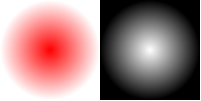
Returns the alpha channel of the pixmap as a new grayscale PySide.QtGui.QPixmap in which each pixel's red, green, and blue values are given the alpha value of the original pixmap. The color depth of the returned pixmap is the system depth on X11 and 8-bit on Windows and Mac OS X.
You can use this function while debugging to get a visible image of the alpha channel. If the pixmap doesn't have an alpha channel, i.e., the alpha channel's value for all pixels equals 0xff), a null pixmap is returned. You can check this with the isNull() 函数。
举例说明:
pixmap = QPixmap(100, 100)
pixmap.fill(Qt.transparent)
gradient = QRadialGradient(50, 50, 50, 50, 50)
gradient.setColorAt(0, QColor.fromRgbF(1, 0, 0, 1))
gradient.setColorAt(1, QColor.fromRgbF(0, 0, 0, 0))
painter = QPainter(pixmap)
painter.fillRect(0, 0, 100, 100, gradient)
channelImage = pixmap.alphaChannel()
update()
警告
This is an expensive operation. The alpha channel of the pixmap is extracted dynamically from the pixeldata. Most usecases of this function are covered by PySide.QtGui.QPainter and compositionModes which will normally execute faster.
另请参阅
PySide.QtGui.QPixmap.setAlphaChannel() Pixmap Information
| 返回类型: | PySide.QtCore.qint64 |
|---|
Returns a number that identifies this PySide.QtGui.QPixmap . Distinct PySide.QtGui.QPixmap objects can only have the same cache key if they refer to the same contents.
PySide.QtGui.QPixmap.cacheKey() will change when the pixmap is altered.
| 参数: |
|
|---|---|
| 返回类型: |
PySide.QtCore.bool |
| 参数: |
|
|---|---|
| 返回类型: |
这是重载函数。
Returns a deep copy of the subset of the pixmap that is specified by the rectangle PySide.QtCore.QRect ( x , y , width , height ).
| 参数: | rect – PySide.QtCore.QRect |
|---|---|
| 返回类型: | PySide.QtGui.QPixmap |
Returns a deep copy of the subset of the pixmap that is specified by the given rectangle . For more information on deep copies, see the 隐式数据共享 文档编制。
若给定 rectangle is empty, the whole image is copied.
另请参阅
PySide.QtGui.QPixmap.operator=() PySide.QtGui.QPixmap.QPixmap() Pixmap 变换
| 参数: | clipTight – PySide.QtCore.bool |
|---|---|
| 返回类型: | PySide.QtGui.QBitmap |
Creates and returns a heuristic mask for this pixmap.
The function works by selecting a color from one of the corners and then chipping away pixels of that color, starting at all the edges. If clipTight is true (the default) the mask is just large enough to cover the pixels; otherwise, the mask is larger than the data pixels.
The mask may not be perfect but it should be reasonable, so you can do things such as the following:
myPixmap = QPixmap()
myPixmap.setMask(myPixmap.createHeuristicMask())
This function is slow because it involves converting to/from a PySide.QtGui.QImage , and non-trivial computations.
| 参数: |
|
|---|---|
| 返回类型: |
| 参数: | maskColor – PySide.QtGui.QColor |
|---|---|
| 返回类型: | PySide.QtGui.QBitmap |
这是重载函数。
Creates and returns a mask for this pixmap based on the given maskColor . Same as calling createMaskFromColor(maskColor, Qt.MaskInColor )
| 返回类型: | PySide.QtCore.int |
|---|
Returns the default pixmap depth used by the application.
On Windows and Mac, the default depth is always 32. On X11 and embedded, the depth of the screen will be returned by this function.
另请参阅
PySide.QtGui.QPixmap.depth() QColormap.depth() Pixmap Information
| 参数: |
|
|---|---|
| 返回类型: |
PySide.QtCore.bool |
| 参数: |
|
|---|
这是重载函数。
Fills the pixmap with the widget ‘s background color or pixmap. The given point, ( x , y ), defines an offset in widget coordinates to which the pixmap's top-left pixel will be mapped to.
| 参数: |
|
|---|
Fills the pixmap with the widget ‘s background color or pixmap according to the given offset.
PySide.QtCore.QPoint offset defines a point in widget coordinates to which the pixmap's top-left pixel will be mapped to. This is only significant if the widget has a background pixmap; otherwise the pixmap will simply be filled with the background color of the widget.
| 参数: | fillColor – PySide.QtGui.QColor |
|---|
填充像素图采用给定 color .
此函数的效果是未定义的,当像素图正在被绘制时。
另请参阅
Pixmap 变换
| 参数: |
|
|---|---|
| 返回类型: |
| 参数: |
|
|---|---|
| 返回类型: |
| 参数: |
|
|---|---|
| 返回类型: |
这是重载函数。
Creates a pixmap and paints the given widget , restricted by PySide.QtCore.QRect ( x , y , width , height ), in it.
警告
Do not grab a widget from its QWidget.paintEvent() . However, it is safe to grab a widget from another widget's PySide.QtGui.QWidget.paintEvent() .
| 参数: |
|
|---|---|
| 返回类型: |
Creates a pixmap and paints the given widget , restricted by the given rectangle , in it. If the widget has any children, then they are also painted in the appropriate positions.
If no rectangle is specified (the default) the entire widget is painted.
若 widget is 0, the specified rectangle doesn't overlap the widget's rectangle, or an error occurs, the function will return a null PySide.QtGui.QPixmap . If the rectangle is a superset of the given widget , the areas outside the widget are covered with the widget's background.
This function actually asks widget to paint itself (and its children to paint themselves) by calling paintEvent() with painter redirection turned on. But PySide.QtGui.QPixmap also provides the PySide.QtGui.QPixmap.grabWindow() function which is a bit faster by grabbing pixels directly off the screen. In addition, if there are overlaying windows, PySide.QtGui.QPixmap.grabWindow() , unlike PySide.QtGui.QPixmap.grabWidget() , will see them.
警告
Do not grab a widget from its QWidget.paintEvent() . However, it is safe to grab a widget from another widget's PySide.QtGui.QWidget.paintEvent() .
| 参数: |
|
|---|---|
| 返回类型: |
| 返回类型: | PySide.QtCore.bool |
|---|
Returns true if this pixmap has an alpha channel, or has a mask, otherwise returns false.
| 返回类型: | PySide.QtCore.bool |
|---|
Returns true if the pixmap has a format that respects the alpha channel, otherwise returns false.
| 参数: |
|
|---|
| 参数: |
|
|---|
| 返回类型: | PySide.QtCore.bool |
|---|
Returns true if this is a null pixmap; otherwise returns false.
A null pixmap has zero width, zero height and no contents. You cannot draw in a null pixmap.
| 返回类型: | PySide.QtCore.bool |
|---|
Returns true if this is a PySide.QtGui.QBitmap ;否则返回 false。
| 参数: |
|
|---|---|
| 返回类型: |
PySide.QtCore.bool |
| 参数: |
|
|---|---|
| 返回类型: |
PySide.QtCore.bool |
| 参数: |
|
|---|---|
| 返回类型: |
PySide.QtCore.bool |
| 返回类型: | PySide.QtCore.Qt::HANDLE |
|---|
| 返回类型: | PySide.QtCore.Qt::HANDLE |
|---|
| 返回类型: | PySide.QtCore.Qt::HANDLE |
|---|
| 返回类型: | PySide.QtGui.QBitmap |
|---|
Extracts a bitmap mask from the pixmap's alpha channel.
警告
This is potentially an expensive operation. The mask of the pixmap is extracted dynamically from the pixeldata.
另请参阅
PySide.QtGui.QPixmap.setMask() Pixmap Information
| 返回类型: | PySide.QtCore.QRect |
|---|
Returns the pixmap's enclosing rectangle.
另请参阅
Pixmap Information
| 参数: |
|
|---|---|
| 返回类型: |
PySide.QtCore.bool |
把像素图保存到文件,采用给定 fileName 使用指定图像文件 format and quality factor. Returns true if successful; otherwise returns false.
quality 因子必须在 [0,100] 范围内或为 -1。指定 0 以获得压缩小文件,100 为未压缩大文件,而 -1 使用默认设置。
若 format is 0, an image format will be chosen from fileName ‘s suffix.
另请参阅
Reading and Writing 图像 文件
| 参数: |
|
|---|---|
| 返回类型: |
PySide.QtCore.bool |
这是重载函数。
此函数写入 PySide.QtGui.QPixmap 到给定 device 使用指定图像文件 format and quality 因子。这可以被使用,例如:把像素图直接保存到 PySide.QtCore.QByteArray :
pixmap = QPixmap()
bytes = QByteArray()
buffer(bytes)
buffer.open(QIODevice.WriteOnly)
pixmap.save(buffer, "PNG") # writes pixmap into bytes in PNG format
| 参数: |
|
|---|---|
| 返回类型: |
| 参数: |
|
|---|---|
| 返回类型: |
| 参数: |
|
|---|---|
| 返回类型: |
| 参数: |
|
|---|---|
| 返回类型: |
| 参数: |
|
|---|
Scrolls the area rect of this pixmap by ( dx , dy ). The exposed region is left unchanged. You can optionally pass a pointer to an empty PySide.QtGui.QRegion to get the region that is exposed by the scroll operation.
pixmap = QPixmap("background.png")
exposed = QRegion()
pixmap.scroll(10, 10, pixmap.rect(), exposed)
You cannot scroll while there is an active painter on the pixmap.
| 参数: |
|
|---|
This convenience function is equivalent to calling QPixmap::scroll( dx , dy , PySide.QtCore.QRect ( x , y , width , height ), exposed ).
| 参数: | arg__1 – PySide.QtGui.QPixmap |
|---|
Sets the alpha channel of this pixmap to the given alphaChannel by converting the alphaChannel into 32 bit and using the intensity of the RGB pixel values.
此函数的效果是未定义的,当像素图正在被绘制时。
警告
This is potentially an expensive operation. Most usecases for this function are covered by PySide.QtGui.QPainter and compositionModes which will normally execute faster.
另请参阅
PySide.QtGui.QPixmap.alphaChannel() Pixmap 变换
| 参数: | arg__1 – PySide.QtGui.QBitmap |
|---|
设置遮罩位图。
此函数合并 mask with the pixmap's alpha channel. A pixel value of 1 on the mask means the pixmap's pixel is unchanged; a value of 0 means the pixel is transparent. The mask must have the same size as this pixmap.
Setting a null mask resets the mask, leaving the previously transparent pixels black. The effect of this function is undefined when the pixmap is being painted on.
警告
这是潜在的昂贵操作。
另请参阅
| 返回类型: | PySide.QtCore.QSize |
|---|
返回像素图尺寸。
另请参阅
PySide.QtGui.QPixmap.width() PySide.QtGui.QPixmap.height() Pixmap Information
| 参数: | other – PySide.QtGui.QPixmap |
|---|
交换像素图 other 与此像素图。此操作非常快且从不失败。
| 返回类型: | PySide.QtGui.QImage |
|---|
将像素图转换成 PySide.QtGui.QImage 。返回 null 图像,若转换失败。
If the pixmap has 1-bit depth, the returned image will also be 1 bit deep. Images with more bits will be returned in a format closely represents the underlying system. Usually this will be QImage.Format_ARGB32_Premultiplied for pixmaps with an alpha and QImage.Format_RGB32 or QImage.Format_RGB16 for pixmaps without alpha.
Note that for the moment, alpha masks on monochrome images are ignored.
另请参阅
| 参数: |
|
|---|---|
| 返回类型: |
| 参数: |
|
|---|---|
| 返回类型: |
| 参数: |
|
|---|---|
| 返回类型: |
Returns the actual matrix used for transforming a pixmap with the given width , height and matrix .
When transforming a pixmap using the PySide.QtGui.QPixmap.transformed() function, the transformation matrix is internally adjusted to compensate for unwanted translation, i.e. PySide.QtGui.QPixmap.transformed() returns the smallest pixmap containing all transformed points of the original pixmap. This function returns the modified matrix, which maps points correctly from the original pixmap into the new pixmap.
另请参阅
PySide.QtGui.QPixmap.transformed() Pixmap 变换
| 参数: |
|
|---|---|
| 返回类型: |
这是重载函数。
This convenience function loads the matrix m 成 PySide.QtGui.QTransform and calls the overloaded function with the PySide.QtGui.QTransform and the width w and the height h .

