PySide.QtGui.QColor class provides colors based on RGB, HSV or CMYK values.
A color is normally specified in terms of RGB (red, green, and blue) components, but it is also possible to specify it in terms of HSV (hue, saturation, and value) and CMYK (cyan, magenta, yellow and black) components. In addition a color can be specified using a color name. The color name can be any of the SVG 1.0 color names.
| RGB | HSV | CMYK |
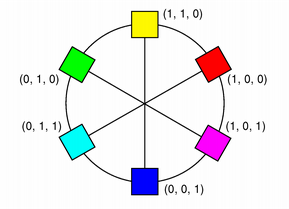
|
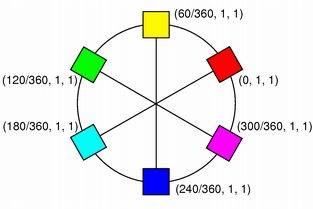
|
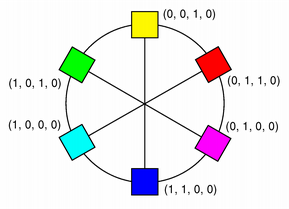
|
PySide.QtGui.QColor constructor creates the color based on RGB values. To create a PySide.QtGui.QColor based on either HSV or CMYK values, use the PySide.QtGui.QColor.toHsv() and PySide.QtGui.QColor.toCmyk() functions respectively. These functions return a copy of the color using the desired format. In addition the static PySide.QtGui.QColor.fromRgb() , PySide.QtGui.QColor.fromHsv() and PySide.QtGui.QColor.fromCmyk() functions create colors from the specified values. Alternatively, a color can be converted to any of the three formats using the PySide.QtGui.QColor.convertTo() function (returning a copy of the color in the desired format), or any of the PySide.QtGui.QColor.setRgb() , PySide.QtGui.QColor.setHsv() and PySide.QtGui.QColor.setCmyk() functions altering this color's format. The PySide.QtGui.QColor.spec() function tells how the color was specified.
A color can be set by passing an RGB string (such as “#112233”), or a color name (such as “blue”), to the PySide.QtGui.QColor.setNamedColor() function. The color names are taken from the SVG 1.0 color names. The PySide.QtGui.QColor.name() function returns the name of the color in the format “#RRGGBB”. Colors can also be set using PySide.QtGui.QColor.setRgb() , PySide.QtGui.QColor.setHsv() and PySide.QtGui.QColor.setCmyk() . To get a lighter or darker color use the PySide.QtGui.QColor.lighter() and PySide.QtGui.QColor.darker() functions respectively.
PySide.QtGui.QColor.isValid() function indicates whether a PySide.QtGui.QColor is legal at all. For example, a RGB color with RGB values out of range is illegal. For performance reasons, PySide.QtGui.QColor mostly disregards illegal colors, and for that reason, the result of using an invalid color is undefined.
The color components can be retrieved individually, e.g with PySide.QtGui.QColor.red() , PySide.QtGui.QColor.hue() and PySide.QtGui.QColor.cyan() . The values of the color components can also be retrieved in one go using the PySide.QtGui.QColor.getRgb() , PySide.QtGui.QColor.getHsv() and PySide.QtGui.QColor.getCmyk() functions. Using the RGB color model, the color components can in addition be accessed with PySide.QtGui.QColor.rgb() .
There are several related non-members: QRgb is a typdef for an unsigned int representing the RGB value triplet (r, g, b). Note that it also can hold a value for the alpha-channel (for more information, see the Alpha-Blended 绘制 section). The qRed() , qBlue() and qGreen() functions return the respective component of the given QRgb value, while the qRgb() and qRgba() functions create and return the QRgb triplet based on the given component values. Finally, the qAlpha() function returns the alpha component of the provided QRgb ,和 qGray() function calculates and return a gray value based on the given value.
PySide.QtGui.QColor is platform and device independent. The QColormap 类把颜色映射到硬件。
For more information about painting in general, see the 描绘系统 文档编制。
PySide.QtGui.QColor supports floating point precision and provides floating point versions of all the color components functions, e.g. PySide.QtGui.QColor.getRgbF() , PySide.QtGui.QColor.hueF() and PySide.QtGui.QColor.fromCmykF() . Note that since the components are stored using 16-bit integers, there might be minor deviations between the values set using, for example, PySide.QtGui.QColor.setRgbF() and the values returned by the PySide.QtGui.QColor.getRgbF() function due to rounding.
While the integer based functions take values in the range 0-255 (except PySide.QtGui.QColor.hue() which must have values within the range 0-359), the floating point functions accept values in the range 0.0 - 1.0.
PySide.QtGui.QColor also support alpha-blended outlining and filling. The alpha channel of a color specifies the transparency effect, 0 represents a fully transparent color, while 255 represents a fully opaque color. For example:
# Specify semi-transparent red
painter.setBrush(QColor(255, 0, 0, 127))
painter.drawRect(0, 0, self.width()/2, self.height())
# Specify semi-transparent blue
painter.setBrush(QColor(0, 0, 255, 127))
painter.drawRect(0, 0, self.width(), self.height()/2)
The code above produces the following output:
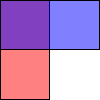
Alpha-blended drawing is supported on Windows, Mac OS X, and on X11 systems that have the X Render extension installed.
The alpha channel of a color can be retrieved and set using the PySide.QtGui.QColor.alpha() and PySide.QtGui.QColor.setAlpha() functions if its value is an integer, and PySide.QtGui.QColor.alphaF() and PySide.QtGui.QColor.setAlphaF() if its value is qreal (double). By default, the alpha-channel is set to 255 (opaque). To retrieve and set all the RGB color components (including the alpha-channel) in one go, use the PySide.QtGui.QColor.rgba() and PySide.QtGui.QColor.setRgba() 函数。
There are 20 predefined QColors described by the Qt.GlobalColor enum, including black, white, primary and secondary colors, darker versions of these colors and three shades of gray. PySide.QtGui.QColor also recognizes a variety of color names; the static PySide.QtGui.QColor.colorNames() function returns a PySide.QtCore.QStringList color names that PySide.QtGui.QColor knows about.
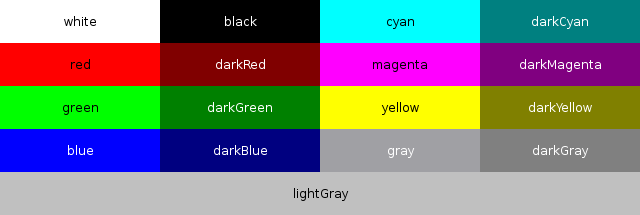
Additionally, the Qt.color0 , Qt.color1 and Qt.transparent colors are used for special purposes.
Qt.color0 (zero pixel value) and Qt.color1 (non-zero pixel value) are special colors for drawing in QBitmaps. Painting with Qt.color0 sets the bitmap bits to 0 (transparent; i.e., background), and painting with Qt.color1 sets the bits to 1 (opaque; i.e., foreground).
Qt.transparent is used to indicate a transparent pixel. When painting with this value, a pixel value will be used that is appropriate for the underlying pixel format in use.
The RGB model is hardware-oriented. Its representation is close to what most monitors show. In contrast, HSV represents color in a way more suited to the human perception of color. For example, the relationships “stronger than”, “darker than”, and “the opposite of” are easily expressed in HSV but are much harder to express in RGB.
HSV, like RGB, has three components:
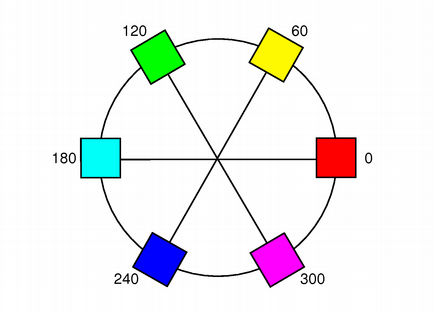
H, for hue, is in the range 0 to 359 if the color is chromatic (not gray), or meaningless if it is gray. It represents degrees on the color wheel familiar to most people. Red is 0 (degrees), green is 120, and blue is 240.
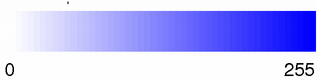
S, for saturation, is in the range 0 to 255, and the bigger it is, the stronger the color is. Grayish colors have saturation near 0; very strong colors have saturation near 255.
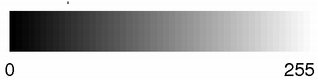
V, for value, is in the range 0 to 255 and represents lightness or brightness of the color. 0 is black; 255 is as far from black as possible.
Here are some examples: pure red is H=0, S=255, V=255; a dark red, moving slightly towards the magenta, could be H=350 (equivalent to -10), S=255, V=180; a grayish light red could have H about 0 (say 350-359 or 0-10), S about 50-100, and S=255.
Qt returns a hue value of -1 for achromatic colors. If you pass a hue value that is too large, Qt forces it into range. Hue 360 or 720 is treated as 0; hue 540 is treated as 180.
In addition to the standard HSV model, Qt provides an alpha-channel to feature alpha-blended drawing .
While the RGB and HSV color models are used for display on computer monitors, the CMYK model is used in the four-color printing process of printing presses and some hard-copy devices.
CMYK has four components, all in the range 0-255: cyan (C), magenta (M), yellow (Y) and black (K). Cyan, magenta and yellow are called subtractive colors; the CMYK color model creates color by starting with a white surface and then subtracting color by applying the appropriate components. While combining cyan, magenta and yellow gives the color black, subtracting one or more will yield any other color. When combined in various percentages, these three colors can create the entire spectrum of colors.
Mixing 100 percent of cyan, magenta and yellow does produce black, but the result is unsatisfactory since it wastes ink, increases drying time, and gives a muddy colour when printing. For that reason, black is added in professional printing to provide a solid black tone; hence the term ‘four color process'.
In addition to the standard CMYK model, Qt provides an alpha-channel to feature alpha-blended drawing .
| 参数: |
|
|---|
Constructs an invalid color with the RGB value (0, 0, 0). An invalid color is a color that is not properly set up for the underlying window system.
The alpha value of an invalid color is unspecified.
Constructs a color that is a copy of color .
Constructs a named color in the same way as PySide.QtGui.QColor.setNamedColor() using the given name .
The color is left invalid if the name 无法剖析。
Constructs a color with the RGB value r , g , b , and the alpha-channel (transparency) value of a .
The color is left invalid if any of the arguments are invalid.
The type of color specified, either RGB, HSV, CMYK or HSL.
| 常量 | 描述 |
|---|---|
| QColor.Rgb | |
| QColor.Hsv | |
| QColor.Cmyk | |
| QColor.Hsl | |
| QColor.Invalid |
| 返回类型: | PyObject |
|---|
| 返回类型: | PyObject |
|---|
| 参数: | arg__1 – PyObject |
|---|---|
| 返回类型: | PyObject |
| 返回类型: | PyObject |
|---|
| 返回类型: | PySide.QtCore.int |
|---|
返回此颜色的 Alpha 颜色分量。
另请参阅
PySide.QtGui.QColor.setAlpha() PySide.QtGui.QColor.alphaF() Alpha-Blended 绘制
| 返回类型: | PySide.QtCore.qreal |
|---|
返回此颜色的 Alpha 颜色分量。
另请参阅
PySide.QtGui.QColor.setAlphaF() PySide.QtGui.QColor.alpha() Alpha-Blended 绘制
| 返回类型: | PySide.QtCore.int |
|---|
Returns the black color component of this color.
另请参阅
PySide.QtGui.QColor.blackF() PySide.QtGui.QColor.getCmyk() CMYK Color Model
| 返回类型: | PySide.QtCore.qreal |
|---|
Returns the black color component of this color.
另请参阅
PySide.QtGui.QColor.black() PySide.QtGui.QColor.getCmykF() CMYK Color Model
| 返回类型: | PySide.QtCore.int |
|---|
Returns the blue color component of this color.
| 返回类型: | PySide.QtCore.qreal |
|---|
Returns the blue color component of this color.
| 返回类型: | 字符串列表 |
|---|
返回 PySide.QtCore.QStringList containing the color names Qt knows about.
另请参阅
Predefined Colors
| 参数: | colorSpec – PySide.QtGui.QColor.Spec |
|---|---|
| 返回类型: | PySide.QtGui.QColor |
Creates a copy of this color in the format specified by colorSpec .
| 返回类型: | PySide.QtCore.int |
|---|
Returns the cyan color component of this color.
另请参阅
PySide.QtGui.QColor.cyanF() PySide.QtGui.QColor.getCmyk() CMYK Color Model
| 返回类型: | PySide.QtCore.qreal |
|---|
Returns the cyan color component of this color.
另请参阅
PySide.QtGui.QColor.cyan() PySide.QtGui.QColor.getCmykF() CMYK Color Model
| 参数: | f – PySide.QtCore.int |
|---|---|
| 返回类型: | PySide.QtGui.QColor |
Returns a darker (or lighter) color, but does not change this object.
若 factor is greater than 100, this functions returns a darker color. Setting factor to 300 returns a color that has one-third the brightness. If the factor is less than 100, the return color is lighter, but we recommend using the PySide.QtGui.QColor.lighter() function for this purpose. If the factor is 0 or negative, the return value is unspecified.
The function converts the current RGB color to HSV, divides the value (V) component by factor and converts the color back to RGB.
| 参数: |
|
|---|---|
| 返回类型: |
Static convenience function that returns a PySide.QtGui.QColor constructed from the given CMYK color values: c (cyan), m (magenta), y (yellow), k (black), and a (alpha-channel, i.e. transparency).
All the values must be in the range 0-255.
另请参阅
PySide.QtGui.QColor.toCmyk() PySide.QtGui.QColor.fromCmykF() PySide.QtGui.QColor.isValid() CMYK Color Model
| 参数: |
|
|---|---|
| 返回类型: |
这是重载函数。
Static convenience function that returns a PySide.QtGui.QColor constructed from the given CMYK color values: c (cyan), m (magenta), y (yellow), k (black), and a (alpha-channel, i.e. transparency).
All the values must be in the range 0.0-1.0.
另请参阅
PySide.QtGui.QColor.toCmyk() PySide.QtGui.QColor.fromCmyk() PySide.QtGui.QColor.isValid() CMYK Color Model
| 参数: |
|
|---|---|
| 返回类型: |
Static convenience function that returns a PySide.QtGui.QColor constructed from the HSV color values, h (hue), s (saturation), l (lightness), and a (alpha-channel, i.e. transparency).
值 s , l ,和 a must all be in the range 0-255; the value of h must be in the range 0-359.
| 参数: |
|
|---|---|
| 返回类型: |
这是重载函数。
Static convenience function that returns a PySide.QtGui.QColor constructed from the HSV color values, h (hue), s (saturation), l (lightness), and a (alpha-channel, i.e. transparency).
All the values must be in the range 0.0-1.0.
| 参数: |
|
|---|---|
| 返回类型: |
Static convenience function that returns a PySide.QtGui.QColor constructed from the HSV color values, h (hue), s (saturation), v (value), and a (alpha-channel, i.e. transparency).
值 s , v ,和 a must all be in the range 0-255; the value of h must be in the range 0-359.
另请参阅
PySide.QtGui.QColor.toHsv() PySide.QtGui.QColor.fromHsvF() PySide.QtGui.QColor.isValid() HSV Color Model
| 参数: |
|
|---|---|
| 返回类型: |
这是重载函数。
Static convenience function that returns a PySide.QtGui.QColor constructed from the HSV color values, h (hue), s (saturation), v (value), and a (alpha-channel, i.e. transparency).
All the values must be in the range 0.0-1.0.
另请参阅
PySide.QtGui.QColor.toHsv() PySide.QtGui.QColor.fromHsv() PySide.QtGui.QColor.isValid() HSV Color Model
| 参数: |
|
|---|---|
| 返回类型: |
Static convenience function that returns a PySide.QtGui.QColor constructed from the RGB color values, r (red), g (green), b (blue), and a (alpha-channel, i.e. transparency).
All the values must be in the range 0-255.
| 参数: | rgb – long |
|---|---|
| 返回类型: | PySide.QtGui.QColor |
| 参数: |
|
|---|---|
| 返回类型: |
Static convenience function that returns a PySide.QtGui.QColor constructed from the RGB color values, r (red), g (green), b (blue), and a (alpha-channel, i.e. transparency).
All the values must be in the range 0.0-1.0.
| 参数: | rgba – long |
|---|---|
| 返回类型: | PySide.QtGui.QColor |
Sets the contents pointed to by c , m , y , k ,和 a , to the cyan, magenta, yellow, black, and alpha-channel (transparency) components of the color's CMYK value.
These components can be retrieved individually using the PySide.QtGui.QColor.cyan() , PySide.QtGui.QColor.magenta() , PySide.QtGui.QColor.yellow() , PySide.QtGui.QColor.black() and PySide.QtGui.QColor.alpha() 函数。
另请参阅
PySide.QtGui.QColor.setCmyk() CMYK Color Model
Sets the contents pointed to by c , m , y , k ,和 a , to the cyan, magenta, yellow, black, and alpha-channel (transparency) components of the color's CMYK value.
These components can be retrieved individually using the PySide.QtGui.QColor.cyanF() , PySide.QtGui.QColor.magentaF() , PySide.QtGui.QColor.yellowF() , PySide.QtGui.QColor.blackF() and PySide.QtGui.QColor.alphaF() 函数。
另请参阅
PySide.QtGui.QColor.setCmykF() CMYK Color Model
Sets the contents pointed to by h , s , l ,和 a , to the hue, saturation, lightness, and alpha-channel (transparency) components of the color's HSL value.
These components can be retrieved individually using the hueHsl(), saturationHsl(), PySide.QtGui.QColor.lightness() and PySide.QtGui.QColor.alpha() 函数。
Sets the contents pointed to by h , s , l ,和 a , to the hue, saturation, lightness, and alpha-channel (transparency) components of the color's HSL value.
These components can be retrieved individually using the hueHslF(), saturationHslF(), PySide.QtGui.QColor.lightnessF() and PySide.QtGui.QColor.alphaF() 函数。
Sets the contents pointed to by h , s , v ,和 a , to the hue, saturation, value, and alpha-channel (transparency) components of the color's HSV value.
These components can be retrieved individually using the PySide.QtGui.QColor.hue() , PySide.QtGui.QColor.saturation() , PySide.QtGui.QColor.value() and PySide.QtGui.QColor.alpha() 函数。
另请参阅
PySide.QtGui.QColor.setHsv() HSV Color Model
Sets the contents pointed to by h , s , v ,和 a , to the hue, saturation, value, and alpha-channel (transparency) components of the color's HSV value.
These components can be retrieved individually using the PySide.QtGui.QColor.hueF() , PySide.QtGui.QColor.saturationF() , PySide.QtGui.QColor.valueF() and PySide.QtGui.QColor.alphaF() 函数。
另请参阅
PySide.QtGui.QColor.setHsv() HSV Color Model
Sets the contents pointed to by r , g , b ,和 a , to the red, green, blue, and alpha-channel (transparency) components of the color's RGB value.
These components can be retrieved individually using the PySide.QtGui.QColor.red() , PySide.QtGui.QColor.green() , PySide.QtGui.QColor.blue() and PySide.QtGui.QColor.alpha() 函数。
Sets the contents pointed to by r , g , b ,和 a , to the red, green, blue, and alpha-channel (transparency) components of the color's RGB value.
These components can be retrieved individually using the PySide.QtGui.QColor.redF() , PySide.QtGui.QColor.greenF() , PySide.QtGui.QColor.blueF() and PySide.QtGui.QColor.alphaF() 函数。
| 返回类型: | PySide.QtCore.int |
|---|
Returns the green color component of this color.
| 返回类型: | PySide.QtCore.qreal |
|---|
Returns the green color component of this color.
| 返回类型: | PySide.QtCore.int |
|---|
Returns the hue color component of this color.
| 返回类型: | PySide.QtCore.qreal |
|---|
Returns the hue color component of this color.
| 返回类型: | PySide.QtCore.int |
|---|
Returns the saturation color component of this color.
另请参阅
PySide.QtGui.QColor.saturationF() PySide.QtGui.QColor.getHsv() HSV Color Model
| 返回类型: | PySide.QtCore.qreal |
|---|
Returns the saturation color component of this color.
| 返回类型: | PySide.QtCore.int |
|---|
Returns the hue color component of this color.
另请参阅
PySide.QtGui.QColor.hueF() PySide.QtGui.QColor.getHsv() HSV Color Model
| 返回类型: | PySide.QtCore.qreal |
|---|
Returns the hue color component of this color.
另请参阅
PySide.QtGui.QColor.hue() PySide.QtGui.QColor.getHsvF() HSV Color Model
| 返回类型: | PySide.QtCore.int |
|---|
Returns the saturation color component of this color.
另请参阅
PySide.QtGui.QColor.saturationF() PySide.QtGui.QColor.getHsv() HSV Color Model
| 返回类型: | PySide.QtCore.qreal |
|---|
Returns the saturation color component of this color.
另请参阅
PySide.QtGui.QColor.saturation() PySide.QtGui.QColor.getHsvF() HSV Color Model
| 返回类型: | PySide.QtCore.int |
|---|
Returns the hue color component of this color.
The color is implicitly converted to HSV.
另请参阅
PySide.QtGui.QColor.hsvHue() PySide.QtGui.QColor.hueF() PySide.QtGui.QColor.getHsv() HSV Color Model
| 返回类型: | PySide.QtCore.qreal |
|---|
Returns the hue color component of this color.
The color is implicitly converted to HSV.
另请参阅
PySide.QtGui.QColor.hsvHueF() PySide.QtGui.QColor.hue() PySide.QtGui.QColor.getHsvF() HSV Color Model
| 返回类型: | PySide.QtCore.bool |
|---|
Returns true if the color is valid; otherwise returns false.
| 参数: | name – unicode |
|---|---|
| 返回类型: | PySide.QtCore.bool |
返回 true 若 name is a valid color name and can be used to construct a valid PySide.QtGui.QColor object, otherwise returns false.
It uses the same algorithm used in PySide.QtGui.QColor.setNamedColor() .
| 参数: | f – PySide.QtCore.int |
|---|---|
| 返回类型: | PySide.QtGui.QColor |
Returns a lighter (or darker) color, but does not change this object.
若 factor is greater than 100, this functions returns a lighter color. Setting factor to 150 returns a color that is 50% brighter. If the factor is less than 100, the return color is darker, but we recommend using the PySide.QtGui.QColor.darker() function for this purpose. If the factor is 0 or negative, the return value is unspecified.
The function converts the current RGB color to HSV, multiplies the value (V) component by factor and converts the color back to RGB.
| 返回类型: | PySide.QtCore.int |
|---|
Returns the lightness color component of this color.
| 返回类型: | PySide.QtCore.qreal |
|---|
Returns the lightness color component of this color.
| 返回类型: | PySide.QtCore.int |
|---|
Returns the magenta color component of this color.
另请参阅
PySide.QtGui.QColor.magentaF() PySide.QtGui.QColor.getCmyk() CMYK Color Model
| 返回类型: | PySide.QtCore.qreal |
|---|
Returns the magenta color component of this color.
另请参阅
PySide.QtGui.QColor.magenta() PySide.QtGui.QColor.getCmykF() CMYK Color Model
| 返回类型: | unicode |
|---|
Returns the name of the color in the format “#RRGGBB”; i.e. a “#” character followed by three two-digit hexadecimal numbers.
| 参数: | c – PySide.QtGui.QColor |
|---|---|
| 返回类型: | PySide.QtCore.bool |
Returns true if this color has a different RGB and alpha values from color ;否则返回 false。
| 参数: | c – PySide.QtGui.QColor |
|---|---|
| 返回类型: | PySide.QtCore.bool |
Returns true if this color has the same RGB and alpha values as color ;否则返回 false。
| 返回类型: | PySide.QtCore.int |
|---|
Returns the red color component of this color.
| 返回类型: | PySide.QtCore.qreal |
|---|
Returns the red color component of this color.
| 返回类型: | long |
|---|
Returns the RGB value of the color. The alpha value is opaque.
| 返回类型: | long |
|---|
Returns the RGB value of the color, including its alpha.
For an invalid color, the alpha value of the returned color is unspecified.
| 返回类型: | PySide.QtCore.int |
|---|
Returns the saturation color component of this color.
The color is implicitly converted to HSV.
| 返回类型: | PySide.QtCore.qreal |
|---|
Returns the saturation color component of this color.
The color is implicitly converted to HSV.
| 参数: | alpha – PySide.QtCore.int |
|---|
Sets the alpha of this color to alpha . Integer alpha is specified in the range 0-255.
另请参阅
PySide.QtGui.QColor.alpha() PySide.QtGui.QColor.alphaF() Alpha-Blended 绘制
| 参数: | alpha – PySide.QtCore.qreal |
|---|
Sets the alpha of this color to alpha . qreal alpha is specified in the range 0.0-1.0.
另请参阅
PySide.QtGui.QColor.alphaF() PySide.QtGui.QColor.alpha() Alpha-Blended 绘制
| 参数: | blue – PySide.QtCore.int |
|---|
Sets the blue color component of this color to blue . Integer components are specified in the range 0-255.
| 参数: | blue – PySide.QtCore.qreal |
|---|
Sets the blue color component of this color to blue . Float components are specified in the range 0.0-1.0.
| 参数: |
|
|---|
Sets the color to CMYK values, c (cyan), m (magenta), y (yellow), k (black), and a (alpha-channel, i.e. transparency).
All the values must be in the range 0-255.
另请参阅
PySide.QtGui.QColor.getCmyk() PySide.QtGui.QColor.setCmykF() CMYK Color Model
| 参数: |
|
|---|
这是重载函数。
Sets the color to CMYK values, c (cyan), m (magenta), y (yellow), k (black), and a (alpha-channel, i.e. transparency).
All the values must be in the range 0.0-1.0.
另请参阅
PySide.QtGui.QColor.getCmykF() PySide.QtGui.QColor.setCmyk() CMYK Color Model
| 参数: | name – unicode |
|---|---|
| 返回类型: | PySide.QtCore.bool |
| 参数: | green – PySide.QtCore.int |
|---|
Sets the green color component of this color to green . Integer components are specified in the range 0-255.
| 参数: | green – PySide.QtCore.qreal |
|---|
Sets the green color component of this color to green . Float components are specified in the range 0.0-1.0.
| 参数: |
|
|---|
Sets a HSL color value; h is the hue, s is the saturation, l is the lightness and a is the alpha component of the HSL color.
The saturation, value and alpha-channel values must be in the range 0-255, and the hue value must be greater than -1.
| 参数: |
|
|---|
Sets a HSL color lightness; h is the hue, s is the saturation, l is the lightness and a is the alpha component of the HSL color.
All the values must be in the range 0.0-1.0.
| 参数: |
|
|---|
Sets a HSV color value; h is the hue, s is the saturation, v is the value and a is the alpha component of the HSV color.
The saturation, value and alpha-channel values must be in the range 0-255, and the hue value must be greater than -1.
另请参阅
hsv() PySide.QtGui.QColor.getHsv() PySide.QtGui.QColor.setHsvF() HSV Color Model
| 参数: |
|
|---|
Sets a HSV color value; h is the hue, s is the saturation, v is the value and a is the alpha component of the HSV color.
All the values must be in the range 0.0-1.0.
另请参阅
PySide.QtGui.QColor.getHsvF() PySide.QtGui.QColor.setHsv() HSV Color Model
| 参数: | name – unicode |
|---|
Sets the RGB value of this PySide.QtGui.QColor to name , which may be in one of these formats:
The color is invalid if name 无法剖析。
另请参阅
PySide.QtGui.QColor.QColor() PySide.QtGui.QColor.name() PySide.QtGui.QColor.isValid() allowX11ColorNames()
| 参数: | red – PySide.QtCore.int |
|---|
Sets the red color component of this color to red . Integer components are specified in the range 0-255.
| 参数: | red – PySide.QtCore.qreal |
|---|
Sets the red color component of this color to red . Float components are specified in the range 0.0-1.0.
| 参数: | rgb – long |
|---|
| 参数: |
|
|---|
Sets the RGB value to r , g , b and the alpha value to a .
All the values must be in the range 0-255.
| 参数: |
|
|---|
Sets the color channels of this color to r (red), g (green), b (blue) and a (alpha, transparency).
All values must be in the range 0.0-1.0.
| 参数: | rgba – long |
|---|
| 返回类型: | PySide.QtGui.QColor.Spec |
|---|
返回如何指定颜色。
另请参阅
QColor.Spec PySide.QtGui.QColor.convertTo()
| 返回类型: | PySide.QtGui.QColor |
|---|
Creates and returns a CMYK PySide.QtGui.QColor based on this color.
另请参阅
PySide.QtGui.QColor.fromCmyk() PySide.QtGui.QColor.convertTo() PySide.QtGui.QColor.isValid() CMYK Color Model
| 返回类型: | PySide.QtGui.QColor |
|---|
Creates and returns an HSL PySide.QtGui.QColor based on this color.
| 返回类型: | PySide.QtGui.QColor |
|---|
Creates and returns an HSV PySide.QtGui.QColor based on this color.
另请参阅
PySide.QtGui.QColor.fromHsv() PySide.QtGui.QColor.convertTo() PySide.QtGui.QColor.isValid() HSV Color Model
| 返回类型: | PySide.QtGui.QColor |
|---|
Create and returns an RGB PySide.QtGui.QColor based on this color.
| 返回类型: | PyObject |
|---|
| 返回类型: | PySide.QtCore.int |
|---|
Returns the value color component of this color.
另请参阅
PySide.QtGui.QColor.valueF() PySide.QtGui.QColor.getHsv() HSV Color Model
| 返回类型: | PySide.QtCore.qreal |
|---|
Returns the value color component of this color.
另请参阅
PySide.QtGui.QColor.value() PySide.QtGui.QColor.getHsvF() HSV Color Model
| 返回类型: | PySide.QtCore.int |
|---|
Returns the yellow color component of this color.
另请参阅
PySide.QtGui.QColor.yellowF() PySide.QtGui.QColor.getCmyk() CMYK Color Model
| 返回类型: | PySide.QtCore.qreal |
|---|
Returns the yellow color component of this color.
另请参阅
PySide.QtGui.QColor.yellow() PySide.QtGui.QColor.getCmykF() CMYK Color Model

