PySide.QtGui.QPalette class contains color groups for each widget state.
A palette consists of three color groups: Active , Disabled ,和 Inactive . All widgets in Qt contain a palette and use their palette to draw themselves. This makes the user interface easily configurable and easier to keep consistent.
If you create a new widget we strongly recommend that you use the colors in the palette rather than hard-coding specific colors.
The color groups:
Both active and inactive windows can contain disabled widgets. (Disabled widgets are often called inaccessible or grayed out .)
In most styles, Active and Inactive look the same.
Colors and brushes can be set for particular roles in any of a palette's color groups with PySide.QtGui.QPalette.setColor() and PySide.QtGui.QPalette.setBrush() . A color group contains a group of colors used by widgets for drawing themselves. We recommend that widgets use color group roles from the palette such as “foreground” and “base” rather than literal colors like “red” or “turquoise”. The color roles are enumerated and defined in the QPalette.ColorRole 文档编制。
We strongly recommend that you use the default palette of the current style (returned by QApplication.palette() ) and modify that as necessary. This is done by Qt's widgets when they are drawn.
To modify a color group you call the functions PySide.QtGui.QPalette.setColor() and PySide.QtGui.QPalette.setBrush() , depending on whether you want a pure color or a pixmap pattern.
There are also corresponding PySide.QtGui.QPalette.color() and PySide.QtGui.QPalette.brush() getters, and a commonly used convenience function to get the QPalette.ColorRole for the current QPalette.ColorGroup : PySide.QtGui.QPalette.window() , PySide.QtGui.QPalette.windowText() , PySide.QtGui.QPalette.base() ,等。
You can copy a palette using the copy constructor and test to see if two palettes are identical 使用 PySide.QtGui.QPalette.isCopyOf() .
PySide.QtGui.QPalette is optimized by the use of 隐式共享 , so it is very efficient to pass PySide.QtGui.QPalette objects as arguments.
警告
Some styles do not use the palette for all drawing, for instance, if they make use of native theme engines. This is the case for both the Windows XP, Windows Vista, and the Mac OS X styles.
| 参数: |
|
|---|
Constructs a palette object that uses the application's default palette.
Constructs a palette. You can pass either brushes, pixmaps or plain colors for windowText , button , light , dark , mid , text , bright_text , base and window .
另请参阅
Constructs a palette from the button color. The other colors are automatically calculated, based on this color. Window will be the button color as well.
Constructs a palette from a button color and a window . The other colors are automatically calculated, based on these colors.
构造副本为 p .
This constructor is fast thanks to 隐式共享 .
| 常量 | 描述 |
|---|---|
| QPalette.Disabled | |
| QPalette.Active | |
| QPalette.Inactive | |
| QPalette.Normal | synonym for Active |
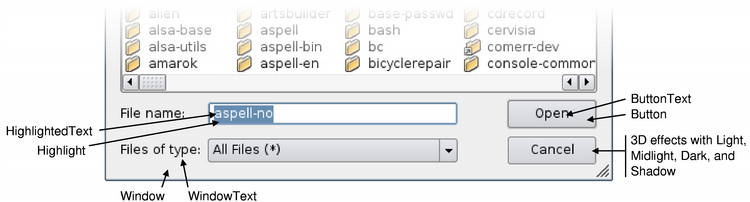
QPalette.ColorRole enum defines the different symbolic color roles used in current GUIs.
The central roles are:
| 常量 | 描述 |
|---|---|
| QPalette.Window | A general background color. |
| QPalette.Background | This value is obsolete. Use Window instead. |
| QPalette.WindowText | A general foreground color. |
| QPalette.Foreground | This value is obsolete. Use WindowText 代替。 |
| QPalette.Base | Used mostly as the background color for text entry widgets, but can also be used for other painting - such as the background of combobox drop down lists and toolbar handles. It is usually white or another light color. |
| QPalette.AlternateBase | Used as the alternate background color in views with alternating row colors (see QAbstractItemView.setAlternatingRowColors() ). |
| QPalette.ToolTipBase | Used as the background color for PySide.QtGui.QToolTip and PySide.QtGui.QWhatsThis . Tool tips use the Inactive color group of PySide.QtGui.QPalette , because tool tips are not active windows. |
| QPalette.ToolTipText | Used as the foreground color for PySide.QtGui.QToolTip and PySide.QtGui.QWhatsThis . Tool tips use the Inactive color group of PySide.QtGui.QPalette , because tool tips are not active windows. |
| QPalette.Text | The foreground color used with Base . This is usually the same as the WindowText , in which case it must provide good contrast with Window and Base . |
| QPalette.Button | The general button background color. This background can be different from Window as some styles require a different background color for buttons. |
| QPalette.ButtonText | A foreground color used with the Button 颜色。 |
| QPalette.BrightText | A text color that is very different from WindowText , and contrasts well with e.g. Dark . Typically used for text that needs to be drawn where 文本 or WindowText would give poor contrast, such as on pressed push buttons. Note that text colors can be used for things other than just words; text colors are usually used for text, but it's quite common to use the text color roles for lines, icons, etc. |
There are some color roles used mostly for 3D bevel and shadow effects. All of these are normally derived from Window , and used in ways that depend on that relationship. For example, buttons depend on it to make the bevels look attractive, and Motif scroll bars depend on Mid to be slightly different from Window .
| 常量 | 描述 |
|---|---|
| QPalette.Light | Lighter than Button 颜色。 |
| QPalette.Midlight | Between Button and Light . |
| QPalette.Dark | Darker than Button . |
| QPalette.Mid | Between Button and Dark . |
| QPalette.Shadow | A very dark color. By default, the shadow color is Qt.black . |
Selected (marked) items have two roles:
| 常量 | 描述 |
|---|---|
| QPalette.Highlight | A color to indicate a selected item or the current item. By default, the highlight color is Qt.darkBlue . |
| QPalette.HighlightedText | A text color that contrasts with Highlight . By default, the highlighted text color is Qt.white . |
There are two color roles related to hyperlinks:
| 常量 | 描述 |
|---|---|
| QPalette.Link | A text color used for unvisited hyperlinks. By default, the link color is Qt.blue . |
| QPalette.LinkVisited | A text color used for already visited hyperlinks. By default, the linkvisited color is Qt.magenta . |
Note that we do not use the Link and LinkVisited roles when rendering rich text in Qt, and that we recommend that you use CSS and the QTextDocument.setDefaultStyleSheet() function to alter the appearance of links. For example:
browser = QTextBrowser()
linkColor = QColor(Qt.red)
sheet = QString.fromLatin1("a { text-decoration: underline color: %1 }").arg(linkColor.name())
browser.document().setDefaultStyleSheet(sheet)
| 常量 | 描述 |
|---|---|
| QPalette.NoRole | No role; this special role is often used to indicate that a role has not been assigned. |
| 返回类型: | PySide.QtGui.QBrush |
|---|
Returns the alternate base brush of the current color group.
另请参阅
QPalette.ColorRole PySide.QtGui.QPalette.brush()
| 返回类型: | PySide.QtGui.QBrush |
|---|
Returns the base brush of the current color group.
另请参阅
QPalette.ColorRole PySide.QtGui.QPalette.brush()
| 返回类型: | PySide.QtGui.QBrush |
|---|
Returns the bright text foreground brush of the current color group.
另请参阅
QPalette.ColorRole PySide.QtGui.QPalette.brush()
| 参数: | |
|---|---|
| 返回类型: |
Returns the brush in the specified color group , used for the given color role .
另请参阅
PySide.QtGui.QPalette.color() PySide.QtGui.QPalette.setBrush() QPalette.ColorRole
| 参数: | cr – PySide.QtGui.QPalette.ColorRole |
|---|---|
| 返回类型: | PySide.QtGui.QBrush |
这是重载函数。
Returns the brush that has been set for the given color role in the current QPalette.ColorGroup .
另请参阅
PySide.QtGui.QPalette.color() PySide.QtGui.QPalette.setBrush() QPalette.ColorRole
| 返回类型: | PySide.QtGui.QBrush |
|---|
Returns the button brush of the current color group.
另请参阅
QPalette.ColorRole PySide.QtGui.QPalette.brush()
| 返回类型: | PySide.QtGui.QBrush |
|---|
Returns the button text foreground brush of the current color group.
另请参阅
QPalette.ColorRole PySide.QtGui.QPalette.brush()
| 返回类型: | PySide.QtCore.qint64 |
|---|
Returns a number that identifies the contents of this PySide.QtGui.QPalette object. Distinct PySide.QtGui.QPalette objects can have the same key if they refer to the same contents.
PySide.QtGui.QPalette.cacheKey() will change when the palette is altered.
| 参数: | cr – PySide.QtGui.QPalette.ColorRole |
|---|---|
| 返回类型: | PySide.QtGui.QColor |
这是重载函数。
Returns the color that has been set for the given color role in the current QPalette.ColorGroup .
另请参阅
PySide.QtGui.QPalette.brush() QPalette.ColorRole
| 参数: | |
|---|---|
| 返回类型: |
Returns the color in the specified color group , used for the given color role .
另请参阅
PySide.QtGui.QPalette.brush() PySide.QtGui.QPalette.setColor() QPalette.ColorRole
| 返回类型: | PySide.QtGui.QPalette.ColorGroup |
|---|
Returns the palette's current color group.
| 返回类型: | PySide.QtGui.QBrush |
|---|
Returns the dark brush of the current color group.
另请参阅
QPalette.ColorRole PySide.QtGui.QPalette.brush()
| 返回类型: | PySide.QtGui.QBrush |
|---|
Returns the highlight brush of the current color group.
另请参阅
QPalette.ColorRole PySide.QtGui.QPalette.brush()
| 返回类型: | PySide.QtGui.QBrush |
|---|
Returns the highlighted text brush of the current color group.
另请参阅
QPalette.ColorRole PySide.QtGui.QPalette.brush()
| 参数: | |
|---|---|
| 返回类型: |
PySide.QtCore.bool |
返回 true 若 QPalette.ColorGroup cg and QPalette.ColorRole cr has been set previously on this palette; otherwise returns false.
| 参数: | p – PySide.QtGui.QPalette |
|---|---|
| 返回类型: | PySide.QtCore.bool |
Returns true if this palette and p are copies of each other, i.e. one of them was created as a copy of the other and neither was subsequently modified; otherwise returns false. This is much stricter than equality.
另请参阅
PySide.QtGui.QPalette.operator=() PySide.QtGui.QPalette.operator==()
| 参数: | |
|---|---|
| 返回类型: |
PySide.QtCore.bool |
Returns true (usually quickly) if color group cg1 等于 cg2 ;否则返回 false。
| 返回类型: | PySide.QtGui.QBrush |
|---|
Returns the light brush of the current color group.
另请参阅
QPalette.ColorRole PySide.QtGui.QPalette.brush()
| 返回类型: | PySide.QtGui.QBrush |
|---|
Returns the unvisited link text brush of the current color group.
另请参阅
QPalette.ColorRole PySide.QtGui.QPalette.brush()
| 返回类型: | PySide.QtGui.QBrush |
|---|
Returns the visited link text brush of the current color group.
另请参阅
QPalette.ColorRole PySide.QtGui.QPalette.brush()
| 返回类型: | PySide.QtGui.QBrush |
|---|
Returns the mid brush of the current color group.
另请参阅
QPalette.ColorRole PySide.QtGui.QPalette.brush()
| 返回类型: | PySide.QtGui.QBrush |
|---|
Returns the midlight brush of the current color group.
另请参阅
QPalette.ColorRole PySide.QtGui.QPalette.brush()
| 参数: | p – PySide.QtGui.QPalette |
|---|---|
| 返回类型: | PySide.QtCore.bool |
Returns true (slowly) if this palette is different from p ; otherwise returns false (usually quickly).
注意
The current QPalette.ColorGroup is not taken into account when comparing palettes
另请参阅
PySide.QtGui.QPalette.operator==()
| 参数: | p – PySide.QtGui.QPalette |
|---|---|
| 返回类型: | PySide.QtCore.bool |
Returns true (usually quickly) if this palette is equal to p ; otherwise returns false (slowly).
注意
The current QPalette.ColorGroup is not taken into account when comparing palettes
另请参阅
PySide.QtGui.QPalette.operator!=()
| 参数: | mask – PySide.QtCore.uint |
|---|
| 参数: | arg__1 – PySide.QtGui.QPalette |
|---|---|
| 返回类型: | PySide.QtGui.QPalette |
返回新 PySide.QtGui.QPalette that has attributes copied from other .
| 返回类型: | PySide.QtCore.uint |
|---|
| 参数: |
|
|---|
Sets the brush for the given color role 到指定 brush for all groups in the palette.
另请参阅
PySide.QtGui.QPalette.brush() PySide.QtGui.QPalette.setColor() QPalette.ColorRole
| 参数: |
|---|
这是重载函数。
Sets the brush in the specified color group , used for the given color role ,到 brush .
另请参阅
PySide.QtGui.QPalette.brush() PySide.QtGui.QPalette.setColor() QPalette.ColorRole
| 参数: |
|
|---|
这是重载函数。
Sets the color used for the given color role , in all color groups, to the specified solid color .
另请参阅
PySide.QtGui.QPalette.brush() PySide.QtGui.QPalette.setColor() QPalette.ColorRole
| 参数: |
|---|
Sets the color in the specified color group , used for the given color role , to the specified solid color .
另请参阅
PySide.QtGui.QPalette.setBrush() PySide.QtGui.QPalette.color() QPalette.ColorRole
| 参数: |
|
|---|
| 参数: |
|
|---|
| 参数: |
|
|---|
Sets a the group at cg . You can pass either brushes, pixmaps or plain colors for windowText , button , light , dark , mid , text , bright_text , base and window .
另请参阅
| 参数: | cg – PySide.QtGui.QPalette.ColorGroup |
|---|
Set the palette's current color group to cg .
| 返回类型: | PySide.QtGui.QBrush |
|---|
Returns the shadow brush of the current color group.
另请参阅
QPalette.ColorRole PySide.QtGui.QPalette.brush()
| 返回类型: | PySide.QtGui.QBrush |
|---|
Returns the text foreground brush of the current color group.
另请参阅
QPalette.ColorRole PySide.QtGui.QPalette.brush()
| 返回类型: | PySide.QtGui.QBrush |
|---|
Returns the tool tip base brush of the current color group. This brush is used by PySide.QtGui.QToolTip and PySide.QtGui.QWhatsThis .
注意
Tool tips use the Inactive color group of PySide.QtGui.QPalette , because tool tips are not active windows.
另请参阅
QPalette.ColorRole PySide.QtGui.QPalette.brush()
| 返回类型: | PySide.QtGui.QBrush |
|---|
Returns the tool tip text brush of the current color group. This brush is used by PySide.QtGui.QToolTip and PySide.QtGui.QWhatsThis .
注意
Tool tips use the Inactive color group of PySide.QtGui.QPalette , because tool tips are not active windows.
另请参阅
QPalette.ColorRole PySide.QtGui.QPalette.brush()
| 返回类型: | PySide.QtGui.QBrush |
|---|
Returns the window (general background) brush of the current color group.
另请参阅
QPalette.ColorRole PySide.QtGui.QPalette.brush()
| 返回类型: | PySide.QtGui.QBrush |
|---|
Returns the window text (general foreground) brush of the current color group.
另请参阅
QPalette.ColorRole PySide.QtGui.QPalette.brush()

