继承者: QConicalGradient , QRadialGradient , QLinearGradient
PySide.QtGui.QGradient class is used in combination with PySide.QtGui.QBrush 以指定渐变填充。
Qt currently supports three types of gradient fills:
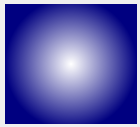
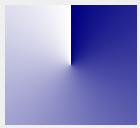
A gradient's type can be retrieved using the PySide.QtGui.QGradient.type() function. Each of the types is represented by a subclass of PySide.QtGui.QGradient :
| PySide.QtGui.QLinearGradient | PySide.QtGui.QRadialGradient | PySide.QtGui.QConicalGradient |

|
|
|
The colors in a gradient are defined using stop points of the QGradientStop type; i.e., a position and a color. Use the PySide.QtGui.QGradient.setColorAt() function to define a single stop point. Alternatively, use the PySide.QtGui.QGradient.setStops() function to define several stop points in one go. Note that the latter function replaces the current set of stop points.
It is the gradient's complete set of stop points (accessible through the PySide.QtGui.QGradient.stops() function) that describes how the gradient area should be filled. If no stop points have been specified, a gradient of black at 0 to white at 1 is used.
A diagonal linear gradient from black at (100, 100) to white at (200, 200) could be specified like this:
linearGrad = QLinearGradient(QPointF(100, 100), QPointF(200, 200))
linearGrad.setColorAt(0, Qt.black)
linearGrad.setColorAt(1, Qt.white)
A gradient can have an arbitrary number of stop points. The following would create a radial gradient starting with red in the center, blue and then green on the edges:
radialGrad = QRadialGradient(QPointF(100, 100), 100)
radialGrad.setColorAt(0, Qt.red)
radialGrad.setColorAt(0.5, Qt.blue)
radialGrad.setColorAt(1, Qt.green)
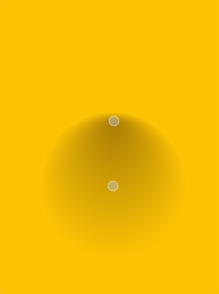
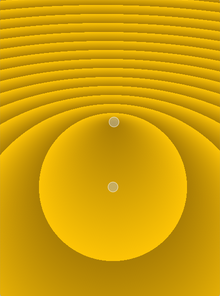
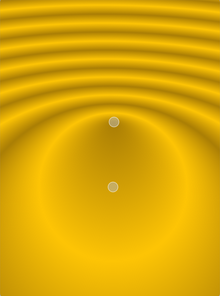
It is possible to repeat or reflect the gradient outside its area by specifiying the spread 方法 使用 PySide.QtGui.QGradient.setSpread() function. The default is to pad the outside area with the color at the closest stop point. The currently set spread 方法 can be retrieved using the PySide.QtGui.QGradient.spread() function. The QGradient.Spread enum defines three different methods:
|
|
|
| PadSpread | RepeatSpread | ReflectSpread |
注意: PySide.QtGui.QGradient.setSpread() function only has effect for linear and radial gradients. The reason is that the conical gradient is closed by definition, i.e. the conical gradient fills the entire circle from 0 - 360 degrees, while the boundary of a radial or a linear gradient can be specified through its radius or final stop points, respectively.
The gradient coordinates can be specified in logical coordinates, relative to device coordinates, or relative to object bounding box coordinates. The coordinate mode can be set using the PySide.QtGui.QGradient.setCoordinateMode() function. The default is LogicalMode , where the gradient coordinates are specified in the same way as the object coordinates. To retrieve the currently set coordinate mode use PySide.QtGui.QGradient.coordinateMode() .
另请参阅
The Gradients Demo PySide.QtGui.QBrush
| 参数: | QGradient – PySide.QtGui.QGradient |
|---|
This enum specifies how gradient coordinates map to the paint device on which the gradient is used.
| 常量 | 描述 |
|---|---|
| QGradient.LogicalMode | This is the default mode. The gradient coordinates are specified logical space just like the object coordinates. |
| QGradient.StretchToDeviceMode | In this mode the gradient coordinates are relative to the bounding rectangle of the paint device, with (0,0) in the top left corner, and (1,1) in the bottom right corner of the paint device. |
| QGradient.ObjectBoundingMode | In this mode the gradient coordinates are relative to the bounding rectangle of the object being drawn, with (0,0) in the top left corner, and (1,1) in the bottom right corner of the object's bounding rectangle. |
Specifies how the area outside the gradient area should be filled.
| 常量 | 描述 |
|---|---|
| QGradient.PadSpread | The area is filled with the closest stop color. This is the default. |
| QGradient.RepeatSpread | The gradient is repeated outside the gradient area. |
| QGradient.ReflectSpread | The gradient is reflected outside the gradient area. |
Specifies the type of gradient.
| 常量 | 描述 |
|---|---|
| QGradient.LinearGradient | Interpolates colors between start and end points ( PySide.QtGui.QLinearGradient ). |
| QGradient.RadialGradient | Interpolate colors between a focal point and end points on a circle surrounding it ( PySide.QtGui.QRadialGradient ). |
| QGradient.ConicalGradient | Interpolate colors around a center point ( PySide.QtGui.QConicalGradient ). |
| QGradient.NoGradient | No gradient is used. |
| 常量 | 描述 |
|---|---|
| QGradient.ComponentInterpolation | The color components and the alpha component are independently linearly interpolated. |
| QGradient.ColorInterpolation | The colors are linearly interpolated in premultiplied color space. |
| 返回类型: | PySide.QtGui.QGradient.CoordinateMode |
|---|
Returns the coordinate mode of this gradient. The default mode is LogicalMode .
| 返回类型: | PySide.QtGui.QGradient.InterpolationMode |
|---|
Returns the interpolation mode of this gradient. The default mode is ColorInterpolation .
| 参数: | other – PySide.QtGui.QGradient |
|---|---|
| 返回类型: | PySide.QtCore.bool |
Returns true if the gradient is the same as the other gradient specified; otherwise returns false.
另请参阅
PySide.QtGui.QGradient.operator==()
| 参数: | gradient – PySide.QtGui.QGradient |
|---|---|
| 返回类型: | PySide.QtCore.bool |
Returns true if the gradient is the same as the other gradient specified; otherwise returns false.
另请参阅
PySide.QtGui.QGradient.operator!=()
| 参数: |
|
|---|
Creates a stop point at the given position 采用给定 color . The given position must be in the range 0 to 1.
| 参数: | mode – PySide.QtGui.QGradient.CoordinateMode |
|---|
Sets the coordinate mode of this gradient to mode . The default mode is LogicalMode .
| 参数: | mode – PySide.QtGui.QGradient.InterpolationMode |
|---|
Sets the interpolation mode of this gradient to mode . The default mode is ColorInterpolation .
| 参数: | spread – PySide.QtGui.QGradient.Spread |
|---|
Specifies the spread 方法 that should be used for this gradient.
Note that this function only has effect for linear and radial gradients.
| 参数: | stops – |
|---|
| 返回类型: | PySide.QtGui.QGradient.Spread |
|---|
Returns the spread method use by this gradient. The default is PadSpread .
| 返回类型: |
|---|
Returns the stop points for this gradient.
If no stop points have been specified, a gradient of black at 0 to white at 1 is used.
| 返回类型: | PySide.QtGui.QGradient.Type |
|---|
Returns the type of gradient.

