PySide.QtGui.QGridLayout class lays out widgets in a grid.
PySide.QtGui.QGridLayout takes the space made available to it (by its parent layout or by the PySide.QtGui.QLayout.parentWidget() ), divides it up into rows and columns, and puts each widget it manages into the correct cell.
列和行的行为等同;我们将讨论列,但行也有等效函数。
Each column has a minimum width and a stretch factor. The minimum width is the greatest of that set using PySide.QtGui.QGridLayout.setColumnMinimumWidth() and the minimum width of each widget in that column. The stretch factor is set using PySide.QtGui.QGridLayout.setColumnStretch() and determines how much of the available space the column will get over and above its necessary minimum.
Normally, each managed widget or layout is put into a cell of its own using PySide.QtGui.QGridLayout.addWidget() . It is also possible for a widget to occupy multiple cells using the row and column spanning overloads of PySide.QtGui.QGridLayout.addItem() and PySide.QtGui.QGridLayout.addWidget() . If you do this, PySide.QtGui.QGridLayout will guess how to distribute the size over the columns/rows (based on the stretch factors).
要从布局移除 Widget,调用 PySide.QtGui.QLayout.removeWidget() 。调用 QWidget.hide() on a widget also effectively removes the widget from the layout until QWidget.show() 被调用。
This illustration shows a fragment of a dialog with a five-column, three-row grid (the grid is shown overlaid in magenta):
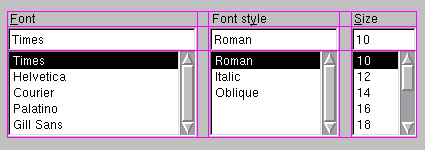
Columns 0, 2 and 4 in this dialog fragment are made up of a PySide.QtGui.QLabel , PySide.QtGui.QLineEdit ,和 QListBox . Columns 1 and 3 are placeholders made with PySide.QtGui.QGridLayout.setColumnMinimumWidth() . Row 0 consists of three PySide.QtGui.QLabel objects, row 1 of three PySide.QtGui.QLineEdit objects and row 2 of three QListBox objects. We used placeholder columns (1 and 3) to get the right amount of space between the columns.
Note that the columns and rows are not equally wide or tall. If you want two columns to have the same width, you must set their minimum widths and stretch factors to be the same yourself. You do this using PySide.QtGui.QGridLayout.setColumnMinimumWidth() and PySide.QtGui.QGridLayout.setColumnStretch() .
若 PySide.QtGui.QGridLayout is not the top-level layout (i.e. does not manage all of the widget's area and children), you must add it to its parent layout when you create it, but before you do anything with it. The normal way to add a layout is by calling PySide.QtGui.QGridLayout.addLayout() on the parent layout.
Once you have added your layout you can start putting widgets and other layouts into the cells of your grid layout using PySide.QtGui.QGridLayout.addWidget() , PySide.QtGui.QGridLayout.addItem() ,和 PySide.QtGui.QGridLayout.addLayout() .
PySide.QtGui.QGridLayout also includes two margin widths: the contents margin 和 PySide.QtGui.QGridLayout.spacing() . The contents margin is the width of the reserved space along each of the PySide.QtGui.QGridLayout ‘s four sides. The PySide.QtGui.QGridLayout.spacing() is the width of the automatically allocated spacing between neighboring boxes.
The default contents margin values are provided by the style . The default value Qt styles specify is 9 for child widgets and 11 for windows. The spacing defaults to the same as the margin width for a top-level layout, or to the same as the parent layout.
另请参阅
PySide.QtGui.QBoxLayout PySide.QtGui.QStackedLayout 布局管理 基本布局范例
| 参数: | parent – PySide.QtGui.QWidget |
|---|
构造新栅格布局。
You must insert this grid into another layout. You can insert widgets and layouts into this layout at any time, but laying out will not be performed before this is inserted into another layout.
构造新 PySide.QtGui.QGridLayout with parent widget, parent . The layout has one row and one column initially, and will expand when new items are inserted.
| 参数: |
|
|---|
| 参数: |
|
|---|
| 参数: |
|
|---|
| 参数: |
|
|---|
| 参数: |
|
|---|
| 参数: |
|
|---|---|
| 返回类型: |
Returns the geometry of the cell with row row and column column in the grid. Returns an invalid rectangle if row or column is outside the grid.
警告
in the current version of Qt this function does not return valid results until PySide.QtGui.QGridLayout.setGeometry() has been called, i.e. after the PySide.QtGui.QLayout.parentWidget() is visible.
| 返回类型: | PySide.QtCore.int |
|---|
Returns the number of columns in this grid.
| 参数: | column – PySide.QtCore.int |
|---|---|
| 返回类型: | PySide.QtCore.int |
Returns the column spacing for column column .
| 参数: | column – PySide.QtCore.int |
|---|---|
| 返回类型: | PySide.QtCore.int |
Returns the stretch factor for column column .
| 参数: | idx – PySide.QtCore.int |
|---|
Returns the position information of the item with the given index .
The variables passed as row and column are updated with the position of the item in the layout, and the rowSpan and columnSpan variables are updated with the vertical and horizontal spans of the item.
另请参阅
PySide.QtGui.QGridLayout.itemAtPosition() PySide.QtGui.QGridLayout.itemAt()
| 返回类型: | PySide.QtCore.int |
|---|
| 参数: |
|
|---|---|
| 返回类型: |
Returns the layout item that occupies cell ( row , column ), or 0 if the cell is empty.
| 返回类型: | PySide.QtCore.Qt.Corner |
|---|
Returns the corner that's used for the grid's origin, i.e. for position (0, 0).
| 返回类型: | PySide.QtCore.int |
|---|
Returns the number of rows in this grid.
| 参数: | row – PySide.QtCore.int |
|---|---|
| 返回类型: | PySide.QtCore.int |
Returns the minimum width set for row row .
| 参数: | row – PySide.QtCore.int |
|---|---|
| 返回类型: | PySide.QtCore.int |
Returns the stretch factor for row row .
| 参数: |
|
|---|
Sets the minimum width of column column to minSize 像素。
| 参数: |
|
|---|
Sets the stretch factor of column column to stretch . The first column is number 0.
The stretch factor is relative to the other columns in this grid. Columns with a higher stretch factor take more of the available space.
The default stretch factor is 0. If the stretch factor is 0 and no other column in this table can grow at all, the column may still grow.
An alternative approach is to add spacing using PySide.QtGui.QGridLayout.addItem() 采用 PySide.QtGui.QSpacerItem .
| 参数: |
|
|---|
| 参数: | spacing – PySide.QtCore.int |
|---|
| 参数: | arg__1 – PySide.QtCore.Qt.Corner |
|---|
| 参数: |
|
|---|
Sets the minimum height of row row to minSize 像素。
| 参数: |
|
|---|
Sets the stretch factor of row row to stretch . The first row is number 0.
The stretch factor is relative to the other rows in this grid. Rows with a higher stretch factor take more of the available space.
The default stretch factor is 0. If the stretch factor is 0 and no other row in this table can grow at all, the row may still grow.
| 参数: | spacing – PySide.QtCore.int |
|---|
| 返回类型: | PySide.QtCore.int |
|---|

