PySide.QtGui.QDial class provides a rounded range control (like a speedometer or potentiometer).
PySide.QtGui.QDial is used when the user needs to control a value within a program-definable range, and the range either wraps around (for example, with angles measured from 0 to 359 degrees) or the dialog layout needs a square widget.
Since PySide.QtGui.QDial 继承自 PySide.QtGui.QAbstractSlider , the dial behaves in a similar way to a slider 。当 PySide.QtGui.QDial.wrapping() is false (the default setting) there is no real difference between a slider and a dial. They both share the same signals, slots and member functions. Which one you use depends on the expectations of your users and on the type of application.
The dial initially emits PySide.QtGui.QAbstractSlider.valueChanged() signals continuously while the slider is being moved; you can make it emit the signal less often by disabling the PySide.QtGui.QAbstractSlider.tracking() property. The PySide.QtGui.QAbstractSlider.sliderMoved() signal is emitted continuously even when tracking is disabled.
The dial also emits PySide.QtGui.QAbstractSlider.sliderPressed() and PySide.QtGui.QAbstractSlider.sliderReleased() signals when the mouse button is pressed and released. Note that the dial's value can change without these signals being emitted since the keyboard and wheel can also be used to change the value.
Unlike the slider, PySide.QtGui.QDial attempts to draw a “nice” number of notches rather than one per line step. If possible, the number of notches drawn is one per line step, but if there aren't enough pixels to draw every one, PySide.QtGui.QDial will skip notches to try and draw a uniform set (e.g. by drawing every second or third notch).
Like the slider, the dial makes the PySide.QtGui.QAbstractSlider 函数 PySide.QtGui.QAbstractSlider.setValue() , addLine() , subtractLine() , addPage() and subtractPage() available as slots.
The dial's keyboard interface is fairly simple: The left / up and right / down arrow keys adjust the dial's PySide.QtGui.QAbstractSlider.value() by the defined PySide.QtGui.QAbstractSlider.singleStep() , Page Up and Page Down by the defined PySide.QtGui.QAbstractSlider.pageStep() ,和 首页 and End keys set the value to the defined PySide.QtGui.QAbstractSlider.minimum() and PySide.QtGui.QAbstractSlider.maximum() 值。
If you are using the mouse wheel to adjust the dial, the increment value is determined by the lesser value of PySide.QtGui.QApplication.wheelScrollLines() multipled by PySide.QtGui.QAbstractSlider.singleStep() ,和 PySide.QtGui.QAbstractSlider.pageStep() .

|
|
|
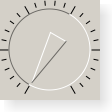
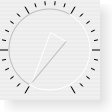
| Dials shown in various widget styles (from left to right): Plastique , Windows XP , Macintosh . | ||
另请参阅
PySide.QtGui.QScrollBar PySide.QtGui.QSpinBox PySide.QtGui.QSlider GUI Design Handbook: Slider 滑块范例
| 参数: | parent – PySide.QtGui.QWidget |
|---|
Constructs a dial.
parent 自变量被发送给 PySide.QtGui.QAbstractSlider 构造函数。
| 参数: | option – PySide.QtGui.QStyleOptionSlider |
|---|
初始化 option 采用值来自此 PySide.QtGui.QDial 。此方法对子类是有用的,当需要 PySide.QtGui.QStyleOptionSlider ,但不希望自己填充所有信息。
| 返回类型: | PySide.QtCore.int |
|---|
This property holds the current notch size.
The notch size is in range control units, not pixels, and if possible it is a multiple of PySide.QtGui.QAbstractSlider.singleStep() that results in an on-screen notch size near PySide.QtGui.QDial.notchTarget() .
默认情况下,此特性拥有 1 值。
| 返回类型: | PySide.QtCore.qreal |
|---|
This property holds the target number of pixels between notches.
The notch target is the number of pixels PySide.QtGui.QDial attempts to put between each notch.
The actual size may differ from the target size.
The default notch target is 3.7 pixels.
| 返回类型: | PySide.QtCore.bool |
|---|
This property holds whether the notches are shown.
If the property is true, a series of notches are drawn around the dial to indicate the range of values available; otherwise no notches are shown.
By default, this property is disabled.
| 参数: | target – PySide.QtCore.double |
|---|
| 参数: | visible – PySide.QtCore.bool |
|---|
This property holds whether the notches are shown.
If the property is true, a series of notches are drawn around the dial to indicate the range of values available; otherwise no notches are shown.
By default, this property is disabled.
| 参数: | on – PySide.QtCore.bool |
|---|
This property holds whether wrapping is enabled.
If true, wrapping is enabled; otherwise some space is inserted at the bottom of the dial to separate the ends of the range of valid values.
If enabled, the arrow can be oriented at any angle on the dial. If disabled, the arrow will be restricted to the upper part of the dial; if it is rotated into the space at the bottom of the dial, it will be clamped to the closest end of the valid range of values.
By default this property is false.
| 返回类型: | PySide.QtCore.bool |
|---|
This property holds whether wrapping is enabled.
If true, wrapping is enabled; otherwise some space is inserted at the bottom of the dial to separate the ends of the range of valid values.
If enabled, the arrow can be oriented at any angle on the dial. If disabled, the arrow will be restricted to the upper part of the dial; if it is rotated into the space at the bottom of the dial, it will be clamped to the closest end of the valid range of values.
By default this property is false.

