继承者: QFontComboBox
PySide.QtGui.QComboBox widget is a combined button and popup list.
A PySide.QtGui.QComboBox provides a means of presenting a list of options to the user in a way that takes up the minimum amount of screen space.
组合框是显示当前项的选择 Widget,且可以弹出可选择项的列表。组合框可能是可编辑的,使用户能够修改每列表项。
组合框可以包含像素图及字符串; PySide.QtGui.QComboBox.insertItem() and PySide.QtGui.QComboBox.setItemText() functions are suitably overloaded. For editable comboboxes, the function PySide.QtGui.QComboBox.clearEditText() is provided, to clear the displayed string without changing the combobox's contents.
有 2 个信号被发射,若当前组合框项改变, PySide.QtGui.QComboBox.currentIndexChanged() and PySide.QtGui.QComboBox.activated() . PySide.QtGui.QComboBox.currentIndexChanged() is always emitted regardless if the change was done programmatically or by user interaction, while PySide.QtGui.QComboBox.activated() is only emitted when the change is caused by user interaction. The PySide.QtGui.QComboBox.highlighted() signal is emitted when the user highlights an item in the combobox popup list. All three signals exist in two versions, one with a PySide.QtCore.QString 自变量和一个带有 int 自变量。若用户选择或突显像素图,仅 int 信号被发射。每当可编辑组合框文本改变时 PySide.QtGui.QComboBox.editTextChanged() 信号被发射。
When the user enters a new string in an editable combobox, the widget may or may not insert it, and it can insert it in several locations. The default policy is is AtBottom 但可以改变这使用 PySide.QtGui.QComboBox.setInsertPolicy() .
可以将输入约束到可编辑组合框使用 PySide.QtGui.QValidator ;见 PySide.QtGui.QComboBox.setValidator() . By default, any input is accepted.
可以使用插入函数填充组合框, PySide.QtGui.QComboBox.insertItem() and PySide.QtGui.QComboBox.insertItems() for example. Items can be changed with PySide.QtGui.QComboBox.setItemText() . An item can be removed with PySide.QtGui.QComboBox.removeItem() and all items can be removed with PySide.QtGui.QComboBox.clear() . The text of the current item is returned by PySide.QtGui.QComboBox.currentText() , and the text of a numbered item is returned with text() . The current item can be set with PySide.QtGui.QComboBox.setCurrentIndex() . The number of items in the combobox is returned by PySide.QtGui.QComboBox.count() ; the maximum number of items can be set with PySide.QtGui.QComboBox.setMaxCount() . You can allow editing using PySide.QtGui.QComboBox.setEditable() . For editable comboboxes you can set auto-completion using PySide.QtGui.QComboBox.setCompleter() and whether or not the user can add duplicates is set with PySide.QtGui.QComboBox.setDuplicatesEnabled() .
PySide.QtGui.QComboBox 使用 模型/视图框架 用于其弹出列表并存储其项。默认情况下 PySide.QtGui.QStandardItemModel 存储项和 PySide.QtGui.QListView 子类显示弹出列表。可以直接访问模型和视图 (采用 PySide.QtGui.QComboBox.model() and PySide.QtGui.QComboBox.view() ), but PySide.QtGui.QComboBox also provides functions to set and get item data (e.g., PySide.QtGui.QComboBox.setItemData() and PySide.QtGui.QComboBox.itemText() ). You can also set a new model and view (with PySide.QtGui.QComboBox.setModel() and PySide.QtGui.QComboBox.setView() ). For the text and icon in the combobox label, the data in the model that has the Qt.DisplayRole and Qt.DecorationRole 在使用。注意:不可以更改 QAbstractItemView.SelectionMode 的 PySide.QtGui.QComboBox.view() , e.g., by using PySide.QtGui.QAbstractItemView.setSelectionMode() .
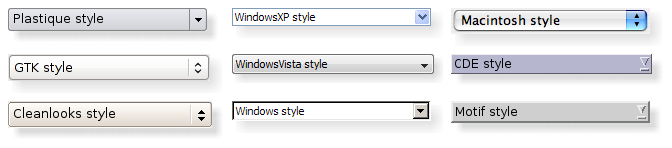
另请参阅
PySide.QtGui.QLineEdit PySide.QtGui.QSpinBox PySide.QtGui.QRadioButton PySide.QtGui.QButtonGroup GUI 设计手册:组合框、下拉列表框
| 参数: | parent – PySide.QtGui.QWidget |
|---|
构造组合框采用给定 parent ,使用默认模型 PySide.QtGui.QStandardItemModel .
此枚举指定什么是 PySide.QtGui.QComboBox 应该做的,当用户键入新字符串时。
| 常量 | 描述 |
|---|---|
| QComboBox.NoInsert | 字符串不会插入组合框。 |
| QComboBox.InsertAtTop | 字符串将插入作为第一组合框项。 |
| QComboBox.InsertAtCurrent | 当前项将 replaced 通过字符串。 |
| QComboBox.InsertAtBottom | 将字符串插入在组合框最后项之后。 |
| QComboBox.InsertAfterCurrent | 将字符串插入在组合框当前项之后。 |
| QComboBox.InsertBeforeCurrent | 将字符串插入在组合框当前项之前。 |
| QComboBox.InsertAlphabetically | 按字母次序将字符串插入组合框。 |
此枚举指定尺寸提示应如何 PySide.QtGui.QComboBox 调节当添加新内容或改变内容时。
| 常量 | 描述 |
|---|---|
| QComboBox.AdjustToContents | 组合框始终根据内容调节 |
| QComboBox.AdjustToContentsOnFirstShow | 组合框将调节到其首次展示内容。 |
| QComboBox.AdjustToMinimumContentsLength | 使用 AdjustToContents or AdjustToContentsOnFirstShow 代替。 |
| QComboBox.AdjustToMinimumContentsLengthWithIcon | 组合框将调节到 PySide.QtGui.QComboBox.minimumContentsLength() 加图标空间。出于性能原因,在大型模型中使用此策略。 |
| 参数: | index – PySide.QtCore.int |
|---|
| 参数: | arg__1 – unicode |
|---|
| 参数: |
|
|---|
把项添加到组合框,采用给定 icon and text ,和包含指定 userData (存储在 Qt.UserRole )。项会被追加到现有项列表。
| 参数: |
|
|---|
把项添加到组合框,采用给定 text ,和包含指定 userData (存储在 Qt.UserRole )。项会被追加到现有项列表。
| 参数: | texts – list of strings |
|---|
添加每字符串在给定 texts 到组合框。每项会被依次追加到现有项列表中。
清零组合框,移除所有项。
注意:若组合框有设置外部模型,此模型仍会被清零 (当调用此函数时)。
清零用于在组合框中编辑的行编辑内容。
| 返回类型: | PySide.QtGui.QCompleter |
|---|
返回被用于自动补全组合框文本输入的补全器。
另请参阅
PySide.QtGui.QComboBox.setCompleter() editable()
| 返回类型: | PySide.QtCore.int |
|---|
This property holds the number of items in the combobox.
默认情况下,对于空组合框,此特性拥有 0 值。
| 返回类型: | PySide.QtCore.int |
|---|
This property holds the index of the current item in the combobox..
当前索引会改变,在插入或移除项时。
默认情况下,对于空组合框或未设置当前项的组合框,此特性拥有 -1 值。
| 参数: | arg__1 – unicode |
|---|
| 参数: | index – PySide.QtCore.int |
|---|
| 返回类型: | unicode |
|---|
This property holds the current text.
若组合框是可编辑的,当前文本是由行编辑显示的值。否则,它是当前项的值,或空字符串若组合框为空或未设置当前项。
另请参阅
editable()
| 返回类型: | PySide.QtCore.bool |
|---|
This property holds whether the user can enter duplicate items into the combobox.
注意:以编程方式把重复项插入组合框始终是可能的。
By default, this property is false (duplicates are not allowed).
| 参数: | arg__1 – unicode |
|---|
| 参数: |
|
|---|---|
| 返回类型: |
PySide.QtCore.int |
| 参数: |
|
|---|---|
| 返回类型: |
PySide.QtCore.int |
| 返回类型: | PySide.QtCore.bool |
|---|
This property holds whether the combo box draws itself with a frame.
若启用 (认默) 组合框将自身绘制在框架内,否则组合框将绘制自身没有任何框架。
Hides the list of items in the combobox if it is currently visible and resets the internal state, so that if the custom pop-up was shown inside the reimplemented PySide.QtGui.QComboBox.showPopup() , then you also need to reimplement the PySide.QtGui.QComboBox.hidePopup() function to hide your custom pop-up and call the base class implementation to reset the internal state whenever your custom pop-up widget is hidden.
| 参数: | arg__1 – unicode |
|---|
| 参数: | index – PySide.QtCore.int |
|---|
| 返回类型: | PySide.QtCore.QSize |
|---|
This property holds the size of the icons shown in the combobox..
除非明确设置,否则返回当前风格的默认值。此尺寸是图标可以拥有的最大尺寸。较小尺寸图标不按比例放大。
| 参数: | option – PySide.QtGui.QStyleOptionComboBox |
|---|
初始化 option 采用值来自此 PySide.QtGui.QComboBox 。此方法对子类是有用的,当需要 PySide.QtGui.QStyleOptionComboBox ,但不希望自己填充所有信息。
| 参数: |
|
|---|
插入 text and userData (存储在 Qt.UserRole ) 进组合框在给定 index .
If the index is equal to or higher than the total number of items, the new item is appended to the list of existing items. If the index is zero or negative, the new item is prepended to the list of existing items.
| 参数: |
|
|---|
插入 icon , text and userData (存储在 Qt.UserRole ) 进组合框在给定 index .
If the index is equal to or higher than the total number of items, the new item is appended to the list of existing items. If the index is zero or negative, the new item is prepended to the list of existing items.
| 参数: |
|
|---|
插入字符串从 list 到组合框作为单独项,起始于 index 指定。
If the index is equal to or higher than the total number of items, the new items are appended to the list of existing items. If the index is zero or negative, the new items are prepended to the list of existing items.
| 返回类型: | PySide.QtGui.QComboBox.InsertPolicy |
|---|
This property holds the policy used to determine where user-inserted items should appear in the combobox.
默认值为 AtBottom ,指示新项将出现在项列表底部。
另请参阅
QComboBox.InsertPolicy
| 参数: | index – PySide.QtCore.int |
|---|
将分隔符项插入组合框在给定 index .
If the index is equal to or higher than the total number of items, the new item is appended to the list of existing items. If the index is zero or negative, the new item is prepended to the list of existing items.
| 返回类型: | PySide.QtCore.bool |
|---|
This property holds whether the combo box can be edited by the user.
By default, this property is false. The effect of editing depends on the insert policy.
另请参阅
QComboBox.InsertPolicy
| 参数: |
|
|---|---|
| 返回类型: |
object |
返回数据为给定 role 以给定 index in the combobox, or QVariant.Invalid 若此角色没有数据。
| 返回类型: | PySide.QtGui.QAbstractItemDelegate |
|---|
返回由弹出列表视图使用的项委托。
| 参数: | index – PySide.QtCore.int |
|---|---|
| 返回类型: | PySide.QtGui.QIcon |
返回图标为给定 index 在组合框。
| 参数: | index – PySide.QtCore.int |
|---|---|
| 返回类型: | unicode |
返回文本为给定 index 在组合框。
| 返回类型: | PySide.QtGui.QLineEdit |
|---|
Returns the line edit used to edit items in the combobox, or 0 if there is no line edit.
仅可编辑组合框拥有行编辑。
| 返回类型: | PySide.QtCore.int |
|---|
This property holds the maximum number of items allowed in the combobox.
注意
若将最大数设为小于当前组合框项数量,额外项将被截取。若有为组合框设置外部模型,这也适用。
默认情况下,此特性值派生自最高可用有符号整数 (通常为 2147483647)。
| 返回类型: | PySide.QtCore.int |
|---|
This property holds the maximum allowed size on screen of the combo box, measured in items.
默认情况下,此特性拥有 10 值。
注意
不可编辑组合框忽略此特性当样式返回 true 时对于 QStyle.SH_ComboBox_Popup (譬如:Mac 样式或 Gtk+ 样式)。
| 返回类型: | PySide.QtCore.int |
|---|
This property holds the minimum number of characters that should fit into the combobox..
默认值为 0。
若此特性被设为正值, PySide.QtGui.QComboBox.minimumSizeHint() and PySide.QtGui.QComboBox.sizeHint() take it into account.
| 返回类型: | PySide.QtCore.QAbstractItemModel |
|---|
返回由组合框使用的模型。
| 返回类型: | PySide.QtCore.int |
|---|
This property holds the column in the model that is visible..
If set prior to populating the combo box, the pop-up view will not be affected and will show the first column (using this property's default value).
默认情况下,此特性拥有 0 值。
| 参数: | index – PySide.QtCore.int |
|---|
移除项位于给定 index 从组合框。这将更新当前索引,若索引被移除。
此函数什么都不做,若 index 超出范围。
| 返回类型: | PySide.QtCore.QModelIndex |
|---|
返回组合框项的根模型项索引。
| 参数: | c – PySide.QtGui.QCompleter |
|---|
设置 completer 以使用而不是当前补全器。若 completer is 0, auto completion is disabled.
默认情况下,对于可编辑组合框, PySide.QtGui.QCompleter 自动创建不区分大小写的内联补全。
| 参数: | index – PySide.QtCore.int |
|---|
This property holds the index of the current item in the combobox..
当前索引会改变,在插入或移除项时。
默认情况下,对于空组合框或未设置当前项的组合框,此特性拥有 -1 值。
| 参数: | enable – PySide.QtCore.bool |
|---|
This property holds whether the user can enter duplicate items into the combobox.
注意:以编程方式把重复项插入组合框始终是可能的。
By default, this property is false (duplicates are not allowed).
| 参数: | text – unicode |
|---|
设置 text 在组合框的文本编辑。
| 参数: | editable – PySide.QtCore.bool |
|---|
This property holds whether the combo box can be edited by the user.
By default, this property is false. The effect of editing depends on the insert policy.
另请参阅
QComboBox.InsertPolicy
| 参数: | arg__1 – PySide.QtCore.bool |
|---|
This property holds whether the combo box draws itself with a frame.
若启用 (认默) 组合框将自身绘制在框架内,否则组合框将绘制自身没有任何框架。
| 参数: | size – PySide.QtCore.QSize |
|---|
This property holds the size of the icons shown in the combobox..
除非明确设置,否则返回当前风格的默认值。此尺寸是图标可以拥有的最大尺寸。较小尺寸图标不按比例放大。
| 参数: | policy – PySide.QtGui.QComboBox.InsertPolicy |
|---|
This property holds the policy used to determine where user-inserted items should appear in the combobox.
默认值为 AtBottom ,指示新项将出现在项列表底部。
另请参阅
QComboBox.InsertPolicy
| 参数: |
|
|---|
设置数据 role 为项在给定 index 在组合框到指定 value .
| 参数: | delegate – PySide.QtGui.QAbstractItemDelegate |
|---|
设置项 delegate 为弹出列表视图。组合框拥有委托的所有权。
警告
You should not share the same instance of a delegate between comboboxes, widget mappers or views. Doing so can cause incorrect or unintuitive editing behavior since each view connected to a given delegate may receive the PySide.QtGui.QAbstractItemDelegate.closeEditor() signal, and attempt to access, modify or close an editor that has already been closed.
| 参数: |
|
|---|
设置 icon 为项在给定 index 在组合框。
| 参数: |
|
|---|
设置 text 为项在给定 index 在组合框。
| 参数: | edit – PySide.QtGui.QLineEdit |
|---|
设置行 edit 以代替使用当前行编辑 Widget。
组合框拥有行编辑的所有权。
| 参数: | max – PySide.QtCore.int |
|---|
This property holds the maximum number of items allowed in the combobox.
注意
若将最大数设为小于当前组合框项数量,额外项将被截取。若有为组合框设置外部模型,这也适用。
默认情况下,此特性值派生自最高可用有符号整数 (通常为 2147483647)。
| 参数: | maxItems – PySide.QtCore.int |
|---|
This property holds the maximum allowed size on screen of the combo box, measured in items.
默认情况下,此特性拥有 10 值。
注意
不可编辑组合框忽略此特性当样式返回 true 时对于 QStyle.SH_ComboBox_Popup (譬如:Mac 样式或 Gtk+ 样式)。
| 参数: | characters – PySide.QtCore.int |
|---|
This property holds the minimum number of characters that should fit into the combobox..
默认值为 0。
若此特性被设为正值, PySide.QtGui.QComboBox.minimumSizeHint() and PySide.QtGui.QComboBox.sizeHint() take it into account.
| 参数: | model – PySide.QtCore.QAbstractItemModel |
|---|
把模型设置为 model . model must not be 0. If you want to clear the contents of a model, call PySide.QtGui.QComboBox.clear() .
| 参数: | visibleColumn – PySide.QtCore.int |
|---|
This property holds the column in the model that is visible..
If set prior to populating the combo box, the pop-up view will not be affected and will show the first column (using this property's default value).
默认情况下,此特性拥有 0 值。
| 参数: | index – PySide.QtCore.QModelIndex |
|---|
设置根模型项 index 为组合框项。
| 参数: | policy – PySide.QtGui.QComboBox.SizeAdjustPolicy |
|---|
This property holds the policy describing how the size of the combobox changes when the content changes.
默认值为 AdjustToContentsOnFirstShow .
另请参阅
QComboBox.SizeAdjustPolicy
| 参数: | v – PySide.QtGui.QValidator |
|---|
设置 validator 以代替当前使用的验证器。
| 参数: | itemView – PySide.QtGui.QAbstractItemView |
|---|
将组合框弹出所用视图设为给定 itemView 。组合框拥有视图的所有权。
注意:若想要使用方便视图 (像 PySide.QtGui.QListWidget , PySide.QtGui.QTableWidget or PySide.QtGui.QTreeWidget ),确保调用 PySide.QtGui.QComboBox.setModel() on the combobox with the convenience widgets model before calling this function.
Displays the list of items in the combobox. If the list is empty then the no items will be shown.
若重新实现此函数以展示自定义弹出,确保调用 PySide.QtGui.QComboBox.hidePopup() to reset the internal state.
| 返回类型: | PySide.QtGui.QComboBox.SizeAdjustPolicy |
|---|
This property holds the policy describing how the size of the combobox changes when the content changes.
默认值为 AdjustToContentsOnFirstShow .
另请参阅
QComboBox.SizeAdjustPolicy
| 返回类型: | PySide.QtGui.QValidator |
|---|
返回用于约束组合框文本输入的验证器。
另请参阅
PySide.QtGui.QComboBox.setValidator() editable()
| 返回类型: | PySide.QtGui.QAbstractItemView |
|---|
返回用于组合框弹出的列表视图。

