PySide.QtGui.QTreeWidget class provides a tree view that uses a predefined tree model.
PySide.QtGui.QTreeWidget class is a convenience class that provides a standard tree widget with a classic item-based interface similar to that used by the PySide.QtGui.QListView 类在 Qt 3。此类基于 Qt 模型/视图体系结构,并使用默认模型来保持项,其中每个项是 PySide.QtGui.QTreeWidgetItem .
不需要灵活模型/视图框架的开发者可以使用此类,非常轻松地创建简单分层列表。更灵活方式涉及组合 PySide.QtGui.QTreeView 采用标准项模型。这允许将数据存储与其表示分开。
以最简单形式,可以按以下方式构造树 Widget:
treeWidget = QTreeWidget()
treeWidget.setColumnCount(1)
items = []
for i in range(10):
    items.append(QTreeWidgetItem(None, QStringList(QString("item: %1").arg(i))))
treeWidget.insertTopLevelItems(None, items)
在可以把项添加到树 Widget 之前,必须设置列数采用 PySide.QtGui.QTreeWidget.setColumnCount() . This allows each item to have one or more labels or other decorations. The number of columns in use can be found with the PySide.QtGui.QTreeWidget.columnCount() 函数。
树可以拥有包含 Widget 每列区间的 Header 头。为每区间设置标签的最简单方式是通过提供字符串列表采用 PySide.QtGui.QTreeWidget.setHeaderLabels() , but a custom header can be constructed with a PySide.QtGui.QTreeWidgetItem 并插入树采用 PySide.QtGui.QTreeWidget.setHeaderItem() 函数。
树中的项可以根据预定义排序次序按列排序。若排序被启用,用户可以通过点击列 Header 头排序项。可以启用或禁用排序通过调用 PySide.QtGui.QTreeView.setSortingEnabled() 。 PySide.QtGui.QTreeView.isSortingEnabled() 函数指示是否启用排序。
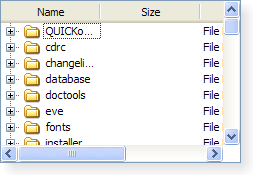
|
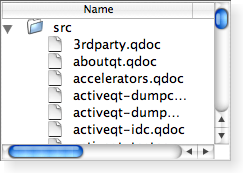
|
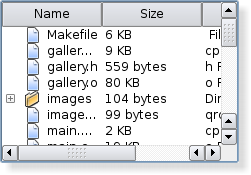
|
| A Windows XP style tree widget. | A Macintosh style tree widget. | A Plastique style tree widget. |
另请参阅
PySide.QtGui.QTreeWidgetItem PySide.QtGui.QTreeWidgetItemIterator PySide.QtGui.QTreeView 模型/视图编程 设置编辑器范例
| 参数: | parent – PySide.QtGui.QWidget |
|---|
构造树 Widget 采用给定 parent .
| 参数: | item – PySide.QtGui.QTreeWidgetItem |
|---|
追加 item 作为 Widget 顶层项。
| 参数: | items – |
|---|
清零树 Widget 通过移除其所有项和选定。
注意
由于每项在被删除之前会从树 Widget 被移除,返回值的 QTreeWidgetItem.treeWidget() will be invalid when called from an item's destructor.
| 参数: |
|
|---|
关闭持久编辑器为 item 以给定 column .
此函数不起作用,若此项和列的组合没有打开持久编辑器。
| 参数: | item – PySide.QtGui.QTreeWidgetItem |
|---|
关闭 item 。这导致包含项子级的树被折叠。
| 返回类型: | PySide.QtCore.int |
|---|
This property holds the number of columns displayed in the tree widget.
默认情况下,此特性拥有 1 值。
| 返回类型: | PySide.QtCore.int |
|---|
返回树 Widget 当前列。
| 返回类型: | PySide.QtGui.QTreeWidgetItem |
|---|
返回树 Widget 中的当前项。
| 参数: |
|
|---|
| 参数: |
|
|---|---|
| 返回类型: |
PySide.QtCore.bool |
| 参数: |
|
|---|
开始编辑 item 以给定 column 若它可编辑。
| 参数: | item – PySide.QtGui.QTreeWidgetItem |
|---|
展开 item 。这导致包含项子级的树被展开。
| 参数: |
|
|---|---|
| 返回类型: |
| 返回类型: | PySide.QtGui.QTreeWidgetItem |
|---|
返回用于树小部件 Header 头的项。
| 参数: |
|
|---|---|
| 返回类型: |
返回 PySide.QtCore.QModelIndex assocated with the given item 以给定 column .
| 参数: | item – PySide.QtGui.QTreeWidgetItem |
|---|---|
| 返回类型: | PySide.QtCore.int |
返回索引为给定顶层 item ,或 -1 若找不到项。
| 参数: |
|
|---|
插入 item at index 在视图的顶层。
If the item has already been inserted somewhere else it wont be inserted.
| 参数: |
|
|---|
| 返回类型: | PySide.QtGui.QTreeWidgetItem |
|---|
返回树 Widget 的不可见根项。
不可见根项提供对树 Widget 顶层项的访问透过 PySide.QtGui.QTreeWidgetItem API,使编写可以按统一方式处理顶层项及其子级的函数成为可能;例如:递归函数。
| 参数: | item – PySide.QtGui.QTreeWidgetItem |
|---|---|
| 返回类型: | PySide.QtCore.bool |
Returns true if the given item is set to show only one section over all columns; otherwise returns false.
| 参数: | item – PySide.QtGui.QTreeWidgetItem |
|---|---|
| 返回类型: | PySide.QtCore.bool |
Returns true if the given item is open; otherwise returns false.
This function is deprecated. Use QTreeWidgetItem.isExpanded() 代替。
| 参数: | item – PySide.QtGui.QTreeWidgetItem |
|---|---|
| 返回类型: | PySide.QtCore.bool |
返回 true 若 item is explicitly hidden, otherwise returns false.
This function is deprecated. Use QTreeWidgetItem.isHidden() 代替。
| 参数: | item – PySide.QtGui.QTreeWidgetItem |
|---|---|
| 返回类型: | PySide.QtCore.bool |
返回 true 若 item is selected; otherwise returns false.
This function is deprecated. Use QTreeWidgetItem.isSelected() 代替。
| 参数: | item – PySide.QtGui.QTreeWidgetItem |
|---|---|
| 返回类型: | PySide.QtGui.QTreeWidgetItem |
返回上方项为给定 item .
| 参数: |
|
|---|
| 参数: |
|
|---|---|
| 返回类型: |
这是重载函数。
返回指针指向项在坐标 ( x , y )。坐标相对于树 Widget 的 PySide.QtGui.QAbstractScrollArea.viewport() .
| 参数: | p – PySide.QtCore.QPoint |
|---|---|
| 返回类型: | PySide.QtGui.QTreeWidgetItem |
返回指针指向项在坐标 p 。坐标相对于树 Widget 的 PySide.QtGui.QAbstractScrollArea.viewport() .
| 参数: | item – PySide.QtGui.QTreeWidgetItem |
|---|---|
| 返回类型: | PySide.QtGui.QTreeWidgetItem |
返回下方可见项为给定 item .
| 参数: |
|
|---|
| 参数: |
|
|---|
| 参数: | item – PySide.QtGui.QTreeWidgetItem |
|---|
| 参数: |
|
|---|
| 参数: |
|
|---|
| 参数: | item – PySide.QtGui.QTreeWidgetItem |
|---|
| 参数: | index – PySide.QtCore.QModelIndex |
|---|---|
| 返回类型: | PySide.QtGui.QTreeWidgetItem |
返回指针指向 PySide.QtGui.QTreeWidgetItem assocated with the given index .
| 参数: |
|
|---|
| 参数: |
|
|---|---|
| 返回类型: |
返回单元格显示 Widget 指定通过 item 和给定 column .
注意
树拥有 Widget 的所有权。
| 参数: | items – |
|---|---|
| 返回类型: | PySide.QtCore.QMimeData |
| 返回类型: | 字符串列表 |
|---|
返回可用于描述 treewidget 项列表的 MIME 类型列表。
| 参数: |
|
|---|
打开持久编辑器为 item 以给定 column .
| 参数: |
|
|---|
删除设置 Widget 在给定 item 以给定 column .
| 参数: |
|---|
| 返回类型: |
|---|
返回所有选定的非隐藏项的列表。
| 参数: | columns – PySide.QtCore.int |
|---|
This property holds the number of columns displayed in the tree widget.
默认情况下,此特性拥有 1 值。
| 参数: |
|
|---|
| 参数: |
|
|---|
设置当前 item 在树 Widget 和当前列到 column .
| 参数: | item – PySide.QtGui.QTreeWidgetItem |
|---|
设置当前 item 在树 Widget。
除非选定模式为 NoSelection , the item is also be selected.
| 参数: |
|
|---|
设置给定 item to only show one section for all columns if span is true; otherwise the item will show one section per column.
| 参数: | item – PySide.QtGui.QTreeWidgetItem |
|---|
设置 Header 头 item for the tree widget. The label for each column in the header is supplied by the corresponding label in the item.
树 Widget 拥有项的所有权。
| 参数: | label – unicode |
|---|
Same as setHeaderLabels( PySide.QtCore.QStringList ( label )).
| 参数: | labels – list of strings |
|---|
为每项添加 Header 头部列按 labels 列表, 并为每列设置标签。
注意: PySide.QtGui.QTreeWidget.setHeaderLabels() won't remove existing columns.
| 参数: |
|
|---|
Sets the item referred to by item to either closed or opened, depending on the value of expand .
This function is deprecated. Use QTreeWidgetItem.setExpanded() 代替。
| 参数: |
|
|---|
Hides the given item if hide is true; otherwise shows the item.
This function is deprecated. Use QTreeWidgetItem.setHidden() 代替。
| 参数: |
|
|---|
若 select is true, the given item is selected; otherwise it is deselected.
This function is deprecated. Use QTreeWidgetItem.setSelected() 代替。
| 参数: |
|
|---|
设置给定 widget 以显示在指定单元格通过给定 item and column .
给定 widget ‘s PySide.QtGui.QWidget.autoFillBackground() 特性必须被设为 true,否则 Widget 背景将透明,同时展示模型数据和树 Widget 项。
此函数只应该用于在树 Widget 项位置处显示静态内容。若想要显示自定义动态内容或实现自定义编辑器 Widget,使用 PySide.QtGui.QTreeView 和子类 PySide.QtGui.QItemDelegate 代替。
不可以调用此函数在设置项层次结构之前,即 PySide.QtGui.QTreeWidgetItem 将保持 widget 必须被添加到视图之后 widget 被设置。
注意
树拥有 Widget 的所有权。
| 返回类型: | PySide.QtCore.int |
|---|
返回用于排序 Widget 内容的列。
| 参数: |
|
|---|
| 返回类型: | PySide.QtCore.Qt.DropActions |
|---|
返回由此视图所支持的掉落动作。
另请参阅
Qt.DropActions
| 参数: | index – PySide.QtCore.int |
|---|---|
| 返回类型: | PySide.QtGui.QTreeWidgetItem |
移除顶层项位于给定 index in the tree and returns it, otherwise returns 0;
| 参数: | index – PySide.QtCore.int |
|---|---|
| 返回类型: | PySide.QtGui.QTreeWidgetItem |
返回顶层项位于给定 index , or 0 if the item does not exist.
| 返回类型: | PySide.QtCore.int |
|---|
This property holds the number of top-level items.
默认情况下,此特性拥有 0 值。
| 参数: | item – PySide.QtGui.QTreeWidgetItem |
|---|---|
| 返回类型: | PySide.QtCore.QRect |
返回项所占据的视口矩形在 item .

