继承者: QHelpContentWidget , QTreeWidget
PySide.QtGui.QTreeView class provides a default model/view implementation of a tree view.
A PySide.QtGui.QTreeView implements a tree representation of items from a model. This class is used to provide standard hierarchical lists that were previously provided by the QListView 类,但使用由 Qt 模型/视图体系结构提供的方式更灵活。
PySide.QtGui.QTreeView class is one of the 模型/视图类 且属于 Qt 的 模型/视图框架 .
PySide.QtGui.QTreeView implements the interfaces defined by the PySide.QtGui.QAbstractItemView 类以允许它显示提供数据,通过模型派生自 PySide.QtCore.QAbstractItemModel 类。
构建树视图以显示来自模型的数据很简单。在以下范例中,目录内容的提供通过 PySide.QtGui.QFileSystemModel 并作为树显示:
model = QFileSystemModel()
model.setRootPath(QDir.currentPath())
tree =  QTreeView()
tree.setModel(model)
模型/视图体系结构确保树视图内容随模型改变更新。
拥有子级的项可以处于展开 (子级可见) 或折叠 (子级被隐藏) 状态。当此状态改变 PySide.QtGui.QTreeView.collapsed() or PySide.QtGui.QTreeView.expanded() signal is emitted with the model index of the relevant item.
用于指示层次结构级别缩进量的控制通过 PySide.QtGui.QTreeView.indentation() 特性。
树视图 Header 头部的构造使用 PySide.QtGui.QHeaderView 类且可以被隐藏使用 header()->hide() 。注意,每个 Header 头部的配置采用其 PySide.QtGui.QHeaderView.stretchLastSection() 特性被设为 true,确保视图不浪费为 Header 头部赋值的任何空间。若此值被设为 true,此特性将覆盖 Header 头部最后区间设置的重置尺寸模式。
PySide.QtGui.QTreeView supports a set of key bindings that enable the user to navigate in the view and interact with the contents of items:
| Key | Action |
| Up | 将光标移动到上一行相同列项。若当前项父级没有更多行可导航,光标将移动到父级之前最后同级行相关项。 |
| Down | Moves the cursor to the item in the same column on the next row. If the parent of the current item has no more rows to navigate to, the cursor moves to the relevant item in the first row of the sibling that follows the parent. |
| Left | 通过折叠分支隐藏当前项 (若存在) 子级。 |
| Minus | Same as LeftArrow. |
| Right | 通过展开分支展现当前项 (若存在) 子级。 |
| Plus | Same as RightArrow. |
| 星号 | Expands all children of the current item (if present). |
| PageUp | 上移光标一页。 |
| PageDown | 下移光标一页。 |
| 首页 | Moves the cursor to an item in the same column of the first row of the first top-level item in the model. |
| End | Moves the cursor to an item in the same column of the last row of the last top-level item in the model. |
| F2 | In editable models, this opens the current item for editing. The Escape key can be used to cancel the editing process and revert any changes to the data displayed. |
|
|
|
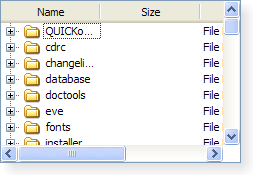
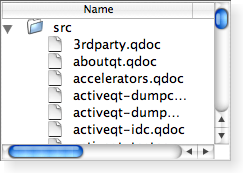
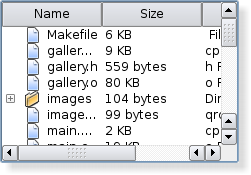
| A Windows XP style tree view. | A Macintosh style tree view. | A Plastique style tree view. |
It is possible to give the view hints about the data it is handling in order to improve its performance when displaying large numbers of items. One approach that can be taken for views that are intended to display items with equal heights is to set the PySide.QtGui.QTreeView.uniformRowHeights() property to true.
| 参数: | parent – PySide.QtGui.QWidget |
|---|
构造树视图采用 parent 来表示模型数据。使用 PySide.QtGui.QTreeView.setModel() to set the model.
| 返回类型: | PySide.QtCore.bool |
|---|
This property holds whether items should show keyboard focus using all columns.
If this property is true all columns will show focus, otherwise only one column will show focus.
默认为 false。
| 返回类型: | PySide.QtCore.int |
|---|
This property holds The delay time before items in a tree are opened during a drag and drop operation..
This property holds the amount of time in milliseconds that the user must wait over a node before that node will automatically open or close. If the time is set to less then 0 then it will not be activated.
By default, this property has a value of -1, meaning that auto-expansion is disabled.
| 参数: | index – PySide.QtCore.QModelIndex |
|---|
折叠的模型项指定通过 index .
折叠所有展开项。
| 参数: | index – PySide.QtCore.QModelIndex |
|---|
| 参数: | x – PySide.QtCore.int |
|---|---|
| 返回类型: | PySide.QtCore.int |
Returns the column in the tree view whose header covers the x coordinate given.
| 参数: |
|
|---|
Informs the tree view that the number of columns in the tree view has changed from oldCount to newCount .
This slot is called whenever a column has been moved.
| 参数: |
|
|---|
This function is called whenever column ‘s size is changed in the header. oldSize and newSize give the previous size and the new size in pixels.
| 参数: | column – PySide.QtCore.int |
|---|---|
| 返回类型: | PySide.QtCore.int |
Returns the horizontal position of the column in the viewport.
| 参数: | column – PySide.QtCore.int |
|---|---|
| 返回类型: | PySide.QtCore.int |
返回宽度为 column .
| 参数: |
|
|---|
Draws the branches in the tree view on the same row as the model item index ,使用 painter given. The branches are drawn in the rectangle specified by rect .
| 参数: |
|
|---|
Draws the row in the tree view that contains the model item index ,使用 painter given. The option control how the item is displayed.
| 参数: |
|
|---|
Draws the part of the tree intersecting the given region 使用指定 painter .
另请参阅
PySide.QtGui.QTreeView.paintEvent()
| 参数: | index – PySide.QtCore.QModelIndex |
|---|
Expands the model item specified by the index .
展开所有可展开项。
Warning: if the model contains a large number of items, this function will take some time to execute.
| 参数: | depth – PySide.QtCore.int |
|---|
展开所有可展开项到给定 depth .
| 参数: | index – PySide.QtCore.QModelIndex |
|---|
| 返回类型: | PySide.QtCore.bool |
|---|
This property holds whether the items can be expanded by double-clicking..
This property holds whether the user can expand and collapse items by double-clicking. The default value is true.
| 返回类型: | PySide.QtGui.QHeaderView |
|---|
返回用于树视图的 Header 头。
另请参阅
PySide.QtGui.QTreeView.setHeader() QAbstractItemModel.headerData()
| 参数: | column – PySide.QtCore.int |
|---|
隐藏 column 给定。
注意
This function should only be called after the model has been initialized, as the view needs to know the number of columns in order to hide column .
| 返回类型: | PySide.QtCore.int |
|---|
This property holds indentation of the items in the tree view..
此特性保持树视图每级项的缩进度量 (以像素为单位)。对于顶层项,缩进指定从视口边缘到第一列项的水平距离;对于子级项,它指定其父项的缩进。
By default, this property has a value of 20.
| 参数: | index – PySide.QtCore.QModelIndex |
|---|---|
| 返回类型: | PySide.QtCore.QModelIndex |
Returns the model index of the item above index .
| 参数: | index – PySide.QtCore.QModelIndex |
|---|---|
| 返回类型: | PySide.QtCore.QModelIndex |
Returns the model index of the item below index .
| 参数: | index – PySide.QtCore.QModelIndex |
|---|---|
| 返回类型: | PySide.QtCore.int |
Returns the size hint for the row indicated by index .
另请参阅
PySide.QtGui.QTreeView.sizeHintForColumn() PySide.QtGui.QTreeView.uniformRowHeights()
| 返回类型: | PySide.QtCore.bool |
|---|
This property holds whether animations are enabled.
If this property is true the treeview will animate expandsion and collasping of branches. If this property is false, the treeview will expand or collapse branches immediately without showing the animation.
默认情况下,此特性为 false。
| 参数: | column – PySide.QtCore.int |
|---|---|
| 返回类型: | PySide.QtCore.bool |
返回 true 若 column is hidden; otherwise returns false.
| 参数: | index – PySide.QtCore.QModelIndex |
|---|---|
| 返回类型: | PySide.QtCore.bool |
Returns true if the model item index 被展开;否则返回 false。
| 参数: |
|
|---|---|
| 返回类型: |
PySide.QtCore.bool |
Returns true if the item in first column in the given row 的 parent is spanning all the columns; otherwise returns false.
| 返回类型: | PySide.QtCore.bool |
|---|
This property holds whether the header is shown or not..
If this property is true, the header is not shown otherwise it is. The default value is false.
| 参数: |
|
|---|---|
| 返回类型: |
PySide.QtCore.bool |
Returns true if the item in the given row 的 parent is hidden; otherwise returns false.
| 返回类型: | PySide.QtCore.bool |
|---|
This property holds whether sorting is enabled.
If this property is true, sorting is enabled for the tree; if the property is false, sorting is not enabled. The default value is false.
注意
In order to avoid performance issues, it is recommended that sorting is enabled after inserting the items into the tree. Alternatively, you could also insert the items into a list before inserting the items into the tree.
| 返回类型: | PySide.QtCore.bool |
|---|
This property holds whether the items are expandable by the user..
此特性保持用户是否可以交互展开和折叠项。
默认情况下,此特性为 true。
| 参数: | column – PySide.QtCore.int |
|---|
重置尺寸 column given to the size of its contents.
| 返回类型: | PySide.QtCore.bool |
|---|
This property holds whether to show controls for expanding and collapsing top-level items.
Items with children are typically shown with controls to expand and collapse them, allowing their children to be shown or hidden. If this property is false, these controls are not shown for top-level items. This can be used to make a single level tree structure appear like a simple list of items.
默认情况下,此特性为 true。
| 参数: | index – PySide.QtCore.QModelIndex |
|---|---|
| 返回类型: | PySide.QtCore.int |
返回指示行的高度通过给定 index .
| 参数: |
|
|---|
Informs the view that the rows from the start row to the end row inclusive have been removed from the given parent model item.
| 参数: | enable – PySide.QtCore.bool |
|---|
This property holds whether items should show keyboard focus using all columns.
If this property is true all columns will show focus, otherwise only one column will show focus.
默认为 false。
| 参数: | enable – PySide.QtCore.bool |
|---|
This property holds whether animations are enabled.
If this property is true the treeview will animate expandsion and collasping of branches. If this property is false, the treeview will expand or collapse branches immediately without showing the animation.
默认情况下,此特性为 false。
| 参数: | delay – PySide.QtCore.int |
|---|
This property holds The delay time before items in a tree are opened during a drag and drop operation..
This property holds the amount of time in milliseconds that the user must wait over a node before that node will automatically open or close. If the time is set to less then 0 then it will not be activated.
By default, this property has a value of -1, meaning that auto-expansion is disabled.
| 参数: |
|
|---|
若 hide 为 true column 被隐藏,否则 column 被展示。
| 参数: |
|
|---|
设置宽度为给定 column 到 width 指定。
| 参数: |
|
|---|
Sets the item referred to by index to either collapse or expanded, depending on the value of expanded .
| 参数: | enable – PySide.QtCore.bool |
|---|
This property holds whether the items can be expanded by double-clicking..
This property holds whether the user can expand and collapse items by double-clicking. The default value is true.
| 参数: |
|
|---|
若 span is true the item in the first column in the row 采用给定 parent is set to span all columns, otherwise all items on the row are shown.
| 参数: | header – PySide.QtGui.QHeaderView |
|---|
Sets the header for the tree view, to the given header .
The view takes ownership over the given header and deletes it when a new header is set.
另请参阅
QAbstractItemModel.headerData()
| 参数: | hide – PySide.QtCore.bool |
|---|
This property holds whether the header is shown or not..
If this property is true, the header is not shown otherwise it is. The default value is false.
| 参数: | i – PySide.QtCore.int |
|---|
This property holds indentation of the items in the tree view..
此特性保持树视图每级项的缩进度量 (以像素为单位)。对于顶层项,缩进指定从视口边缘到第一列项的水平距离;对于子级项,它指定其父项的缩进。
By default, this property has a value of 20.
| 参数: | enable – PySide.QtCore.bool |
|---|
This property holds whether the items are expandable by the user..
此特性保持用户是否可以交互展开和折叠项。
默认情况下,此特性为 true。
| 参数: | show – PySide.QtCore.bool |
|---|
This property holds whether to show controls for expanding and collapsing top-level items.
Items with children are typically shown with controls to expand and collapse them, allowing their children to be shown or hidden. If this property is false, these controls are not shown for top-level items. This can be used to make a single level tree structure appear like a simple list of items.
默认情况下,此特性为 true。
| 参数: |
|
|---|
若 hide 为 true row 采用给定 parent 被隐藏,否则 row 被展示。
| 参数: | enable – PySide.QtCore.bool |
|---|
This property holds whether sorting is enabled.
If this property is true, sorting is enabled for the tree; if the property is false, sorting is not enabled. The default value is false.
注意
In order to avoid performance issues, it is recommended that sorting is enabled after inserting the items into the tree. Alternatively, you could also insert the items into a list before inserting the items into the tree.
| 参数: | uniform – PySide.QtCore.bool |
|---|
This property holds whether all items in the treeview have the same height.
This property should only be set to true if it is guaranteed that all items in the view has the same height. This enables the view to do some optimizations.
The height is obtained from the first item in the view. It is updated when the data changes on that item.
默认情况下,此特性为 false。
| 参数: | on – PySide.QtCore.bool |
|---|
This property holds the item text word-wrapping policy.
If this property is true then the item text is wrapped where necessary at word-breaks; otherwise it is not wrapped at all. This property is false by default.
Note that even if wrapping is enabled, the cell will not be expanded to fit all text. Ellipsis will be inserted according to the current PySide.QtGui.QAbstractItemView.textElideMode() .
| 参数: | column – PySide.QtCore.int |
|---|
展示给定 column 在树视图。
| 参数: |
|
|---|
| 返回类型: | PySide.QtCore.bool |
|---|
This property holds whether all items in the treeview have the same height.
This property should only be set to true if it is guaranteed that all items in the view has the same height. This enables the view to do some optimizations.
The height is obtained from the first item in the view. It is updated when the data changes on that item.
默认情况下,此特性为 false。
| 参数: | index – PySide.QtCore.QModelIndex |
|---|---|
| 返回类型: | PySide.QtCore.int |
| 返回类型: | PySide.QtCore.bool |
|---|
This property holds the item text word-wrapping policy.
If this property is true then the item text is wrapped where necessary at word-breaks; otherwise it is not wrapped at all. This property is false by default.
Note that even if wrapping is enabled, the cell will not be expanded to fit all text. Ellipsis will be inserted according to the current PySide.QtGui.QAbstractItemView.textElideMode() .

