PySide.QtGui.QDesktopWidget 类提供对多头系统屏幕信息的访问。
具有多个图形卡和显示器的系统,可以管理作为多个桌面或大型虚拟桌面的可用物理屏幕空间。
此类提供有关用户桌面的信息,如总尺寸、屏幕数、每个屏幕的几何体及把它们配置成单独桌面或单个虚拟桌面。
由 Qt 提供的 Widget 使用此类把工具提示、菜单及对话框放置在其父级 (或应用程序 Widget) 的正确屏幕上。应用程序可以使用此类,以获得可用于保存窗口位置的信息,或在一特定屏幕上放置子级 Widget 和对话框。
QApplication.desktop() function is used to get an instance of PySide.QtGui.QDesktopWidget .
Widget 的 PySide.QtGui.QDesktopWidget.screenGeometry() function provides information about the geometry of the available screens with. The number of screens available is returned by PySide.QtGui.QDesktopWidget.screenCount() ,和 PySide.QtGui.QDesktopWidget.screenCountChanged() signal is emitted when screens are added or removed. The screen number that a particular point or widget is located in is returned by PySide.QtGui.QDesktopWidget.screenNumber() .
要获得特定屏幕的尺度,调用 PySide.QtGui.QDesktopWidget.screenGeometry() function. On some desktop environments, not all of the screen is available for applications to use; for example, an application dock or menu bar may take up some space. Use the PySide.QtGui.QDesktopWidget.availableGeometry() function to obtain the available area for applications.
PySide.QtGui.QDesktopWidget also inherits the PySide.QtGui.QWidget 特性, PySide.QtGui.QWidget.width() and PySide.QtGui.QWidget.height() , which specify the size of the desktop. However, for desktops with multiple screens, the size of the desktop is the union of all the screen sizes, so PySide.QtGui.QWidget.width() and PySide.QtGui.QWidget.height() should not 用于计算,要被放置在某一屏幕上的 Widget 尺寸。
在将可用屏幕配置成单个大型虚拟桌面的系统中, virtualDesktop() 特性会被设为 true。在这种情况下,Widget 的尺寸通常是所有屏幕的边界矩形尺寸。
对于应用程序,主 Widget 所在的屏幕是首要屏幕。这被存储在 PySide.QtGui.QDesktopWidget.primaryScreen() 特性。打开于应用程序上下文的所有窗口,都应该被约束到首要屏幕边界;例如:它会很不方便,若对话框在不同屏幕中弹出,或分割于 2 屏幕上。
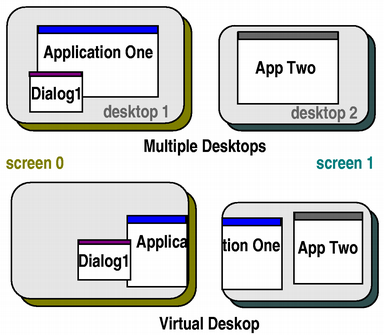
上图中,Application One 的首要屏幕是 screen 0,App Two 的首要屏幕是 screen 1。
另请参阅
PySide.QtGui.QApplication QApplication.desktop() QX11Info.appRootWindow()
Creates the desktop widget.
If the system supports a virtual desktop, this widget will have the size of the virtual desktop; otherwise this widget will have the size of the primary screen.
Instead of using PySide.QtGui.QDesktopWidget directly, use QApplication.desktop() .
| 参数: | widget – PySide.QtGui.QWidget |
|---|---|
| 返回类型: | PySide.QtCore.QRect |
这是重载函数。
返回屏幕的可用几何体,其包含 widget .
| 参数: | screen – PySide.QtCore.int |
|---|---|
| 返回类型: | PySide.QtCore.QRect |
Returns the available geometry of the screen with index screen . What is available will be subrect of PySide.QtGui.QDesktopWidget.screenGeometry() based on what the platform decides is available (for example excludes the dock and menu bar on Mac OS X, or the task bar on Windows). The default screen is used if screen is -1.
注意
In Symbian devices the available geometry reported by PySide.QtGui.QDesktopWidget is not guaranteed to be correct at the time the geometry change resize event is passed to widgets. The correct way to listen for available geometry changes is to connect to the PySide.QtGui.QDesktopWidget.workAreaResized() signal of PySide.QtGui.QDesktopWidget .
| 参数: | point – PySide.QtCore.QPoint |
|---|---|
| 返回类型: | PySide.QtCore.QRect |
这是重载函数。
返回屏幕的可用几何体,其包含 p .
| 返回类型: | PySide.QtCore.bool |
|---|
This property holds if the system manages the available screens in a virtual desktop..
For virtual desktops, PySide.QtGui.QDesktopWidget.screen() will always return the same widget. The size of the virtual desktop is the size of this desktop widget.
| 返回类型: | PySide.QtCore.int |
|---|
返回可用屏幕的编号。
This function is deprecated. Use PySide.QtGui.QDesktopWidget.screenCount() 代替。
| 返回类型: | PySide.QtCore.int |
|---|
This property holds the index of the screen that is configured to be the primary screen on the system..
| 参数: | arg__1 – PySide.QtCore.int |
|---|
| 参数: | screen – PySide.QtCore.int |
|---|---|
| 返回类型: | PySide.QtGui.QWidget |
Returns a widget that represents the screen with index screen (a value of -1 means the default screen).
If the system uses a virtual desktop, the returned widget will have the geometry of the entire virtual desktop; i.e., bounding every screen .
另请参阅
PySide.QtGui.QDesktopWidget.primaryScreen() PySide.QtGui.QDesktopWidget.screenCount() virtualDesktop()
| 返回类型: | PySide.QtCore.int |
|---|
This property holds the number of screens currently available on the system..
| 参数: | arg__1 – PySide.QtCore.int |
|---|
| 参数: | point – PySide.QtCore.QPoint |
|---|---|
| 返回类型: | PySide.QtCore.QRect |
这是重载函数。
返回屏幕的几何体,其包含 p .
| 参数: | widget – PySide.QtGui.QWidget |
|---|---|
| 返回类型: | PySide.QtCore.QRect |
这是重载函数。
返回屏幕的几何体,其包含 widget .
| 参数: | screen – PySide.QtCore.int |
|---|---|
| 返回类型: | PySide.QtCore.QRect |
Returns the geometry of the screen with index screen . The default screen is used if screen is -1.
注意
In Symbian devices the screen geometry reported by PySide.QtGui.QDesktopWidget is not guaranteed to be correct at the time the geometry change resize event is passed to widgets. The correct way to listen for screen geometry changes is to connect to the PySide.QtGui.QDesktopWidget.resized() signal of PySide.QtGui.QDesktopWidget .
| 参数: | widget – PySide.QtGui.QWidget |
|---|---|
| 返回类型: | PySide.QtCore.int |
返回屏幕的索引,包含最大部分的 widget ,或 -1 若 Widget 不在屏幕上。
| 参数: | arg__1 – PySide.QtCore.QPoint |
|---|---|
| 返回类型: | PySide.QtCore.int |
这是重载函数。
Returns the index of the screen that contains the point , or the screen which is the shortest distance from the point .
| 参数: | arg__1 – PySide.QtCore.int |
|---|

