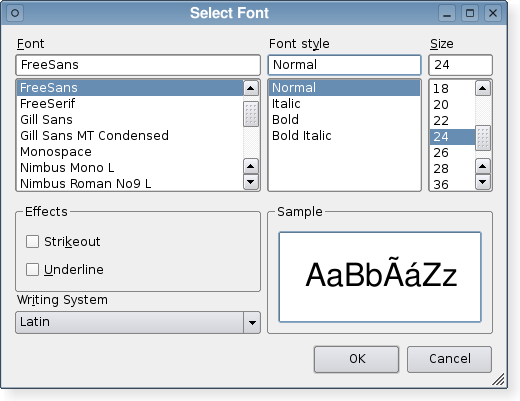
PySide.QtGui.QFontDialog class provides a dialog widget for selecting a font.
字体对话框的创建是透过某一静态 PySide.QtGui.QFontDialog.getFont() 函数。
范例:
(ok, font) = QFontDialog.getFont(QFont("Helvetica [Cronyx]", 10), self)
if ok:
    # the user clicked OK and font is set to the font the user selected
else:
    # the user canceled the dialog; font is set to the initial
    # value, in this case Helvetica [Cronyx], 10
The dialog can also be used to set a widget's font directly:
myWidget.setFont(QFontDialog.getFont(0, myWidget.font()))
If the user clicks OK the font they chose will be used for myWidget, and if they click Cancel the original font is used.
| 参数: |
|
|---|
Constructs a standard font dialog.
使用 PySide.QtGui.QFontDialog.setCurrentFont() to set the initial font attributes.
parent parameter is passed to the PySide.QtGui.QDialog 构造函数。
Constructs a standard font dialog with the given parent and specified initial font.
This enum specifies various options that affect the look and feel of a font dialog.
| 常量 | 描述 |
|---|---|
| QFontDialog.NoButtons | Don't display OK and Cancel buttons. (Useful for “live dialogs”.) |
| QFontDialog.DontUseNativeDialog | Use Qt's standard font dialog on the Mac instead of Apple's native font panel. (Currently, the native dialog is never used, but this is likely to change in future Qt releases.) |
| 返回类型: | PySide.QtGui.QFont |
|---|
This property holds the current font of the dialog..
| 参数: | font – PySide.QtGui.QFont |
|---|
| 参数: | font – PySide.QtGui.QFont |
|---|
| 参数: |
|
|---|---|
| 返回类型: |
PyTuple |
| 参数: |
|
|---|---|
| 返回类型: |
PyTuple |
这是重载函数。
| 参数: |
|
|---|---|
| 返回类型: |
PyTuple |
这是重载函数。
| 参数: | parent – PySide.QtGui.QWidget |
|---|---|
| 返回类型: | PyTuple |
这是重载函数。
执行模态字体对话框并返回字体。
If the user clicks OK , the selected font is returned. If the user clicks Cancel , the Qt default font is returned.
The dialog is constructed with the given parent 。若 ok parameter is not-null, the value it refers to is set to true if the user clicks OK , and false if the user clicks Cancel .
范例:
(ok, font) = QFontDialog.getFont(self)
if ok:
    # font is set to the font the user selected
else:
    # the user canceled the dialog; font is set to the default
    # application font, QApplication.font()
警告
Do not delete parent during the execution of the dialog. If you want to do this, you should create the dialog yourself using one of the PySide.QtGui.QFontDialog 构造函数。
| 参数: |
|
|---|
这是重载函数。
打开对话框并连接其 PySide.QtGui.QFontDialog.fontSelected() signal to the slot specified by receiver and member .
信号将断开槽连接,当对话框被关闭时。
| 返回类型: | PySide.QtGui.QFontDialog.FontDialogOptions |
|---|
This property holds the various options that affect the look and feel of the dialog.
默认情况下,所有选项是被禁用的。
Options should be set before showing the dialog. Setting them while the dialog is visible is not guaranteed to have an immediate effect on the dialog (depending on the option and on the platform).
| 返回类型: | PySide.QtGui.QFont |
|---|
Returns the font that the user selected by clicking the OK or equivalent button.
注意
This font is not always the same as the font held by the PySide.QtGui.QFontDialog.currentFont() property since the user can choose different fonts before finally selecting the one to use.
| 参数: | font – PySide.QtGui.QFont |
|---|
This property holds the current font of the dialog..
| 参数: |
|
|---|
设置给定 option to be enabled if on is true; otherwise, clears the given option .
| 参数: | options – PySide.QtGui.QFontDialog.FontDialogOptions |
|---|
This property holds the various options that affect the look and feel of the dialog.
默认情况下,所有选项是被禁用的。
Options should be set before showing the dialog. Setting them while the dialog is visible is not guaranteed to have an immediate effect on the dialog (depending on the option and on the platform).
| 参数: | option – PySide.QtGui.QFontDialog.FontDialogOption |
|---|---|
| 返回类型: | PySide.QtCore.bool |
Returns true if the given option 被启用;否则,返回 false。

