PySide.QtGui.QColorDialog class provides a dialog widget for specifying colors.
The color dialog's function is to allow users to choose colors. For example, you might use this in a drawing program to allow the user to set the brush color.
The static functions provide modal color dialogs.
静态 PySide.QtGui.QColorDialog.getColor() function shows the dialog, and allows the user to specify a color. This function can also be used to let users choose a color with a level of transparency: pass the ShowAlphaChannel option as an additional argument.
The user can store PySide.QtGui.QColorDialog.customCount() different custom colors. The custom colors are shared by all color dialogs, and remembered during the execution of the program. Use PySide.QtGui.QColorDialog.setCustomColor() to set the custom colors, and use PySide.QtGui.QColorDialog.customColor() to get them.
标准对话框 example shows how to use PySide.QtGui.QColorDialog as well as other built-in Qt dialogs.
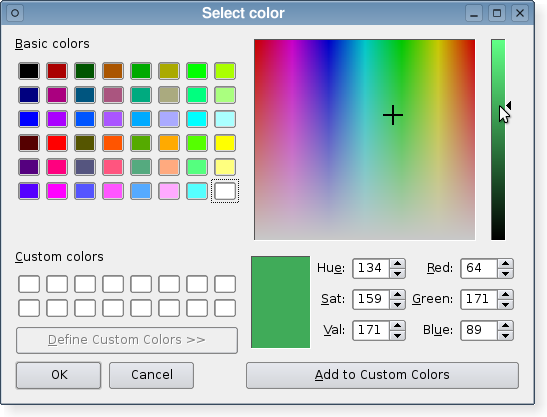
| 参数: |
|
|---|
Constructs a color dialog with the given parent .
Constructs a color dialog with the given parent and specified initial 颜色。
This enum specifies various options that affect the look and feel of a color dialog.
| 常量 | 描述 |
|---|---|
| QColorDialog.ShowAlphaChannel | Allow the user to select the alpha component of a color. |
| QColorDialog.NoButtons | Don't display OK and Cancel buttons. (Useful for “live dialogs”.) |
| QColorDialog.DontUseNativeDialog | Use Qt's standard color dialog on the Mac instead of Apple's native color panel. |
| 参数: | color – PySide.QtGui.QColor |
|---|
| 返回类型: | PySide.QtGui.QColor |
|---|
This property holds the currently selected color in the dialog.
| 参数: | color – PySide.QtGui.QColor |
|---|
| 参数: | index – PySide.QtCore.int |
|---|---|
| 返回类型: | long |
Returns the custom color at the given index 作为 QRgb 值。
| 返回类型: | PySide.QtCore.int |
|---|
Returns the number of custom colors supported by PySide.QtGui.QColorDialog . All color dialogs share the same custom colors.
| 参数: |
|
|---|---|
| 返回类型: |
| 参数: |
|
|---|---|
| 返回类型: |
Pops up a modal color dialog, lets the user choose a color, and returns that color. The color is initially set to initial . The dialog is a child of parent . It returns an invalid (see QColor.isValid() ) color if the user cancels the dialog.
On Symbian, this static function will use the native color dialog and not a PySide.QtGui.QColorDialog .
| 参数: |
|
|---|
这是重载函数。
打开对话框并连接其 PySide.QtGui.QColorDialog.colorSelected() signal to the slot specified by receiver and member .
信号将断开槽连接,当对话框被关闭时。
| 返回类型: | PySide.QtGui.QColorDialog.ColorDialogOptions |
|---|
This property holds the various options that affect the look and feel of the dialog.
默认情况下,所有选项是被禁用的。
Options should be set before showing the dialog. Setting them while the dialog is visible is not guaranteed to have an immediate effect on the dialog (depending on the option and on the platform).
| 返回类型: | PySide.QtGui.QColor |
|---|
Returns the color that the user selected by clicking the OK or equivalent button.
注意
This color is not always the same as the color held by the PySide.QtGui.QColorDialog.currentColor() property since the user can choose different colors before finally selecting the one to use.
| 参数: | color – PySide.QtGui.QColor |
|---|
| 参数: |
|
|---|
| 参数: |
|
|---|
设置给定 option to be enabled if on is true; otherwise, clears the given option .
| 参数: | options – PySide.QtGui.QColorDialog.ColorDialogOptions |
|---|
This property holds the various options that affect the look and feel of the dialog.
默认情况下,所有选项是被禁用的。
Options should be set before showing the dialog. Setting them while the dialog is visible is not guaranteed to have an immediate effect on the dialog (depending on the option and on the platform).
| 参数: |
|
|---|
| 参数: | option – PySide.QtGui.QColorDialog.ColorDialogOption |
|---|---|
| 返回类型: | PySide.QtCore.bool |
Returns true if the given option 被启用;否则,返回 false。

