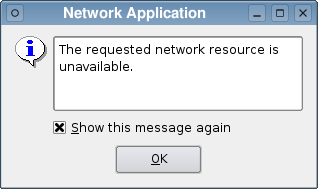
PySide.QtGui.QErrorMessage class provides an error message display dialog.
An error message widget consists of a text label and a checkbox. The checkbox lets the user control whether the same error message will be displayed again in the future, typically displaying the text, “Show this message again” translated into the appropriate local language.
For production applications, the class can be used to display messages which the user only needs to see once. To use PySide.QtGui.QErrorMessage like this, you create the dialog in the usual way, and show it by calling the PySide.QtGui.QErrorMessage.showMessage() slot or connecting signals to it.
静态 PySide.QtGui.QErrorMessage.qtHandler() function installs a message handler using qInstallMsgHandler() and creates a PySide.QtGui.QErrorMessage that displays qDebug() , qWarning() and qFatal() messages. This is most useful in environments where no console is available to display warnings and error messages.
In both cases PySide.QtGui.QErrorMessage will queue pending messages and display them in order, with each new message being shown as soon as the user has accepted the previous message. Once the user has specified that a message is not to be shown again it is automatically skipped, and the dialog will show the next appropriate message in the queue.
标准对话框 example shows how to use PySide.QtGui.QErrorMessage as well as other built-in Qt dialogs.
另请参阅
| 参数: | parent – PySide.QtGui.QWidget |
|---|
Constructs and installs an error handler window with the given parent .
| 返回类型: | PySide.QtGui.QErrorMessage |
|---|
返回指针指向 PySide.QtGui.QErrorMessage object that outputs the default Qt messages. This function creates such an object, if there isn't one already.
| 参数: | message – unicode |
|---|
Shows the given message, message , and returns immediately. If the user has requested for the message not to be shown again, this function does nothing.
Normally, the message is displayed immediately. However, if there are pending messages, it will be queued to be displayed later.
| 参数: |
|
|---|
这是重载函数。
Shows the given message, message , and returns immediately. If the user has requested for messages of type, type , not to be shown again, this function does nothing.
Normally, the message is displayed immediately. However, if there are pending messages, it will be queued to be displayed later.

