• PySide 模块
  • PySide.QtGui
  • 内容表

    上一话题

    QMessageBox

    下一话题

    QErrorMessage

    QInputDialog

    概要

    静态函数

    • def getDouble (parent, title, label[, value=0[, minValue=-2147483647[, maxValue=2147483647[, decimals=1[, flags=0]]]]])
    • def getInt (parent, title, label[, value=0[, minValue=-2147483647[, maxValue=2147483647[, step=1[, flags=0]]]]])
    • def getInteger (parent, title, label[, value=0[, minValue=-2147483647[, maxValue=2147483647[, step=1[, flags=0]]]]])
    • def getItem (parent, title, label, items, current, editable, ok, flags, inputMethodHints)
    • def getItem (parent, title, label, items[, current=0[, editable=true[, flags=0]]])
    • def getText (parent, title, label, echo, text, ok, flags, inputMethodHints)
    • def getText (parent, title, label[, echo=QLineEdit.Normal[, text=”“[, flags=0]]])

    详细描述

    PySide.QtGui.QInputDialog class provides a simple convenience dialog to get a single value from the user.

    The input value can be a string, a number or an item from a list. A label must be set to tell the user what they should enter.

    Four static convenience functions are provided: PySide.QtGui.QInputDialog.getText() , PySide.QtGui.QInputDialog.getInt() , PySide.QtGui.QInputDialog.getDouble() ,和 PySide.QtGui.QInputDialog.getItem() . All the functions can be used in a similar way, for example:

    text = QInputDialog::getText(self, self.tr("QInputDialog().getText()"),
                                         self.tr("User name:"), QLineEdit.Normal,
                                         QDir().home().dirName(), ok)
    if ok and text:
        textLabel.setText(text)
    									

    ok variable is set to true if the user clicks OK ; otherwise it is set to false.
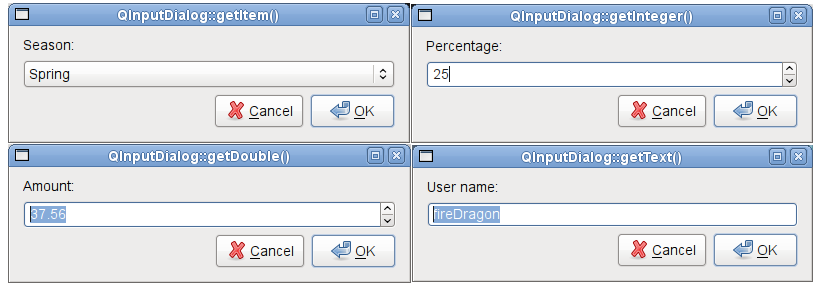
    ../../_images/inputdialogs.png

    标准对话框 example shows how to use PySide.QtGui.QInputDialog as well as other built-in Qt dialogs.

    另请参阅

    PySide.QtGui.QMessageBox 标准对话框范例

    class PySide.QtGui. QInputDialog ( [ parent=None [ , flags=0 ] ] )
    参数:
    PySide.QtGui.QInputDialog. InputMode

    This enum describes the different modes of input that can be selected for the dialog.

    常量 描述
    QInputDialog.TextInput Used to input text strings.
    QInputDialog.IntInput Used to input integers.
    QInputDialog.DoubleInput Used to input floating point numbers with double precision accuracy.
    PySide.QtGui.QInputDialog. InputDialogOption

    This enum specifies various options that affect the look and feel of an input dialog.

    常量 描述
    QInputDialog.NoButtons Don't display OK and Cancel buttons. (Useful for “live dialogs”.)
    QInputDialog.UseListViewForComboBoxItems Use a PySide.QtGui.QListView rather than a non-editable PySide.QtGui.QComboBox for displaying the items set with PySide.QtGui.QInputDialog.setComboBoxItems() .
    PySide.QtGui.QInputDialog. cancelButtonText ( )
    返回类型: unicode
    PySide.QtGui.QInputDialog. comboBoxItems ( )
    返回类型: 字符串列表
    PySide.QtGui.QInputDialog. doubleDecimals ( )
    返回类型: PySide.QtCore.int
    PySide.QtGui.QInputDialog. doubleMaximum ( )
    返回类型: PySide.QtCore.double
    PySide.QtGui.QInputDialog. doubleMinimum ( )
    返回类型: PySide.QtCore.double
    PySide.QtGui.QInputDialog. doubleValue ( )
    返回类型: PySide.QtCore.double
    PySide.QtGui.QInputDialog. doubleValueChanged ( value )
    参数: value PySide.QtCore.double
    PySide.QtGui.QInputDialog. doubleValueSelected ( value )
    参数: value PySide.QtCore.double
    static PySide.QtGui.QInputDialog. getDouble ( parent , title , label [ , value=0 [ , minValue=-2147483647 [ , maxValue=2147483647 [ , decimals=1 [ , flags=0 ] ] ] ] ] )
    参数:
    • parent PySide.QtGui.QWidget
    • title – unicode
    • label – unicode
    • value PySide.QtCore.double
    • minValue PySide.QtCore.double
    • maxValue PySide.QtCore.double
    • decimals PySide.QtCore.int
    • flags PySide.QtCore.Qt.WindowFlags
    返回类型:

    PySide.QtCore.double

    static PySide.QtGui.QInputDialog. getInt ( parent , title , label [ , value=0 [ , minValue=-2147483647 [ , maxValue=2147483647 [ , step=1 [ , flags=0 ] ] ] ] ] )
    参数:
    • parent PySide.QtGui.QWidget
    • title – unicode
    • label – unicode
    • value PySide.QtCore.int
    • minValue PySide.QtCore.int
    • maxValue PySide.QtCore.int
    • step PySide.QtCore.int
    • flags PySide.QtCore.Qt.WindowFlags
    返回类型:

    PySide.QtCore.int

    static PySide.QtGui.QInputDialog. getInteger ( parent , title , label [ , value=0 [ , minValue=-2147483647 [ , maxValue=2147483647 [ , step=1 [ , flags=0 ] ] ] ] ] )
    参数:
    • parent PySide.QtGui.QWidget
    • title – unicode
    • label – unicode
    • value PySide.QtCore.int
    • minValue PySide.QtCore.int
    • maxValue PySide.QtCore.int
    • step PySide.QtCore.int
    • flags PySide.QtCore.Qt.WindowFlags
    返回类型:

    PySide.QtCore.int

    static PySide.QtGui.QInputDialog. getItem ( parent , title , label , items , current , editable , ok , flags , inputMethodHints )
    参数:
    • parent PySide.QtGui.QWidget
    • title – unicode
    • label – unicode
    • items – list of strings
    • current PySide.QtCore.int
    • editable PySide.QtCore.bool
    • ok PySide.QtCore.bool
    • flags PySide.QtCore.Qt.WindowFlags
    • inputMethodHints PySide.QtCore.Qt.InputMethodHints
    返回类型:

    unicode

    static PySide.QtGui.QInputDialog. getItem ( parent , title , label , items [ , current=0 [ , editable=true [ , flags=0 ] ] ] )
    参数:
    • parent PySide.QtGui.QWidget
    • title – unicode
    • label – unicode
    • items – list of strings
    • current PySide.QtCore.int
    • editable PySide.QtCore.bool
    • flags PySide.QtCore.Qt.WindowFlags
    返回类型:

    unicode

    static PySide.QtGui.QInputDialog. getText ( parent , title , label [ , echo=QLineEdit.Normal [ , text="" [ , flags=0 ] ] ] )
    参数:
    返回类型:

    unicode

    static PySide.QtGui.QInputDialog. getText ( parent , title , label , echo , text , ok , flags , inputMethodHints )
    参数:
    返回类型:

    unicode

    PySide.QtGui.QInputDialog. inputMode ( )
    返回类型: PySide.QtGui.QInputDialog.InputMode
    PySide.QtGui.QInputDialog. intMaximum ( )
    返回类型: PySide.QtCore.int
    PySide.QtGui.QInputDialog. intMinimum ( )
    返回类型: PySide.QtCore.int
    PySide.QtGui.QInputDialog. intStep ( )
    返回类型: PySide.QtCore.int
    PySide.QtGui.QInputDialog. intValue ( )
    返回类型: PySide.QtCore.int
    PySide.QtGui.QInputDialog. intValueChanged ( value )
    参数: value PySide.QtCore.int
    PySide.QtGui.QInputDialog. intValueSelected ( value )
    参数: value PySide.QtCore.int
    PySide.QtGui.QInputDialog. isComboBoxEditable ( )
    返回类型: PySide.QtCore.bool
    PySide.QtGui.QInputDialog. labelText ( )
    返回类型: unicode
    PySide.QtGui.QInputDialog. okButtonText ( )
    返回类型: unicode
    PySide.QtGui.QInputDialog. open ( receiver , member )
    参数:

    这是重载函数。

    This function connects one of its signals to the slot specified by receiver and member . The specific signal depends on the arguments that are specified in member . These are:

    信号将断开槽连接,当对话框被关闭时。

    PySide.QtGui.QInputDialog. setCancelButtonText ( text )
    参数: text – unicode
    PySide.QtGui.QInputDialog. setComboBoxEditable ( editable )
    参数: editable PySide.QtCore.bool
    PySide.QtGui.QInputDialog. setComboBoxItems ( items )
    参数: items – list of strings
    PySide.QtGui.QInputDialog. setDoubleDecimals ( decimals )
    参数: decimals PySide.QtCore.int
    PySide.QtGui.QInputDialog. setDoubleMaximum ( max )
    参数: max PySide.QtCore.double
    PySide.QtGui.QInputDialog. setDoubleMinimum ( min )
    参数: min PySide.QtCore.double
    PySide.QtGui.QInputDialog. setDoubleRange ( min , max )
    参数:
    • min PySide.QtCore.double
    • max PySide.QtCore.double

    Sets the range of double precision floating point values accepted by the dialog when used in DoubleInput mode, with minimum and maximum values specified by min and max 分别。

    PySide.QtGui.QInputDialog. setDoubleValue ( value )
    参数: value PySide.QtCore.double
    PySide.QtGui.QInputDialog. setInputMode ( mode )
    参数: mode PySide.QtGui.QInputDialog.InputMode
    PySide.QtGui.QInputDialog. setIntMaximum ( max )
    参数: max PySide.QtCore.int
    PySide.QtGui.QInputDialog. setIntMinimum ( min )
    参数: min PySide.QtCore.int
    PySide.QtGui.QInputDialog. setIntRange ( min , max )
    参数:
    • min PySide.QtCore.int
    • max PySide.QtCore.int

    Sets the range of integer values accepted by the dialog when used in IntInput mode, with minimum and maximum values specified by min and max 分别。

    PySide.QtGui.QInputDialog. setIntStep ( step )
    参数: step PySide.QtCore.int
    PySide.QtGui.QInputDialog. setIntValue ( value )
    参数: value PySide.QtCore.int
    PySide.QtGui.QInputDialog. setLabelText ( text )
    参数: text – unicode
    PySide.QtGui.QInputDialog. setOkButtonText ( text )
    参数: text – unicode
    PySide.QtGui.QInputDialog. setOption ( option [ , on=true ] )
    参数:

    设置给定 option to be enabled if on is true; otherwise, clears the given option .

    PySide.QtGui.QInputDialog. setTextEchoMode ( mode )
    参数: mode PySide.QtGui.QLineEdit.EchoMode
    PySide.QtGui.QInputDialog. setTextValue ( text )
    参数: text – unicode
    PySide.QtGui.QInputDialog. testOption ( option )
    参数: option PySide.QtGui.QInputDialog.InputDialogOption
    返回类型: PySide.QtCore.bool

    Returns true if the given option 被启用;否则,返回 false。

    PySide.QtGui.QInputDialog. textEchoMode ( )
    返回类型: PySide.QtGui.QLineEdit.EchoMode
    PySide.QtGui.QInputDialog. textValue ( )
    返回类型: unicode
    PySide.QtGui.QInputDialog. textValueChanged ( text )
    参数: text – unicode
    PySide.QtGui.QInputDialog. textValueSelected ( text )
    参数: text – unicode
