PySide.QtGui.QDialogButtonBox class is a widget that presents buttons in a layout that is appropriate to the current widget style.
Dialogs and message boxes typically present buttons in a layout that conforms to the interface guidelines for that platform. Invariably, different platforms have different layouts for their dialogs. PySide.QtGui.QDialogButtonBox allows a developer to add buttons to it and will automatically use the appropriate layout for the user's desktop environment.
大多数对话框按钮遵循某些角色。这些角色包括:
There can also be alternate ways of dismissing the dialog which may cause destructive results.
Most dialogs have buttons that can almost be considered standard (e.g. OK and Cancel buttons). It is sometimes convenient to create these buttons in a standard way.
There are a couple ways of using PySide.QtGui.QDialogButtonBox . One ways is to create the buttons (or button texts) yourself and add them to the button box, specifying their role.
    findButton = QPushButton(self.tr("&Find"))
    findButton.setDefault(True)
    moreButton = QPushButton(self.tr("&More"))
    moreButton.setCheckable(True)
    moreButton.setAutoDefault(False)
    buttonBox = QDialogButtonBox(Qt.Vertical)
    buttonBox.addButton(findButton, QDialogButtonBox.ActionRole)
    buttonBox.addButton(moreButton, QDialogButtonBox.ActionRole)
<Code snippet "examples/dialogs/extension/finddialog.cpp:6" not found>
另外, PySide.QtGui.QDialogButtonBox provides several standard buttons (e.g. OK, Cancel, Save) that you can use. They exist as flags so you can OR them together in the constructor.
self.buttonBox = QDialogButtonBox(QDialogButtonBox.Ok
                             | QDialogButtonBox.Cancel)
self.buttonBox.accepted.connect(self.accept)
self.buttonBox.rejected.connect(self.reject)
You can mix and match normal buttons and standard buttons.
Currently the buttons are laid out in the following way if the button box is horizontal:

|
Button box laid out in horizontal GnomeLayout |

|
Button box laid out in horizontal KdeLayout |

|
Button box laid out in horizontal MacLayout |

|
Button box laid out in horizontal WinLayout |
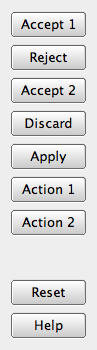
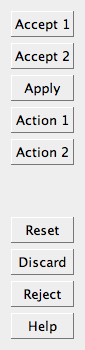
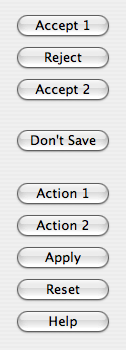
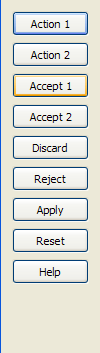
The buttons are laid out the following way if the button box is vertical:
| GnomeLayout | KdeLayout | MacLayout | WinLayout |
|
|
|
|
Additionally, button boxes that contain only buttons with ActionRole or HelpRole can be considered modeless and have an alternate look on Mac OS X:
| 非模态水平 MacLayout |

|
When a button is clicked in the button box, the PySide.QtGui.QDialogButtonBox.clicked() signal is emitted for the actual button is that is pressed. For convenience, if the button has an AcceptRole , RejectRole ,或 HelpRole , PySide.QtGui.QDialogButtonBox.accepted() , PySide.QtGui.QDialogButtonBox.rejected() ,或 PySide.QtGui.QDialogButtonBox.helpRequested() signals are emitted respectively.
If you want a specific button to be default you need to call QPushButton.setDefault() on it yourself. However, if there is no default button set and to preserve which button is the default button across platforms when using the QPushButton.autoDefault property, the first push button with the accept role is made the default button when the PySide.QtGui.QDialogButtonBox is shown,
| 参数: |
|
|---|
Constructs an empty, horizontal button box with the given parent .
This enum describes the layout policy to be used when arranging the buttons contained in the button box.
| 常量 | 描述 |
|---|---|
| QDialogButtonBox.WinLayout | Use a policy appropriate for applications on Windows. |
| QDialogButtonBox.MacLayout | Use a policy appropriate for applications on Mac OS X. |
| QDialogButtonBox.KdeLayout | Use a policy appropriate for applications on KDE. |
| QDialogButtonBox.GnomeLayout | Use a policy appropriate for applications on GNOME. |
The button layout is specified by the current style . However, on the X11 platform, it may be influenced by the desktop environment.
This enum describes the roles that can be used to describe buttons in the button box. Combinations of these roles are as flags used to describe different aspects of their behavior.
| 常量 | 描述 |
|---|---|
| QDialogButtonBox.InvalidRole | The button is invalid. |
| QDialogButtonBox.AcceptRole | Clicking the button causes the dialog to be accepted (e.g. OK). |
| QDialogButtonBox.RejectRole | Clicking the button causes the dialog to be rejected (e.g. Cancel). |
| QDialogButtonBox.DestructiveRole | Clicking the button causes a destructive change (e.g. for Discarding Changes) and closes the dialog. |
| QDialogButtonBox.ActionRole | Clicking the button causes changes to the elements within the dialog. |
| QDialogButtonBox.HelpRole | The button can be clicked to request help. |
| QDialogButtonBox.YesRole | The button is a “Yes”-like button. |
| QDialogButtonBox.NoRole | The button is a “No”-like button. |
| QDialogButtonBox.ApplyRole | The button applies current changes. |
| QDialogButtonBox.ResetRole | The button resets the dialog's fields to default values. |
另请参阅
QDialogButtonBox.StandardButton
These enums describe flags for standard buttons. Each button has a defined QDialogButtonBox.ButtonRole .
| 常量 | 描述 |
|---|---|
| QDialogButtonBox.Ok | An “OK” button defined with the AcceptRole . |
| QDialogButtonBox.Open | A “Open” button defined with the AcceptRole . |
| QDialogButtonBox.Save | A “Save” button defined with the AcceptRole . |
| QDialogButtonBox.Cancel | A “Cancel” button defined with the RejectRole . |
| QDialogButtonBox.Close | A “Close” button defined with the RejectRole . |
| QDialogButtonBox.Discard | A “Discard” or “Don't Save” button, depending on the platform, defined with the DestructiveRole . |
| QDialogButtonBox.Apply | An “Apply” button defined with the ApplyRole . |
| QDialogButtonBox.Reset | A “Reset” button defined with the ResetRole . |
| QDialogButtonBox.RestoreDefaults | A “Restore Defaults” button defined with the ResetRole . |
| QDialogButtonBox.Help | A “Help” button defined with the HelpRole . |
| QDialogButtonBox.SaveAll | A “Save All” button defined with the AcceptRole . |
| QDialogButtonBox.Yes | A “Yes” button defined with the YesRole . |
| QDialogButtonBox.YesToAll | A “Yes to All” button defined with the YesRole . |
| QDialogButtonBox.No | A “No” button defined with the NoRole . |
| QDialogButtonBox.NoToAll | A “No to All” button defined with the NoRole . |
| QDialogButtonBox.Abort | An “Abort” button defined with the RejectRole . |
| QDialogButtonBox.Retry | A “Retry” button defined with the AcceptRole . |
| QDialogButtonBox.Ignore | An “Ignore” button defined with the AcceptRole . |
| QDialogButtonBox.NoButton | An invalid button. |
另请参阅
QDialogButtonBox.ButtonRole PySide.QtGui.QDialogButtonBox.standardButtons()
| 参数: |
|
|---|---|
| 返回类型: |
Creates a push button with the given text , adds it to the button box for the specified role , and returns the corresponding push button. If role is invalid, no button is created, and zero is returned.
| 参数: | button – PySide.QtGui.QDialogButtonBox.StandardButton |
|---|---|
| 返回类型: | PySide.QtGui.QPushButton |
添加标准 button to the button box if it is valid to do so, and returns a push button. If button is invalid, it is not added to the button box, and zero is returned.
| 参数: |
|
|---|
添加给定 button to the button box with the specified role . If the role is invalid, the button is not added.
If the button has already been added, it is removed and added again with the new role.
注意
The button box takes ownership of the button.
| 参数: | which – PySide.QtGui.QDialogButtonBox.StandardButton |
|---|---|
| 返回类型: | PySide.QtGui.QPushButton |
返回 PySide.QtGui.QPushButton corresponding to the standard button which , or 0 if the standard button doesn't exist in this button box.
| 参数: | button – PySide.QtGui.QAbstractButton |
|---|---|
| 返回类型: | PySide.QtGui.QDialogButtonBox.ButtonRole |
Returns the button role for the specified button . This function returns InvalidRole if button is 0 or has not been added to the button box.
| 返回类型: |
|---|
Returns a list of all the buttons that have been added to the button box.
| 返回类型: | PySide.QtCore.bool |
|---|
This property holds whether the buttons in the button box are centered.
By default, this property is false. This behavior is appopriate for most types of dialogs. A notable exception is message boxes on most platforms (e.g. Windows), where the button box is centered horizontally.
Clears the button box, deleting all buttons within it.
| 参数: | button – PySide.QtGui.QAbstractButton |
|---|
| 返回类型: | PySide.QtCore.Qt.Orientation |
|---|
This property holds the orientation of the button box.
By default, the orientation is horizontal (i.e. the buttons are laid out side by side). The possible orientations are Qt.Horizontal and Qt.Vertical .
| 参数: | button – PySide.QtGui.QAbstractButton |
|---|
移除 button from the button box without deleting it and sets its parent to zero.
| 参数: | center – PySide.QtCore.bool |
|---|
This property holds whether the buttons in the button box are centered.
By default, this property is false. This behavior is appopriate for most types of dialogs. A notable exception is message boxes on most platforms (e.g. Windows), where the button box is centered horizontally.
| 参数: | orientation – PySide.QtCore.Qt.Orientation |
|---|
This property holds the orientation of the button box.
By default, the orientation is horizontal (i.e. the buttons are laid out side by side). The possible orientations are Qt.Horizontal and Qt.Vertical .
| 参数: | buttons – PySide.QtGui.QDialogButtonBox.StandardButtons |
|---|
This property holds collection of standard buttons in the button box.
This property controls which standard buttons are used by the button box.
| 参数: | button – PySide.QtGui.QAbstractButton |
|---|---|
| 返回类型: | PySide.QtGui.QDialogButtonBox.StandardButton |
Returns the standard button enum value corresponding to the given button ,或 NoButton 若给定 button 不是标准按钮。
| 返回类型: | PySide.QtGui.QDialogButtonBox.StandardButtons |
|---|
This property holds collection of standard buttons in the button box.
This property controls which standard buttons are used by the button box.

